transmission HONDA PRELUDE 1998 User Guide
[x] Cancel search | Manufacturer: HONDA, Model Year: 1998, Model line: PRELUDE, Model: HONDA PRELUDE 1998Pages: 278, PDF Size: 2.61 MB
Page 139 of 278
Automatic Transmission
Neutral (N) — Use Neutral if you
need to restart a stalled engine, or if
it is necessary to stop briefly with
the engine idling. Shift to Park posi-
tion if you need to leave the vehicle for any reason. Press on the brake pe-dal when you are moving the shift
lever from Neutral to another gear.
Drive (D4) — Use this position for
your normal driving. The transmis- sion automatically selects a suitable
gear for your speed and acceleration.
You may notice the transmission shifting up at higher speeds when
the engine is cold. This helps the
engine warm up faster. Sequential SportShift Mode With
the shift lever in "D4" position, you can select the Sequential SportShift
mode to shift gears; much like a
manual transmission, but without a clutch pedal.
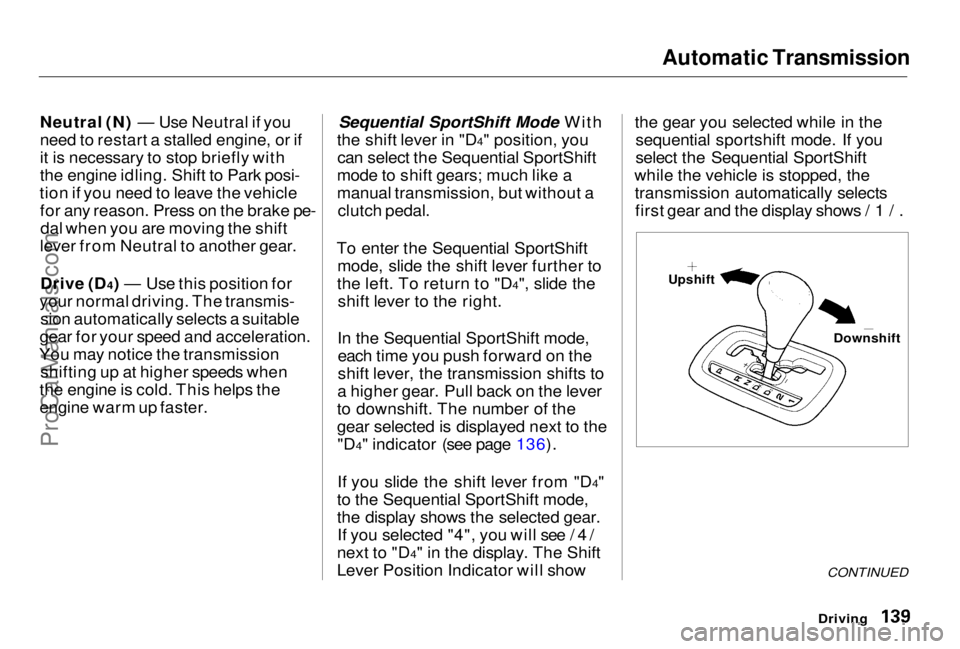
To enter the Sequential SportShift mode, slide the shift lever further to
the left. To return to "D4", slide the shift lever to the right.
In the Sequential SportShift mode, each time you push forward on the
shift lever, the transmission shifts to
a higher gear. Pull back on the lever
to downshift. The number of the
gear selected is displayed next to the "D4" indicator (see page 136).
If you slide the shift lever from "D4"
to the Sequential SportShift mode,
the display shows the selected gear. If you selected "4", you will see /4/
next to "D4" in the display. The Shift
Lever Position Indicator will show the gear you selected while in the
sequential sportshift mode. If you
select the Sequential SportShift
while the vehicle is stopped, the transmission automatically selectsfirst gear and the display shows /1/.
Driving
CONTINUED
Downshift
UpshiftProCarManuals.comMain Menu Table of Contents s t
Page 140 of 278
Automatic Transmission
When you accelerate away from a stop, the transmission will be in first
gear. The transmission will not automatically upshift. Watch the
tachometer and upshift manually
before the engine reaches redline.
The transmission remains in the
selected gear (4, 3, 2, or 1). There is
no automatic downshift when you
push the accelerator pedal to the
floor.
The transmission may automatically downshift from fourth gear to third
gear under the following conditions: The vehicle speeds drops below
20 mph (32km/h).
If you drive uphill between
20 — 31mph(32 — 50km/h).
If you press the brake pedal as you
drive downhill.
Downshifting gives you more power
when climbing or provides engine braking when going down a steep hill.
The transmission will also shift automatically as the vehicle comes to
a complete stop. It will downshift to
first gear when the vehicle speed is
under 6 mph (10 km/h).
If you try to manually downshift at aspeed that would cause the engine to
exceed the redline in a lower gear,
the transmission will not downshift.
If you try to downshift from fourth
gear to third gear, the gear indicator
will flash /3/ several times, then return to /4/; if you try to downshift
from third gear to second gear, the
gear indicator will flash /2/ several
times, then return to third gear.
DrivingProCarManuals.comMain Menu Table of Contents s t
Page 141 of 278
Automatic Transmission
If the vehicle speeds slows to below
the redline of the selected lower gear
position while the indicator is
flashing, the transmission downshifts and the display shows
the selected lower gear.
If the transmission temperature is
below 14°F(— 10°C), you may not be able to use the SequentialSportShift mode. The table shows the speed ranges
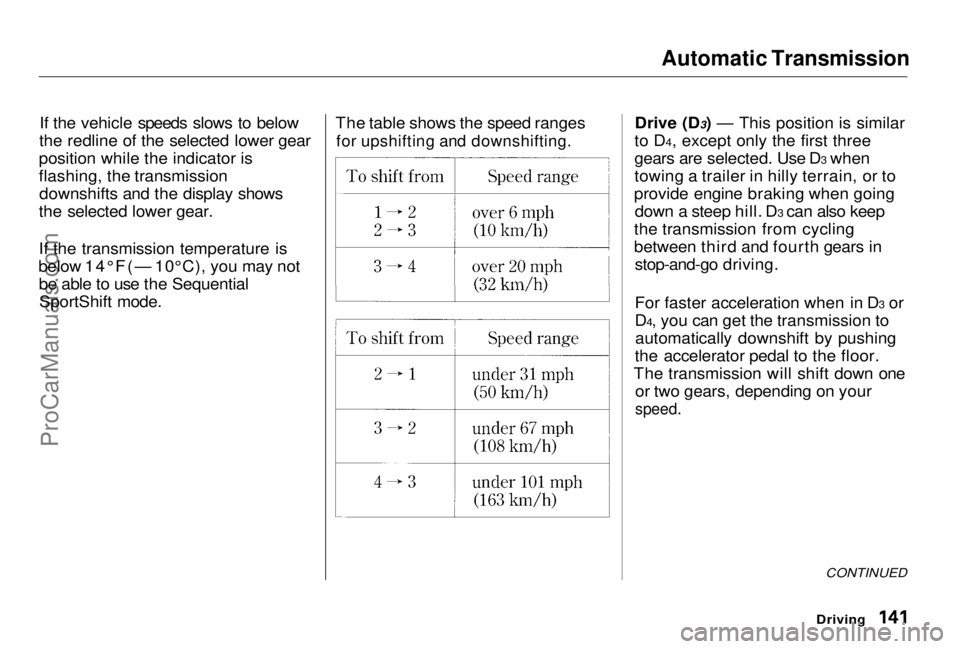
for upshifting and downshifting.
Drive (D3) — This position is similar
t
o
D4, except only the first three
gears are selected. Use D3 when
towing a trailer in hilly terrain, or to
provide engine braking when going down a steep hill. D3 can also keep
the transmission from cycling
between third and fourth gears in stop-and-go driving.
For faster acceleration when in D3 or
D4, you can get the transmission toautomatically downshift by pushing
the accelerator pedal to the floor.
The transmission will shift down one or two gears, depending on your
speed.
Driving
CONTINUED
ProCarManuals.comMain Menu Table of Contents s t
Page 142 of 278
Automatic Transmission
Second (2) — This position locks
the transmission in second gear. It does not downshift to first gear
when you come to a stop. Second
gives you more power when climbing, and increased engine braking when
going down steep hills. Use second
gear when starting out on a slippery surface or in deep snow. It will help
reduce wheelspin. First (1) With the lever in this
position, the transmission locks in
First gear.
If you shift into First position when
the vehicle speed exceeds 31 mph (50 km/h), the transmission shifts
into Second gear first to avoid the
application of the sudden engine
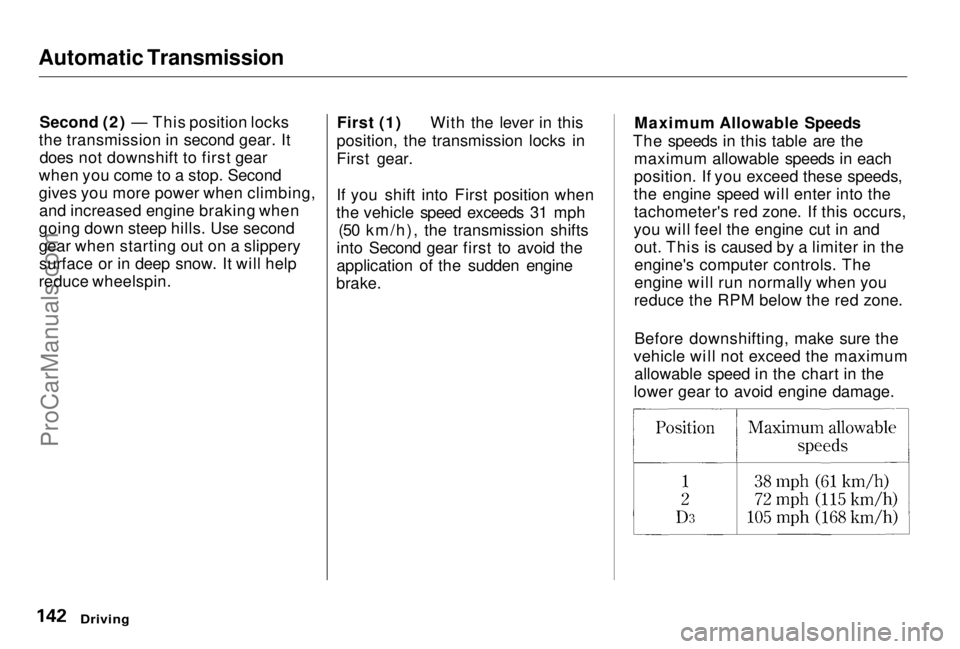
brake. Maximum Allowable Speeds
The speeds in this table are the maximum allowable speeds in each
position. If you exceed these speeds,
the engine speed will enter into the tachometer's red zone. If this occurs,
you will feel the engine cut in and out. This is caused by a limiter in the
engine's computer controls. The
engine will run normally when you
reduce the RPM below the red zone.
Before downshifting, make sure the
vehicle will not exceed the maximum allowable speed in the chart in the
lower gear to avoid engine damage.
DrivingProCarManuals.comMain Menu Table of Contents s t
Page 143 of 278
Automatic Transmission
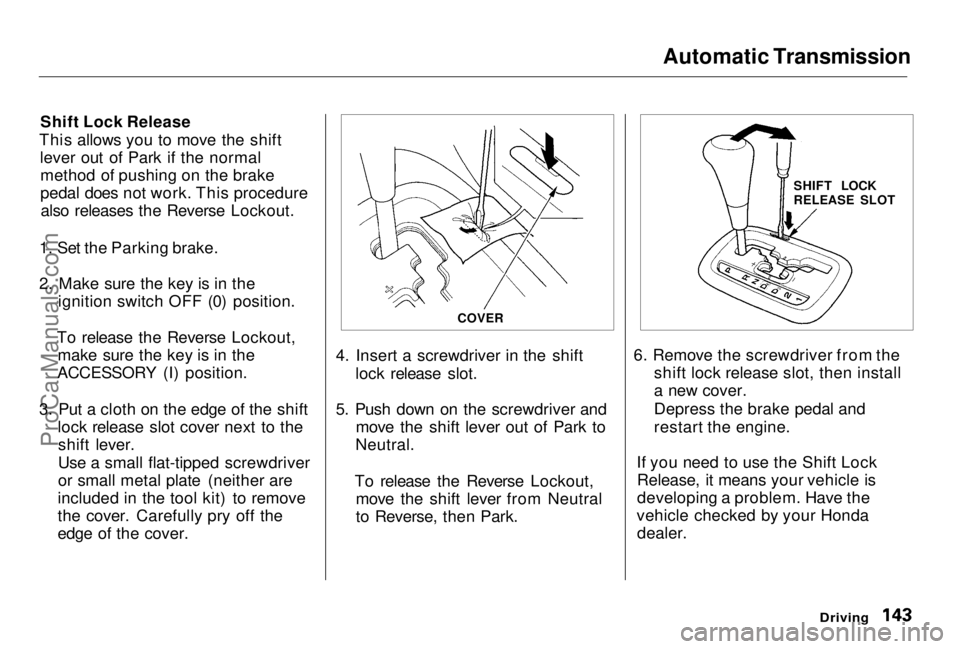
Shift Lock Release
This allows you to move the shift lever out of Park if the normalmethod of pushing on the brake
pedal does not work. This procedurealso releases the Reverse Lockout.
1. Set the Parking brake.
2. Make sure the key is in the ignition switch OFF (0) position.
To release the Reverse Lockout, make sure the key is in the
ACCESSORY (I) position.
3. Put a cloth on the edge of the shift lock release slot cover next to theshift lever.
Use a small flat-tipped screwdriver
or small metal plate (neither are
included in the tool kit) to remove
the cover. Carefully pry off the
edge of the cover. 4. Insert a screwdriver in the shift
lock release slot.
5. Push down on the screwdriver and move the shift lever out of Park to
Neutral.
To release the Reverse Lockout, move the shift lever from Neutral
to Reverse, then Park. 6. Remove the screwdriver from the
shift lock release slot, then install
a new cover.
Depress the brake pedal and
restart the engine.
If you need to use the Shift Lock Release, it means your vehicle is
developing a problem. Have the
vehicle checked by your Honda dealer.
Driving
COVER
SHIFT LOCK
RELEASE SLOTProCarManuals.comMain Menu Table of Contents s t
Page 144 of 278
Parking
Always use the parking brake when
you park your vehicle. The indicator on the instrument panel shows that
the parking brake is not fully
released; it does not indicate that the
parking brake is firmly set. Make sure the parking brake is set firmly
or your vehicle may roll if it is
parked on an incline.
If your vehicle has an automatic
transmission, set the parking brake
before you put the transmission in Park. This keeps the vehicle from
moving and putting pressure on the
parking mechanism in the
transmission — making it easier to move the shift lever out of Park
when you want to drive away. If the vehicle is facing uphill, turn
the front wheels away from the curb. If you have a manual transmission,
put it in first gear.
If the vehicle is facing downhill, turn
the front wheels toward the curb. If
you have a manual transmission, put it in reverse gear.
Make sure the parking brake is fully
released before driving away. Driving with the parking brake
partially set can overheat or damage
the rear brakes. Parking Tips
Make sure the moonroof and the
windows are closed.
Turn off the lights. Place any packages, valuables, etc.,
in the trunk or take them with you.
Lock the doors.
Never park over dry leaves, tall
grass, or other flammable
materials. The three way catalytic
converter gets very hot, and could
cause these materials to catch on
fire.
DrivingProCarManuals.comMain Menu Table of Contents s t
Page 156 of 278
Towing a Trailer
Towing Safety
Your vehicle will not stop as quickly
with a trailer in tow. Leave extra distance between your vehicle and
other vehicles. Avoid braking or
turning suddenly. This could cause
the trailer to jackknife or possibly
turn over.
Keep in mind that your total vehicle
is now much longer. Leave more
room when making turns. The trailer
tracks a smaller arc than the vehicle
and can hit or run over something
that the vehicle misses. When
passing another vehicle, make sure
the trailer is clear before changing
lanes.
The vehicle/trailer combination is
more affected by crosswinds andbuffeting. When being passed by a
large vehicle, keep a constant speed and steer straight ahead. If there is
too much wind buffeting, slow down
to get out of the other vehicle's air
turbulence.
Towing a trailer puts an extra load on your vehicle. You should have
your vehicle serviced according to the "Maintenance Schedule undersevere driving conditions" on page 166. This extra load is magnified when
you are driving in hilly terrain.
Watch the temperature gauge closely when climbing hills. If it gets
near the hot area, turn off the airconditioning (if it is on). If this does
not reduce the heat, it may be
necessary to pull to the side of the
road and wait for the engine to cool. If the automatic transmission shifts
frequently between 3rd and 4th
gears, put it in D3. This will help prevent the transmission from
overheating. Help keep the brakes
from overheating by shifting to a
lower gear when going downhill.
If you have to stop while going uphill,do not hold the vehicle in place by
pressing on the accelerator. This can cause the automatic transmission to
overheat. Use the parking brake or
footbrake.
DrivingProCarManuals.comMain Menu Table of Contents s t
Page 157 of 278

Towing a Trailer
When towing a trailer in the Sequential SportShift mode, select
Third, Second, or First gear; depending on the vehicle speeds and
road condition. Do not use Fourth
gear. The recommended speed
range for each gear position is shown in the table. When parking your vehicle and
trailer, especially on a hill, be sure to
follow all the normal precautions.
Turn your front wheels into the curb, set the parking brake firmly, and put
the transmission in 1st or Reverse (manual) or Park (automatic). In
addition, place wheel chocks at each
of the trailer's tires.
Backing up with a trailer is difficult and takes practice. Drive slowly,
make small movements with thesteering wheel, and have someone
stand outside to guide you. Grip the
steering wheel on the bottom (rather
than the usual position near the top). Move your hand to the left to get the
trailer to move to the left, and right
to move the trailer right.
DrivingProCarManuals.comMain Menu Table of Contents s t
Page 158 of 278
Maintenance
This section explains why it is important to keep your vehicle wellmaintained and to follow basic
maintenance safety precautions.
This section also includes Maintenance Schedules for normaldriving and severe driving conditions,
a Maintenance Record, and instruc-
tions for simple maintenance tasks
you may want to take care of
yourself.
If you have the skills and tools to per-
form more complex maintenance
tasks on your Honda, you may want to purchase the Service Manual. See
page 271 for information on how toobtain a copy, or see your Honda
dealer.
Maintenance Safety....................... 160
Important Safety Precautions ..161
Maintenance Schedule.................. 162
Required Maintenance Record.... 169 Owner Maintenance Checks........ 171
Fluid Locations............................... 172
Engine Oil.......................................173
Adding Oil................................... 173Recommended Oil..................... 173Synthetic Oil............................... 174
Additives..................................... 174
Changing the Oil and Filter...... 175
Cooling System.............................. 177
Adding Engine Coolant............. 177Replacing Engine Coolant........ 179
Windshield Washers..................... 182
Transmission Fluid........................ 183 AutomaticTransmission.......................... 183
5-speed Manual Transmission.......................... 184
Brake and Clutch Fluid................. 185 Brake System............................. 185
Clutch System............................ 186
Power Steering............................... 186
Air Cleaner Element...................... 187 Spark Plugs..................................... 188
Replacement............................... 188
Specifications............................. 190
Battery............................................ 190
Wiper Blades.................................. 193
Air Conditioning System............... 195 Drive Belts...................................... 196
Timing Belt..................................... 196
Tires................................................ 197
Inflation....................................... 197
Inspection................................... 198
Maintenance............................... 199
Tire Rotation.............................. 200 Replacing Tires and Wheels .... 200
Wheels and Tires....................... 201
Winter Driving...........................201
Snow Tires.............................. 202
Tire Chains............................. 202
Lights.............................................. 203
Headlight Aimimg..................... 205
Replacing Bulbs......................... 206
Storing Your Vehicle..................... 217
MaintenanceProCarManuals.comMain Menu s t
Page 170 of 278
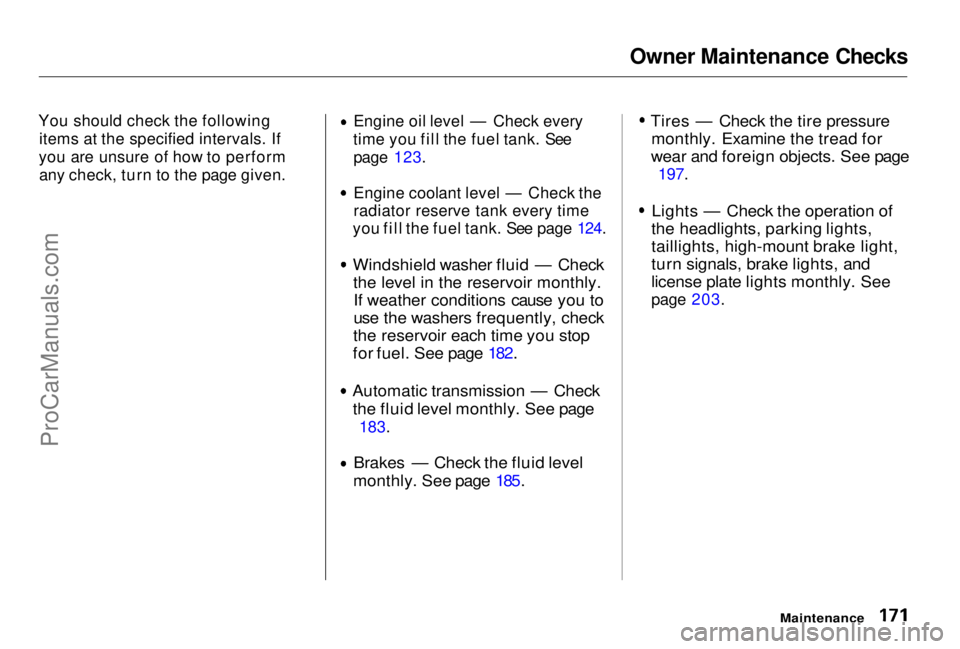
Owner Maintenance Checks
You should check the following items at the specified intervals. If
you are unsure of how to perform any check, turn to the page given. Engine oil level — Check every
time you fill the fuel tank. See page 123. Engine coolant level — Check the
radiator reserve tank every time
you fill the fuel tank. See page 124.
Windshield washer fluid — Check
the level in the reservoir monthly.If weather conditions cause you to
use the washers frequently, check
the reservoir each time you stop
for fuel. See page 182. Automatic transmission — Check
the fluid level monthly. See page
183.
Brakes — Check the fluid level
monthly. See page 185. Tires — Check the tire pressure
monthly. Examine the tread for
wear and foreign objects. See page
197.
Lights — Check the operation of
the headlights, parking lights,
taillights, high-mount brake light,
turn signals, brake lights, and
license plate lights monthly. See
page 203.
MaintenanceProCarManuals.comMain Menu Table of Contents s t