lock HONDA PRELUDE 1998 Owner's Manual
[x] Cancel search | Manufacturer: HONDA, Model Year: 1998, Model line: PRELUDE, Model: HONDA PRELUDE 1998Pages: 278, PDF Size: 2.61 MB
Page 65 of 278
Controls Near the Steering Wheel
Make sure the rear window is clear
and you have good visibility before
starting to drive.
The defogger and antenna wires on the inside of the rear window can beaccidentally damaged. When
cleaning the glass, always wipe side
to side.
Steering Wheel Adjustment
See page 15 for important safety
information about how to properly
position the steering wheel.
Make any steering wheel adjustment
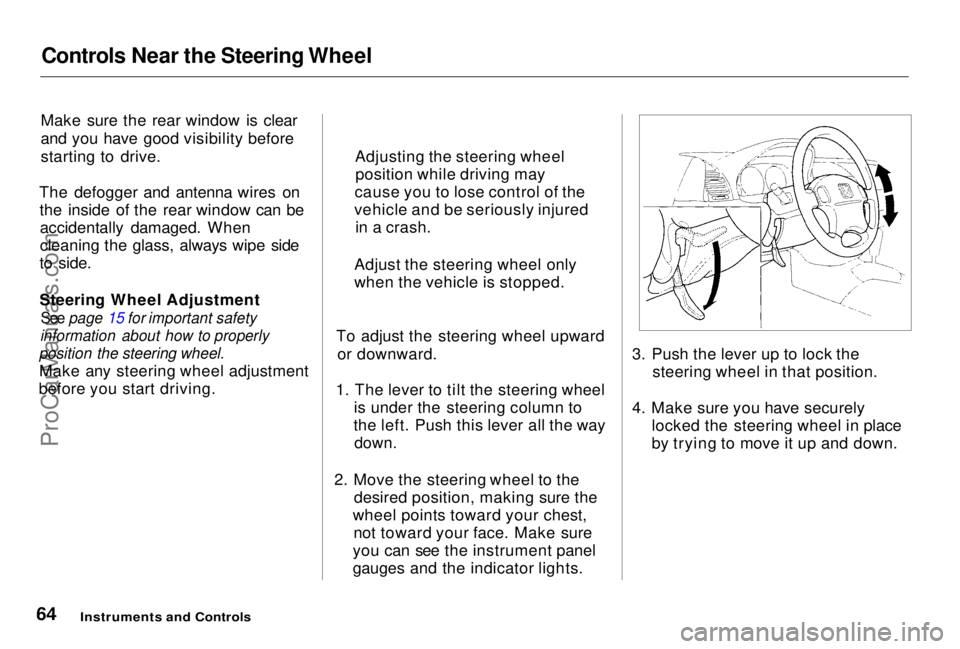
before you start driving. To adjust the steering wheel upward
or downward.
1. The lever to tilt the steering wheel is under the steering column to
the left. Push this lever all the way
down.
2. Move the steering wheel to the desired position, making sure the
wheel points toward your chest, not toward your face. Make sure
you can see the instrument panel
gauges and the indicator lights. 3. Push the lever up to lock the
steering wheel in that position.
4. Make sure you have securely locked the steering wheel in place
by trying to move it up and down.
Instruments and Controls
Adjusting the steering wheel
position while driving may
cause you to lose control of the
vehicle and be seriously injured in a crash.
Adjust the steering wheel only
when the vehicle is stopped.ProCarManuals.comMain Menu Table of Contents s t
Page 66 of 278
Steering Wheel Controls
Cruise Control
Cruise control allows you to maintain
a set speed above 25 mph (40 km/h)
without keeping your foot on the accelerator pedal. It should be used
for cruising on straight, open
highways. It is not recommended for conditions such as city driving,
winding roads, slippery roads, heavy rain, or bad weather. You should
have full control of the vehicle under
those conditions.
The cruise control, as it operates,
moves the accelerator pedal. You can
damage your vehicle's accelerator
mechanism by resting your foot under
the pedal and blocking the movement.
Using the Cruise Control
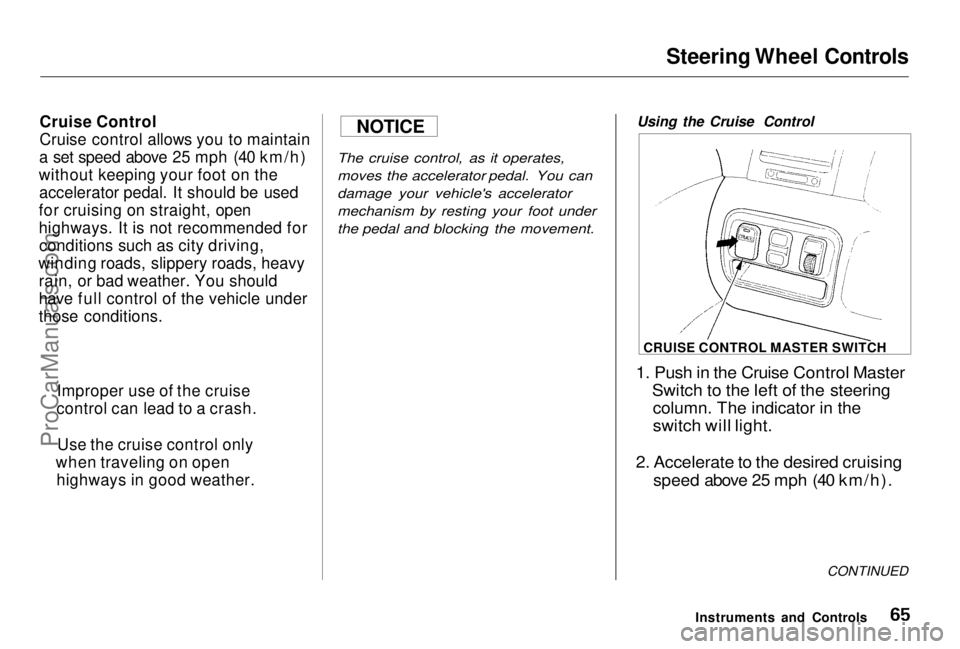
1. Push in the Cruise Control Master
Switch to the left of the steering
column. The indicator in the
switch will light.
2. Accelerate to the desired cruising
speed above 25 mph (40 km/h).
CONTINUED
Instruments and Controls
Improper use of the cruise
control can lead to a crash.
Use the cruise control only
when traveling on open highways in good weather.
NOTICE
CRUISE CONTROL MASTER SWITCHProCarManuals.comMain Menu Table of Contents s t
Page 69 of 278
Keys and Locks
Keys
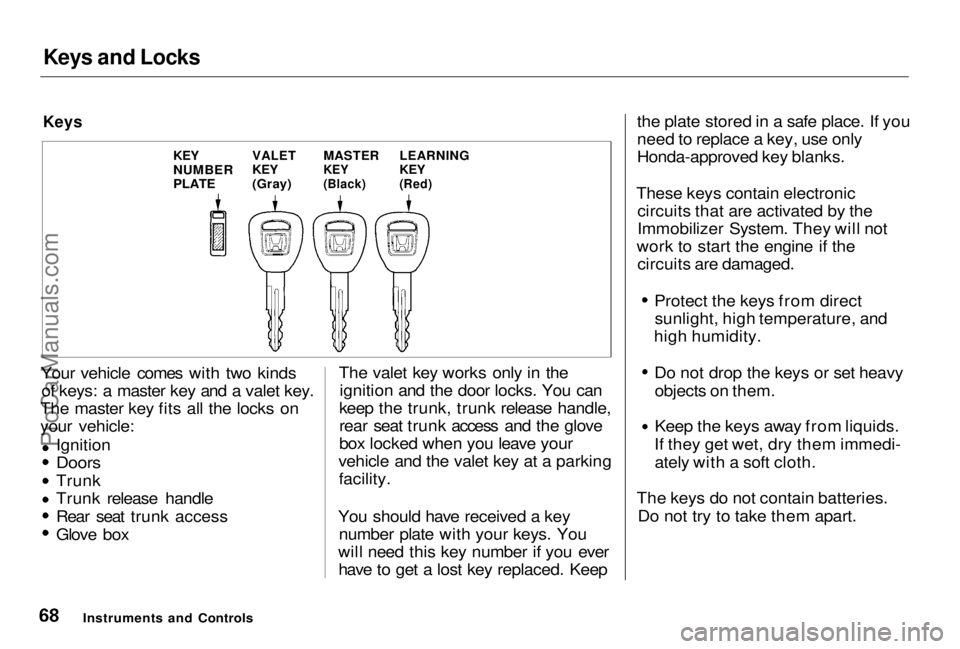
Your vehicle comes with two kinds of keys: a master key and a valet key.
The master key fits all the locks on
your vehicle:
Ignition
Doors
Trunk Trunk release handle
Rear seat trunk access
Glove box The valet key works only in the
ignition and the door locks. You can
keep the trunk, trunk release handle,
rear seat trunk access and the glove
box locked when you leave your
vehicle and the valet key at a parking facility.
You should have received a key number plate with your keys. You
will need this key number if you ever have to get a lost key replaced. Keep the plate stored in a safe place. If you
need to replace a key, use only
Honda-approved key blanks.
These keys contain electronic circuits that are activated by the
Immobilizer System. They will not
work to start the engine if the circuits are damaged. Protect the keys from direct
sunlight, high temperature, and
high humidity. Do not drop the keys or set heavy
objects on them. Keep the keys away from liquids.
If they get wet, dry them immedi- ately with a soft cloth.
The keys do not contain batteries. Do not try to take them apart.
Instruments and Controls
LEARNING
KEY
(Red)
MASTER
KEY
(Black)
VALET
KEY
(Gray)
KEY
NUMBER
PLATEProCarManuals.comMain Menu Table of Contents s t
Page 70 of 278
Keys and Locks
Learning Key
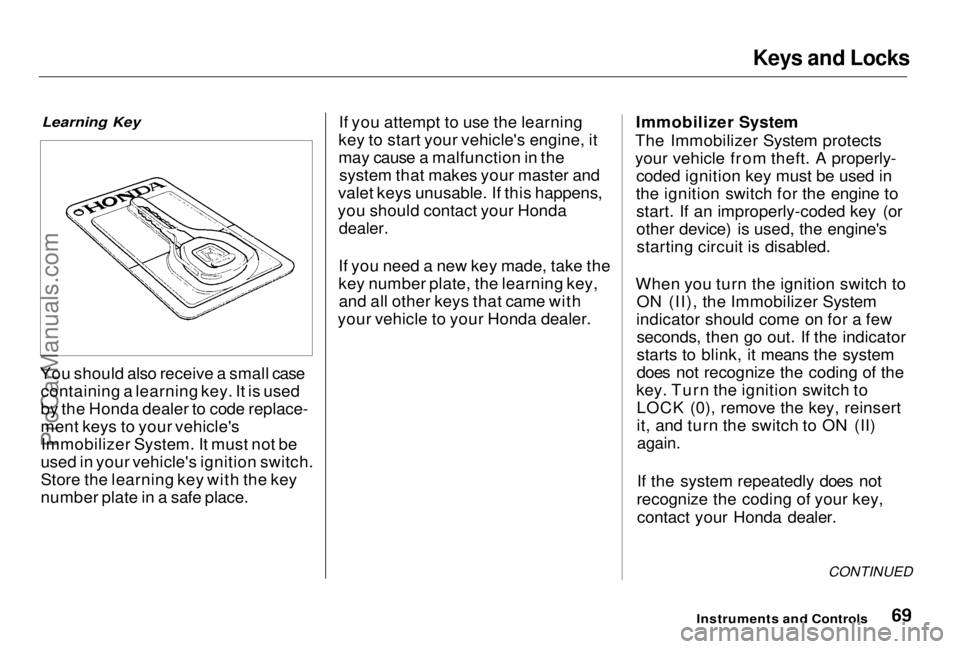
You should also receive a small case containing a learning key. It is used
by the Honda dealer to code replace-
ment keys to your vehicle'sImmobilizer System. It must not be
used in your vehicle's ignition switch.
Store the learning key with the key
number plate in a safe place. If you attempt to use the learning
key to start your vehicle's engine, it
may cause a malfunction in the system that makes your master and
valet keys unusable. If this happens,
you should contact your Honda
dealer.
If you need a new key made, take the
key number plate, the learning key, and all other keys that came with
your vehicle to your Honda dealer. Immobilizer System
The Immobilizer System protects
your vehicle from theft. A properly- coded ignition key must be used in
the ignition switch for the engine to start. If an improperly-coded key (or
other device) is used, the engine'sstarting circuit is disabled.
When you turn the ignition switch to ON (II), the Immobilizer System
indicator should come on for a few seconds, then go out. If the indicator
starts to blink, it means the system
does not recognize the coding of the
key. Turn the ignition switch to LOCK (0), remove the key, reinsert
it, and turn the switch to ON (II)
again.
If the system repeatedly does not
recognize the coding of your key, contact your Honda dealer.
CONTINUED
Instruments and ControlsProCarManuals.comMain Menu Table of Contents s t
Page 71 of 278
Keys and Locks
This indicator will also blink several times when you turn the ignition switch from ON (II) to ACCESSORY (I) or LOCK (0).
The system may not recognize your key's coding if the key is in contact
with a key from another immobilizer system. If you have a key from
another vehicle's immobilizer system,
keep it separate.
Do not attempt to alter this system
or add other devices to it. Electrical
problems could result that may make
your vehicle undriveable.
If you have lost your key and you
cannot start the engine, contact your
Honda dealer.
As required by the FCC:
This device complies with Part 15 of the
FCC rules. Operation is subject to the
following two conditions: (1) This device
way not cause harmful interference, and (2) this device must accept any
interference received, including
interference that may cause undesired operation.This device complies with DOC rules in
Canada.
Changes or modifications not expressly
approved by the party responsible for
compliance could void the user's
authority to operate the equipment.
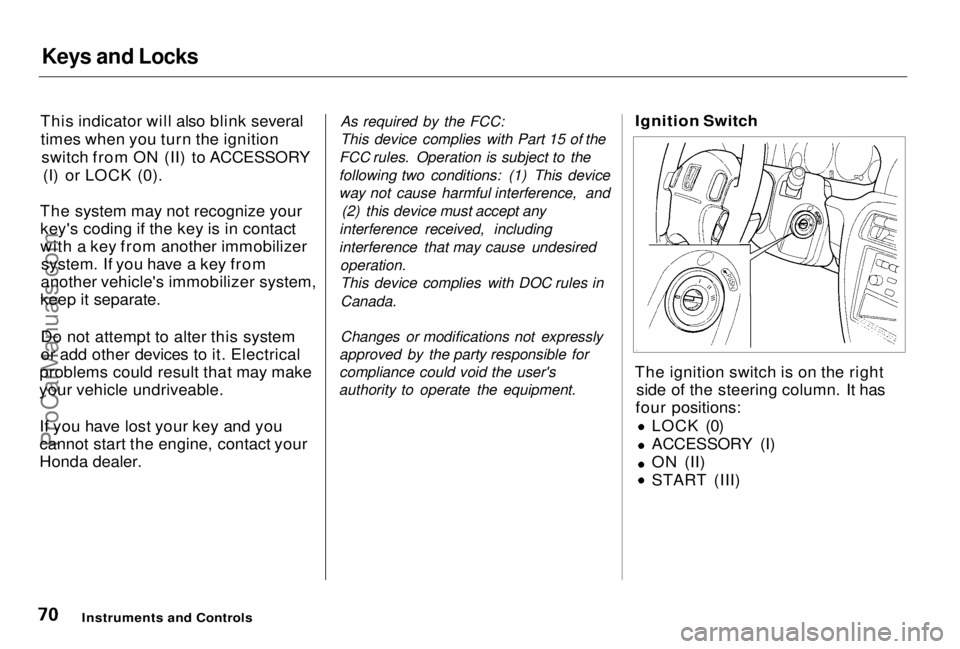
Ignition Switch
The ignition switch is on the right side of the steering column. It has
four positions:
LOCK (0)
ACCESSORY (I)
ON (II) START (III)
Instruments and ControlsProCarManuals.comMain Menu Table of Contents s t
Page 72 of 278
Keys and Locks
LOCK (0) — You can insert or
remove the key only in this position.
To switch from ACCESSORY to LOCK, you must push the key in
slightly as you turn it. If your vehicle
has an automatic transmission, it must also be in Park. The anti-theft
lock will lock the steering column
when you remove the key. If the front wheels are turned, the
anti-theft lock may sometimes make
it difficult to turn the key from
LOCK to ACCESSORY. Firmly turn
the steering wheel to the left or to
the right as you turn the key. ACCESSORY (I) — In this position,
you can operate the audio systemand the accessory power socket.
ON (II) — This is the normal key
position when driving. All features and accessories on the vehicle are
usable. Several of the lights on the
instrument panel come on as a test
when you turn the ignition switch
from ACCESSORY to ON (see page
51).
START (III) — Use this position
only to start the engine. The switch
returns to ON (II) when you let go of
the key.
The engine will not start if the Immobilizer System does not
recognize the key's coding (see page 69).
You will hear a reminder beeper if
you leave the key in the ignition switch in the LOCK (0) or
ACCESSORY (I) position and open the driver's door. Remove the key to
turn off the beeper.
Instruments and Controls
Removing the key from the
ignition switch while driving
locks the steering. This can
cause you to lose control.
Remove the key from the
ignition switch only when
parked.ProCarManuals.comMain Menu Table of Contents s t
Page 73 of 278
Keys and Locks
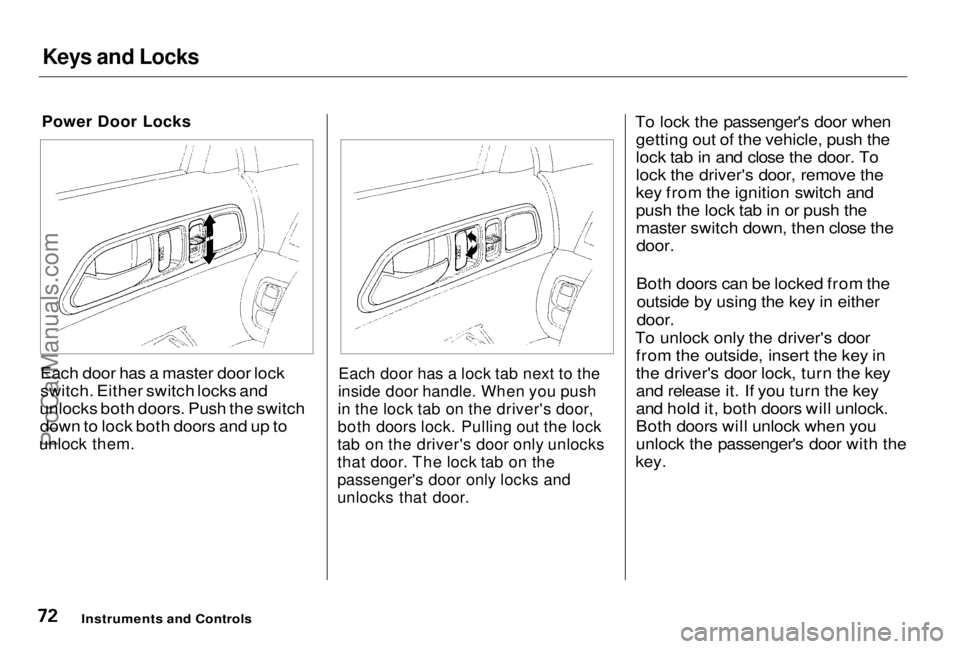
Power Door Locks
Each door has a master door lock
switch. Either switch locks and
unlocks both doors. Push the switch down to lock both doors and up to
unlock them.
Each door has a lock tab next to the
inside door handle. When you push
in the lock tab on the driver's door,
both doors lock. Pulling out the lock
tab on the driver's door only unlocks
that door. The lock tab on the
passenger's door only locks and
unlocks that door.
To lock the passenger's door when
getting out of the vehicle, push the
lock tab in and close the door. To
lock the driver's door, remove the
key from the ignition switch and
push the lock tab in or push the
master switch down, then close the
door.
Both doors can be locked from the
outside by using the key in either
door.
To unlock only the driver's door from the outside, insert the key in
the driver's door lock, turn the key
and release it. If you turn the key
and hold it, both doors will unlock.
Both doors will unlock when you
unlock the passenger's door with the
key.
Instruments and ControlsProCarManuals.comMain Menu Table of Contents s t
Page 74 of 278
Keys and Locks
Lockout Prevention
If you forget and leave the key in the
ignition switch, Lockout Prevention
will not allow you to lock the driver's door. With the driver's door open
and the key in the ignition, both
master door lock switches are
disabled.
However, if the driver's door is not open, the master door lock switches
are not disabled. Pushing the switch
down on the open passenger's door
will lock both doors. If you try to lock an open driver'sdoor by pushing in the lock tab, the
tabs on both doors pop out. Pushing
in the lock tab on the passenger's door only locks that door.
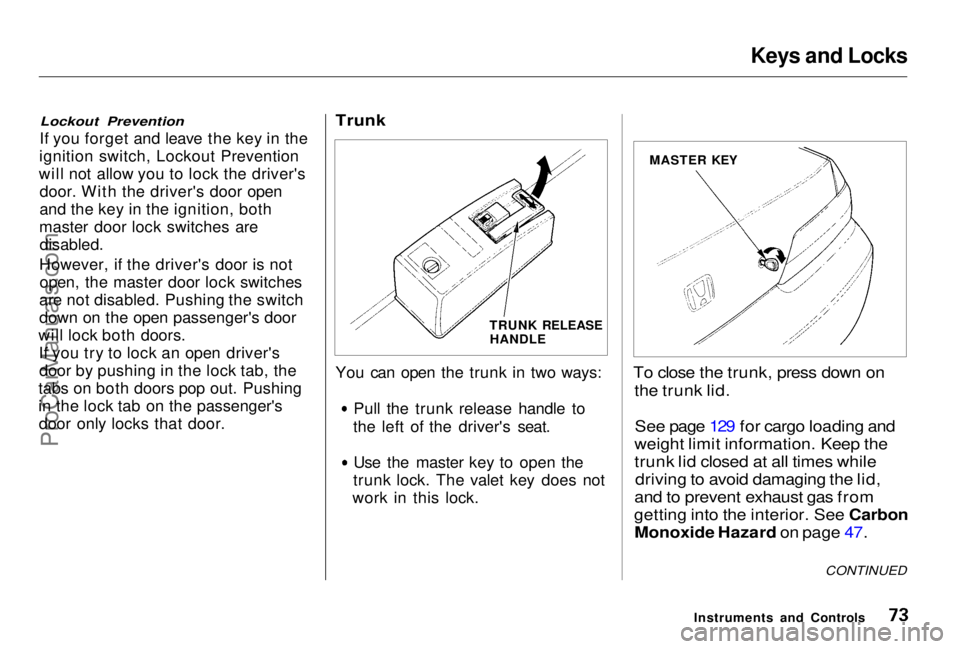
Trunk
You can open the trunk in two ways:
Pull the trunk release handle to
the left of the driver's seat. Use the master key to open the
trunk lock. The valet key does not
work in this lock.
To close the trunk, press down on
the trunk lid.
See page 129 for cargo loading and
weight limit information. Keep the
trunk lid closed at all times while
driving to avoid damaging the lid,
and to prevent exhaust gas from
getting into the interior. See Carbon
Monoxide Hazard on page 47.
Instruments and Controls
CONTINUED
TRUNK RELEASE
HANDLE MASTER KEYProCarManuals.comMain Menu Table of Contents s t
Page 75 of 278
Keys and Locks
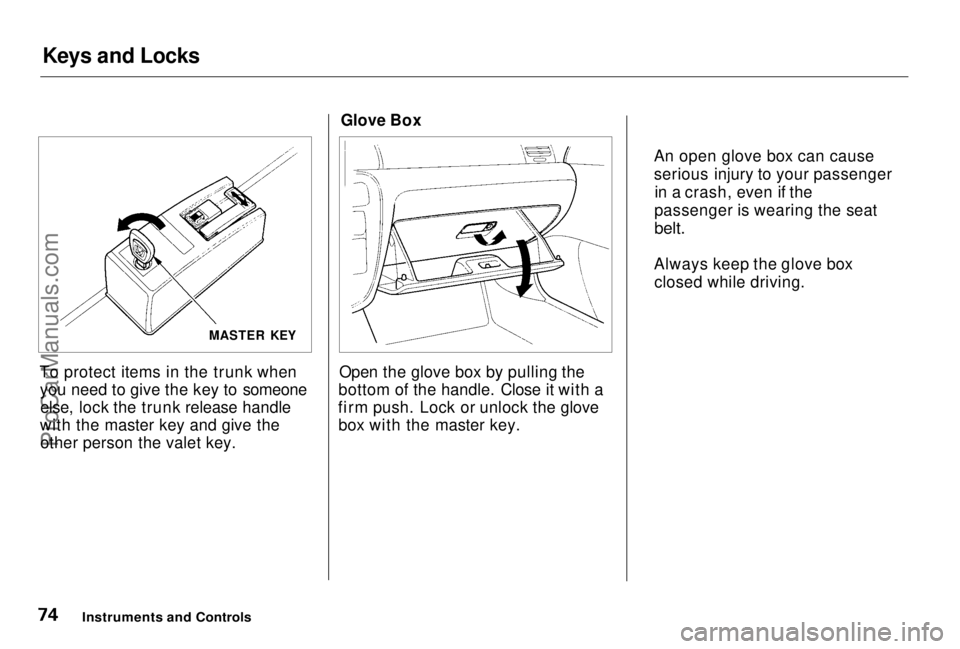
To protect items in the trunk when you need to give the key to someoneelse, lock the trunk release handle
with the master key and give the other person the valet key. Glove Box
Open the glove box by pulling the
bottom of the handle. Close it with a
firm push. Lock or unlock the glove box with the master key.
Instruments and Controls
An open glove box can cause
serious injury to your passenger
in a crash, even if the
passenger is wearing the seat
belt.
Always keep the glove box closed while driving.
MASTER KEYProCarManuals.comMain Menu Table of Contents s t
Page 76 of 278
Seat Adjustments
Front Seat Adjustments
See pages 11 — 12 for important safety
information and warnings about how to
properly position seats and seat-backs.
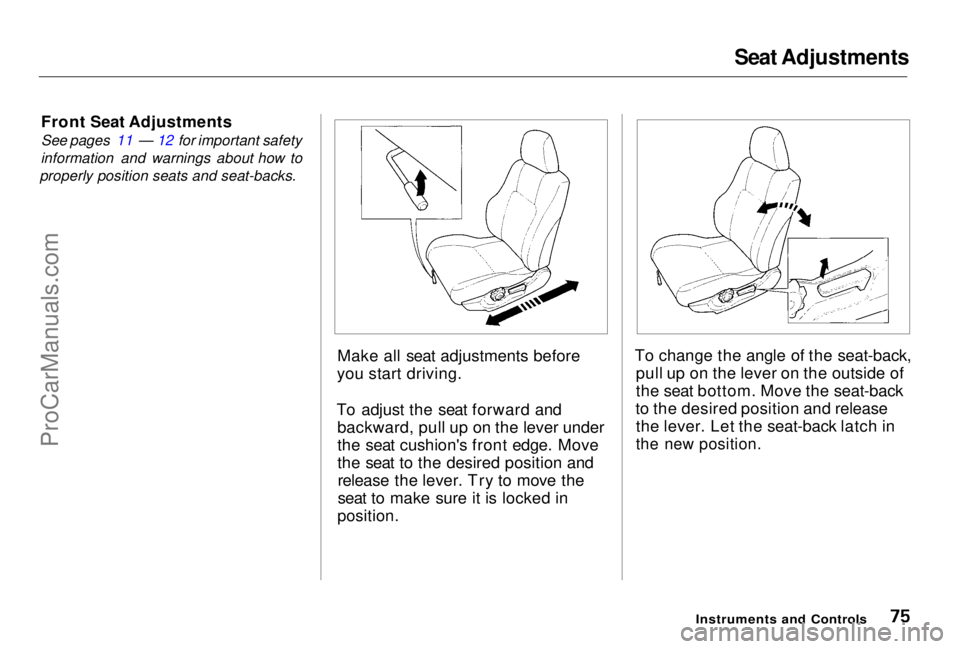
Make all seat adjustments before
you start driving.
To adjust the seat forward and backward, pull up on the lever under
the seat cushion's front edge. Move
the seat to the desired position andrelease the lever. Try to move the
seat to make sure it is locked in
position.
To change the angle of the seat-back,
pull up on the lever on the outside of
the seat bottom. Move the seat-back
to the desired position and release the lever. Let the seat-back latch in
the new position.
Instruments and ControlsProCarManuals.comMain Menu Table of Contents s t