brake light HONDA RIDGELINE 2007 1.G Owners Manual
[x] Cancel search | Manufacturer: HONDA, Model Year: 2007, Model line: RIDGELINE, Model: HONDA RIDGELINE 2007 1.GPages: 331, PDF Size: 5.45 MB
Page 61 of 331
This section gives inf ormation about
the controls and displays that
contribute to the daily operation of
your vehicle. All the essential
controls are within easy reach............................
Control Locations .58
............................
Instrument Panel .59
..........
Instrument Panel Indicators .61
.............................................
Gauges .70
Controls Near the Steering
...........................................
Wheel .74
........................
Multi-Control Lever .75
...................
Headlight Control Dial .76
........
Instrument Panel Brightness .78
.................
Hazard Warning Button .79
..........
Steering Wheel Adjustment .79
..................................................
Keys .80
........................
Immobilizer System .81
................................
Ignition Switch .82
......................................
Door Locks .83
.......................
Remote Transmitter .89
.......................
Dual-Action Tailgate .92
...............................
In-Bed Trunk .95
.................................................
Seats .98
..................................
Seat Heaters .104
............................
Power Windows .105
.......................................
Moonroof .108
...............................
Parking Brake .109
...........................................
Mirrors .110 .........
Interior Convenience Items .112
.........................
Center Console .113
.......
Console Compartments .113
.........................
Cargo Hooks .114
.....................
Beverage Holders .114
..................................
Glove Box .115
................................
Coat Hooks .115
....................
Sunglasses Holder .115
........
Accessory Power Sockets .116
...................................
Sun Visor .117
............................
Vanity Mirror .117
...............................
Interior Lights .118
.....................................
Bed Lights .120
Instruments and Controls
Inst rument s and Cont rols
57
TM
Page 63 of 331
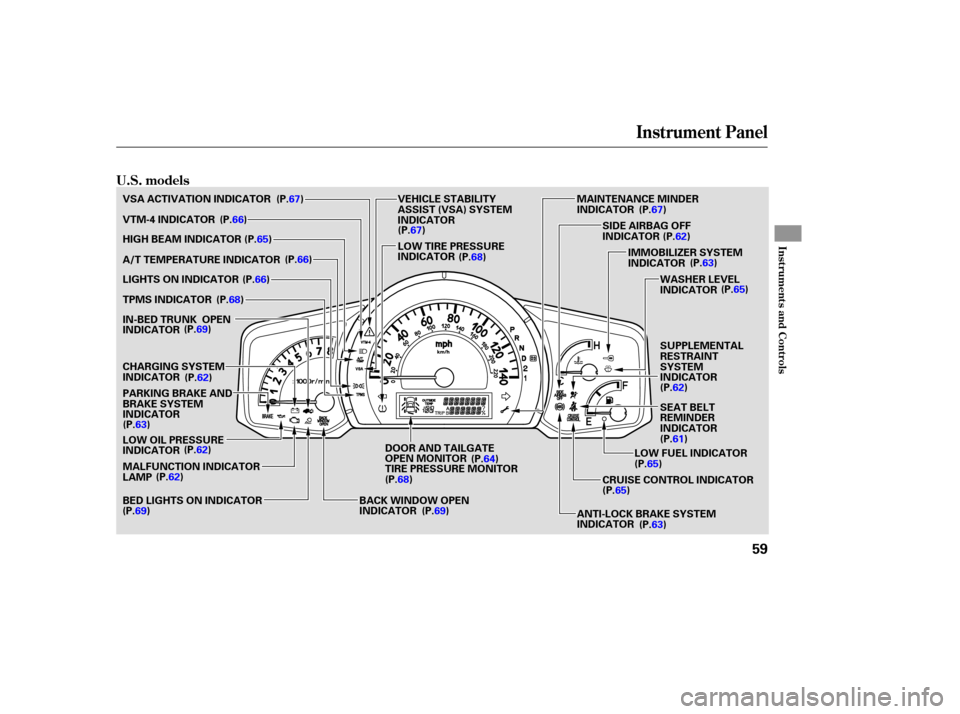
Instrument Panel
Instru me ntsand Cont ro ls
U.S. models
59
IMMOBILIZER SYSTEM
INDICATOR
WASHER LEVEL
INDICATOR
MALFUNCTION INDICATOR
LAMP LOW OIL PRESSURE
INDICATOR VSA ACTIVATION INDICATOR
VTM-4 INDICATOR
HIGH BEAM INDICATOR
A/T TEMPERATURE INDICATOR
LIGHTS ON INDICATOR
TPMS INDICATOR
CHARGING SYSTEM
INDICATOR
PARKING BRAKE AND
BRAKE SYSTEM
INDICATOR SIDE
AIRBAG OFF
INDICATOR
LOW FUEL INDICATOR
CRUISE CONTROL INDICATOR
BACK WINDOW OPEN
INDICATOR LOW
TIRE PRESSURE
INDICATOR MAINTENANCE
MINDER
INDICATOR
ANTI-LOCK BRAKE SYSTEM
INDICATOR
VEHICLE
STABILITY
ASSIST (VSA) SYSTEM
INDICATOR
SUPPLEMENTAL
RESTRAINT
SYSTEM
INDICATOR
SEAT BELT
REMINDER
INDICATOR
BED LIGHTS ON INDICATOR
IN-BED
TRUNK OPEN
INDICATOR (P.67)
(P.66)
(P.66)
(P.66)
(P.68)
(P.69)
(P.62)
(P.63) (P.62)
(P.62)
(P.69) (P.67)
(P.68) (P.67)
(P.62) (P.63)
(P.65)
(P.62)
(P.61)
(P.65)
(P.65)
(P.63)
(P.69) (P.64)
(P.65)
DOOR AND TAILGATE
OPEN MONITOR
TIRE PRESSURE MONITOR
(P.68)
Page 64 of 331
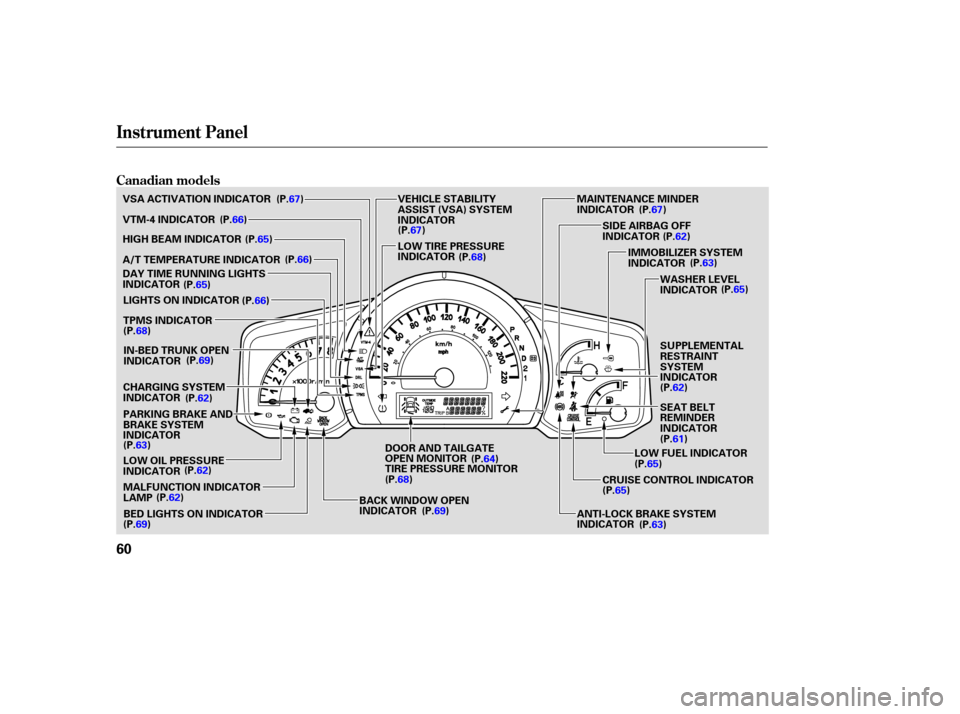
Instrument Panel
Canadian models
60
IMMOBILIZER SYSTEM
INDICATOR
WASHER LEVEL
INDICATOR
MALFUNCTION INDICATOR
LAMP LOW OIL PRESSURE
INDICATOR
VSA
ACTIVATION INDICATOR
VTM-4 INDICATOR
HIGH BEAM INDICATOR
A/T TEMPERATURE INDICATOR
LIGHTS ON INDICATOR
TPMS INDICATOR
CHARGING SYSTEM
INDICATOR
PARKING BRAKE AND
BRAKE SYSTEM
INDICATOR SIDE
AIRBAG OFF
INDICATOR
LOW FUEL INDICATOR
CRUISE CONTROL INDICATOR
BACK WINDOW OPEN
INDICATOR LOW
TIRE PRESSURE
INDICATOR MAINTENANCE
MINDER
INDICATOR
ANTI-LOCK BRAKE SYSTEM
INDICATOR
VEHICLE
STABILITY
ASSIST (VSA) SYSTEM
INDICATOR
SUPPLEMENTAL
RESTRAINT
SYSTEM
INDICATOR
SEAT BELT
REMINDER
INDICATOR
DAY
TIME RUNNING LIGHTS
INDICATOR
BED LIGHTS ON INDICATOR
IN-BED
TRUNK OPEN
INDICATOR (P.67)
(P.66)
(P.66)
(P.65) (P.66)
(P.68) (P.69)
(P.62)
(P.63) (P.62)
(P.62)
(P.69) (P.64)
(P.69)
(P.67)
(P.68) (P.67)
(P.62) (P.63)
(P.65)
(P.62)
(P.61)
(P.65)
(P.65)
(P.63)
(P.65)
DOOR AND TAILGATE
OPEN MONITOR
TIRE PRESSURE MONITOR
(P.68)
Page 69 of 331
This indicator comes on when you
turn the ignition switch to the ON
(II) position with the headlight
switch off and the parking brake set.
It should go off when you turn on the
headlights or release the parking
brake. If it comes on at any other
time, it means there is a problem
withtheDRL.There mayalsobea
problem with the high beam
headlights. This
indicator comes on with the
high beam headlights. For more
info rmation, see page .
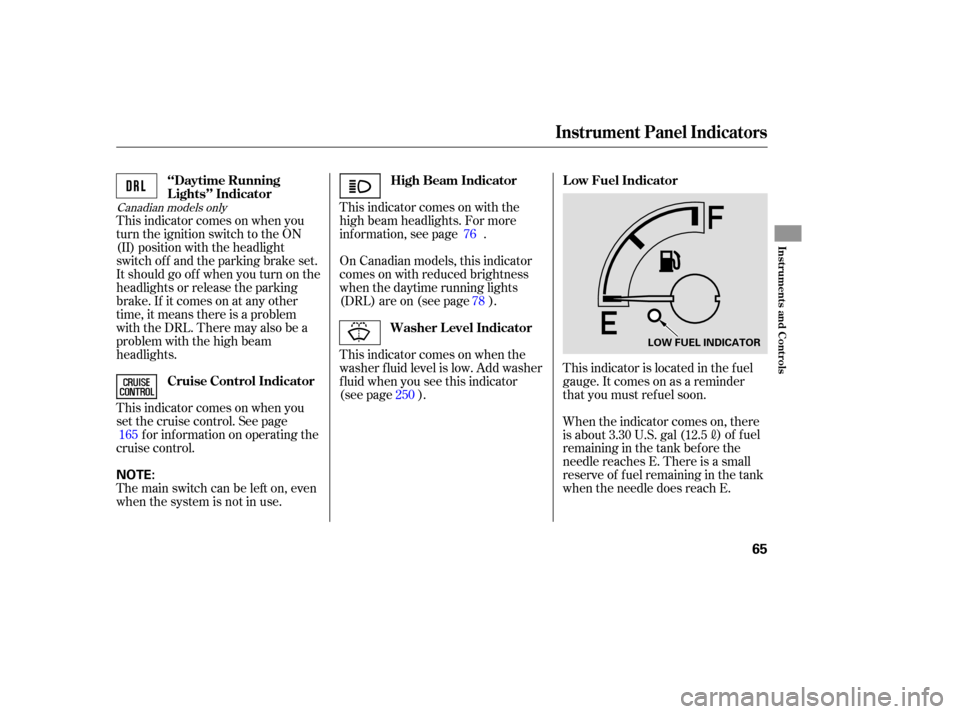
This indicator is located in the fuel
gauge. It comes on as a reminder
that you must refuel soon.
On
Canadian models, this indicator
comes on with reduced brightness
wh en the daytime running lights
(DRL) are on (see page ).
This indicator comes on when the
washer fluid level is low. Add washer
fluid when you see this indicator
(see page ).
When the indicator comes on, there
is about 3.30 U.S. gal (12.5
)offuel
remaining in the tank before the
needle reaches E. There is a small
reserve of fuel remaining in the tank
when the needle does reach E.
This
indicator comes on when you
set the cruise control. See page f or inf ormation on operating the
cruise control. 78
165 25076
Canadian models only
‘‘Daytime Running
Lights’’ Indicator
High Beam Indicator L ow Fuel Indicator
Washer Level Indicator
Cruise Control Indicator
Instrument Panel Indicators
Inst rument s and Cont rols
65
LOW FUEL INDICATOR
The main switch can be left on, even
when the system is not in use. NOTE:
Page 82 of 331
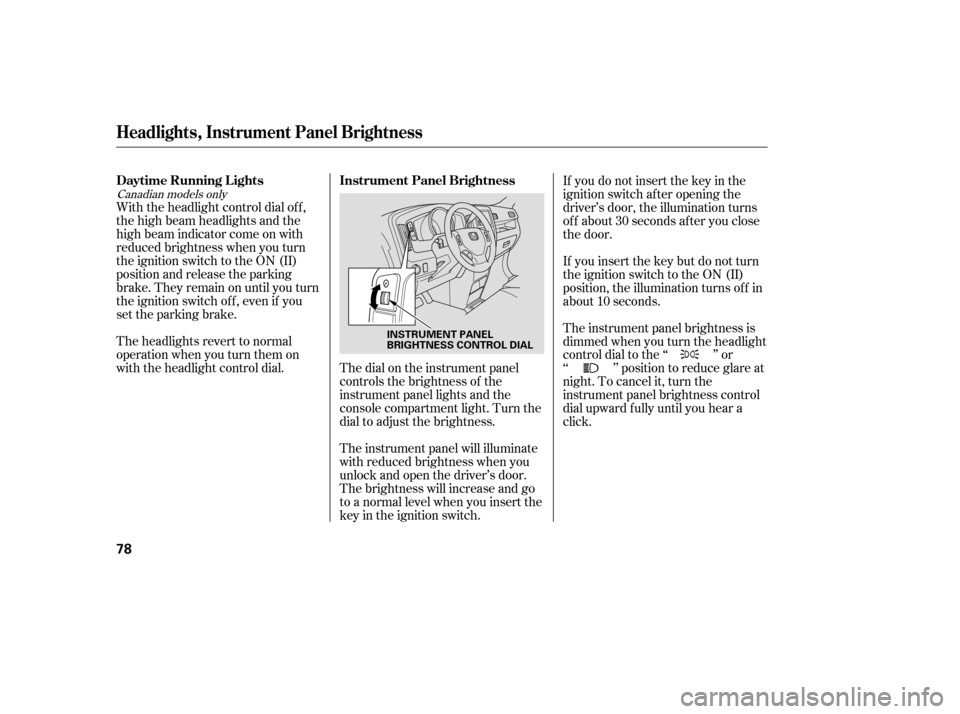
The dial on the instrument panel
controls the brightness of the
instrument panel lights and the
console compartment light. Turn the
dial to adjust the brightness.
With the headlight control dial of f ,
the high beam headlights and the
high beam indicator come on with
reduced brightness when you turn
the ignition switch to the ON (II)
position and release the parking
brake. They remain on until you turn
the ignition switch of f , even if you
set the parking brake.
The headlights revert to normal
operation when you turn them on
with the headlight control dial.
The instrument panel will illuminate
with reduced brightness when you
unlock and open the driver’s door.
The brightness will increase and go
to a normal level when you insert the
key in the ignition switch.If you do not insert the key in the
ignition switch af ter opening the
driver’s door, the illumination turns
of f about 30 seconds af ter you close
the door.
If you insert the key but do not turn
the ignition switch to the ON (II)
position, the illumination turns of f in
about 10 seconds.
The instrument panel brightness is
dimmedwhenyouturntheheadlight
controldialtothe‘‘ ’’or
‘‘ ’’ position to reduce glare at
night. To cancel it, turn the
instrument panel brightness control
dial upward f ully until you hear a
click.
Canadian models only
Instrument Panel Brightness
Daytime Running L ights
Headlights, Instrument Panel Brightness
78
INSTRUMENT PANEL
BRIGHTNESS CONTROL DIAL
Page 114 of 331
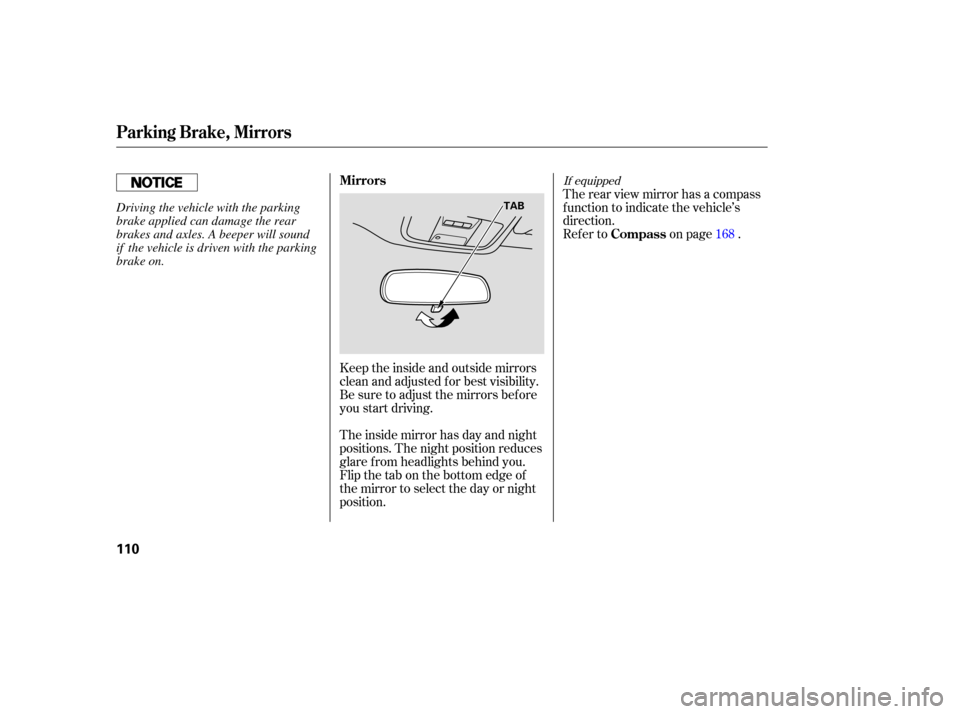
Keeptheinsideandoutsidemirrors
clean and adjusted for best visibility.
Be sure to adjust the mirrors before
you start driving.
The inside mirror has day and night
positions. The night position reduces
glare from headlights behind you.
Flip the tab on the bottom edge of
the mirror to select the day or night
position. Therearviewmirrorhasacompass
function
to indicate the vehicle’s
direction.
Refer to on page . 168
If equippedMirrors
Compass
Parking Brake, Mirrors
110
TABDriving the vehicle with the parking
brake applied can damage the rear
brakes and axles. A beeper will sound
if the vehicle is driven with the parking
brake on.
Page 170 of 331

You can decrease the set cruising
speed in any of these ways:If you need to decrease your
speed quickly, use the brakes as you
normally would.
Press and hold the SET/DECEL
button. Release the button when
you reach the desired speed.
To slow down in very small
amounts, tap the SET/DECEL
button. Each time you do this,
your vehicle will slow down about
1 mph (1.6 km/h).
Tap the brake pedal lightly with
your f oot. The CRUISE
CONTROL indicator on the
instrument panel will go out.
When the vehicle slows to the
desired speed, press the SET/
DECEL button.
You can increase the set cruising
speed in any of these ways:
Press and hold the RES/ACCEL
button. When you reach the
desired cruising speed, release the
button.
To increase your speed in very
small amounts, tap the RES/
ACCEL button. Each time you do
this, the vehicle will speed up
about 1 mph (1.6 km/h).
Cruise control may not hold the set
speed when you are going up and
down hills. If your speed increases
going down a hill, use the brakes to
slow down. This will cancel cruise
control. To resume the set speed,
press the RES/ACCEL button. The
indicator on the instrument panel will
come back on.
When climbing a steep hill, the
automatic transmission may
downshif t to hold the set speed.
Push on the accelerator pedal.
Accelerate to the desired cruising
speed, then press the SET/
DECEL button.
Changing the Set Speed
Cruise Control
166
NOTE:
Page 185 of 331
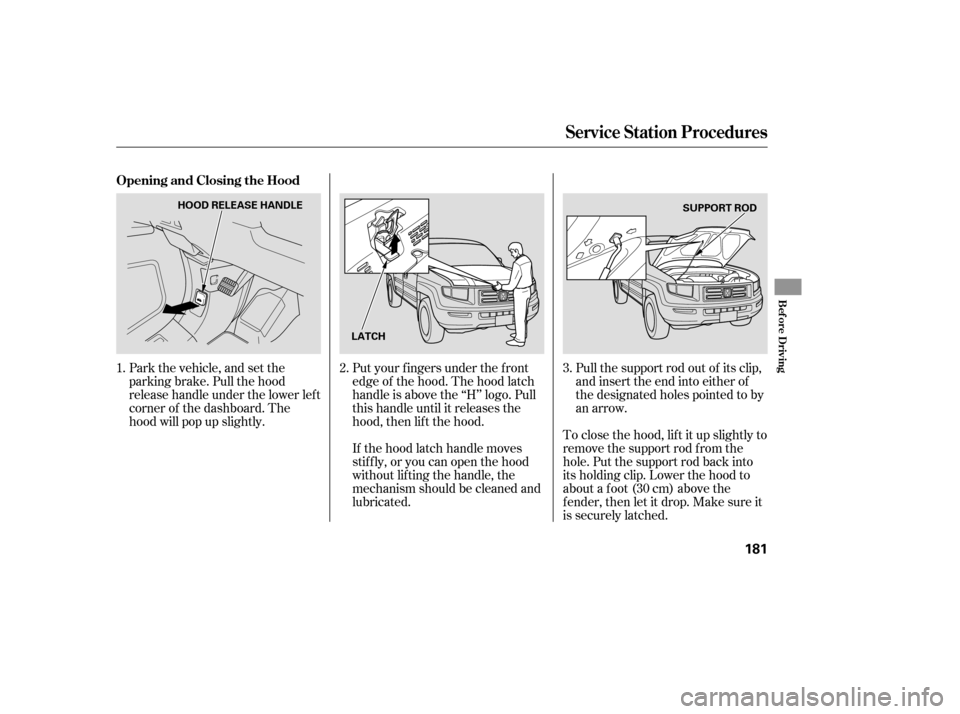
Put your f ingers under the f ront
edge of the hood. The hood latch
handle is above the ‘‘H’’ logo. Pull
this handle until it releases the
hood, then lif t the hood.Pull the support rod out of its clip,
and insert the end into either of
the designated holes pointed to by
an arrow.
To close the hood, lif t it up slightly to
remove the support rod f rom the
hole. Put the support rod back into
its holding clip. Lower the hood to
about a f oot (30 cm) above the
f ender, then let it drop. Make sure it
is securely latched.
If the hood latch handle moves
stif f ly, or you can open the hood
without lifting the handle, the
mechanism should be cleaned and
lubricated.
Park the vehicle, and set the
parking brake. Pull the hood
release handle under the lower lef t
corner of the dashboard. The
hood will pop up slightly.
1. 2. 3.
Service Station Procedures
Opening and Closing the Hood
Bef ore Driving
181
HOOD RELEASE HANDLE
LATCH SUPPORT ROD
Page 188 of 331
Your dealer has Honda accessories
that allow you to personalize your
vehicle. These accessories have
been designed and approved for your
vehicle, and are covered by warranty.
Modifying
your vehicle, or installing
some non-Honda accessories, can
make it unsafe. Before you make any
modifications or add any accessories,
be sure to read the following
info rmation.
Al though non-Honda accessories
may fit on your vehicle, they may not
meet factory specifications, and
could adversely affect your vehicle’s
handling and stability. When
properly installed, cellular
phones, alarms, two-way radios, and
low-powered audio systems should
not interfere with your vehicle’s
computer controlled systems, such
as your airbags and anti-lock brakes.
Befo re installing any accesso ry:
Make sure the accessory does not
obscure any lights, or interfere
with proper vehicle operation or
performance.
Be sure electronic accessories do
not overload electrical circuits
(see page ) or interfere with
the proper operation of your
vehicle.
If
you install a truck cap, be sure it is
properly installed and does not
exceed your vehicle’s load limits (see
page ). 187 291
A ccessories
A ccessories and Modif ications
Your vehicle should not be used to
carry a slide-in camper.
184
Improper accessories or
modifications can affect your
vehicle’s handling, stability, and
performance, and cause a
crash in which you can be hurt
or killed.
Follow all instructions in this
owner’s manual regarding
accessories and modifications.
Page 210 of 331

Make sure the moonroof (if
equipped) and the windows are
closed.
Turn of f the lights.
Place any packages, valuables, etc.
in the cargo area in your vehicle or
the In-Bed Trunk, or take them
with you.
Lock the doors.
Check the indicator on the driver’s
door to verify that the security
system is set.
Never park over dry leaves, tall
grass, or other f lammable
materials. The hot three way
catalytic converter could cause
these materials to catch on fire.
Set the parking brake bef ore you put
the transmission in Park. This keeps
the vehicle from moving and putting
pressure on the parking mechanism
in the transmission. Always use the parking brake when
you park your vehicle. Make sure
the parking brake is set f irmly, or
your vehicle may roll if it is parked
on an incline.
On vehicles with security system
As required by the FCC:
This device complies with Part 15 of theFCC rules. Operation is subject to thef ollowing two conditions: (1) This devicemay not cause harmf ul interf erence, and(2) this device must accept anyinterf erence received, includinginterf erence that may cause undesiredoperation.
Changes or modif ications not expresslyapproved by the party responsible f orcompliance could void the user’sauthority to operate the equipment.
This device complies with IndustryCanada Standard RSS-210.Operation is subject to the f ollowing twoconditions: (1) this device may not causeinterf erence, and (2) this device mustaccept any interf erence that may causeundesired operation of the device.
Parking T ips
Parking
Tire Pressure Monitoring System (TPMS), Parking
206