audio HONDA RIDGELINE 2017 2.G Owners Manual
[x] Cancel search | Manufacturer: HONDA, Model Year: 2017, Model line: RIDGELINE, Model: HONDA RIDGELINE 2017 2.GPages: 606, PDF Size: 13.21 MB
Page 305 of 606
304
uuCustomized Features u
Features
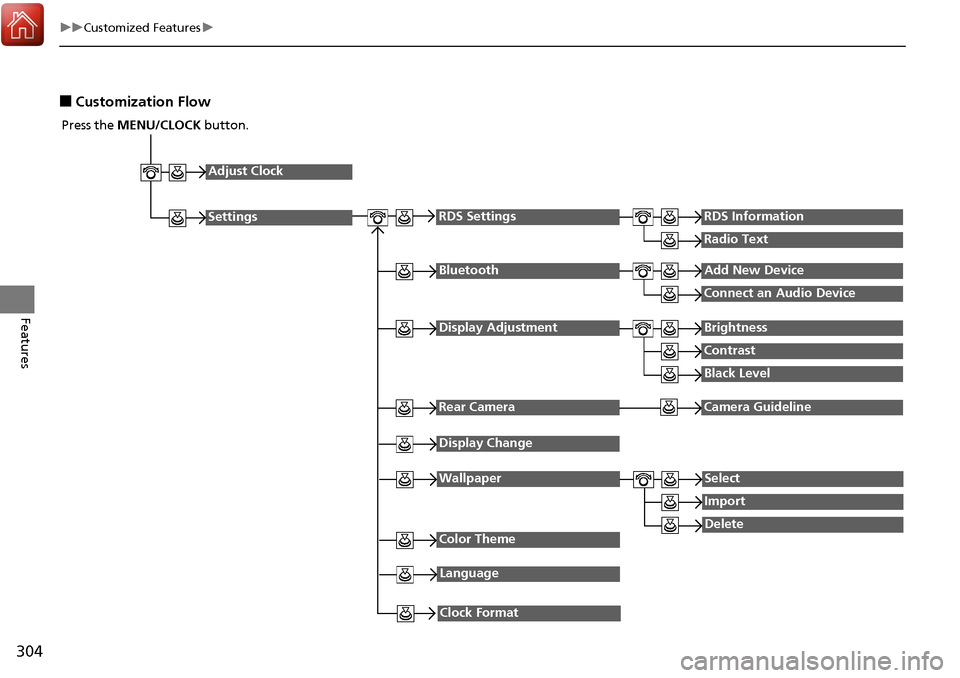
■Customization Flow
Press the MENU/CLOCK button.
Adjust Clock
Settings
BluetoothAdd New Device
Connect an Audio Device
Display AdjustmentBrightness
Contrast
Black Level
Rear CameraCamera Guideline
RDS SettingsRDS Information
Radio Text
Display Change
WallpaperSelect
Import
DeleteColor Theme
Language
Clock Format
Page 306 of 606
305
uuCustomized Features u
Continued
Features
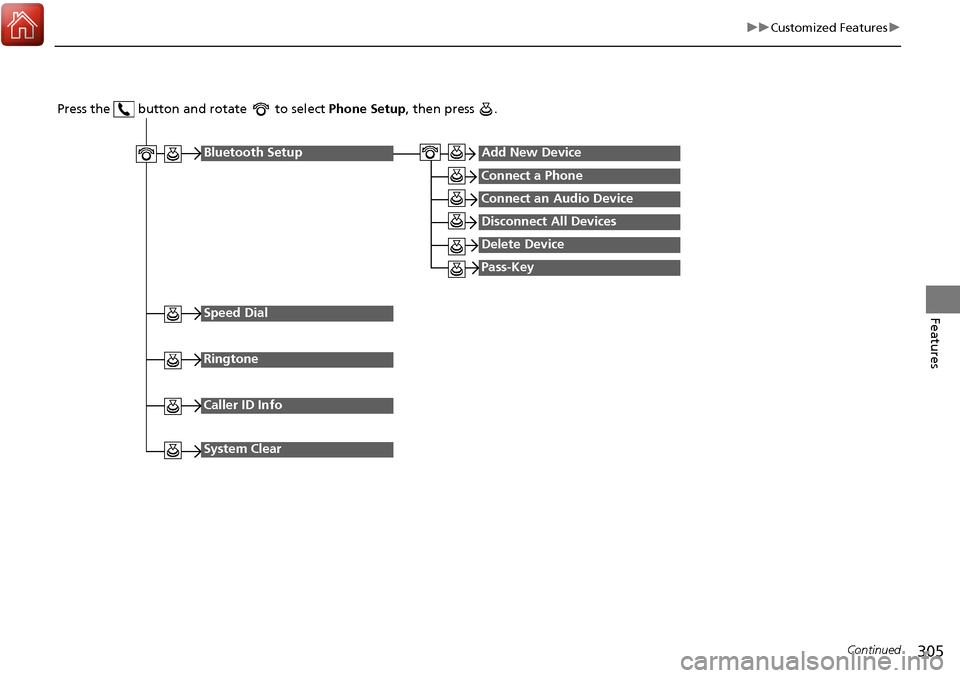
Press the button and rotate to select Phone Setup, then press .
Ringtone
Bluetooth SetupAdd New Device
Connect a Phone
Connect an Audio Device
Disconnect All Devices
Delete Device
Pass-Key
Speed Dial
Caller ID Info
System Clear
Page 307 of 606
306
uuCustomized Features u
Features
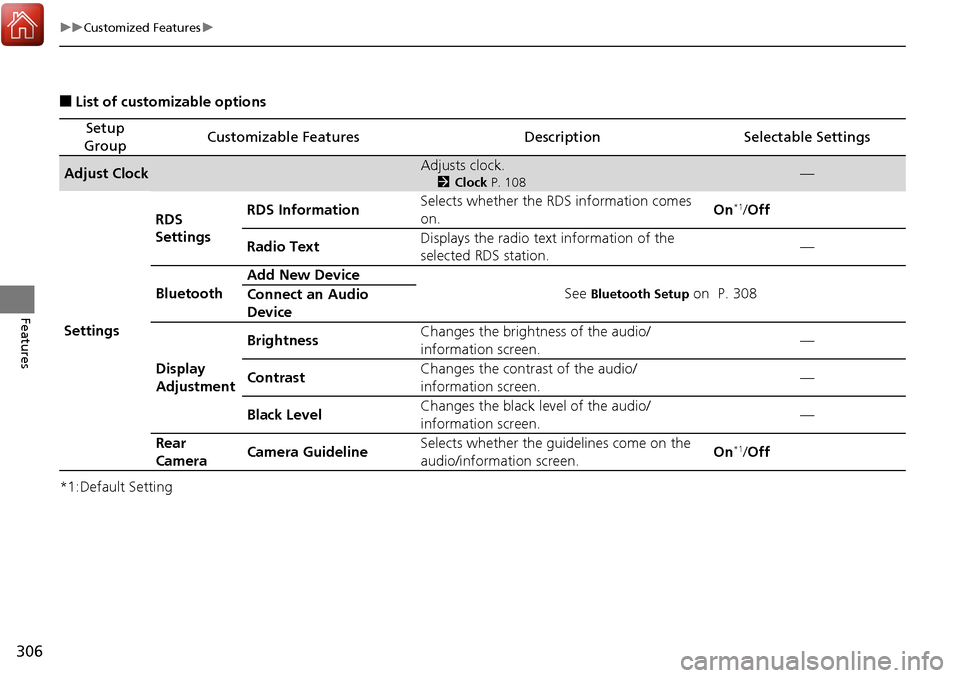
■List of customizable options
*1:Default Setting
Setup
GroupCustomizable FeaturesDescriptionSelectable Settings
Adjust ClockAdjusts clock.
2 Clock P. 108—
Settings RDS
Settings
RDS Information
Selects whether the RDS information comes
on. On
*1/
Off
Radio Text Displays the radio text information of the
selected RDS station. —
Bluetooth Add New Device
See
Bluetooth Setup on P. 308
Connect an Audio
Device
Display
Adjustment Brightness
Changes the brightness of the audio/
information screen. —
Contrast Changes the contrast of the audio/
information screen. —
Black Level Changes the black level of the audio/
information screen.
—
Rear
Camera Camera Guideline Selects whether the guidelines come on the
audio/information screen. On
*1/
Off
Page 308 of 606
307
uuCustomized Features u
Continued
Features
*1:Default Setting
Setup
GroupCustomizable FeaturesDescriptionSelectable Settings
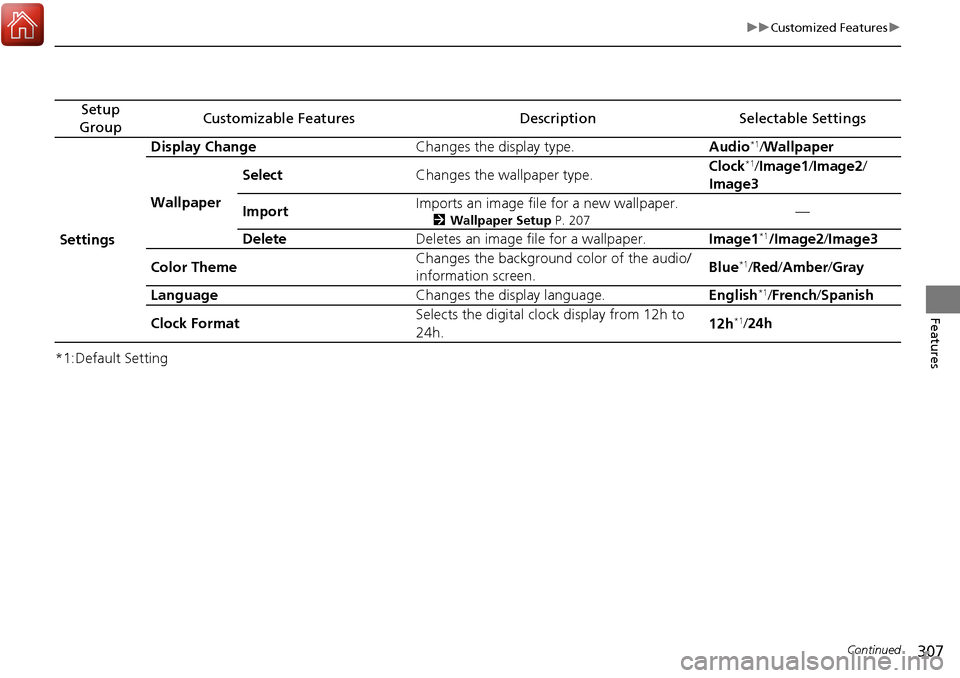
Settings Display Change
Changes the display type. Audio
*1/Wallpaper
Wallpaper Select
Changes the wallpaper type. Clock*1/
Image1/ Image2/
Image3
Import Imports an image file for a new wallpaper.
2
Wallpaper Setup P. 207—
Delete Deletes an image file for a wallpaper. Image1
*1/Image2/Image3
Color Theme Changes the background color of the audio/
information screen.
Blue
*1/
Red /Amber /Gray
Language Changes the display language. English
*1/French /Spanish
Clock Format Selects the digital clock display from 12h to
24h. 12h
*1/
24h
Page 309 of 606
308
uuCustomized Features u
Features
*1:Default Setting
Setup
GroupCustomizable FeaturesDescriptionSelectable Settings
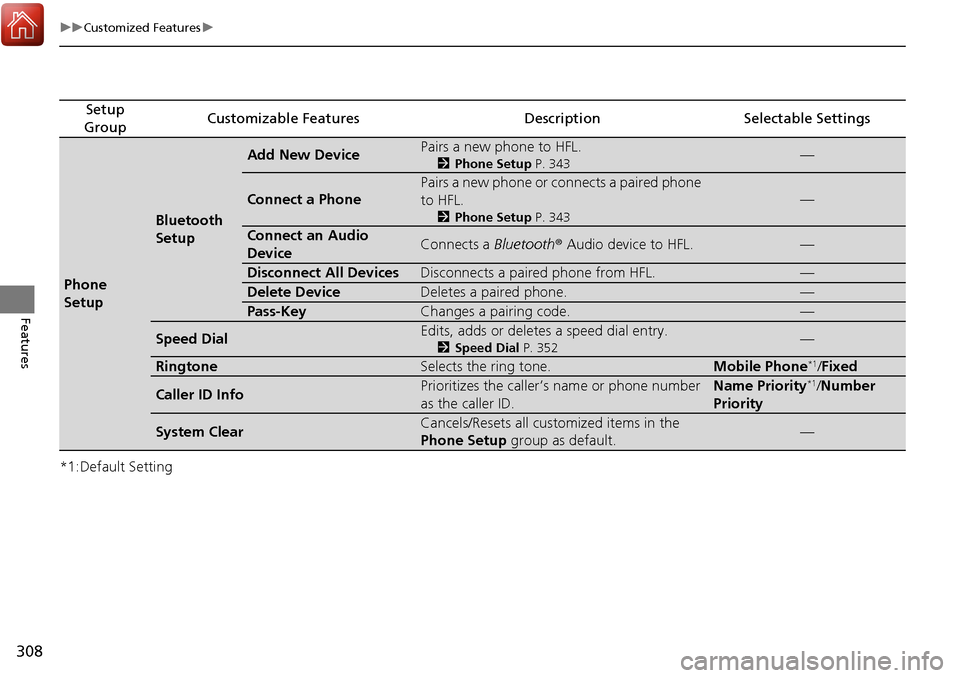
Phone
Setup
Bluetooth
Setup
Add New DevicePairs a new phone to HFL.
2 Phone Setup P. 343—
Connect a Phone
Pairs a new phone or connects a paired phone
to HFL.
2Phone Setup P. 343
—
Connect an Audio
DeviceConnects a Bluetooth® Audio device to HFL.—
Disconnect All DevicesDisconnects a paired phone from HFL.—
Delete DeviceDeletes a paired phone.—
Pass-KeyChanges a pairing code.—
Speed DialEdits, adds or deletes a speed dial entry.
2Speed Dial P. 352—
RingtoneSelects the ring tone.Mobile Phone*1/Fixed
Caller ID InfoPrioritizes the caller’s name or phone number
as the caller ID.Name Priority*1/Number
Priority
System ClearCancels/Resets all customized items in the
Phone Setup group as default.—
Page 310 of 606
Continued309
uuCustomized Features u
Features
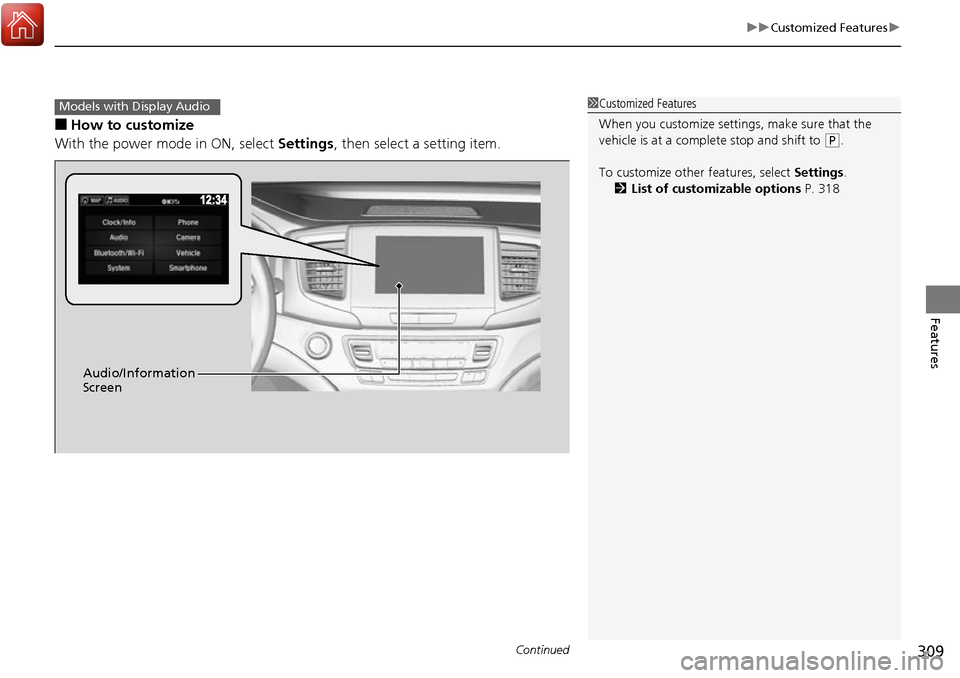
■How to customize
With the power mode in ON, select Settings, then select a setting item.
1Customized Features
When you customize settings, make sure that the
vehicle is at a complete stop and shift to
(P.
To customize other features, select Settings.
2 List of customizable options P. 318
Models with Display Audio
Audio/Information
Screen
Page 315 of 606
314
uuCustomized Features u
Features
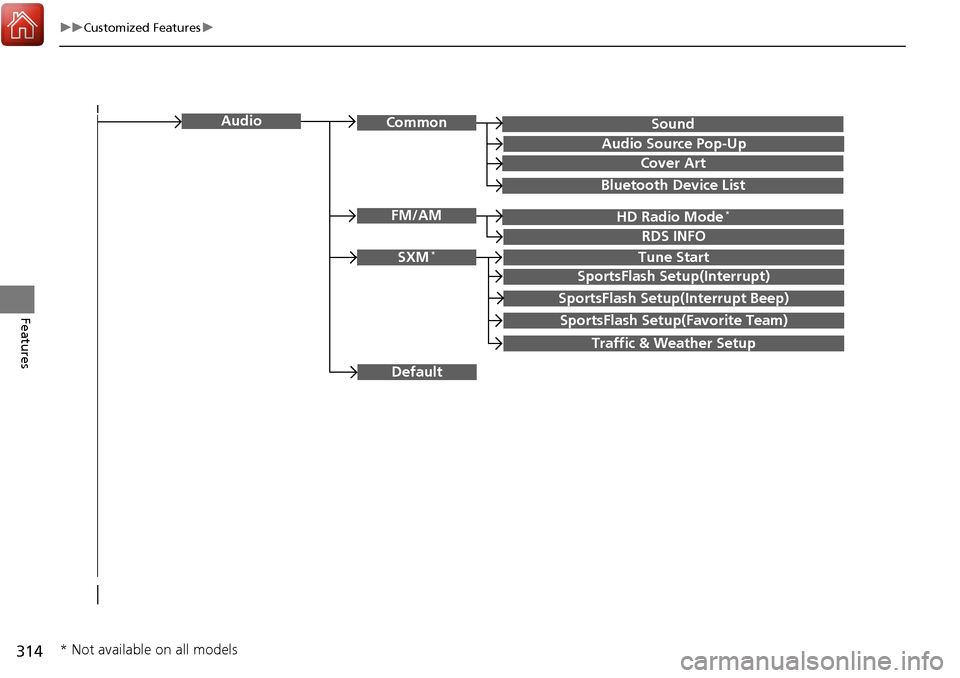
SoundAudioCommon
Audio Source Pop-Up
Cover Art
HD Radio Mode*FM/AM
RDS INFO
SXM*Tune Start
SportsFlash Setup(Interrupt)
SportsFlash Setup(Interrupt Beep)
SportsFlash Setup(Favorite Team)
Traffic & Weather Setup
Bluetooth Device List
Default
* Not available on all models
Page 319 of 606
318
uuCustomized Features u
Features
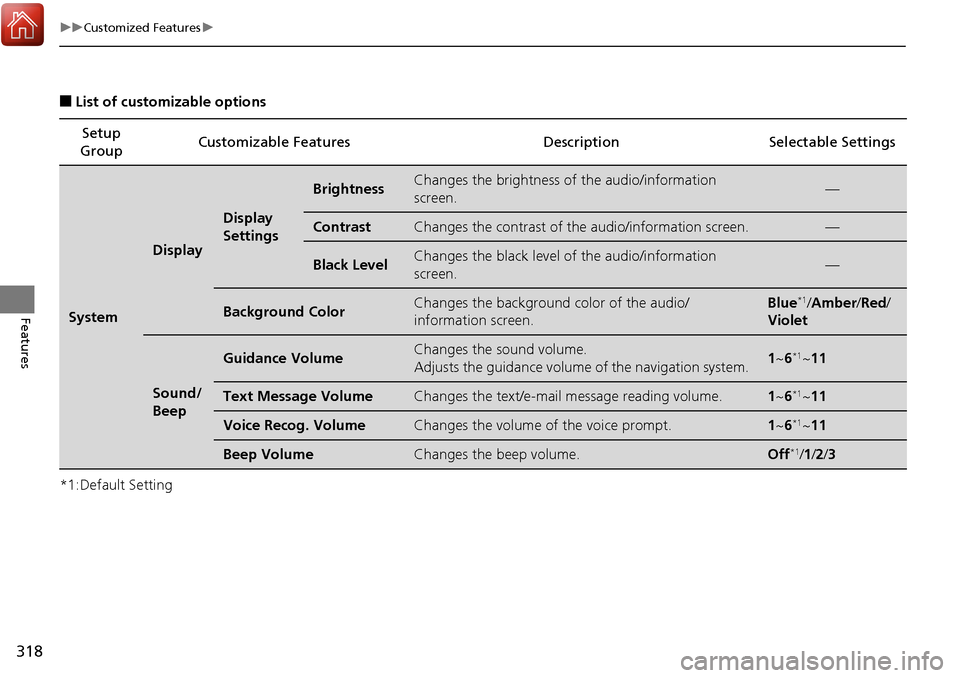
■List of customizable options
*1:Default Setting Setup
Group Customizable Features Description Selectable Settings
System
Display
Display
Settings
BrightnessChanges the brightness of
the audio/information
screen.—
ContrastChanges the contrast of th e audio/information screen.—
Black LevelChanges the black level of the audio/information
screen.—
Background ColorChanges the background color of the audio/
information screen.Blue*1/Amber /Red /
Violet
Sound/
Beep
Guidance VolumeChanges the sound volume.
Adjusts the guidance volume of the navigation system.1 ~6*1~11
Text Message VolumeChanges the text/e-mail message reading volume.1~6*1~11
Voice Recog. VolumeChanges the volume of the voice prompt.1~6*1~11
Beep VolumeChanges the beep volume.Off*1/1 /2 /3
Page 328 of 606
327
uuCustomized Features u
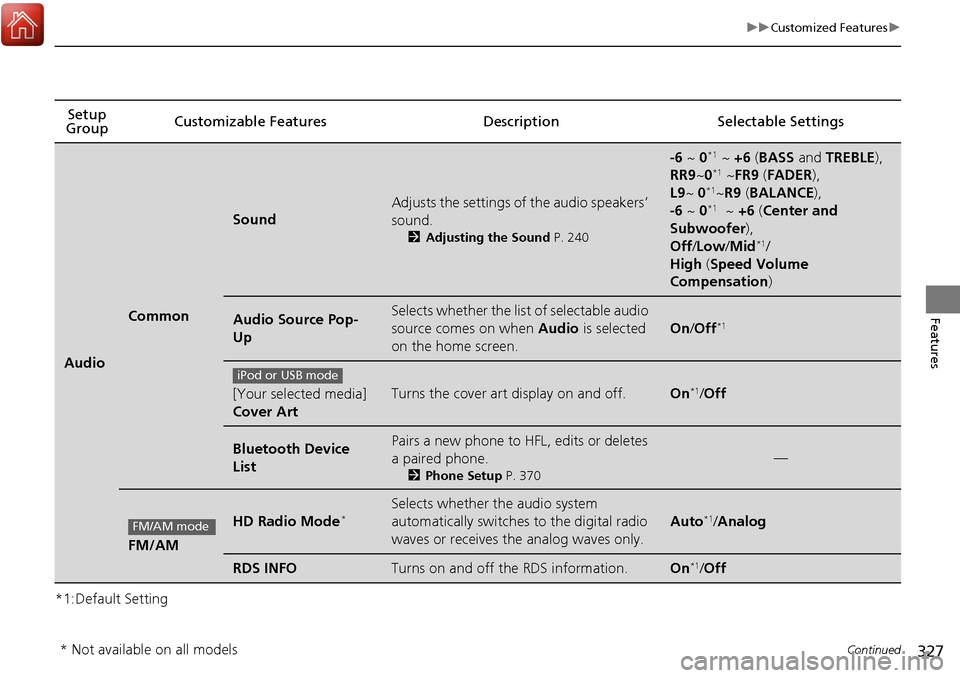
Continued
Features
*1:Default SettingSetup
Group Customizable Features Description Selectable Settings
Audio
Common
Sound
Adjusts the settings of
the audio speakers’
sound.
2 Adjusting the Sound P. 240
-6 ~ 0*1 ~ +6 (BASS and TREBLE ),
RR9 ~0*1 ~FR9 (FADER ),
L9 ~ 0*1~R9 (BALANCE ),
-6 ~ 0*1 ~ +6 (Center and
Subwoofer ),
Off /Low /Mid
*1/
High (Speed Volume
Compensation )
Audio Source Pop-
UpSelects whether the list of selectable audio
source comes on when Audio is selected
on the home screen.
On /Off*1
[Your selected media]
Cover ArtTurns the cover art display on and off.On*1/Off
Bluetooth Device
ListPairs a new phone to HFL, edits or deletes
a paired phone.
2 Phone Setup P. 370
—
FM/AM
HD Radio Mode*Selects whether the audio system
automatically switches to the digital radio
waves or receives the analog waves only.
Auto*1/Analog
RDS INFOTurns on and off the RDS information.On*1/ Off
iPod or USB mode
FM/AM mode
* Not available on all models
Page 329 of 606
328
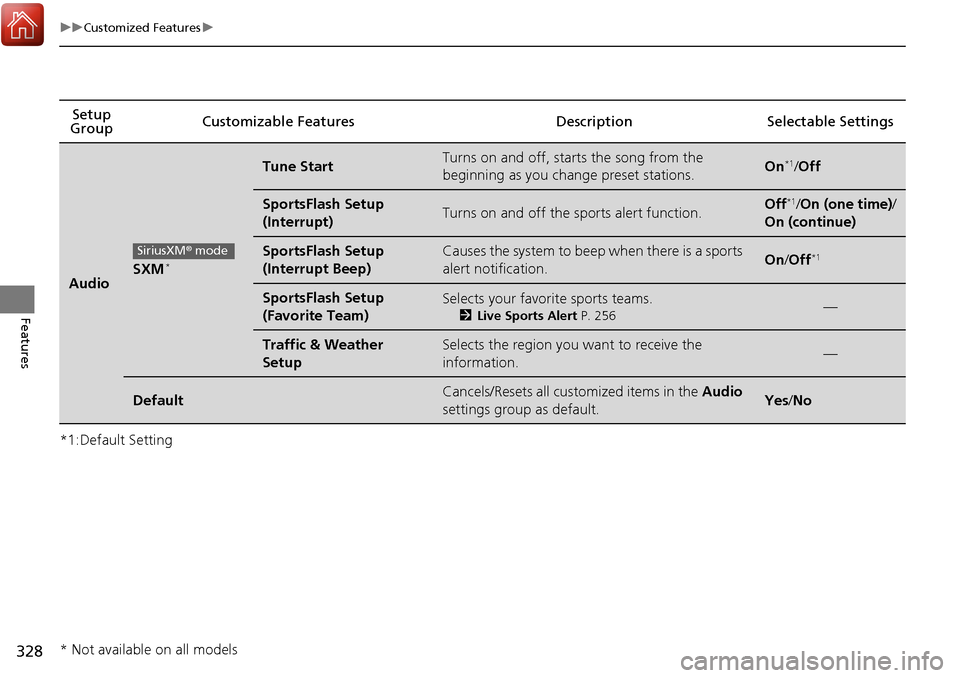
uuCustomized Features u
Features
*1:Default SettingSetup
Group Customizable Features Descri
ption Selectable Settings
AudioSXM*
Tune StartTurns on and off, starts the song from the
beginning as you change preset stations.On*1/Off
SportsFlash Setup
(Interrupt)Turns on and off the sports alert function.Off*1/On (one time) /
On (continue)
SportsFlash Setup
(Interrupt Beep)Causes the system to beep when there is a sports
alert notification.On /Off*1
SportsFlash Setup
(Favorite Team)Selects your favorite sports teams.
2 Live Sports Alert P. 256—
Traffic & Weather
SetupSelects the region you want to receive the
information.—
DefaultCancels/Resets all customized items in the Audio
settings group as default.Yes /No
SiriusXM ® mode
* Not available on all models