key battery HONDA RIDGELINE 2019 Owner's Manual (in English)
[x] Cancel search | Manufacturer: HONDA, Model Year: 2019, Model line: RIDGELINE, Model: HONDA RIDGELINE 2019Pages: 624, PDF Size: 34.98 MB
Page 96 of 624
94
uuIndicators uMulti-Information Display Warn ing and Information Messages
Instrument Panel
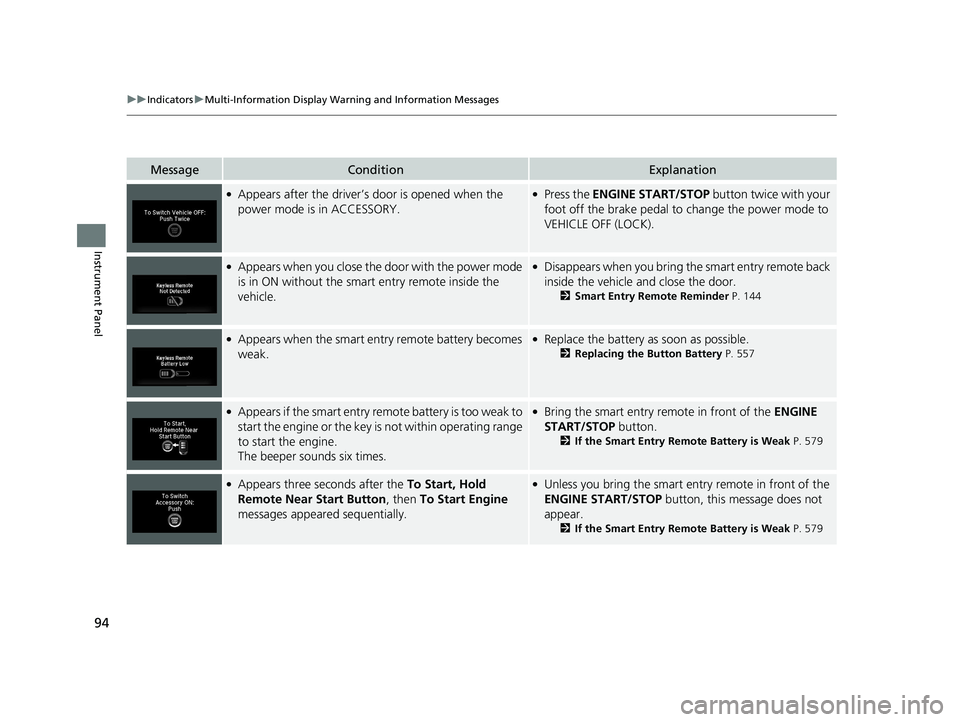
MessageConditionExplanation
●Appears after the driver’s door is opened when the
power mode is in ACCESSORY.●Press the ENGINE START/STOP button twice with your
foot off the brake pedal to change the power mode to
VEHICLE OFF (LOCK).
●Appears when you close the door with the power mode
is in ON without the smart entry remote inside the
vehicle.●Disappears when you bring the smart entry remote back
inside the vehicle and close the door.
2 Smart Entry Remote Reminder P. 144
●Appears when the smart entry remote battery becomes
weak.●Replace the battery as soon as possible.
2Replacing the Button Battery P. 557
●Appears if the smart entry remote battery is too weak to
start the engine or the key is not within operating range
to start the engine.
The beeper sounds six times.●Bring the smart entry remote in front of the ENGINE
START/STOP button.
2 If the Smart Entry Remote Battery is Weak P. 579
●Appears three seconds after the To Start, Hold
Remote Near Start Button , then To Start Engine
messages appeared sequentially.●Unless you bring the smart en try remote in front of the
ENGINE START/STOP button, this message does not
appear.
2 If the Smart Entry Remote Battery is Weak P. 579
Page 113 of 624
111Continued
Controls
Locking and Unlocking the Doors
Key Types and Functions
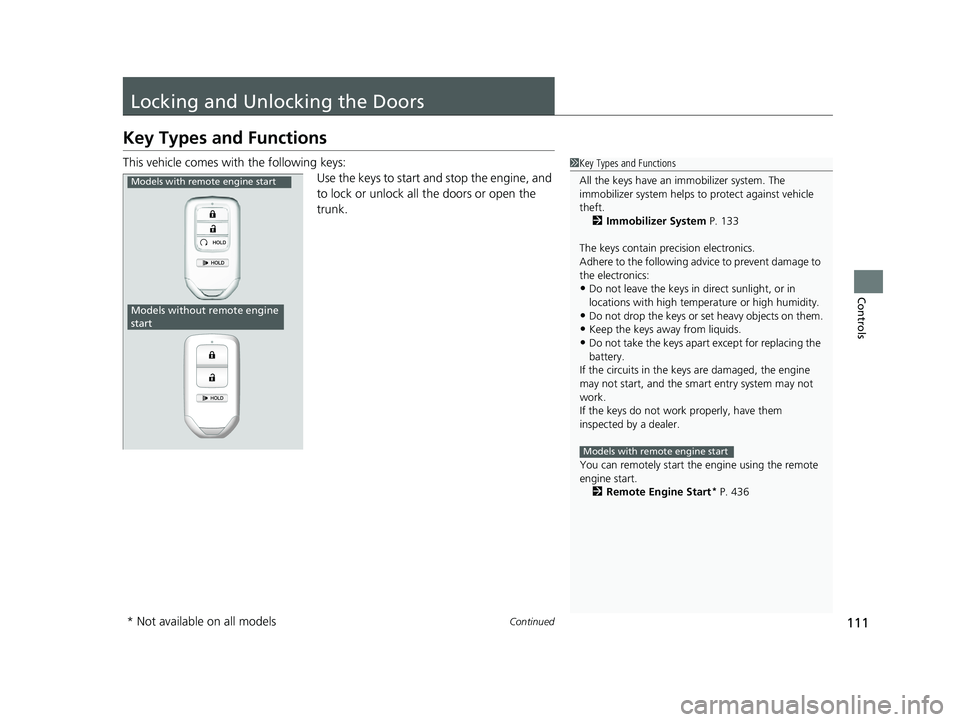
This vehicle comes with the following keys:
Use the keys to start and stop the engine, and
to lock or unlock all the doors or open the
trunk.1Key Types and Functions
All the keys have an immobilizer system. The
immobilizer system helps to protect against vehicle
theft. 2 Immobilizer System P. 133
The keys contain precision electronics.
Adhere to the following advi ce to prevent damage to
the electronics:
•Do not leave the keys in direct sunlight, or in
locations with high temperature or high humidity.
•Do not drop the keys or set heavy objects on them.
•Keep the keys away from liquids.
•Do not take the keys apart except for replacing the
battery.
If the circuits in the keys are damaged, the engine
may not start, and the smart entry system may not
work.
If the keys do not work properly, have them
inspected by a dealer.
You can remotely start the engine using the remote
engine start.
2 Remote Engine Start
* P. 436
Models with remote engine start
Models with remote engine start
Models without remote engine
start
* Not available on all models
Page 114 of 624
uuLocking and Unlocking the Doors uKey Types and Functions
112
Controls
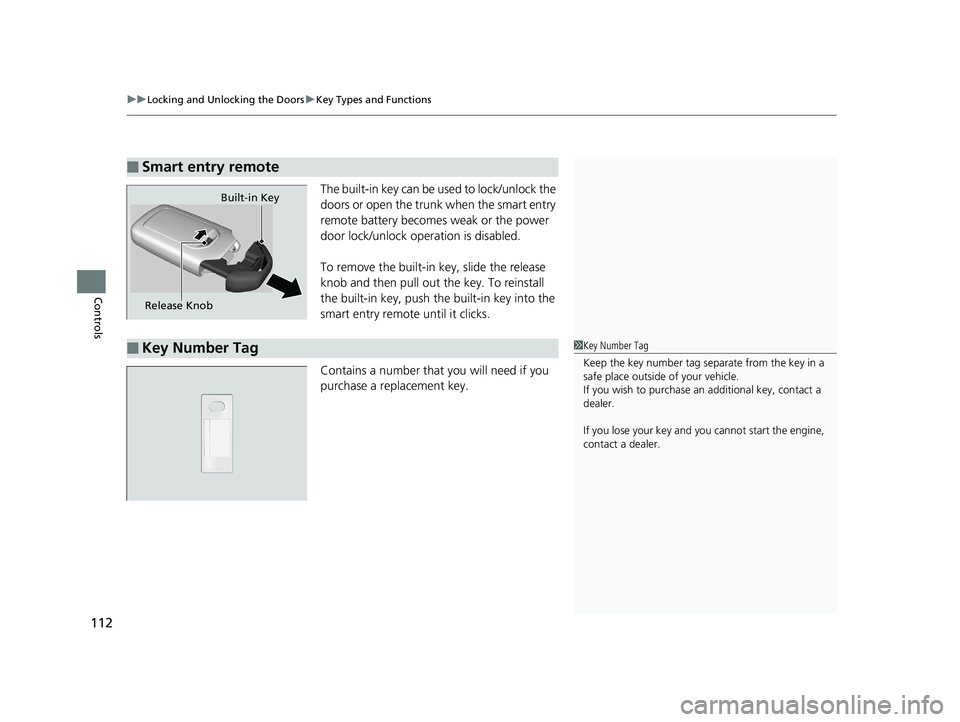
The built-in key can be us ed to lock/unlock the
doors or open the trunk when the smart entry
remote battery becomes weak or the power
door lock/unlock operation is disabled.
To remove the built-in key, slide the release
knob and then pull out the key. To reinstall
the built-in key, push th e built-in key into the
smart entry remote until it clicks.
Contains a number that you will need if you
purchase a replacement key.
■Smart entry remote
Release Knob Built-in Key
■Key Number Tag1
Key Number Tag
Keep the key number tag separate from the key in a
safe place outside of your vehicle.
If you wish to purchase an additional key, contact a
dealer.
If you lose your key and you cannot start the engine,
contact a dealer.
Page 121 of 624
Continued119
uuLocking and Unlocking the Doors uLocking/Unlocking the Doors from the Outside
Controls
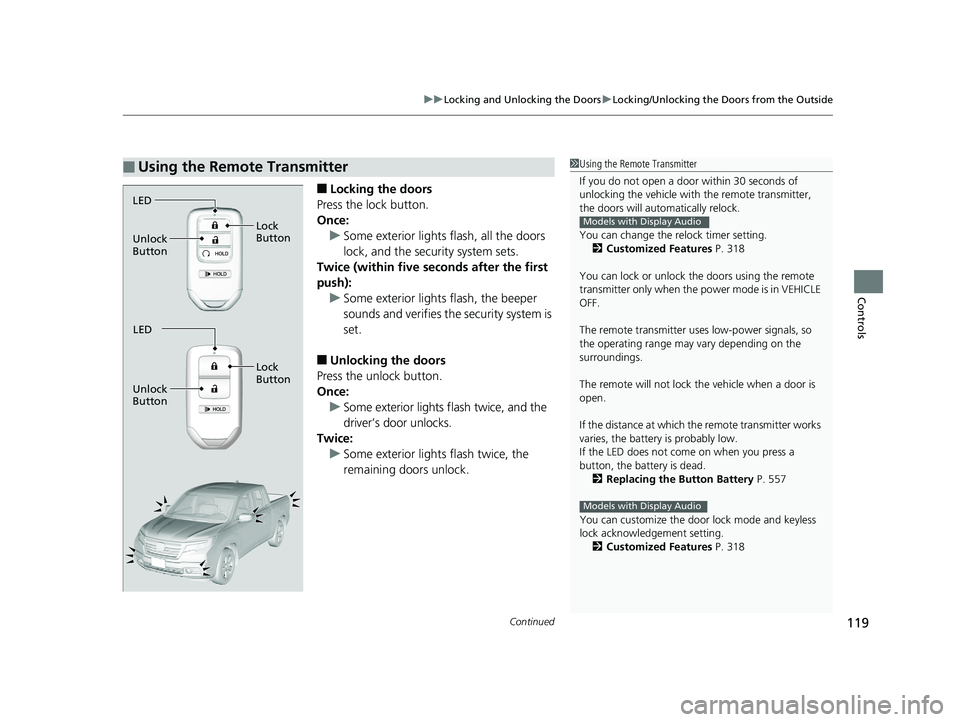
■Locking the doors
Press the lock button.
Once: u Some exterior lights flash, all the doors
lock, and the security system sets.
Twice (within five se conds after the first
push): u Some exterior lights flash, the beeper
sounds and verifies the security system is
set.
■Unlocking the doors
Press the unlock button.
Once: u Some exterior lights flash twice, and the
driver’s door unlocks.
Twice:
u Some exterior light s flash twice, the
remaining doors unlock.
■Using the Remote Transmitter1 Using the Remote Transmitter
If you do not open a door within 30 seconds of
unlocking the vehicle with the remote transmitter,
the doors will auto matically relock.
You can change the relock timer setting. 2 Customized Features P. 318
You can lock or unlock the doors using the remote
transmitter only when the power mode is in VEHICLE
OFF.
The remote transmitter us es low-power signals, so
the operating range may vary depending on the
surroundings.
The remote will not lock th e vehicle when a door is
open.
If the distance at which the remote transmitter works
varies, the batter y is probably low.
If the LED does not come on when you press a
button, the battery is dead.
2 Replacing the Button Battery P. 557
You can customize the door lock mode and keyless
lock acknowledge ment setting.
2 Customized Features P. 318
Models with Display Audio
Models with Display Audio
LED
Unlock
Button Lock
Button
LED
Unlock
Button Lock
Button
Page 122 of 624
uuLocking and Unlocking the Doors uLocking/Unlocking the Doors from the Outside
120
Controls
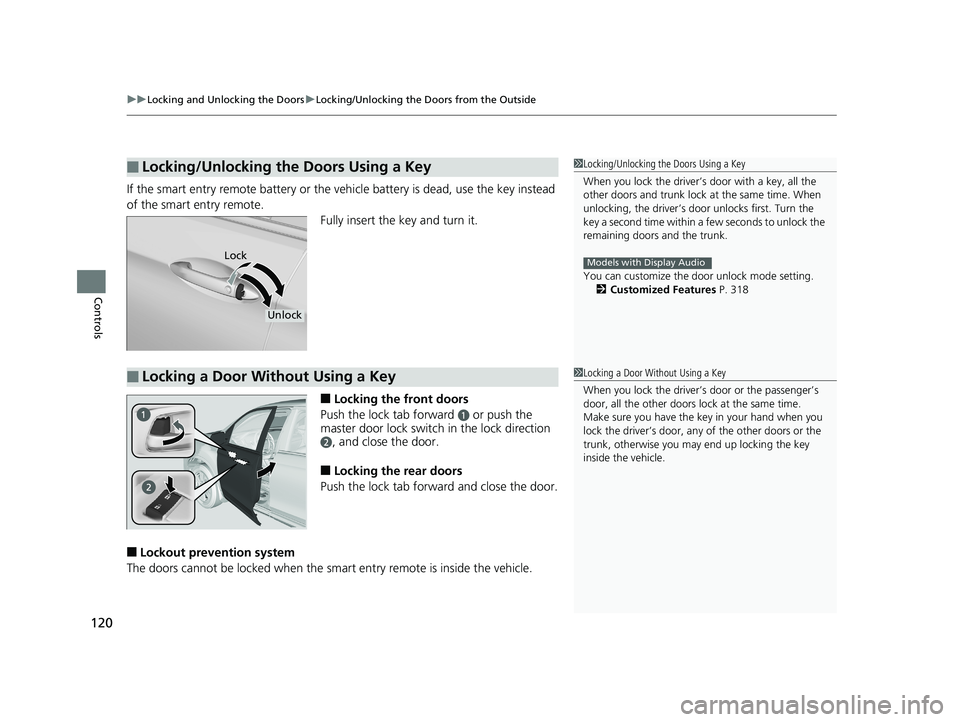
If the smart entry remote battery or the ve hicle battery is dead, use the key instead
of the smart entry remote. Fully insert the key and turn it.
■Locking the front doors
Push the lock tab forward
a or push the
master door lock switch in the lock direction
b, and close the door.
■Locking the rear doors
Push the lock tab forward and close the door.
■Lockout prevention system
The doors cannot be locked when the sm art entry remote is inside the vehicle.
■Locking/Unlocking the Doors Using a Key1Locking/Unlocking the Doors Using a Key
When you lock the driver’s door with a key, all the
other doors and trunk lock at the same time. When
unlocking, the driver’s door unlocks first. Turn the
key a second time within a few seconds to unlock the
remaining doors and the trunk.
You can customize the door unlock mode setting. 2 Customized Features P. 318
Models with Display AudioLock
Unlock
■Locking a Door Without Using a Key1Locking a Door Without Using a Key
When you lock the driver’s door or the passenger’s
door, all the other doors lock at the same time.
Make sure you have the key in your hand when you
lock the driver’s door, any of the other doors or the
trunk, otherwise you may end up locking the key
inside the vehicle.
Page 132 of 624
130
Controls
Opening and Closing the Trunk
Precautions for Opening/Closing the Trunk
■Opening the trunk
Open the trunk all the way. u If it is not fully opened, the trunk lid may begin to close under its own weight.
■Closing the trunk
Keep the trunk lid clos ed while driving to:
u Avoid possible damage.
Using the key
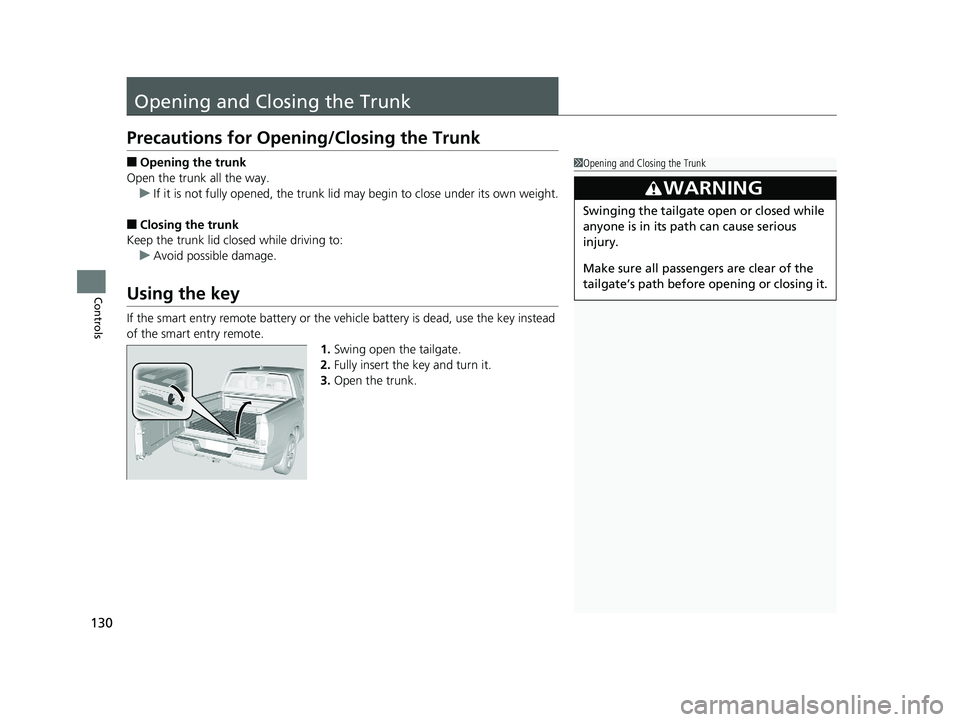
If the smart entry remote battery or the ve hicle battery is dead, use the key instead
of the smart entry remote. 1.Swing open the tailgate.
2. Fully insert the key and turn it.
3. Open the trunk.
1Opening and Closing the Trunk
3WARNING
Swinging the tailgate open or closed while
anyone is in its path can cause serious
injury.
Make sure all passengers are clear of the
tailgate’s path before opening or closing it.
Page 136 of 624
uuSecurity System uSecurity System Alarm
134
Controls
■To deactivate the security system alarm
Unlock the vehicle using the key, remote transmitter, or smart entry with push
button start system. The system, along with the horn and flashing lights, is
deactivated.
■Setting the security system alarm
The security system alarm automatically sets when the following conditions have
been met:
• The power mode is set to VEHICLE OFF (LOCK).
• The hood and trunk are closed.
• All doors are locked from outside with the key, remote transmitter, or smart entry
system.
■When the security system alarm sets
The security system alarm indicator in the instrument panel blinks. When the
blinking interval changes after about 15 seconds, the security system alarm is set.
■To cancel the security system alarm
The security system alarm is canceled when the vehicle is unlocked using the key,
remote transmitter, smart entry system, or th e power mode is set to ON. The security
system alarm indicator goe s off at the same time.
1Security System Alarm
Do not set the security system alarm when someone
is in the vehicle or a window is open. The system can
accidentally activate when:
•Unlocking the door with the lock tab.•Opening the trunk with the trunk release or the
emergency trunk opener.
•Opening the hood with the hood release.•Moving the shift lever out of ( P.
If the battery goes dead after you have set the
security system alarm, the security alarm may go off
once the battery is re charged or replaced.
If this occurs, deactivate the security system alarm by
unlocking a door using the ke y, remote transmitter,
or smart entry system.
Page 439 of 624
Continued437
uuWhen Driving uStarting the Engine
Driving
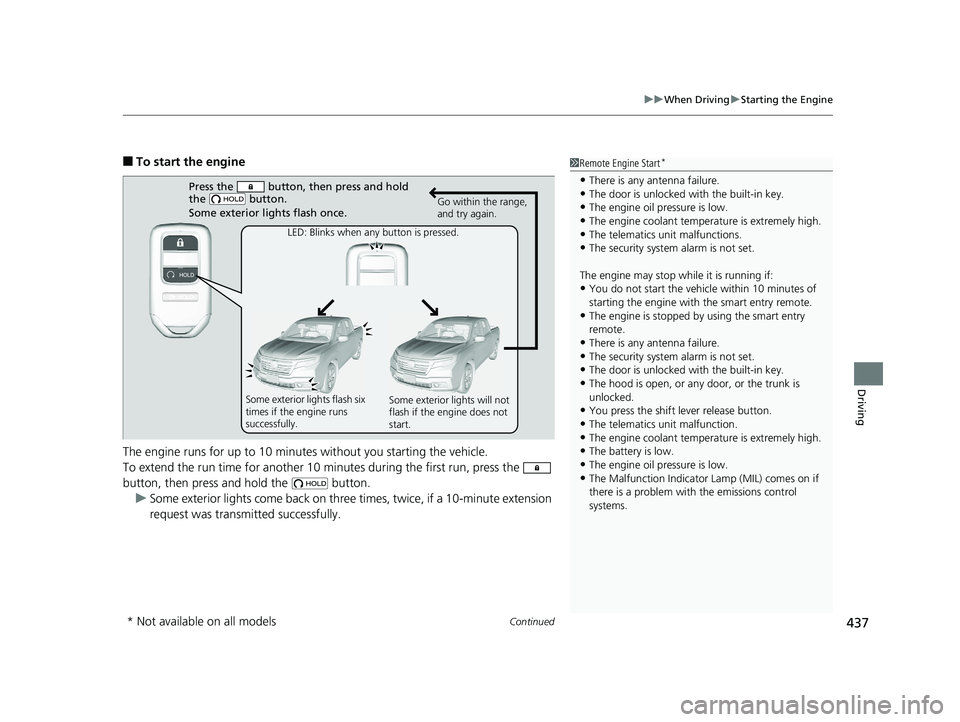
■To start the engine
The engine runs for up to 10 minu tes without you starting the vehicle.
To extend the run time for another 10 mi nutes during the first run, press the
button, then press an d hold the button.
u Some exterior lights come back on three times, twice, if a 10-minute extension
request was transmitted successfully.1 Remote Engine Start*
•There is any antenna failure.•The door is unlocked with the built-in key.
•The engine oil pressure is low.
•The engine coolant temper ature is extremely high.•The telematics unit malfunctions.
•The security system alarm is not set.
The engine may stop whil e it is running if:
•You do not start the vehicl e within 10 minutes of
starting the engine with the smart entry remote.
•The engine is stopped by using the smart entry
remote.
•There is any antenna failure.•The security system alarm is not set.
•The door is unlocked with the built-in key.
•The hood is open, or any door, or the trunk is
unlocked.
•You press the shift lever release button.
•The telematics unit malfunction.
•The engine coolant temper ature is extremely high.•The battery is low.
•The engine oil pressure is low.
•The Malfunction Indicator Lamp (MIL) comes on if
there is a problem with the emissions control
systems.
Press the button, then press and hold
the button.
Some exterior lights flash once.
LED: Blinks when any button is pressed. Go within the range,
and try again.
Some exterior lights flash six
times if the engine runs
successfully. Some exterior lights will not
flash if the engine does not
start.
* Not available on all models
Page 559 of 624
557
Maintenance
Remote Transmitter Care
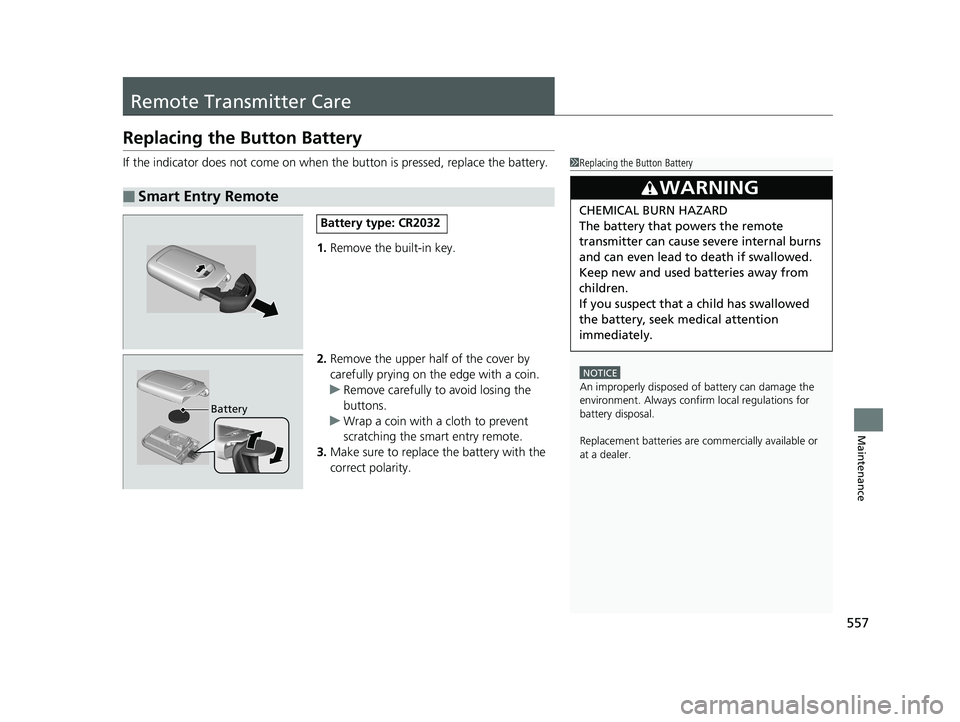
Replacing the Button Battery
If the indicator does not come on when the button is pressed, replace the battery.
1. Remove the built-in key.
2. Remove the upper half of the cover by
carefully prying on the edge with a coin.
u Remove carefully to avoid losing the
buttons.
u Wrap a coin with a cloth to prevent
scratching the smart entry remote.
3. Make sure to replace the battery with the
correct polarity.
■Smart Entry Remote
1Replacing the Button Battery
NOTICE
An improperly disposed of battery can damage the
environment. Always conf irm local regulations for
battery disposal.
Replacement batteries are commercially available or
at a dealer.
3WARNING
CHEMICAL BURN HAZARD
The battery that powers the remote
transmitter can cause severe internal burns
and can even lead to death if swallowed.
Keep new and used batteries away from
children.
If you suspect that a child has swallowed
the battery, seek medical attention
immediately.Battery type: CR2032
Battery
Page 617 of 624
615
Index
Collision Mitigation Braking SystemTM
(CMBSTM) ................................................. 494
Indicator ............................................. 88, 89
Compact Spare Tire .......................... 569, 603
Console Compartment ............................. 174
Controls .................................................... 109
Conversation Mirror ................................ 179
Coolant (Engine) ...................................... 535
Adding to the Radiator ........................... 536
Adding to the Reserve Tank .................... 535
Overheating ............................................ 585
Creeping (Automatic Transmission) ........ 441
Cross Traffic Monitor ............................... 508
Cruise Control .......................................... 447
Indicator ................................................... 82
Cup Holders .............................................. 175
Customer Service Information ................ 612
Customized Features ............................... 318
D
Daytime Running Lights .......................... 150
Dead Battery ............................................ 581
Defaulting All the Settings ...................... 348
Defogger/Heated Door Mirror ................ 156
Defrosting the Windshield and Windows ......................................... 189, 198
Devices that Emit Radio Waves ............... 605
Dimming Headlights .............................................. 146
Rearview Mirror ...................................... 161 Dipstick (Engine Oil)
................................. 531
Directional Signals (Turn Signal) ............. 145
Display Button .......................................... 226
Door Mirrors ............................................. 162
Doors ......................................................... 111
Auto Door Locking .................................. 124
Auto Door Unlocking ............................... 124
Door Open Message ............................ 34, 91
Keys ........................................................ 111
Locking/Unlocking the Doors from the Inside ................................ 14, 121
Locking/Unlocking the Doors from the Outside ................................... 114
Lockout Prevention System ...................... 120
DOT Tire Quality Grading ........................ 550
Driving ....................................................... 411
Adaptive Cruise Control (ACC) ................ 457
Automatic Transmission ........................... 441
Braking .................................................... 490
Cruise Control ......................................... 447
Off-Highway Driving Guidelines ............... 432
Starting the Engine .................................. 434
Driving Guidelines for Your Utility Vehicle ..................................................... 440
Driving Position Memory System ............. 158
Dust and Pollen Filter ............................... 558
E
ECON Button............................................. 444
ECON Mode Indicator ................................ 87 Electric Power Steering (EPS) System
Indicator............................................ 80, 589
Electronic Stability Control (ESC) ............. 478
Emergency ................................................ 596
Emergency Trunk Opener ........................ 132
Emissions Testing (Readiness Codes) ....... 607
Engine ....................................................... 604
Coolant ................................................... 535
Jump Starting .......................................... 581
Oil ........................................................... 530
Remote Engine Start................................ 436
Starting ................................................... 434
Engine Compartment Cover .................... 529
Engine Coolant ......................................... 535
Adding to the Radiator ............................ 536
Adding to the Reserve Tank..................... 535
Overheating ............................................ 585
Temperature Gauge ................................ 103
Engine Oil ................................................. 530
Adding .................................................... 532
Checking................................................. 531
Displaying Oil Life .................................... 523
Low Oil Pressure Indicator ................. 75, 587
Recommended Engine Oil ....................... 530
ENGINE START/STOP Button .................... 142
EPS (Electric Power Steering) System ............................................... 80, 589
Exhaust Gas Hazard
(Carbon Monoxide) .................................. 70
Exterior Care (Cleaning) ........................... 561
Exterior Mirrors ........................................ 162