transmission HONDA RIDGELINE 2023 Owner's Manual
[x] Cancel search | Manufacturer: HONDA, Model Year: 2023, Model line: RIDGELINE, Model: HONDA RIDGELINE 2023Pages: 598, PDF Size: 12.34 MB
Page 279 of 598
277
uuAudio System Basic Operation uTruck Bed Audio System*
Features
Truck Bed Audio System*
When the vehicle is stopped or moving at speeds up to 9 mph (15 km/h), audio can
be played from the truck bed.
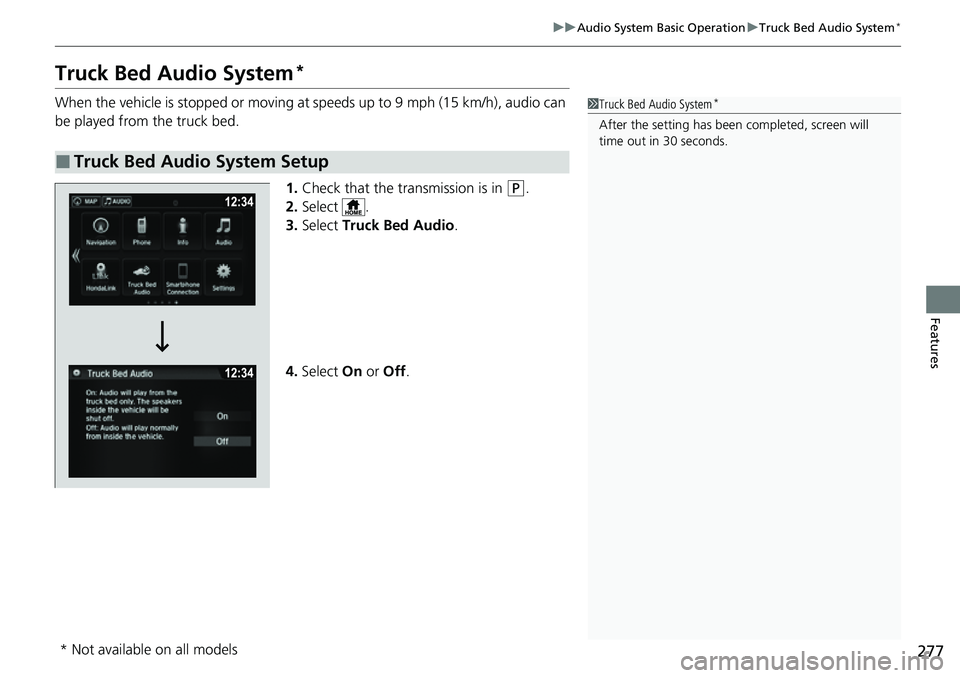
1.Check that the transmission is in
(P.
2. Select .
3. Select Truck Bed Audio .
4. Select On or Off .
■Truck Bed Audio System Setup
1Truck Bed Audio System*
After the setting has been completed, screen will
time out in 30 seconds.
* Not available on all models
Page 291 of 598
289
uuGeneral Information on the Audio System uHonda App License Agreement
Continued
Features
E. Information Collection and Storage
1. Information Collection, Use, Transmission a nd Storage of Data. Consent to Use of Data:
You agree that HONDA and PROVIDERS may
collect and use your information gathered in any manner as part of product support services related to the SOFTWARE or related services.
HONDA may share such information with third parties, including, without limitation, PR OVIDERS, third party software and service s
suppliers, their affiliates and/or their designated agents, solely to improve their products or to provide services or technolo gies to you.
HONDA, third party software and systems supplie rs, their affiliates and/or their designated agent may disclose this information to others,
but not in a form that pe rsonally identifies you.
2. Information Storage.
Depending on the type of mult imedia system you have in your VEHICLE, certain information may be stored for ease
of use of the SOFTWARE including, without limitation, search history, location history in certain applications, previous and sa ved
destinations, map locations within certain applications, and device numbers and contact information.
(a) Vehicle Health Information.
Your VEHICLE may remotely transmit information re garding the status and health of your VEHICLE
(“VEHICLE INFORMATION”) to HO NDA without notification to you. VEHICLE INFO RMATION may contain VEHICLE maintenance and
malfunction status that is derived from VEHICLE diagnostic data and includes, but is not limited to, status of powered doors and windows,
battery life data, battery charging data, VE HICLE speed, coolant temperature, air comp ressor revolution, output power, warning codes,
diagnostic trouble codes, fuel injection volume, and engine rotati ons per minute. VEHICLE HEALTH INFORMATION may be used by HON DA
for research and development, to deliver HONDA SERVICES and informat ion to you, and to contact you, and is retained only for a period
of time necessary to fulfill these goals.
(b) VEHICLE Geolocation Data (non-navigation/map based).
If you opt-in to geolocation-based SERVICES, your vehicle’s geolocation data
(latitude and longitude) will be automatically sent from your VEHICLE to HONDA and PROVIDERS.
(c) You understand that the inputting or uploading of information to your VEHICLE’s multimedia system or the SOFTWARE or SERVIC ES is
at your own risk and that HONDA is not responsible for unauthori zed access to or use of any personal or other information. All information
uploaded to the SOFTWARE and SERVICES may be stored on your VEHICLES’s multimedia system and you understand that the security and
safety of your VEHICLE’s multimedia system is your sole responsibility.
Page 294 of 598
292
uuGeneral Information on the Audio System uHonda App License Agreement
Features
I. Availability/Interruption. The SOFTWARE and certain SERVICES are made availa ble through your VEHICLE’s compatible multimedia
system when the VEHICLE is turned on. Certain SERVICES may be avai lable only through your compatible mobile device when it is within
the operating range of the VEHICLE and a wireless carrier. The availability of the SOFTWARE and SERVICES may be subject to tran smission
limitation or interruption, including but not limited to techni cal obsolesce or sunsetting of the hardware, software or firmwar e, inside of
or external to the Vehicle, required fo r data transmission or receipt. HONDA does not guarantee that the SOFTWARE, SERVICES, or any
portion thereof will be av ailable at all times or in all ar eas. You acknowledge and agree that HONDA is not responsible for performance
degradation, interruption or delays. You acknowledge that HONDA shall not be liable to you if the SOFTWARE or SERVICES in a given
location are not available. If the SOFTWARE or SERVICES are not available within your intended location, you agree that your sole remedy
shall be to cease using the SOFTWARE and SERVICES.
J. PRODUCT SUPPORT: Product support for the SOFTWARE is provided by HONDA. For product support, please refer to HONDA
instructions provided in the DOCUMENTATION. Should you have any que stions concerning this AGREEMENT, or if you desire to contact
HONDA for any other reason, please refer to the HONDA contact information provided in the DOCUMENTATION.
K. Termination and Transfer.
1. Termination. This AGREEMENT is effective until terminated by you or US . WE may terminate this AGREEMENT for any or no reason,
and with or without notice to you. Your rights under this AGRE EMENT will terminate automatically without notice from US if you fail to
comply with any term of this AGREEMENT. Up on termination of this AGREEMENT, you shall cease all use of the SOFTWARE and SERVICE S.
2. Transfer: You may permanently transfer your rights under this AGREEMENT only as part of a sale or transfer of the VEHICLE, provided
you retain no copies, you transfer all of the SOFTWARE and HO NDA SERVICES (including all component parts, the media and printed
materials, and any upgrades), and the recipi ent agrees to the terms of this AGREEMENT. You agree to notify HONDA upon the sale or
transfer of the VEHICLE. To contact HO NDA, please refer to the HONDA contact in formation provided in the DOCUMENTATION.
Page 301 of 598
299Continued
Features
Customized Features
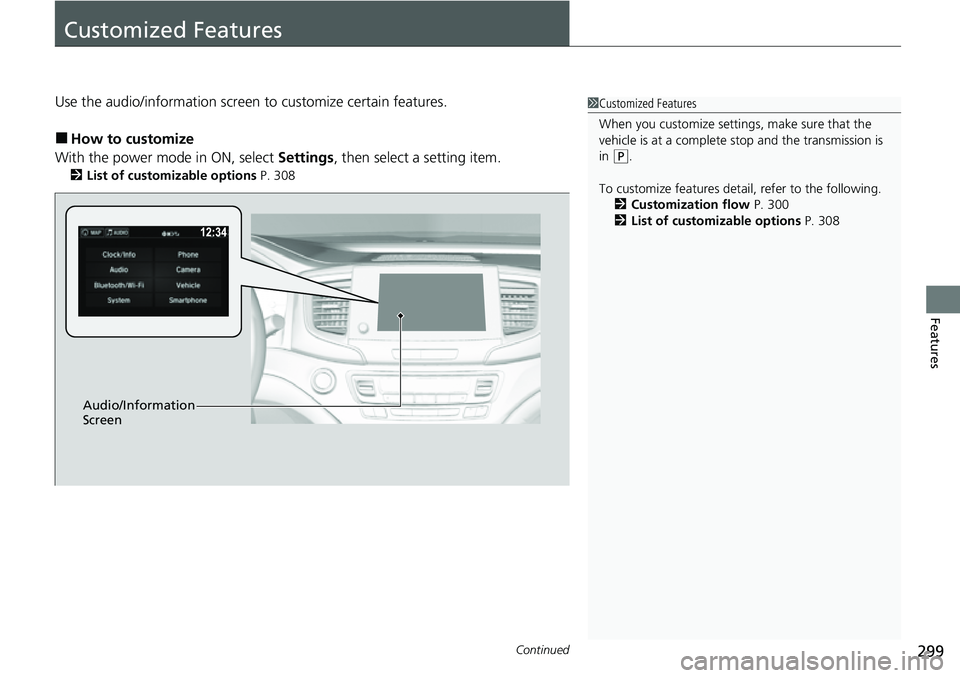
Use the audio/information screen to customize certain features.
■How to customize
With the power mode in ON, select Settings, then select a setting item.
2List of customizable options P. 308
1Customized Features
When you customize settings, make sure that the
vehicle is at a complete stop and the transmission is
in
(P.
To customize features detail, refer to the following. 2 Customization flow P. 300
2 List of customizable options P. 308
Audio/Information
Screen
Page 315 of 598
313
uuCustomized Features u
Continued
Features
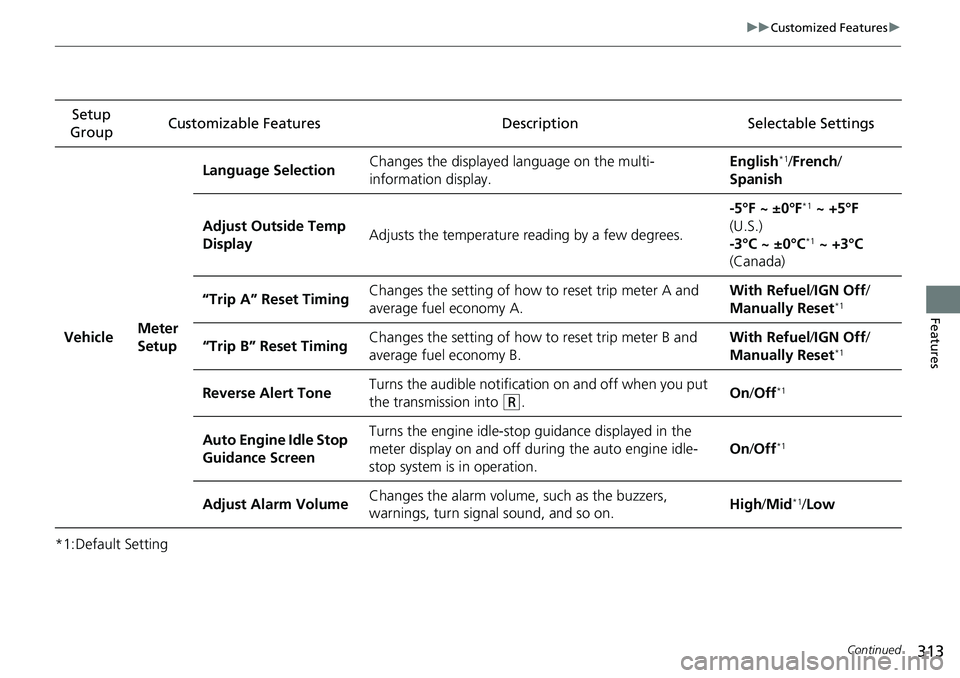
*1:Default SettingSetup
Group Customizable Features Description Selectable Settings
Vehicle Meter
SetupLanguage Selection
Changes the displayed language on the multi-
information display. English
*1/
French /
Spanish
Adjust Outside Temp
Display Adjusts the temperature reading by a few degrees. -5°F ~ ±0°F
*1
~ +5°F
(U.S.)
-3°C ~ ±0°C
*1 ~ +3°C
(Canada)
“Trip A” Reset Timing Changes the setting of how to reset trip meter A and
average fuel economy A. With Refuel
/IGN Off /
Manually Reset
*1
“Trip B” Reset Timing Changes the setting of how to reset trip meter B and
average fuel economy B. With Refuel
/IGN Off /
Manually Reset*1
Reverse Alert Tone Turns the audible notification on and off when you put
the transmission into (R. On
/Off*1
Auto Engine Idle Stop
Guidance Screen Turns the engine idle-stop guidance displayed in the
meter display on and off during the auto engine idle-
stop system is in operation.
On
/Off*1
Adjust Alarm Volume Changes the alarm volume,
such as the buzzers,
warnings, turn signal sound, and so on. High
/Mid*1/Low
Page 365 of 598
363
Driving
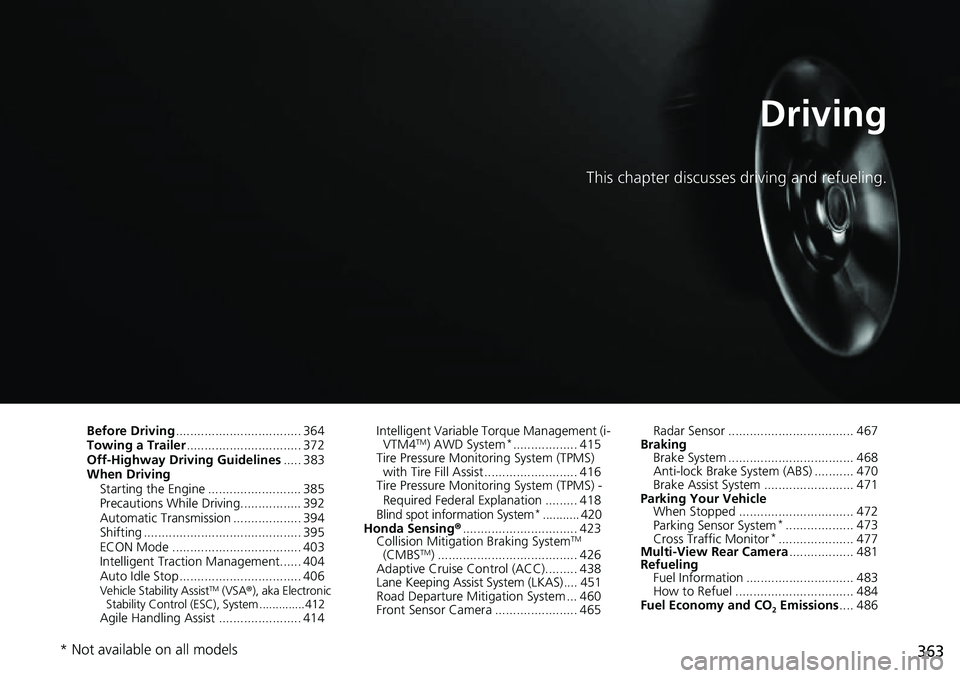
This chapter discusses driving and refueling.
Before Driving................................... 364
Towing a Trailer ................................ 372
Off-Highway Driving Guidelines ..... 383
When Driving Starting the Engine .......................... 385
Precautions While Driving................. 392
Automatic Transmission ................... 394
Shifting ............................................ 395
ECON Mode .................................... 403
Intelligent Traction Management...... 404
Auto Idle Stop .................................. 406
Vehicle Stability AssistTM (VSA ®), aka Electronic
Stability Control (ESC), System ..............412
Agile Handling Assist ....................... 414 Intelligent Variable To
rque Management (i-
VTM4
TM) AWD System*.................. 415
Tire Pressure Monitoring System (TPMS) with Tire Fill Assist .......................... 416
Tire Pressure Monitoring System (TPMS) -
Required Federal Explanation ......... 418
Blind spot information System
*........... 420
Honda Sensing ®................................ 423
Collision Mitigati on Braking System
TM
(CMBSTM) ....................................... 426
Adaptive Cruise Control (ACC)......... 438
Lane Keeping Assist System (LKAS).... 451
Road Departure Mitigation System ... 460
Front Sensor Camera ....................... 465 Radar Sensor ................................... 467
Braking Brake System ................................... 468
Anti-lock Brake System (ABS) ........... 470
Brake Assist System ......................... 471
Parking Your Vehicle When Stopped ................................ 472
Parking Sensor System
*................... 473
Cross Traffic Monitor*..................... 477
Multi-View Rear Camera .................. 481
Refueling Fuel Information .............................. 483
How to Refuel ................................. 484
Fuel Economy and CO
2 Emissions .... 486
* Not available on all models
Page 384 of 598
uuTowing a Trailer uTowing Behind a Motorhome
382
Driving
• Monitor your temperature gauge. If it nears the mark, turn off the climate
control system and reduce speed. Pull to the side of the road safely to cool down
the engine if necessary.
• Shift to the
(S position if the transmission shifts frequently.
When retrieving a boat from the water, we recommend using the sequential mode
(S to utilize the transmissions lower gears.
Towing Behind a Motorhome
Your vehicle is not designed to be towed behind a motor home. If your vehicle needs
to be towed in an emergency, refe r to the emergency towing information.
2Emergency Towing P. 568
■Driving in Hilly Terrain
■Retrieving a Boat
1Driving in Hilly Terrain
If the automatic transmission fluid temperature
exceeds the specified limit, the transmission will also
automatically up shift, even in the sequential mode.
H
Page 386 of 598
384
uuOff-Highway Driving Guidelines uAvoiding Trouble
Driving
Avoiding Trouble
• Check Out Your Vehicle before you leave the pavement and make sure that all
scheduled maintenance has been comple ted. Pay special attention to the
condition of the tires, an d check the tire pressures.
• Remember the route you choose presents limits (too steep or bumpy), you have
limits (driving skill and comfort), and your ve hicle has limits (traction, stability, and
power). Failing to recognize these limits will likely put you and your passengers in
a hazardous situation.
• Accelerating and Braking should be done slowly and gradually. Trying to start
or stop too fast can cause a loss of traction and you could lose control.
• Avoiding Obstacles and Debris in the road reduces the likelihood of a rollover
or damage to your suspension or other components.
• Driving on Slopes increases your risk of a rollover, particularly if you attempt to
drive across a slope that is too steep. Going straight up or down a slope is usually
the safest. If you can’t clearly see all cond itions or obstacles on a slope, walk it
before you drive it. If there is any doubt whether you can safely pass, don’t try it.
Find another route. If you get stuck when climbing, do not try to turn around.
Back down slowly following the same route you took up the hill.
• Crossing a Stream - Avoid driving through deep water. If you encounter water
in your route (a small stream or large pu ddle, for example), evaluate it carefully
before going ahead. Make sure it is shallow, flowing slowly, and has firm ground
underneath. If you are not sure of the depth or the ground, turn around and find
another route. Driving through deep water can also damage your vehicle. The
water can get into the transmission and differential, diluting the lubricant and
causing an eventual failure. It can also wash the grease out of the wheel bearings.
• If You Get Stuck, carefully go in the direction that you think will get you
unstuck. Do not spin the tires as this will only make things worse and could
damage the transmission. If you are unable to free yourself, your vehicle will need
to be towed. Front and rear tow hooks are provided for this purpose.
Page 390 of 598
uuWhen Driving uStarting the Engine
388
Driving
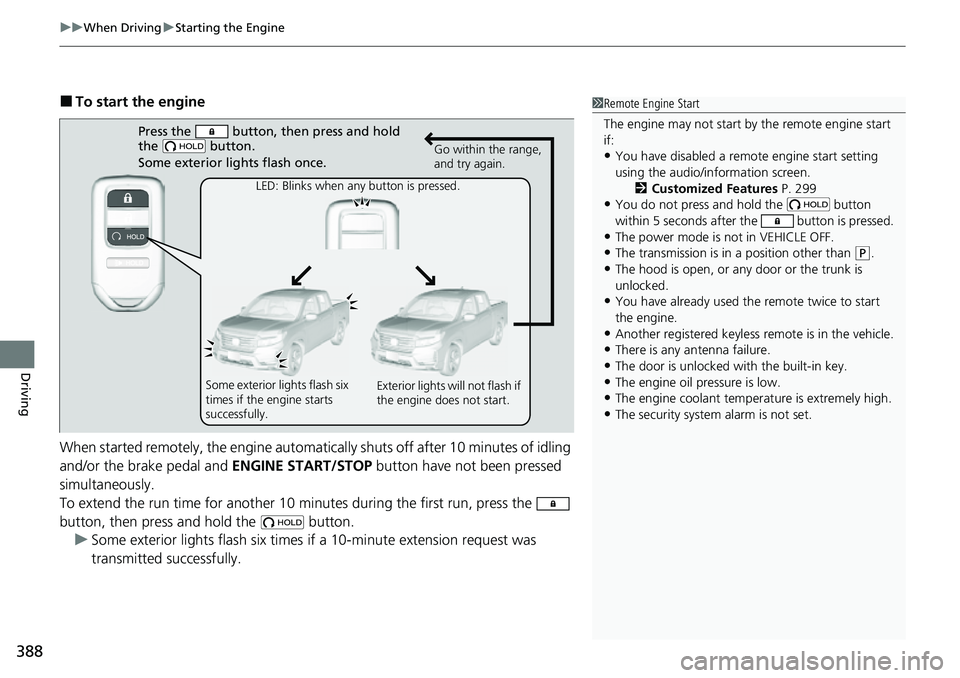
■To start the engine
When started remotely, the engine automati cally shuts off after 10 minutes of idling
and/or the brake pedal and ENGINE START/STOP button have not been pressed
simultaneously.
To extend the run time for another 10 minutes during the first run, press the
button, then press and hold the button. u Some exterior lights flash six times if a 10-minute extension request was
transmitted successfully.1Remote Engine Start
The engine may not start by the remote engine start
if:
•You have disabled a remo te engine start setting
using the audio/information screen. 2Customized Features P. 299
•You do not press and hold the button
within 5 seconds after the button is pressed.
•The power mode is not in VEHICLE OFF.
•The transmission is in a position other than (P.
•The hood is open, or any door or the trunk is
unlocked.
•You have already used the remote twice to start
the engine.
•Another registered keyless remote is in the vehicle.
•There is any antenna failure.
•The door is unlocked with the built-in key.•The engine oil pressure is low.
•The engine coolant temper ature is extremely high.
•The security system alarm is not set.
Press the button, then press and hold
the button.
Some exterior lights flash once.
LED: Blinks when any button is pressed. Go within the range,
and try again.
Some exterior lights flash six
times if the engine starts
successfully. Exterior lights will not flash if
the engine does not start.
Page 391 of 598
Continued389
uuWhen Driving uStarting the Engine
Driving
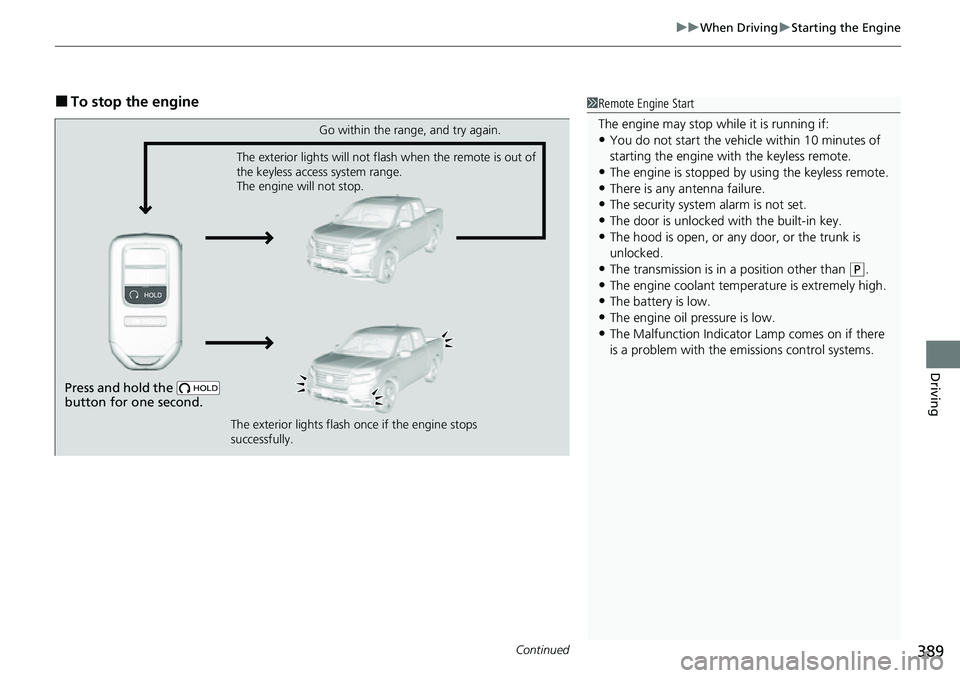
■To stop the engine1Remote Engine Start
The engine may stop whil e it is running if:
•You do not start the vehicl e within 10 minutes of
starting the engine with the keyless remote.
•The engine is stopped by using the keyless remote.•There is any antenna failure.
•The security system alarm is not set.
•The door is unlocked with the built-in key.•The hood is open, or any door, or the trunk is
unlocked.
•The transmission is in a position other than (P.•The engine coolant temper ature is extremely high.
•The battery is low.
•The engine oil pressure is low.•The Malfunction Indicator Lamp comes on if there
is a problem with the emissions control systems.
Press and hold the
button for one second.
Go within the range, and try again.
The exterior lights will not flash when the remote is out of
the keyless access system range.
The engine will not stop.
The exterior lights flash once if the engine stops
successfully.