home HONDA RIDGELINE 2023 Owners Manual
[x] Cancel search | Manufacturer: HONDA, Model Year: 2023, Model line: RIDGELINE, Model: HONDA RIDGELINE 2023Pages: 598, PDF Size: 12.34 MB
Page 6 of 598
Contents
This owner’s manual should be considered a permanent part of the
vehicle and should remain with the vehicle when it is sold.
The Navigation Manual is available online at owners.honda.com
(U.S.) or honda.ca (Canada). If you are the first registered owner
of your vehicle, you may request a complimentary printed
copy of the Navigation Manual within the first six months of
vehicle purchase. To request a copy, visit owners.honda.com. In
Canada, please request a copy from your Honda dealer.
This owner’s manual covers all models of your vehicle. You may find
descriptions of equipment and features that are not on your
particular model.
Images throughout this owner’s ma nual (including the front cover)
represent features and equipment that are available on some, but
not all, models. Your particular mo del may not have some of these
features.
This owner’s manual is for vehicles sold in the United States and
Canada.
The information and specifications in cluded in this publication were
in effect at the time of approval for printing. Honda Motor Co., Ltd.
reserves the right, however, to discontinue or change specifications
or design at any time without notice and without incurring any
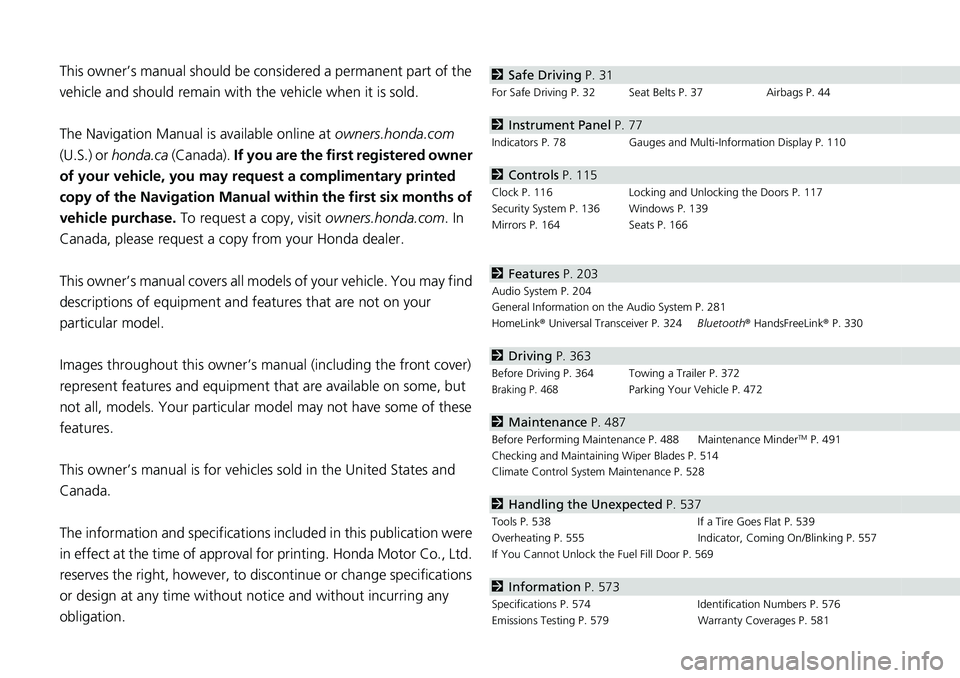
obligation.2 Safe Driving P. 31
For Safe Driving P. 32 Seat Belts P. 37 Airbags P. 44
2Instrument Panel P. 77
Indicators P. 78 Gauges and Multi-Information Display P. 110
2Controls P. 115
Clock P. 116 Locking and Unlocking the Doors P. 117
Security System P. 136 Windows P. 139
Mirrors P. 164 Seats P. 166
2Features P. 203
Audio System P. 204
General Information on the Audio System P. 281
HomeLink ® Universal Transceiver P. 324 Bluetooth® HandsFreeLink ® P. 330
2 Driving P. 363
Before Driving P. 364 Towing a Trailer P. 372
Braking P. 468Parking Your Vehicle P. 472
2Maintenance P. 487
Before Performing Maintenance P. 488 Maintenance MinderTM P. 491
Checking and Maintaining Wiper Blades P. 514
Climate Control System Maintenance P. 528
2Handling the Unexpected P. 537
Tools P. 538 If a Tire Goes Flat P. 539
Overheating P. 555 Indicator, Coming On/Blinking P. 557
If You Cannot Unlock the Fuel Fill Door P. 569
2 Information P. 573
Specifications P. 574 Identification Numbers P. 576
Emissions Testing P. 579 Warranty Coverages P. 581
Page 10 of 598
Visual Index
8
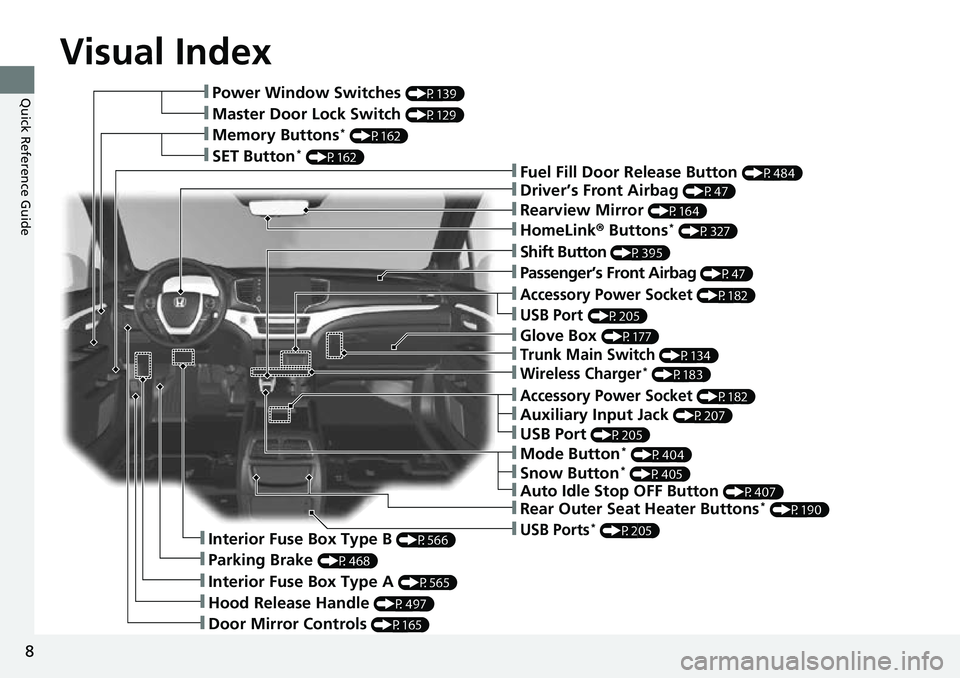
Quick Reference Guide❚Power Window Switches (P139)
❚Master Door Lock Switch (P129)
❚Memory Buttons* (P162)
❚SET Button* (P162)❚Fuel Fill Door Release Button (P484)
❚Driver’s Front Airbag (P47)
❚Shift Button (P395)
❚Auxiliary Input Jack (P207)
❚Parking Brake (P468)
❚Interior Fuse Box Type A (P565)
❚Hood Release Handle (P497)
❚Door Mirror Controls (P165)
❚Accessory Power Socket (P182)
❚USB Port (P205)
❚Auto Idle Stop OFF Button (P407)
❚Mode Button* (P404)
❚Trunk Main Switch (P134)
❚Interior Fuse Box Type B (P566)
❚Snow Button* (P405)
❚Wireless Charger* (P183)
❚Glove Box (P177)
❚USB Ports* (P205)
❚Accessory Power Socket (P182)
❚Passenger’s Front Airbag (P47)
❚Rearview Mirror (P164)
❚HomeLink® Buttons* (P327)
❚Rear Outer Seat Heater Buttons* (P190)
❚USB Port (P205)
Page 11 of 598
9
Quick Reference Guide
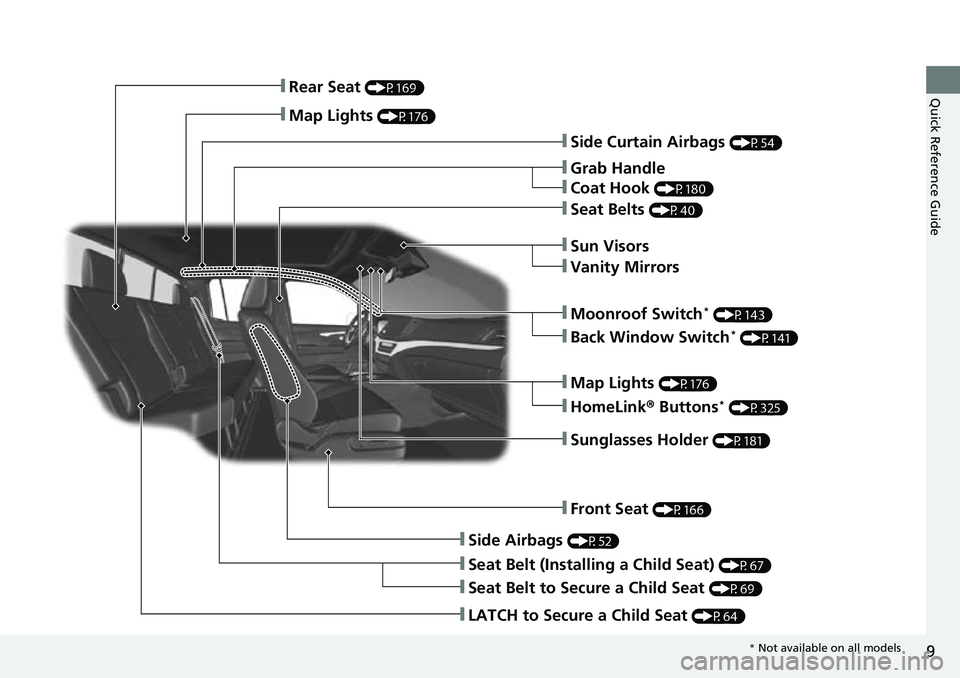
❚Side Curtain Airbags (P54)
❚Grab Handle
❚Coat Hook (P180)
❚Seat Belts (P40)
❚Sun Visors
❚Vanity Mirrors
❚Moonroof Switch* (P143)
❚Map Lights (P176)
❚HomeLink® Buttons* (P325)
❚Sunglasses Holder (P181)
❚Front Seat (P166)
❚Side Airbags (P52)
❚Seat Belt (Installing a Child Seat) (P67)
❚Seat Belt to Secure a Child Seat (P69)
❚LATCH to Secure a Child Seat (P64)
❚Rear Seat (P169)
❚Map Lights (P176)
❚Back Window Switch* (P141)
* Not available on all models
Page 16 of 598
14
Quick Reference Guide
Instrument Panel (P77)
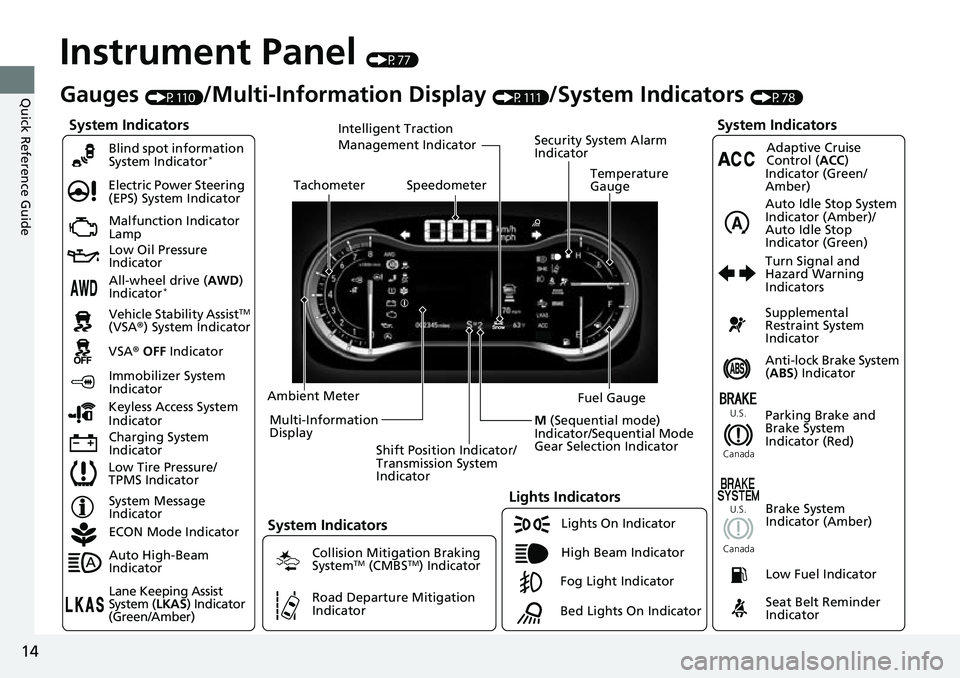
System Indicators
Malfunction Indicator
Lamp
Low Oil Pressure
Indicator
Charging System
IndicatorAnti-lock Brake System
(
ABS ) Indicator
Vehicle Stability Assist
TM
(VSA® ) System Indicator
VSA ® OFF Indicator
Electric Power Steering
(EPS) System Indicator
Lights Indicators
Lights On Indicator
High Beam Indicator
Immobilizer System
Indicator
Seat Belt Reminder
Indicator
System Indicators
System Message
IndicatorParking Brake and
Brake System
Indicator (Red)Supplemental
Restraint System
Indicator
Low Fuel Indicator
Gauges (P110)/Multi-Information Display (P111)/System Indicators (P78)
Low Tire Pressure/
TPMS Indicator Turn Signal and
Hazard Warning
Indicators
Keyless Access System
Indicator Ambient Meter
Shift Position Indicator/
Transmission System
Indicator Fuel Gauge
TachometerTemperature
GaugeSpeedometer
Multi-Information
Display
Brake System
Indicator (Amber)
All-wheel drive (AWD)
Indicator*
Blind spot information
System Indicator*
System Indicators
Collision Mitigation Braking
SystemTM (CMBSTM) Indicator
Road Departure Mitigation
Indicator
Security System Alarm
Indicator
U.S.
Canada U.S.
Canada
Fog Light Indicator
ECON Mode Indicator
Auto High-Beam
Indicator
Lane Keeping Assist
System (
LKAS) Indicator
(Green/Amber)
Adaptive Cruise
Control ( ACC)
Indicator (Green/
Amber)
Intelligent Traction
Management Indicator
Bed Lights On Indicator
Auto Idle Stop System
Indicator (Amber)/
Auto Idle Stop
Indicator (Green)
M (Sequential mode)
Indicator/Sequential Mode
Gear Selection Indicator
Page 21 of 598
19
Quick Reference Guide
Features (P203)
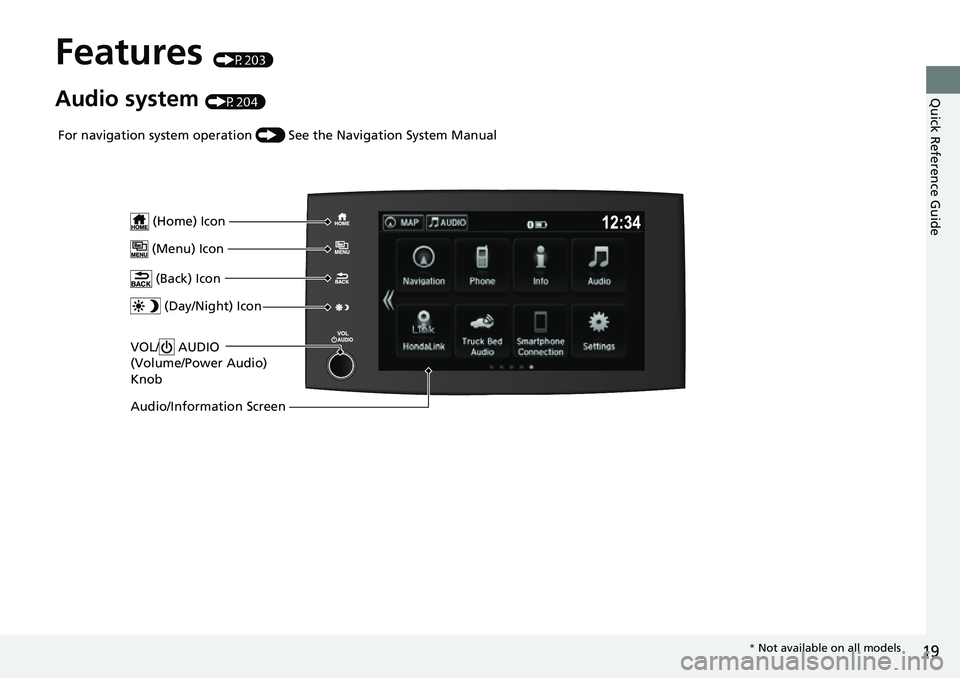
Audio system (P204)
VOL/ AUDIO
(Volume/Power Audio)
Knob
(Home) Icon
(Menu) Icon
(Back) Icon
(Day/Night) Icon
Audio/Information Screen
For navigation system operation () See the Navigation System Manual
* Not available on all models
Page 112 of 598
110
Instrument Panel
Gauges and Multi-Information Display
Gauges
Gauges include the speedometer, fuel gauge, and other related indicators. They are
displayed when the power mode is in ON.
Displays your driving speed in mph or km/h.
Shows the number of engine revolutions per minute.
Displays the amount of fuel left in the fuel tank.
Displays the temperature of the engine coolant.
■Speedometer
■Tachometer
■Fuel Gauge
■Temperature Gauge
1Speedometer
Press and hold the RESET button until you hear a
beep when the blank appears on the multi-
information display.
The speedometer reading as well as the displayed
measurements will switch between mph and km/h.
The display change message will switch for a few
seconds.
1 Fuel Gauge
NOTICE
You should refuel when the needle approaches .
Running out of fuel can cause the engine to misfire,
damaging the cata lytic converter.
The actual amount of remain ing fuel may differ from
the fuel gauge reading.E
1 Temperature Gauge
NOTICE
Driving with the temperat ure gauge needle in the
upper zone can cause serious engine damage. Pull
safely to the side of th e road and allow engine
temperature to return to normal. 2 Overheating P. 555
Page 205 of 598
203
Features
This chapter describes how to operate technology features.
Audio SystemAbout Your Audio System ................ 204
USB Ports ......................................... 205
Auxiliary Input Jack .......................... 207
Audio System Theft Protection ......... 208
Audio Remote Controls .................... 209
Audio System Basic Operation ........ 211
Audio/Information Screen ................ 212
Adjusting the Sound ........................ 229
Display Setup ................................... 230
Voice Control Operation .................. 232
Playing AM/FM Radio ....................... 236
Playing SiriusXM ® Radio
*................. 239 Playing an iPod ................................ 247
Song By Voice
TM (SBV) ...................... 250
Playing Pandora ®*............................ 254
Playing a USB Flash Drive ................. 256
Playing Bluetooth ® Audio................. 259
HondaLink ®..................................... 261
Wi-Fi Connection ............................. 266
Siri Eyes Free .................................... 268
Apple CarPlay .................................. 269
Android Auto
TM................................ 273
Truck Bed Audio System*................ 277
Models with navigation systemAudio Error Messages ...................... 278
General Information on the Audio System ............................................. 281
Customized Features ........................ 299
HomeLink ® Universal Transceiver .... 324
Bluetooth® HandsFreeLink® ............. 330
* Not available on all models
Page 213 of 598
211
Features
Audio System Basic Operation
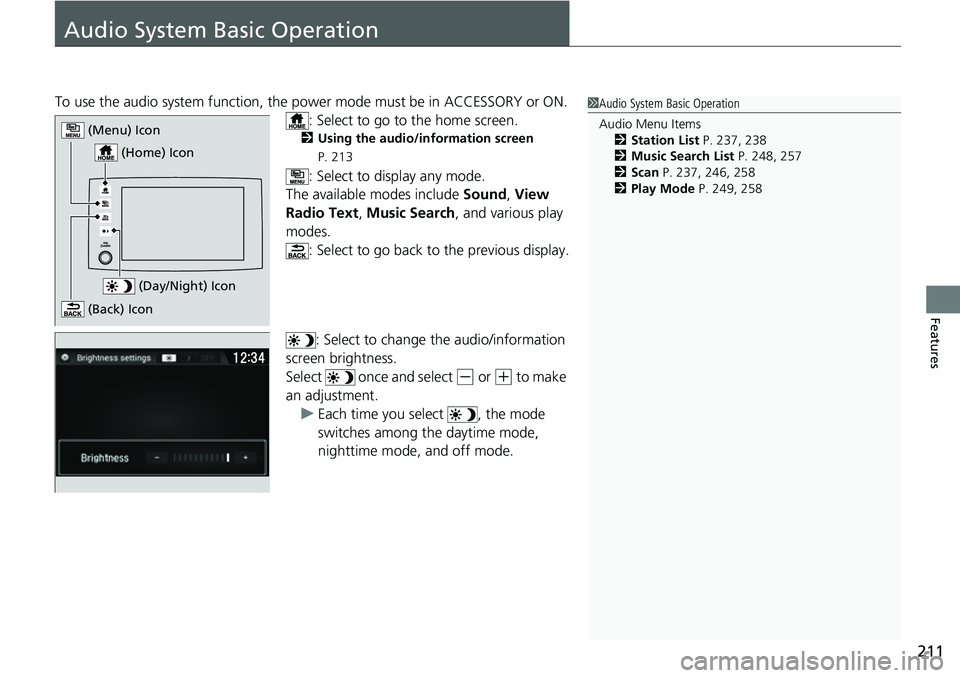
To use the audio system function, the power mode must be in ACCESSORY or ON.
: Select to go to the home screen.
2 Using the audio/information screen
P. 213
: Select to display any mode.
The available modes include Sound, View
Radio Text , Music Search, and various play
modes. : Select to go back to the previous display.
: Select to change the audio/information
screen brightness.
Select once and select
(- or (+ to make
an adjustment.
u Each time you select , the mode
switches among the daytime mode,
nighttime mode, and off mode.
1Audio System Basic Operation
Audio Menu Items
2 Station List P. 237, 238
2 Music Search List P. 248, 257
2 Scan P. 237, 246, 258
2 Play Mode P. 249, 258
(Day/Night) Icon
(Home) Icon
(Menu) Icon
(Back) Icon
Page 215 of 598
Continued213
uuAudio System Basic Operation uAudio/Information Screen
Features
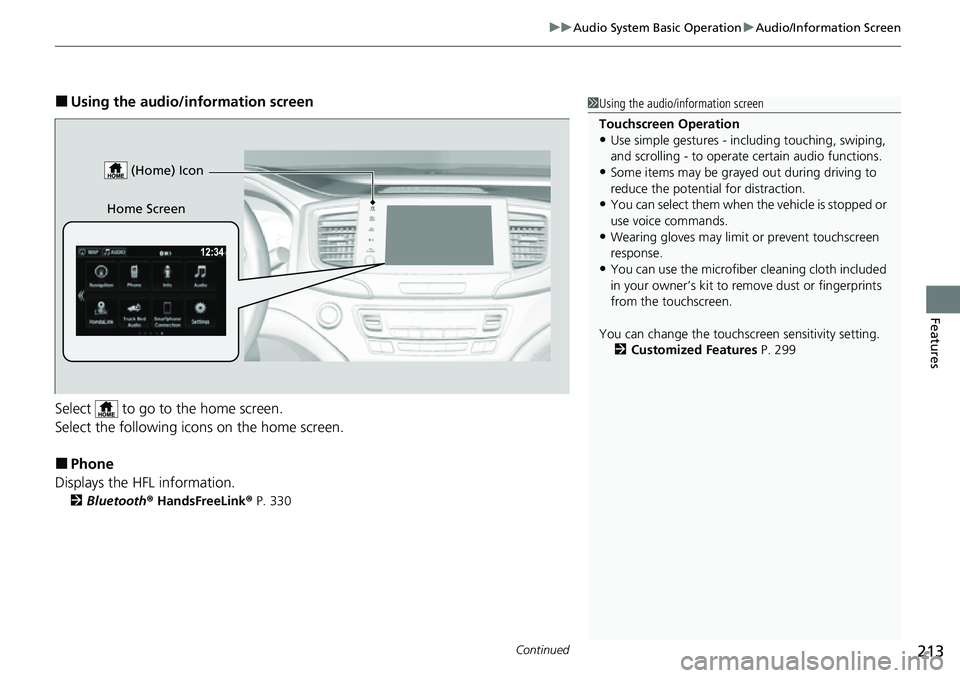
■Using the audio/in formation screen
Select to go to the home screen.
Select the following icons on the home screen.
■Phone
Displays the HFL information.
2 Bluetooth ® HandsFreeLink ® P. 330
1 Using the audio/in formation screen
Touchscreen Operation
•Use simple gestures - in cluding touching, swiping,
and scrolling - to operate certain audio functions.
•Some items may be grayed out during driving to
reduce the potential for distraction.
•You can select them when the vehicle is stopped or
use voice commands.
•Wearing gloves may limit or prevent touchscreen
response.
•You can use the microfiber cleaning cloth included
in your owner’s kit to remo ve dust or fingerprints
from the touchscreen.
You can change the touchs creen sensitivity setting.
2 Customized Features P. 299
Home Screen (Home) Icon
Page 218 of 598
uuAudio System Basic Operation uAudio/Information Screen
216
Features
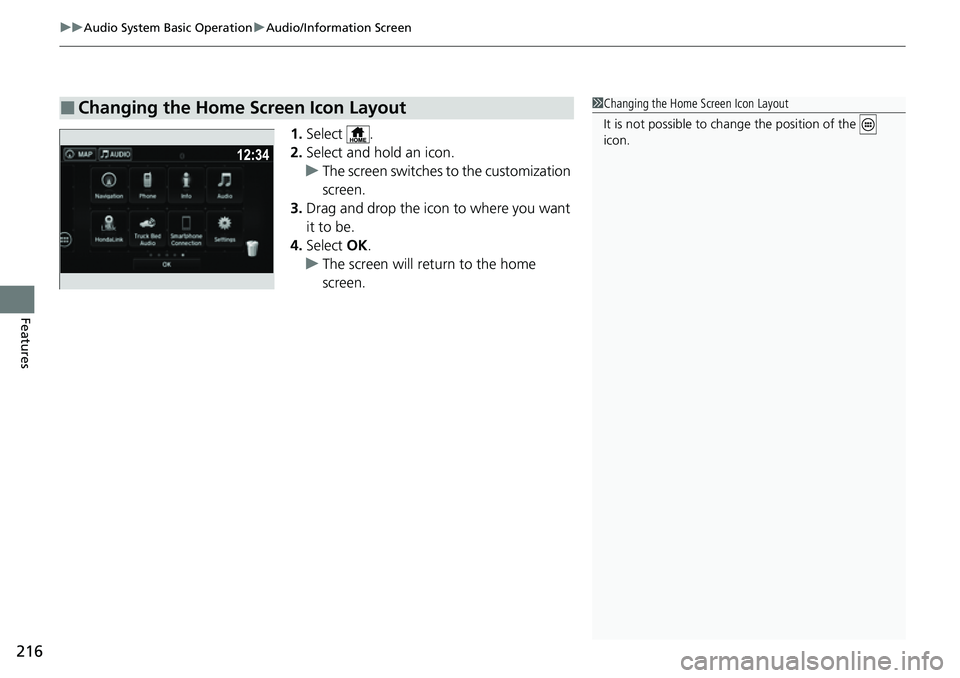
1. Select .
2. Select and hold an icon.
u The screen switches to the customization
screen.
3. Drag and drop the icon to where you want
it to be.
4. Select OK.
u The screen will return to the home
screen.
■Changing the Home Screen Icon Layout1Changing the Home Screen Icon Layout
It is not possible to cha nge the position of the
icon.