lights HONDA S2000 2000 1.G User Guide
[x] Cancel search | Manufacturer: HONDA, Model Year: 2000, Model line: S2000, Model: HONDA S2000 2000 1.GPages: 273, PDF Size: 21.58 MB
Page 66 of 273
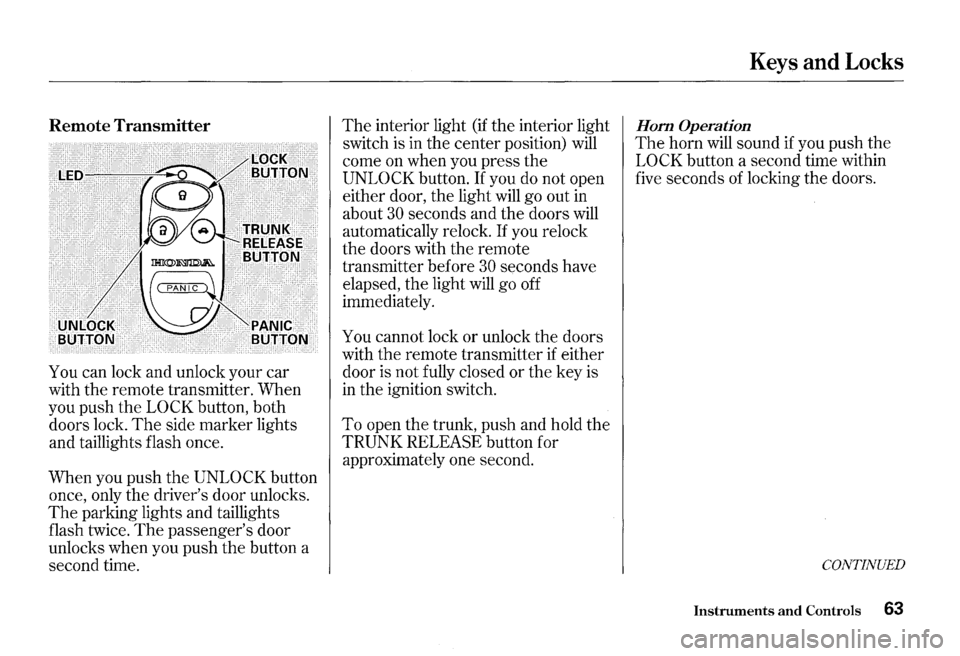
Remote Transmitter
You can lock and unlock your car
with the remote transmitter. When
you push the
LOCK button, both
doors lock.
The side marker lights
and taillights flash once.
When you push
the UNLOCK button
once, only the driver's door unlocks.
The parking lights and taillights
flash twice.
The passenger's door
unlocks when you push the button a
second time.
The interior light (if the interior light
switch is in
the center position) will
come on when you press the
UNLOCK button. If you do not open
either door, the light will go out in
about
30 seconds and the doors will
automatically relock.
If you relock
the doors with the remote
transmitter before
30 seconds have
elapsed, the light will go off
immediately.
You cannot lock or unlock the doors
with
the remote transmitter if either
door is not fully closed
or the key is
in the ignition switch.
To open the trunk, push and hold the
TRUNK RELEASE button for
approximately one second.
Keys and Locks
Hom Operation
The horn will sound if you push the
LOCK button a second time within
five seconds of locking the doors.
CONTINUED
Instruments and Controls 63
Page 67 of 273
Keys and Locks
Panic Mode
Panic mode allows you to remotely
activate your car's security system to
attract attention. When activated,
the
horn will sound, and the exterior
lights will flash for about
30 seconds.
To activate panic mode, press and
hold
the PANIC button for about one
second.
To cancel Panic mode before 30
seconds, press any button on the
remote transmitter. You can also
turn the ignition switch to
0 N (II).
64 Instruments and Controls
Replacing the Battery
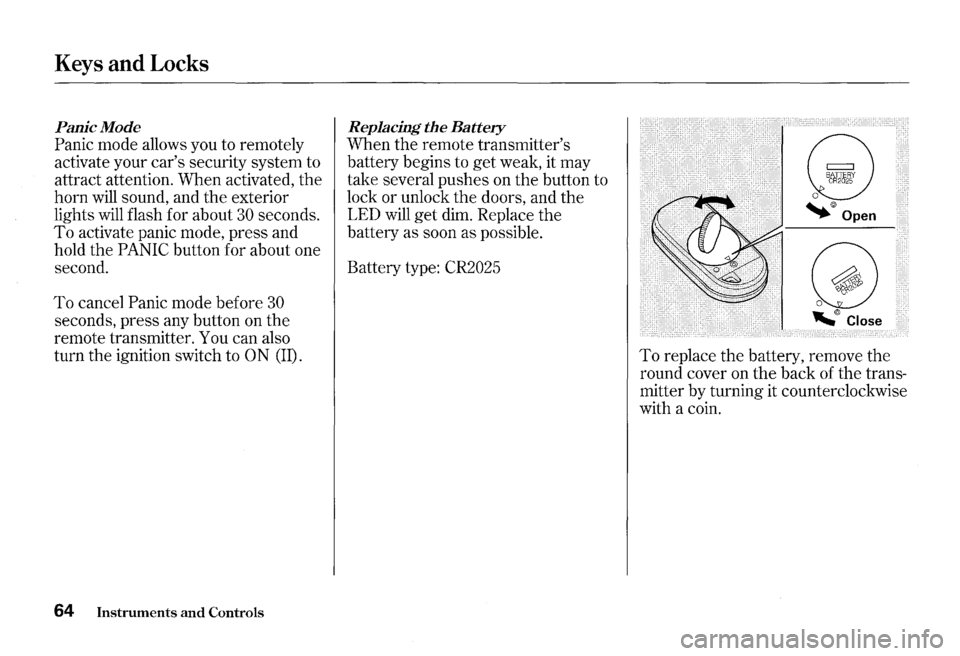
When the remote transmitter's
battery begins to
get weak, it may
take several pushes on the button to
lock or unlock
the doors, and the
LED will
get dim. Replace the
battery as soon as possible.
Battery type: CR2025
To replace the battery, remove the
round cover on the back of the trans
mitter by turning it counterclockwise
with a coin.
Page 82 of 273
Hazard Warning
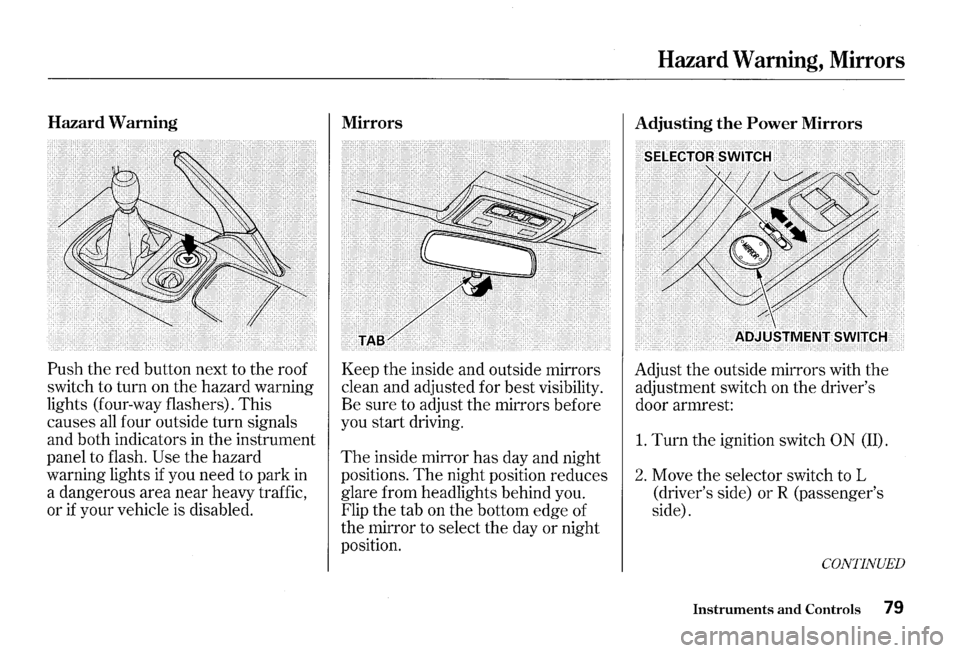
Push the red button next to the roof
switch to turn on the hazard warning
lights (four-way flashers). This
causes
all four outside turn signals
and both indicators in the instrument
panel to flash.
Use the hazard
warning lights
if you need to park in
a dangerous area near heavy traffic,
or
if your vehicle is disabled.
Mirrors
Keep the inside and outside mirrors
clean and adjusted for best visibility.
Be sure to adjust the mirrors before
you start driving.
The inside mirror has day and night
positions.
The night position reduces
glare from headlights behind you.
Flip the tab on the bottom edge of
the mirror to select the day or night
position.
Hazard Warning, Mirrors
Adjusting the Power Mirrors
Adjust the outside mirrors with the
adjustment switch on the driver's
door armrest:
1. Turn the ignition switch 0 N (II).
2. Move the selector switch to L
(driver's side)
orR (passenger's
side).
CONTINUED
Instruments and Controls 79
Page 86 of 273
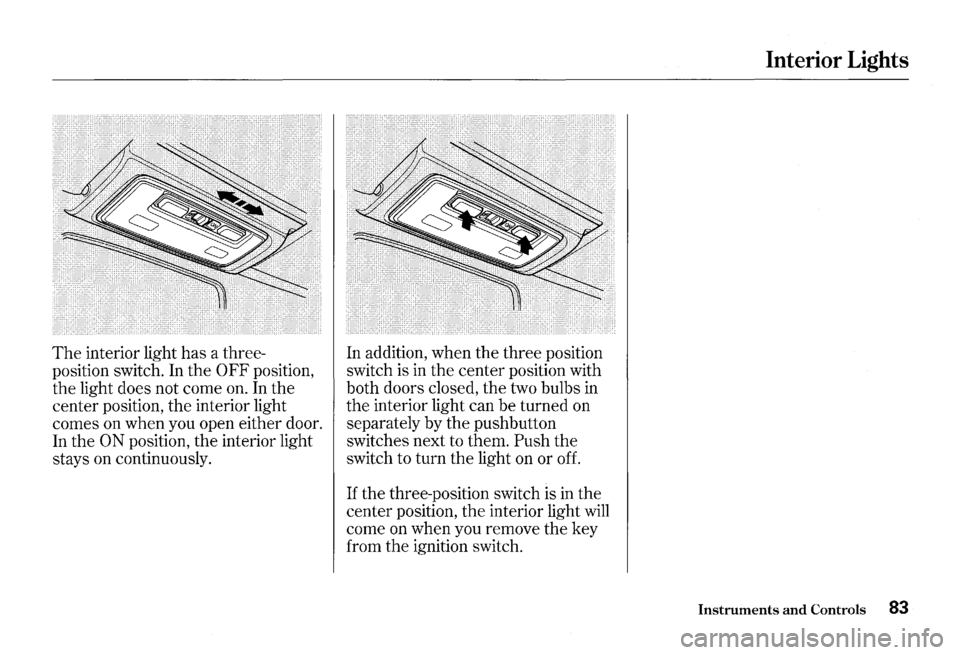
The interior light has a three
position switch. In the
0 FF position,
the light does not come on. In the
center position, the interior light
comes on when you open either door.
In the
ON position, the interior light
stays on continuously. In
addition, when the three position
switch is in the center position with
both doors closed, the two bulbs
in
the interior light can be turned on
separately by the pushbutton
switches next to them.
Push the
switch to turn the light on or off.
If the three-position switch is in the
center position,
the interior light will
come on when you remove the key
from the ignition switch.
Interior Lights
Instruments and Controls 83
Page 89 of 273
Heating and Cooling
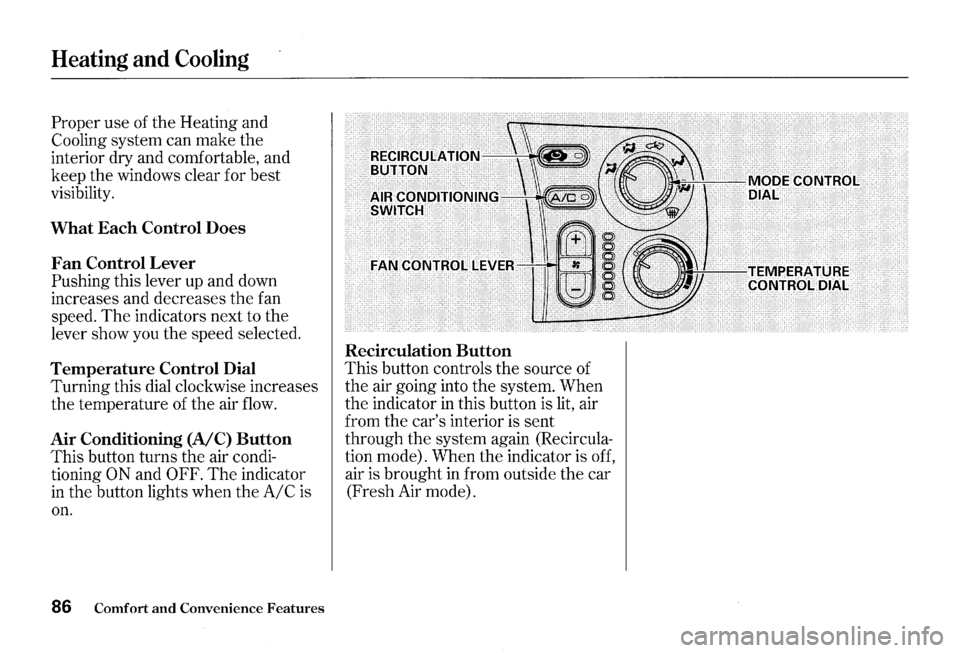
Proper use of the Heating and
Cooling system can make the
interior dry and comfortable, and
keep the windows clear for best
visibility.
What Each Control Does
Fan Control Lever
Pushing this lever up and down
increases and decreases
the fan
speed.
The indicators next to the
lever show you the speed selected.
Temperature Control Dial
Turning this dial clockwise increases
the temperature of the air
flow.
Air Conditioning (A/C) Button
This button turns the air condi
tioning
ON and OFF. The indicator
in the button lights when theA/Cis
on.
86 Comfort and Convenience Features
Recirculation Button
This button controls the source of
the air going into the system. When
the indicator
in this button is lit, air
from the car's interior is sent
through the system again (Recircula
tion mode). When the indicator is off,
air
is brought in from outside the car
(Fresh Air mode).
Page 96 of 273
These settings direct all the air flow
to the defroster vents at the base of
the windshield and the side window
defroster vents.
The air flow will get
warmer and clear the windows faster
as the engine warms up. You can
close the side vents with the dial
beside each vent.
This will send
more warm air to the windshield
defroster vents.
For safety, make sure you have a
clear view through all the windows
before driving away.
To Tum Everything Off
To shut off the system temporarily,
turn off the fan (no lights
illuminated).
You should shut the system
completely off only for the first few
minutes of driving in cold weather,
until the engine coolant warms up
enough to operate the heater. Keep
the fan on at
all other times so stale
air does not build up
in the interior.
Heating and Cooling
Comfort and Convenience Features 93
Page 103 of 273
Audio System
Audio System Lighting
The audio system illuminates when
the parking lights are on, even
if the
radio is turned off.
1 00 Comfort and Convenience Features
Radio Frequencies
Your Honda's radio can receive the
complete AM and FM bands.
Those bands cover these frequen
cies:
AM band:
530 to 1,710 kilohertz
FMband:
87.7 to 107.9 megahertz
Radio stations on
the AM band are
assigned frequencies at least ten
kilohertz apart
(530, 540, 550).
Stations on the FM band are
assigned frequencies
at least 0.2
megahertz apart (87.9, 88.1, 88.3). Stations
must use these exact
frequencies.
It is fairly common for
stations to round-off the frequency
in
their advertising, so your radio could
display a frequency of
100.9 even
though the announcer may identify
the station as
"FM101."
Page 125 of 273
Accessories and Modifications
Modifying your car, or installing
some non-Honda accessories, can
make your car unsafe. Before you
make any modifications or add any
accessories, be sure to read the
following information.
Accessories
Your dealer has Genuine Honda
accessories that allow you to
personalize your car.
These
accessories have been designed and
approved for your car, and are
covered by warranty.
Non-Honda accessories are usually
designed for universal applications.
Although aftermarket accessories
may fit on your car, they may not
meet factory specifications, and
could adversely affect your car's
handling and stability. (See
"Modifications" on the page 123 for
additional information.)
122 Before Driving
Improper accessories or
modifications can affect your
car's
handling, stability and
performance, and cause a
crash
in which you can be hurt
or
killed.
Follow all
instructions in this
owner's
manual regarding
accessories and modifications.
When properly installed, cellular
phones, alarms, two-way radios, and
low-powered audio systems should
not interfere with your car's
computer-controlled systems, such
as the
SRS and anti-lock brake
system. However,
if electronic
accessories
are improperly installed, or exceed
your car's electrical system capacity,
they can interfere with the operation
of your car, or even cause the
airbags to deploy.
Before installing any accessory:
• Make sure the accessory does not
obscure any lights,
or interfere
with proper car operation or
performance.
• Be sure electronic accessories do
not overload electrical circuits
(see page 231).
• Have the installer contact your
Honda dealer for assistance before
installing any electronic accessory.
If possible, have your dealer inspect
the final installation.
Page 133 of 273
Preparing to Drive
You should do the following checks
and adjustments every day before
you drive
your car.
1. Make sure all windows, mirrors,
and outside lights
are clean and
unobstructed. Remove frost, snow,
or ice.
2. Check that the hood and trunk are
fully closed.
3. Visually check the tires. If a tire
looks low,
use a gauge to check its
pressure.
130 Driving
4. Check that any items you may be
carrying with you inside are stored
properly or fastened down
securely.
5. Check the adjustment of the seat
(see page 68 ) .
6. Check the adjustment of the
inside and outside mirrors (see
page
79 ).
7. Make sure the doors are securely
closed and locked.
8. Fasten your seat belt. Check that
your passenger has fastened his
seat belt (see page 15 ) .
9. Turn the ignition switch ON (II).
Check
the indicator lights in the
instrument panel.
10.Start
the engine (see page 131 ) .
1l.Check the gauges and indicator
lights in
the instrument panel (see
page
43 ).
Page 138 of 273
Always use the parking brake when
you park your car.
The indicator on
the instrument panel shows that the
parking brake is not fully released; it
does not indicate that the parking
brake is firmly set. Make sure the
parking brake is set firmly or your
car may roll
if it is parked on an
incline. If
the car is facing uphill, turn the
front wheels away from the curb and
put
the transmission in first gear.
If the car is facing downhill, turn the
front wheels toward the curb and put
the transmission
in reverse gear.
Make sure the parking brake is fully
released before driving away.
Driving with the parking brake
partially set can overheat or damage
the rear brakes.
Parking
Parking Tips
• Make sure the convertible top and
the windows are closed.
• Turn off the lights.
• Place any packages, valuables, etc.,
in the trunk or take them with you.
• Lock the doors with the key or the
remote transmitter.
• Never park over dry leaves, tall
grass, or other flammable
materials.
The three way catalytic
converter gets very hot, and could
cause these materials to catch on
fire.
Driving 135