display HUMMER H3 2007 Owner's Manual
[x] Cancel search | Manufacturer: HUMMER, Model Year: 2007, Model line: H3, Model: HUMMER H3 2007Pages: 480, PDF Size: 2.73 MB
Page 196 of 480
DIC Warnings and Messages
Messages are displayed on the DIC to notify the
driver that the status of the vehicle has changed
and that some action may be needed by the driver
to correct the condition. Multiple messages may
appear one after another. The messages are
displayed for four seconds each.
Some messages may not require immediate
action, but you should press and release the trip
odometer reset stem to acknowledge that you
received the messages and to clear them from the
display. Each message must be acknowledged
individually.
Some messages cannot be cleared from the DIC
display because they are more urgent. These
messages require action before they can be
cleared. You should take any messages that
appear on the display seriously and remember
that clearing the messages will only make
the messages disappear, not correct the problem.
The following are the possible messages that can
be displayed and some information about them.
AC (Air Conditioning) OFF
This message displays when the engine coolant
temperature is too high and the air conditioning in
your vehicle needs to be turned off. SeeEngine
Overheating on page 338andClimate Control
System on page 170for more information.
This message displays along with the ENG HOT
message.
ABS (Anti-Lock Brake System) FAULT
This message displays if there is a problem
with the Anti-Lock Brake System (ABS). Check the
ABS as soon as possible and have your vehicle
serviced by your dealer. SeeBrakes on page 347
andAnti-Lock Brake System Warning Light on
page 183for more information. Press and release
the reset stem to acknowledge the message
and clear it from the display.
196
Page 197 of 480
BRAKES
This message displays if there is a problem with
the brakes. Check the brakes as soon as possible
and have your vehicle serviced by your dealer.
SeeBrakes on page 347andBrake System
Warning Light on page 182for more information.
Press and release the reset stem to acknowledge
the message and clear it from the display.
CHANGE OIL
This message displays when the oil needs to be
changed. Check the oil in your vehicle as soon
as possible and have your vehicle serviced by
your dealer. SeeEngine Oil on page 323
andScheduled Maintenance on page 429for
more information. Press and release the reset
stem to acknowledge the message and clear
it from the display.
DOORS
This message displays when one or more of
the doors is ajar. Check all the doors on your
vehicle to make sure they are closed. The
message clears from the display after all of
the doors are closed.
ENG (Engine) HOT
This message displays when the engine coolant
temperature is hot. Check the engine coolant
temperature gage. SeeEngine Coolant
Temperature Gage on page 185. Have your
vehicle serviced by your dealer as soon as
possible if you suspect the engine is overheating.
SeeEngine Overheating on page 338for more
information.
FLUID
This message displays if the brake uid is low.
Check the brake uid as soon as possible
and have your vehicle serviced by your dealer.
SeeBrakes on page 347for more information.
Press and release the reset stem to acknowledge
the message and clear it from the display.
197
Page 198 of 480

FUEL CAP
This message displays if the vehicle’s fuel cap is
either off or loose. Pull over as soon as possible
and check to see if the fuel cap is secure. You may
also see the check engine light on the instrument
panel cluster. If the check engine light does
come on when the fuel cap was loose, it may take
a few driving trips before the light turns off. See
Malfunction Indicator Lamp on page 186for more
information if the light still remains on. Press
and release the reset stem to acknowledge the
message and clear it from the display.
LOW FUEL
This message displays if the level of fuel in the
vehicle is low. Also check the fuel gage. See
Fuel Gage on page 191for more information.
Rell the fuel tank as soon as possible.
LOW TIRE
This message displays if a low tire pressure is
detected in any of the vehicle’s tires. Press
and release the reset stem to acknowledge the
message and clear it from the display. The
message appears at each ignition cycle until the
tires are inated to the correct ination pressure.
SeeTires on page 367andInation - Tire
Pressure on page 375for more information on
tires and the correct ination pressures.
OIL
This message displays when the oil pressure is
low. SeeOil Pressure Light on page 189and
Engine Oil on page 323for more information.
PARK BRK (Brake)
This message displays when the parking brake
is set. SeeParking Brake on page 116and
Brake System Warning Light on page 182for
more information. The message clears from the
display after the parking brake is released or
by pressing and releasing the reset stem.
198
Page 199 of 480
REDUCED POWER
This message displays when the vehicle’s engine
power is reduced. Reduced engine power can
affect the vehicle’s ability to accelerate. If this
message is on, but there is no reduction in
performance, proceed to your destination. The
performance may be reduced the next time the
vehicle is driven. The vehicle may be driven at a
reduced speed while this message is on, but
acceleration and speed may be reduced. Anytime
this message stays on, the vehicle should be taken
to your dealer for service as soon as possible.
Press and release the reset stem to acknowledge
the message and clear it from the display.
SERV (Service) 4WD
(Four-Wheel Drive)
This message displays when there is a problem
with the transfer case control system. Check
the transfer case on your vehicle and have
it serviced by your dealer. SeeFull-Time
Four-Wheel Drive on page 111for more
information about the transfer case. Press and
release the reset stem to acknowledge the
message and clear it from the display.
SERV (Service) TPM
(Tire Pressure Monitor)
This message displays if any of the tire monitor
sensors have malfunctioned, if the tire monitor
sensors have not been programmed, or if
the recommended tire pressures are not
programmed. The tire pressure light also ashes
for one minute and then turns on solid until
the condition goes away or the system is serviced.
SeeTire Pressure Light on page 185. Press
and release the reset stem to acknowledge the
message and clear it from the display. This
message appears at each ignition cycle until the
system is serviced. See your dealer for service.
SeeTire Pressure Monitor System on page 376
for more information.
SERV (Service) VEH (Vehicle)
This message displays if your vehicle needs
service. Have your vehicle serviced by your dealer
as soon as possible.
199
Page 200 of 480
SERVICE CHARG (Charge)
SYS (System)
This message displays if there is a problem
with the battery charging system. Under certain
conditions, the battery warning light may also turn
on in the instrument panel cluster. SeeBattery
Warning Light on page 181. The battery will not be
charging at an optimal rate and the vehicle will
lose the ability to enter the fuel economy mode.
The vehicle is safe to drive, however have
the electrical system checked by your dealer.
Press and release the reset stem to acknowledge
the message and clear it from the display.
SERVICE STAB (Stability)
SYS (System)
This message displays if there is a problem
with the StabiliTrak®system. Have your vehicle
serviced by your dealer. SeeStabiliTrak®System
on page 244for more information.
STAB (Stability) SYS (System) OFF
This message displays when the StabiliTrak®
system is turned off. SeeStabiliTrak®System
on page 244for more information.
TRAC (Traction) OFF
This message along with the traction off light
displays when the Traction Control System (TCS)
is turned off by pressing the TCS button. See
Traction Off Light on page 184andTraction
Control System (TCS) on page 241for more
information.
TRACTION FAILED
This message displays if there is a problem with
the Traction Control System (TCS). Check
the TCS as soon as possible and have your
vehicle serviced by your dealer. SeeTraction
Control System (TCS) on page 241for more
information. Press and release the reset stem to
acknowledge the message and clear it from
the display.
TURN SIGNAL
This message displays when the turn signal is
on for about 0.75 miles (1.2 km) of travel. Press
and release the reset stem to acknowledge
the message and clear it from the display.
200
Page 202 of 480
Here are some ways in which you can help avoid
distraction while driving.
While your vehicle is parked:
Familiarize yourself with all of its controls.
Familiarize yourself with its operation.
Set up your audio system by presetting your
favorite radio stations, setting the tone, and
adjusting the speakers. Then, when driving
conditions permit, you can tune to your favorite
radio stations using the presets and steering
wheel controls if the vehicle has them.
Notice:Before adding any sound equipment
to your vehicle, such as an audio system,
CD player, CB radio, mobile telephone, or
two-way radio, make sure that it can be added
by checking with your dealer. Also, check
federal rules covering mobile radio and
telephone units. If sound equipment can be
added, it is very important to do it properly.Added sound equipment may interfere with
the operation of your vehicle’s engine, radio,
or other systems, and even damage them.
Your vehicle’s systems may interfere with
the operation of sound equipment that has
been added.
Your vehicle has a feature called Retained
Accessory Power (RAP). With RAP, the audio
system can be played even after the ignition
is turned off. SeeRetained Accessory Power
(RAP) on page 103for more information.
Setting the Time
Press and hold H until the correct hour appears
on the display. AM or PM will appear on the
display (Radio with CD (UpLevel, MP3, and
Six-Disc CD)). Press and hold M until the correct
minute appears on the display. The time can
be set with the ignition on or off.
202
Page 203 of 480
Radio with CDXM™ Satellite Radio Service
XM™ is a satellite radio service that is based in
the 48 contiguous United States and Canada.
XM™ offers a large variety of coast-to-coast
channels including music, news, sports, talk,
traffic/weather (U.S. subscribers), and children’s
programming. XM™ provides digital quality
audio and text information that includes song title
and artist name. A service fee is required in
order to receive the XM™ service. For more
information, contact XM™; In the U.S. at
www.xmradio.com or call 1-800-852-XMXM (9696)
or in Canada at www.xmradio.ca or call
1-877-GET-XMSR (438-9677).
Playing the Radio
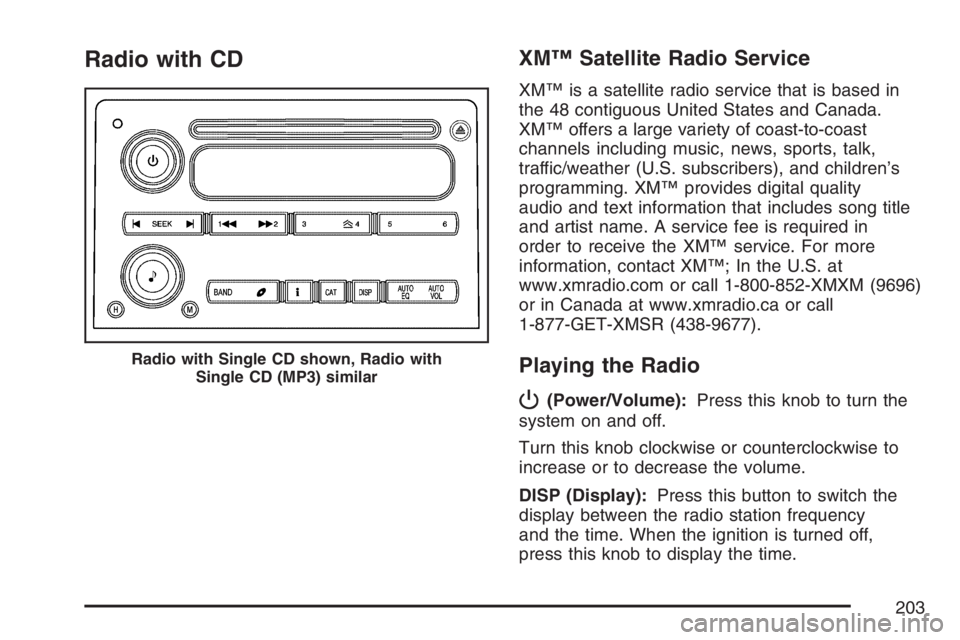
P
(Power/Volume):Press this knob to turn the
system on and off.
Turn this knob clockwise or counterclockwise to
increase or to decrease the volume.
DISP (Display):Press this button to switch the
display between the radio station frequency
and the time. When the ignition is turned off,
press this knob to display the time.
Radio with Single CD shown, Radio with
Single CD (MP3) similar
203
Page 204 of 480

For XM™ (if equipped), press the DISP button while
in XM™ mode to retrieve four different categories of
information related to the current song or channel:
Artist, Song Title, Category or PTY (program type),
Channel Number/Channel Name.
To change the default on the display, press the
DISP button until you see the desired display, then
hold this knob for two seconds. The radio produces
one beep and the selected display becomes the
default.
AUTO VOL (Automatic Volume):With automatic
volume, the audio system adjusts automatically
to make up for road and wind noise as you drive.
Set the volume at the desired level. Press this
button to select LOW, MEDIUM, or HIGH.
Each higher setting allows for more volume
compensation at faster vehicle speeds. Then as
you drive, automatic volume increases the volume,
as necessary, to overcome noise at any speed.
The volume level should always sound the same
to you as you drive. NONE displays if the radio
cannot determine the vehicle speed. To turn
automatic volume off, press this button until
AVOL OFF displays.Finding a Station
BAND:Press this button to switch between FM1,
FM2, AM, or XM1 or XM2 (if equipped). The
display shows the selection.
e(Tune):Turn this knob to select radio stations.
tSEEKu:Press and release the right or
the left arrow to go to the next or to the previous
station and stay there.
To scan stations, press and hold either arrow
for more than two seconds. SCN displays and the
radio produces one beep. The radio goes to a
station, plays for a few seconds, then goes to the
next station. Press either arrow again or one of
the pushbuttons to stop scanning presets.
To scan preset stations, press and hold either
arrow for more than four seconds. PSC displays
and the radio produces two beeps. The radio
goes to a preset station, plays for a few seconds,
then goes to the next preset station. Press
either arrow again or one of the pushbuttons to
stop scanning presets.
The radio only seeks and scans stations with a
strong signal that are in the selected band.
204
Page 205 of 480
4(Information) (XM™ Satellite Radio Service
and MP3 Features):If the current station
has a message, the information symbol appears
on the display. Press this button to see the
message. The message may display the artist,
song title, call in phone numbers, etc.
If the entire message is not displayed, parts of
the message appears every three seconds.
To scroll through the message, press and release
the information button. A new group of words
appears on the display after every press of this
button. Once the complete message has
displayed, the information symbol disappears
from the display until another new message
is received. The last message can be displayed
by pressing the information button. You can
view the last message until a new message is
received or a different station is tuned to.
When a message is not available from a station,
NO INFO displays.Setting Preset Stations
Up to 30 stations (six FM1, six FM2, and six AM,
six XM1 and six XM2 (if equipped)), can be
programmed on the six numbered pushbuttons,
by performing the following steps:
1. Turn the radio on.
2. Press BAND to select FM1, FM2, AM,
or XM1 or XM2.
3. Tune in the desired station.
4. Press EQ to select the equalization.
5. Press and hold one of the six numbered
pushbuttons until a beep sounds. Whenever
that numbered pushbutton is pressed,
the station that was set returns and the
equalization that was selected is stored
for that pushbutton.
6. Repeat the steps for each pushbutton.
205
Page 206 of 480

Setting the Tone (Bass/Treble)
e
(Bass/Treble):Push and release this knob
until BAS or TRE appears on the display. Turn
this knob to increase or to decrease. The display
shows the bass or the treble level. If a station
is weak or has static, decrease the treble.
To adjust the bass and the treble to the middle
position, push and hold the tone knob. The radio
produces one beep.
To adjust all tone and speaker controls to the
middle position, push and hold the tone knob
when no tone or speaker control is displayed.
CEN (center) displays and a beep sounds.
AUTO EQ (Automatic Equalization):Press this
button to select customized equalization settings
designed for country/western, jazz, talk, pop, rock,
and classical.
To return the bass and treble to the manual mode,
push and release the tone knob until MANUAL
displays.
Adjusting the Speakers (Balance/Fade)
e
(Balance/Fade):To adjust the balance
between the right and the left speakers, push and
release this knob until BAL displays. Turn the
knob to move the sound toward the right or the
left speakers.
To adjust the fade between the front and the rear
speakers, push and release the speaker knob
until FAD displays. Turn the knob to move
the sound toward the front or the rear speakers.
To adjust the balance and the fade to the
middle position, push the speaker knob, then
push it again and hold it until one beep sounds.
To adjust all tone and speaker controls to the
middle position, push and hold the speaker knob
when no tone or speaker control is displayed.
CEN displays and a beep sounds.
206