DIFF HUMMER H3 2008 User Guide
[x] Cancel search | Manufacturer: HUMMER, Model Year: 2008, Model line: H3, Model: HUMMER H3 2008Pages: 416, PDF Size: 5.66 MB
Page 92 of 416
Starting and Operating
Your Vehicle
New Vehicle Break-In
Notice:Your vehicle does not need an elaborate
break-in. But it will perform better in the long run if
you follow these guidelines:
Keep your speed at 55 mph (88 km/h) or less for
the rst 500 miles (805 km).
Do not drive at any one constant speed, fast or
slow, for the rst 500 miles (805 km). Do not
make full-throttle starts. Avoid downshifting to
brake or slow the vehicle.
Avoid making hard stops for the rst 200 miles
(322 km) or so. During this time the new brake
linings are not yet broken in. Hard stops
with new linings can mean premature wear and
earlier replacement. Follow this breaking-in
guideline every time you get new brake linings.
Do not tow a trailer during break-in. SeeTowing
a Trailer on page 4-50for the trailer towing
capabilities of your vehicle and more
information.
Following break-in, engine speed and load can be
gradually increased.
Ignition Positions
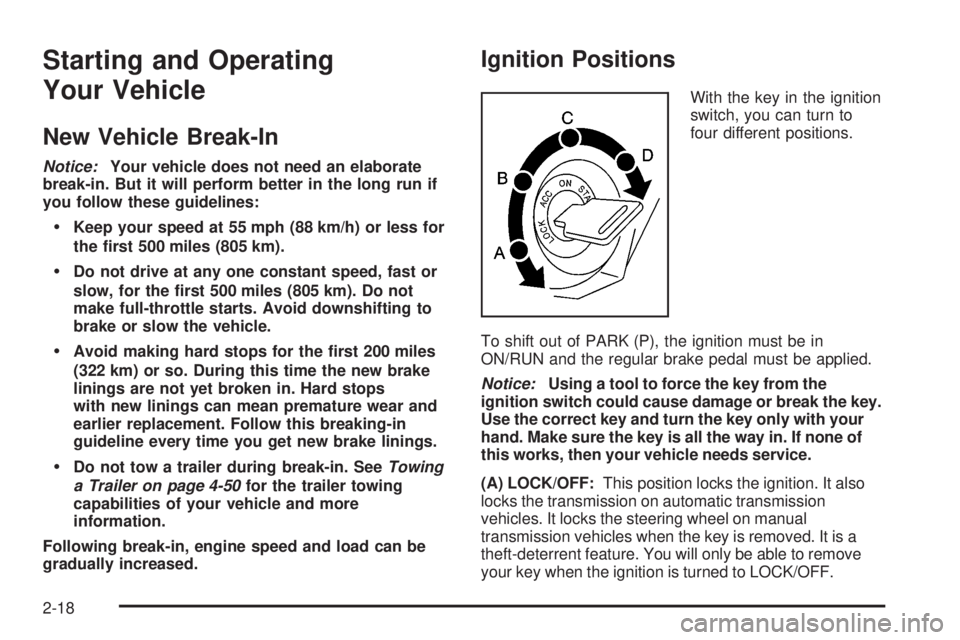
With the key in the ignition
switch, you can turn to
four different positions.
To shift out of PARK (P), the ignition must be in
ON/RUN and the regular brake pedal must be applied.
Notice:Using a tool to force the key from the
ignition switch could cause damage or break the key.
Use the correct key and turn the key only with your
hand. Make sure the key is all the way in. If none of
this works, then your vehicle needs service.
(A) LOCK/OFF:This position locks the ignition. It also
locks the transmission on automatic transmission
vehicles. It locks the steering wheel on manual
transmission vehicles when the key is removed. It is a
theft-deterrent feature. You will only be able to remove
your key when the ignition is turned to LOCK/OFF.
2-18
Page 97 of 416
Automatic Transmission Operation
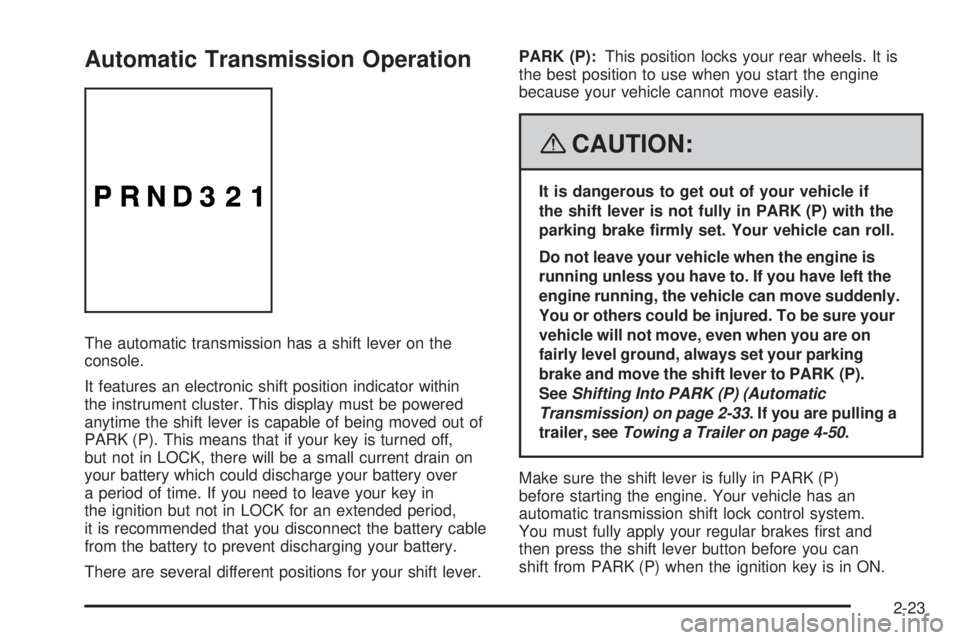
The automatic transmission has a shift lever on the
console.
It features an electronic shift position indicator within
the instrument cluster. This display must be powered
anytime the shift lever is capable of being moved out of
PARK (P). This means that if your key is turned off,
but not in LOCK, there will be a small current drain on
your battery which could discharge your battery over
a period of time. If you need to leave your key in
the ignition but not in LOCK for an extended period,
it is recommended that you disconnect the battery cable
from the battery to prevent discharging your battery.
There are several different positions for your shift lever.PARK (P):This position locks your rear wheels. It is
the best position to use when you start the engine
because your vehicle cannot move easily.
{CAUTION:
It is dangerous to get out of your vehicle if
the shift lever is not fully in PARK (P) with the
parking brake rmly set. Your vehicle can roll.
Do not leave your vehicle when the engine is
running unless you have to. If you have left the
engine running, the vehicle can move suddenly.
You or others could be injured. To be sure your
vehicle will not move, even when you are on
fairly level ground, always set your parking
brake and move the shift lever to PARK (P).
SeeShifting Into PARK (P) (Automatic
Transmission) on page 2-33. If you are pulling a
trailer, seeTowing a Trailer on page 4-50.
Make sure the shift lever is fully in PARK (P)
before starting the engine. Your vehicle has an
automatic transmission shift lock control system.
You must fully apply your regular brakes rst and
then press the shift lever button before you can
shift from PARK (P) when the ignition key is in ON.
2-23
Page 102 of 416

Transfer Case Buttons
The transfer case buttons are located to the right of the
instrument panel cluster. Use these switches to shift
into and out of the different Full-Time Four-Wheel
Drive modes.
You can choose between four modes:
4
m(Four-Wheel High):This setting is used for driving
in most street and highway situations. You can also
use this setting for light or variable off-road conditions.
N (NEUTRAL):Shift the vehicle’s transfer case to
NEUTRAL only when towing your vehicle. See
Recreational Vehicle Towing on page 4-48orTowing
Your Vehicle on page 4-48for more information.Notice:Driving on pavement in Four-Wheel
High Lock or Four Wheel Low Lock for extended
periods may cause premature wear on your vehicle’s
powertrain and tires. Do not drive in Four-Wheel
High Lock or Four-Wheel Low Lock on pavement for
extended periods.
4
mQ(Four-Wheel-High Lock):Use this mode
when you need extra traction in most off-road situations
such as sand, mud, snow or level, rocky trails.
Notice:Operating your vehicle in
Four-Wheel-Low Lock above 30 mph (48 km/h) for
any extended period of time could cause damage
to the transfer case. Do not operate your vehicle
in Four-Wheel-Low Lock above 30 mph (48 km/h) for
extended periods.
4
nQ(Four-Wheel-Low Lock):This mode delivers
extra torque to all four wheels and is used for extreme
off-road conditions. You might choose 4-Wheel-Low
Lock if you are driving in off-road situations, such as,
deep sand, mud, or snow and climbing or descending
steep hills.
If the vehicle has a locking rear axle, when in this mode
you can also choose to lock the rear axle for additional
traction in extreme off-road situations. SeeLocking Rear
Axle on page 4-6.
2-28
Page 108 of 416

Leaving Your Vehicle With the Engine
Running (Automatic Transmission)
{CAUTION:
It can be dangerous to leave your vehicle with
the engine running. Your vehicle could move
suddenly if the shift lever is not fully in
PARK (P) with the parking brake rmly set.
And, if you leave the vehicle with the engine
running, it could overheat and even catch re.
You or others could be injured. Do not leave
your vehicle with the engine running.
If you have to leave your vehicle with the engine
running, be sure your vehicle is in PARK (P) and your
parking brake is rmly set before you leave it. After
you have moved the shift lever into PARK (P), hold
the regular brake pedal down. Then, see if you
can move the shift lever away from PARK (P) without
rst pressing the shift lever button. If you can, it means
that the shift lever was not fully locked into PARK (P).
Torque Lock (Automatic Transmission)
If you are parking on a hill and you do not shift your
transmission into PARK (P) properly, the weight of the
vehicle may put too much force on the parking pawl
in the transmission. You may nd it difficult to pull the
shift lever out of PARK (P). This is called “torque
lock.” To prevent torque lock, set the parking brake
and then shift into PARK (P) properly before you leave
the driver’s seat. To nd out how, seeShifting Into
PARK (P) (Automatic Transmission) on page 2-33.
When you are ready to drive, move the shift lever out of
PARK (P) before you release the parking brake.
If torque lock does occur, you may need to have another
vehicle push yours a little uphill to take some of the
pressure from the parking pawl in the transmission,
so you can pull the shift lever out of PARK (P).
2-34
Page 110 of 416

Parking Over Things That Burn
{CAUTION:
Things that can burn could touch hot exhaust
parts under your vehicle and ignite. Do not
park over papers, leaves, dry grass, or other
things that can burn.
Engine Exhaust
{CAUTION:
Engine exhaust can kill. It contains the gas
carbon monoxide (CO), which you cannot see or
smell. It can cause unconsciousness and death.
You might have exhaust coming in if:
The exhaust system sounds strange
or different.
Your vehicle gets rusty underneath.
Your vehicle was damaged in a collision.
Your vehicle was damaged when driving
over high points on the road or over
road debris.
Repairs were not done correctly.
Your vehicle or the exhaust system has
been modied improperly.
If you ever suspect exhaust is coming into
your vehicle:
Drive it only with all the windows down
to blow out any CO; and
Have your vehicle xed immediately.
2-36
Page 114 of 416

Compass Variance
The mirror is set in zone eight upon leaving the
factory. It will be necessary to adjust the compass to
compensate for compass variance if the vehicle is
outside of zone eight. Under certain circumstances,
as during a long distance cross-country trip, it will
be necessary to adjust for compass variance. Compass
variance is the difference between earth’s magnetic
north and true geographic north. If not adjusted
to account for compass variance, the compass could
give false readings.
To adjust for compass variance:
1. Find your current location and variance zone
number on the following zone map.
2. Press and hold
Yfor 12 seconds until a zone
number appears in the display. The compass is
now in zone mode.
3. Keep pressing the
Yuntil the desired zone
number appears in the display. Release the button.
After approximately four seconds of inactivity,
the new zone number will be locked in and the
compass/temperature display will return.
2-40
Page 116 of 416

Compass Calibration
The compass may need calibration if one of the
following occurs:
If CAL is displayed while driving in the vehicle.
After approximately ve seconds, the display does
not show a compass heading, N for North, for
example, there may be a strong magnetic eld
interfering with the compass. Such interference may
be caused by a magnetic antenna mount, magnetic
note pad holder, or a similar magnetic item.
The compass does not display the correct heading
and the compass zone variance is set correctly.
In order to calibrate, CAL must be displayed in the
mirror compass windows. If CAL is not displayed, push
in the compass/temperature button for approximately
nine seconds or until CAL is displayed.
The compass can be calibrated by driving the vehicle
in circles at 5 mph (8 km/h) or less until the display
reads a direction.
Compass Variance
The mirror is set in zone eight upon leaving the
factory. It will be necessary to adjust the compass to
compensate for compass variance if the vehicle is
outside zone eight. Under certain circumstances,
as during a long distance cross-country trip, it will
be necessary to adjust for compass variance.Compass variance is the difference between earth’s
magnetic north and true geographic north. If not
adjusted to account for compass variance, your
compass could give false readings.
To adjust for compass variance:
1. Find your current location and variance zone
number on the following zone map.
2. Press and hold the compass/temperature button
for six seconds until a zone number appears in
the display.
2-42
Page 119 of 416
To turn on the rear camera vision feature again, press
the right mirror button briey. The green light indicator
will illuminate. The rear camera vision system is
now enabled and the display will slide out from the
mirror normally.
To manually slide out the rear camera screen for
cleaning, do the following:
1. Place the vehicle shift lever in PARK (P).
2. Turn the ignition key to the ACCESSORY or
RUN position.
3. Press and hold the right mirror button for
ve seconds. The display will slide out from
the mirror for 30 seconds; the right green LED
indicator will remain illuminated. The camera
screen will not be on when it slides out of
the mirror.
4. If additional time is required for cleaning,
repeat step 3.
To resume normal operation, press the right button
momentarily while the rear camera screen is out or wait
30 seconds for screen to slide back into the mirror.
For more information on the automatic dimming,
compass, and temperature features of the mirror, see
Automatic Dimming Rearview Mirror with Compass
and Temperature Display on page 2-41.
{CAUTION:
The Rear Vision Camera (RVC) system does
not replace driver vision. RVC does not:
Detect objects that are outside the
camera’s eld of view, below the bumper,
or underneath the vehicle.
Detect children, pedestrians, bicyclists,
or pets.
Do not back the vehicle by only looking at the
rear vision camera screen, or use the screen
during longer, higher speed backing maneuvers
or where there could be cross-traffic. Your
judged distances using the screen will differ
from actual distances.
So if you do not use proper care before backing
up, you could hit a vehicle, child, pedestrian,
bicyclist, or pet, resulting in vehicle damage,
injury, or death. Even though the vehicle has
the RVC system, always check carefully before
backing up by checking behind your vehicle.
2-45
Page 120 of 416
Area Displayed On Screen
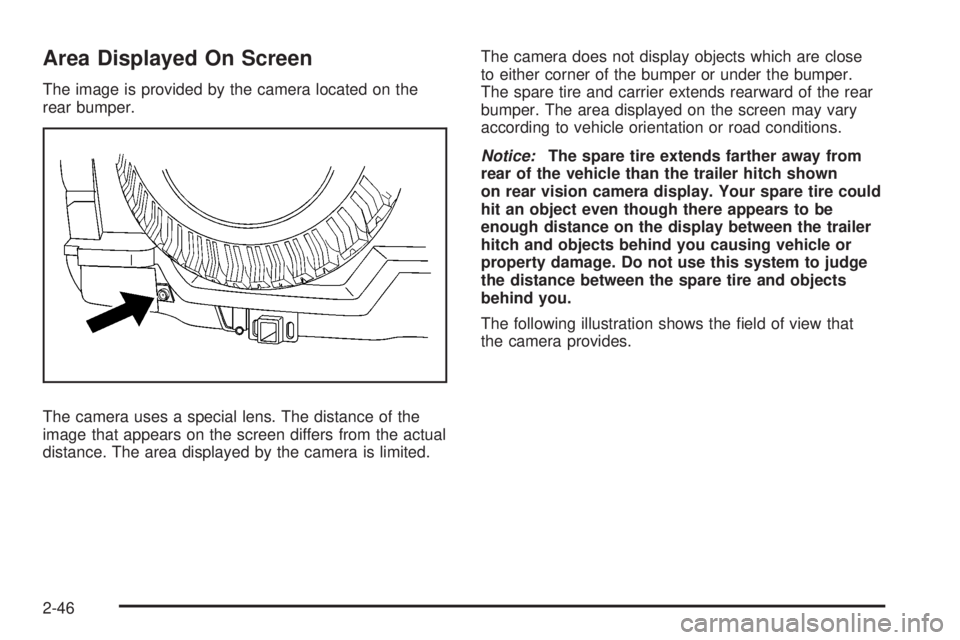
The image is provided by the camera located on the
rear bumper.
The camera uses a special lens. The distance of the
image that appears on the screen differs from the actual
distance. The area displayed by the camera is limited.The camera does not display objects which are close
to either corner of the bumper or under the bumper.
The spare tire and carrier extends rearward of the rear
bumper. The area displayed on the screen may vary
according to vehicle orientation or road conditions.
Notice:The spare tire extends farther away from
rear of the vehicle than the trailer hitch shown
on rear vision camera display. Your spare tire could
hit an object even though there appears to be
enough distance on the display between the trailer
hitch and objects behind you causing vehicle or
property damage. Do not use this system to judge
the distance between the spare tire and objects
behind you.
The following illustration shows the eld of view that
the camera provides.
2-46
Page 129 of 416
7. Firmly press and release the “Learn” or “Smart”
button. After you press this button, you will have
30 seconds to complete Step 8.
8. Immediately return to the vehicle. Firmly press
and hold the Universal Home Remote button,
chosen in Step 3 to control the garage door, for
two seconds, and then release it. If the garage door
does not move, press and hold the same button
a second time for two seconds, and then release it.
Again, if the door does not move, press and hold
the same button a third time for two seconds,
and then release.
The Universal Home Remote should now activate
the garage door.
To program the remaining two Universal Home
Remote buttons, begin with Step 2 of “Programming
the Universal Home Remote System.” Do not repeat
Step 1, as this will erase all previous programming
from the Universal Home Remote buttons.Gate Operator and Canadian
Programming
If you have questions or need help programming the
Universal Home Remote System, call 1-800-355-3515
or go to www.homelink.com.
Canadian radio-frequency laws require transmitter
signals to time out or quit after several seconds of
transmission. This may not be long enough for
Universal Home Remote to pick up the signal during
programming. Similarly, some U.S. gate operators
are manufactured to time out in the same manner.
If you live in Canada, or you are having difficulty
programming a gate operator or garage door opener
by using the “Programming Universal Home Remote”
procedures, regardless of where you live, replace
Step 3 under “Programming Universal Home Remote”
with the following:
Continue to press and hold the Universal Home Remote
button while you press and release every two seconds
(cycle) the hand-held transmitter button until the
frequency signal has been successfully accepted by the
Universal Home Remote. The Universal Home Remote
indicator light will ash slowly at rst and then rapidly.
Proceed with Step 4 under “Programming Universal
Home Remote” to complete.
2-55