warning light HUMMER H3 2010 Owner's Manual
[x] Cancel search | Manufacturer: HUMMER, Model Year: 2010, Model line: H3, Model: HUMMER H3 2010Pages: 410, PDF Size: 2.24 MB
Page 139 of 410

Instruments and Controls 5-25
TRACTION FAILED
This message displays if there is a
problem with the Traction Control
System (TCS). Check the TCS as
soon as possible and have the
vehicle serviced by your dealer.
SeeTraction Control System (TCS)/
StabiliTrak
®Lighton page 5‑16for
more information. Press and release
the reset stem to acknowledge the
message and clear it from the
display.
Service Vehicle Messages
SERV (Service) VEH (Vehicle)
This message displays if the vehicle
needs service. Have the vehicle
serviced by your dealer as soon as
possible.
Tire Messages
LOW TIRE
On vehicles with the Tire Pressure
Monitor System (TPMS), this
message displays if a low tire
pressure is detected in any of the
vehicle's tires. Press and release
the reset stem to acknowledge the
message and clear it from the
display. The message appears at
each ignition cycle until the tires
are inflated to the correct inflation
pressure. See Tires
on page 10‑44andTire Pressureon page 10‑51for
more information on tires and the
correct inflation pressures.
SERV (Service)
TPM (Tire Pressure Monitor)
On vehicles with the Tire Pressure
Monitor System (TPMS), this
message displays if a part on the
TPMS is not working properly.
The tire pressure light also flashes and then remains on during the
same ignition cycle. See
Tire
Pressure Light
on page 5‑16.
Several conditions may cause this
message to appear. See Tire
Pressure Monitor Operation
on
page 10‑53for more information.
If the warning comes on and stays
on, there may be a problem with the
TPMS. See your dealer.
Transmission Messages
SERV (Service)
4WD (Four-Wheel Drive)
This message displays when
there is a problem with the transfer
case control system. Check the
transfer case on the vehicle and
have it serviced by your dealer.
See Four-Wheel Drive
on
page 9‑46for more information
about the transfer case. Press
and release the reset stem to
acknowledge the message and
clear it from the display.
Page 145 of 410

Lighting 6-1
Lighting
Exterior Lighting
Exterior Lamp Controls . . . . . . . . 6-1
Exterior Lamps OffReminder . . . . . . . . . . . . . . . . . . . . 6-3
Headlamp High/Low-Beam Changer . . . . . . . . . . . . . . . . . . . . . 6-3
Flash-to-Pass . . . . . . . . . . . . . . . . . 6-3
Daytime Running Lamps (DRL) . . . . . . . . . . . . . . . . 6-3
Automatic Headlamp System . . . . . . . . . . . . . . . . . . . . . . 6-4
Hazard Warning Flashers . . . . . 6-5 Turn and Lane-Change
Signals . . . . . . . . . . . . . . . . . . . . . . 6-5
Fog Lamps . . . . . . . . . . . . . . . . . . . . 6-6
Off-Road Lamps . . . . . . . . . . . . . . 6-6Interior Lighting
Instrument Panel Illumination Control . . . . . . . . . . . . . . . . . . . . . . 6-7
Dome Lamps . . . . . . . . . . . . . . . . . 6-7
Reading Lamps . . . . . . . . . . . . . . . 6-8
Lighting Features
Exit Lighting . . . . . . . . . . . . . . . . . . . 6-8
Battery Load Management . . . . 6-8
Battery Power Protection . . . . . . 6-9
Exterior Lighting
Exterior Lamp Controls
The exterior lamps control is on the
instrument panel to the left of the
steering wheel.
O (Exterior Lamps): Turn the
control to select one of the
four exterior lamp positions.
Page 149 of 410
Lighting 6-5
During that delay, the instrument
panel cluster may not be as bright
as usual. Make sure the instrument
panel brightness control is in the
full bright position. SeeInstrument
Panel Illumination Control
on
page 6‑7.
Hazard Warning Flashers
|
(Hazard Warning Flasher):
Press this button located on the
instrument panel, to make the front
and rear turn signal lamps flash on
and off. This warns others that you
are having trouble.
Press
|again to turn the
flashers off.
Turn and Lane-Change
Signals
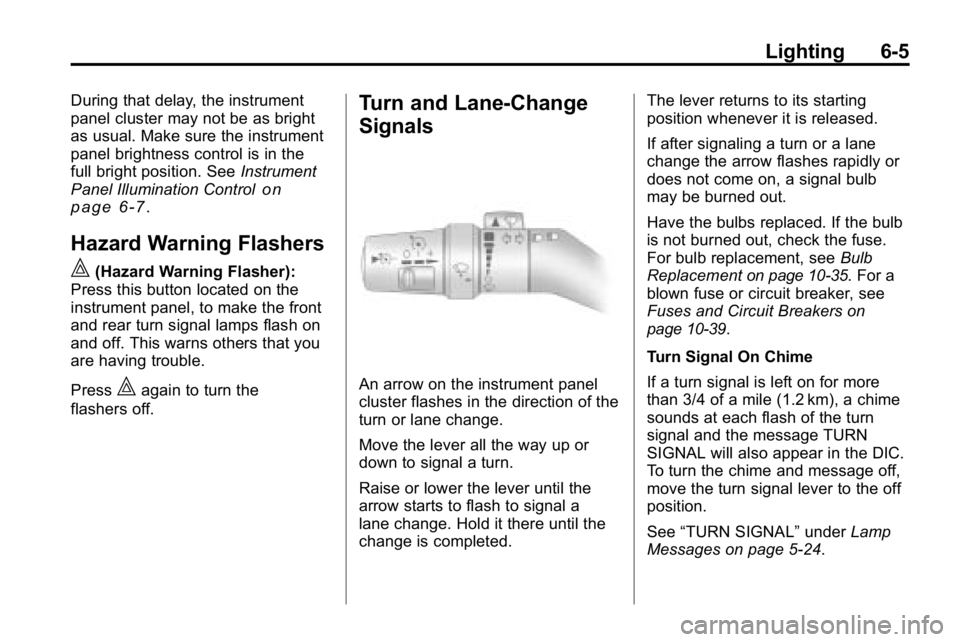
An arrow on the instrument panel
cluster flashes in the direction of the
turn or lane change.
Move the lever all the way up or
down to signal a turn.
Raise or lower the lever until the
arrow starts to flash to signal a
lane change. Hold it there until the
change is completed. The lever returns to its starting
position whenever it is released.
If after signaling a turn or a lane
change the arrow flashes rapidly or
does not come on, a signal bulb
may be burned out.
Have the bulbs replaced. If the bulb
is not burned out, check the fuse.
For bulb replacement, see
Bulb
Replacement
on page 10‑35. For a
blown fuse or circuit breaker, see
Fuses and Circuit Breakers
on
page 10‑39.
Turn Signal On Chime
If a turn signal is left on for more
than 3/4 of a mile (1.2 km), a chime
sounds at each flash of the turn
signal and the message TURN
SIGNAL will also appear in the DIC.
To turn the chime and message off,
move the turn signal lever to the off
position.
See “TURN SIGNAL” underLamp
Messages on page 5‑24.
Page 187 of 410
Driving and Operating 9-3
Death and injury associated with
drinking and driving is a global
tragedy.
Alcohol affects four things that
anyone needs to drive a vehicle:
judgment, muscular coordination,
vision, and attentiveness.
Police records show that
almost 40 percent of all motor
vehicle-related deaths involve
alcohol. In most cases, these
deaths are the result of someone
who was drinking and driving.
In recent years, more than
17,000 annual motor vehicle-related
deaths have been associated with
the use of alcohol, with about
250,000 people injured.
For persons under 21, it is against
the law in every U.S. state to drink
alcohol. There are good medical,
psychological, and developmental
reasons for these laws.
The obvious way to eliminate the
leading highway safety problem is
for people never to drink alcohol
and then drive.Medical research shows that
alcohol in a person's system
can make crash injuries worse,
especially injuries to the brain,
spinal cord, or heart. This means
that when anyone who has been
drinking
—driver or passenger —is
in a crash, that person's chance of
being killed or permanently disabled
is higher than if the person had not
been drinking.
Control of a Vehicle
The following three systems
help to control the vehicle while
driving —brakes, steering, and
accelerator. At times, as when
driving on snow or ice, it is easy to
ask more of those control systems
than the tires and road can provide.
Meaning, you can lose control of
the vehicle. See Traction Control
System (TCS)
on page 9‑52and
StabiliTrak System on page 9‑53. Adding non‐dealer/non‐retailer
accessories can affect vehicle
performance. See
Accessories and
Modifications on page 10‑3.
Braking
See Brake System Warning Lighton page 5‑14.
Braking action involves perception
time and reaction time. Deciding to
push the brake pedal is perception
time. Actually doing it is
reaction time.
Average reaction time is about
three‐fourths of a second. But that is
only an average. It might be less
with one driver and as long as
two or three seconds or more with
another. Age, physical condition,
alertness, coordination, and
eyesight all play a part. So do
alcohol, drugs, and frustration. But
even in three‐fourths of a second,
a vehicle moving at 100 km/h
(60 mph) travels 20 m (66 ft).
Page 196 of 410
9-12 Driving and Operating
For mounds, washouts, loose
up-hill slopes, ditches, etc.
When wheel spin occurs as the
vehicle is moving, the driver
may notice a slight shaking or
shuddering of the vehicle. This
should be stopped as soon as
possible to prevent damage to
vehicle components. This is the
indication that a loss of traction is
occurring on this terrain. The
operator should:
1. Reduce speed and apply thebrakes.
2. Assess the terrain properly and adjust vehicle speed and gear
ranges accordingly: Four‐Wheel
High position for higher speeds
and Four‐Wheel‐Low Lock for
more torque and lower speeds.
Transmission 1 (First) gear is
generally recommended. 3. Apply slight pressure to the
brake when the shaking or
shuddering sensation is felt,
keeping the vehicle moving in
a controlled manner.
4. Be prepared to alternate between braking and
accelerating through the
adverse terrain.
Getting Familiar with Off-Road
Driving
It is a good idea to practice in an
area that is safe and close to home
before you go into the wilderness.
Off-roading requires some new and
different skills.
Tune your senses to different kinds
of signals. Your eyes need to
constantly sweep the terrain for
unexpected obstacles. Your ears
need to listen for unusual tire or
engine sounds. Use your arms,
hands, feet, and body to respond to
vibrations and vehicle bounce. Controlling the vehicle is the key to
successful off-road driving. One of
the best ways to control the vehicle
is to control the speed. At higher
speeds:
.You approach things faster and
have less time to react.
.There is less time to scan the
terrain for obstacles.
.The vehicle has more bounce
when driving over obstacles.
.More braking distance is
needed, especially on an
unpaved surface.
{WARNING
When you are driving off-road,
bouncing and quick changes in
direction can easily throw you
out of position. This could cause
you to lose control and crash.
So, whether you are driving on
or off the road, you and your
passengers should wear safety
belts.
Page 202 of 410
9-18 Driving and Operating
Driving Downhill
When off-roading takes you
downhill, consider:
.How steep is the downhill?
Will I be able to maintain vehicle
control?
.What is the surface like?
Smooth? Rough? Slippery?
Hard-packed dirt? Gravel?
.Are there hidden surface
obstacles? Ruts? Logs?
Boulders?
.What is at the bottom of the hill?
Is there a hidden creek bank or
even a river bottom with large
rocks?
If you decide you can go down
a hill safely, try to keep the vehicle
headed straight down. Use a low
gear so engine drag can help the
brakes so they do not have to do all
the work. Descend slowly, keeping
the vehicle under control at all
times.
{WARNING
Heavy braking when going down
a hill can cause your brakes to
overheat and fade. This could
cause loss of control and a
serious accident. Apply the
brakes lightly when descending a
hill and use a low gear to keep
vehicle speed under control.
Things not to do when driving down
a hill:
.When driving downhill, avoid
turns that take you across the
incline of the hill. A hill that is not
too steep to drive down might be
too steep to drive across. The
vehicle could roll over.
.Never go downhill with the
transmission in N (Neutral),
called free-wheeling. The brakes
will have to do all the work and
could overheat and fade. Vehicles are much more likely to
stall when going uphill, but if it
happens when going downhill:
1. Stop the vehicle by applying the
regular brakes and apply the
parking brake.
2. With an automatic transmission, shift to P (Park). While still
braking, restart the engine.
3. Shift back to a low gear, release the parking brake, and drive
straight down.
4. If the engine will not start, get out and get help.
Page 206 of 410
9-22 Driving and Operating
Driving on Wet Roads
Rain and wet roads can reduce
vehicle traction and affect your
ability to stop and accelerate.
Always drive slower in these types
of driving conditions and avoid
driving through large puddles and
deep‐standing or flowing water.
{WARNING
Wet brakes can cause crashes.
They might not work as well in
a quick stop and could cause
pulling to one side. You could
lose control of the vehicle.
After driving through a large
puddle of water or a car/vehicle
wash, lightly apply the brake
pedal until the brakes work
normally.(Continued)
WARNING (Continued)
Flowing or rushing water creates
strong forces. Driving through
flowing water could cause your
vehicle to be carried away. If this
happens, you and other vehicle
occupants could drown. Do not
ignore police warnings and be
very cautious about trying to drive
through flowing water.
Hydroplaning
Hydroplaning is dangerous. Water
can build up under your vehicle's
tires so they actually ride on the
water. This can happen if the road
is wet enough and you are going
fast enough. When your vehicle is
hydroplaning, it has little or no
contact with the road.
There is no hard and fast rule about
hydroplaning. The best advice is to
slow down when the road is wet.
Other Rainy Weather Tips
Besides slowing down, other wet
weather driving tips include:
.Allow extra following distance.
.Pass with caution.
.Keep windshield wiping
equipment in good shape.
.Keep the windshield washer fluid
reservoir filled.
.Have good tires with proper
tread depth. SeeTireson
page 10‑44.
.Turn off cruise control.
Highway Hypnosis
Always be alert and pay attention
to your surroundings while driving.
If you become tired or sleepy, find a
safe place to park your vehicle
and rest.
Page 209 of 410

Driving and Operating 9-25
WARNING (Continued)
If the vehicle is stuck in the snow:
.Clear away snow from around
the base of your vehicle,
especially any that is blocking
the exhaust pipe.
.Check again from time to
time to be sure snow does
not collect there.
.Open a window about 5 cm
(two inches) on the side of
the vehicle that is away from
the wind to bring in fresh air.
.Fully open the air outlets on
or under the instrument
panel.
.Adjust the Climate Control
system to a setting that
circulates the air inside the
vehicle and set the fan speed
to the highest setting. See
Climate Control System in the
Index.(Continued)
WARNING (Continued)
For more information about
carbon monoxide, see Engine
Exhaust on page 9‑40.
Snow can trap exhaust gases
under your vehicle. This can
cause deadly CO (carbon
monoxide) gas to get inside.
CO could overcome you and kill
you. You cannot see it or smell it,
so you might not know it is in your
vehicle. Clear away snow from
around the base of your vehicle,
especially any that is blocking the
exhaust.
Run the engine for short periods
only as needed to keep warm, but
be careful. To save fuel, run the engine for only
short periods as needed to warm
the vehicle and then shut the engine
off and close the window most of
the way to save heat. Repeat this
until help arrives but only when you
feel really uncomfortable from the
cold. Moving about to keep warm
also helps.
If it takes some time for help to
arrive, now and then when you run
the engine, push the accelerator
pedal slightly so the engine runs
faster than the idle speed. This
keeps the battery charged to restart
the vehicle and to signal for help
with the headlamps. Do this as little
as possible to save fuel.
Page 210 of 410
9-26 Driving and Operating
If the Vehicle is Stuck
Slowly and cautiously spin the
wheels to free the vehicle when
stuck in sand, mud, ice, or snow.
If stuck too severely for the traction
system to free the vehicle, turn the
traction system off and use the
rocking method.
{WARNING
If the vehicle's tires spin at high
speed, they can explode, and you
or others could be injured. The
vehicle can overheat, causing an
engine compartment fire or other
damage. Spin the wheels as little
as possible and avoid going
above 55 km/h (35 mph) as
shown on the speedometer.
For information about using tire
chains on the vehicle, see Tire
Chains on page 10‑64.
Rocking the Vehicle to Get
it Out
Turn the steering wheel left and
right to clear the area around the
front wheels. Turn off any traction
system. Shift back and forth
between R (Reverse) and a forward
gear, or with a manual transmission,
between 1 (First) or 2 (Second) and
R (Reverse), spinning the wheels
as little as possible. To prevent
transmission wear, wait until the
wheels stop spinning before shifting
gears. Release the accelerator
pedal while shifting, and press
lightly on the accelerator pedal
when the transmission is in gear.
Slowly spinning the wheels in the
forward and reverse directions
causes a rocking motion that could
free the vehicle. If that does not get
the vehicle out after a few tries, it
might need to be towed out. The
recovery loops can be used. If the
vehicle does need to be towed out,
see Towing the Vehicle
on
page 10‑90. Recovery Loops
{WARNING
These loops, when used, are
under a lot of force. Keep people
away from the vicinity of the loops
and any chains or cables during
use. Always pull the vehicle
straight out. Never pull on the
loops at a sideways angle. The
loops could break off and you or
others could be injured from the
chain or cable snapping back.
Notice: Never use the recovery
loops to tow the vehicle. The
vehicle could be damaged and
it would not be covered by the
vehicle warranty.
Page 218 of 410
9-34 Driving and Operating
Ignition Positions
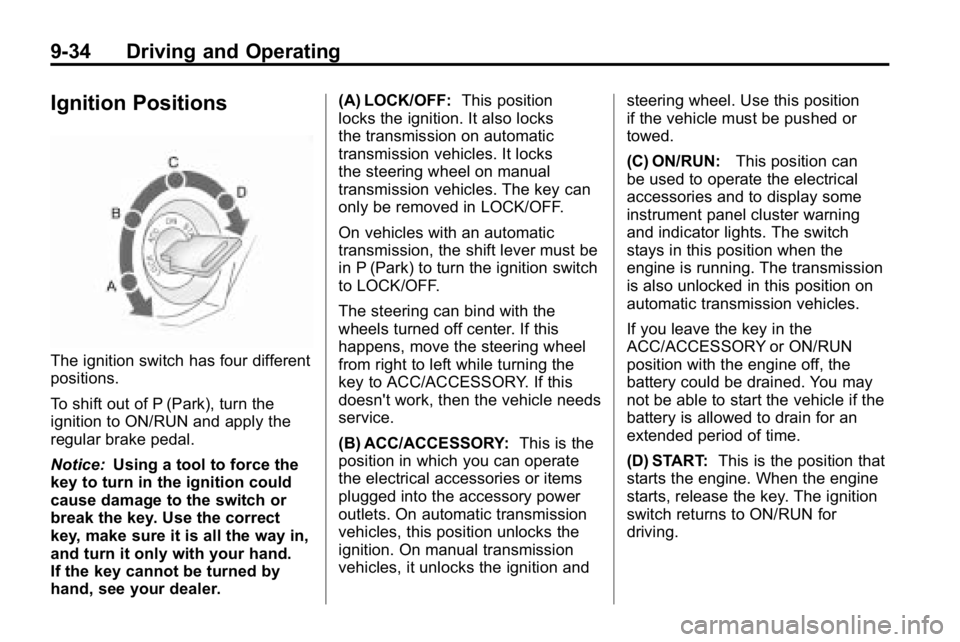
The ignition switch has four different
positions.
To shift out of P (Park), turn the
ignition to ON/RUN and apply the
regular brake pedal.
Notice:Using a tool to force the
key to turn in the ignition could
cause damage to the switch or
break the key. Use the correct
key, make sure it is all the way in,
and turn it only with your hand.
If the key cannot be turned by
hand, see your dealer. (A) LOCK/OFF:
This position
locks the ignition. It also locks
the transmission on automatic
transmission vehicles. It locks
the steering wheel on manual
transmission vehicles. The key can
only be removed in LOCK/OFF.
On vehicles with an automatic
transmission, the shift lever must be
in P (Park) to turn the ignition switch
to LOCK/OFF.
The steering can bind with the
wheels turned off center. If this
happens, move the steering wheel
from right to left while turning the
key to ACC/ACCESSORY. If this
doesn't work, then the vehicle needs
service.
(B) ACC/ACCESSORY: This is the
position in which you can operate
the electrical accessories or items
plugged into the accessory power
outlets. On automatic transmission
vehicles, this position unlocks the
ignition. On manual transmission
vehicles, it unlocks the ignition and steering wheel. Use this position
if the vehicle must be pushed or
towed.
(C) ON/RUN:
This position can
be used to operate the electrical
accessories and to display some
instrument panel cluster warning
and indicator lights. The switch
stays in this position when the
engine is running. The transmission
is also unlocked in this position on
automatic transmission vehicles.
If you leave the key in the
ACC/ACCESSORY or ON/RUN
position with the engine off, the
battery could be drained. You may
not be able to start the vehicle if the
battery is allowed to drain for an
extended period of time.
(D) START: This is the position that
starts the engine. When the engine
starts, release the key. The ignition
switch returns to ON/RUN for
driving.