ignition HUMMER H3 2010 Owner's Guide
[x] Cancel search | Manufacturer: HUMMER, Model Year: 2010, Model line: H3, Model: HUMMER H3 2010Pages: 410, PDF Size: 2.24 MB
Page 155 of 410
Infotainment System 7-1
Infotainment
System
Introduction
Introduction . . . . . . . . . . . . . . . . . . . 7-1
Theft-Deterrent Feature . . . . . . . 7-2
Operation . . . . . . . . . . . . . . . . . . . . . 7-2
Radio
AM-FM Radio . . . . . . . . . . . . . . . . . 7-5
Satellite Radio . . . . . . . . . . . . . . . . 7-6
Radio Reception . . . . . . . . . . . . . . 7-9
Fixed Mast Antenna . . . . . . . . . 7-10
Satellite Radio Antenna . . . . . . 7-10
Audio Players
CD Player . . . . . . . . . . . . . . . . . . . 7-10
Phone
Bluetooth . . . . . . . . . . . . . . . . . . . . 7-15
Introduction
Determine which radio the vehicle
has and read the following pages to
become familiar with its features.
{WARNING
Taking your eyes off the road
for extended periods could
cause a crash resulting in injury
or death to you or others. Do not
give extended attention to
entertainment tasks while driving.
This system provides access to
many audio and non‐audio listings.
To minimize taking your eyes off the
road while driving, do the following
while the vehicle is parked:
.Become familiar with the
operation and controls of the
audio system.
.Set up the tone, speaker
adjustments, and preset radio
stations. For more information, see
Defensive
Driving on page 9‑2.
Notice: Contact your dealer
before adding any equipment.
Adding audio or communication
equipment could interfere with
the operation of the vehicle's
engine, radio, or other systems,
and could damage them. Follow
federal rules covering mobile
radio and telephone equipment.
The vehicle has Retained
Accessory Power (RAP). With RAP,
the audio system can be played
even after the ignition is turned off.
See Retained Accessory Power
(RAP)
on page 9‑35for more
information.
For vehicles with a navigation radio
system, see the separate Navigation
System manual.
Page 156 of 410
7-2 Infotainment System
Theft-Deterrent Feature
THEFTLOCK®is designed to
discourage theft of the vehicle's
radio by learning a portion of the
Vehicle Identification Number (VIN).
The radio does not operate and
LOCKED displays if the radio is
stolen or moved to a different
vehicle.
When the ignition is in the off
position, a blinking red light on the
upper left side of the radio indicates
that THEFTLOCK
®is armed.
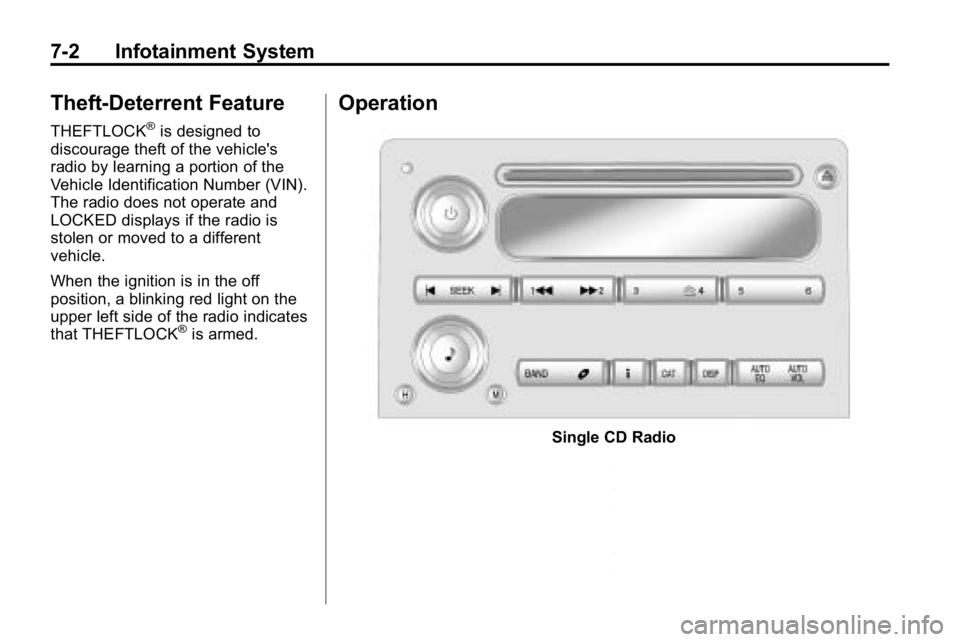
Operation
Single CD Radio
Page 157 of 410
Infotainment System 7-3
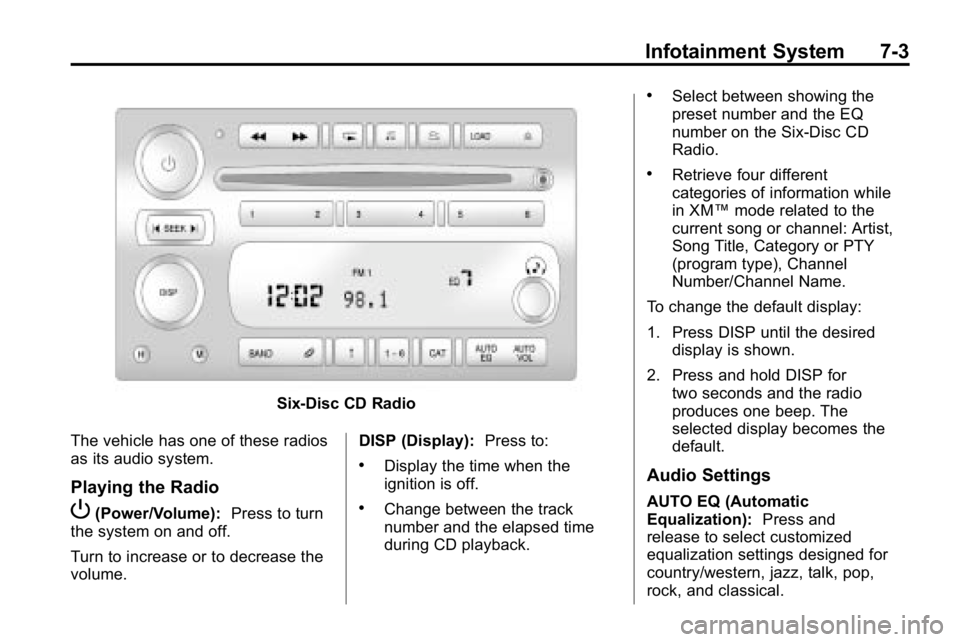
Six-Disc CD Radio
The vehicle has one of these radios
as its audio system.
Playing the Radio
P(Power/Volume): Press to turn
the system on and off.
Turn to increase or to decrease the
volume. DISP (Display):
Press to:
.Display the time when the
ignition is off.
.Change between the track
number and the elapsed time
during CD playback.
.Select between showing the
preset number and the EQ
number on the Six-Disc CD
Radio.
.Retrieve four different
categories of information while
in XM™mode related to the
current song or channel: Artist,
Song Title, Category or PTY
(program type), Channel
Number/Channel Name.
To change the default display:
1. Press DISP until the desired display is shown.
2. Press and hold DISP for two seconds and the radio
produces one beep. The
selected display becomes the
default.
Audio Settings
AUTO EQ (Automatic
Equalization): Press and
release to select customized
equalization settings designed for
country/western, jazz, talk, pop,
rock, and classical.
Page 164 of 410
7-10 Infotainment System
Fixed Mast Antenna
The fixed mast antenna can
withstand most car washes without
being damaged as long as it is
securely attached to the base.
If the mast becomes slightly bent,
straighten it out by hand. If the mast
is badly bent, replace it.
Occasionally check to make sure
the antenna is tightened to its base.
If tightening is required, tighten
by hand until fully seated plus
one quarter turn.
Satellite Radio Antenna
The XM Satellite Radio antenna is
located on the roof of the vehicle.
Keep the antenna clear of
obstructions for clear radio
reception.
If the vehicle has a sunroof, the
performance of the XM system may
be affected if the sunroof is open.
Audio Players
CD Player
The CD player can play smaller
8 cm (3 in) single CDs with an
adapter ring.
A CD in the player it stays in the
player when the ignition is turned
off. When the ignition or radio is
turned on, the CD starts to play
where it stopped, if it was the last
selected audio source.
Care of CDs
Store CDs in their original cases or
other protective cases and away
from direct sunlight and dust. The
CD player scans the bottom of
the disc. If the bottom of a CD is
damaged it may not play properly or
at all. Do not touch the bottom of a
CD while handling it. Pick up CDs
by grasping the outer edges or the
edge of the hole and the outer edge.
If the surface of a CD is dirty, take
a soft, lint free cloth or dampen a
clean, soft cloth in a mild, neutraldetergent solution mixed with water,
and clean it. Make sure the wiping
process starts from the center to
the edge.
Care of the CD Player
Do not add labels to a CD, it could
get caught in the CD player. Use a
marking pen to write on the top of
the CD if a description is needed.
Do not use CD lens cleaners, they
could damage the CD player.
Notice:
If a label is added to a
CD, or more than one CD is
inserted into the slot at a time,
or an attempt is made to play
scratched or damaged CDs, the
CD player could be damaged.
While using the CD player, use
only CDs in good condition
without any label, load one CD at
a time, and keep the CD player
and the loading slot free of
foreign materials, liquids, and
debris.
If an error displays, see “CD
Messages” later in this section.
Page 165 of 410

Infotainment System 7-11
Loading and Ejecting CDs
Single CD Radio
To load a CD:
.To Insert a CD with the ignition
on, insert the CD partway into
the slot, label side up, until the
player pulls the CD in. The CD
begins playing automatically.
.To insert a CD with the ignition
off, press the
Z(Eject) button
or the DISP knob first.
The CD symbol displays when a CD
is inserted, and the track number
displays just before the track starts
to play.
Z(Eject): Press to eject a CD.
Eject can be used with either the
ignition or radio off.
Six-Disc CD Radio
To load CDs:
LOAD: Press to load CDs into the
CD player. To insert one CD:
1. Turn the ignition on.
2. Press and release the LOAD
button.
3. Wait for the indicator light to turn green.
4. Insert the CD partway into the slot, label side up, until the
player pulls the CD in. The CD
begins playing automatically.
To insert multiple CDs:
1. Turn the ignition on.
2. Press and hold the LOAD button for two seconds. The radio
beeps once, the indicator light
flashes, and MULTI LOAD #
displays.
3. Load a CD once INSERT CD # displays and the light stops
flashing and turns green. Insert
the CD partway into the slot,
label side up, until the player
pulls the CD in.
4. Repeat step 3 to load the remaining CDs. To load more than one CD but
less than six, complete Steps 1
through 3. When finished loading
CDs, press the LOAD button to
cancel the loading function. The
last CD loaded begins playing
automatically.
Z(Eject):
Press to eject CD(s).
Press and release
Zto eject the
CD that is currently playing.
To eject multiple CDs:
1. Press and hold
Zfor
five seconds. A beep sounds
and the indicator light begins to
flash and EJECT ALL displays.
2. Remove the CD when REMOVE CD # displays and the light
stops flashing.
Once the CD is removed, the
indicator light begins flashing
again and another CD ejects.
To stop ejecting the CDs,
press LOAD or
Z.
Page 183 of 410
Climate Controls 8-3
@(Recirculation):Press to turn
the recirculation mode on or off.
An indicator light comes on when
the recirculation is on. This mode
recirculates and helps to quickly
cool the air inside the vehicle. It can
be used to prevent outside air and
odors from entering the vehicle.
Recirculation is available in the
bi-level and vent modes. This mode
cannot be selected while in the floor,
floor/defog or defrost modes. If you
try to select the recirculation mode,
the indicator flashes three times
indicating it is not available in that
mode. When the recirculation mode
is turned on, the air conditioning
turns on automatically. When it is hot enough outside, the
recirculation mode may turn on
automatically to help improve
cooling performance. The indicator
light will be lit to show this mode is
active. If the recirculation button is
pressed while in this mode, the light
flashes three times and stays on to
indicate that recirculation may not
be shut off.
Rear Window Defogger
The rear window defogger uses
a warming grid to remove fog or
frost from the rear window when the
key is in the ignition and turned to
ON/RUN.
=
(Rear Defogger): Press to turn
the rear window defogger on or off.
After the button is first pressed the
rear window defogger stays on for
about 15 minutes. If turned on
again, the defogger only runs for
about seven and one-half minutes.
Notice: Do not use anything
sharp on the inside of the rear
window. If you do, you could cut
or damage the warming grid, and
the repairs would not be covered
by the vehicle warranty. Do not
attach a temporary vehicle
license, tape, a decal or anything
similar to the defogger grid.
Page 185 of 410
Driving and Operating 9-1
Driving and
Operating
Driving Information
Defensive Driving . . . . . . . . . . . . . 9-2
Drunk Driving . . . . . . . . . . . . . . . . . 9-2
Control of a Vehicle . . . . . . . . . . . 9-3
Braking . . . . . . . . . . . . . . . . . . . . . . . 9-3
Steering . . . . . . . . . . . . . . . . . . . . . . . 9-4
Off-Road Recovery . . . . . . . . . . . . 9-5
Loss of Control . . . . . . . . . . . . . . . . 9-6
Off-Road Driving . . . . . . . . . . . . . . 9-7
Driving on Wet Roads . . . . . . . 9-22
Highway Hypnosis . . . . . . . . . . . 9-22
Hill and Mountain Roads . . . . . 9-23
Winter Driving . . . . . . . . . . . . . . . 9-24
If the Vehicle is Stuck . . . . . . . . 9-26
Vehicle Load Limits . . . . . . . . . . 9-27
Truck-Camper LoadingInformation . . . . . . . . . . . . . . . . . 9-33
Starting and Operating
New Vehicle Break-In . . . . . . . . 9-33
Ignition Positions . . . . . . . . . . . . 9-34
Retained AccessoryPower (RAP) . . . . . . . . . . . . . . . 9-35
Starting the Engine . . . . . . . . . . 9-35
Engine Coolant Heater . . . . . . . 9-36
Shifting Into Park . . . . . . . . . . . . 9-37
Shifting Out of Park . . . . . . . . . . 9-38
Parking . . . . . . . . . . . . . . . . . . . . . . 9-39
Parking Over Things
That Burn . . . . . . . . . . . . . . . . . . 9-40
Engine Exhaust
Engine Exhaust . . . . . . . . . . . . . . 9-40
Running the Vehicle WhileParked . . . . . . . . . . . . . . . . . . . . . 9-41
Automatic Transmission
Automatic Transmission . . . . . 9-41
Manual Transmission
Manual Transmission . . . . . . . . 9-44
Drive Systems
Four-Wheel Drive . . . . . . . . . . . . 9-46
Brakes
Antilock BrakeSystem (ABS) . . . . . . . . . . . . . . 9-50
Parking Brake . . . . . . . . . . . . . . . 9-51
Brake Assist . . . . . . . . . . . . . . . . . 9-51
Hill Start Assist (HSA) . . . . . . . 9-52
Ride Control Systems
Traction Control System (TCS) . . . . . . . . . . . . . . 9-52
StabiliTrak System . . . . . . . . . . . 9-53
Locking Rear Axle . . . . . . . . . . . 9-54
Locking Front Axle . . . . . . . . . . . 9-55
Cruise Control
Cruise Control . . . . . . . . . . . . . . . 9-57
Object Detection Systems
Rear Vision Camera (RVC) . . . . . . . . . . . . . 9-60
Fuel
Fuel . . . . . . . . . . . . . . . . . . . . . . . . . 9-64
Recommended Fuel . . . . . . . . . 9-64
Gasoline Specifications . . . . . . 9-65
California FuelRequirements . . . . . . . . . . . . . . 9-65
Page 205 of 410
Driving and Operating 9-21
Driving in Water
{WARNING
Driving through rushing water can
be dangerous. Deep water can
sweep your vehicle downstream
and you and your passengers
could drown. If it is only shallow
water, it can still wash away the
ground from under your tires, and
you could lose traction and roll
the vehicle over. Do not drive
through rushing water.
Heavy rain can mean flash flooding,
and flood waters demand extreme
caution. Find out how deep the water is
before driving through it. Do not
try it if it is deep enough to cover
the wheel hubs, axles, or exhaust
pipe
—you probably will not get
through. Deep water can damage
the axle and other vehicle parts.
The vehicle is capable of depths up
to 50 cm (20 inches). Know how to
judge whether the water is deeper
than this before proceeding into it.
If the water is not too deep, drive
slowly through it. At faster speeds,
water splashes on the ignition
system and the vehicle can stall.
Stalling can also occur if you get the
tailpipe under water. If the tailpipe is
under water, you will never be able
to start the engine. When going
through water, remember that when
the brakes get wet, it might take
longer to stop. See Driving on Wet
Roads on page 9‑22.
After Off-Road Driving
Remove any brush or debris that
has collected on the underbody,
chassis, or under the hood. These
accumulations can be a fire hazard.
After operation in mud or sand,
have the brake linings cleaned and
checked. These substances can
cause glazing and uneven braking.
Check the engine and oil coolers
for mud accumulation. Thoroughly
and carefully clean these devices
to allow proper cooling. Check
the body structure, steering,
suspension, wheels, tires, and
exhaust system for damage and
check the fuel lines and cooling
system for any leakage.
The vehicle requires more frequent
service due to off-road use. Refer
to the Maintenance Schedule for
additional information.
Page 207 of 410

Driving and Operating 9-23
Other driving tips include:
.Keep the vehicle well ventilated.
.Keep interior temperature cool.
.Keep your eyes moving—scan
the road ahead and to the sides.
.Check the rearview mirror and
vehicle instruments often.
Hill and Mountain Roads
Driving on steep hills or through
mountains is different than driving
on flat or rolling terrain. Tips for
driving in these conditions include:
.Keep the vehicle serviced and in
good shape.
.Check all fluid levels and brakes,
tires, cooling system, and
transmission.
.Going down steep or long hills,
shift to a lower gear.
{WARNING
If you do not shift down, the
brakes could get so hot that they
would not work well. You would
then have poor braking or even
none going down a hill. You could
crash. Shift down to let the engine
assist the brakes on a steep
downhill slope.
{WARNING
Coasting downhill in N (Neutral)
or with the ignition off is
dangerous. The brakes will have
to do all the work of slowing down
and they could get so hot that
they would not work well. You
would then have poor braking or
even none going down a hill. You
could crash. Always have the
engine running and the vehicle in
gear when going downhill.
.Stay in your own lane. Do not
swing wide or cut across the
center of the road. Drive at
speeds that let you stay in your
own lane.
.Top of hills: Be alert —
something could be in your
lane (stalled car, accident).
.Pay attention to special road
signs (falling rocks area, winding
roads, long grades, passing or
no-passing zones) and take
appropriate action.
Page 218 of 410
9-34 Driving and Operating
Ignition Positions
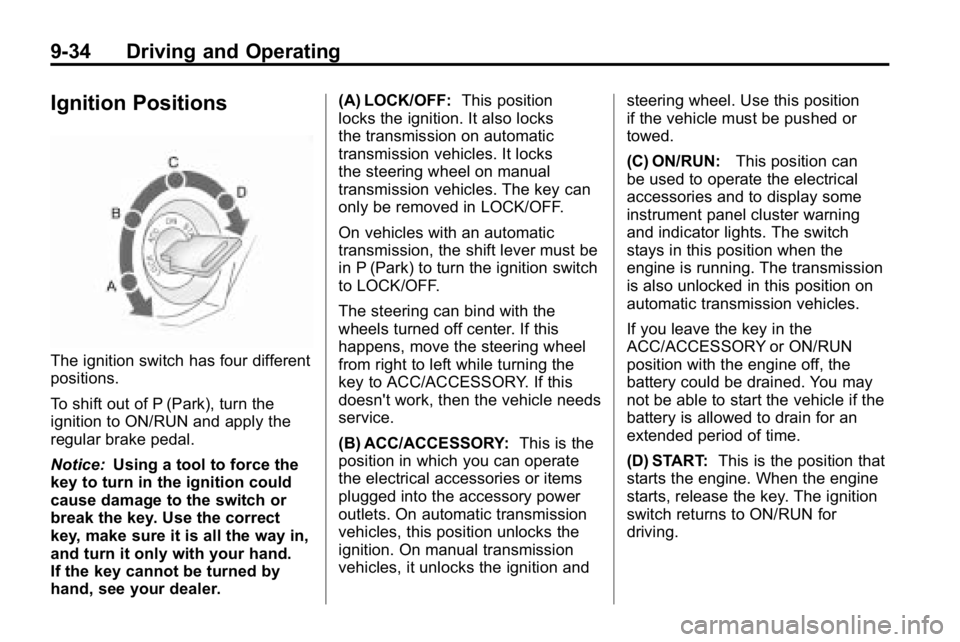
The ignition switch has four different
positions.
To shift out of P (Park), turn the
ignition to ON/RUN and apply the
regular brake pedal.
Notice:Using a tool to force the
key to turn in the ignition could
cause damage to the switch or
break the key. Use the correct
key, make sure it is all the way in,
and turn it only with your hand.
If the key cannot be turned by
hand, see your dealer. (A) LOCK/OFF:
This position
locks the ignition. It also locks
the transmission on automatic
transmission vehicles. It locks
the steering wheel on manual
transmission vehicles. The key can
only be removed in LOCK/OFF.
On vehicles with an automatic
transmission, the shift lever must be
in P (Park) to turn the ignition switch
to LOCK/OFF.
The steering can bind with the
wheels turned off center. If this
happens, move the steering wheel
from right to left while turning the
key to ACC/ACCESSORY. If this
doesn't work, then the vehicle needs
service.
(B) ACC/ACCESSORY: This is the
position in which you can operate
the electrical accessories or items
plugged into the accessory power
outlets. On automatic transmission
vehicles, this position unlocks the
ignition. On manual transmission
vehicles, it unlocks the ignition and steering wheel. Use this position
if the vehicle must be pushed or
towed.
(C) ON/RUN:
This position can
be used to operate the electrical
accessories and to display some
instrument panel cluster warning
and indicator lights. The switch
stays in this position when the
engine is running. The transmission
is also unlocked in this position on
automatic transmission vehicles.
If you leave the key in the
ACC/ACCESSORY or ON/RUN
position with the engine off, the
battery could be drained. You may
not be able to start the vehicle if the
battery is allowed to drain for an
extended period of time.
(D) START: This is the position that
starts the engine. When the engine
starts, release the key. The ignition
switch returns to ON/RUN for
driving.