ignition HUMMER H3 2010 Workshop Manual
[x] Cancel search | Manufacturer: HUMMER, Model Year: 2010, Model line: H3, Model: HUMMER H3 2010Pages: 410, PDF Size: 2.24 MB
Page 237 of 410
Driving and Operating 9-53
Examples of these conditions
include hard acceleration in a turn,
an abrupt upshift or downshift of the
transmission or driving on rough
roads.
If cruise control is being used when
TCS begins to limit wheel spin,
the cruise control automatically
disengages. The cruise control
can be re-engaged when road
conditions allow. SeeCruise Control
on page 9‑57for more information.
TRACTION FAILED appears on the
Driver information Center (DIC)
when a TCS or antilock brake
system problem has been detected
and the vehicle needs service.
When this message is on, the
system will not limit wheel spin.
Adjust your driving accordingly.
See Driver Information Center (DIC)
on page 5‑18for more information.
It is recommended to leave the
system on for normal driving
conditions, but it may be necessary
to turn the system off if the vehicle
is stuck in sand, mud, ice, or snow, and it is necessary to
“rock”the
vehicle to attempt to free it. See If
the Vehicle is Stuck
on page 9‑26for more information.
To turn the system off, press and
release the TCS/StabiliTrak button.
When TCS has been turned off, this
light comes on steady and TRAC
OFF appears on the DIC. This light
flashes when TCS is active.
Press and release the
TCS/StabiliTrak button again to
turn the system back on. The TRAC
OFF message then goes off. TCS automatically comes on
whenever the vehicle is started and
resets itself at each ignition cycle.
Adding non‐dealer/non‐retailer
accessories can affect the vehicle's
performance. See
Accessories and
Modifications on page 10‑3.
StabiliTrak System
The vehicle has a vehicle stability
enhancement system called
StabiliTrak. It is an advanced
computer controlled system that
assists the driver with directional
control of the vehicle in difficult
driving conditions.
StabiliTrak activates when the
computer senses a difference
between the intended path and the
direction the vehicle is actually
traveling. StabiliTrak selectively
applies braking pressure at any
one of the vehicle's brakes to assist
the driver with keeping the vehicle
on the intended path.
Page 238 of 410
9-54 Driving and Operating
When the vehicle is started and
begins to move, the system
performs several diagnostic checks
to insure there are no problems.
The system may be heard or felt
while it is working. This is normal
and does not mean there is a
problem with the vehicle.
If cruise control is being used when
StabiliTrak activates, the cruise
control automatically disengages.
The cruise control can be
re-engaged when road conditions
allow. SeeCruise Control
on
page 9‑57.
If there is a problem detected with
StabiliTrak, a SERVICE STAB SYS
message displays on the Driver
Information Center (DIC). See
Driver Information Center (DIC)
on
page 5‑18for more information.
When this message is displayed,
the system is not working. Adjust
your driving accordingly. StabiliTrak comes on automatically
whenever the vehicle is started and
resets itself at each ignition cycle.
However, when the transfer case is
placed in Four‐Wheel‐Low Lock
mode, StabiliTrak is automatically
disabled. See
Four-Wheel Drive
on
page 9‑46for more information.
It is recommended to leave the
system on for normal driving
conditions, but it may be necessary
to turn the system off if the vehicle
is stuck in sand, mud, ice, or snow,
and it is necessary to “rock”the
vehicle to attempt to free it. See If
the Vehicle is Stuck
on page 9‑26.
This light comes on steady when
TCS has been turned off. This light
flashes when StabiliTrak is active. To Turn off TCS and StabiliTrak,
press and hold the TCS/StabiliTrak
button until STAB SYS OFF
displays on the DIC. Press and
release the TCS/StabiliTrak button
again to turn StabiliTrak back on.
Locking Rear Axle
For vehicles with this feature,
additional traction can be obtained
from the rear wheels when traveling
in off-road situations such as mud,
snow, sand, steep hills and uneven
terrain.
The button used to turn this
feature on or off is located on the
instrument panel.
Page 244 of 410
9-60 Driving and Operating
Ending Cruise Control
To turn off the cruise control, do
one of the following:
.Step lightly on the brake pedal.
.Move the cruise control switch
to
9.
.Lightly tap or press the clutch,
if the vehicle has a manual
transmission.
Erasing Speed Memory
The cruise control set speed
memory is erased, when the cruise
control or the ignition is turned off.
Object Detection
Systems
Rear Vision
Camera (RVC)
Vehicles with the rear vision camera
system are designed to help the
driver while the vehicle is backing
up. The area behind the vehicle is
displayed on the screen in the
inside rear view mirror. Read this
entire section before using the
camera system.
When the key is in the ON/RUN
position and the driver shifts the
vehicle into R (Reverse), the video
image appears from inside the rear
view mirror. Once the vehicle is
shifted out of R (Reverse), the
image disappears. The display may have a guideline
overlay that can help the driver align
the vehicle when backing into a
parking spot.
Turning the Rear Vision Camera
System On or Off
To turn off the rear vision camera
system, press and hold
z, located
on the inside rearview mirror, until
the left indicator light turns off. The
rear camera vision display is now
disabled.
To turn the rear vision camera
system on again, press and
hold
zuntil the left indicator light
illuminates. The rear vision camera
system display is now enabled and
the display will appear in the mirror
normally.
Page 267 of 410
Vehicle Care 10-1
Vehicle Care
General Information
General Information . . . . . . . . . . 10-2
California Proposition65 Warning . . . . . . . . . . . . . . . . . 10-2
California Perchlorate Materials Requirements . . . . 10-3
Accessories and Modifications . . . . . . . . . . . . . . . 10-3
Vehicle Checks
Doing Your OwnService Work . . . . . . . . . . . . . . . 10-4
Hood . . . . . . . . . . . . . . . . . . . . . . . . 10-5
Engine Compartment Overview . . . . . . . . . . . . . . . . . . . 10-6
Engine Oil . . . . . . . . . . . . . . . . . . . 10-9
Engine Oil Life System . . . . . 10-11
Automatic Transmission Fluid . . . . . . . . . . . . . . . . . . . . . . 10-12
Manual Transmission Fluid . . . . . . . . . . . . . . . . . . . . . . 10-15 Hydraulic Clutch . . . . . . . . . . . . 10-16
Engine Air Cleaner/Filter . . . . 10-17
Cooling System . . . . . . . . . . . . 10-18
Engine Coolant . . . . . . . . . . . . . 10-19
Engine Overheating . . . . . . . . 10-22
Engine Fan . . . . . . . . . . . . . . . . . 10-24
Power Steering Fluid . . . . . . . 10-24
Washer Fluid . . . . . . . . . . . . . . . 10-25
Brakes . . . . . . . . . . . . . . . . . . . . . 10-26
Brake Fluid . . . . . . . . . . . . . . . . . 10-27
Battery . . . . . . . . . . . . . . . . . . . . . 10-28
Four-Wheel Drive . . . . . . . . . . . 10-29
Front Axle . . . . . . . . . . . . . . . . . . 10-29
Rear Axle . . . . . . . . . . . . . . . . . . 10-29
Starter Switch Check . . . . . . . 10-30
Automatic Transmission Shift
Lock Control System
Check . . . . . . . . . . . . . . . . . . . . . 10-30
Ignition Transmission Lock Check . . . . . . . . . . . . . . . . . . . . . 10-31
Park Brake and P (Park) Mechanism Check . . . . . . . . 10-31
Wiper Blade Replacement . . . . . . . . . . . . . . 10-32
Headlamp Aiming
Headlamp Aiming . . . . . . . . . . 10-33
Bulb Replacement
Bulb Replacement . . . . . . . . . . 10-35
Halogen Bulbs . . . . . . . . . . . . . . 10-35
Headlamps . . . . . . . . . . . . . . . . . 10-35
Taillamps, Turn Signal,Stoplamps, and Back-Up
Lamps (H3) . . . . . . . . . . . . . . . 10-35
Taillamps, Turn Signal, Stoplamps, and Back-Up
Lamps (H3T) . . . . . . . . . . . . . . 10-36
License Plate Lamp . . . . . . . . 10-37
Replacement Bulbs . . . . . . . . . 10-37
Electrical System
Electrical System Overload . . . . . . . . . . . . . . . . . . 10-38
Fuses and Circuit Breakers . . . . . . . . . . . . . . . . . . 10-39
Engine Compartment Fuse Block . . . . . . . . . . . . . . . . . . . . . 10-39
Page 278 of 410
10-12 Vehicle Care
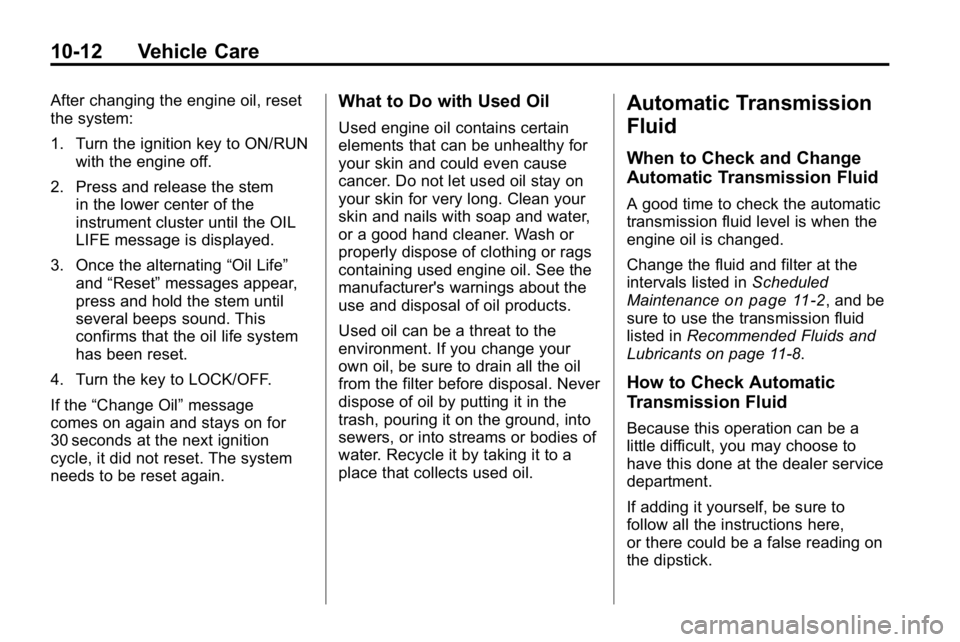
After changing the engine oil, reset
the system:
1. Turn the ignition key to ON/RUNwith the engine off.
2. Press and release the stem in the lower center of the
instrument cluster until the OIL
LIFE message is displayed.
3. Once the alternating “Oil Life”
and “Reset” messages appear,
press and hold the stem until
several beeps sound. This
confirms that the oil life system
has been reset.
4. Turn the key to LOCK/OFF.
If the “Change Oil” message
comes on again and stays on for
30 seconds at the next ignition
cycle, it did not reset. The system
needs to be reset again.What to Do with Used Oil
Used engine oil contains certain
elements that can be unhealthy for
your skin and could even cause
cancer. Do not let used oil stay on
your skin for very long. Clean your
skin and nails with soap and water,
or a good hand cleaner. Wash or
properly dispose of clothing or rags
containing used engine oil. See the
manufacturer's warnings about the
use and disposal of oil products.
Used oil can be a threat to the
environment. If you change your
own oil, be sure to drain all the oil
from the filter before disposal. Never
dispose of oil by putting it in the
trash, pouring it on the ground, into
sewers, or into streams or bodies of
water. Recycle it by taking it to a
place that collects used oil.
Automatic Transmission
Fluid
When to Check and Change
Automatic Transmission Fluid
A good time to check the automatic
transmission fluid level is when the
engine oil is changed.
Change the fluid and filter at the
intervals listed in Scheduled
Maintenance
on page 11‑2, and be
sure to use the transmission fluid
listed in Recommended Fluids and
Lubricants on page 11‑8.
How to Check Automatic
Transmission Fluid
Because this operation can be a
little difficult, you may choose to
have this done at the dealer service
department.
If adding it yourself, be sure to
follow all the instructions here,
or there could be a false reading on
the dipstick.
Page 297 of 410

Vehicle Care 10-31
3. With the engine off, turn theignition to ON/RUN, but do
not start the engine. Without
applying the regular brake, try
to move the shift lever out of
P (Park) with normal effort. If the
shift lever moves out of P (Park),
contact your dealer for service.
Ignition Transmission
Lock Check
While parked, and with the parking
brake set, try to turn the ignition to
LOCK/OFF in each shift lever
position.
.For automatic transmission
vehicles, the ignition should turn
to LOCK/OFF only when the
shift lever is in P (Park). The
ignition key should come out
only in LOCK/OFF.
.For manual transmission
vehicles, the ignition key should
come out only in LOCK/OFF.
Contact your dealer if service is
required.
Park Brake and P (Park)
Mechanism Check
{WARNING
When you are doing this check,
the vehicle could begin to move.
You or others could be injured
and property could be damaged.
Make sure there is room in front
of the vehicle in case it begins to
roll. Be ready to apply the regular
brake at once should the vehicle
begin to move. Park on a fairly steep hill, with the
vehicle facing downhill. Keeping
your foot on the regular brake, set
the parking brake.
.To check the parking brake's
holding ability: With the engine
running and the transmission in
N (Neutral), slowly remove foot
pressure from the regular brake
pedal. Do this until the vehicle is
held by the parking brake only.
.To check the P (Park)
mechanism's holding ability:
With the engine running, shift
to P (Park). Then release the
parking brake followed by the
regular brake.
Contact your dealer if service is
required.
Page 307 of 410

Vehicle Care 10-41
FuseUsage
1 Heated Seats
2 Grille Guard
3 Stop Lamp
(H3T Only)
4 Roof Rack Lamps
5 Battery Ignition
Switch
6 Front Wiper
7 Regulated Voltage
Control Power
8 Power Locks
9 Sunroof, Front
Washer Pump
10 Accessories (SPO) 11 Not Used
12 Transfer Case
Control Module
13 Radio
14 Body Control
Module Fuse
Usage
15 Rear Wiper Motor
(H3 Only)
16 Rear Wiper Pump
Switch (H3 Only)
17 Air Injection Reactor
(AIR) Pump Relay/
Transmission
Control Module
(TCM) (V8 Only)
18 Rear Vision Camera
19 Cluster
20 Rear Turn Lamp,
Hazard Lamp
21 Powertrain Control
Module 1
22 Mass Air Flow
Sensor, Canister
Vent Purge Solenoid
23 Injector/V8 Coil
24 Fog Lamp
25 Powertrain Control
Module B Fuse
Usage
26 Transmission
Control
Module (TCM)
27 Airbags
28 Not Used
29 Antilock Brake
System, StabiliTrak
®
30Rear Window
Defogger
31 Canister Vent
32 Regulated Voltage
Control Sensor
33 Ignition 1
34 Transmission
35 Cruise Control,
Miscellaneous
36 Horn
37 Driver Side Rear
Park Lamp
38 Amplifier
Page 309 of 410
Vehicle Care 10-43
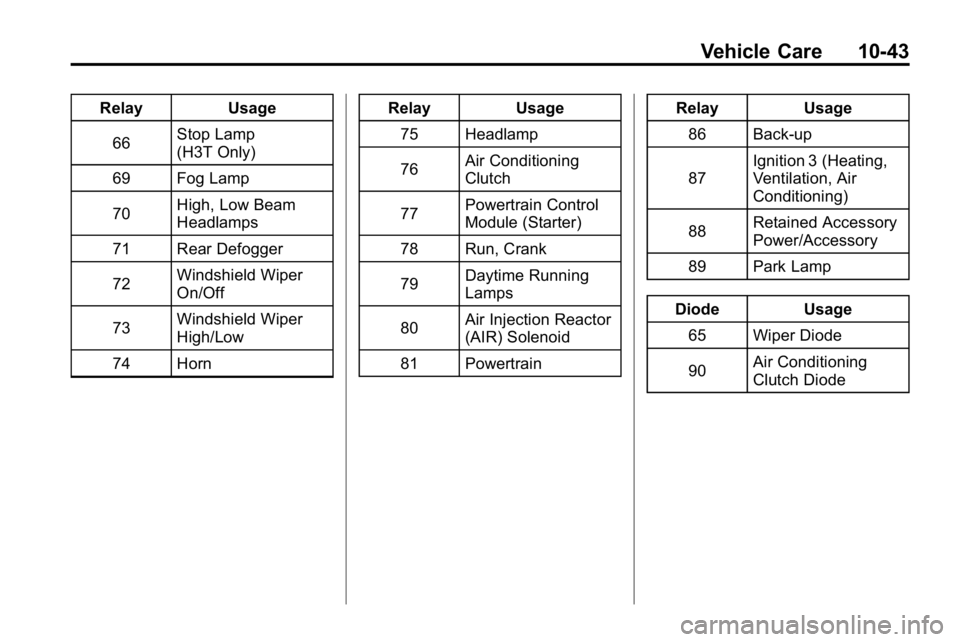
RelayUsage
66 Stop Lamp
(H3T Only)
69 Fog Lamp
70 High, Low Beam
Headlamps
71 Rear Defogger
72 Windshield Wiper
On/Off
73 Windshield Wiper
High/Low
74 Horn Relay
Usage
75 Headlamp
76 Air Conditioning
Clutch
77 Powertrain Control
Module (Starter)
78 Run, Crank
79 Daytime Running
Lamps
80 Air Injection Reactor
(AIR) Solenoid
81 Powertrain Relay
Usage
86 Back-up
87 Ignition 3 (Heating,
Ventilation, Air
Conditioning)
88 Retained Accessory
Power/Accessory
89 Park Lamp
Diode Usage
65 Wiper Diode
90 Air Conditioning
Clutch Diode
Page 320 of 410

10-54 Vehicle Care
If the warning light comes on,
stop as soon as possible and
inflate the tires to the recommended
pressure shown on the tire loading
information label. SeeVehicle Load
Limits on page 9‑27.
At the same time, a Driver
Information Center (DIC) message
is displayed on the DIC display
screen. The low tire pressure
warning light and the DIC warning
message come on at each ignition
cycle until the tires are inflated to
the correct inflation pressure. For
additional information and details
about the DIC operation and
displays see Tire Messages
on
page 5‑25.
The low tire pressure warning light
may come on in cool weather when
the vehicle is first started, and then
turn off as you start to drive. This
could be an early indicator that the
air pressure in the tire(s) are getting
low and need to be inflated to the
proper pressure. A Tire and Loading Information
label, attached to the vehicle, shows
the size of the vehicle's original
equipment tires and the correct
inflation pressure for the vehicle's
tires when they are cold. See
Vehicle Load Limits
on page 9‑27,
for an example of the Tire and
Loading Information label and its
location on the vehicle. Also see
Tire Pressure on page 10‑51.
The vehicle's TPMS can warn you
about a low tire pressure condition
but it does not replace normal tire
maintenance. See Tire Inspection
on page 10‑57,Tire Rotationon
page 10‑57and Tires on
page 10‑44.
Notice: Liquid tire sealants could
damage the Tire Pressure Monitor
System (TPMS) sensors. Sensor
damage caused by using a tire
sealant is not covered by your
warranty. Do not use liquid tire
sealants.
TPMS Malfunction Light and
Message
The TPMS will not function properly
if one or more of the TPMS sensors
are missing or inoperable. When the
system detects a malfunction, the
low tire warning light flashes for
about one minute and then stays on
for the remainder of the ignition
cycle. A DIC warning message is
also displayed. The low tire warning
light and DIC warning message
come on at each ignition cycle until
the problem is corrected. Some of
the conditions that can cause the
malfunction light and DIC message
to come on are:
.One of the road tires has been
replaced with the spare tire.
The spare tire does not have
a TPMS sensor. The TPMS
malfunction light and DIC
message should go off once you
re‐install the road tire containing
the TPMS sensor.
Page 322 of 410

10-56 Vehicle Care
You have one minute to match
the first tire/wheel position, and
five minutes overall, to match all
four tire/wheel positions. If it takes
longer than one minute, to match
the first tire and wheel, or more than
five minutes to match all four tire
and wheel positions, the matching
process stops and you need to
start over.
The TPMS sensor matching
procedure is outlined below:
1. Set the parking brake.
2. Turn the ignition switch toON/RUN with the engine off.
3. Turn the exterior lamp switch from AUTO to OFF four times
within three seconds.
A double horn chirp will
sound and the TPMS low tire
warning light starts flashing.
The double horn chirp and
flashing TPMS warning light
indicates the TPMS matching
process has started. The TPMS warning light should continue
flashing throughout the matching
procedure. The LOW TIRE
message displays on the Driver
Information Center (DIC).
4. Start with the driver side front tire.
5. Remove the valve cap from the valve cap stem. Activate the
TPMS sensor by increasing or
decreasing the tire's air pressure
for 10 seconds, then stop and
listen for a single horn chirp. The
single horn chirp should sound
within 15 seconds, confirming
that the sensor identification
code has been matched to this
tire and wheel position. If you
do not hear the confirming
single horn chirp, turn the
ignition switch to LOCK and start
over beginning with Step 2.
6. Proceed to the passenger side front tire, and repeat the
procedure in Step 5. 7. Proceed to the passenger side
rear tire, and repeat the
procedure in Step 5.
8. Proceed to the driver side rear tire, and repeat the procedure in
Step 5.
9. After hearing the confirming horn chirp for the driver side rear tire,
check to see if the TPMS low tire
warning light and the DIC LOW
TIRE messages have turned off.
If yes, the TPMS sensors have
been relearned. Turn the ignition
switch to LOCK/OFF.
If the low tire warning light and
the SERV TPM message on the
DIC are on after completing
Step 5 for the driver side rear
tire, the sensor relearn process
has not been successful. Turn
the ignition switch to LOCK/OFF
and repeat the matching process
beginning with Step 2.