radio HUMMER H3 2010 Owners Manual
[x] Cancel search | Manufacturer: HUMMER, Model Year: 2010, Model line: H3, Model: HUMMER H3 2010Pages: 410, PDF Size: 2.24 MB
Page 1 of 410

2010 HUMMER H3/H3T Owner ManualM
In Brief. . . . . . . . . . . . . . . . . . . . . . . . 1-1
Instrument Panel . . . . . . . . . . . . . . 1-2
Initial Drive Information . . . . . . . . 1-3
Vehicle Features . . . . . . . . . . . . . 1-13
Performance and Maintenance . . . . . . . . . . . . . . . . 1-16
Keys, Doors and Windows . . . 2-1
Keys and Locks . . . . . . . . . . . . . . . 2-2
Doors . . . . . . . . . . . . . . . . . . . . . . . . . . 2-7
Vehicle Security . . . . . . . . . . . . . . . . 2-9
Exterior Mirrors . . . . . . . . . . . . . . . 2-13
Interior Mirrors . . . . . . . . . . . . . . . . 2-14
Windows . . . . . . . . . . . . . . . . . . . . . 2-15
Roof . . . . . . . . . . . . . . . . . . . . . . . . . . 2-17
Seats and Restraints . . . . . . . . . 3-1
Head Restraints . . . . . . . . . . . . . . . 3-2
Front Seats . . . . . . . . . . . . . . . . . . . . 3-3
Rear Seats . . . . . . . . . . . . . . . . . . . . 3-7
Safety Belts . . . . . . . . . . . . . . . . . . 3-10
Airbag System . . . . . . . . . . . . . . . . 3-27
Child Restraints . . . . . . . . . . . . . . 3-42 Storage
. . . . . . . . . . . . . . . . . . . . . . . 4-1
Storage Compartments . . . . . . . . 4-1
Additional Storage Features . . . 4-2
Roof Rack System . . . . . . . . . . . . . 4-4
Instruments and Controls . . . . 5-1
Controls . . . . . . . . . . . . . . . . . . . . . . . 5-2
Warning Lights, Gauges, and
Indicators . . . . . . . . . . . . . . . . . . . . 5-6
Information Displays . . . . . . . . . . 5-18
Vehicle Messages . . . . . . . . . . . . 5-21
Universal Remote System . . . . 5-26
Lighting . . . . . . . . . . . . . . . . . . . . . . . 6-1
Exterior Lighting . . . . . . . . . . . . . . . 6-1
Interior Lighting . . . . . . . . . . . . . . . . 6-7
Lighting Features . . . . . . . . . . . . . . 6-8
Infotainment System . . . . . . . . . 7-1
Introduction . . . . . . . . . . . . . . . . . . . . 7-1
Radio . . . . . . . . . . . . . . . . . . . . . . . . . . 7-5
Audio Players . . . . . . . . . . . . . . . . 7-10
Phone . . . . . . . . . . . . . . . . . . . . . . . . 7-15
Climate Controls . . . . . . . . . . . . . 8-1
Climate Control Systems . . . . . . 8-1
Air Vents . . . . . . . . . . . . . . . . . . . . . . . 8-4 Driving and Operating
. . . . . . . . 9-1
Driving Information . . . . . . . . . . . . . 9-2
Starting and Operating . . . . . . . 9-33
Engine Exhaust . . . . . . . . . . . . . . 9-40
Automatic Transmission . . . . . . 9-41
Manual Transmission . . . . . . . . . 9-44
Drive Systems . . . . . . . . . . . . . . . . 9-46
Brakes . . . . . . . . . . . . . . . . . . . . . . . 9-50
Ride Control Systems . . . . . . . . 9-52
Cruise Control . . . . . . . . . . . . . . . . 9-57
Object Detection Systems . . . . 9-60
Fuel . . . . . . . . . . . . . . . . . . . . . . . . . . 9-64
Towing . . . . . . . . . . . . . . . . . . . . . . . 9-70
Conversions and Add-Ons . . . 9-81
Vehicle Care . . . . . . . . . . . . . . . . . 10-1
General Information . . . . . . . . . . 10-2
Vehicle Checks . . . . . . . . . . . . . . . 10-4
Headlamp Aiming . . . . . . . . . . . 10-33
Bulb Replacement . . . . . . . . . . 10-35
Electrical System . . . . . . . . . . . . 10-38
Wheels and Tires . . . . . . . . . . . 10-44
Jump Starting . . . . . . . . . . . . . . . 10-86
Towing . . . . . . . . . . . . . . . . . . . . . . 10-90
Appearance Care . . . . . . . . . . . 10-92
Page 5 of 410
In Brief 1-1
In Brief
Instrument Panel
Instrument Panel . . . . . . . . . . . . . . 1-2
Initial Drive Information
Initial Drive Information . . . . . . . . 1-3
Remote Keyless Entry (RKE)System . . . . . . . . . . . . . . . . . . . . . . 1-4
Door Locks . . . . . . . . . . . . . . . . . . . 1-4
Tailgate . . . . . . . . . . . . . . . . . . . . . . . 1-5
Windows . . . . . . . . . . . . . . . . . . . . . . 1-6
Seat Adjustment . . . . . . . . . . . . . . 1-7
Heated Seats . . . . . . . . . . . . . . . . . 1-8
Head Restraint Adjustment . . . . 1-8
Safety Belt . . . . . . . . . . . . . . . . . . . . 1-8
Sensing System for Passenger Airbag . . . . . . . . . . . . . . . . . . . . . . . 1-9 Mirror Adjustment . . . . . . . . . . . . . 1-9
Steering Wheel
Adjustment . . . . . . . . . . . . . . . . . 1-10
Interior Lighting . . . . . . . . . . . . . . 1-10
Exterior Lighting . . . . . . . . . . . . . 1-11
Washer and Wiper Systems . . . . . . . . . . . . . . . . . . . . 1-11
Climate Controls . . . . . . . . . . . . . 1-12
Transmission . . . . . . . . . . . . . . . . 1-12
Vehicle Features
Radio(s) . . . . . . . . . . . . . . . . . . . . . 1-13
Satellite Radio . . . . . . . . . . . . . . . 1-14
Bluetooth
®. . . . . . . . . . . . . . . . . . . 1-15
Navigation System . . . . . . . . . . . 1-15
Cruise Control . . . . . . . . . . . . . . . 1-15
Storage Compartments . . . . . . 1-15
Power Outlets . . . . . . . . . . . . . . . 1-16
Sunroof . . . . . . . . . . . . . . . . . . . . . . 1-16
Performance and Maintenance
Traction Control System (TCS) . . . . . . . . . . . . . . 1-16
StabiliTrak
®. . . . . . . . . . . . . . . . . . 1-17
Tire Pressure Monitor . . . . . . . . 1-17
Engine Oil Life System . . . . . . 1-18
Fuel E85 (85% Ethanol) . . . . . 1-18
Driving for Better Fuel Economy . . . . . . . . . . . . . . . . . . . 1-18
Roadside Service . . . . . . . . . . . . 1-19
OnStar
®. . . . . . . . . . . . . . . . . . . . . 1-19
Page 7 of 410

In Brief 1-3
A.Air Vents on page 8‑4.
B. Turn and Lane-Change Signals
on page 6‑5.Windshield
Wiper/Washeron page 5‑2.
Cruise Control on page 9‑57.
C. Horn on page 5‑2.
D. Instrument Cluster
on
page 5‑7.
E. Four-Wheel Drive on page 9‑46.
F. Hazard Warning Flashers
on
page 6‑5.
G. Passenger Airbag Status
Indicator on page 5‑11.
H. Locking Rear Axle
on
page 9‑54. Locking Front Axle
(If Equipped) or Traction Control
System (TCS) on page 9‑52.
I. Exterior Lamp Controls
on
page 6‑1. Dome Lamp
Override. See Dome Lampson
page 6‑7. Instrument Panel
Illumination Controlon
page 6‑7. Fog Lampson
page 6‑6. J.
Parking Brake on page 9‑51.
K. AM-FM Radio on page 7‑5.
L. Climate Control Systems
on
page 8‑1.
M. Rear Window Wiper/Washer
on
page 5‑3(If Equipped).
N. Traction Control System (TCS)
on page 9‑52(For vehicles with
Locking Front Axle).
O. Off-Road Lamps on page 6‑6.
P. Shift Lever. See Automatic
Transmission
on page 9‑41or Manual Transmissionon
page 9‑44.
Q. Power Outlets on page 5‑5.
R. Glove Box on page 4‑1.
Initial Drive
Information
This section provides a brief
overview about some of the
important features that may or may
not be on your specific vehicle.
For more detailed information, refer
to each of the features which can be
found later in this owner manual.
Page 17 of 410
In Brief 1-13
4m Q(Four-Wheel-High Lock):
When extra traction is needed in
most off-road situations.
4
n Q(Four-Wheel-Low Lock):
Delivers extra torque to all
four wheels. Used for extreme
off-road conditions. See Four-Wheel
Drive on page 9‑46.
Vehicle Features
Radio(s)
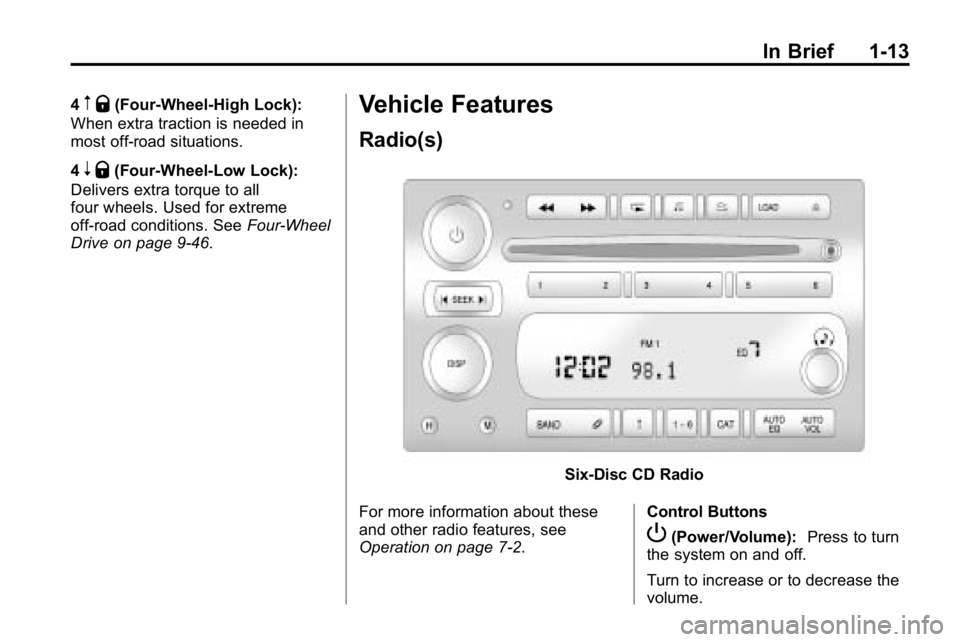
Six-Disc CD Radio
For more information about these
and other radio features, see
Operation on page 7‑2. Control Buttons
P(Power/Volume):
Press to turn
the system on and off.
Turn to increase or to decrease the
volume.
Page 18 of 410
1-14 In Brief
BAND:Press to select FM1, FM2,
AM, XM1, if equipped, or XM2,
if equipped.
DISP: Turn to select a radio station.
1-6 (Preset Pushbuttons): Press
to select preset stations.
tSEEKu: Press and release to
go to the previous or next station
and stay there. Press and hold to
scan stations or preset stations.
Setting the Clock
The clock can be set with the
ignition on or off.
To set the clock:
1. Press and hold H until the correct hour and AM or PM
displays.
2. Press and hold M until the correct minute displays.
Press DISP (Display) to display the
time while the ignition is turned off. Setting Preset Stations
Up to 30 stations (six FM1, six FM2,
and six AM, six XM1, if equipped,
and six XM2, if equipped) can be
programmed.
To program presets:
1. Turn the radio on.
2. Press BAND to select FM1,
FM2, AM, or XM1 or XM2.
3. Tune in the desired station.
4. Press and hold one of the six numbered pushbuttons
until the radio beeps once.
5. Repeat the steps for each pushbutton.
Satellite Radio
Vehicles with an XM™ Satellite
Radio tuner and a valid XM Satellite
Radio subscription can receive XM
programming.
XM Satellite Radio Service
XM is a satellite radio service
that is based in the 48 contiguous
United States and 10 Canadian
provinces. XM Satellite Radio
has a wide variety of programming
and commercial-free music,
coast-to-coast, and in digital-quality
sound. A fee is required to receive
the XM service.
For more information refer to:
.www.xmradio.com or call
1-800-929-2100 (U.S.).
.www.xmradio.ca or call
1-877-438-9677 (Canada).
See Satellite Radio on page 7‑6.
Page 25 of 410
In Brief 1-21
The vehicle must have a working
electrical system, including
adequate battery power, for the
OnStar equipment to operate. There
are other problems OnStar cannot
control that may prevent OnStar
from providing OnStar service at
any particular time or place. Some
examples are damage to important
parts of the vehicle in a crash, hills,
tall buildings, tunnels, weather or
wireless phone network congestion.Additional OnStar Controls
The vehicle may have a button,
located on the driver side of the
instrument panel near the headlamp
controls, that can be used to interact
with OnStar.
Use this button to dial numbers into
voicemail systems or to dial phone
number extensions. See the OnStar
Owner's Guide for more information.
Your Responsibility
Increase the volume of the radio if
the OnStar advisor cannot be heard.
If the light next to the OnStar
buttons is red, the system may
not be functioning properly.
Press
Qand request a vehicle
diagnostic. If the light appears clear
(no light is appearing), your OnStar
subscription has expired and all
services have been deactivated.
Press
Qto confirm that the OnStar
equipment is active.
Page 28 of 410
2-2 Keys, Doors and Windows
Keys and Locks
Keys
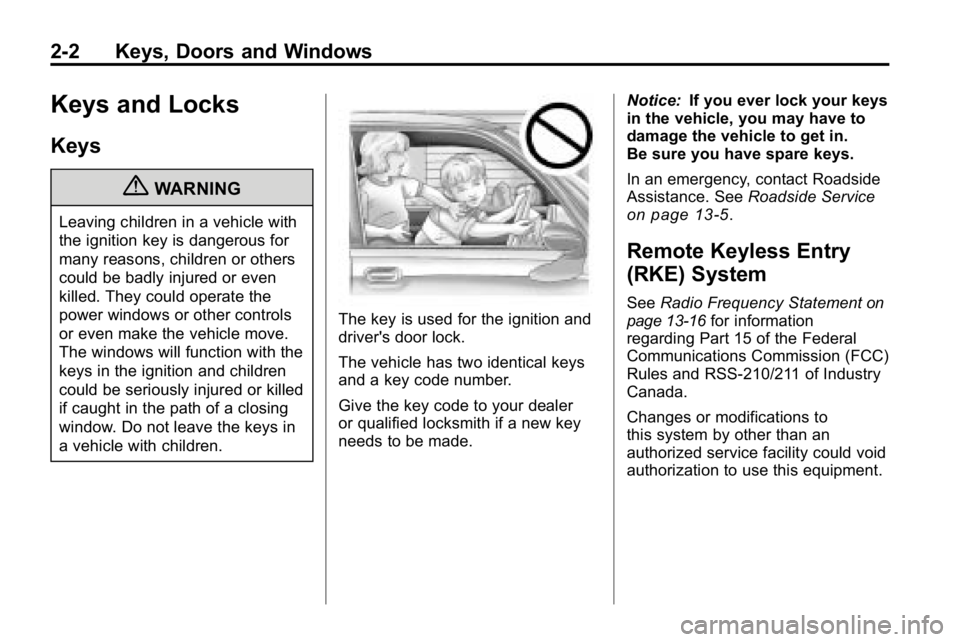
{WARNING
Leaving children in a vehicle with
the ignition key is dangerous for
many reasons, children or others
could be badly injured or even
killed. They could operate the
power windows or other controls
or even make the vehicle move.
The windows will function with the
keys in the ignition and children
could be seriously injured or killed
if caught in the path of a closing
window. Do not leave the keys in
a vehicle with children.
The key is used for the ignition and
driver's door lock.
The vehicle has two identical keys
and a key code number.
Give the key code to your dealer
or qualified locksmith if a new key
needs to be made.Notice:
If you ever lock your keys
in the vehicle, you may have to
damage the vehicle to get in.
Be sure you have spare keys.
In an emergency, contact Roadside
Assistance. See Roadside Service
on page 13‑5.
Remote Keyless Entry
(RKE) System
SeeRadio Frequency Statementon
page 13‑16for information
regarding Part 15 of the Federal
Communications Commission (FCC)
Rules and RSS-210/211 of Industry
Canada.
Changes or modifications to
this system by other than an
authorized service facility could void
authorization to use this equipment.
Page 36 of 410
2-10 Keys, Doors and Windows
To avoid setting off the alarm by
accident:
.Lock the vehicle with the manual
door lock lever, the power door
lock switch, or the key, after the
doors are closed.
.Unlock the doors by pressing
the unlock button on the RKE
transmitter or by contacting
OnStar. Unlocking a door any
other way activates the alarm.
Press unlock on the RKE
transmitter, start the vehicle with
the correct key, or have OnStar
unlock the doors to turn the alarm
off. The alarm does not stop if a
door is unlocked any other way.
Testing the Alarm
To test the alarm:
1. From inside the vehicle, lock the doors with the RKE transmitter.
2. Unlock the door with the manual door lock and open the door.
The pre-alarm should sound
followed by the full alarm about
10 seconds later.
3. Press the unlock button on the RKE transmitter or start the
engine to turn the alarm off.
If the alarm does not sound but the
lights flash, check to see if the horn
works. The horn fuse could be
blown. To replace the fuse, see
Fuses and Circuit Breakers
on
page 10‑39.
If the alarm does not sound or the
front turn signal lamps do not flash,
see your dealer for service.
Immobilizer
See Radio Frequency Statementon
page 13‑16for information
regarding Part 15 of the Federal
Communications Commission (FCC)
Rules and RSS-210/211 of Industry
Canada.
Immobilizer
Operation (U.S.)
Passlock®is a passive
theft-deterrent system that enables
fuel if the vehicle is started with a
valid key. If an incorrect key is used
or the ignition lock cylinder is
tampered with, the fuel system is
disabled and the vehicle does not
start.
The security light turns off
approximately five seconds after
the engine is started. See Security
Light on page 5‑17.
Page 118 of 410

5-4 Instruments and Controls
Compass Calibration
The compass may need to be
calibrated if CAL is not displayed
and the compass requires
calibration. Press and hold
Ountil
CAL displays in the compass
window, then release the button.
The compass is now in
calibration mode.
.Drive the vehicle in circles
at less than 8 km/h (5 mph)
until CAL is no longer displayed
in the compass window. Then
continue to drive to make sure
all eight directions are available.
.Drive the vehicle under normal
operating conditions.
Compass Variance
The mirror is set to zone eight.
If you do not live in zone eight or
drive out of the area, the compass
variance needs to be changed to
the appropriate zone. To adjust for compass variance:
1. Find your current location and
variance zone number on the
following zone map.
2. Press and holdOfor
six seconds until ZONE
displays. Release the button.
The compass is now in
zone mode. 3. Keep pressing
Ountil the
desired zone number displays.
Release the button. After
four seconds, the new zone
number locks in and the
compass display returns.
Clock
The clock can be set with the
ignition on or off. Use the H and
M buttons located on the lower left
side of the radio.
To set the clock:
1. Press and hold H until the correct hour and AM or PM
displays.
2. Press and hold M until the correct minute displays.
Press DISP (Display) to display the
time while the ignition is turned off.
Page 126 of 410

5-12 Instruments and Controls
It should go out once the engine
starts. If it stays on, or comes on
while driving, there could be a
problem with the charging system.
A charging system message in the
Driver Information Center (DIC)
may also appear. SeeBattery
Voltage and Charging Messages
on
page 5‑21for more information.
This light could indicate that there
are problems with a generator drive
belt, or that there is an electrical
problem. Have it checked right
away. If the vehicle must be driven a
short distance with the light on, turn
off all the accessories, such as the
radio and air conditioner.
Malfunction
Indicator Lamp
A computer system called OBD II
(On-Board Diagnostics-Second
Generation) monitors operation of
the fuel, ignition, and emission
control systems. It ensures that emissions are at acceptable levels
for the life of the vehicle, helping to
produce a cleaner environment.
This light comes on when the
ignition is on, but the engine is not
running, as a check to show it is
working. If it does not, have the
vehicle serviced by your dealer.
If the check engine light comes on
and stays on, while the engine is
running, this indicates that there is
an OBD II problem and service is
required.
Malfunctions often are indicated by
the system before any problem is
apparent. Being aware of the light
can prevent more serious damage
to the vehicle. This system assists
the service technician in correctly
diagnosing any malfunction.Notice:
If the vehicle is
continually driven with this light
on, after a while, the emission
controls might not work as well,
the vehicle's fuel economy might
not be as good, and the engine
might not run as smoothly. This
could lead to costly repairs that
might not be covered by the
vehicle warranty.
Notice: Modifications made to the
engine, transmission, exhaust,
intake, or fuel system of the
vehicle or the replacement of
the original tires with other
than those of the same Tire
Performance Criteria (TPC) can
affect the vehicle's emission
controls and can cause this light
to come on. Modifications to
these systems could lead to
costly repairs not covered by
the vehicle warranty. This
could also result in a failure
to pass a required Emission
Inspection/Maintenance test.
See Accessories and
Modifications on page 10‑3.