radio HUMMER H3 2010 User Guide
[x] Cancel search | Manufacturer: HUMMER, Model Year: 2010, Model line: H3, Model: HUMMER H3 2010Pages: 410, PDF Size: 2.24 MB
Page 140 of 410
5-26 Instruments and Controls
Universal Remote
System
SeeRadio Frequency Statementon
page 13‑16for information
regarding Part 15 of the Federal
Communications Commission (FCC)
Rules and RSS-210/211 of Industry
and Science Canada.
The FCC Grant of Equipment
Authorization Certificate number is
CB2SAHL3.
The Canadian Registration ID
number is 2791021849A.
Universal Remote System
Programming
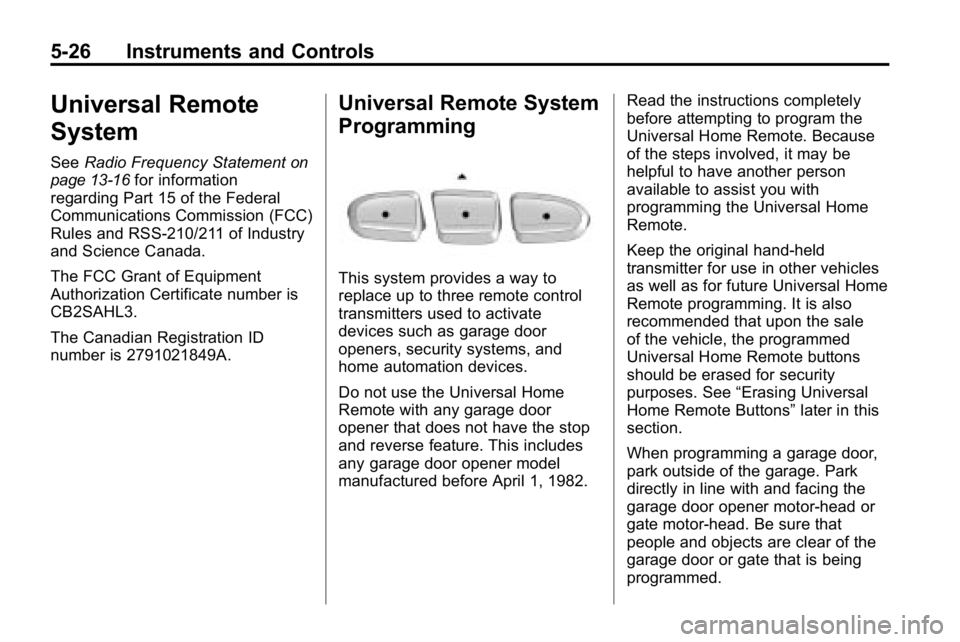
This system provides a way to
replace up to three remote control
transmitters used to activate
devices such as garage door
openers, security systems, and
home automation devices.
Do not use the Universal Home
Remote with any garage door
opener that does not have the stop
and reverse feature. This includes
any garage door opener model
manufactured before April 1, 1982. Read the instructions completely
before attempting to program the
Universal Home Remote. Because
of the steps involved, it may be
helpful to have another person
available to assist you with
programming the Universal Home
Remote.
Keep the original hand-held
transmitter for use in other vehicles
as well as for future Universal Home
Remote programming. It is also
recommended that upon the sale
of the vehicle, the programmed
Universal Home Remote buttons
should be erased for security
purposes. See
“Erasing Universal
Home Remote Buttons” later in this
section.
When programming a garage door,
park outside of the garage. Park
directly in line with and facing the
garage door opener motor-head or
gate motor-head. Be sure that
people and objects are clear of the
garage door or gate that is being
programmed.
Page 141 of 410
Instruments and Controls 5-27
It is recommended that a new
battery be installed in your
hand-held transmitter for quicker
and more accurate transmission of
the radio-frequency signal.
Programming the Universal
Home Remote System
For questions or help programming
the Universal Home Remote
System, call 1‐800‐355‐3515
or go to www.homelink.com.
Programming a garage door opener
involves time-sensitive actions, so
read the entire procedure before
starting. Otherwise, the device will
time out and the procedure will have
to be repeated.To program up to three devices:
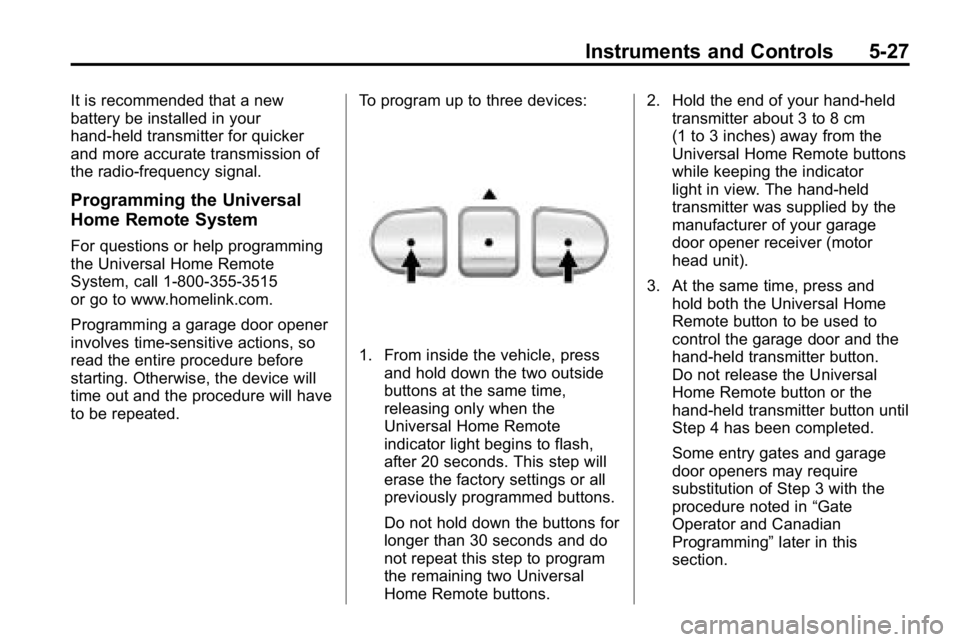
1. From inside the vehicle, press
and hold down the two outside
buttons at the same time,
releasing only when the
Universal Home Remote
indicator light begins to flash,
after 20 seconds. This step will
erase the factory settings or all
previously programmed buttons.
Do not hold down the buttons for
longer than 30 seconds and do
not repeat this step to program
the remaining two Universal
Home Remote buttons. 2. Hold the end of your hand-held
transmitter about 3 to 8 cm
(1 to 3 inches) away from the
Universal Home Remote buttons
while keeping the indicator
light in view. The hand-held
transmitter was supplied by the
manufacturer of your garage
door opener receiver (motor
head unit).
3. At the same time, press and hold both the Universal Home
Remote button to be used to
control the garage door and the
hand-held transmitter button.
Do not release the Universal
Home Remote button or the
hand-held transmitter button until
Step 4 has been completed.
Some entry gates and garage
door openers may require
substitution of Step 3 with the
procedure noted in “Gate
Operator and Canadian
Programming” later in this
section.
Page 143 of 410
Instruments and Controls 5-29
8. Immediately return to thevehicle. Firmly press and hold
the Universal Home Remote
button, selected in Step 3 to
control the garage door, for
two seconds, and then release
it. If the garage door does not
move, press and hold the
same button a second time for
two seconds, and then release
it. Again, if the door does not
move, press and hold the
same button a third time for
two seconds, and then release.
The Universal Home Remote
should now activate the
garage door.
To program the remaining
two Universal Home Remote
buttons, begin with Step 2 of
“Programming the Universal Home
Remote System.” Do not repeat
Step 1, as this will erase all
previous programming from the
Universal Home Remote buttons.Gate Operator and Canadian
Programming
If you have questions or need
help programming the Universal
Home Remote System, call
1-800-355-3515 or go to
www.homelink.com.
Canadian radio-frequency laws
require transmitter signals to time
out or quit after several seconds
of transmission. This may not be
long enough for Universal Home
Remote to pick up the signal during
programming. Similarly, some U.S.
gate operators are manufactured to
time out in the same manner. If you live in Canada, or you are
having difficulty programming a gate
operator or garage door opener by
using the
“Programming Universal
Home Remote” procedures,
regardless of where you live,
replace Step 3 under “Programming
Universal Home Remote” with the
following:
Continue to press and hold the
Universal Home Remote button
while you press and release
every two seconds (cycle) the
hand-held transmitter button until
the frequency signal has been
successfully accepted by the
Universal Home Remote. The
Universal Home Remote indicator
light will flash slowly at first and then
rapidly. Proceed with Step 4 under
“Programming Universal Home
Remote” to complete the training
procedure.
Page 148 of 410
6-4 Lighting
The DRL system comes on when
the following conditions are met:
.The ignition is on.
.The exterior lamps control is
in AUTO.
.The transmission is not in
P (Park), if the vehicle has an
automatic transmission.
.The light sensor determines it is
daytime.
When the DRL are on, no other
lamps are on. The instrument panel
will not be lit up either. For vehicles
first sold in Canada, if parking lamps
are manually turned on, DRL will
stay on.
When it begins to get dark, the
automatic headlamp system
changes from DRL to the
headlamps.
The regular headlamp system
should be turned on when needed.
To turn off the DRL, see Exterior
Lamp Controls
on page 6‑1. Vehicles first sold in Canada
cannot turn off DRL unless certain
conditions are met. See
Exterior
Lamp Controls on page 6‑1.
Automatic Headlamp
System
When it is dark enough outside, the
automatic headlamp system turns
on after the transmission has been
shifted from P (Park) to D (Drive).
The headlamps, taillamps,
sidemarker, parking lamps, roof
marker lamps, and the instrument
panel lights turn on at normal
brightness. The radio lights will
become dimmer when the
headlights are off compared to
when the headlights are on.
The vehicle has a light sensor
located on the top of the instrument
panel. Do not cover the sensor,
or the system will be on whenever
the ignition is on. The system can turn on the
headlamps when driving in a
parking garage, through a tunnel or
when there is overcast weather.
This is normal.
There is a delay in the transition
between the daytime and nighttime
operation of the Daytime Running
Lamps (DRL) and the automatic
headlamp system so that driving
under bridges or bright overhead
street lights does not affect the
system. The DRL and automatic
headlamp system will only be
affected when the light sensor
detects a change in lighting lasting
longer than the delay.
If the vehicle is started in a dark
garage, the automatic headlamp
system comes on immediately.
Once the vehicle leaves the garage,
it takes about one minute for the
automatic headlamp system to
change to DRL if it is light outside.
Page 151 of 410
Lighting 6-7
Notice:Turning on the off-road
lamps before removing the lamp
covers could damage the off-road
lamps and the covers. Always
remove the covers before turning
on the off-road lamps.
The off-road lamps remain on even
after the ignition is turned off. The
off-road lamp button must be
pressed to turn them off.Interior Lighting
Instrument Panel
Illumination Control
The instrument panel brightness
thumbwheel is next to the exterior
lamp control.
D (Instrument Panel
Brightness): Turn the thumbwheel
up or down to brighten or dim the
instrument panel lights and the radio
display. The instrument panel lights,
cluster, and radio display do not dim
to complete darkness. Turn the
thumbwheel all the way up to turn
the dome lamps on.
Dome Lamps
The dome lamps are located in the
front area of the vehicle. There is
also a dome lamp in the cargo area
of the H3 model only.
Turn the thumbwheel, located next
to the exterior lamps control, all
the way up to turn the dome and
footwell lamps on.
The dome lamp in the cargo area
automatically turns off when:
.The shift lever is shifted
out of P (Park) (automatic
transmissions).
.The parking brake is released
(manual transmissions).
Page 155 of 410
Infotainment System 7-1
Infotainment
System
Introduction
Introduction . . . . . . . . . . . . . . . . . . . 7-1
Theft-Deterrent Feature . . . . . . . 7-2
Operation . . . . . . . . . . . . . . . . . . . . . 7-2
Radio
AM-FM Radio . . . . . . . . . . . . . . . . . 7-5
Satellite Radio . . . . . . . . . . . . . . . . 7-6
Radio Reception . . . . . . . . . . . . . . 7-9
Fixed Mast Antenna . . . . . . . . . 7-10
Satellite Radio Antenna . . . . . . 7-10
Audio Players
CD Player . . . . . . . . . . . . . . . . . . . 7-10
Phone
Bluetooth . . . . . . . . . . . . . . . . . . . . 7-15
Introduction
Determine which radio the vehicle
has and read the following pages to
become familiar with its features.
{WARNING
Taking your eyes off the road
for extended periods could
cause a crash resulting in injury
or death to you or others. Do not
give extended attention to
entertainment tasks while driving.
This system provides access to
many audio and non‐audio listings.
To minimize taking your eyes off the
road while driving, do the following
while the vehicle is parked:
.Become familiar with the
operation and controls of the
audio system.
.Set up the tone, speaker
adjustments, and preset radio
stations. For more information, see
Defensive
Driving on page 9‑2.
Notice: Contact your dealer
before adding any equipment.
Adding audio or communication
equipment could interfere with
the operation of the vehicle's
engine, radio, or other systems,
and could damage them. Follow
federal rules covering mobile
radio and telephone equipment.
The vehicle has Retained
Accessory Power (RAP). With RAP,
the audio system can be played
even after the ignition is turned off.
See Retained Accessory Power
(RAP)
on page 9‑35for more
information.
For vehicles with a navigation radio
system, see the separate Navigation
System manual.
Page 156 of 410
7-2 Infotainment System
Theft-Deterrent Feature
THEFTLOCK®is designed to
discourage theft of the vehicle's
radio by learning a portion of the
Vehicle Identification Number (VIN).
The radio does not operate and
LOCKED displays if the radio is
stolen or moved to a different
vehicle.
When the ignition is in the off
position, a blinking red light on the
upper left side of the radio indicates
that THEFTLOCK
®is armed.
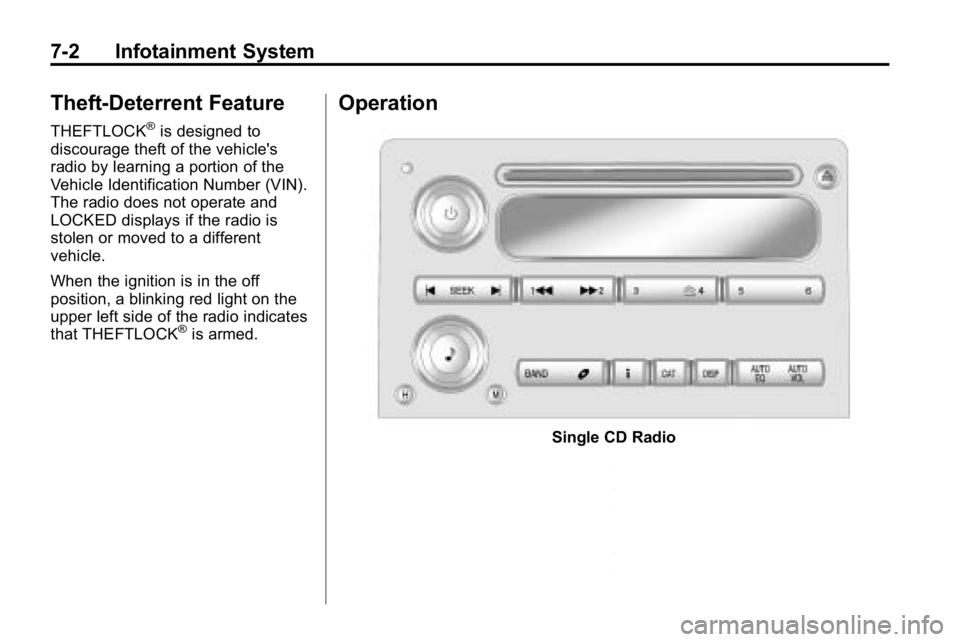
Operation
Single CD Radio
Page 157 of 410
Infotainment System 7-3
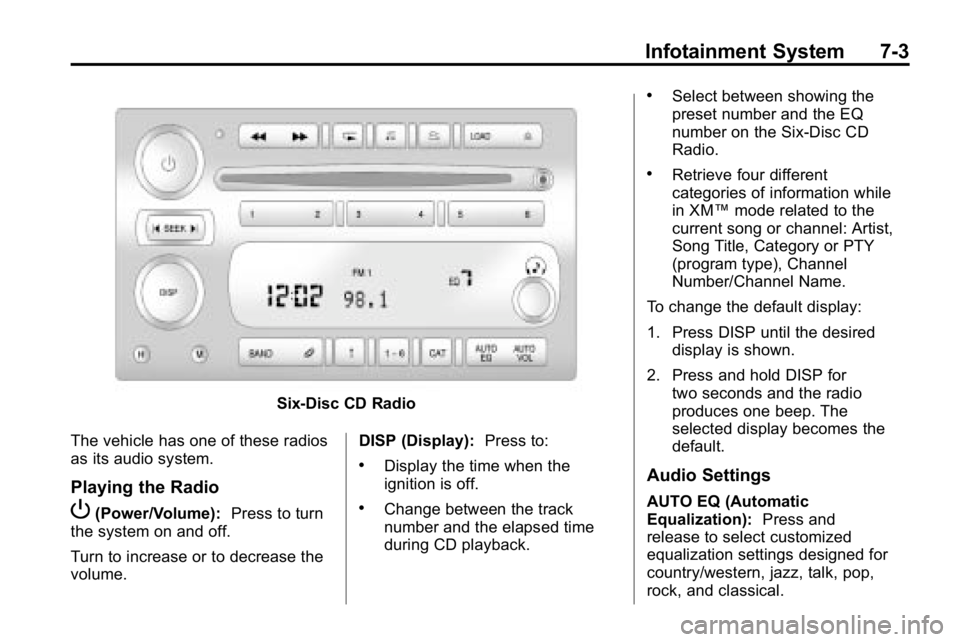
Six-Disc CD Radio
The vehicle has one of these radios
as its audio system.
Playing the Radio
P(Power/Volume): Press to turn
the system on and off.
Turn to increase or to decrease the
volume. DISP (Display):
Press to:
.Display the time when the
ignition is off.
.Change between the track
number and the elapsed time
during CD playback.
.Select between showing the
preset number and the EQ
number on the Six-Disc CD
Radio.
.Retrieve four different
categories of information while
in XM™mode related to the
current song or channel: Artist,
Song Title, Category or PTY
(program type), Channel
Number/Channel Name.
To change the default display:
1. Press DISP until the desired display is shown.
2. Press and hold DISP for two seconds and the radio
produces one beep. The
selected display becomes the
default.
Audio Settings
AUTO EQ (Automatic
Equalization): Press and
release to select customized
equalization settings designed for
country/western, jazz, talk, pop,
rock, and classical.
Page 158 of 410
7-4 Infotainment System
AUTO VOL (Automatic Volume):
This adjusts the radio volume to
compensate for road and wind
noise.
To set Automatic Volume:
1. Adjust the volume at the desiredlevel.
2. Press AUTO VOL to select LOW, MEDIUM, or HIGH. Each
higher setting allows for more
volume compensation at faster
vehicle speeds.
To turn automatic volume off,
press AUTO VOL until AVOL OFF
displays.
Tone and Speaker Controls
To adjust all tone and speaker
controls to the center setting, press
and hold
euntil CEN or ALL
CENTERED displays and the radio
beeps once. Adjusting the Tone (Bass/Treble)
To adjust Bass/Treble:
Press and release
euntil BASS or
TREB displays.
.Turneto increase or to
decrease the level.
.To set the Bass or Treble to
the center setting, press and
hold
euntil the radio
beeps once.
Adjusting the Speakers
(Balance/Fade)
To adjust the Balance:
Press and release
euntil BAL
displays.
.Turneto move the sound
toward the right or the left
speakers.
.To adjust the balance to the
center setting, press and
hold
euntil the radio
beeps once. To adjust the Fade:
Press and release
euntil FAD or
FADE displays
.Turneto move the sound
toward the front or the rear
speakers.
.To set the fade to the center
setting, press and hold
euntil
the radio beeps once.
Radio Messages
CAL ERR (Calibration Error):
Displays if the radio is no longer
configured properly for the vehicle.
The vehicle must be returned to
your dealer for service.
LOCKED: Displays when the
THEFTLOCK
®system has locked
up. The vehicle must be returned to
your dealer for service.
If any error occurs repeatedly or
cannot be corrected, contact your
dealer.
Page 159 of 410
Infotainment System 7-5
Radio
AM-FM Radio
Finding a Station
BAND:Press to select FM1, FM2,
AM, XM1, if equipped, or XM2,
if equipped.
Manual Tuning
Single CD Radio:
e(Tune): Turn to select a radio
station.
Six-Disc CD Radio:
DISP: Turn to select a radio station.
Automatic Tuning
1-6 (Preset Pushbuttons): Press
to select preset stations.
tSEEKu: Press and release to
go to the previous or next station
and stay there. The radio only stops
at stations with a strong signal.
Press and hold to scan stations or
preset stations. To scan stations:
1. Press and hold
torufor more
than two seconds. SC or SCAN
displays and the radio beeps
once. The radio goes to a
station, plays for a few seconds,
then goes to the next station.
2. Press
toruagain or one of
the pushbuttons to stop
scanning presets.
To scan preset stations:
1. Press and hold
torufor
more than four seconds. PSC or
PSCN displays and the radio
beeps twice. The radio goes
to a preset station, plays for a
few seconds, then goes to the
next preset station.
2. Press
toruagain or one of
the pushbuttons to stop
scanning presets. Setting Preset Stations
Up to 30 stations (six FM1, six FM2,
and six AM, six XM1, if equipped,
and six XM2, if equipped), and
equalization settings for each
station can be programmed on the
six numbered pushbuttons.
To program presets:
1. Turn the radio on.
2. Press BAND to select FM1,
FM2, AM, or XM1 or XM2.
3. Tune in the desired station.
4. Press AUTO EQ to select the equalization.
5. Press and hold one of the six numbered pushbuttons
until the radio beeps once.
6. Repeat the steps for each pushbutton.