ECO mode Hyundai Accent 2006 Owner's Guide
[x] Cancel search | Manufacturer: HYUNDAI, Model Year: 2006, Model line: Accent, Model: Hyundai Accent 2006Pages: 599, PDF Size: 17.59 MB
Page 175 of 599
2
DRIVING YOUR HYUNDAI
13
C090H01A-GAT NOTE:
o For smooth and safe operation, depress the brake pedal when shifting from "Neutral" positionor "Park" position to a forward or reverse gear.
o The brake pedal fully depressed in order to move the shift leverfrom the "P" (Park) position to any of the other positions.
o It is always possible to shift from "R", "N", "D", "2", "L" position to"P" position. The vehicle mustbe fully stopped to avoid transaxle damage.
C090I04A-AAT
CAUTION:
o Shift into "R" and "P" position only when the vehicle has com- pletely stopped.
o Do not accelerate the engine in reverse or any of the forwardpositions with the brakes applied.
o Always apply the footbrake when shifting from "P" or "N", to "R",
"D", "2" or "L" position.
! C090P01A
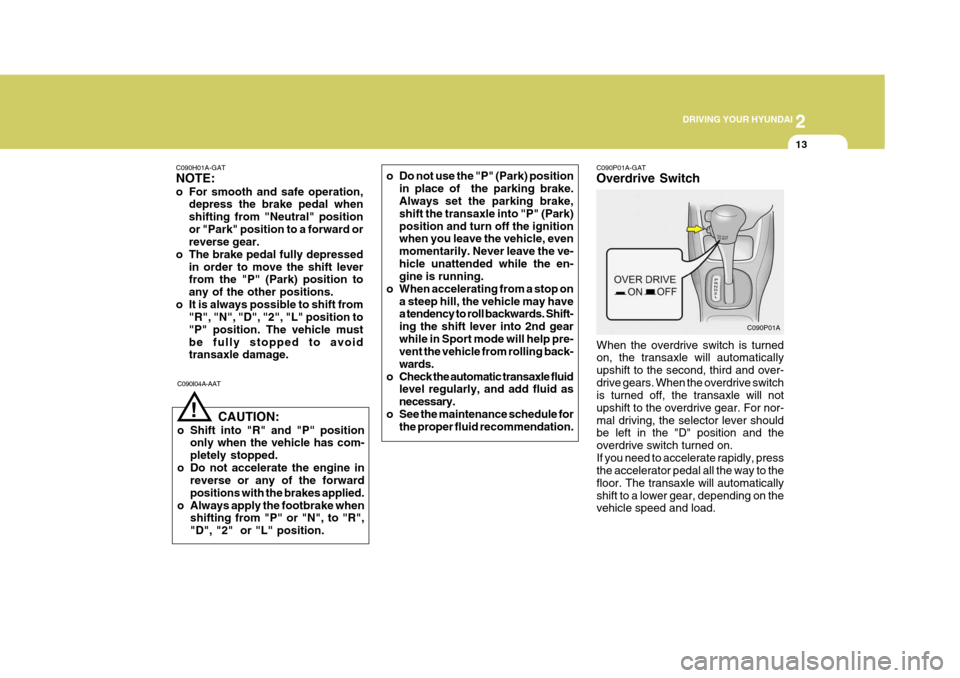
C090P01A-GAT Overdrive Switch
When the overdrive switch is turned on, the transaxle will automatically upshift to the second, third and over-drive gears. When the overdrive switch is turned off, the transaxle will not upshift to the overdrive gear. For nor-mal driving, the selector lever should be left in the "D" position and the overdrive switch turned on.If you need to accelerate rapidly, press the accelerator pedal all the way to the floor. The transaxle will automaticallyshift to a lower gear, depending on the vehicle speed and load.
o Do not use the "P" (Park) position
in place of the parking brake.Always set the parking brake, shift the transaxle into "P" (Park)position and turn off the ignition when you leave the vehicle, even momentarily. Never leave the ve-hicle unattended while the en- gine is running.
o When accelerating from a stop on
a steep hill, the vehicle may havea tendency to roll backwards. Shift- ing the shift lever into 2nd gearwhile in Sport mode will help pre- vent the vehicle from rolling back- wards.
o Check the automatic transaxle fluid level regularly, and add fluid asnecessary.
o See the maintenance schedule for the proper fluid recommendation.
Page 179 of 599
2
DRIVING YOUR HYUNDAI
17DRIVING FOR ECONOMY
C140A01A-GAT You can save fuel and get more kilo- meters from your car if you follow these suggestions:
o Drive smoothly. Accelerate at a moderate rate. Don't make "jack- rabbit" starts or full-throttle shiftsand maintain a steady cruising speed. Don't race between stop- lights. Try to adjust your speed tothat of the other traffic so you don't have to change speeds unneces- sarily. Avoid heavy traffic wheneverpossible. Always maintain a safe distance from other vehicles so you can avoidunnecessary braking. This also re- duces brake wear.
o Drive at a moderate speed. The faster you drive, the more fuel yourcar uses. Driving at a moderate speed, especially on the highway, isone of the most effective ways to reduce fuel consumption. more frequent maintenance is re- quired (see Section 5 for details).
o Keep your car clean. For maximum service, your Hyundai should bekept clean and free of corrosivematerials. It is especially important that mud, dirt, ice, etc. not be al- lowed to accumulate on the under-side of the car. This extra weight can result in increased fuel con- sumption and also contribute to cor-rosion.
o Travel lightly. Don't carry unneces-
sary weight in your car. Weight re-duces fuel economy.
o Don't let the engine idle longer than
necessary. If you are waiting (andnot in traffic), turn off your engine and restart only when you're ready to go.
o Remember, your Hyundai does not require extended warm-up. As soonas the engine is running smoothly,you can drive away. In very cold weather, however, give your engine a slightly longer warm-up period.
o Don't "ride" the brake or clutch pedal.
This can increase fuel consumptionand also increase wear on these components. In addition, driving with your foot resting on the brake pedalmay cause the brakes to overheat, which reduces their effectiveness and may lead to more serious con-sequences.
o Take care of your tires. Keep them
inflated to the recommended pres-sure. Incorrect inflation, either too much or too little, results in unnec- essary tire wear. Check the tire pres-sures at least once a month.
o Be sure that the wheels are aligned
correctly. Improper alignment canresult from hitting curbs or driving too fast over irregular surfaces. Poor alignment causes faster tire wearand may also result in other prob- lems as well as greater fuel con- sumption.
o Keep your car in good condition. For better fuel economy and reducedmaintenance costs, maintain yourcar in accordance with the mainte- nance schedule in Section 5. If you drive your car in severe conditions,
Page 285 of 599
1
FEATURES OF YOUR HYUNDAI
3BREAKING IN YOUR NEW HYUNDAI
B010B01A-AAT What About Gasohol? Gasohol (a mixture of 90% unleaded gasoline and 10% ethanol or grain alco-hol) may be used in your Hyundai. However, if your engine develops driveability problems, the use of 100%unleaded gasoline is recommended. Fuels with unspecified quantities of alcohol, or alcohols other than ethanol,should not be used. B010E01A-AAT Gasolines for Cleaner Air To help contribute to cleaner air, Hyundai recommends that you use gasolinestreated with detergent additives, which help prevent deposit formation in the engine. These gasolines will help theengine run cleaner and enhance perfor- mance of the Emission Control Sys- tem.
B010D01S-AAT Do not Use Methanol Fuels containing methanol (wood alco- hol) should not be used in your Hyundai. This type of fuel can reduce vehicleperformance and damage components of the fuel system. CAUTION:
Your Hyundai's New Vehicle Limited Warranty may not cover damage to the fuel system and performance problems that are caused by the useof methanol or fuels containing methanol.
! B010F01A-AAT Operation in Foreign Countries If you are going to drive your Hyundai in another country, be sure to:
o Observe all regulations regarding reg-
istration and insurance.
o Determine that acceptable fuel is available. B020A01S-GAT During the First 2,000 Km (1,200 Miles) (Gasoline Engine) No formal "break-in" procedure is re- quired with your new Hyundai. How-ever, you can contribute to the eco- nomical operation and durability of your Hyundai by observing the following rec-ommendations during the first 2,000 km (1,200 miles).
o Don't drive faster than 88 km/h (55
mph).
o While driving, keep your engine speed (rpm, or revolutions per minute) be- tween 2,000 rpm and 4,000 rpm.
o Use moderate acceleration. Don't start, depress the accelerator pedalfully.
o For the first 300 km (200 miles), try to avoid hard stops.
o Don't lug the engine (in other words,
don't drive so slowly in too high a gear that the engine "bucks": shift to a lower gear).
o Whether going fast or slow, vary your
speed from time to time.
Page 286 of 599
1FEATURES OF YOUR HYUNDAI
4KEYS
B020B01FC-GAT During the First 1,000 Km (600 Miles) (Diesel Engine) No formal "break-in" procedure is re- quired with your new Hyundai. How- ever, you can contribute to the eco- nomical operation and durability of your Hyundai by observing the following rec- ommendations during the first 1,000km (600 miles).
o While driving, keep your engine speed (rpm, or revolutions per minute) within 3,000 rpm.
o While driving, keep under three quar- ters of maximum speed.
o Use moderate acceleration. Don't
start, depress the accelerator pedal fully.
o For the first 300 km (200 miles), try
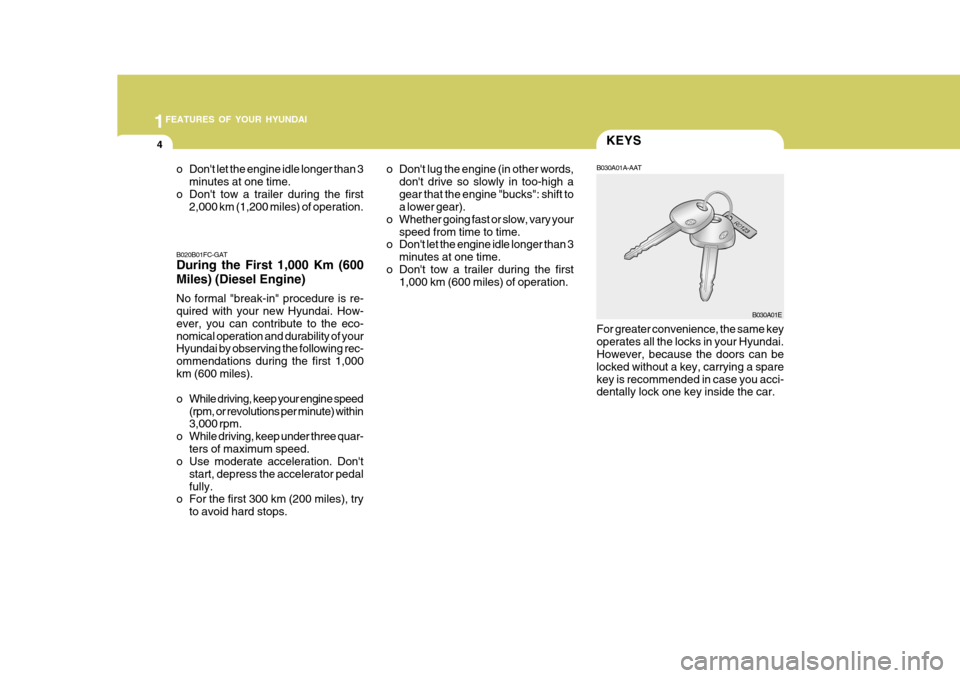
to avoid hard stops. B030A01A-AAT For greater convenience, the same key operates all the locks in your Hyundai. However, because the doors can be locked without a key, carrying a sparekey is recommended in case you acci- dentally lock one key inside the car.
o Don't lug the engine (in other words,
don't drive so slowly in too-high a gear that the engine "bucks": shift to a lower gear).
o Whether going fast or slow, vary your speed from time to time.
o Don't let the engine idle longer than 3
minutes at one time.
o Don't tow a trailer during the first 1,000 km (600 miles) of operation.
B030A01E
o Don't let the engine idle longer than 3
minutes at one time.
o Don't tow a trailer during the first 2,000 km (1,200 miles) of operation.
Page 341 of 599
1
FEATURES OF YOUR HYUNDAI
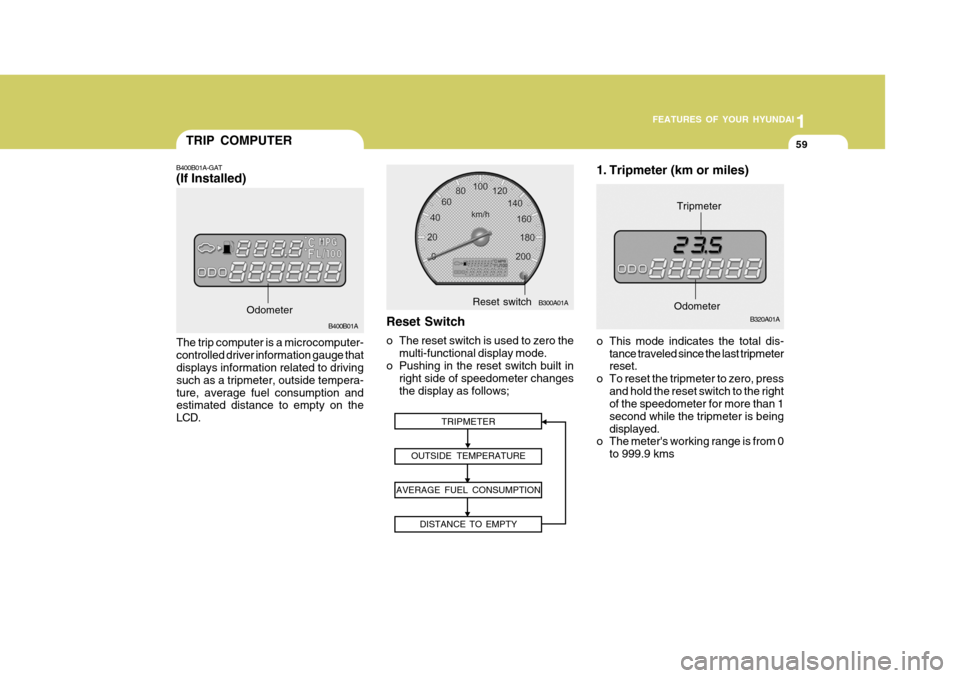
59TRIP COMPUTER
B400B01A
The trip computer is a microcomputer- controlled driver information gauge that displays information related to driving such as a tripmeter, outside tempera-ture, average fuel consumption and estimated distance to empty on the LCD.
B400B01A-GAT (If Installed)
Odometer
1. Tripmeter (km or miles)
TRIPMETER
OUTSIDE TEMPERATURE
AVERAGE FUEL CONSUMPTION DISTANCE TO EMPTY
o This mode indicates the total dis-tance traveled since the last tripmeter reset.
o To reset the tripmeter to zero, press
and hold the reset switch to the rightof the speedometer for more than 1 second while the tripmeter is beingdisplayed.
o The meter's working range is from 0
to 999.9 kms
B320A01A
Odometer
Tripmeter
Reset Switch
o The reset switch is used to zero the multi-functional display mode.
o Pushing in the reset switch built in
right side of speedometer changes the display as follows;
B300A01AReset switch
Page 345 of 599
1
FEATURES OF YOUR HYUNDAI
63WINDSHIELD WIPER AND WASHER SWITCH
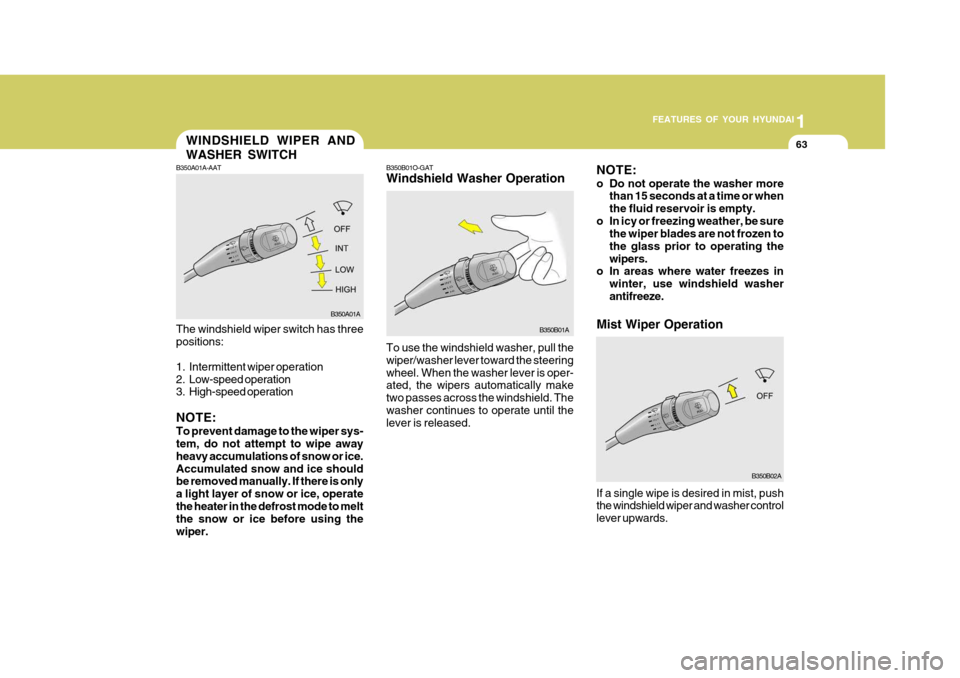
To use the windshield washer, pull the wiper/washer lever toward the steeringwheel. When the washer lever is oper- ated, the wipers automatically make two passes across the windshield. Thewasher continues to operate until the lever is released.
B350B01O-GAT Windshield Washer Operation
B350A01A-AAT The windshield wiper switch has three positions:
1. Intermittent wiper operation
2. Low-speed operation
3. High-speed operation NOTE: To prevent damage to the wiper sys- tem, do not attempt to wipe away heavy accumulations of snow or ice.Accumulated snow and ice should be removed manually. If there is only a light layer of snow or ice, operatethe heater in the defrost mode to melt the snow or ice before using the wiper.
B350A01A
B350B01A
Mist Wiper Operation
NOTE:
o Do not operate the washer more
than 15 seconds at a time or when the fluid reservoir is empty.
o In icy or freezing weather, be sure the wiper blades are not frozen tothe glass prior to operating thewipers.
o In areas where water freezes in
winter, use windshield washerantifreeze.
If a single wipe is desired in mist, push the windshield wiper and washer control lever upwards.
B350B02A
Page 368 of 599
1FEATURES OF YOUR HYUNDAI
86
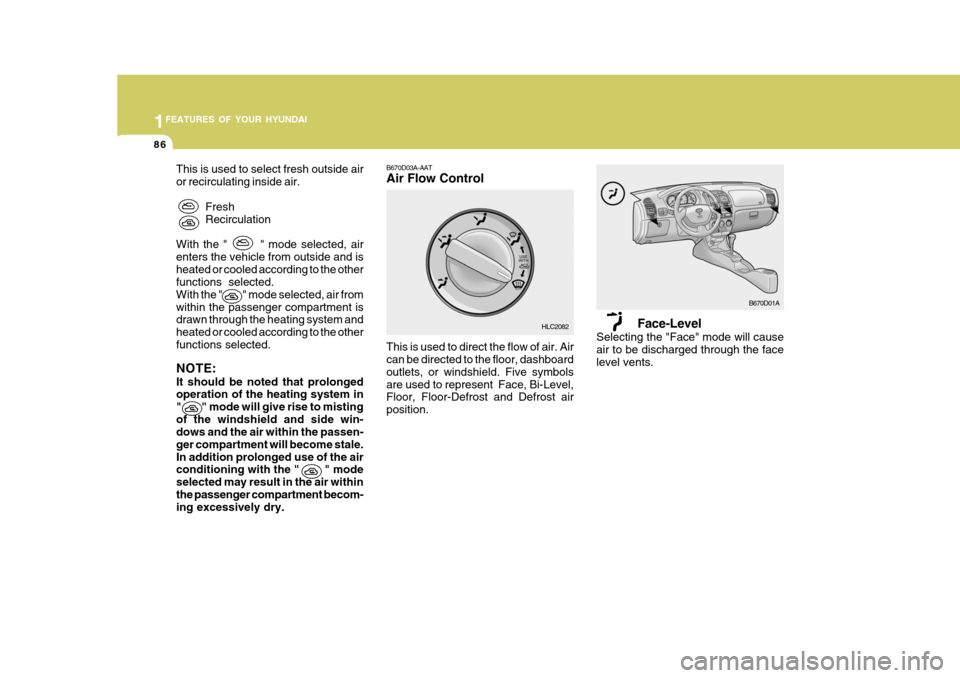
Face-Level
Selecting the "Face" mode will cause air to be discharged through the face level vents.
This is used to select fresh outside air or recirculating inside air.
FreshRecirculation
With the " " mode selected, airenters the vehicle from outside and isheated or cooled according to the other functions selected. With the " " mode selected, air fromwithin the passenger compartment is drawn through the heating system and heated or cooled according to the otherfunctions selected. NOTE: It should be noted that prolonged operation of the heating system in " " mode will give rise to mistingof the windshield and side win- dows and the air within the passen- ger compartment will become stale.In addition prolonged use of the air conditioning with the " " mode selected may result in the air withinthe passenger compartment becom- ing excessively dry. B670D03A-AAT Air Flow Control This is used to direct the flow of air. Air can be directed to the floor, dashboard outlets, or windshield. Five symbolsare used to represent Face, Bi-Level, Floor, Floor-Defrost and Defrost air position.
B670D01A
HLC2082
Page 379 of 599

1
FEATURES OF YOUR HYUNDAI
97
H210B04O-AAT
1. POWER ON-OFF/VOLUME Control Knob
The radio unit may be operated when the ignition key is in the "ACC" or "ON"position. Rotate the knob clockwise to switch the radio unit on and to increase the volume.The LCD shows the radio frequency in the radio mode. Turn the knob counter- clockwise to reduce the volume and toswitch the radio unit off. BAL (Balance Control) Knob Pull and turn the control knob clockwise to emphasize right speaker sound (left speaker sound will be attenuated). When the control knob is turned counterclock-wise, left speaker sound will be empha- sized (right speaker sound will be at- tenuated).After adjusting the balance, push the knob again to use the other function. SCAN Knob When the scan knob is pressed, the frequency will increase and the receiv-able stations will be tuned in one after another, receiving each station for 5 seconds. To stop scanning, press thescan knob again.
2. FAD (Fader Control) Knob Turn the control knob counterclockwise to emphasize front speaker sound (rear speaker sound will be attenuated). Whenthe control knob is turned clockwise, rear speaker sound will be emphasized (front speaker sound will be attenu-ated).
3. BASS Control Knob Press to pop the knob out and turn to the left or right for the desired bass tone. TREBLE Control Knob. Pull the bass control knob further out. Turn to the left or right for the desiredtreble tone.4. BAND Selector Pressing the button changes the AM, FM1 and FM2 bands. The modeselected is displayed on LCD.
5. TUNE (Manual) Select Button Press the ( ) side or ( ) side to increase or to decrease the frequency. With the button held down for 1 sec. ormore, the stop signal (broadcasting radio wave) is ignored and channel selection continues. SEEK Operation (Automatic Channel Selection) Press the TUNE select button for 1 sec. or more. When the ( ) side is pressed,the unit will automatically tune to the next higher frequency and when the ( ) side is pressed, it will automaticallytune to the next lower frequency.
6. PRESET STATION SELECT
Button
Six (6) stations for AM, FM1 and FM2 respectively can be preset in the elec- tronic memory circuit on this unit.
FM AM
Page 382 of 599
1FEATURES OF YOUR HYUNDAI
100
H210B04O-AAT
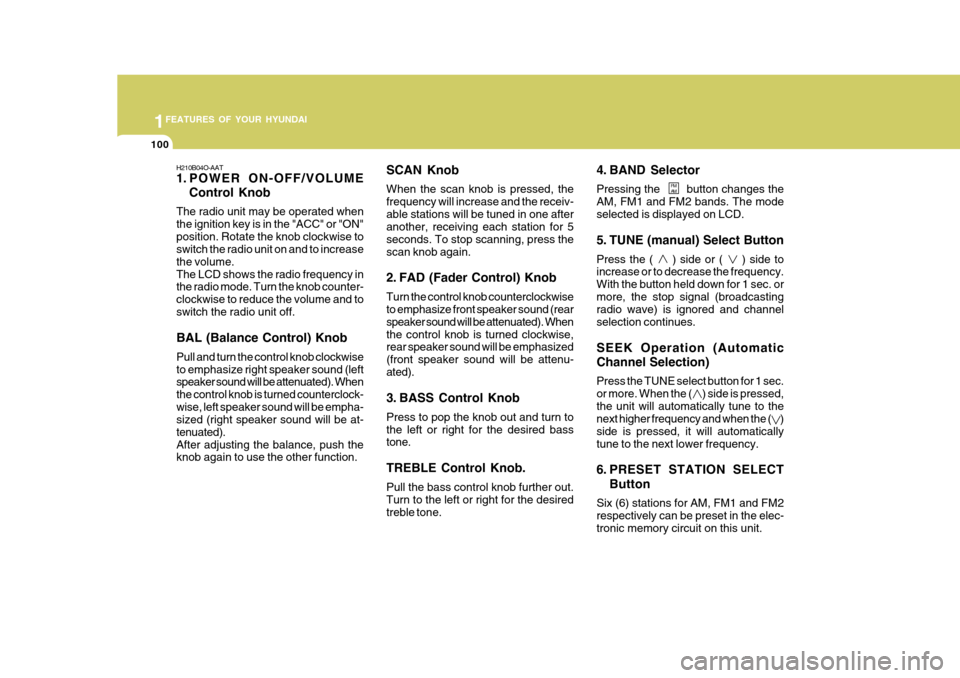
1. POWER ON-OFF/VOLUMEControl Knob
The radio unit may be operated when the ignition key is in the "ACC" or "ON"position. Rotate the knob clockwise to switch the radio unit on and to increase the volume.The LCD shows the radio frequency in the radio mode. Turn the knob counter- clockwise to reduce the volume and toswitch the radio unit off. BAL (Balance Control) Knob Pull and turn the control knob clockwise to emphasize right speaker sound (left speaker sound will be attenuated). When the control knob is turned counterclock-wise, left speaker sound will be empha- sized (right speaker sound will be at- tenuated).After adjusting the balance, push the knob again to use the other function. SCAN Knob When the scan knob is pressed, the frequency will increase and the receiv-able stations will be tuned in one after another, receiving each station for 5 seconds. To stop scanning, press thescan knob again.
2. FAD (Fader Control) Knob Turn the control knob counterclockwise to emphasize front speaker sound (rear speaker sound will be attenuated). Whenthe control knob is turned clockwise, rear speaker sound will be emphasized (front speaker sound will be attenu-ated).
3. BASS Control Knob Press to pop the knob out and turn to the left or right for the desired bass tone. TREBLE Control Knob. Pull the bass control knob further out. Turn to the left or right for the desiredtreble tone. 4. BAND Selector Pressing the button changes the AM, FM1 and FM2 bands. The modeselected is displayed on LCD.
5. TUNE (manual) Select Button Press the ( ) side or ( ) side to increase or to decrease the frequency. With the button held down for 1 sec. ormore, the stop signal (broadcasting radio wave) is ignored and channel selection continues. SEEK Operation (Automatic Channel Selection) Press the TUNE select button for 1 sec. or more. When the ( ) side is pressed,the unit will automatically tune to the next higher frequency and when the ( ) side is pressed, it will automaticallytune to the next lower frequency.
6. PRESET STATION SELECT
Button
Six (6) stations for AM, FM1 and FM2 respectively can be preset in the elec- tronic memory circuit on this unit.
FM AM
Page 387 of 599

1
FEATURES OF YOUR HYUNDAI
105
H260B04O-AAT
1. POWER ON-OFF Control Knob
The radio unit may be operated when the ignition key is in the "ACC" or "ON"position. Press the knob to switch the power on. The LCD shows the radio frequency in the radio mode or the CDtrack indicator in the CD mode. To switch the power off, press the knob again. VOLUME Control Rotate the knob clockwise to increase the volume and turn the knob counter-clockwise to reduce the volume. BALANCE Control Pull and turn the control knob clockwise to emphasize right speaker sound (left speaker sound will be attenuated). Whenthe control knob is turned counterclock- wise, left speaker sound will be empha- sized (right speaker sound will be at-tenuated). 2. FAD (Fader Control) Knob Turn the control knob counterclockwise to emphasize front speaker sound (rearspeaker sound will be attenuated). When the control knob is turned clockwise, rear speaker sound will be emphasized(front speaker sound will be attenu- ated).
3. BASS Control Knob Press to pop the knob out and turn to the left or right for the desired basstone. TREB (Treble Control) Knob Pull the bass control knob further out. Turn to the left or right for the desired treble tone.
4. SCAN Button When the scan button is pressed, the frequency will increase and the receiv-able stations will be tuned in one after another, receiving each station for 5 seconds. To stop scanning, press thescan button again.5. TUNE (Manual) Select Button Press the ( ) side or ( ) side to increase or to decrease the frequency.Press either button and hold down to continuously scroll. Release button once the desired station is reached. SEEK Operation (Automatic Channel Selection) Press the TUNE select button for 0.5 sec or more. Releasing it will automati-cally tune to the next available station with a beep sound. When the ( ) side is pressed longerthan 0.5 second, releasing will auto- matically tune to the next higher fre- quency and when the ( ) side ispressed longer than 0.5 second, releas- ing will automatically tune to the next lower frequency.
6. BAND Selector Pressing the button changes the AM, FM1 and FM2 bands. The mode selected is displayed on LCD.
FM/AM