Radio Hyundai Accent 2006 Owner's Guide
[x] Cancel search | Manufacturer: HYUNDAI, Model Year: 2006, Model line: Accent, Model: Hyundai Accent 2006Pages: 599, PDF Size: 17.59 MB
Page 247 of 599

6
DO-IT-YOURSELF MAINTENANCE
29
4. Replace the blown fuse by pressing
a new fuse of the same rating into place. The fuse should be a snug fit. If it is not, have the fuse clip repairedor replaced by a Hyundai dealer. If you do not have a spare fuse, you may be able to borrow a fuse of thesame or lower rating from an acces-
G200B02A-AAT Replacing Accessory Fuse The fuse box for the lights and other electrical accessories will be found lowon the dashboard on the driver's side. Inside the box you will find a list show- ing the circuits protected by each fuse.If any of your car's lights or other electrical accessories stop working, a blown fuse could be the reason. If thefuse has burned out, you will see that the metal strip inside the fuse has burned through. If you suspect a blownfuse, follow this procedure:
HLC40021. Turn off the ignition and all other
switches.
2. Open the fuse box and examine each fuse. Remove each fuse bypulling it toward you (a small "fusepuller" tool is contained in the fuse box to simplify this operation).
3. Be sure to check all other fuses even if you find one that appears tohave burned out.
HLC4003sory you can temporarily get along without (the radio or cigarette light-er, for example). Always remember to replace the borrowed fuse.
G200B02L
Good
Burned out
Page 281 of 599

10
INDEX
5
R Rear Seat .................................................................. 1-17
Folding Rear Seatbacks ............... ............................ 1-18
Rear Window Defroster Switch ................................ 1-66
S Seat Front seat ............................................................... 1-14
Rear seat ............................................................... 1-18
Rear seat entry (3-door model) ............................. 1-17
Seat Warmer .......................................................... 1-17
Seat Belts 2-Point type ............................................................ 1-24
3-Point system ............................................ 1-23 , 1-25
Adjustable height .................................................... 1-22
Adjusting your seat be lt .........................................1-23
Care of seat belts .................................................. 1-21
Precautions ............................................................ 1-19
Pre-tensioner seat belt (Without A/BAG) ..............1-32
Pre-tensioner seat belt (With A/BAG) ...................1-33
Pre-tensioner seat belt (With Dual-stage A/BAG) . 1-38
Spark Plugs ............................................................... 6-15
Speedometer ............................................................. 1-57
Starting ........................................................................ 2-5
Steering Wheel Freeplay .................. ........................ 6-26
Steering Wheel Tilt Lever .............. ...........................1-82Stereo Radio Operation (H215, H225, H265)
.......................................................... 1-96, 1-99, 1-104
Stereo Sound System ............................................... 1-94
Sun Visor .................................................................. 1-82
Sunroof ...................................................................... 1-71
Sunshad e .................................................................. 1-70
TTachometer ............................................................... 1-57
Theft-Alarm system ..................................................... 1-9
Tires
Balancing .................................................................. 8-5
Chains ...................................................................... 8-4
If you have a flat tire ............................................... 3-6
Information ............................................................... 8-3
Pressure ................................................................... 8-3
Replacement ............................................................ 8-5
Rotation .................................................................... 8-4
Snow tires ................................................................ 8-4
Spare tire ................................................................. 3-5
Traction .................................................................... 8-5
Towing A trailer (or vehicle) ............................................... 2-21
Emergency ............................................................. 3-13
If your car must be towed .....................................3-11
Trailer or Vehicle towing ........................................... 2-21
Page 376 of 599
1FEATURES OF YOUR HYUNDAI
94STEREO SOUND SYSTEM
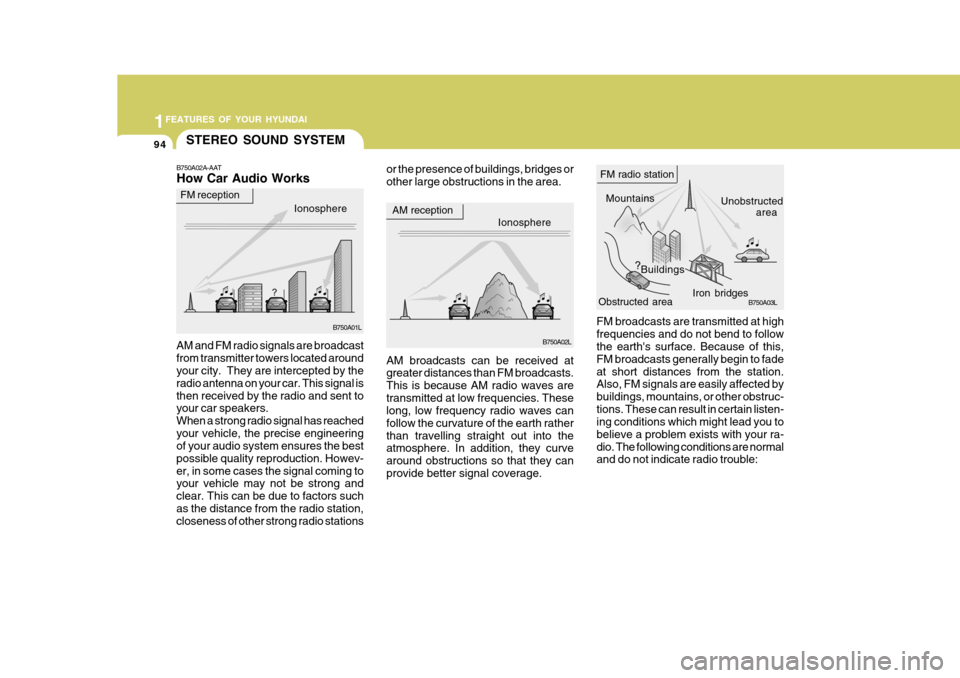
or the presence of buildings, bridges or other large obstructions in the area.
FM broadcasts are transmitted at highfrequencies and do not bend to follow the earth's surface. Because of this, FM broadcasts generally begin to fadeat short distances from the station. Also, FM signals are easily affected by buildings, mountains, or other obstruc-tions. These can result in certain listen- ing conditions which might lead you to believe a problem exists with your ra-dio. The following conditions are normal and do not indicate radio trouble:
AM broadcasts can be received atgreater distances than FM broadcasts. This is because AM radio waves aretransmitted at low frequencies. These long, low frequency radio waves can follow the curvature of the earth ratherthan travelling straight out into the atmosphere. In addition, they curve around obstructions so that they canprovide better signal coverage.
B750A02A-AAT How Car Audio Works
AM and FM radio signals are broadcast from transmitter towers located around your city. They are intercepted by the radio antenna on your car. This signal isthen received by the radio and sent to your car speakers. When a strong radio signal has reachedyour vehicle, the precise engineering of your audio system ensures the best possible quality reproduction. Howev-er, in some cases the signal coming to your vehicle may not be strong and clear. This can be due to factors suchas the distance from the radio station, closeness of other strong radio stations
Ionosphere B750A02L
AM reception
Mountains
Buildings Unobstructed
area
FM radio station
B750A03L
Ionosphere
FM reception
B750A01L Obstructed area
Iron bridges
Page 377 of 599
1
FEATURES OF YOUR HYUNDAI
95
!
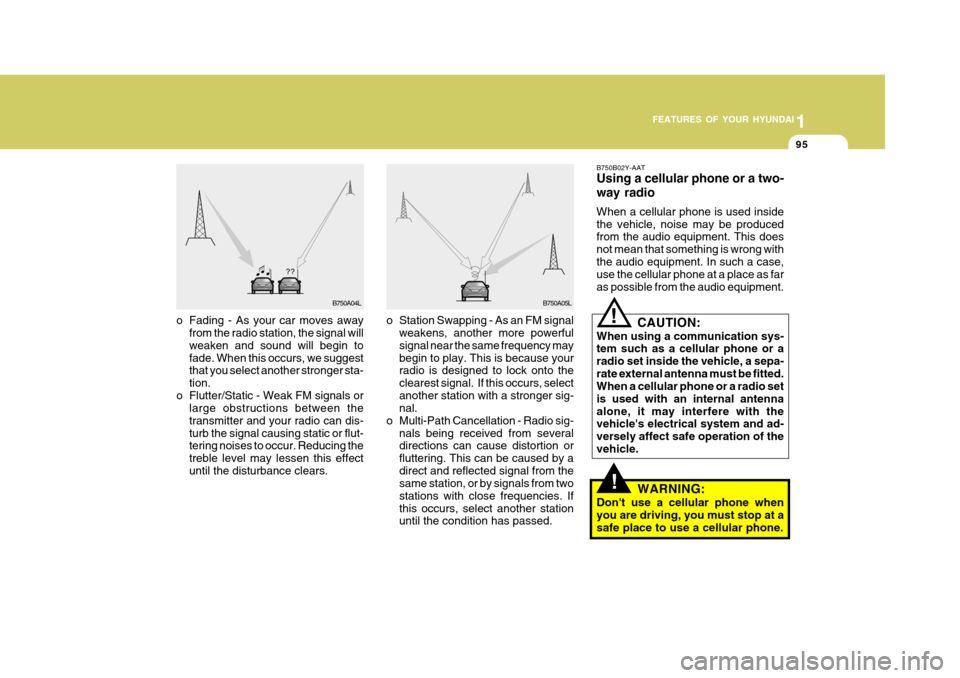
o Station Swapping - As an FM signal
weakens, another more powerful signal near the same frequency may begin to play. This is because your radio is designed to lock onto the clearest signal. If this occurs, selectanother station with a stronger sig- nal.
o Multi-Path Cancellation - Radio sig- nals being received from severaldirections can cause distortion or fluttering. This can be caused by adirect and reflected signal from the same station, or by signals from two stations with close frequencies. Ifthis occurs, select another station until the condition has passed.
o Fading - As your car moves away
from the radio station, the signal willweaken and sound will begin to fade. When this occurs, we suggest that you select another stronger sta- tion.
o Flutter/Static - Weak FM signals or large obstructions between thetransmitter and your radio can dis-turb the signal causing static or flut- tering noises to occur. Reducing the treble level may lessen this effectuntil the disturbance clears. B750B02Y-AAT Using a cellular phone or a two- way radio When a cellular phone is used inside the vehicle, noise may be produced from the audio equipment. This does not mean that something is wrong withthe audio equipment. In such a case, use the cellular phone at a place as far as possible from the audio equipment.!
CAUTION:
When using a communication sys- tem such as a cellular phone or a radio set inside the vehicle, a sepa-rate external antenna must be fitted. When a cellular phone or a radio set is used with an internal antennaalone, it may interfere with the vehicle's electrical system and ad- versely affect safe operation of thevehicle.
WARNING:
Don't use a cellular phone whenyou are driving, you must stop at asafe place to use a cellular phone.
B750A04L B750A05L
Page 378 of 599
1FEATURES OF YOUR HYUNDAI
96AUDIO SYSTEM
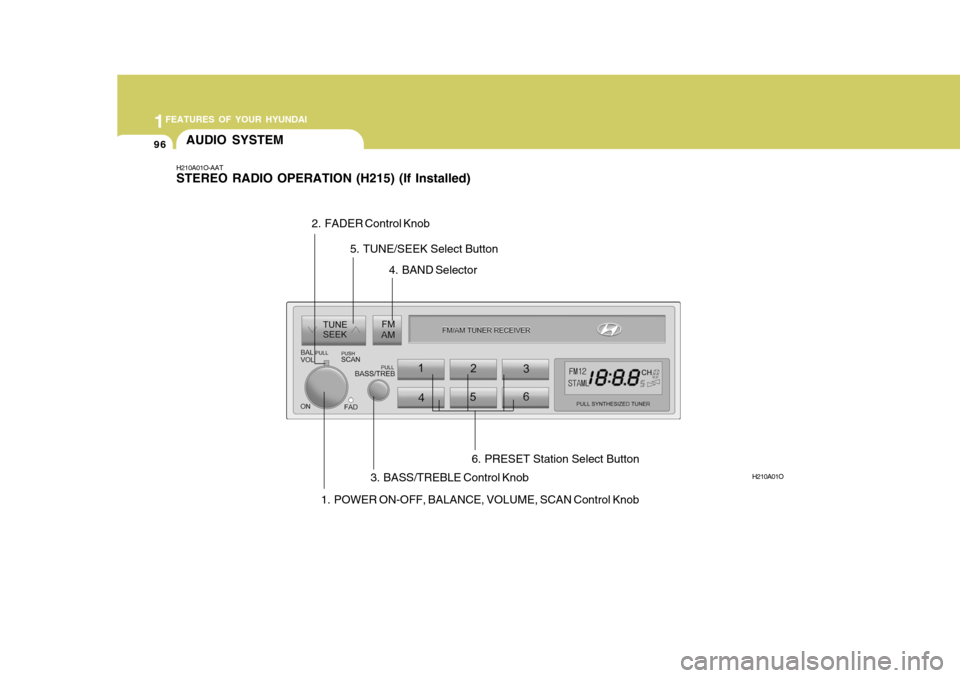
1. POWER ON-OFF, BALANCE, VOLUME, SCAN Control Knob
H210A01O-AAT STEREO RADIO OPERATION (H215) (If Installed)
H210A01O
2. FADER Control Knob
3. BASS/TREBLE Control Knob4. BAND Selector
5. TUNE/SEEK Select Button
6. PRESET Station Select Button
Page 379 of 599
1
FEATURES OF YOUR HYUNDAI
97
H210B04O-AAT
1. POWER ON-OFF/VOLUME Control Knob
The radio unit may be operated when the ignition key is in the "ACC" or "ON"position. Rotate the knob clockwise to switch the radio unit on and to increase the volume.The LCD shows the radio frequency in the radio mode. Turn the knob counter- clockwise to reduce the volume and toswitch the radio unit off. BAL (Balance Control) Knob Pull and turn the control knob clockwise to emphasize right speaker sound (left speaker sound will be attenuated). When the control knob is turned counterclock-wise, left speaker sound will be empha- sized (right speaker sound will be at- tenuated).After adjusting the balance, push the knob again to use the other function. SCAN Knob When the scan knob is pressed, the frequency will increase and the receiv-able stations will be tuned in one after another, receiving each station for 5 seconds. To stop scanning, press thescan knob again.
2. FAD (Fader Control) Knob Turn the control knob counterclockwise to emphasize front speaker sound (rear speaker sound will be attenuated). Whenthe control knob is turned clockwise, rear speaker sound will be emphasized (front speaker sound will be attenu-ated).
3. BASS Control Knob Press to pop the knob out and turn to the left or right for the desired bass tone. TREBLE Control Knob. Pull the bass control knob further out. Turn to the left or right for the desiredtreble tone.4. BAND Selector Pressing the button changes the AM, FM1 and FM2 bands. The modeselected is displayed on LCD.
5. TUNE (Manual) Select Button Press the ( ) side or ( ) side to increase or to decrease the frequency. With the button held down for 1 sec. ormore, the stop signal (broadcasting radio wave) is ignored and channel selection continues. SEEK Operation (Automatic Channel Selection) Press the TUNE select button for 1 sec. or more. When the ( ) side is pressed,the unit will automatically tune to the next higher frequency and when the ( ) side is pressed, it will automaticallytune to the next lower frequency.
6. PRESET STATION SELECT
Button
Six (6) stations for AM, FM1 and FM2 respectively can be preset in the elec- tronic memory circuit on this unit.
FM AM
Page 380 of 599
1FEATURES OF YOUR HYUNDAI
98
HOW TO PRESET STATIONS Six AM and twelve FM stations may be programmed into the memory of theradio. Then, by simply pressing the band select button and/or one of the six station select buttons, you may recallany of these stations instantly. To pro- gram the stations, follow these steps:
o Press band selector to set the bandfor AM, FM1, and FM2.
o Select the desired station to be stored by seek, scan or manual tuning.
o Determine the preset station select
button you wish to use to access that station.
o Press the station select button for
more than two seconds. A selectbutton indicator will show in the dis- play indicating which select button you have depressed. You shouldthen release the button, and proceed to program the next desired station. A total of 18 stations can be pro-grammed by selecting one AM and two FM stations per button.
o When completed, any preset station may be recalled by selecting AM,FM1 or FM2 band and the appropri- ate station button. CAUTION:
o Do not place beverages close to the audio system. The audio sys- tem mechanism may be damaged if you spill them.
o Do not impact on the audio sys- tem, or the audio system mecha-nism could be damaged.
!
Page 381 of 599
1
FEATURES OF YOUR HYUNDAI
99
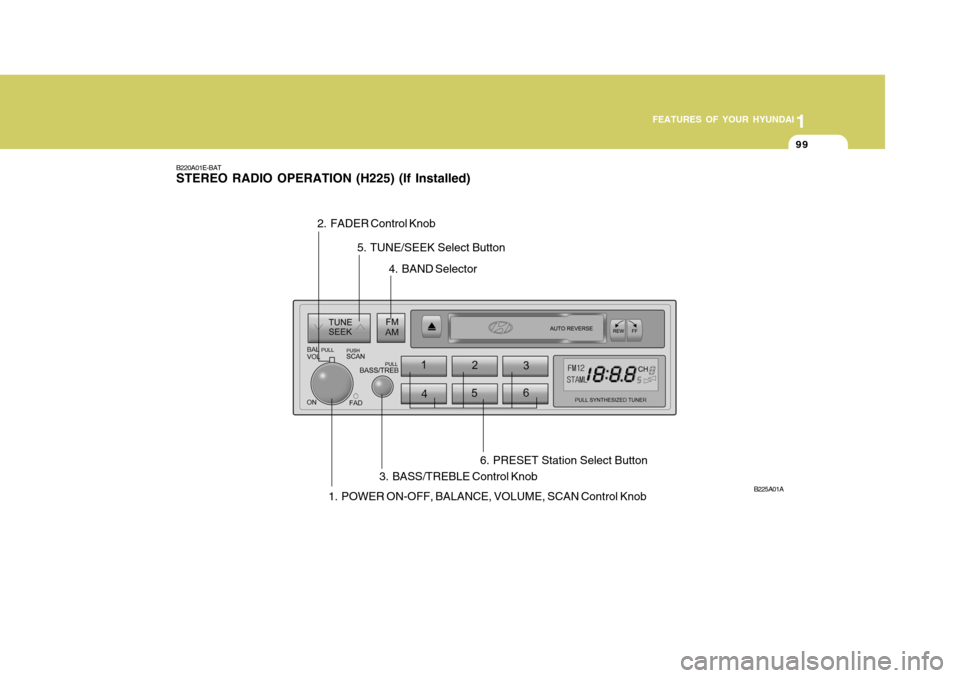
B220A01E-BAT STEREO RADIO OPERATION (H225) (If Installed)
1. POWER ON-OFF, BALANCE, VOLUME, SCAN Control Knob
B225A01A
2. FADER Control Knob
3. BASS/TREBLE Control Knob4. BAND Selector
5. TUNE/SEEK Select Button
6. PRESET Station Select Button
Page 382 of 599
1FEATURES OF YOUR HYUNDAI
100
H210B04O-AAT
1. POWER ON-OFF/VOLUMEControl Knob
The radio unit may be operated when the ignition key is in the "ACC" or "ON"position. Rotate the knob clockwise to switch the radio unit on and to increase the volume.The LCD shows the radio frequency in the radio mode. Turn the knob counter- clockwise to reduce the volume and toswitch the radio unit off. BAL (Balance Control) Knob Pull and turn the control knob clockwise to emphasize right speaker sound (left speaker sound will be attenuated). When the control knob is turned counterclock-wise, left speaker sound will be empha- sized (right speaker sound will be at- tenuated).After adjusting the balance, push the knob again to use the other function. SCAN Knob When the scan knob is pressed, the frequency will increase and the receiv-able stations will be tuned in one after another, receiving each station for 5 seconds. To stop scanning, press thescan knob again.
2. FAD (Fader Control) Knob Turn the control knob counterclockwise to emphasize front speaker sound (rear speaker sound will be attenuated). Whenthe control knob is turned clockwise, rear speaker sound will be emphasized (front speaker sound will be attenu-ated).
3. BASS Control Knob Press to pop the knob out and turn to the left or right for the desired bass tone. TREBLE Control Knob. Pull the bass control knob further out. Turn to the left or right for the desiredtreble tone. 4. BAND Selector Pressing the button changes the AM, FM1 and FM2 bands. The modeselected is displayed on LCD.
5. TUNE (manual) Select Button Press the ( ) side or ( ) side to increase or to decrease the frequency. With the button held down for 1 sec. ormore, the stop signal (broadcasting radio wave) is ignored and channel selection continues. SEEK Operation (Automatic Channel Selection) Press the TUNE select button for 1 sec. or more. When the ( ) side is pressed,the unit will automatically tune to the next higher frequency and when the ( ) side is pressed, it will automaticallytune to the next lower frequency.
6. PRESET STATION SELECT
Button
Six (6) stations for AM, FM1 and FM2 respectively can be preset in the elec- tronic memory circuit on this unit.
FM AM
Page 383 of 599
1
FEATURES OF YOUR HYUNDAI
101
HOW TO PRESET STATIONS Six AM and twelve FM stations may be programmed into the memory of theradio. Then, by simply pressing the band select button and/or one of the six station select buttons, you may recallany of these stations instantly. To pro- gram the stations, follow these steps:
o Press band selector to set the band for AM, FM1, and FM2.
o Select the desired station to be stored by seek, scan or manual tuning.
o Determine the preset station select
button you wish to use to access that station.
o Press the station select button for
more than two seconds. A selectbutton indicator will show in the dis- play indicating which select button you have depressed. You shouldthen release the button, and proceed to program the next desired station. A total of 18 stations can be pro-grammed by selecting one AM and two FM stations per button.
o When completed, any preset station may be recalled by selecting AM,FM1 or FM2 band and the appropri- ate station button.
! CAUTION:
o Do not place beverages close to the audio system. The audio sys- tem mechanism may be damagedif you spill them.
o Do not impact on the audio sys-
tem, or the audio system mecha-nism could be damaged.