air condition Hyundai Accent 2007 User Guide
[x] Cancel search | Manufacturer: HYUNDAI, Model Year: 2007, Model line: Accent, Model: Hyundai Accent 2007Pages: 282, PDF Size: 10.55 MB
Page 119 of 282
1
FEATURES OF YOUR HYUNDAI
107
1
FEATURES OF YOUR HYUNDAI
107
1
FEATURES OF YOUR HYUNDAI
107
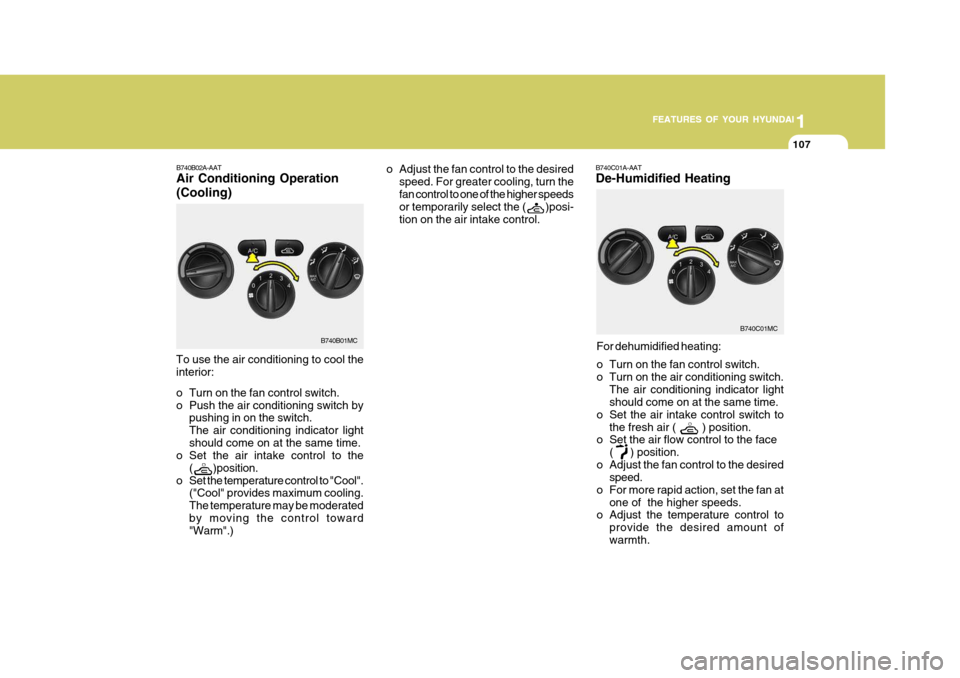
For dehumidified heating:
o Turn on the fan control switch.
o Turn on the air conditioning switch. The air conditioning indicator light should come on at the same time.
o Set the air intake control switch to the fresh air (
) position.
o Set the air flow control to the face
(
) position.
o Adjust the fan control to the desired speed.
o For more rapid action, set the fan at one of the higher speeds.
o Adjust the temperature control to
provide the desired amount of warmth.
B740B02A-AAT Air Conditioning Operation (Cooling)
B740C01A-AAT De-Humidified Heating
To use the air conditioning to cool the interior:
o Turn on the fan control switch.
o Push the air conditioning switch by pushing in on the switch.The air conditioning indicator lightshould come on at the same time.
o Set the air intake control to the
(
)position.
o Set the temperature control to "Cool". ("Cool" provides maximum cooling. The temperature may be moderatedby moving the control toward "Warm".) o Adjust the fan control to the desired
speed. For greater cooling, turn the fan control to one of the higher speeds or temporarily select the (
)posi-
tion on the air intake control.
B740B01MC
B740C01MC
Page 120 of 282

1FEATURES OF YOUR HYUNDAI
108
B740D01A-AAT Operation Tips
o If the interior of the car is hot whenyou first get in, open the windows for a few minutes to expel the hot air.
o When you are using the air condi-
tioning system, keep all windowsclosed to keep hot air out.
o When moving slowly, as in heavy
traffic, shift to a lower gear.This increases engine speed, which in turn increases the speed of the air conditioning compressor.
o On steep grades, turn the air condi- tioning off to avoid the possibility ofthe engine overheating.
o During winter months or in periods when the air conditioning is not usedregularly, run the air conditioningonce every month for a few min- utes. This will help circulate the lubricantsand keep your system in peak oper- ating condition.
Page 121 of 282
1
FEATURES OF YOUR HYUNDAI
109
1
FEATURES OF YOUR HYUNDAI
109
1
FEATURES OF YOUR HYUNDAI
109AUTOMATIC HEATING AND COOLING CONTROL SYSTEM
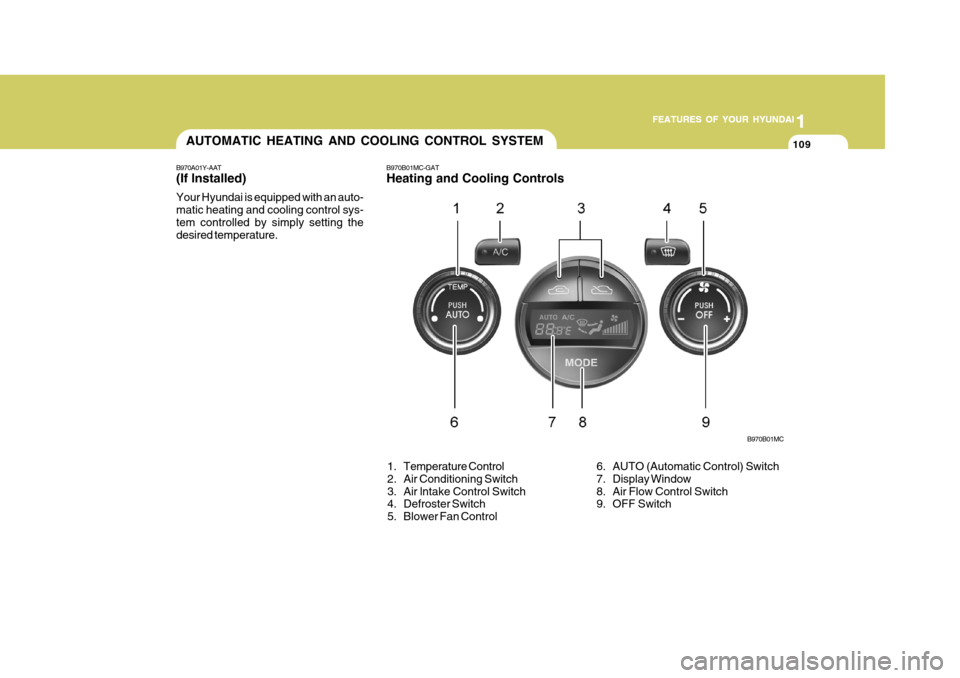
B970A01Y-AAT (If lnstalled) Your Hyundai is equipped with an auto- matic heating and cooling control sys-tem controlled by simply setting the desired temperature. B970B01MC-GAT Heating and Cooling Controls
B970B01MC
6. AUTO (Automatic Control) Switch
7. Display Window
8. Air Flow Control Switch
9. OFF Switch
1. Temperature Control
2. Air Conditioning Switch
3. Air lntake Control Switch
4. Defroster Switch
5. Blower Fan Control
Page 122 of 282
1FEATURES OF YOUR HYUNDAI
110
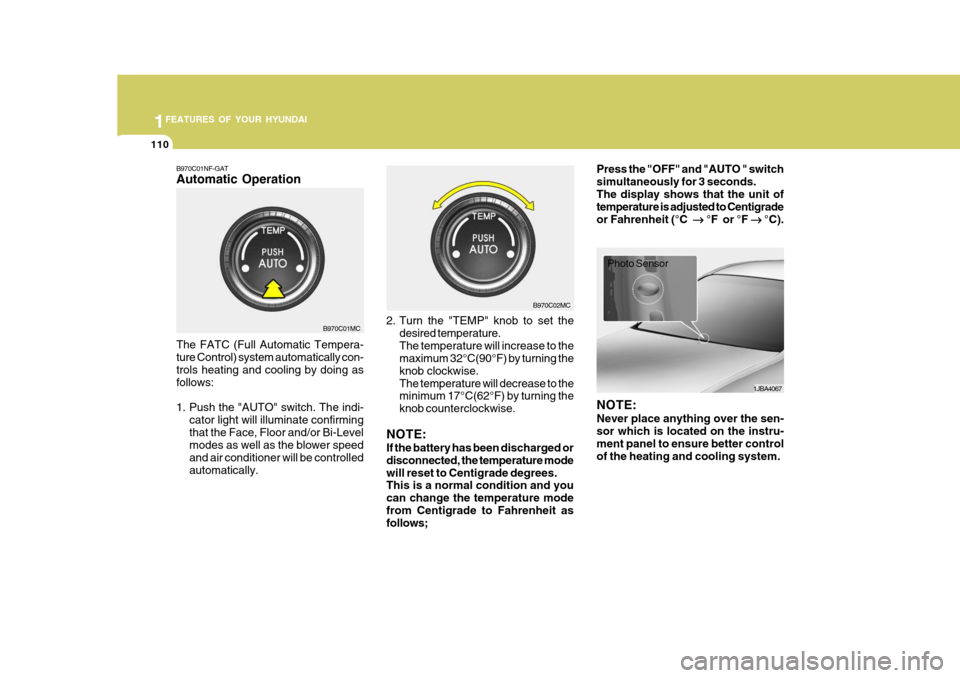
B970C01NF-GAT Automatic Operation The FATC (Full Automatic Tempera- ture Control) system automatically con- trols heating and cooling by doing as follows:
1. Push the "AUTO" switch. The indi-
cator light will illuminate confirming that the Face, Floor and/or Bi-Level modes as well as the blower speed and air conditioner will be controlledautomatically. 2. Turn the "TEMP" knob to set the
desired temperature.The temperature will increase to the maximum 32°C(90°F) by turning the knob clockwise.The temperature will decrease to the minimum 17°C(62°F) by turning the knob counterclockwise.
NOTE: If the battery has been discharged or disconnected, the temperature modewill reset to Centigrade degrees. This is a normal condition and you can change the temperature modefrom Centigrade to Fahrenheit as follows; Press the "OFF" and "AUTO " switch simultaneously for 3 seconds.The display shows that the unit of temperature is adjusted to Centigrade or Fahrenheit (°C
°F or °F
°C).
B970C01MC B970C02MC
1JBA4067
Photo Sensor
NOTE: Never place anything over the sen- sor which is located on the instru- ment panel to ensure better control of the heating and cooling system.
Page 124 of 282
1FEATURES OF YOUR HYUNDAI
112
With the "Fresh" mode selected, air enters the vehicle from the outside andis heated or cooled according to the function selected. With the "Recirculation" mode selected, air from within the passenger compart- ment will be drawn through the heatingsystem and heated or cooled according to the function selected. NOTE: It should be noted that prolonged operation of the heating system in "recirculation" mode will give rise to fogging of the windshield and sidewindows and the air within the pas- senger compartment will become stale. In addition, prolonged use ofthe air conditioning with the "Recir- culation" mode selected may result in the air within the passenger com-partment becoming excessively dry.
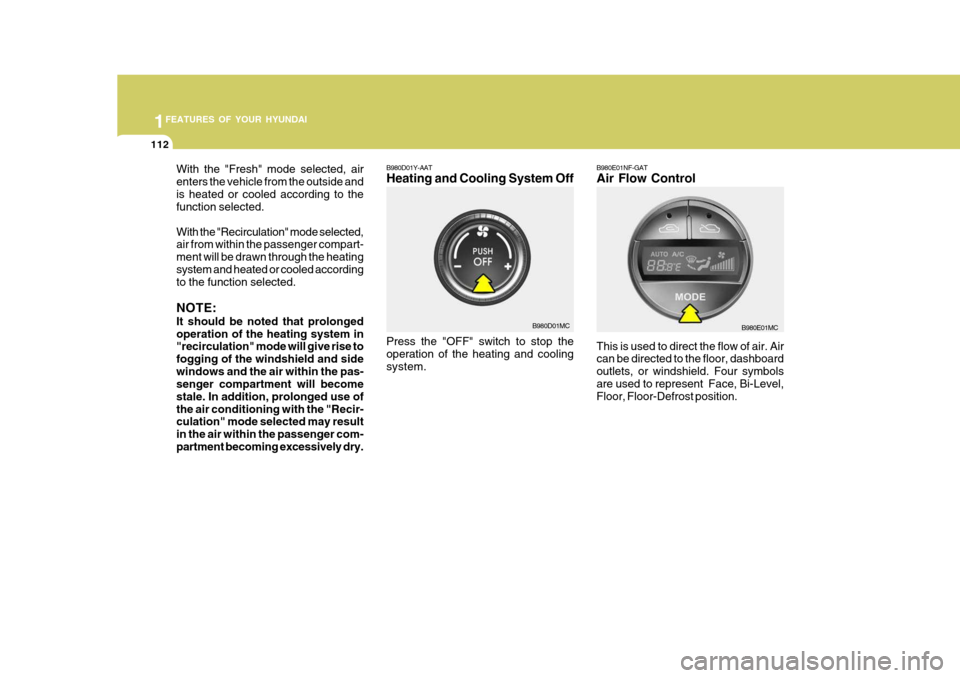
B980D01Y-AAT Heating and Cooling System Off Press the "OFF" switch to stop the operation of the heating and cooling system. B980D01MCB980E01NF-GAT Air Flow Control This is used to direct the flow of air. Air can be directed to the floor, dashboard outlets, or windshield. Four symbolsare used to represent Face, Bi-Level, Floor, Floor-Defrost position.B980E01MC
Page 126 of 282
1FEATURES OF YOUR HYUNDAI
114
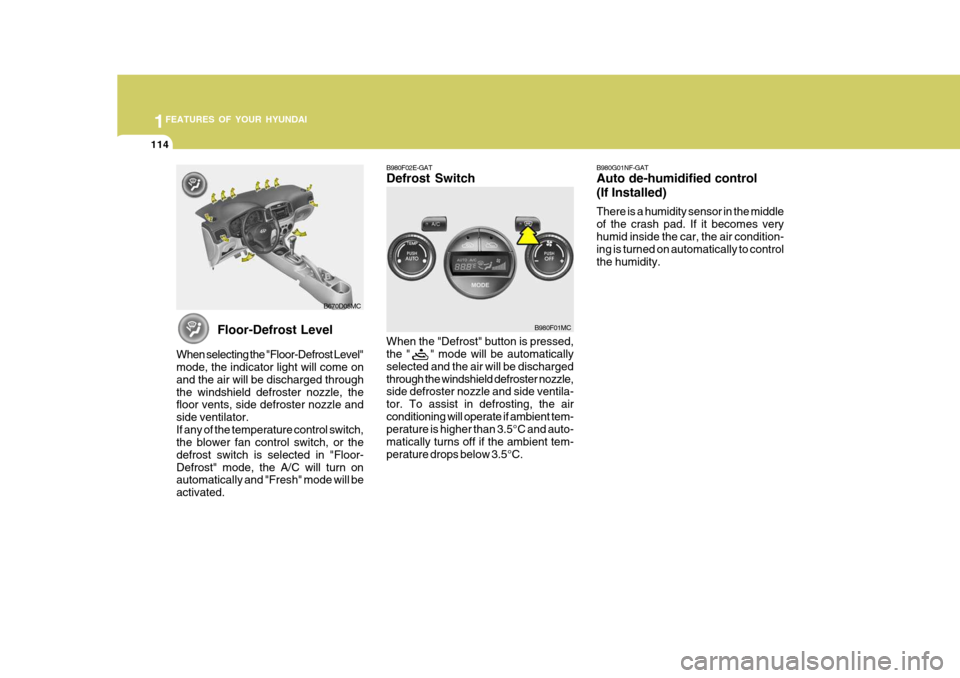
Floor-Defrost Level
When selecting the "Floor-Defrost Level" mode, the indicator light will come on and the air will be discharged throughthe windshield defroster nozzle, the floor vents, side defroster nozzle and side ventilator.If any of the temperature control switch, the blower fan control switch, or the defrost switch is selected in "Floor-Defrost" mode, the A/C will turn on automatically and "Fresh" mode will be activated. B670D05MC
B980F02E-GAT Defrost Switch When the "Defrost" button is pressed, the " " mode will be automatically selected and the air will be dischargedthrough the windshield defroster nozzle, side defroster nozzle and side ventila- tor. To assist in defrosting, the airconditioning will operate if ambient tem- perature is higher than 3.5°C and auto- matically turns off if the ambient tem-perature drops below 3.5°C.
B980F01MCB980G01NF-GAT Auto de-humidified control (If Installed) There is a humidity sensor in the middle of the crash pad. If it becomes veryhumid inside the car, the air condition- ing is turned on automatically to control the humidity.
Page 140 of 282

1FEATURES OF YOUR HYUNDAI
128
7. RANDOM (RDM) Button Press the RDM button to listen the tracks in random, rather than sequen-tial, order. Press it again to cancel random play. NOTE:
o To assure proper operation of theunit, keep the vehicle interior tem- perature within a normal range byusing the vehicle's air condition- ing or heating system.
o When replacing the fuse, replace
it with a fuse having the correctcapacity.
o All stored bookmarks are all erased when the car battery is discon-nected or power to the vehicle is lost. If this occurs, the bookmarkswill have to be reset.
o This equipment is designed to be
used only in a 12 volt DC batterysystem with negative ground.
o This unit is made of precision
parts. Do not attempt to disas-semble or adjust any parts.
o When driving your vehicle, be sure
to keep the volume of the unit setlow enough to allow you to hear sounds coming from the outside. o Do not expose this equipment (in-
cluding the speakers and CD) to water or excessive moisture.
! CAUTION:
o Do not insert warped or poor qual- ity discs into the CD player as damage to the unit may occur.
o Do not insert anything like coins
into the player slot as damage tothe unit may occur.
o Do not place beverages close to
the audio system. The playback mechanism may be damaged if you spill them.
o Do not strike or allow anything to impact the audio system, damageto the system mechanisms couldoccur.
o Off-road or rough surface driving
may cause the compact disc toskip. Do not use the compact disc when driving in such conditions as damage to the compact discface could occur.
o Do not attempt to grab or pull thecompact disc out while the disc is being pulled into the audio unit bythe self-loading mechanism. Dam- age to the audio unit and compact disc could occur.
o Avoid using recorded compact discs in your audio unit. Originalcompact discs are recommended.
Page 145 of 282

1
FEATURES OF YOUR HYUNDAI
133
1
FEATURES OF YOUR HYUNDAI
133
1
FEATURES OF YOUR HYUNDAI
133
1
FEATURES OF YOUR HYUNDAI
133
M455D01MC-GAT 1. TAPE PROGRAM Button
o This allows you to play the reverse side of the tape by merely depress- ing the program button. An arrow will appear in the display to show tape direction.
o Push the TAPE button to turn on that function without pushing power ON/OFF control knob.
2. TAPE EJECT Button
o When the
button is pressed with a
cassette loaded, the cassette will eject.
o When the
button is pressed during
FF/REW mode, the cassette will eject.
3. AUTO MUSIC Search (AMS) Button
Press the button to find the startingpoint of each song in a prerecorded music tape. The quiet space betweensongs (must have at least 4 sec. gap) can be identified by the AUTO MUSIC SEARCH button. o Pressing the
button will play the
beginning of the next music seg- ment.
o Pressing the
button will start re-
play at the beginning of the music just listened to.
4. FF/REW Button
o Forward tape winding starts when the FF button is pressed during PLAY or REW mode.
o Tape PLAY starts when the FF but- ton is pressed again during FF mode.
o Tape rewinding starts when the REW
button is pressed during PLAY or FF mode.
o Tape PLAY starts when the REW
button pressed again during REWmode.
5. REPEAT (RPT) Button
o To repeat the track you are currently listening to, press the RPT button. To cancel, press again.
o If you do not release RPT operation when the track ends, it will automati-cally be replayed. This process will be continued untilyou push the button again or turn thepower OFF then ON.
6. DOLBY Button If you get background noise during tape PLAY, you can reduce this consider- ably by merely pressing the DOLBY button. If you want to cancel the DOLBYfeature, press the button again. 7. EQ Button Press the EQ button to select the CLAS- SIC, POPS, ROCK, JAZZ and OFFMODE for the desired tone quality. Each press of the button changes the display as follows; NOTE :
o To assure proper operation of the unit, keep the vehicle interior tem- perature within a normal range by using the vehicle's air condition- ing or heating system.
CLASSIC
POPS ROCK JAZZ DEFEAT
Page 150 of 282

1FEATURES OF YOUR HYUNDAI
138
!
CAUTION:
o Do not insert warped or poor qual- ity discs into the CD player as damage to the unit may occur.
o Do not insert anything like coins into the player slot as damage tothe unit may occur.
o Do not place beverages close to the audio system. The playbackmechanism may be damaged ifyou spill them.
o Do not strike or allow anything to
impact the audio system, damage to the system mechanisms could occur.
o Off-road or rough surface driving
may cause the compact disc toskip. Do not use the compact disc when driving in such conditionsas damage to the compact disc face could occur.
o Do not attempt to grab or pull the
compact disc out while the disc isbeing pulled into the audio unit by the self-loading mechanism. Dam- age to the audio unit and compact disc could occur.
o Avoid using recorded compact discs in your audio unit. Originalcompact discs are recommended.
12. DIRECTORY SEARCH
Button
o You can move through the folder by pushing the DIR button to up ( ) anddown ( ). After moving the desired folder, press the FILE SEARCH knob to playbackthe selected folder. If you do not press the FILE SEARCH knob within five seconds, the searchwill stop.
NOTE :
o To assure proper operation of the unit, keep the vehicle interior tem- perature within a normal range by using the vehicle's air condition- ing or heating system.
o When replacing the fuse, replace it with a fuse having the correctcapacity.
o All stored bookmarks are all erased when the car battery is discon-nected or power to the vehicle islost. If this occurs, the bookmarks will have to be reset. o This equipment is designed to be
used only in a 12 volt DC battery system with negative ground.
o This unit is made of precision
parts. Do not attempt to disas-semble or adjust any parts.
o When driving your vehicle, be sure
to keep the volume of the unit setlow enough to allow you to hear sounds coming from the outside.
o Do not expose this equipment (in-
cluding the speakers and tape) towater or excessive moisture.
Page 159 of 282

1
FEATURES OF YOUR HYUNDAI
147
1
FEATURES OF YOUR HYUNDAI
147
1
FEATURES OF YOUR HYUNDAI
147
1
FEATURES OF YOUR HYUNDAI
147
10. REPEAT (RPT) Button
o To repeat the track you are currently listening to, press the RPT button. To cancel, press again.
o To repeat the music within selected
CD, press the RPT button for morethan 0.8 seconds. To cancel, press it again for more than 0.8 seconds.
o If you do not release RPT operation after all the tracks are played back,the unit will play back again from thefirst track.
11. RANDOM (RDM) Button With random, you can listen to the tracks in random, rather than sequen- tial order, on all of the discs or on onedisc. To use random, do the following:
o Press the RDM button to listen to recorded tracks in random sequence.Press RDM again to cancel or turnthe audio unit OFF then ON. The unit defaults to playing tracks in sequen- tial order. NOTE :
o To assure proper operation of the
unit, keep the vehicle interior tem- perature within a normal range byusing the vehicle's air condition- ing or heating system.
o When replacing the fuse, replace it with a fuse having the correctcapacity.
o All stored bookmarks are all erased when the car battery is discon-nected or power to the vehicle is lost. If this occurs, the bookmarkswill have to be reset.
o Do not add any oil to the rotating
parts. Keep magnets, screwdriv-ers and other metallic objects away from the tape mechanism and head.
! CAUTION:
o Do not insert warped or poor qual- ity discs into the CD player as damage to the unit may occur.
o Do not insert anything like coins
into the player slot as damage tothe unit may occur.
o Do not place beverages close to
the audio system. The playbackmechanism may be damaged if you spill them.
o Do not strike or allow anything to impact the audio system, damageto the system mechanisms could occur.
o Off-road or rough surface driving may cause the compact disc toskip. Do not use the compact discwhen driving in such conditions as damage to the compact disc face could occur.
o Do not attempt to grab or pull the compact disc out while the disc isbeing pulled into the audio unit bythe self-loading mechanism. Dam- age to the audio unit and compact disc could occur.