Ignition switch Hyundai Accent 2007 Owner's Guide
[x] Cancel search | Manufacturer: HYUNDAI, Model Year: 2007, Model line: Accent, Model: Hyundai Accent 2007Pages: 282, PDF Size: 10.55 MB
Page 93 of 282
1
FEATURES OF YOUR HYUNDAI
81
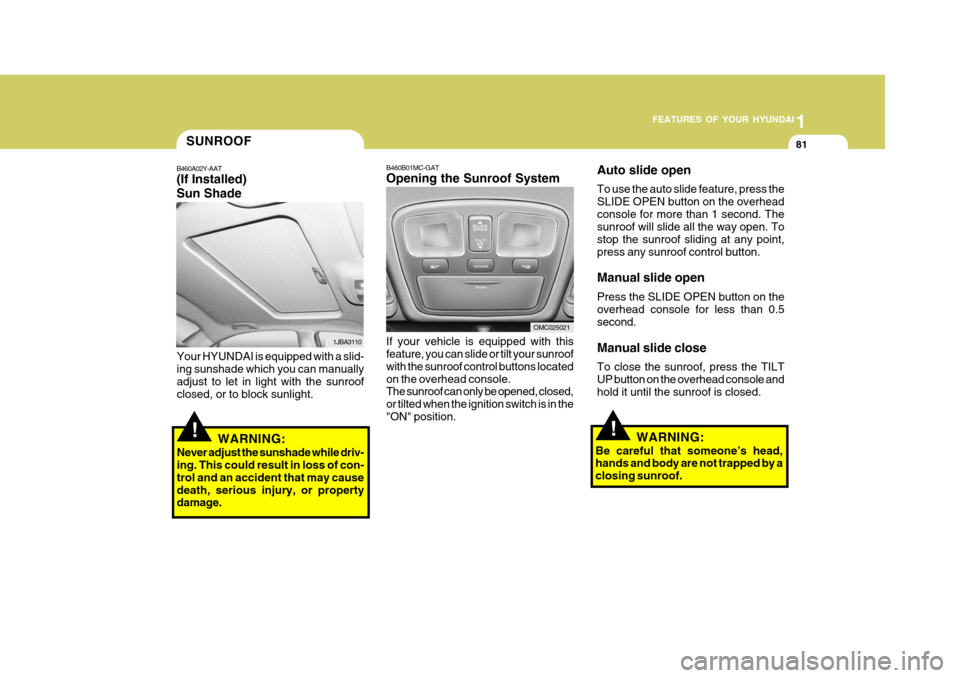
B460B01MC-GAT Opening the Sunroof System If your vehicle is equipped with this feature, you can slide or tilt your sunroof with the sunroof control buttons locatedon the overhead console. The sunroof can only be opened, closed, or tilted when the ignition switch is in the"ON" position.
!
SUNROOF
B460A02Y-AAT (If Installed) Sun Shade
1JBA3110
Your HYUNDAI is equipped with a slid- ing sunshade which you can manually adjust to let in light with the sunroofclosed, or to block sunlight.
WARNING:
Never adjust the sunshade while driv- ing. This could result in loss of con- trol and an accident that may causedeath, serious injury, or property damage.
OMC025021
!
Auto slide open To use the auto slide feature, press the SLIDE OPEN button on the overheadconsole for more than 1 second. The sunroof will slide all the way open. To stop the sunroof sliding at any point,press any sunroof control button. Manual slide open Press the SLIDE OPEN button on the overhead console for less than 0.5 second. Manual slide close To close the sunroof, press the TILT UP button on the overhead console andhold it until the sunroof is closed.
WARNING:
Be careful that someone’s head, hands and body are not trapped by a closing sunroof.
Page 96 of 282
1FEATURES OF YOUR HYUNDAI
84
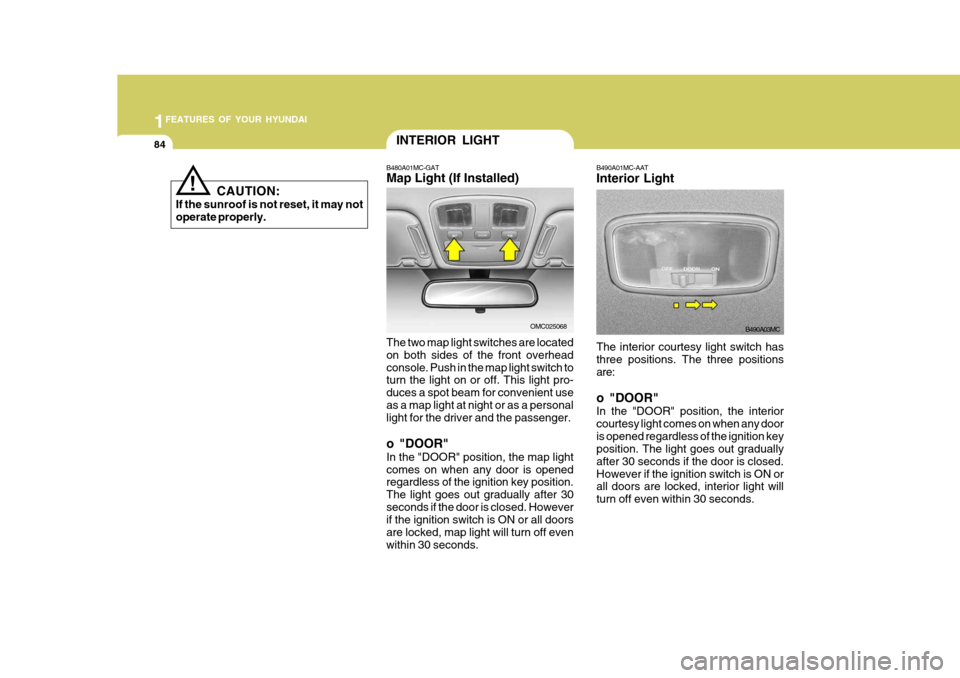
The interior courtesy light switch has three positions. The three positions are: o "DOOR" In the "DOOR" position, the interior courtesy light comes on when any dooris opened regardless of the ignition key position. The light goes out gradually after 30 seconds if the door is closed.However if the ignition switch is ON or all doors are locked, interior light will turn off even within 30 seconds.
B490A01MC-AAT Interior Light
B490A03MC
INTERIOR LIGHT
B480A01MC-GAT Map Light (If Installed) The two map light switches are located on both sides of the front overheadconsole. Push in the map light switch to turn the light on or off. This light pro- duces a spot beam for convenient useas a map light at night or as a personal light for the driver and the passenger. o "DOOR" In the "DOOR" position, the map light comes on when any door is opened regardless of the ignition key position. The light goes out gradually after 30seconds if the door is closed. However if the ignition switch is ON or all doors are locked, map light will turn off evenwithin 30 seconds.
OMC025068
! CAUTION:
If the sunroof is not reset, it may not operate properly.
Page 115 of 282
1
FEATURES OF YOUR HYUNDAI
103
1
FEATURES OF YOUR HYUNDAI
103
1
FEATURES OF YOUR HYUNDAI
103
Defrost-Level
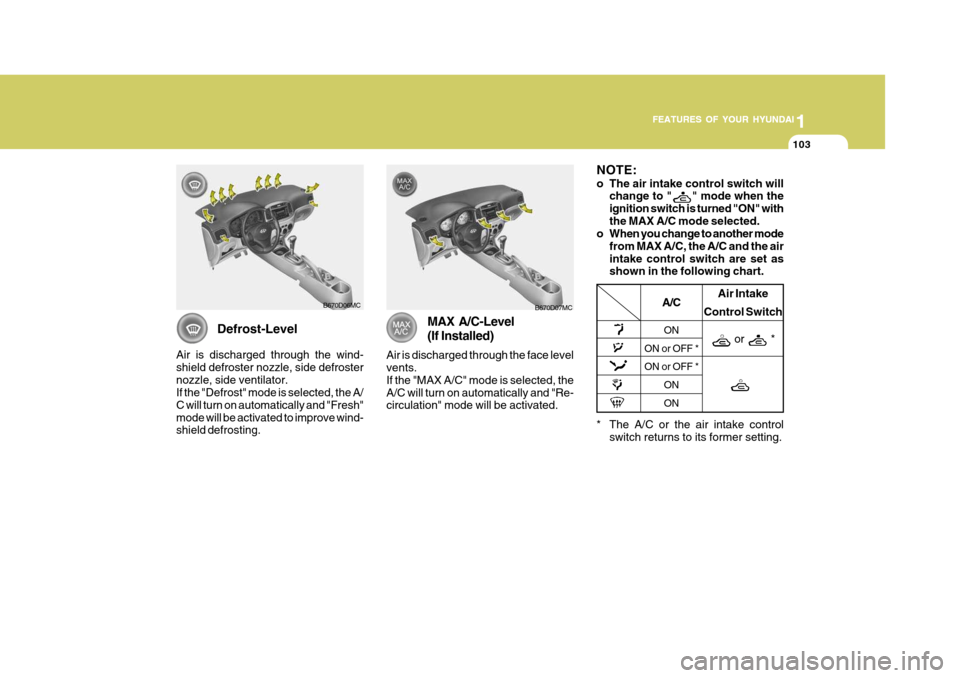
Air is discharged through the wind- shield defroster nozzle, side defrosternozzle, side ventilator. If the "Defrost" mode is selected, the A/ C will turn on automatically and "Fresh"mode will be activated to improve wind- shield defrosting.
B670D06MC
MAX A/C-Level (If Installed)
Air is discharged through the face level vents. If the "MAX A/C" mode is selected, theA/C will turn on automatically and "Re- circulation" mode will be activated. B670D07MC
* The A/C or the air intake controlswitch returns to its former setting.
A/C
ON
ON or OFF * ON or OFF *
ONON Air Intake
Control Switch
or *
NOTE:
o The air intake control switch will change to "
" mode when the
ignition switch is turned "ON" with the MAX A/C mode selected.
o When you change to another mode
from MAX A/C, the A/C and the airintake control switch are set as shown in the following chart.
Page 131 of 282
1
FEATURES OF YOUR HYUNDAI
119
1
FEATURES OF YOUR HYUNDAI
119
1
FEATURES OF YOUR HYUNDAI
119
1
FEATURES OF YOUR HYUNDAI
119
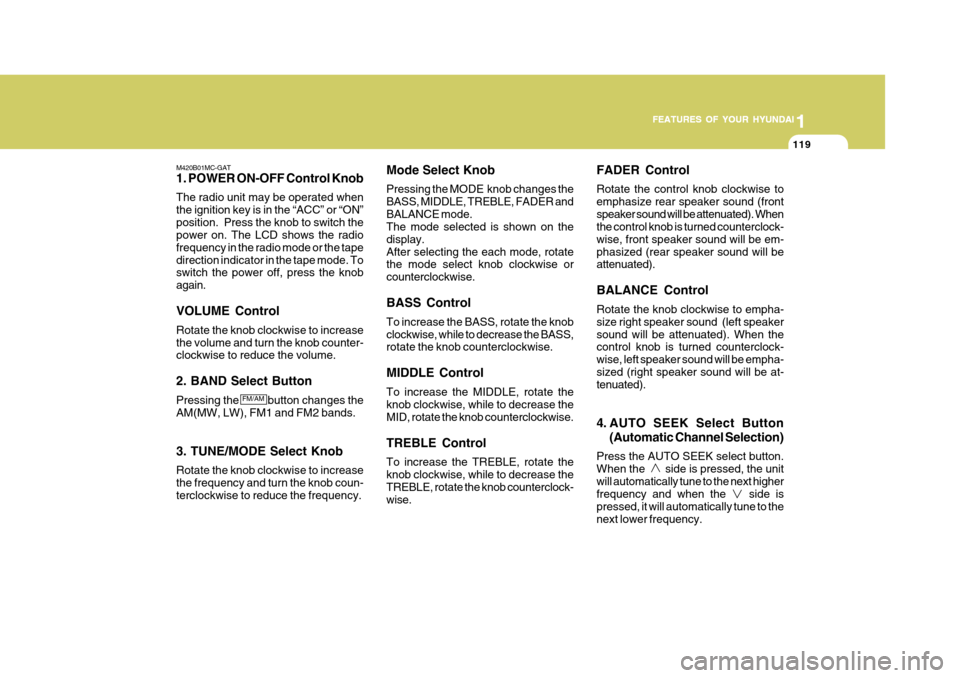
M420B01MC-GAT 1. POWER ON-OFF Control Knob The radio unit may be operated when the ignition key is in the “ACC” or “ON”position. Press the knob to switch the power on. The LCD shows the radio frequency in the radio mode or the tapedirection indicator in the tape mode. To switch the power off, press the knob again. VOLUME Control Rotate the knob clockwise to increase the volume and turn the knob counter- clockwise to reduce the volume. 2. BAND Select Button Pressing the button changes the AM(MW, LW), FM1 and FM2 bands. 3. TUNE/MODE Select Knob Rotate the knob clockwise to increase the frequency and turn the knob coun- terclockwise to reduce the frequency. Mode Select Knob Pressing the MODE knob changes the BASS, MIDDLE, TREBLE, FADER andBALANCE mode. The mode selected is shown on the display.After selecting the each mode, rotate the mode select knob clockwise or counterclockwise. BASS Control To increase the BASS, rotate the knob clockwise, while to decrease the BASS, rotate the knob counterclockwise. MIDDLE Control To increase the MIDDLE, rotate the knob clockwise, while to decrease the MID, rotate the knob counterclockwise. TREBLE Control To increase the TREBLE, rotate the knob clockwise, while to decrease the TREBLE, rotate the knob counterclock- wise.FADER Control Rotate the control knob clockwise to emphasize rear speaker sound (frontspeaker sound will be attenuated). When the control knob is turned counterclock- wise, front speaker sound will be em-phasized (rear speaker sound will be attenuated). BALANCE Control Rotate the knob clockwise to empha- size right speaker sound (left speakersound will be attenuated). When the control knob is turned counterclock- wise, left speaker sound will be empha-sized (right speaker sound will be at- tenuated).
4. AUTO SEEK Select Button
(Automatic Channel Selection)
Press the AUTO SEEK select button. When the side is pressed, the unitwill automatically tune to the next higher frequency and when the side is pressed, it will automatically tune to thenext lower frequency.
FM/AM
Page 136 of 282
1FEATURES OF YOUR HYUNDAI
124
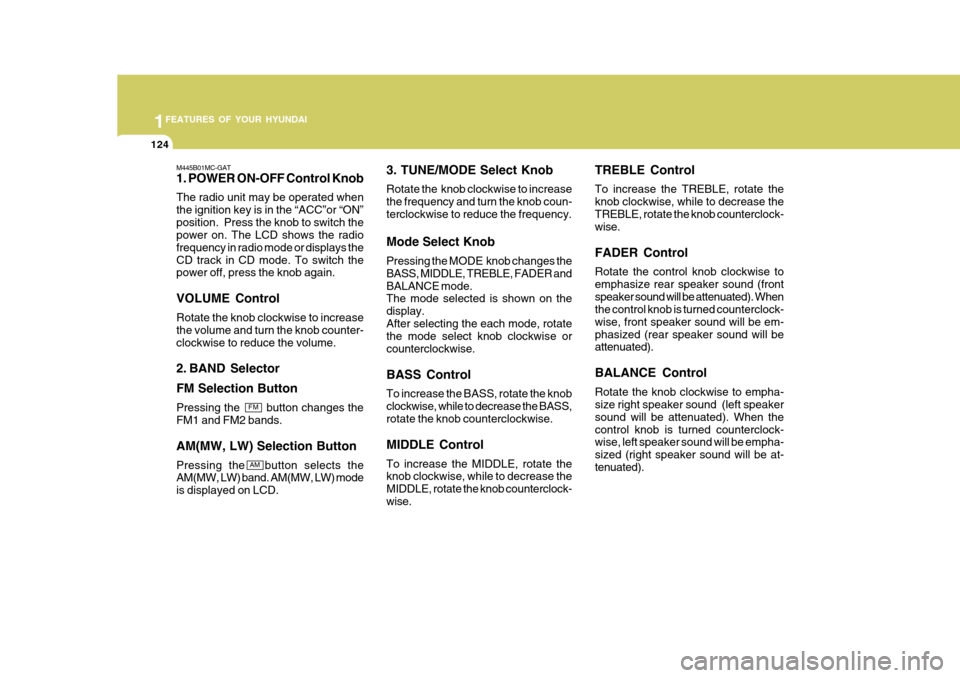
M445B01MC-GAT 1. POWER ON-OFF Control Knob The radio unit may be operated when the ignition key is in the “ACC”or “ON”position. Press the knob to switch the power on. The LCD shows the radio frequency in radio mode or displays theCD track in CD mode. To switch the power off, press the knob again. VOLUME Control Rotate the knob clockwise to increase the volume and turn the knob counter-clockwise to reduce the volume.
2. BAND Selector FM Selection Button Pressing the button changes the FM1 and FM2 bands. AM(MW, LW) Selection Button Pressing the button selects the AM(MW, LW) band. AM(MW, LW) mode is displayed on LCD. 3. TUNE/MODE Select Knob Rotate the knob clockwise to increase the frequency and turn the knob coun-terclockwise to reduce the frequency. Mode Select Knob Pressing the MODE knob changes the BASS, MIDDLE, TREBLE, FADER andBALANCE mode. The mode selected is shown on the display.After selecting the each mode, rotate the mode select knob clockwise or counterclockwise. BASS Control To increase the BASS, rotate the knob clockwise, while to decrease the BASS, rotate the knob counterclockwise. MIDDLE Control To increase the MIDDLE, rotate the knob clockwise, while to decrease the MIDDLE, rotate the knob counterclock-wise.TREBLE Control To increase the TREBLE, rotate the knob clockwise, while to decrease theTREBLE, rotate the knob counterclock- wise. FADER Control Rotate the control knob clockwise to emphasize rear speaker sound (frontspeaker sound will be attenuated). When the control knob is turned counterclock- wise, front speaker sound will be em-phasized (rear speaker sound will be attenuated). BALANCE Control Rotate the knob clockwise to empha- size right speaker sound (left speaker sound will be attenuated). When thecontrol knob is turned counterclock- wise, left speaker sound will be empha- sized (right speaker sound will be at-tenuated).
FM
AM
Page 139 of 282
1
FEATURES OF YOUR HYUNDAI
127
1
FEATURES OF YOUR HYUNDAI
127
1
FEATURES OF YOUR HYUNDAI
127
1
FEATURES OF YOUR HYUNDAI
127
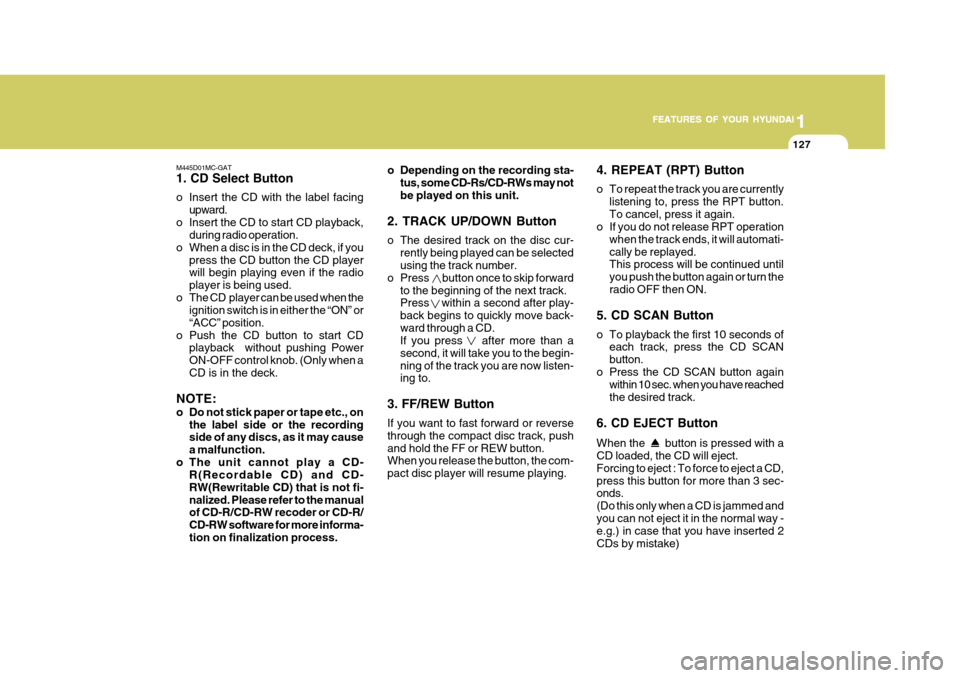
M445D01MC-GAT 1. CD Select Button
o Insert the CD with the label facing upward.
o Insert the CD to start CD playback, during radio operation.
o When a disc is in the CD deck, if you press the CD button the CD player will begin playing even if the radio player is being used.
o The CD player can be used when the ignition switch is in either the “ON” or“ACC” position.
o Push the CD button to start CD playback without pushing PowerON-OFF control knob. (Only when aCD is in the deck.
NOTE:
o Do not stick paper or tape etc., on the label side or the recording side of any discs, as it may cause a malfunction.
o The unit cannot play a CD- R(Recordable CD) and CD-RW(Rewritable CD) that is not fi-nalized. Please refer to the manual of CD-R/CD-RW recoder or CD-R/ CD-RW software for more informa-tion on finalization process. o Depending on the recording sta-
tus, some CD-Rs/CD-RWs may notbe played on this unit.
2. TRACK UP/DOWN Button
o The desired track on the disc cur- rently being played can be selected using the track number.
o Press button once to skip forward to the beginning of the next track.Press within a second after play- back begins to quickly move back-ward through a CD. If you press after more than a second, it will take you to the begin-ning of the track you are now listen- ing to.
3. FF/REW Button If you want to fast forward or reverse through the compact disc track, pushand hold the FF or REW button. When you release the button, the com- pact disc player will resume playing. 4. REPEAT (RPT) Button
o To repeat the track you are currently
listening to, press the RPT button. To cancel, press it again.
o If you do not release RPT operation
when the track ends, it will automati-cally be replayed. This process will be continued until you push the button again or turn theradio OFF then ON.
5. CD SCAN Button
o To playback the first 10 seconds of each track, press the CD SCAN button.
o Press the CD SCAN button again within 10 sec. when you have reachedthe desired track.
6. CD EJECT Button When the
button is pressed with a
CD loaded, the CD will eject. Forcing to eject : To force to eject a CD,press this button for more than 3 sec- onds. (Do this only when a CD is jammed andyou can not eject it in the normal way - e.g.) in case that you have inserted 2 CDs by mistake)
Page 142 of 282
1FEATURES OF YOUR HYUNDAI
130
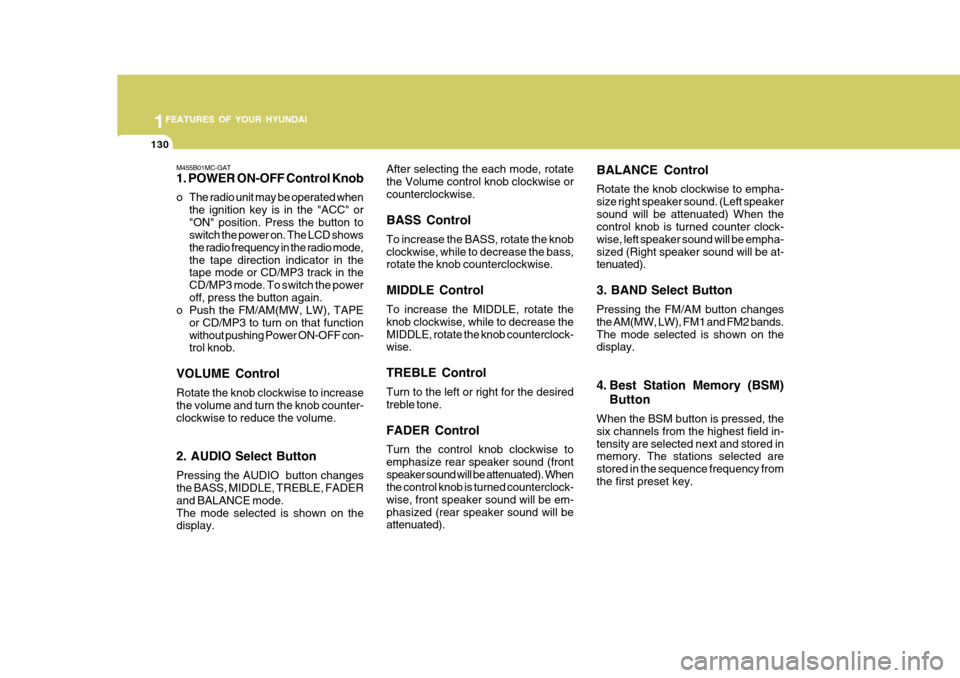
M455B01MC-GAT 1. POWER ON-OFF Control Knob
o The radio unit may be operated whenthe ignition key is in the "ACC" or "ON" position. Press the button to switch the power on. The LCD shows the radio frequency in the radio mode,the tape direction indicator in the tape mode or CD/MP3 track in the CD/MP3 mode. To switch the poweroff, press the button again.
o Push the FM/AM(MW, LW), TAPE
or CD/MP3 to turn on that functionwithout pushing Power ON-OFF con- trol knob.
VOLUME Control Rotate the knob clockwise to increase the volume and turn the knob counter-clockwise to reduce the volume. 2. AUDIO Select Button Pressing the AUDIO button changes the BASS, MIDDLE, TREBLE, FADER and BALANCE mode.The mode selected is shown on the display. After selecting the each mode, rotate the Volume control knob clockwise orcounterclockwise. BASS Control To increase the BASS, rotate the knob clockwise, while to decrease the bass, rotate the knob counterclockwise. MIDDLE Control To increase the MIDDLE, rotate the knob clockwise, while to decrease theMIDDLE, rotate the knob counterclock- wise. TREBLE Control Turn to the left or right for the desired treble tone. FADER Control Turn the control knob clockwise to emphasize rear speaker sound (frontspeaker sound will be attenuated). When the control knob is turned counterclock- wise, front speaker sound will be em-phasized (rear speaker sound will be attenuated).
BALANCE Control Rotate the knob clockwise to empha- size right speaker sound. (Left speakersound will be attenuated) When the control knob is turned counter clock- wise, left speaker sound will be empha-sized (Right speaker sound will be at- tenuated). 3. BAND Select Button Pressing the FM/AM button changes the AM(MW, LW), FM1 and FM2 bands.The mode selected is shown on the display.
4. Best Station Memory (BSM)
Button
When the BSM button is pressed, the six channels from the highest field in-tensity are selected next and stored in memory. The stations selected are stored in the sequence frequency fromthe first preset key.
Page 148 of 282
1FEATURES OF YOUR HYUNDAI
136
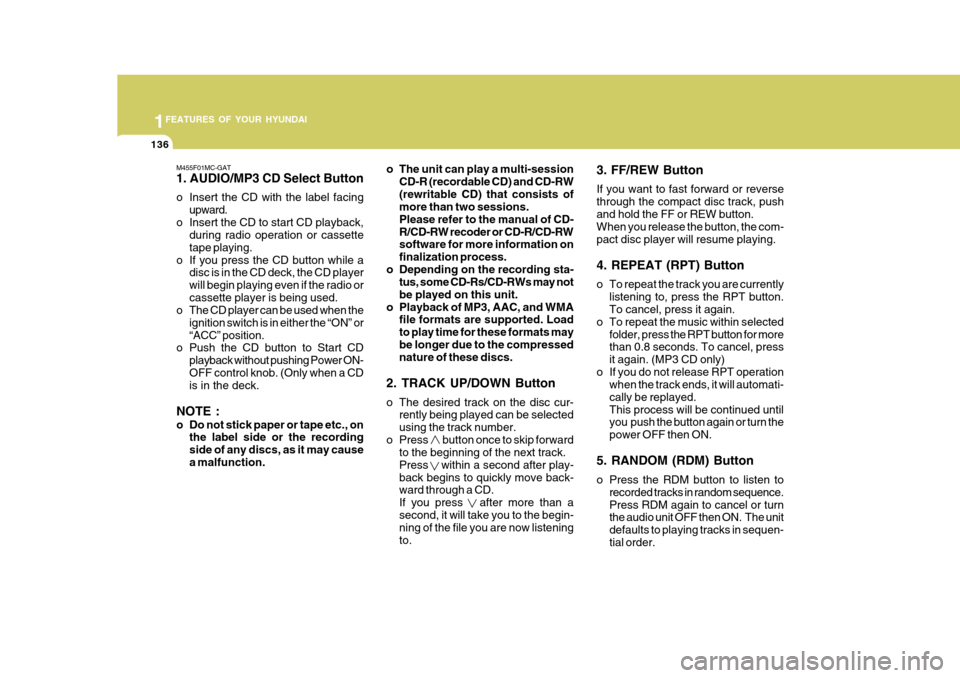
M455F01MC-GAT 1. AUDIO/MP3 CD Select Button
o Insert the CD with the label facingupward.
o Insert the CD to start CD playback, during radio operation or cassette tape playing.
o If you press the CD button while a disc is in the CD deck, the CD playerwill begin playing even if the radio orcassette player is being used.
o The CD player can be used when the
ignition switch is in either the “ON” or“ACC” position.
o Push the CD button to Start CD
playback without pushing Power ON-OFF control knob. (Only when a CD is in the deck.
NOTE :
o Do not stick paper or tape etc., on the label side or the recording side of any discs, as it may causea malfunction. o The unit can play a multi-session
CD-R (recordable CD) and CD-RW(rewritable CD) that consists of more than two sessions. Please refer to the manual of CD-R/CD-RW recoder or CD-R/CD-RW software for more information on finalization process.
o Depending on the recording sta- tus, some CD-Rs/CD-RWs may notbe played on this unit.
o Playback of MP3, AAC, and WMA file formats are supported. Loadto play time for these formats maybe longer due to the compressed nature of these discs.
2. TRACK UP/DOWN Button
o The desired track on the disc cur- rently being played can be selected using the track number.
o Press button once to skip forward to the beginning of the next track.Press within a second after play-back begins to quickly move back- ward through a CD. If you press after more than asecond, it will take you to the begin- ning of the file you are now listening to. 3. FF/REW Button If you want to fast forward or reverse through the compact disc track, pushand hold the FF or REW button. When you release the button, the com- pact disc player will resume playing. 4. REPEAT (RPT) Button
o To repeat the track you are currently
listening to, press the RPT button. To cancel, press it again.
o To repeat the music within selected
folder, press the RPT button for morethan 0.8 seconds. To cancel, press it again. (MP3 CD only)
o If you do not release RPT operation when the track ends, it will automati-cally be replayed.This process will be continued until you push the button again or turn the power OFF then ON.
5. RANDOM (RDM) Button
o Press the RDM button to listen to recorded tracks in random sequence. Press RDM again to cancel or turn the audio unit OFF then ON. The unit defaults to playing tracks in sequen-tial order.
Page 152 of 282
1FEATURES OF YOUR HYUNDAI
140
M465B01MC-GAT 1. POWER ON-OFF Control Knob The radio unit may be operated when the ignition key is in the "ACC" or “ON”position. Press the knob to switch the power on. The LCD shows the radio frequency in the radio mode, the tapedirection indicator in the tape mode or CD track in either the CD mode or CD AUTO CHANGER mode. To switch thepower off, press the knob again. VOLUME Control Rotate the knob clockwise to increase the volume and turn the knob counter- clockwise to reduce the volume. 2. BAND Select Button Pressing the FM/AM button changes the AM(MW, LW), FM1 and FM2 bands.The mode selected is shown on the display. 3. TUNE/MODE Select Knob Rotate the knob clockwise to increase the frequency and turn the knob coun- terclockwise to reduce the frequency. Mode Select Knob Pressing the MODE knob changes the BASS, MIDDLE, TREBLE, FADER andBALANCE mode. The mode selected is shown on the display.After selecting the each mode, rotate the mode select knob clockwise or counterclockwise. BASS Control To increase the BASS, rotate the knob clockwise, while to decrease the BASS, rotate the knob counterclockwise. MIDDLE Control To increase the MIDDLE, rotate the knob clockwise, while to decrease the MID, rotate the knob counterclockwise. TREBLE Control To increase the TREBLE, rotate the knob clockwise, while to decrease the TREBLE, rotate the knob counterclock- wise.
FADER Control Rotate the control knob clockwise to emphasize rear speaker sound (frontspeaker sound will be attenuated). When the control knob is turned counterclock- wise, front speaker sound will be em-phasized (rear speaker sound will be attenuated). BALANCE Control Rotate the knob clockwise to empha- size right speaker sound (left speakersound will be attenuated). When the control knob is turned counterclock- wise, left speaker sound will be empha-sized (right speaker sound will be at- tenuated).
4. AUTO SEEK Select Button
(Automatic Channel Selection)
Press the AUTO SEEK select button. When the side is pressed, the unit will automatically tune to the next higherfrequency and when the side is pressed, it will automatically tune to the next lower frequency.
Page 157 of 282
1
FEATURES OF YOUR HYUNDAI
145
1
FEATURES OF YOUR HYUNDAI
145
1
FEATURES OF YOUR HYUNDAI
145
1
FEATURES OF YOUR HYUNDAI
145
M465F01MC-GAT 1. LOAD Button This compact disc player will accom- modate up to six compact discs.To insert multiple discs into the player, perform the following:
1. Press and release the LOAD Button.
2. Green light on the slot will be illumi- nated and the lowest number of empty slot will blink on the display. After “WAIT” is displayed on the LCD, the slot will open with “LOAD”displayed on the LCD.
3. Insert a disc partway into the slot,
label side up. The player will pull thedisc in.
When the disc is inserted, the disc willbegin to play automatically. NOTE :
o The disc can be only inserted while the green light is blinking on the slot.
o This CD player is suitable only for
12 cm discs, do not use irregularshaped CDs. To insert multiple discs do the follow- ings:
1. Press and hold the LOAD button for
one second or more. You will then hear a beep sound and the green light on the slot will be illuminated, and the numbers ofempty disc will blink on the display.
2. After “WAIT” is displayed on the LCD
with the lowest number of empty slotblinking, the slot will open with “LOAD” displayed on the LCD.
3. Insert a disc partway into the slot, label side up. The player will pull thedisc in. Once the disc is loaded, the num-bers of the empty disc will blink on the display continuously. If the next “DISC NO.” is displayedwhen the slot is illuminated, you can then load another disc.
4. Load the remaining disc by following the same procedures 1 and 2. Whenyou finished loading 6 discs, the CD player will begin to play the last CDloaded.
5. To load more than one disc but less
than six, complete Steps 1 and 2. When you have finished loading discs,press LOAD button to cancel the load-ing function or wait for 10 seconds. The CD player will begin to play the last CD loaded. As each CD starts to play, theDISC number will appear on the dis- play. NOTE : The disc player takes up to six discs. Do not try to load more than six. 2. CD/AUX Button
o Press the CD Button to start CD
playback, during radio operation or cassette tape playing.
o When discs are in the CD deck, if you press the CD button, the CD playerwill begin playing even if the radio orcassette player is being used.
o The CD player can be used when the
ignition switch is in either the “ON” or“ACC” position.
o Push the CD button to start CD
playback without pushing Power ON-OFF control knob. (Only when a CD is in the deck.