vin Hyundai Accent 2008 Owner's Guide
[x] Cancel search | Manufacturer: HYUNDAI, Model Year: 2008, Model line: Accent, Model: Hyundai Accent 2008Pages: 273, PDF Size: 9.36 MB
Page 104 of 273
1FEATURES OF YOUR HYUNDAI92
CAUTION:
If the mirror control is jammed with ice,
do not attempt to break it free using the
control handle or by manipulating the
face of the mirror. Use an approved
spray de-icer (not radiator antifreeze) to
release the frozen mechanism or move
the vehicle to a warm place and allow the
ice to melt.
!
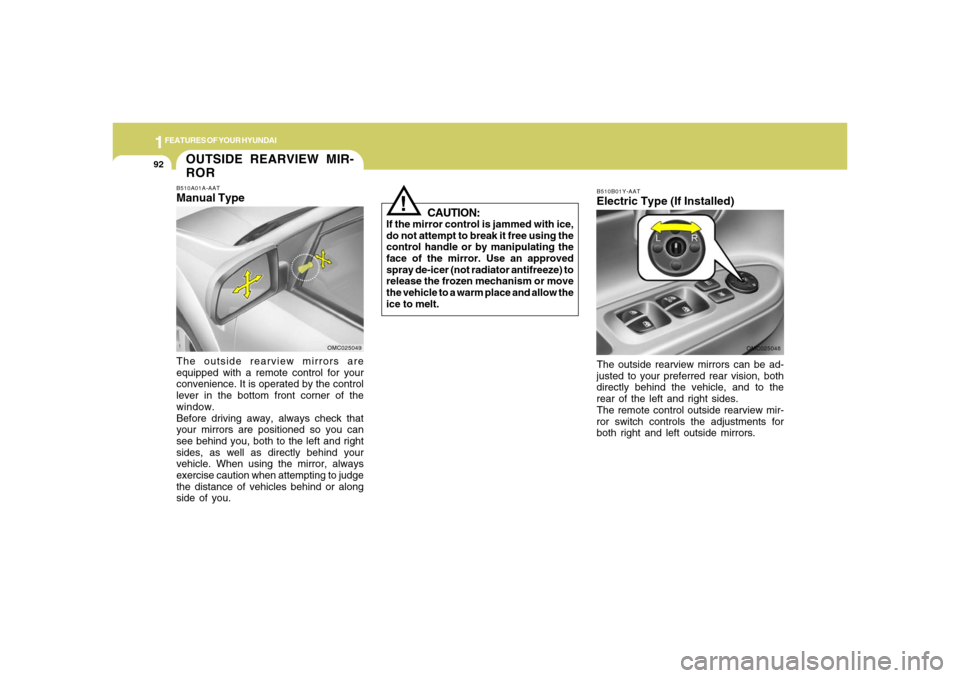
B510B01Y-AATElectric Type (If Installed)
OMC025048
The outside rearview mirrors can be ad-
justed to your preferred rear vision, both
directly behind the vehicle, and to the
rear of the left and right sides.
The remote control outside rearview mir-
ror switch controls the adjustments for
both right and left outside mirrors.
OUTSIDE REARVIEW MIR-
RORB510A01A-AATManual TypeThe outside rearview mirrors are
equipped with a remote control for your
convenience. It is operated by the control
lever in the bottom front corner of the
window.
Before driving away, always check that
your mirrors are positioned so you can
see behind you, both to the left and right
sides, as well as directly behind your
vehicle. When using the mirror, always
exercise caution when attempting to judge
the distance of vehicles behind or along
side of you.
OMC025049
Page 106 of 273
1FEATURES OF YOUR HYUNDAI94
PARKING BRAKE
DAY/NIGHT INSIDE REAR-
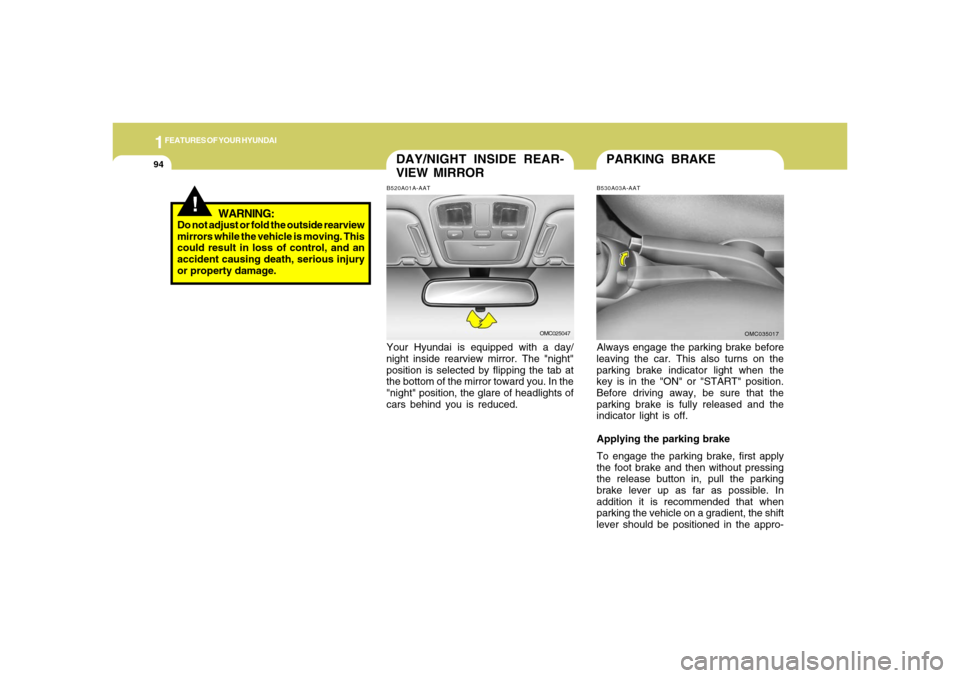
VIEW MIRRORB520A01A-AATYour Hyundai is equipped with a day/
night inside rearview mirror. The "night"
position is selected by flipping the tab at
the bottom of the mirror toward you. In the
"night" position, the glare of headlights of
cars behind you is reduced.
OMC025047
B530A03A-AATAlways engage the parking brake before
leaving the car. This also turns on the
parking brake indicator light when the
key is in the "ON" or "START" position.
Before driving away, be sure that the
parking brake is fully released and the
indicator light is off.
Applying the parking brake
To engage the parking brake, first apply
the foot brake and then without pressing
the release button in, pull the parking
brake lever up as far as possible. In
addition it is recommended that when
parking the vehicle on a gradient, the shift
lever should be positioned in the appro-
OMC035017
!
WARNING:
Do not adjust or fold the outside rearview
mirrors while the vehicle is moving. This
could result in loss of control, and an
accident causing death, serious injury
or property damage.
Page 107 of 273
1
FEATURES OF YOUR HYUNDAI
951
FEATURES OF YOUR HYUNDAI
95
!
HIGH-MOUNTED REAR
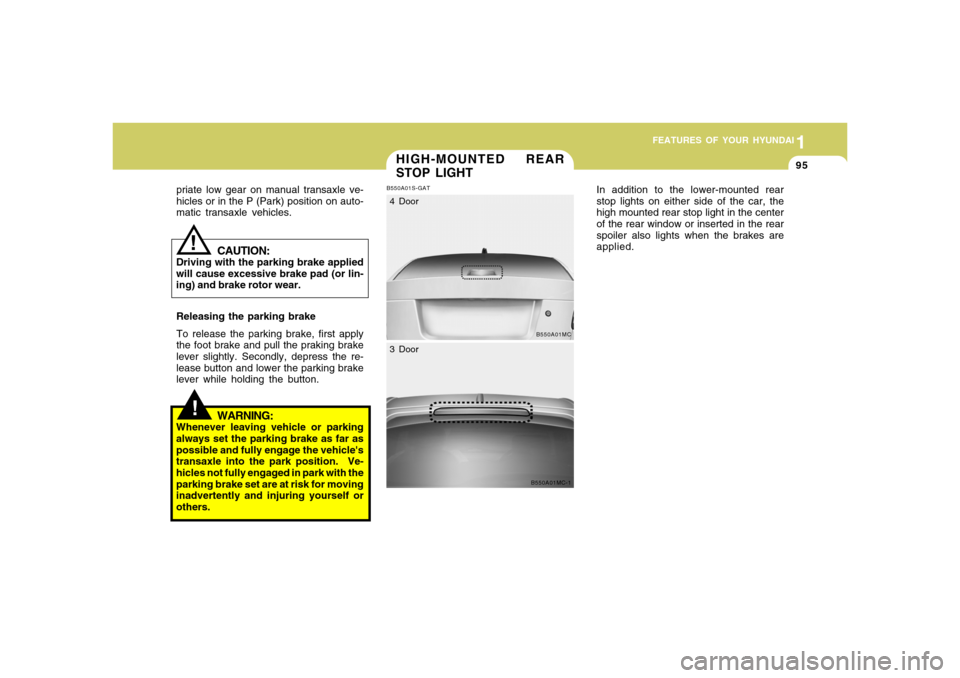
STOP LIGHTB550A01S-GAT
In addition to the lower-mounted rear
stop lights on either side of the car, the
high mounted rear stop light in the center
of the rear window or inserted in the rear
spoiler also lights when the brakes are
applied.
B550A01MC
4 Door
B550A01MC-1
3 Door
WARNING:
Whenever leaving vehicle or parking
always set the parking brake as far as
possible and fully engage the vehicle's
transaxle into the park position. Ve-
hicles not fully engaged in park with the
parking brake set are at risk for moving
inadvertently and injuring yourself or
others.priate low gear on manual transaxle ve-
hicles or in the P (Park) position on auto-
matic transaxle vehicles.
CAUTION:
Driving with the parking brake applied
will cause excessive brake pad (or lin-
ing) and brake rotor wear.
Releasing the parking brake
To release the parking brake, first apply
the foot brake and pull the praking brake
lever slightly. Secondly, depress the re-
lease button and lower the parking brake
lever while holding the button.
!
Page 116 of 273
1FEATURES OF YOUR HYUNDAI
104
!STEERING WHEEL TILT
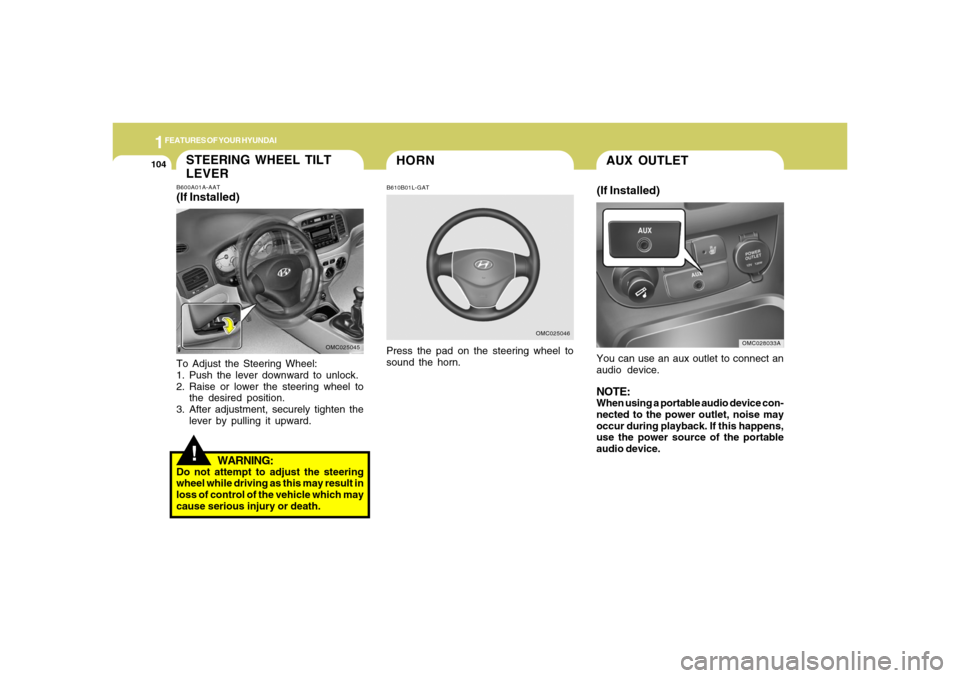
LEVERB600A01A-AAT(If Installed)To Adjust the Steering Wheel:
1. Push the lever downward to unlock.
2. Raise or lower the steering wheel to
the desired position.
3. After adjustment, securely tighten the
lever by pulling it upward.
WARNING:
Do not attempt to adjust the steering
wheel while driving as this may result in
loss of control of the vehicle which may
cause serious injury or death.
OMC025045
HORNB610B01L-GATPress the pad on the steering wheel to
sound the horn.
OMC025046
AUX OUTLET(If Installed)You can use an aux outlet to connect an
audio device.NOTE:When using a portable audio device con-
nected to the power outlet, noise may
occur during playback. If this happens,
use the power source of the portable
audio device.
OMC028033A
Page 126 of 273
1FEATURES OF YOUR HYUNDAI
114
B740D01A-AATOperation Tipso If the interior of the car is hot when you
first get in, open the windows for a few
minutes to expel the hot air.
o When you are using the air condition-
ing system, keep all windows closed to
keep hot air out.
o When moving slowly, as in heavy traf-
fic, shift to a lower gear.
This increases engine speed, which in
turn increases the speed of the air
conditioning compressor.
o On steep grades, turn the air condi-
tioning off to avoid the possibility of the
engine overheating.
o During winter months or in periods
when the air conditioning is not used
regularly, run the air conditioning once
every month for a few minutes.
This will help circulate the lubricants
and keep your system in peak operat-
ing condition.
o Set the temperature control to "Cool".
("Cool" provides maximum cooling. The
temperature may be moderated by
moving the control toward "Warm".)
o Adjust the fan control to the desired
speed. For greater cooling, turn the fan
control to one of the higher speeds or
temporarily select the (
)position
on the air intake control.
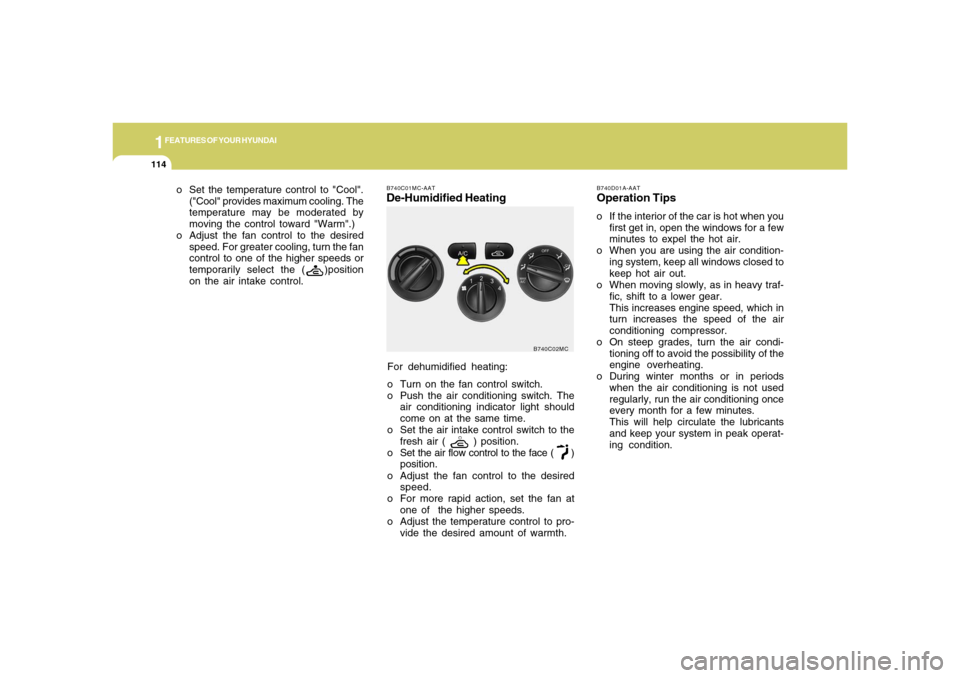
For dehumidified heating:
o Turn on the fan control switch.
o Push the air conditioning switch. The
air conditioning indicator light should
come on at the same time.
o Set the air intake control switch to the
fresh air (
) position.
o Set the air flow control to the face (
)
position.
o Adjust the fan control to the desired
speed.
o For more rapid action, set the fan at
one of the higher speeds.
o Adjust the temperature control to pro-
vide the desired amount of warmth.
B740C01MC-AATDe-Humidified Heating
B740C02MC
Page 130 of 273
1FEATURES OF YOUR HYUNDAI
118
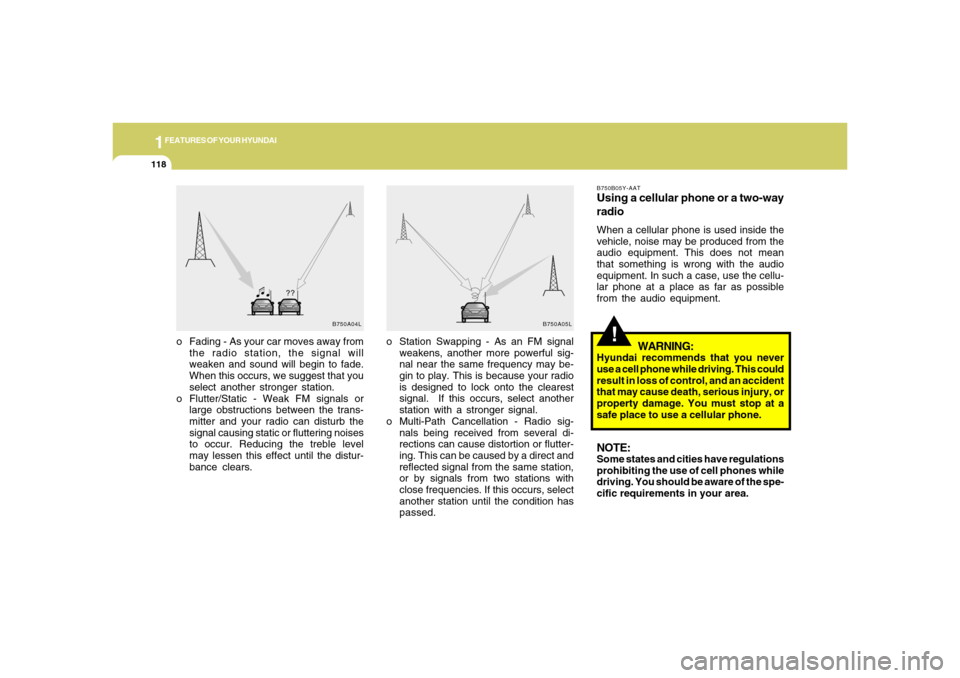
o Station Swapping - As an FM signal
weakens, another more powerful sig-
nal near the same frequency may be-
gin to play. This is because your radio
is designed to lock onto the clearest
signal. If this occurs, select another
station with a stronger signal.
o Multi-Path Cancellation - Radio sig-
nals being received from several di-
rections can cause distortion or flutter-
ing. This can be caused by a direct and
reflected signal from the same station,
or by signals from two stations with
close frequencies. If this occurs, select
another station until the condition has
passed. o Fading - As your car moves away from
the radio station, the signal will
weaken and sound will begin to fade.
When this occurs, we suggest that you
select another stronger station.
o Flutter/Static - Weak FM signals or
large obstructions between the trans-
mitter and your radio can disturb the
signal causing static or fluttering noises
to occur. Reducing the treble level
may lessen this effect until the distur-
bance clears.
B750A04L B750A05L
!
B750B05Y-AATUsing a cellular phone or a two-way
radioWhen a cellular phone is used inside the
vehicle, noise may be produced from the
audio equipment. This does not mean
that something is wrong with the audio
equipment. In such a case, use the cellu-
lar phone at a place as far as possible
from the audio equipment.
WARNING:
Hyundai recommends that you never
use a cell phone while driving. This could
result in loss of control, and an accident
that may cause death, serious injury, or
property damage. You must stop at a
safe place to use a cellular phone.NOTE:Some states and cities have regulations
prohibiting the use of cell phones while
driving. You should be aware of the spe-
cific requirements in your area.
Page 139 of 273

1
FEATURES OF YOUR HYUNDAI
127127
7. Information Display ButtonDisplays the information of the current
CD TRACK in the order of DISC TITLE
➟DISC ARTIST➟TRACK TITLE➟ TRACK
ARTIST➟TOTAL TRACK➟ Play Screen
➟DISC TITLE➟···.(not displayed if the in-
formation is not available on the DISC.)8. TUNE/ENTER ButtonTurn this button clockwise to display
songs after current song.
Also, turn this button counterclockwise to
display songs before current song.
To listen to the displayed song, press the
button to skip to the song and play.9. RANDOM Play ButtonTurns on/off the randomization of the play
list of files in the currently played DISC.
To cancel the mode, press the key once
again.
10. REPEAT ButtonRepeats current song when the button is
pressed for less than 0.8 second.
Repeats current folder when the button is
pressed for 0.8 second or longer. (If there
is no folder, entire disc will be repeated.)11. SCAN Play ButtonPlays first 10 seconds of each song in the
DISC. To cancel the mode, press the key
once again.12. FOLDER ButtonFolder up/down operation
o Folder is moved up or down from cur-
rently playing and folder name be-
comes displayed.
o Press enter key to play the selected
folder.
o If the enter key is not pressed within 5
seconds, then the previous folder name
will be displayed again.
NOTE:o To assure proper operation of the
unit, keep the vehicle interior tem-
perature within a normal range by
using the vehicle's air conditioning
or heating system.
o When replacing the fuse, replace it
with a fuse having the correct capac-
ity.
o All stored bookmarks are all erased
when the car battery is disconnected
or power to the vehicle is lost. If this
occurs, the bookmarks will have to
be reset.
o This equipment is designed to be
used only in a 12 volt DC battery
system with negative ground.
o This unit is made of precision parts.
Do not attempt to disassemble or
adjust any parts.
o When driving your vehicle, be sure to
keep the volume of the unit set low
enough to allow you to hear sounds
coming from the outside.
o Do not expose this equipment (in-
cluding the speakers and CD) to water
or excessive moisture.
Page 140 of 273
1FEATURES OF YOUR HYUNDAI
128
!
CAUTION:
o Do not insert warped or poor quality
discs into the CD player as damage
to the unit may occur.
o Do not insert anything like coins into
the player slot as damage to the unit
may occur.
o Do not place beverages close to the
audio system. The playback mecha-
nism may be damaged if you spill
them.
o Do not strike or allow anything to
impact the audio system, damage to
the system mechanisms could oc-
cur.
o Off-road or rough surface driving may
cause the compact disc to skip. Do
not use the compact disc when driv-
ing in such conditions as damage to
the compact disc face could occur.
o Do not attempt to grab or pull the
compact disc out while the disc is
being pulled into the audio unit by the
self-loading mechanism. Damage to
the audio unit and compact disc could
occur.
Page 146 of 273
![Hyundai Accent 2008 Owners Guide 1FEATURES OF YOUR HYUNDAI
134
5. Automatic Track Selection Buttono Push [SEEK
] button for less than
0.8 second to play from the beginning
of current song.
o Push [SEEK ] button for less than
0.8 s](/img/35/14394/w960_14394-145.png "Hyundai Accent 2008 Owners Guide 1FEATURES OF YOUR HYUNDAI
134
5. Automatic Track Selection Buttono Push [SEEK
] button for less than
0.8 second to play from the beginning
of current song.
o Push [SEEK ] button for less than
0.8 s")
1FEATURES OF YOUR HYUNDAI
134
5. Automatic Track Selection Buttono Push [SEEK
] button for less than
0.8 second to play from the beginning
of current song.
o Push [SEEK ] button for less than
0.8 second and press again within 1
second to play the previous song.
o Push [SEEK ] button for 0.8 or longer
to initiate reverse direction high speed
sound search of current song.
o Push [SEEK ] button for less than
0.8 second to play the next song.
o Push [SEEK ] button for 0.8 or longer
to initiate high speed sound search of
current song.
6. Information Display ButtonDisplays the information of the current
CD TRACK in the order of DISC TITLE
➟DISC ARTIST➟TRACK TITLE➟ TRACK
ARTIST➟TOTAL TRACK➟Play Screen
➟DISC TITLE➟···.(not displayed if the in-
formation is not available on the DISC.)
7. TUNE/ENTER ButtonTurn this button clockwise to display
songs after current song.
Also, turn this button counterclockwise to
display songs before current song.
To listen to the displayed song, press the
button to skip to the song and play.8. RANDOM Play ButtonTurns on/off the randomization of the play
list of files in the currently played DISC.
To cancel the mode, press the key once
again.9. REPEAT ButtonRepeats current song when the button is
pressed for less than 0.8 seconds.
Repeats current folder when the button is
pressed for 0.8 second or longer. (If there
is no folder, entire disc will be repeated.)10. SCAN Play ButtonPlays first 10 seconds of each song in the
DISC. To cancel the mode, press the key
once again.
11. FOLDER ButtonFolder up/down operation
o Folder is moved up or down from cur-
rently playing and folder name be-
comes displayed.
o Press enter key to play the selected
folder.
o If the enter key is not pressed within 5
seconds, then the previous folder name
will be displayed again.NOTE:o To assure proper operation of the
unit, keep the vehicle interior tem-
perature within a normal range by
using the vehicle's air conditioning
or heating system.
o When replacing the fuse, replace it
with a fuse having the correct capac-
ity.
o All stored bookmarks are all erased
when the car battery is disconnected
or power to the vehicle is lost. If this
occurs, the bookmarks will have to
be reset.
o This equipment is designed to be
used only in a 12 volt DC battery
system with negative ground.
Page 147 of 273
1
FEATURES OF YOUR HYUNDAI
135135
o This unit is made of precision parts.
Do not attempt to disassemble or
adjust any parts.
o When driving your vehicle, be sure to
keep the volume of the unit set low
enough to allow you to hear sounds
coming from the outside.
o Do not expose this equipment (in-
cluding the speakers and CD) to water
or excessive moisture.
!
CAUTION:
o Do not insert warped or poor quality
discs into the CD player as damage
to the unit may occur.
o Do not insert anything like coins into
the player slot as damage to the unit
may occur.
o Do not place beverages close to the
audio system. The playback mecha-
nism may be damaged if you spill
them.
o Do not strike or allow anything to
impact the audio system, damage to
the system mechanisms could oc-
cur.o Off-road or rough surface driving may
cause the compact disc to skip. Do
not use the compact disc when driv-
ing in such conditions as damage to
the compact disc face could occur.
o Do not attempt to grab or pull the
compact disc out while the disc is
being pulled into the audio unit by the
self-loading mechanism. Damage to
the audio unit and compact disc could
occur.