lock Hyundai Accent 2011 Workshop Manual
[x] Cancel search | Manufacturer: HYUNDAI, Model Year: 2011, Model line: Accent, Model: Hyundai Accent 2011Pages: 282, PDF Size: 14.82 MB
Page 149 of 282
1FEATURES OF YOUR HYUNDAI
138
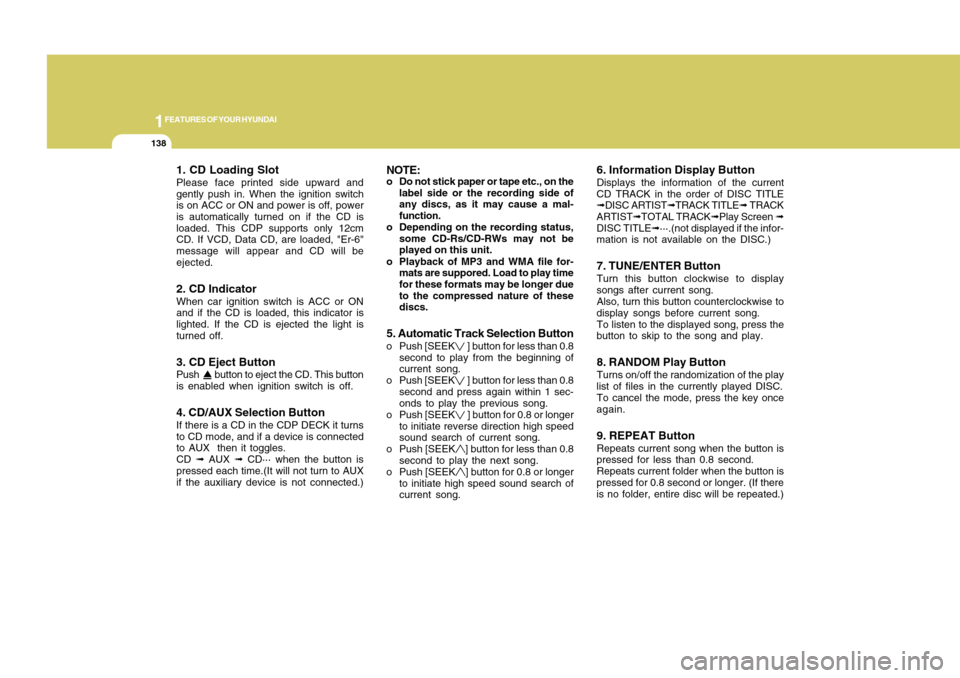
1. CD Loading SlotPlease face printed side upward and
gently push in. When the ignition switch
is on ACC or ON and power is off, power
is automatically turned on if the CD is
loaded. This CDP supports only 12cm
CD. If VCD, Data CD, are loaded, "Er-6"
message will appear and CD will be
ejected.2. CD IndicatorWhen car ignition switch is ACC or ON
and if the CD is loaded, this indicator is
lighted. If the CD is ejected the light is
turned off.3. CD Eject ButtonPush button to eject the CD. This button
is enabled when ignition switch is off.4. CD/AUX Selection ButtonIf there is a CD in the CDP DECK it turns
to CD mode, and if a device is connected
to AUX then it toggles.
CD ➟ AUX ➟ CD··· when the button is
pressed each time.(It will not turn to AUX
if the auxiliary device is not connected.)
NOTE:o Do not stick paper or tape etc., on the
label side or the recording side of
any discs, as it may cause a mal-
function.
o Depending on the recording status,
some CD-Rs/CD-RWs may not be
played on this unit.
o Playback of MP3 and WMA file for-
mats are suppored. Load to play time
for these formats may be longer due
to the compressed nature of these
discs.5. Automatic Track Selection Buttono Push [SEEK
] button for less than 0.8
second to play from the beginning of
current song.
o Push [SEEK ] button for less than 0.8
second and press again within 1 sec-
onds to play the previous song.
o Push [SEEK ] button for 0.8 or longer
to initiate reverse direction high speed
sound search of current song.
o Push [SEEK] button for less than 0.8
second to play the next song.
o Push [SEEK] button for 0.8 or longer
to initiate high speed sound search of
current song.
6. Information Display ButtonDisplays the information of the current
CD TRACK in the order of DISC TITLE
➟DISC ARTIST➟TRACK TITLE➟ TRACK
ARTIST➟TOTAL TRACK➟Play Screen ➟
DISC TITLE➟···.(not displayed if the infor-
mation is not available on the DISC.)7. TUNE/ENTER ButtonTurn this button clockwise to display
songs after current song.
Also, turn this button counterclockwise to
display songs before current song.
To listen to the displayed song, press the
button to skip to the song and play.8. RANDOM Play ButtonTurns on/off the randomization of the play
list of files in the currently played DISC.
To cancel the mode, press the key once
again.9. REPEAT ButtonRepeats current song when the button is
pressed for less than 0.8 second.
Repeats current folder when the button is
pressed for 0.8 second or longer. (If there
is no folder, entire disc will be repeated.)
Page 152 of 282
1141141
DRIVING YOUR HYUNDAI
1
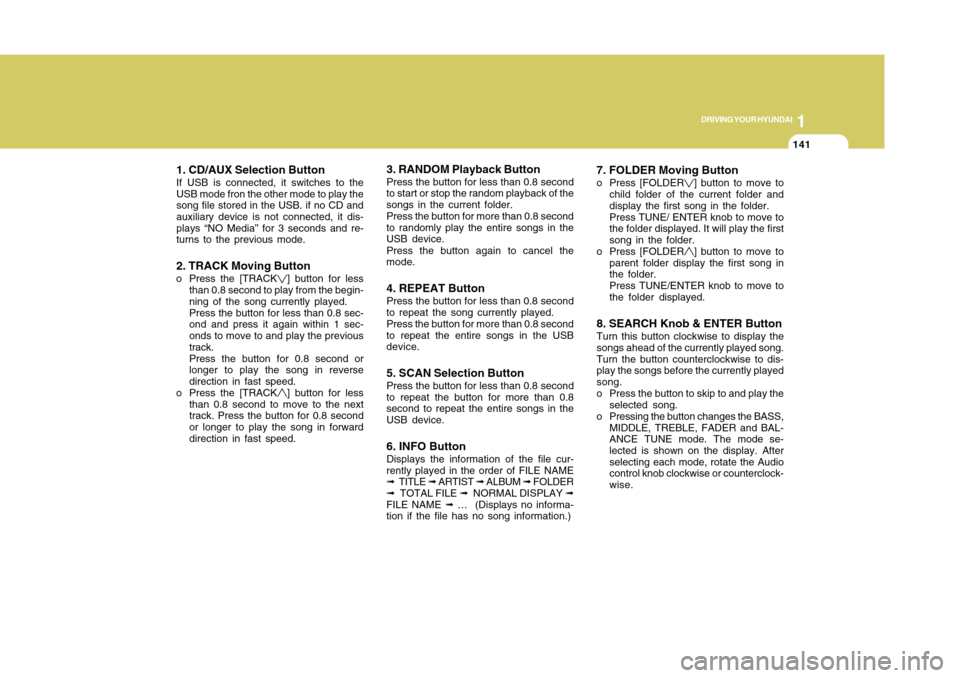
1. CD/AUX Selection ButtonIf USB is connected, it switches to the
USB mode fron the other mode to play the
song file stored in the USB. if no CD and
auxiliary device is not connected, it dis-
plays “NO Media” for 3 seconds and re-
turns to the previous mode.2. TRACK Moving Buttono Press the [TRACK
] button for less
than 0.8 second to play from the begin-
ning of the song currently played.
Press the button for less than 0.8 sec-
ond and press it again within 1 sec-
onds to move to and play the previous
track.
Press the button for 0.8 second or
longer to play the song in reverse
direction in fast speed.
o Press the [TRACK] button for less
than 0.8 second to move to the next
track. Press the button for 0.8 second
or longer to play the song in forward
direction in fast speed.
3. RANDOM Playback ButtonPress the button for less than 0.8 second
to start or stop the random playback of the
songs in the current folder.
Press the button for more than 0.8 second
to randomly play the entire songs in the
USB device.
Press the button again to cancel the
mode.4. REPEAT ButtonPress the button for less than 0.8 second
to repeat the song currently played.
Press the button for more than 0.8 second
to repeat the entire songs in the USB
device.5. SCAN Selection ButtonPress the button for less than 0.8 second
to repeat the button for more than 0.8
second to repeat the entire songs in the
USB device.6. INFO ButtonDisplays the information of the file cur-
rently played in the order of FILE NAME
➟ TITLE ➟ ARTIST ➟ ALBUM ➟ FOLDER
➟ TOTAL FILE ➟ NORMAL DISPLAY ➟
FILE NAME ➟ … (Displays no informa-
tion if the file has no song information.)
7. FOLDER Moving Buttono Press [FOLDER
] button to move to
child folder of the current folder and
display the first song in the folder.
Press TUNE/ ENTER knob to move to
the folder displayed. It will play the first
song in the folder.
o Press [FOLDER] button to move to
parent folder display the first song in
the folder.
Press TUNE/ENTER knob to move to
the folder displayed.
8. SEARCH Knob & ENTER ButtonTurn this button clockwise to display the
songs ahead of the currently played song.
Turn the button counterclockwise to dis-
play the songs before the currently played
song.
o Press the button to skip to and play the
selected song.
o Pressing the button changes the BASS,
MIDDLE, TREBLE, FADER and BAL-
ANCE TUNE mode. The mode se-
lected is shown on the display. After
selecting each mode, rotate the Audio
control knob clockwise or counterclock-
wise.
Page 155 of 282
1FEATURES OF YOUR HYUNDAI
144
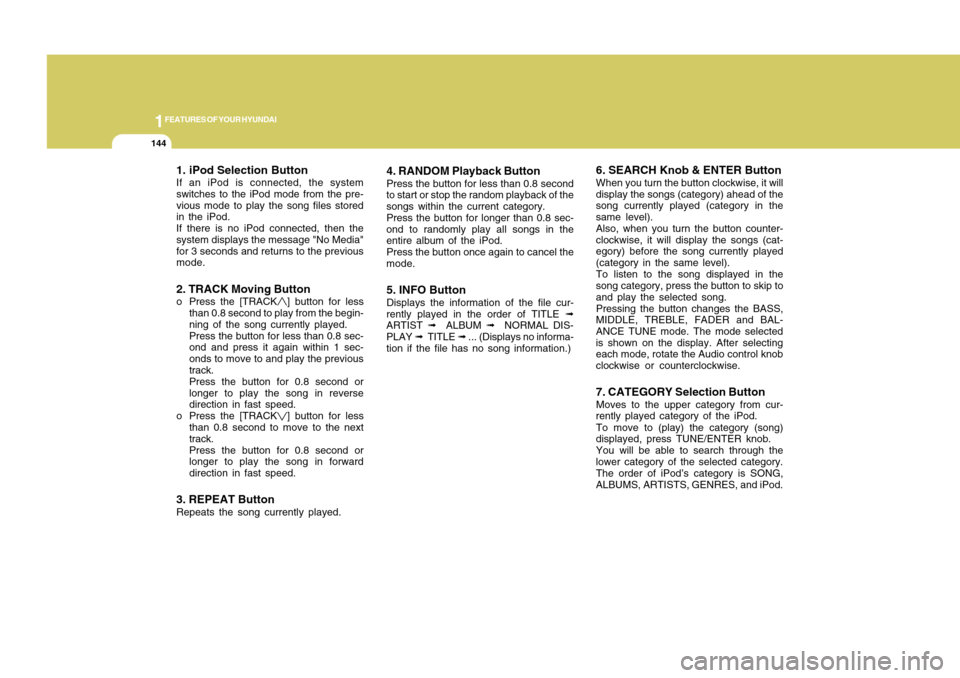
1. iPod Selection ButtonIf an iPod is connected, the system
switches to the iPod mode from the pre-
vious mode to play the song files stored
in the iPod.
If there is no iPod connected, then the
system displays the message "No Media"
for 3 seconds and returns to the previous
mode.2. TRACK Moving Buttono Press the [TRACK
] button for less
than 0.8 second to play from the begin-
ning of the song currently played.
Press the button for less than 0.8 sec-
ond and press it again within 1 sec-
onds to move to and play the previous
track.
Press the button for 0.8 second or
longer to play the song in reverse
direction in fast speed.
o Press the [TRACK] button for less
than 0.8 second to move to the next
track.
Press the button for 0.8 second or
longer to play the song in forward
direction in fast speed.
3. REPEAT ButtonRepeats the song currently played.
4. RANDOM Playback ButtonPress the button for less than 0.8 second
to start or stop the random playback of the
songs within the current category.
Press the button for longer than 0.8 sec-
ond to randomly play all songs in the
entire album of the iPod.
Press the button once again to cancel the
mode.5. INFO ButtonDisplays the information of the file cur-
rently played in the order of TITLE ➟
ARTIST ➟ ALBUM ➟ NORMAL DIS-
PLAY ➟ TITLE ➟ ... (Displays no informa-
tion if the file has no song information.)
6. SEARCH Knob & ENTER ButtonWhen you turn the button clockwise, it will
display the songs (category) ahead of the
song currently played (category in the
same level).
Also, when you turn the button counter-
clockwise, it will display the songs (cat-
egory) before the song currently played
(category in the same level).
To listen to the song displayed in the
song category, press the button to skip to
and play the selected song.
Pressing the button changes the BASS,
MIDDLE, TREBLE, FADER and BAL-
ANCE TUNE mode. The mode selected
is shown on the display. After selecting
each mode, rotate the Audio control knob
clockwise or counterclockwise.7. CATEGORY Selection ButtonMoves to the upper category from cur-
rently played category of the iPod.
To move to (play) the category (song)
displayed, press TUNE/ENTER knob.
You will be able to search through the
lower category of the selected category.
The order of iPod’s category is SONG,
ALBUMS, ARTISTS, GENRES, and iPod.
Page 157 of 282
Engine Exhaust can be Dangerous! ............................. 2-2
Before Starting the Engine ............................................ 2-3
Key Positions ................................................................ 2-4
Starting..........................................................................2-5
Operating the Manual Transaxle ................................... 2-6
Automatic Transaxle ..................................................... 2-9
Anti-Lock Brake System.............................................2-13
Good Braking Practices..............................................2-14
Driving for Economy...................................................2-15
Winter Driving.............................................................2-16
Trailer Towing.............................................................2-20
Vehicle Load Limit.......................................................2-20
DRIVING YOUR HYUNDAI
2
2
Page 159 of 282
3
DRIVING YOUR HYUNDAI
2
!
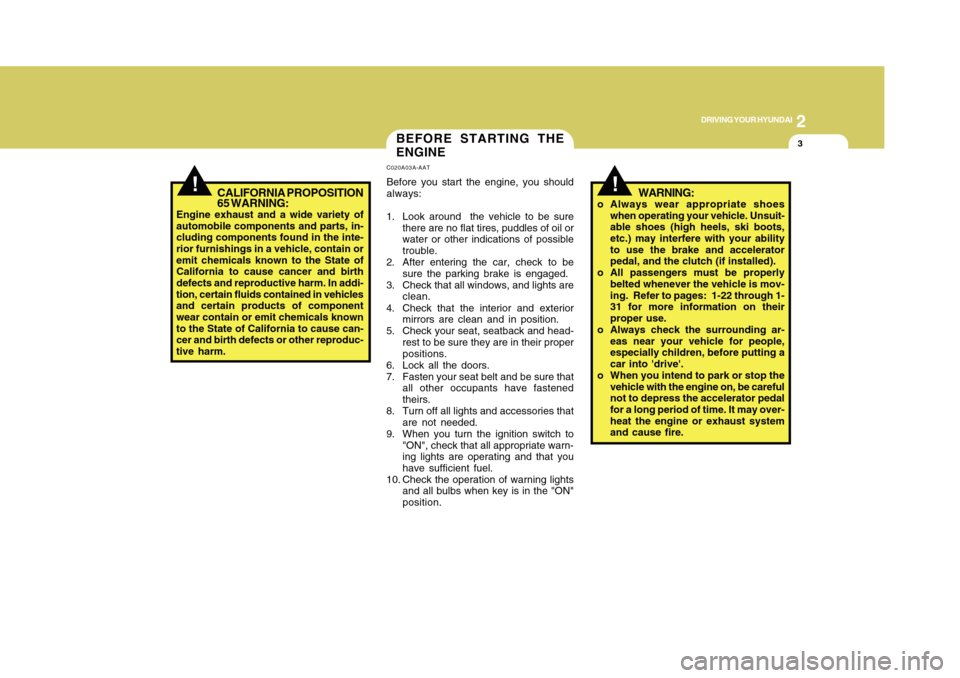
BEFORE STARTING THE
ENGINEC020A03A-AATBefore you start the engine, you should
always:
1. Look around the vehicle to be sure
there are no flat tires, puddles of oil or
water or other indications of possible
trouble.
2. After entering the car, check to be
sure the parking brake is engaged.
3. Check that all windows, and lights are
clean.
4. Check that the interior and exterior
mirrors are clean and in position.
5. Check your seat, seatback and head-
rest to be sure they are in their proper
positions.
6. Lock all the doors.
7. Fasten your seat belt and be sure that
all other occupants have fastened
theirs.
8. Turn off all lights and accessories that
are not needed.
9. When you turn the ignition switch to
"ON", check that all appropriate warn-
ing lights are operating and that you
have sufficient fuel.
10. Check the operation of warning lights
and all bulbs when key is in the "ON"
position.
CALIFORNIA PROPOSITION
65 WARNING:
Engine exhaust and a wide variety of
automobile components and parts, in-
cluding components found in the inte-
rior furnishings in a vehicle, contain or
emit chemicals known to the State of
California to cause cancer and birth
defects and reproductive harm. In addi-
tion, certain fluids contained in vehicles
and certain products of component
wear contain or emit chemicals known
to the State of California to cause can-
cer and birth defects or other reproduc-
tive harm.
!
WARNING:
o Always wear appropriate shoes
when operating your vehicle. Unsuit-
able shoes (high heels, ski boots,
etc.) may interfere with your ability
to use the brake and accelerator
pedal, and the clutch (if installed).
o All passengers must be properly
belted whenever the vehicle is mov-
ing. Refer to pages: 1-22 through 1-
31 for more information on their
proper use.
o Always check the surrounding ar-
eas near your vehicle for people,
especially children, before putting a
car into 'drive'.
o When you intend to park or stop the
vehicle with the engine on, be careful
not to depress the accelerator pedal
for a long period of time. It may over-
heat the engine or exhaust system
and cause fire.
Page 160 of 282
2
DRIVING YOUR HYUNDAI4
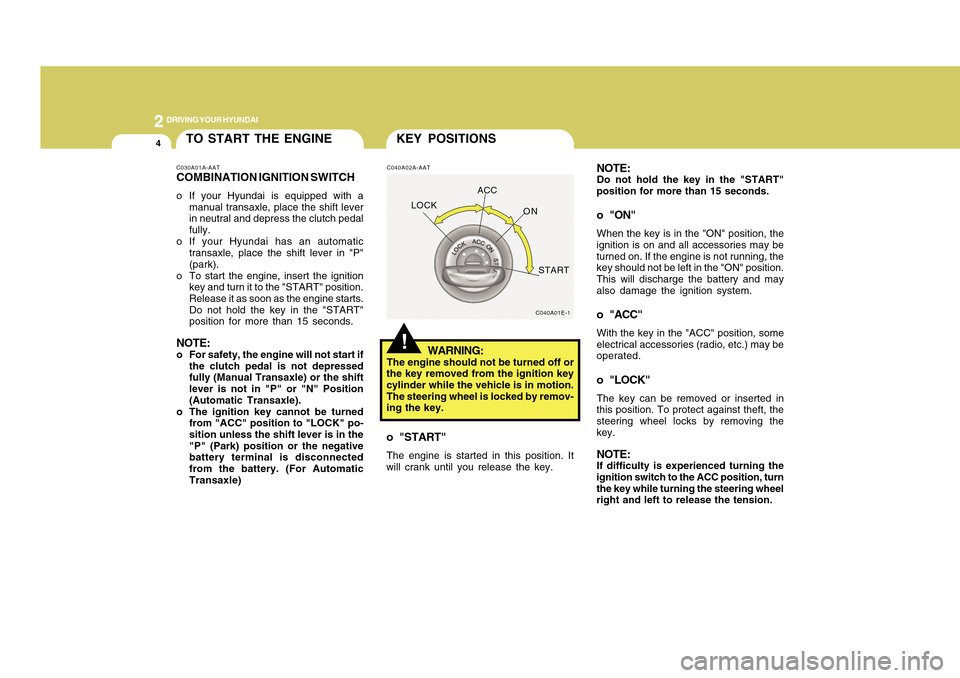
C040A02A-AAT
WARNING:
The engine should not be turned off or
the key removed from the ignition key
cylinder while the vehicle is in motion.
The steering wheel is locked by remov-
ing the key.o "START"The engine is started in this position. It
will crank until you release the key.
!KEY POSITIONS
C040A01E-1
LOCKACC
ON
START
NOTE:Do not hold the key in the "START"
position for more than 15 seconds.o "ON"When the key is in the "ON" position, the
ignition is on and all accessories may be
turned on. If the engine is not running, the
key should not be left in the "ON" position.
This will discharge the battery and may
also damage the ignition system.o "ACC"With the key in the "ACC" position, some
electrical accessories (radio, etc.) may be
operated.o "LOCK"The key can be removed or inserted in
this position. To protect against theft, the
steering wheel locks by removing the
key.NOTE:If difficulty is experienced turning the
ignition switch to the ACC position, turn
the key while turning the steering wheel
right and left to release the tension.
TO START THE ENGINEC030A01A-AATCOMBINATION IGNITION SWITCHo If your Hyundai is equipped with a
manual transaxle, place the shift lever
in neutral and depress the clutch pedal
fully.
o If your Hyundai has an automatic
transaxle, place the shift lever in "P"
(park).
o To start the engine, insert the ignition
key and turn it to the "START" position.
Release it as soon as the engine starts.
Do not hold the key in the "START"
position for more than 15 seconds.NOTE:o For safety, the engine will not start if
the clutch pedal is not depressed
fully (Manual Transaxle) or the shift
lever is not in "P" or "N" Position
(Automatic Transaxle).
o The ignition key cannot be turned
from "ACC" position to "LOCK" po-
sition unless the shift lever is in the
"P" (Park) position or the negative
battery terminal is disconnected
from the battery. (For Automatic
Transaxle)
Page 161 of 282
5
DRIVING YOUR HYUNDAI
2
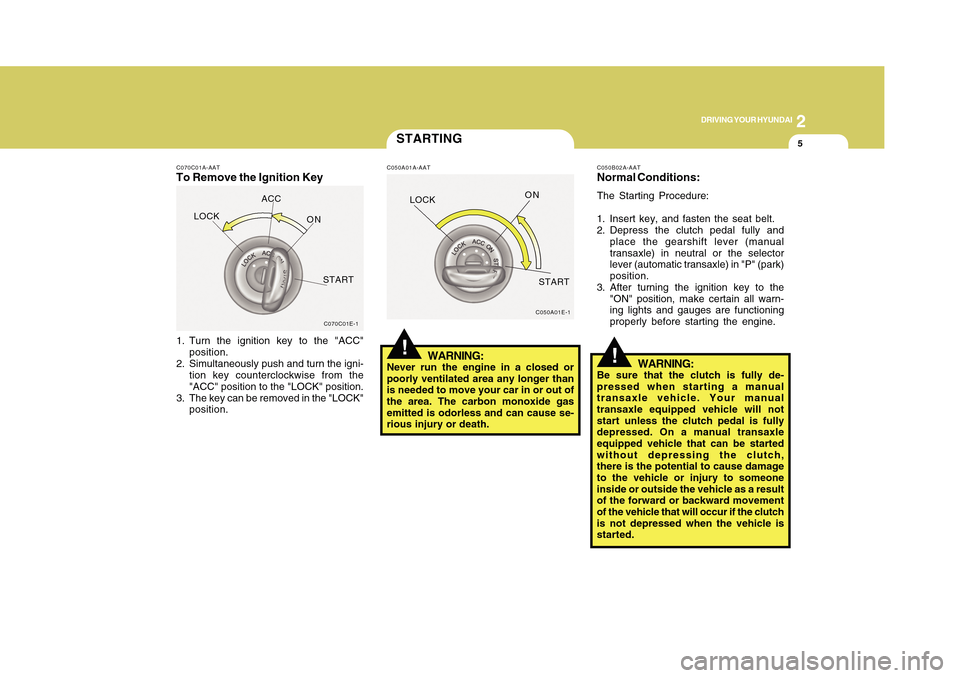
C070C01A-AATTo Remove the Ignition Key1. Turn the ignition key to the "ACC"
position.
2. Simultaneously push and turn the igni-
tion key counterclockwise from the
"ACC" position to the "LOCK" position.
3. The key can be removed in the "LOCK"
position.
C070C01E-1
LOCKACC
ON
START
STARTINGC050A01A-AAT
WARNING:
Never run the engine in a closed or
poorly ventilated area any longer than
is needed to move your car in or out of
the area. The carbon monoxide gas
emitted is odorless and can cause se-
rious injury or death.
C050A01E-1
!LOCKON
START
C050B02A-AATNormal Conditions:The Starting Procedure:
1. Insert key, and fasten the seat belt.
2. Depress the clutch pedal fully and
place the gearshift lever (manual
transaxle) in neutral or the selector
lever (automatic transaxle) in "P" (park)
position.
3. After turning the ignition key to the
"ON" position, make certain all warn-
ing lights and gauges are functioning
properly before starting the engine.
WARNING:
Be sure that the clutch is fully de-
pressed when starting a manual
transaxle vehicle. Your manual
transaxle equipped vehicle will not
start unless the clutch pedal is fully
depressed. On a manual transaxle
equipped vehicle that can be started
without depressing the clutch,
there is the potential to cause damage
to the vehicle or injury to someone
inside or outside the vehicle as a result
of the forward or backward movement
of the vehicle that will occur if the clutch
is not depressed when the vehicle is
started.
!
Page 169 of 282
13
DRIVING YOUR HYUNDAI
2
!
o If your vehicle becomes stuck in
snow, mud, sand, etc., then you may
attempt to rock the vehicle free by
moving it forward and backward. Do
not attempt this procedure if people
or objects are anywhere near the
vehicle. During the rocking opera-
tion the vehicle may suddenly move
forward or backward as it becomes
unstuck, causing injury to nearby
people or damage to objects.
WARNING:
!
WARNING:
ABS will not prevent accidents due to
improper or dangerous driving maneu-
vers. Even though vehicle control is
improved during emergency braking,
always maintain a safe distance be-
tween you and objects ahead. Vehicle
speeds should always be reduced dur-
ing extreme road conditions.
The braking distance for cars equipped
with an anti-lock braking system may
be longer than for those without it in the
following road conditions.
During these conditions the veicle
should be driven at reduced speeds.
o Rough, gravel or snow-covered
roads.
o With tire chains installed.
o On roads where the road surface is
pitted or has different surface height.
These roads should be driven at re-
duced speeds. The safety features of
an ABS equipped vehicle should not be
tested by high speed driving or corner-
ing. This could endanger the safety of
yourself or others.
ANTI-LOCK BRAKE SYS-
TEMC120A01MC-AAT(If Installed)The Anti-Lock Brake System (ABS) is
designed to prevent wheel lock-up dur-
ing sudden braking or on hazardous road
surfaces. The ABS control module moni-
tors the wheel speed and controls the
pressure applied to each brake. Thus, in
emergency situations or on slick roads,
ABS will increase vehicle control during
braking.NOTE:o A click sound may be heard in the
engine compartment when the ve-
hicle begins to move after the engine
is started. These conditions are nor-
mal and indicate that the anti-lock
brake system is functioning prop-
erly.
o During ABS operation, a slight pulsa-
tion may be felt in the brake pedal
when the brakes are applied. Also, a
noise may be heard in the engine
compartment while braking. These
conditions are normal and indicate
that the anti-lock brake system is
functioning properly.
Page 170 of 282
2
DRIVING YOUR HYUNDAI
14
o After being parked, check to be sure
the parking brake is not engaged and
that the parking brake indicator light is
out before driving away.
o Driving through water may get the
brakes wet. They can also get wet
when the car is washed. Wet brakes
can be dangerous! Your car will not
stop as quickly if the brakes are wet.
Wet brakes may cause the car to pull
to one side. To dry the brakes, apply
the brakes lightly until the braking ac-
tion returns to normal, taking care to
keep the car under control at all times.
If the braking action does not return to
normal, stop as soon as it is safe to do
so and call your Hyundai dealer for
assistance.
o Don't coast down hills with the car out
of gear. This is extremely hazardous.
Keep the car in gear at all times, use
the brakes to slow down, then shift to
a lower gear so that engine braking
will help you maintain a safe speed.
o Don't "ride" the brake pedal. Resting
your foot on the brake pedal while
driving can be dangerous because it
can result in the brakes overheating
and losing their effectiveness. It also
increases the wear of the brake com-
ponents.o If a tire goes flat while you are driving,
apply the brakes gently and keep the
car pointed straight ahead while you
slow down. When you are moving
slowly enough for it to be safe to do so,
pull off the road and stop in a safe
place.
o If your car is equipped with an auto-
matic transaxle, don't let your car creep
forward. To avoid creeping forward,
keep your foot firmly on the brake pedal
when the car is stopped.
o Use caution when parking on a hill.
Firmly engage the parking brake and
place the gear selector lever in "P"
(automatic transaxle) or in first or re-
verse gear (manual transaxle). If your
car is facing downhill, turn the front
wheels into the curb to help keep the
car from rolling. If your car is facing
uphill, turn the front wheels away from
the curb to help keep the car from
rolling. If there is no curb or if it is
required by other conditions to keep
the car from rolling, block the wheels.
GOOD BRAKING PRACTICES!
C130A02A-AAT
WARNING:
o Whenever leaving vehicle or park-
ing, always set the parking brake as
far as possible and fully engage the
vehicle's transaxle into the P (Park)
position (automatic transaxle) or in
first or reverse (manual transaxle).
Vehicles not fully engaged in P (Park)
with the parking brake set are at risk
for moving inadvertently and injuring
yourself or others.
o All vehicles should always have the
parking brake fully engaged when
parking to avoid inadvertent move-
ment of the car which can injure
occupants or pedestrians.
o Nothing should be carried on top of
the shelf panel behind the rear seat.
If there were an accident or a sudden
stop, such objects could move for-
ward and cause damage to the ve-
hicle or injure the occupants.
Page 171 of 282
15
DRIVING YOUR HYUNDAI
2
DRIVING FOR ECONOMYC140A02A-AATYou can save fuel and get more miles
from your car if you follow these sugges-
tions:
o Drive smoothly. Accelerate at a mod-
erate rate. Don't make "jack-rabbit"
starts or full-throttle shifts and maintain
a steady cruising speed. Don't race
between stoplights. Try to adjust your
speed to that of the other traffic so you
don't have to change speeds unnec-
essarily. Avoid heavy traffic whenever
possible. Always maintain a safe dis-
tance from other vehicles so you can
avoid unnecessary braking. This also
reduces brake wear.
o Drive at a moderate speed. The faster
you drive the more fuel your vehicle
uses. Driving at a moderate speed, in
the highest gear appropriate for the
conditions, especially on the highway,
is one of the most effective ways to
reduce fuel consumption.
o Don't "ride" the brake or clutch pedal.
This can increase fuel consumption
and also increase wear on these com-
ponents. In addition, driving with your
foot resting on the brake pedal may
cause the brakes to overheat, which
reduces their effectiveness and may
lead to more serious consequences. o Under some conditions your parking
brake can freeze in the engaged posi-
tion. This is most likely to happen when
there is an accumulation of snow or ice
around or near the rear brakes or if the
brakes are wet. If there is a risk that the
parking brake may freeze, apply it only
temporarily while you put the gear
selector lever in "P" (automatic) or in
first or reverse gear (manual transaxle)
and block the rear wheels so the car
cannot roll. Then release the parking
brake.
o Do not hold the vehicle on the upgrade
with the accelerator pedal. This can
cause the transaxle to overheat. Al-
ways use the brake pedal or parking
brake.o Take care of your tires. Keep them
inflated to the recommended pressure.
Incorrect inflation, either too much or
too little, results in unnecessary tire
wear. Check the tire pressures at least
once a month.
o Be sure that the wheels are aligned
correctly. Improper alignment can re-
sult from hitting curbs or driving too fast
over irregular surfaces. Poor align-
ment causes faster tire wear and may
also result in other problems as well as
greater fuel consumption.
o Keep your car in good condition. For
better fuel economy and reduced main-
tenance costs, maintain your car in
accordance with the maintenance
schedule in Section 5. If you drive your
car in severe conditions, more fre-
quent maintenance is required (see
Section 5 for details).
o Keep your car clean. For maximum
service, your Hyundai should be kept
clean and free of corrosive materials.
It is especially important that mud, dirt,
ice, etc. not be allowed to accumulate
on the underside of the car. This extra
weight can result in increased fuel
consumption and also contribute to
corrosion.