lock Hyundai Accent 2013 Owner's Guide
[x] Cancel search | Manufacturer: HYUNDAI, Model Year: 2013, Model line: Accent, Model: Hyundai Accent 2013Pages: 402, PDF Size: 8.49 MB
Page 57 of 402
339
Safety features of your vehicle
WARNING
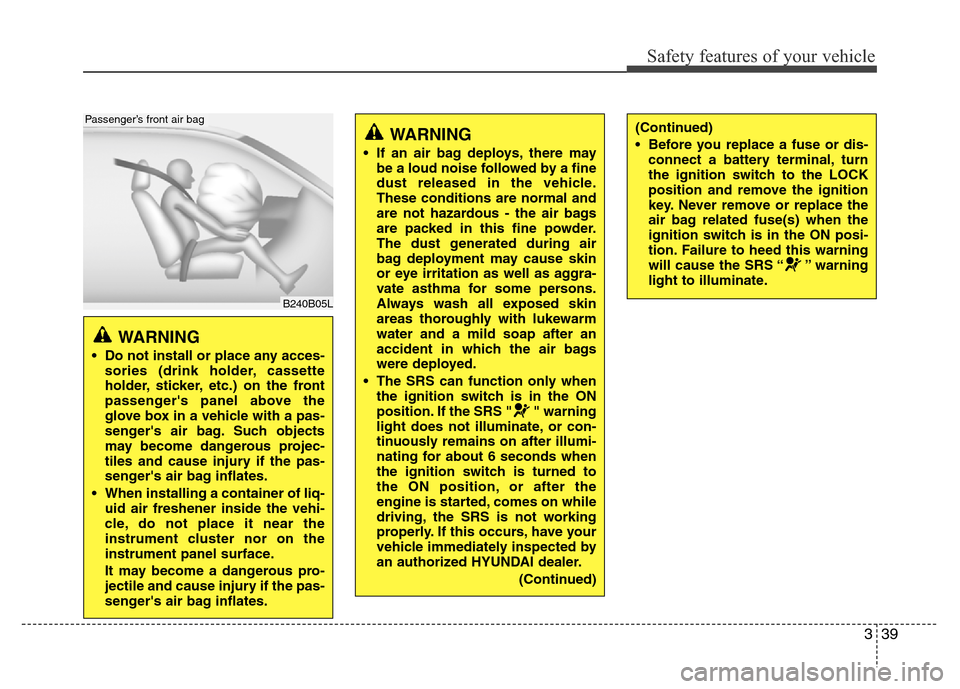
• Do not install or place any acces-
sories (drink holder, cassette
holder, sticker, etc.) on the front
passenger's panel above the
glove box in a vehicle with a pas-
senger's air bag. Such objects
may become dangerous projec-
tiles and cause injury if the pas-
senger's air bag inflates.
• When installing a container of liq-
uid air freshener inside the vehi-
cle, do not place it near the
instrument cluster nor on the
instrument panel surface.
It may become a dangerous pro-
jectile and cause injury if the pas-
senger's air bag inflates.
B240B05L
Passenger’s front air bag
WARNING
• If an air bag deploys, there may
be a loud noise followed by a fine
dust released in the vehicle.
These conditions are normal and
are not hazardous - the air bags
are packed in this fine powder.
The dust generated during air
bag deployment may cause skin
or eye irritation as well as aggra-
vate asthma for some persons.
Always wash all exposed skin
areas thoroughly with lukewarm
water and a mild soap after an
accident in which the air bags
were deployed.
• The SRS can function only when
the ignition switch is in the ON
position. If the SRS " " warning
light does not illuminate, or con-
tinuously remains on after illumi-
nating for about 6 seconds when
the ignition switch is turned to
the ON position, or after the
engine is started, comes on while
driving, the SRS is not working
properly. If this occurs, have your
vehicle immediately inspected by
an authorized HYUNDAI dealer.
(Continued)
(Continued)
• Before you replace a fuse or dis-
connect a battery terminal, turn
the ignition switch to the LOCK
position and remove the ignition
key. Never remove or replace the
air bag related fuse(s) when the
ignition switch is in the ON posi-
tion. Failure to heed this warning
will cause the SRS “ ” warning
light to illuminate.
Page 62 of 402
Safety features of your vehicle
44 3
The curtain air bags are designed to
deploy only during certain side impact
collisions, depending on the crash sever-
ity, angle, speed and impact. The curtain
air bags are not designed to deploy in all
side impact situations, collisions from the
front or rear of the vehicle or in most
rollover situations.
WARNING
• In order for side and curtain air
bags to provide the best protec-
tion, front seat occupants and
outboard rear occupants should
sit in an upright position with the
seat belts properly fastened.
Importantly, children should sit in
a proper child restraint system in
the rear seat.
• When children are seated in the
rear outboard seats, they must be
seated in the proper child
restraint system. Make sure to
position the child restraint sys-
tem as far away from the door
side as possible, and secure the
child restraint system in a locked
position.
(Continued)
(Continued)
• Do not allow the passengers to
lean their heads or bodies onto
doors, put their arms on the
doors, stretch their arms out of
the window, or place objects
between the doors and passen-
gers when they are seated on
seats equipped with side and/or
curtain air bags.
• Never try to open or repair any
components of the side curtain
air bag system. This should only
be done by an authorized
HYUNDAI dealer.
Failure to follow the above instruc-
tions can result in injury or death to
the vehicle occupants in an acci-
dent.
Page 71 of 402
4
Keys / 4-3
Smart key / 4-6
Remote keyless entry / 4-10
Door locks / 4-13
Trunk / 4-17
Tailgate / 4-20
Windows / 4-23
Hood / 4-28
Fuel filler lid / 4-30
Sunroof / 4-33
Steering wheel / 4-37
Mirrors / 4-39
Instrument cluster / 4-43
Rear parking assist system / 4-69
Rearview camera / 4-72
Hazard warning flasher / 4-73
Lighting / 4-74
Wipers and washers / 4-81
Interior light / 4-84
Defroster / 4-87
Manual climate control system / 4-88
Automatic climate control system / 4-97
Windshield defrosting and defogging / 4-104
Features of your vehicle
Page 73 of 402
43
Features of your vehicle
Record your key number
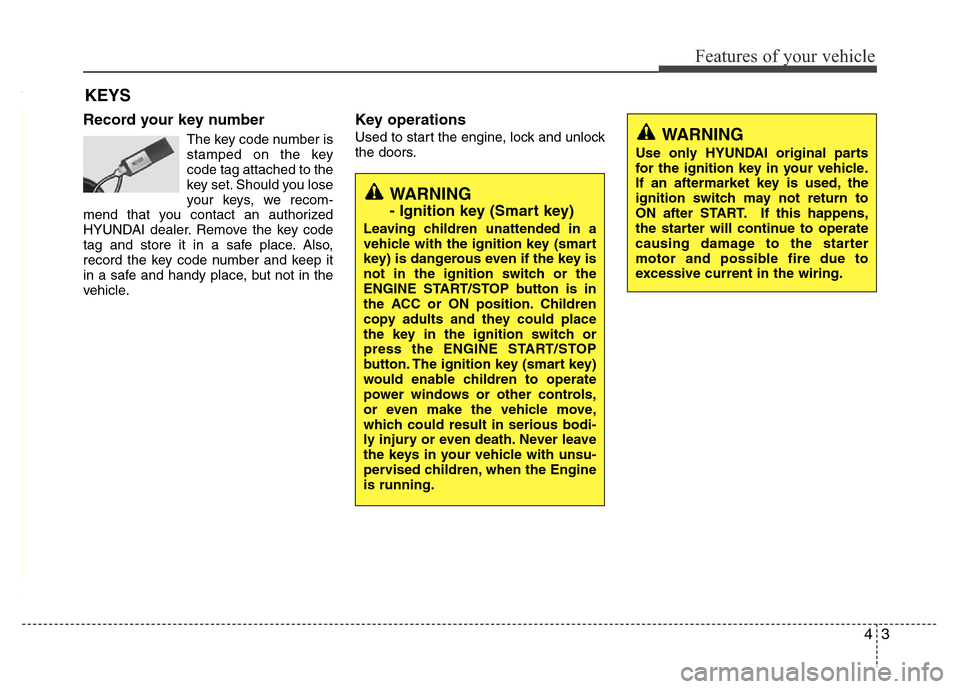
The key code number is
stamped on the key
code tag attached to the
key set. Should you lose
your keys, we recom-
mend that you contact an authorized
HYUNDAI dealer. Remove the key code
tag and store it in a safe place. Also,
record the key code number and keep it
in a safe and handy place, but not in the
vehicle.
Key operations
Used to start the engine, lock and unlock
the doors.
KEYS
WARNING
Use only HYUNDAI original parts
for the ignition key in your vehicle.
If an aftermarket key is used, the
ignition switch may not return to
ON after START. If this happens,
the starter will continue to operate
causing damage to the starter
motor and possible fire due to
excessive current in the wiring.
WARNING
- Ignition key (Smart key)
Leaving children unattended in a
vehicle with the ignition key (smart
key) is dangerous even if the key is
not in the ignition switch or the
ENGINE START/STOP button is in
the ACC or ON position. Children
copy adults and they could place
the key in the ignition switch or
press the ENGINE START/STOP
button. The ignition key (smart key)
would enable children to operate
power windows or other controls,
or even make the vehicle move,
which could result in serious bodi-
ly injury or even death. Never leave
the keys in your vehicle with unsu-
pervised children, when the Engine
is running.
Page 76 of 402
Features of your vehicle
6 4
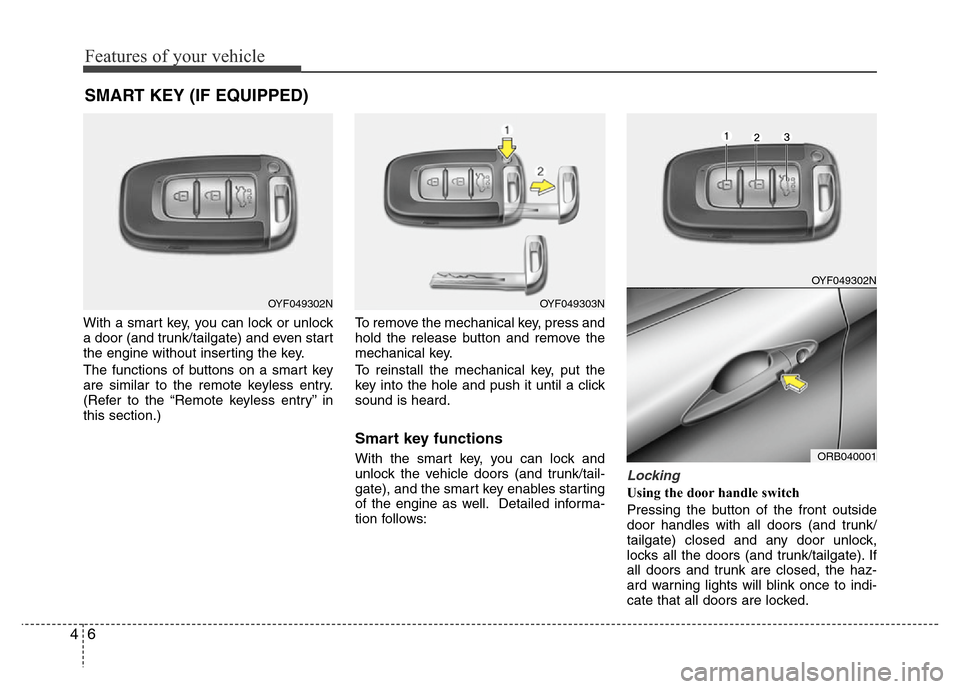
With a smart key, you can lock or unlock
a door (and trunk/tailgate) and even start
the engine without inserting the key.
The functions of buttons on a smart key
are similar to the remote keyless entry.
(Refer to the “Remote keyless entry” in
this section.)To remove the mechanical key, press and
hold the release button and remove the
mechanical key.
To reinstall the mechanical key, put the
key into the hole and push it until a click
sound is heard.
Smart key functions
With the smart key, you can lock and
unlock the vehicle doors (and trunk/tail-
gate), and the smart key enables starting
of the engine as well. Detailed informa-
tion follows:
Locking
Using the door handle switch
Pressing the button of the front outside
door handles with all doors (and trunk/
tailgate) closed and any door unlock,
locks all the doors (and trunk/tailgate). If
all doors and trunk are closed, the haz-
ard warning lights will blink once to indi-
cate that all doors are locked.
SMART KEY (IF EQUIPPED)
OYF049302NOYF049303N
OYF049302N
ORB040001
Page 77 of 402
47
Features of your vehicle
However, if any door remains open, the
doors won't lock and the chime will sound
for 3 seconds. Close the door and try
again to lock the doors.
If trunk/tailgate remains open, the hazard
warning light won't operate. After this,
trunk/tailgate is closed, the hazard warn-
ing lights blink once.
The button will only operate when the
smart key is within 0.7~1 m (28~40 in.)
from the outside door handle. If you want
to make sure that a door has locked or
not, you should check the door lock but-
ton inside the vehicle or pull the outside
door handle.
Even though you press the outside door
handle buttons, the doors will not lock
and the chime will sound for 3 seconds if
any of following occur:
• The smart key is in the vehicle.
• The ignition switch is in ACC or ON
position.
• Any door except the trunk/tailgate is
open.Using the button on the smart key
All doors (and trunk/tailgate) are locked if
the lock button(1) is pressed. If all doors
(and trunk/tailgate) are closed, the haz-
ard warning lights will blink once to indi-
cate that all doors are locked.
However, if any door (or trunk/tailgate)
remains open, the hazard warning lights
will not operate. If all doors (and trunk/
tailgate) are closed after the lock button
is pressed, the hazard warning lights
blink once.Unlocking
Using the door handle switch
Press the button of the front outside door
handles with all doors (and trunk/tailgate)
closed and locked, unlocks all the doors
(and trunk/tailgate). The hazard warning
lights blink twice to indicate that all doors
(and trunk/tailgate) are unlocked. The
button will only operate when the smart
key is within 0.7~1 m (28~40 in.) from the
outside door handle.
When the smart key is recognized in the
area of 0.7~1 m (28~40 in.) from the front
outside door handle, other people can
also open the door without possession of
the smart key.
After pressing the button, the doors will
lock automatically unless you open any
door within 30 seconds.
Using the button on the smart key
All doors (and trunk/tailgate) are
unlocked if the unlock button (2) is
pressed. The hazard warning lights will
blink twice to indicate that all doors are
unlocked.
After pressing this button, the doors will
lock automatically unless you open any
door within 30 seconds.
Page 78 of 402
Features of your vehicle
8 4
Trunk unlocking (4 Door)
Using the trunk handle switch
If you are within 0.7~1 m (28~40 in.) from
the outside trunk handle with your smart
key in your possession, the trunk will
unlock and open when you press the
trunk handle switch. Once the trunk is
opened and then closed, the trunk will be
locked automatically.
If the trunk is closed with the smart key in
the trunk, the warning chime will sound
for about 5 seconds and the trunk will not
locked.
Using the button on the smart key
The trunk is opened if the trunk unlock
button (3) is pressed for more than 1 sec-
ond. Once the trunk is opened and then
closed, the trunk will lock automatically.
❈The word “HOLD” is written on the but-
ton to inform you that you must press
and hold the button for 1 second.
Tailgate unlocking (5 Door)
Using the tailgate handle switch
If you are within 0.7 m ~ 1 m (28 ~ 40 in.)
from the outside tailgate handle, with
your smart key in possession, the tail-
gate will unlock and open when you
press the tailgate handle switch.
The hazard warning lights will blink twice
to indicate that the tailgate is unlocked.
Once the tailgate is opened and then
closed when all doors are locked, the tail-
gate will lock automatically.
Using the button on the smart key
The tailgate is unlocked if the tailgate
unlock button (3) is pressed for more
than 1 second. Once the tailgate is
opened and then closed when all doors
are locked, the tailgate will lock automat-
ically.
❈The word “HOLD” is written on the but-
ton to inform you that you must press
and hold the button for 1 second.
Start-up
You can start the engine without inserting
the key. For detailed information refer to
“Engine start/stop button” in section 5.
Smart key precautions
✽NOTICE
• If, for some reason, you happen to lose
your smart key, you will not be able to
start the engine. Tow the vehicle, if
necessary, and contact an authorized
HYUNDAI dealer.
• A maximum of 2 smart keys can be
registered to a single vehicle. If you
lose a smart key, you should immedi-
ately take the vehicle and key to your
authorized HYUNDAI dealer to pro-
tect it from potential theft.
• The smart key will not work if any of
following occur:
- The smart key is close to a radio
transmitter such as a radio station or
an airport which can interfere with
normal operation of the smart key.
- You keep the smart key near a
mobile two-way radio system or a
cellular phone.
- Another vehicle’s smart key is being
operated close to your vehicle.
When the smart key does not work
correctly, open and close the door with
the mechanical key. If you have a
problem with the smart key, contact
an authorized HYUNDAI dealer.
(Continued)
Page 79 of 402
49
Features of your vehicle
(Continued)
• If the smart key is in close proximity
to your cell phone or smart phone, the
signal from the smart key could be
blocked by normal operation of your
cell phone or smart phone. This is
especially important when the phone
is active such as making call, receiving
calls, text messaging, and/or send-
ing/receiving emails. Avoid placing
the smart key and your cell phone or
smart phone in the same pants or
jacket pocket and maintain adequate
distance between the two devices.
Battery replacement
A smart key battery should last for sever-
al years, but if the smart key is not work-
ing properly, try replacing the battery with
a new one. If you are unsure how to use
your smart key or replace the battery,
contact an authorized HYUNDAI dealer.
✽NOTICE
The circuit inside the smart key can
have a problem if exposed to moisture
or static electricity. If you are unsure
how to use your smart key or replace the
battery, contact an authorized
HYUNDAI dealer.
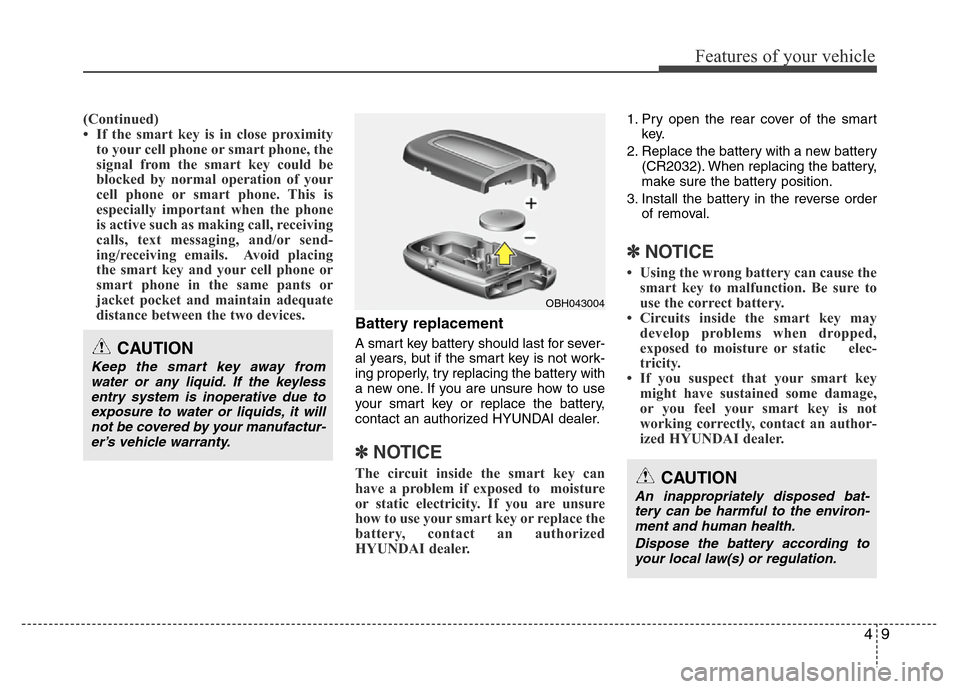
1. Pry open the rear cover of the smart
key.
2. Replace the battery with a new battery
(CR2032). When replacing the battery,
make sure the battery position.
3. Install the battery in the reverse order
of removal.
✽NOTICE
• Using the wrong battery can cause the
smart key to malfunction. Be sure to
use the correct battery.
• Circuits inside the smart key may
develop problems when dropped,
exposed to moisture or static elec-
tricity.
• If you suspect that your smart key
might have sustained some damage,
or you feel your smart key is not
working correctly, contact an author-
ized HYUNDAI dealer.
CAUTION
An inappropriately disposed bat-
tery can be harmful to the environ-
ment and human health.
Dispose the battery according to
your local law(s) or regulation.
CAUTION
Keep the smart key away from
water or any liquid. If the keyless
entry system is inoperative due to
exposure to water or liquids, it will
not be covered by your manufactur-
er’s vehicle warranty.
OBH043004
Page 80 of 402
Features of your vehicle
10 4
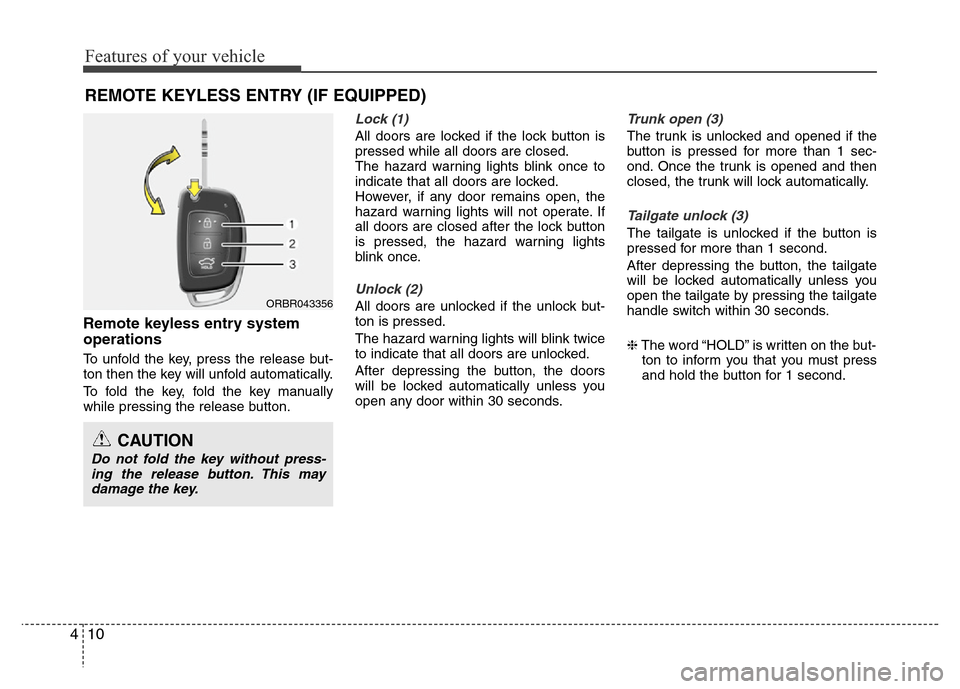
Remote keyless entry system
operations
To unfold the key, press the release but-
ton then the key will unfold automatically.
To fold the key, fold the key manually
while pressing the release button.
Lock (1)
All doors are locked if the lock button is
pressed while all doors are closed.
The hazard warning lights blink once to
indicate that all doors are locked.
However, if any door remains open, the
hazard warning lights will not operate. If
all doors are closed after the lock button
is pressed, the hazard warning lights
blink once.
Unlock (2)
All doors are unlocked if the unlock but-
ton is pressed.
The hazard warning lights will blink twice
to indicate that all doors are unlocked.
After depressing the button, the doors
will be locked automatically unless you
open any door within 30 seconds.
Trunk open (3)
The trunk is unlocked and opened if the
button is pressed for more than 1 sec-
ond. Once the trunk is opened and then
closed, the trunk will lock automatically.
Tailgate unlock (3)
The tailgate is unlocked if the button is
pressed for more than 1 second.
After depressing the button, the tailgate
will be locked automatically unless you
open the tailgate by pressing the tailgate
handle switch within 30 seconds.
❈The word “HOLD” is written on the but-
ton to inform you that you must press
and hold the button for 1 second.
REMOTE KEYLESS ENTRY (IF EQUIPPED)
ORBR043356
CAUTION
Do not fold the key without press-
ing the release button. This may
damage the key.
Page 81 of 402
411
Features of your vehicle
Transmitter precautions
✽NOTICE
• The transmitter will not work if any of
following occur:
- The ignition key is in ignition switch.
- You exceed the operating distance
limit (about 10 m [30 feet]).
- The battery in the transmitter is
weak.
- Other vehicles or objects may be
blocking the signal.
- The weather is extremely cold.
- The transmitter is close to a radio
transmitter such as a radio station or
an airport which can interfere with
normal operation of the transmitter.
When the transmitter does not work
correctly, open and close the door with
the ignition key. If you have a problem
with the transmitter, contact an author-
ized HYUNDAI dealer.
(Continued)(Continued)
• If the transmitter is in close proximity
to your cell phone or smart phone, the
signal from the transmitter could be
blocked by normal operation of your
cell phone or smart phone. This is
especially important when the phone
is active such as making call, receiving
calls, text messaging, and/or send-
ing/receiving emails. Avoid placing
the transmitter and your cell phone or
smart phone in the same pants or
jacket pocket and maintain adequate
distance between the two devices.
CAUTION
Changes or modifications not
expressly approved by the party
responsible for compliance could
void the user’s authority to operate
the equipment. If the keyless entry
system is inoperative due to
changes or modifications not
expressly approved by the party
responsible for compliance, it will
not be covered by your manufactur-
er’s vehicle warranty.
CAUTION
Keep the transmitter away from
water or any liquid. If the keyless
entry system is inoperative due to
exposure to water or liquids, it will
not be covered by your manufactur-
er vehicle warranty.