key Hyundai Accent 2017 Service Manual
[x] Cancel search | Manufacturer: HYUNDAI, Model Year: 2017, Model line: Accent, Model: Hyundai Accent 2017Pages: 380, PDF Size: 12.45 MB
Page 191 of 380
![Hyundai Accent 2017 Service Manual 4-117
Features of your vehicle
Disconnecting a Device
Press the keySelect [Phone]
Select [Paired Phone List]
From the paired phone list, select the
currently connected device and select
[Disconnect] b](/img/35/14348/w960_14348-190.png "Hyundai Accent 2017 Service Manual 4-117
Features of your vehicle
Disconnecting a Device
Press the keySelect [Phone]
Select [Paired Phone List]
From the paired phone list, select the
currently connected device and select
[Disconnect] b")
4-117
Features of your vehicle
Disconnecting a Device
Press the keySelect [Phone]
Select [Paired Phone List]
From the paired phone list, select the
currently connected device and select
[Disconnect] button.
Deleting a Device
Press the key Select [Phone]
Select [Paired Phone List]
From the paired phone list, select the
device you want to delete and select
[Delete] button.
✽ ✽ NOTICE
• When deleting the currently connect-
ed device, the device will automatical-
ly be disconnected to proceed with the
deleting process.
• If a paired Bluetooth
®Wireless
Technology device is deleted, the
device's call history and contacts data
will also be deleted.
• To re-use a deleted device, you must pair the device again.
SETUPCLOCKSETUPCLOCK
Page 192 of 380
Features of your vehicle
4-118
USING Bluetooth®Wireless
Technology
Phone Menu Screen
Phone Menus
With a Bluetooth®Wireless Technology
device connected, press the key
to display the Phone menu screen.
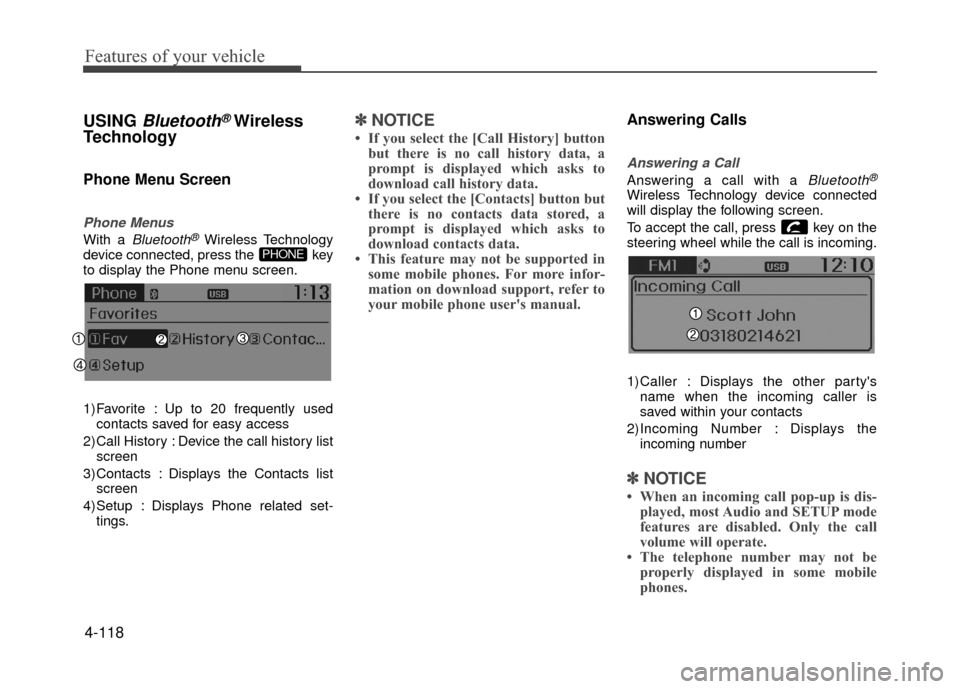
1) Favorite : Up to 20 frequently used contacts saved for easy access
2) Call History : Device the call history list screen
3) Contacts : Displays the Contacts list screen
4) Setup : Displays Phone related set- tings.
✽ ✽ NOTICE
• If you select the [Call History] button
but there is no call history data, a
prompt is displayed which asks to
download call history data.
• If you select the [Contacts] button but there is no contacts data stored, a
prompt is displayed which asks to
download contacts data.
• This feature may not be supported in some mobile phones. For more infor-
mation on download support, refer to
your mobile phone user's manual.
Answering Calls
Answering a Call
Answering a call with a Bluetooth®
Wireless Technology device connected
will display the following screen.
To accept the call, press key on the
steering wheel while the call is incoming.
1)Caller : Displays the other party's
name when the incoming caller is
saved within your contacts
2)Incoming Number : Displays the incoming number
✽ ✽ NOTICE
• When an incoming call pop-up is dis-
played, most Audio and SETUP mode
features are disabled. Only the call
volume will operate.
• The telephone number may not be properly displayed in some mobile
phones.
PHONE
Page 193 of 380
![Hyundai Accent 2017 Service Manual 4-119
Features of your vehicle
Favorites
Press the key Select
[Favorites]
1) Saved favorite contact : Connects callupon selection
2) To add favorite : Downloaded contacts be saved as favorite.
✽ â](/img/35/14348/w960_14348-192.png "Hyundai Accent 2017 Service Manual 4-119
Features of your vehicle
Favorites
Press the key Select
[Favorites]
1) Saved favorite contact : Connects callupon selection
2) To add favorite : Downloaded contacts be saved as favorite.
✽ â")
4-119
Features of your vehicle
Favorites
Press the key Select
[Favorites]
1) Saved favorite contact : Connects callupon selection
2) To add favorite : Downloaded contacts be saved as favorite.
✽ ✽ NOTICE
• To save Favorite, contacts should be
downloaded.
• Contact saved in Favorites will not be automatically updated if the contact
has been updated in the phone. To
update Favorites, delete the Favorite
and create a new Favorite.
Call History
Press the key Select [Call
History]
A list of incoming, outgoing and missed
calls is displayed.
Call history may not be saved in the call
history list in some mobile phones.
Calls received with hidden caller ID will not be saved in the call history list.
Calling through the call history is not possible when there is no call history
stored or a
Bluetooth®Wireless
Technology phone is not connected.
Up to 20 received, dialed and missed calls are stored in Call History.
Time of received/dialed calls and call time information are not saved.
Contacts
Press the key Select
[Contacts]
The list of saved phone book entries is
displayed.
NOTE:
Find a contact in an alphabetical
order, press the key.
MENU
PHONEPHONE
PHONE
Page 194 of 380
Features of your vehicle
4-120
✽
✽NOTICE
• Up to 1,000 contacts saved in your
Bluetooth®Wireless Technology phone
can be downloaded into the car con-
tacts. Contacts that have been down-
loaded to the car cannot be edited or
deleted on the phone.
• Mobile phone contacts are managed separately for each paired Bluetooth
®
Wireless Technology device (max 5
devices x 1,000 contacts each).
Previously downloaded data is main-
tained even if the Bluetooth
®Wireless
Technology device has been discon-
nected.
(However, the contacts and call histo-
ry saved to the phone will be deleted if
a paired phone is deleted.)
• It is possible to download contacts during Bluetooth streaming audio.
• When downloading contacts, the icon will be displayed within the status bar. (Continued)(Continued)
• It is not possible to begin downloading
a contact list when the contact down-
load feature has been turned off with-
in the Bluetooth
®Wireless Technology
device. In addition, some devices may
require device authorization upon
attempting to download contacts. If
downloading does not normally occur,
check the Bluetooth
®Wireless
Technology device settings or the
screen state.
• The contacts download feature may not be supported in some mobile
phones. For more information of sup-
ported Bluetooth
®devices and func-
tion support, refer to your phone’s
user manual.
Bluetooth®Wireless
Technology Setting
Pairing a New Device
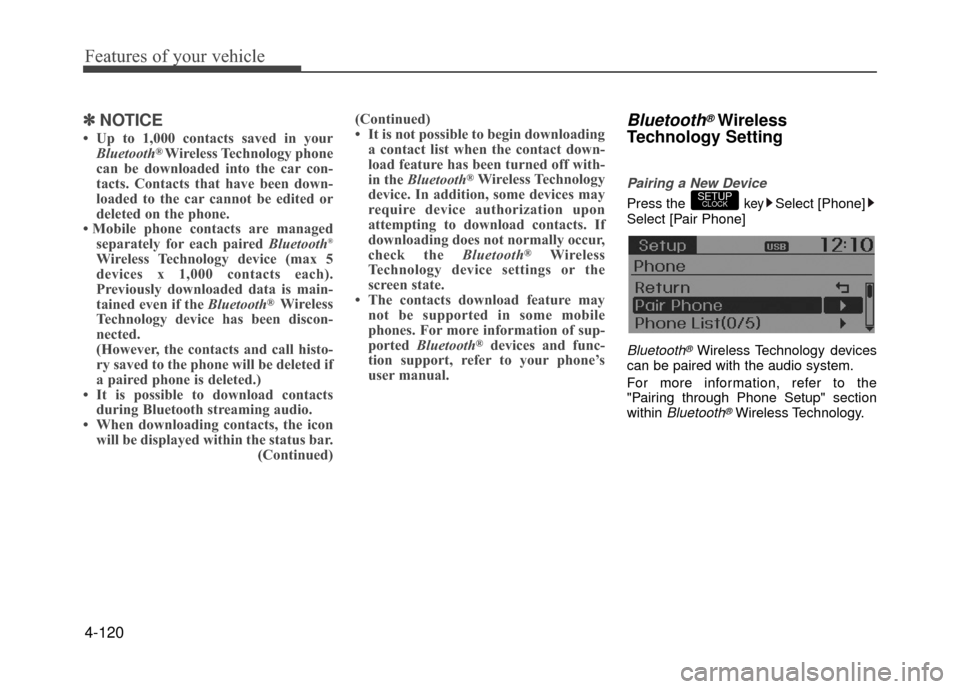
Press the keySelect [Phone]
Select [Pair Phone]
Bluetooth®Wireless Technology devices
can be paired with the audio system.
For more information, refer to the
"Pairing through Phone Setup" section
within
Bluetooth®Wireless Technology.
SETUPCLOCK
Page 195 of 380
![Hyundai Accent 2017 Service Manual 4-121
Features of your vehicle
Viewing Paired Phone List
Press the keySelect [Phone]
Select [Paired Phone List]
This feature is used to view mobile
phones that have been paired with the
audio system.](/img/35/14348/w960_14348-194.png "Hyundai Accent 2017 Service Manual 4-121
Features of your vehicle
Viewing Paired Phone List
Press the keySelect [Phone]
Select [Paired Phone List]
This feature is used to view mobile
phones that have been paired with the
audio system.")
4-121
Features of your vehicle
Viewing Paired Phone List
Press the keySelect [Phone]
Select [Paired Phone List]
This feature is used to view mobile
phones that have been paired with the
audio system. Upon selecting a paired
phone, the setup menu is displayed.
For more information, refer to the
"Setting
Bluetooth®Wireless Technology
Connection" section within Bluetooth®
Wireless Technology.
1) Connect/Disconnect Phone : Connect/ disconnects currently selected phone
2) Change Priority : Sets currently select- ed phone to highest connection priori-
ty 3) Delete : Deletes the currently selected
phone
4) Return : Moves to the previous screen
✽ ✽ NOTICE BEFORE DOWN-
LOADING CONTACTS
• Only contacts within connected
phones can be downloaded. Also
check to see that your mobile phone
supports the download feature.
• To learn more about whether your mobile phone supports contacts
downloads, refer to your mobile
phone user's manual.
• The contacts for only the connected phone can be downloaded.
Downloading Contacts
Press the keySelect [Phone]
Select [Contacts Download]
As the contacts are downloaded from
the mobile phone, a download progress
bar is displayed.
✽ ✽ NOTICE
• Upon downloading phone contacts,
the previous corresponding data is
deleted.
• This feature may not be supported in some mobile phones.
• Voice Recognition may not operate while contacts are being downloaded.
Outgoing Volume
Press thekeySelect [Phone]
Select [Outgoing Volume]
Use TUNE knob to adjust the outgo-
ing volume level.
✽ ✽ NOTICE
While on a call, the volume can be
changed by using the key.SEEK
TRACK
SETUPCLOCK
SETUPCLOCK
SETUPCLOCK
Page 196 of 380
![Hyundai Accent 2017 Service Manual Features of your vehicle
4-122
Turning Bluetooth System Off
Press the keySelect [Phone]
Select [Bluetooth System Off]
Once
Bluetooth®Wireless Technology is
turned off, Bluetooth®Wireless
Technology](/img/35/14348/w960_14348-195.png "Hyundai Accent 2017 Service Manual Features of your vehicle
4-122
Turning Bluetooth System Off
Press the keySelect [Phone]
Select [Bluetooth System Off]
Once
Bluetooth®Wireless Technology is
turned off, Bluetooth®Wireless
Technology")
Features of your vehicle
4-122
Turning Bluetooth System Off
Press the keySelect [Phone]
Select [Bluetooth System Off]
Once
Bluetooth®Wireless Technology is
turned off, Bluetooth®Wireless
Technology related features will not be
supported within the audio system.
✽ ✽ NOTICE
To turn Bluetooth®Wireless Technology
back on, go to [Phone] and
select "Yes".
VOICE RECOGNITION
(if equipped model)
Using Voice Recognition
Starting Voice Recognition
Shortly press the key on the steer-
ing wheel. Say a command.
If prompt feedback is in [ON], then the
system will say "Please say a command
after the beep (BEEP)"
If prompt feedback is in [OFF] mode, then the system will only say "(BEEP)"
To change Prompt Feedback [On]/[Off], go to [System]
[Prompt Feedback]
✽ ✽ NOTICE
For proper recognition, say the com-
mand after the voice instruction and
beep tone.
Contact List Best Practices
1) Do not store single-name entries (e.g.,
"Bob", "Mom", "Kim", etc.).
Instead, always use full names (includ-
ing first and last names) for all contacts
(e.g., use "Jacob Stevenson" instead
of "Dad").
2) Do not use abbreviations (i.e., use "Lieutenant" instead of "Lt." or
"Sergeant" instead of "Sgt.").
3) Do not use acronyms (i.e., use "County Finance Department" instead of
"CFD").
4) Do not use special characters (e.g., "@", "hyphen -", "asterisk *", "amper-
sand &").
5) If a name is not recognized from the contact list, change it to a more
descriptive name (e.g., use "Grandpa
Joseph" instead of "Pa Joe").
SETUPCLOCKSETUPCLOCK
SETUPCLOCK
Page 197 of 380
4-123
Features of your vehicle
Skipping Prompt Messages
While prompt message is being stated
Shortly press the key on the steer-
ing remote controller.
The prompt message is immediately
ended and the beep tone will sound.
After the "beep", say the voice command.
Re-starting Voice Recognition
While system waits for a command
Shortly press the key on the steer-
ing remote controller.
The command wait state is immediately
ended and the beep ton will sound. After
the "beep", say the voice command.
ENDING VOICE RECOGNITION
While Voice Recognition is operating
Press and hold the key on the steer-
ing remote controller.
✽ ✽NOTICE
• While using voice command, pressing
any steering wheel control or a differ-
ent key will end voice command.
• When the system is waiting for a voice command, say "cancel" or "end" to
end voice command.
• When the system is waiting for a voice command, press and hold the key
on the steering wheel to end voice
command.
Voice Recognition and Phone
Contact Tips:
The Hyundai Voice Recognition System
may have difficulty understanding some
accents or uncommon names.
When using Voice Recognition to place a
call, speak in a moderate tone, with clear
pronunciation To maximize the use of
Voice Recognition, consider these guide-
lines when storing contacts:
Do not store single-name entries (e.g.,
"Bob", "Mom", etc.). Instead, always
use full names (including first and last
names) for these contacts
Do not use special characters (e.g., '@', '-', '*', '&', etc.)
Do not use abbreviations (i.e., use "Lieutenant" instead of "Lt.") or
acronyms (i.e., use "County Finance
Department" instead of "C. F. D."; Be
sure to say the name exactly as it is
entered in the contacts list
Page 198 of 380
Features of your vehicle
4-124
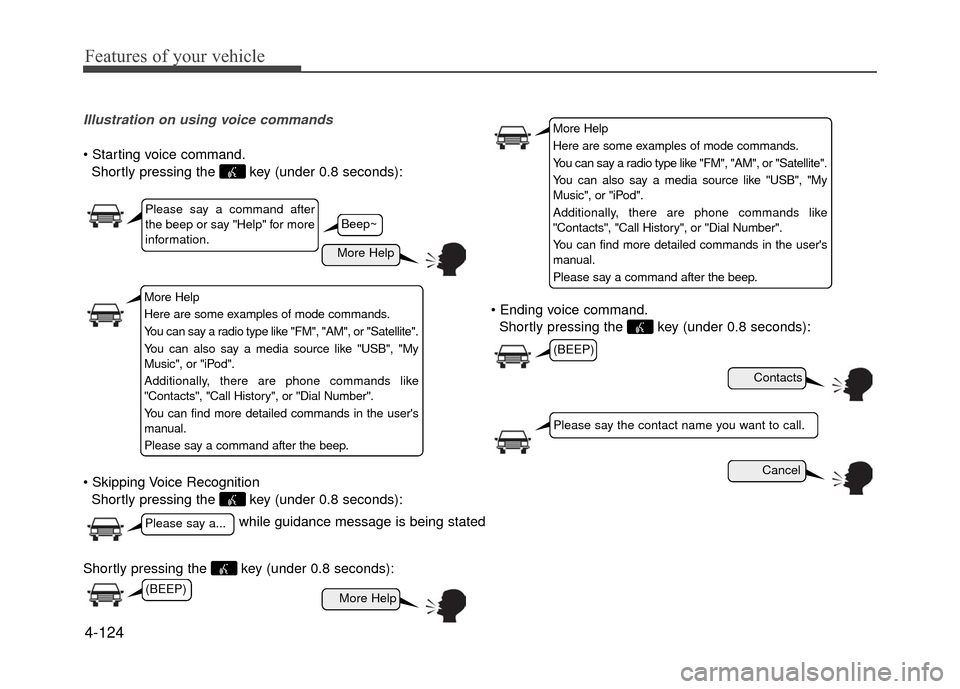
Illustration on using voice commands
Shortly pressing the key (under 0.8 seconds):
Shortly pressing the key (under 0.8 seconds):
Shortly pressing the key (under 0.8 seconds): voice command.
Shortly pressing the key (under 0.8 seconds):
while guidance message is being stated
More Help
Contacts
Cancel
More Help
Please say a command after
the beep or say "Help" for more
information.
Please say a...
Please say the contact name you want to call.
(BEEP)
Beep~
More Help
Here are some examples of mode commands.
You can say a radio type like "FM", "AM", or "Satellite".
You can also say a media source like "USB", "My
Music", or "iPod".
Additionally, there are phone commands like
"Contacts", "Call History", or "Dial Number".
You can find more detailed commands in the user's
manual.
Please say a command after the beep.
More Help
Here are some examples of mode commands.
You can say a radio type like "FM", "AM", or "Satellite".
You can also say a media source like "USB", "My
Music", or "iPod".
Additionally, there are phone commands like
"Contacts", "Call History", or "Dial Number".
You can find more detailed commands in the user's
manual.
Please say a command after the beep.
(BEEP)
Page 204 of 380
5
Before driving / 5-3
Key / 5-5
Manual transaxle /5-7
Automatic transaxle / 5-10
Brake system / 5-15
Cruise control system / 5-26
Active ECO system / 5-30
Economical operation / 5-30
Special driving conditions / 5-32
Winter driving / 5-36
Vehicle load limit / 5-40
Vehicle weight / 5-45
Trailer towing / 5-45
Driving your vehicle
Page 208 of 380
5-5
Driving your vehicle
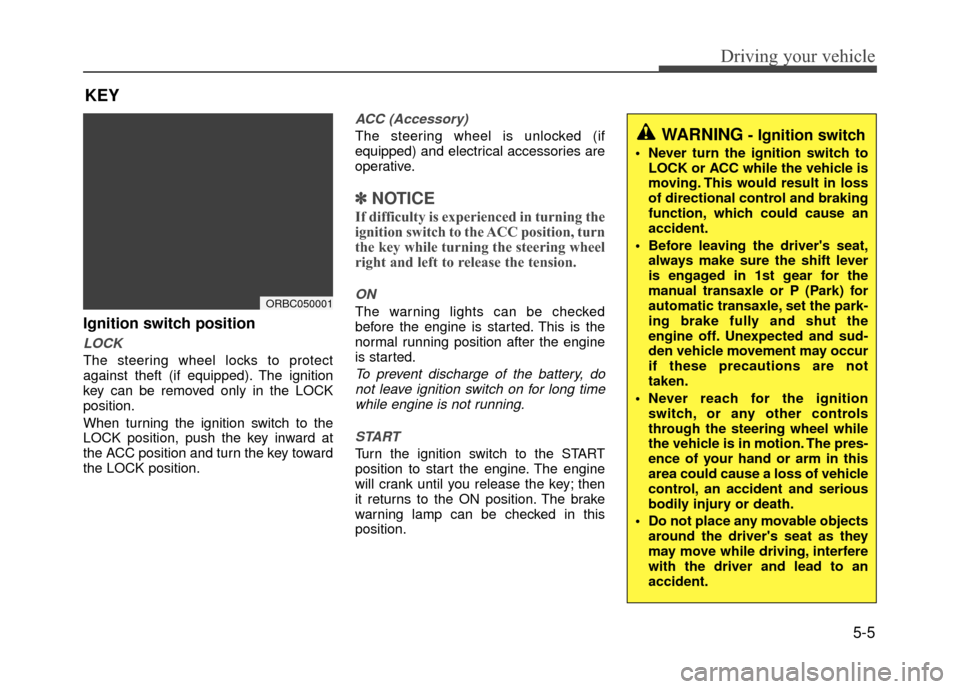
Ignition switch position
LOCK
The steering wheel locks to protect
against theft (if equipped). The ignition
key can be removed only in the LOCK
position.
When turning the ignition switch to the
LOCK position, push the key inward at
the ACC position and turn the key toward
the LOCK position.
ACC (Accessory)
The steering wheel is unlocked (if
equipped) and electrical accessories are
operative.
✽ ✽NOTICE
If difficulty is experienced in turning the
ignition switch to the ACC position, turn
the key while turning the steering wheel
right and left to release the tension.
ON
The warning lights can be checked
before the engine is started. This is the
normal running position after the engine
is started.
To prevent discharge of the battery, do
not leave ignition switch on for long timewhile engine is not running.
START
Turn the ignition switch to the START
position to start the engine. The engine
will crank until you release the key; then
it returns to the ON position. The brake
warning lamp can be checked in this
position.
KEY
ORBC050001
WARNING- Ignition switch
Never turn the ignition switch to LOCK or ACC while the vehicle is
moving. This would result in loss
of directional control and braking
function, which could cause an
accident.
Before leaving the driver's seat, always make sure the shift lever
is engaged in 1st gear for the
manual transaxle or P (Park) for
automatic transaxle, set the park-
ing brake fully and shut the
engine off. Unexpected and sud-
den vehicle movement may occur
if these precautions are not
taken.
Never reach for the ignition switch, or any other controls
through the steering wheel while
the vehicle is in motion. The pres-
ence of your hand or arm in this
area could cause a loss of vehicle
control, an accident and serious
bodily injury or death.
Do not place any movable objects around the driver's seat as they
may move while driving, interfere
with the driver and lead to an
accident.