ECU Hyundai Azera 2006 User Guide
[x] Cancel search | Manufacturer: HYUNDAI, Model Year: 2006, Model line: Azera, Model: Hyundai Azera 2006Pages: 307, PDF Size: 12.62 MB
Page 53 of 307
1
FEATURES OF YOUR HYUNDAI
39
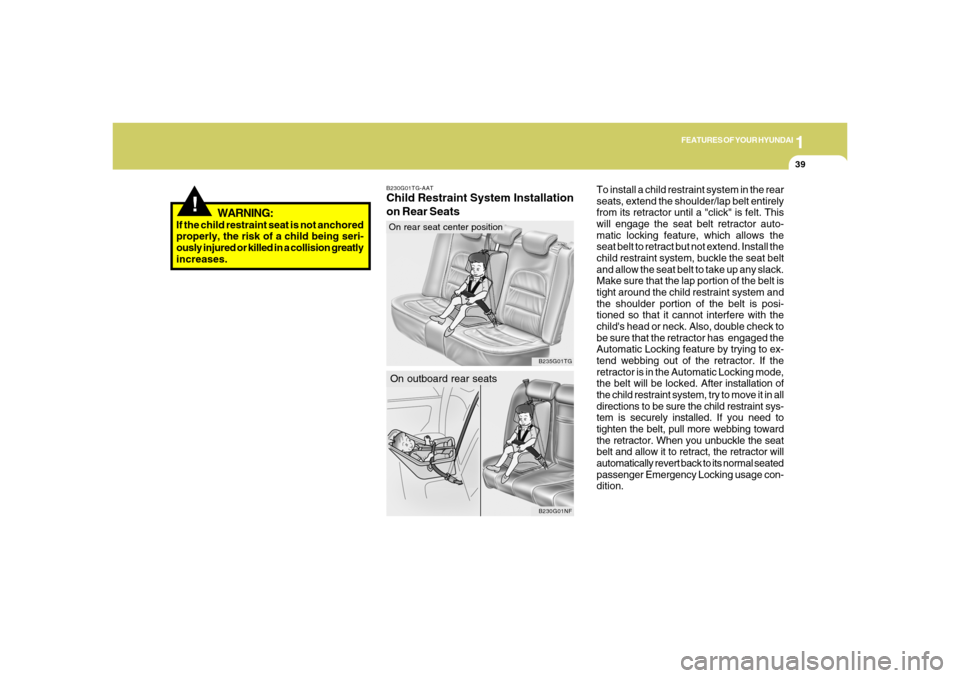
To install a child restraint system in the rear
seats, extend the shoulder/lap belt entirely
from its retractor until a "click" is felt. This
will engage the seat belt retractor auto-
matic locking feature, which allows the
seat belt to retract but not extend. Install the
child restraint system, buckle the seat belt
and allow the seat belt to take up any slack.
Make sure that the lap portion of the belt is
tight around the child restraint system and
the shoulder portion of the belt is posi-
tioned so that it cannot interfere with the
child's head or neck. Also, double check to
be sure that the retractor has engaged the
Automatic Locking feature by trying to ex-
tend webbing out of the retractor. If the
retractor is in the Automatic Locking mode,
the belt will be locked. After installation of
the child restraint system, try to move it in all
directions to be sure the child restraint sys-
tem is securely installed. If you need to
tighten the belt, pull more webbing toward
the retractor. When you unbuckle the seat
belt and allow it to retract, the retractor will
automatically revert back to its normal seated
passenger Emergency Locking usage con-
dition.
B230G01TG-AATChild Restraint System Installation
on Rear Seats
B230G01NF
On outboard rear seats
B235G01TG
On rear seat center position
!
WARNING:
If the child restraint seat is not anchored
properly, the risk of a child being seri-
ously injured or killed in a collision greatly
increases.
Page 118 of 307
1FEATURES OF YOUR HYUNDAI
104
!
Integrated HomeLink
® Wireless Con-
trol System
The HomeLink
® Wireless Control System
provides a convenient way to replace up to
three hand-held radio-frequency (RF)
transmitters with a single built-in device.
This innovative feature will learn the radio
frequency codes of most current transmit-
ters to operate devices such as gate op-
erators, garage door openers, entry door
locks, security systems, even home light-
ing. Both standard and rolling code-
equipped transmitters can be programmed
by following the outlined procedures. Ad-
ditional HomeLink
® information can be
found at: www.homelink.com or by calling
1-800-355-3515.
CAUTION:
Before programming HomeLink
® to a
garage door opener or gate operator,
make sure that people and objects are
out of the way of the device to prevent
potential harm or damage. Do not use
HomeLink
® with any garage door opener
that lacks the safety stop and reverse
features as required by U.S. federal
safety standards (this includes any ga-
rage door opener model manufactured
before April 1, 1982). A garage door that
cannot detect an object - signaling the
door to stop and reverse - does not meet
current U.S. federal safety standards.
Using a garage door opener without these
features increases the risk of serious
injury or death.Programming HomeLink
®
NOTE:o When programming a garage door
opener, it is advised to park the ve-
hicle outside of the garage.
o It is recommended that a new battery
be placed in the hand-held transmit-
ter of the device being programmed
to HomeLink
® for quicker training and
accurate transmission of the radio-
frequency signal.
o Some vehicles may require the igni-
tion switch to be turned to the second
(or "accessories") position for pro-
gramming and/or operation of
HomeLink.
o In the event that there are still pro-
gramming difficulties or questions
after following the programming steps
listed below, contact HomeLink
® at:
www.homelink.com or 1-800-355-
3515. Retain the original transmitter of the RF
device you are programming for use in
other vehicles as well as for future
HomeLink
® programming. It is also sug-
gested that upon the sale of the vehicle, the
programmed HomeLink
® buttons be
erased for security purposes.
1. Press and hold the button for more
than 6 seconds. When the compass
memory is cleared a "C" will appear in
the display.
2. To calibrate the compass, drive the
vehicle in 2 complete circles at less than
5 MPH (8 Km/h).
Page 120 of 307

1FEATURES OF YOUR HYUNDAI
106
4. Press and hold the just-trained
HomeLink
® button and observe the red
Status Indicator LED. If the indicator
light stays on constantly, programming
is complete and your device should
activate.
5. To program the remaining two
HomeLink® buttons, follow either steps
1 through 4 above for other Rolling
Code devices or steps 2 through 5 in
Standard Programming for standard
devices.
During programming, your handheld trans-
mitter may automatically stop transmitting.
Continue to press the Integrated
HomeLink
® Wireless Control System but-
ton (note steps 2 through 4 in the Standard
Programming portion of this document)
while you press and re-press ("cycle") your
handheld transmitter every two seconds
until the frequency signal has been learned.
The indicator light will flash slowly and
then rapidly after several seconds upon
successful training.Operating HomeLink
®
To operate, simply press and release the
programmed HomeLink
® button. Activa-
tion will now occur for the trained device
(i.e. garage door opener, gate operator,
security system, entry door lock, home/
office lighting, etc.). For convenience, the
hand-held transmitter of the device may
also be used at any time.
Reprogramming a Single HomeLink
®
Button
To program a new device to a previously
trained HomeLink
® button, follow these
steps:
1. Press and hold the desired HomeLink
®
button. Do NOT release until step 4 has
been completed.
2. When the indicator light begins to flash
slowly (after 20 seconds), position the
handheld transmitter 1 to 3 inches away
from the HomeLink
® surface.
3. Press and hold the handheld transmit-
ter button. The HomeLink
® indicator light
will flash, first slowly and then rapidly.
4. When the indicator light begins to flash
rapidly, release both buttons.
5. Press and hold the just-trainedHomeLink
® button and observe the red
Status Indicator LED. If the indicator
light stays on constantly, programming
is complete and your new device should
activate.
Erasing HomeLink
® Buttons
Individual buttons cannot be erased. How-
ever, to erase all three programmed but-
tons:
1. Press and hold the two outer HomeLink
®
buttons until the indicator light begins to
flash-after 20 seconds.
2. Release both buttons. Do not hold for
longer than 30 seconds.
The Integrated HomeLink
® Wireless Con-
trol System is now in the training (learn)
mode and can be programmed at any time
following the appropriate steps in the Pro-
gramming sections above.
FCC ID: NZLZTVHL3
IC: 4112A-ZTVHL3
Page 122 of 307
1FEATURES OF YOUR HYUNDAI
108
!
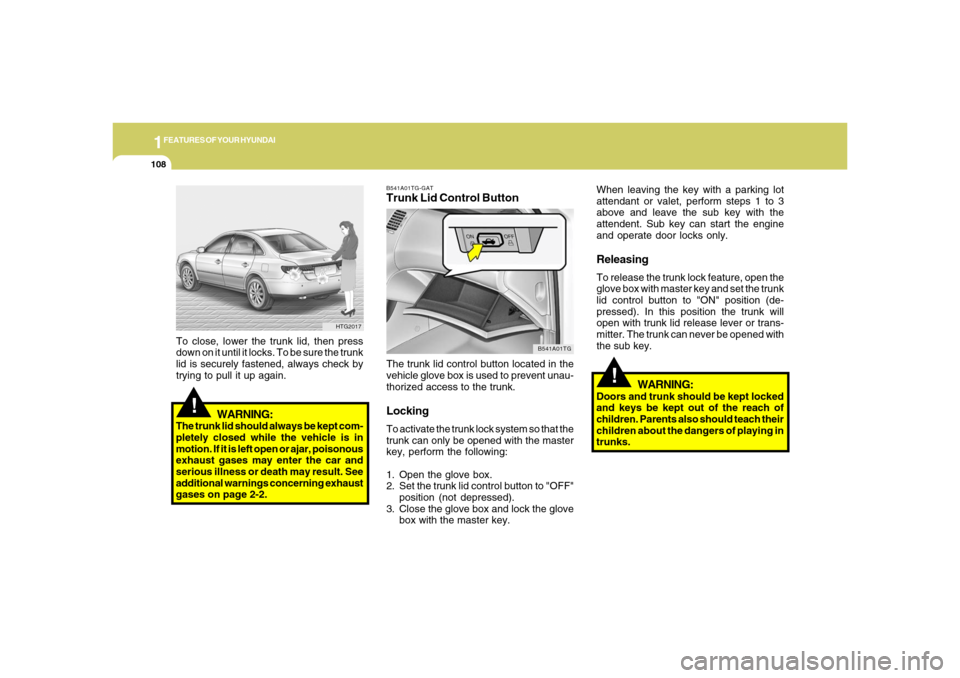
B541A01TG-GATTrunk Lid Control ButtonThe trunk lid control button located in the
vehicle glove box is used to prevent unau-
thorized access to the trunk.LockingTo activate the trunk lock system so that the
trunk can only be opened with the master
key, perform the following:
1. Open the glove box.
2. Set the trunk lid control button to "OFF"
position (not depressed).
3. Close the glove box and lock the glove
box with the master key.
B541A01TG
When leaving the key with a parking lot
attendant or valet, perform steps 1 to 3
above and leave the sub key with the
attendent. Sub key can start the engine
and operate door locks only.ReleasingTo release the trunk lock feature, open the
glove box with master key and set the trunk
lid control button to "ON" position (de-
pressed). In this position the trunk will
open with trunk lid release lever or trans-
mitter. The trunk can never be opened with
the sub key.
WARNING:
Doors and trunk should be kept locked
and keys be kept out of the reach of
children. Parents also should teach their
children about the dangers of playing in
trunks.
!
WARNING:
The trunk lid should always be kept com-
pletely closed while the vehicle is in
motion. If it is left open or ajar, poisonous
exhaust gases may enter the car and
serious illness or death may result. See
additional warnings concerning exhaust
gases on page 2-2.To close, lower the trunk lid, then press
down on it until it locks. To be sure the trunk
lid is securely fastened, always check by
trying to pull it up again.
HTG2017
Page 125 of 307
1
FEATURES OF YOUR HYUNDAI
111
!
WARNING:
o The fuel cap must be tightened until
the cap clicks, otherwise " " light
will illuminate.
o Gasoline vapors are dangerous. Be-
fore refueling, always stop the engine
and never allow sparks or open flames
near the filler area. If you need to
replace the filler cap, use a genuine
Hyundai replacement part.
HTG2023
REMOTE FUEL-FILLER LID
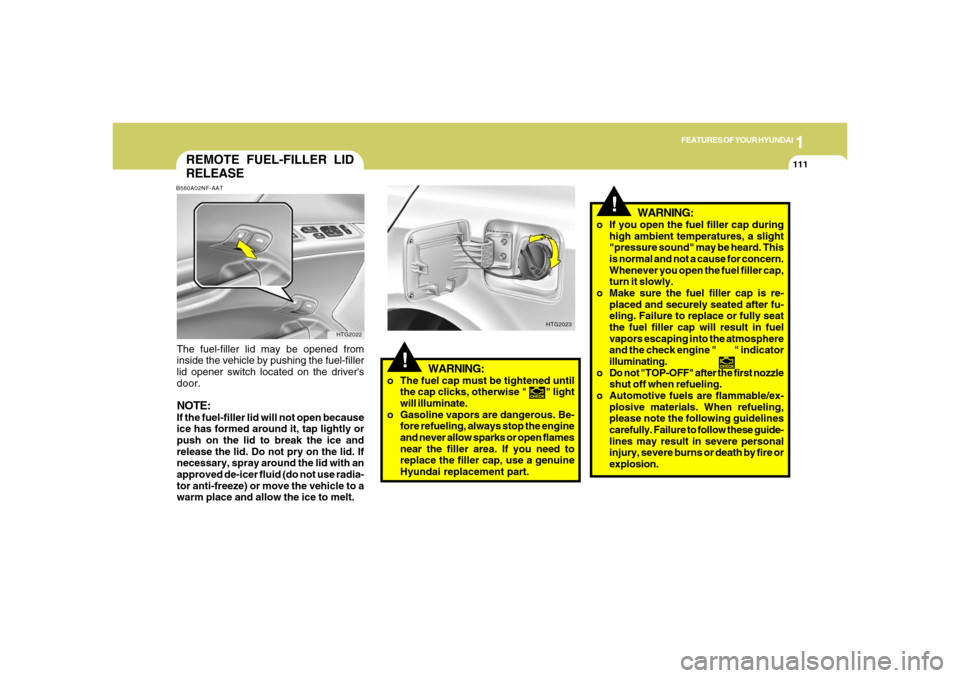
RELEASEB560A02NF-AATThe fuel-filler lid may be opened from
inside the vehicle by pushing the fuel-filler
lid opener switch located on the driver's
door.NOTE:If the fuel-filler lid will not open because
ice has formed around it, tap lightly or
push on the lid to break the ice and
release the lid. Do not pry on the lid. If
necessary, spray around the lid with an
approved de-icer fluid (do not use radia-
tor anti-freeze) or move the vehicle to a
warm place and allow the ice to melt.
HTG2022
WARNING:
o If you open the fuel filler cap during
high ambient temperatures, a slight
"pressure sound" may be heard. This
is normal and not a cause for concern.
Whenever you open the fuel filler cap,
turn it slowly.
o Make sure the fuel filler cap is re-
placed and securely seated after fu-
eling. Failure to replace or fully seat
the fuel filler cap will result in fuel
vapors escaping into the atmosphere
and the check engine " " indicator
illuminating.
o Do not "TOP-OFF" after the first nozzle
shut off when refueling.
o Automotive fuels are flammable/ex-
plosive materials. When refueling,
please note the following guidelines
carefully. Failure to follow these guide-
lines may result in severe personal
injury, severe burns or death by fire or
explosion.
!
Page 126 of 307
1FEATURES OF YOUR HYUNDAI
112
!
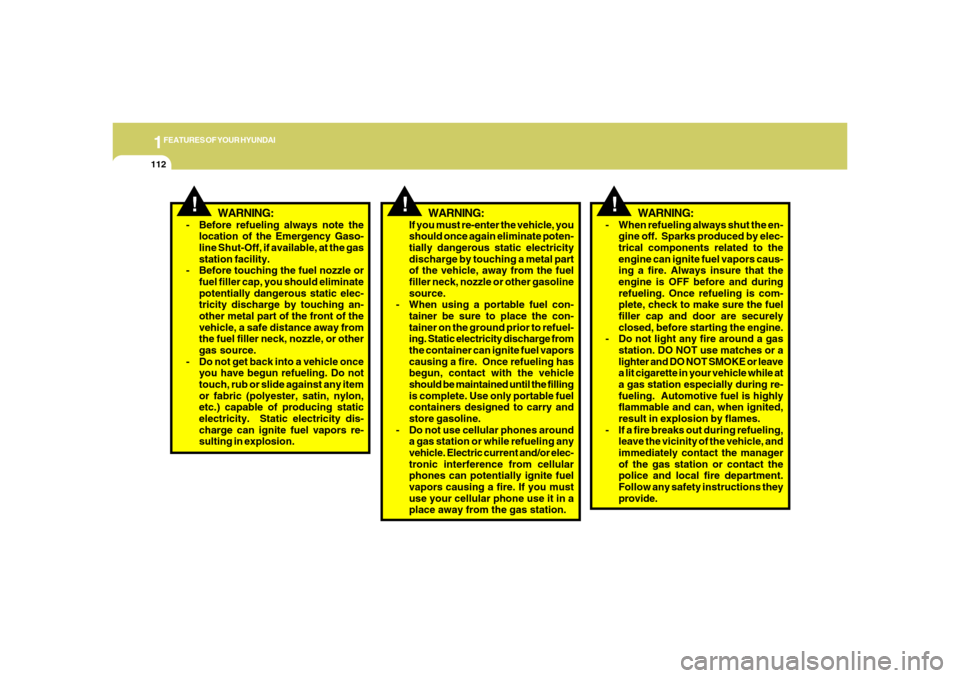
WARNING:
- When refueling always shut the en-
gine off. Sparks produced by elec-
trical components related to the
engine can ignite fuel vapors caus-
ing a fire. Always insure that the
engine is OFF before and during
refueling. Once refueling is com-
plete, check to make sure the fuel
filler cap and door are securely
closed, before starting the engine.
- Do not light any fire around a gas
station. DO NOT use matches or a
lighter and DO NOT SMOKE or leave
a lit cigarette in your vehicle while at
a gas station especially during re-
fueling. Automotive fuel is highly
flammable and can, when ignited,
result in explosion by flames.
- If a fire breaks out during refueling,
leave the vicinity of the vehicle, and
immediately contact the manager
of the gas station or contact the
police and local fire department.
Follow any safety instructions they
provide.
!
WARNING:
!
WARNING:
- Before refueling always note the
location of the Emergency Gaso-
line Shut-Off, if available, at the gas
station facility.
- Before touching the fuel nozzle or
fuel filler cap, you should eliminate
potentially dangerous static elec-
tricity discharge by touching an-
other metal part of the front of the
vehicle, a safe distance away from
the fuel filler neck, nozzle, or other
gas source.
- Do not get back into a vehicle once
you have begun refueling. Do not
touch, rub or slide against any item
or fabric (polyester, satin, nylon,
etc.) capable of producing static
electricity. Static electricity dis-
charge can ignite fuel vapors re-
sulting in explosion.If you must re-enter the vehicle, you
should once again eliminate poten-
tially dangerous static electricity
discharge by touching a metal part
of the vehicle, away from the fuel
filler neck, nozzle or other gasoline
source.
- When using a portable fuel con-
tainer be sure to place the con-
tainer on the ground prior to refuel-
ing. Static electricity discharge from
the container can ignite fuel vapors
causing a fire. Once refueling has
begun, contact with the vehicle
should be maintained until the filling
is complete. Use only portable fuel
containers designed to carry and
store gasoline.
- Do not use cellular phones around
a gas station or while refueling any
vehicle. Electric current and/or elec-
tronic interference from cellular
phones can potentially ignite fuel
vapors causing a fire. If you must
use your cellular phone use it in a
place away from the gas station.
Page 131 of 307
1
FEATURES OF YOUR HYUNDAI
117
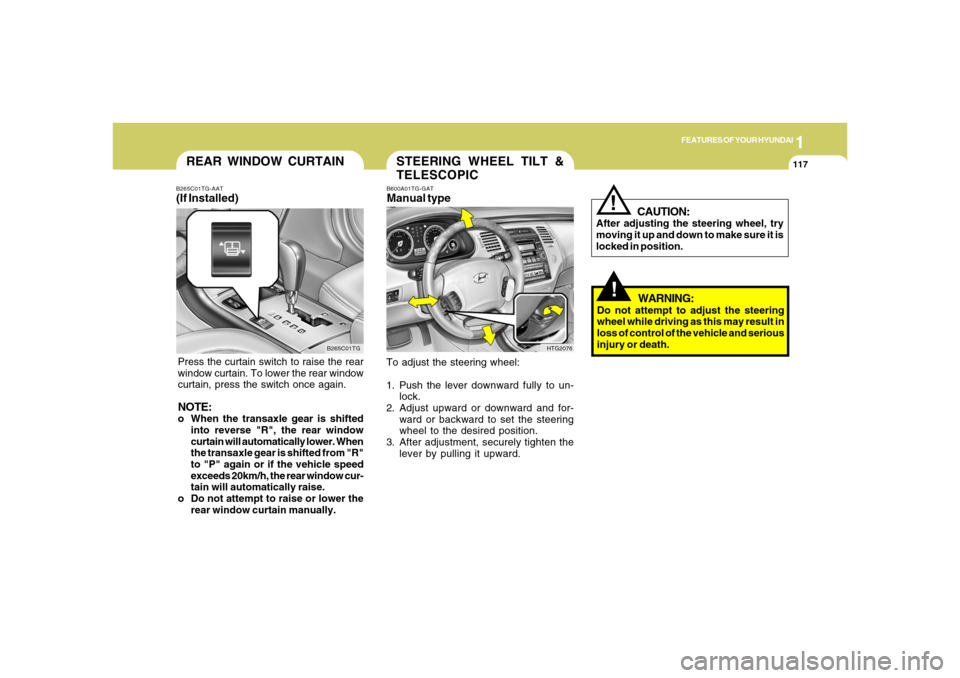
REAR WINDOW CURTAIN
B265C01TG B265C01TG-AAT
(If Installed)Press the curtain switch to raise the rear
window curtain. To lower the rear window
curtain, press the switch once again.NOTE:o When the transaxle gear is shifted
into reverse "R", the rear window
curtain will automatically lower. When
the transaxle gear is shifted from "R"
to "P" again or if the vehicle speed
exceeds 20km/h, the rear window cur-
tain will automatically raise.
o Do not attempt to raise or lower the
rear window curtain manually.
STEERING WHEEL TILT &
TELESCOPICB600A01TG-GATManual typeTo adjust the steering wheel:
1. Push the lever downward fully to un-
lock.
2. Adjust upward or downward and for-
ward or backward to set the steering
wheel to the desired position.
3. After adjustment, securely tighten the
lever by pulling it upward.
HTG2076
!!
CAUTION:
After adjusting the steering wheel, try
moving it up and down to make sure it is
locked in position.
WARNING:
Do not attempt to adjust the steering
wheel while driving as this may result in
loss of control of the vehicle and serious
injury or death.
Page 183 of 307
2
DRIVING YOUR HYUNDAI
3
!
PROPOSITION 65 WARNING:
Engine exhaust and a wide variety of
automobile components and parts, in-
cluding components found in the interior
furnishings in a vehicle, contain or emit
chemicals known to the State of Califor-
nia to cause cancer and birth defects
and reproductive harm. In addition, cer-
tain fluids contained in vehicles and cer-
tain products of component wear con-
tain or emit chemicals known to the State
of California to cause cancer and birth
defects or other reproductive harm.
BEFORE STARTING
THE ENGINEC020A01A-AATBefore you start the engine, you should
always:
1. Look around the vehicle to be sure
there are no flat tires, puddles of oil,
water or other indications of possible
trouble.
2. After entering the car, check to be sure
the parking brake is engaged.
3. Check that all windows and lights are
clean.
4. Check that the interior and exterior
mirrors are clean and in position.
5. Check your seat, seatback and head-
rest to be sure they are in their proper
positions.
6. Lock all the doors.
7. Fasten your seat belt and be sure that
all other occupants have fastened
theirs.
8. Turn off all lights and accessories that
are not needed.
9. When you turn the ignition switch to
"ON", check that all appropriate warn-
ing lights are operating and that you
have sufficient fuel.
10. Check the operation of warning lights
and all bulbs when key is in the "ON"
position.
TO START THE ENGINEC030A01TG-AATCOMBINATION IGNITION SWITCHo Place the shift lever in "P" (park) and
depress the brake pedal fully.
o To start the engine, insert the ignition
key and turn it to the "START" position.
Release it as soon as the engine starts.
Do not hold the key in the "START"
position for more than 15 seconds.NOTE:o For safety, the engine will not start if
the shift lever is not in "P" or "N"
Position.
o The ignition key cannot be turned from
"ACC" position to "LOCK" position
unless the shift lever is in the "P"
(Park) position or the negative bat-
tery terminal is disconnected from
the battery. To remove the key, al-
ways confirm that the shift lever is
securely positioned in "P" (Park).
o For additional information about start-
ing, see page 2-5.
Page 187 of 307
2
DRIVING YOUR HYUNDAI
7
C090D02A-AATo N (Neutral):In the "N" position, the transaxle is in neu-
tral, which means that no gears are en-
gaged. The engine can be started with the
shift lever in "N" position, although this is
not recommended except if the engine
stalls while the car is moving.C090C01A-AATo R (Reverse):Use for backing up the vehicle. Bring the
car to a complete stop before shifting the
selector lever to "R" position.C090E01TG-GATo D (Drive):Use for normal driving. The transaxle will
automatically shift through a five gear se-
quence.
CAUTION:
o In sports mode, the driver must ex-
ecute upward shifts in accordance
with prevailing road conditions, tak-
ing care to keep the engine speed
below the red zone.
o For engine protection, upward shifts
are made automatically when the
engine rpm reaches the red zone.
o By rapidly moving the selector lever
backwards (-) twice it is possible to
skip one gear, i.e., 3rd to 1st, 4th to 2nd
or 5th to 3rd. Since sudden engine
braking and/or rapid acceleration can
cause a loss of traction, downshifts
must be made carefully in accordance
with the vehicle's speed.
!
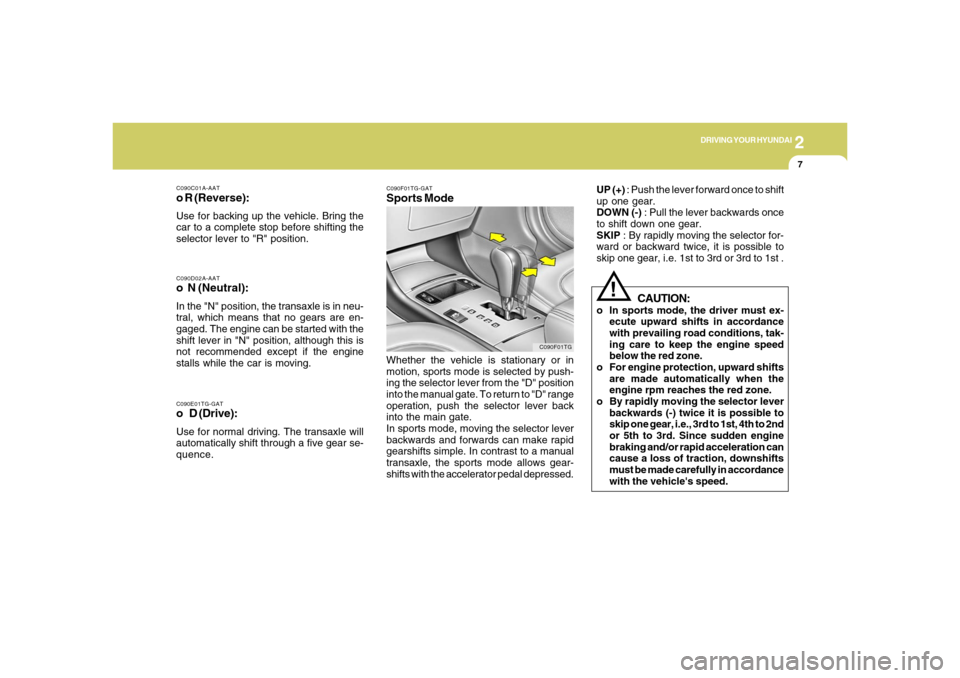
C090F01TG-GATSports ModeWhether the vehicle is stationary or in
motion, sports mode is selected by push-
ing the selector lever from the "D" position
into the manual gate. To return to "D" range
operation, push the selector lever back
into the main gate.
In sports mode, moving the selector lever
backwards and forwards can make rapid
gearshifts simple. In contrast to a manual
transaxle, the sports mode allows gear-
shifts with the accelerator pedal depressed.
C090F01TG
UP (+) : Push the lever forward once to shift
up one gear.
DOWN (-) : Pull the lever backwards once
to shift down one gear.
SKIP : By rapidly moving the selector for-
ward or backward twice, it is possible to
skip one gear, i.e. 1st to 3rd or 3rd to 1st .
Page 188 of 307
2
DRIVING YOUR HYUNDAI
8
NOTE:o In sports mode, only the five forward
gears can be selected. To reverse or
park the vehicle, move the selector
lever to the "R" or "P" position as
required.
o In sports mode, downward shifts are
made automatically when the vehicle
slows down. When the vehicle stops,
1st gear is automatically selected.
o To maintain the required levels of ve-
hicle performance and safety, the sys-
tem may not execute certain gear-
shifts when the selector lever is oper-
ated.
o Before driving away from a stop on a
slippery road, push the selector lever
forward into the +(UP) position. This
causes the transaxle to shift into 2nd
gear which is better for smooth driv-
ing away on a slippery road. Push the
selector lever to the -(DOWN) side to
shift back to 1st gear.
C090H01L-GATNOTE:o For smooth and safe operation, de-
press the brake pedal when shifting
from "Neutral" position or "Park"
position to a forward or reverse gear.
o The ignition key must be in the "ON"
position and the brake pedal fully de-
pressed in order to move the shift
lever from the "P" (Park) position to
any of the other positions.
o It is always possible to shift from "R",
"N", or "D" position to "P" position.
The vehicle must be fully stopped to
avoid transaxle damage.
!
C090I03L-GAT
CAUTION:
o Shift into "R" and "P" position only
when the vehicle has completely
stopped.
o Do not accelerate the engine in re-
verse or any of the forward positions
with the brakes applied.o Always apply the footbrake when
shifting from "P" or "N", to "R" or
"D"position.
o Do not use the "P" (Park) position in
place of the parking brake. Always
set the parking brake, shift the
transaxle into "P" (Park) position and
turn off the ignition when you leave the
vehicle, even momentarily. Never
leave the vehicle unattended while
the engine is running.
o When accelerating from a stop on a
steep hill, the vehicle may have a
tendency to roll backwards. Shifting
the shift lever into 2nd gear while in
Sport mode will help prevent the ve-
hicle from rolling backwards.
o Check the automatic transaxle fluid
level regularly, and add fluid as nec-
essary.
o See the maintenance schedule for
the proper fluid recommendation.