light Hyundai Azera 2007 Repair Manual
[x] Cancel search | Manufacturer: HYUNDAI, Model Year: 2007, Model line: Azera, Model: Hyundai Azera 2007Pages: 308, PDF Size: 12.63 MB
Page 143 of 308
1
FEATURES OF YOUR HYUNDAI
1291
FEATURES OF YOUR HYUNDAI
129
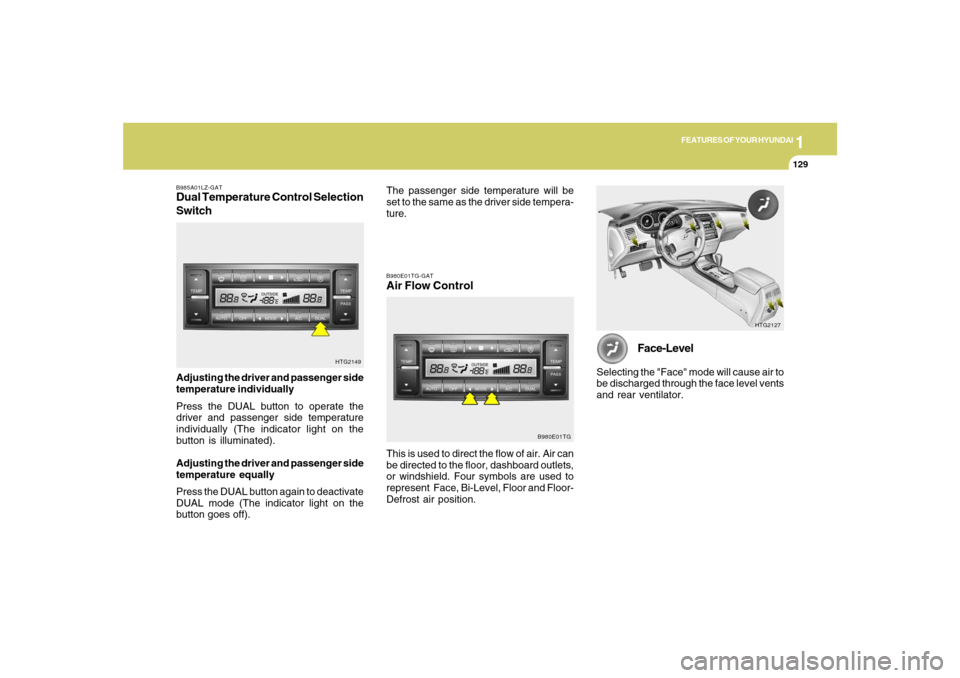
B985A01LZ-GATDual Temperature Control Selection
SwitchAdjusting the driver and passenger side
temperature individually
Press the DUAL button to operate the
driver and passenger side temperature
individually (The indicator light on the
button is illuminated).
Adjusting the driver and passenger side
temperature equally
Press the DUAL button again to deactivate
DUAL mode (The indicator light on the
button goes off).
HTG2149
HTG2127
Face-Level
Selecting the "Face" mode will cause air to
be discharged through the face level vents
and rear ventilator.
B980E01TG-GATAir Flow Control
B980E01TG
This is used to direct the flow of air. Air can
be directed to the floor, dashboard outlets,
or windshield. Four symbols are used to
represent Face, Bi-Level, Floor and Floor-
Defrost air position.The passenger side temperature will be
set to the same as the driver side tempera-
ture.
Page 174 of 308

1FEATURES OF YOUR HYUNDAI
160
M465F02TG-AAT1. LOAD ButtonThis compact disc player will accommo-
date up to six compact discs.
To insert one disc into the player, do the
following:
1. Press and release the LOAD Button.
2. Green light on the slot will be illumi-
nated and the lowest number of empty
slot will blink on the display. After "WAIT"
is displayed on the LCD, the slot will
open with "INSERT" displayed on the
LCD.
3. Insert a disc partway into the slot, label
side up. The player will pull the disc in.
When the disc is inserted, the disc will
begin to play automatically.NOTE:o The disc can be only inserted while
the green light is blinking on the slot.
o This CD player is suitable only for 12
cm discs, do not use irregular shaped
CDs.
To insert multiple discs into the player, do
the followings:1. Press and hold the LOAD button for one
second or more. You will then hear a
beep sound and the green light on the
slot will be illuminated, and the num-
bers of empty disc will blink on the
display.
2. After "WAIT" is displayed on the LCD
with the lowest number of empty slot
blinking, the slot will open with "IN-
SERT" displayed on the LCD.
3. Insert a disc partway into the slot, label
side up. The player will pull the disc in.
Once the disc is loaded, the numbers of
the empty disc will blink on the display
continuously. If the next "DISC NO." is
displayed when the slot is illuminated,
you can then load another disc.
4. Load the remaining disc by following
the same procedures 1 and 2. When
you finished loading 6 discs, the CD
player will begin to play the last CD
loaded.
5. To load more than one disc but less than
six, complete Steps 1 and 2. When you
have finished loading discs, press LOAD
button to cancel the loading function or
wait for 10 seconds. The CD player will
begin to play the last CD loaded. As
each CD starts to play, the DISC num-
ber will appear on the display.
NOTE:The disc player takes up to six discs.
Do not try to load more than six.2. Audio/MP3 CD Select Buttono Press the CD Button to start CD play-
back, during radio operation or cas-
sette tape playing.
o When discs are in the CD deck, if you
press the CD button, the CD player will
begin playing even if the radio or cas-
sette player is being used.
o The CD player can be used when the
ignition switch is in either the "ON" or
"ACC" position.NOTE:o Do not stick paper or tape etc., on the
label side or the recording side of any
discs, as it may cause a malfunction.
o The unit cannot play a CDR (Record-
able CD) and CDRW (Rewritable CD)
that is not finalized. Please refer to the
manual of CDR/ CD-RW recoder or
CD-R/CDRW software for more infor-
mation on finalization process.
o Depending on the recording status,
some CD-Rs/CD-RWs may not be
played on this unit.
Page 178 of 308
1FEATURES OF YOUR HYUNDAI
164
CARE OF DISCS
B850A02L B850A02F-AAT
Proper HandlingStorage
When not in use, place your discs in their
individual case and store them in a cool
place away from the sun, heat, and dust.
Do not grip or pull out the disc with your
hand while the disc is being pulled into the
unit by the self loading mechanism.Keep Your Discs Clean
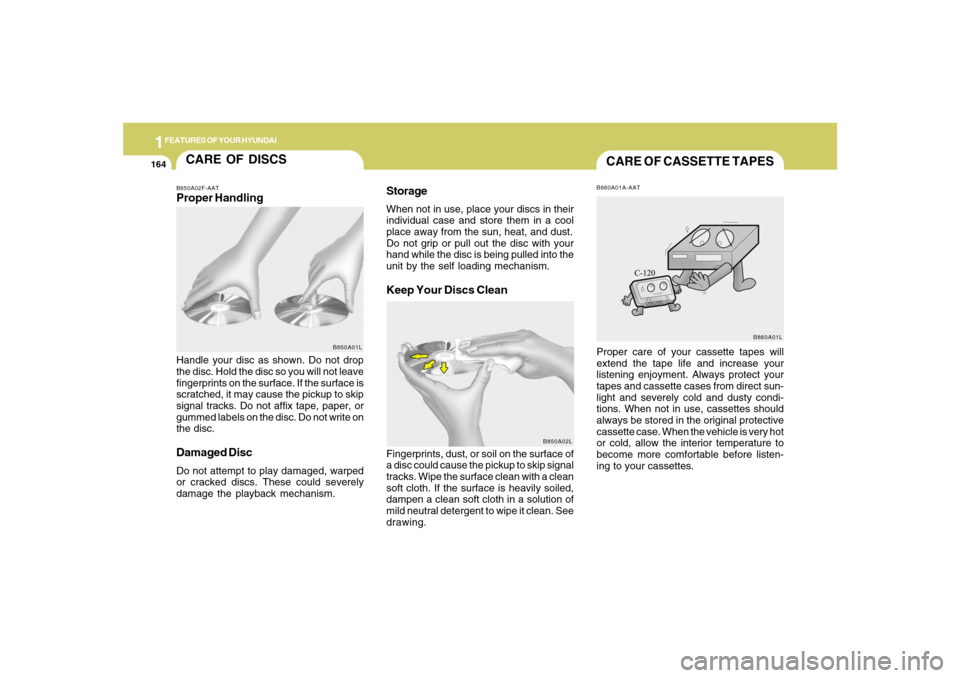
Handle your disc as shown. Do not drop
the disc. Hold the disc so you will not leave
fingerprints on the surface. If the surface is
scratched, it may cause the pickup to skip
signal tracks. Do not affix tape, paper, or
gummed labels on the disc. Do not write on
the disc.Damaged DiscDo not attempt to play damaged, warped
or cracked discs. These could severely
damage the playback mechanism.Fingerprints, dust, or soil on the surface of
a disc could cause the pickup to skip signal
tracks. Wipe the surface clean with a clean
soft cloth. If the surface is heavily soiled,
dampen a clean soft cloth in a solution of
mild neutral detergent to wipe it clean. See
drawing.
B850A01L
CARE OF CASSETTE TAPESB860A01A-AATProper care of your cassette tapes will
extend the tape life and increase your
listening enjoyment. Always protect your
tapes and cassette cases from direct sun-
light and severely cold and dusty condi-
tions. When not in use, cassettes should
always be stored in the original protective
cassette case. When the vehicle is very hot
or cold, allow the interior temperature to
become more comfortable before listen-
ing to your cassettes.
B860A01L
Page 183 of 308
2
DRIVING YOUR HYUNDAI
3
!
!
PROPOSITION 65 WARNING:
Engine exhaust and a wide variety of
automobile components and parts, in-
cluding components found in the interior
furnishings in a vehicle, contain or emit
chemicals known to the State of Califor-
nia to cause cancer and birth defects
and reproductive harm. In addition, cer-
tain fluids contained in vehicles and cer-
tain products of component wear con-
tain or emit chemicals known to the State
of California to cause cancer and birth
defects or other reproductive harm.
BEFORE STARTING
THE ENGINEC020A01TG-AATBefore you start the engine, you should
always:
1. Look around the vehicle to be sure
there are no flat tires, puddles of oil,
water or other indications of possible
trouble.
2. After entering the car, check to be sure
the parking brake is engaged.
3. Check that all windows and lights are
clean.
4. Check that the interior and exterior
mirrors are clean and in position.
5. Check your seat, seatback and head-
rest to be sure they are in their proper
positions.
6. Lock all the doors.
7. Fasten your seat belt and be sure that
all other occupants have fastened
theirs.
8. Turn off all lights and accessories that
are not needed.
9. When you turn the ignition switch to
"ON", check that all appropriate warn-
ing lights are operating and that you
have sufficient fuel.
10. Check the operation of warning lights
and all bulbs when key is in the "ON"
position.
WARNING:
o Always wear appropriate shoes when
operating your vehicle. Unsuitable
shoes (high heels, ski boots, etc.) may
interfere with your ability to use the
brake and accelerator pedal.
o All passengers must be properly
belted whenever the vehicle is mov-
ing. Refer to pages: 1-26 through 1-
34 for more information on their proper
use.
o Always check the surrounding areas
near your vehicle for people, espe-
cially children, before putting a car
into 'drive'.
Page 185 of 308
2
DRIVING YOUR HYUNDAI
5
!
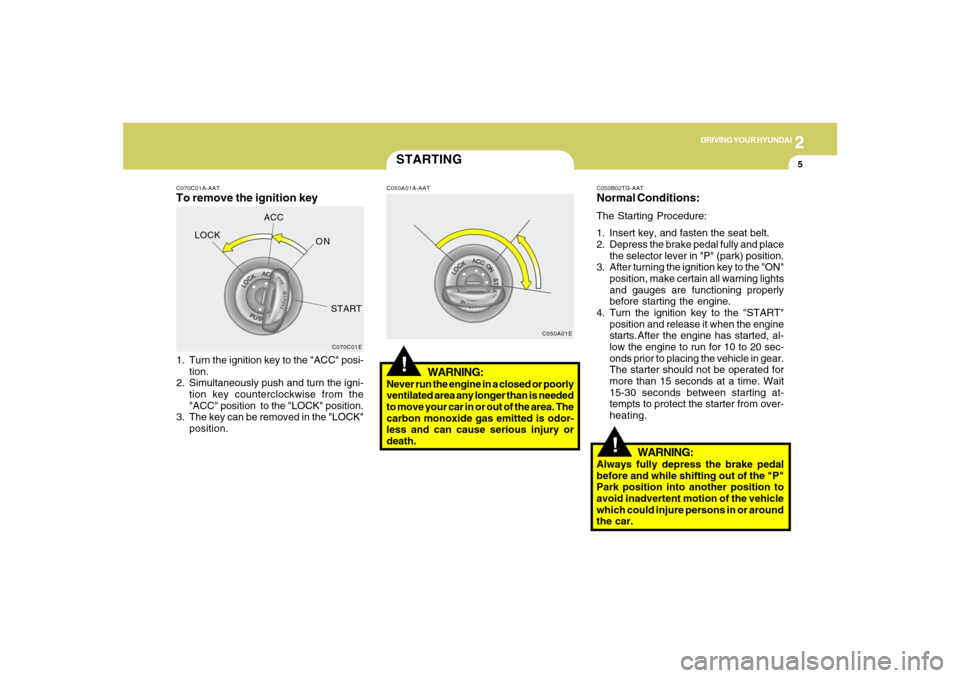
C070C01A-AATTo remove the ignition key1. Turn the ignition key to the "ACC" posi-
tion.
2. Simultaneously push and turn the igni-
tion key counterclockwise from the
"ACC" position to the "LOCK" position.
3. The key can be removed in the "LOCK"
position.
C070C01E
LOCKACC
ON
START
STARTING!
C050A01A-AAT
WARNING:
Never run the engine in a closed or poorly
ventilated area any longer than is needed
to move your car in or out of the area. The
carbon monoxide gas emitted is odor-
less and can cause serious injury or
death.
C050A01EC050B02TG-AAT
Normal Conditions:The Starting Procedure:
1. Insert key, and fasten the seat belt.
2. Depress the brake pedal fully and place
the selector lever in "P" (park) position.
3. After turning the ignition key to the "ON"
position, make certain all warning lights
and gauges are functioning properly
before starting the engine.
4. Turn the ignition key to the "START"
position and release it when the engine
starts.After the engine has started, al-
low the engine to run for 10 to 20 sec-
onds prior to placing the vehicle in gear.
The starter should not be operated for
more than 15 seconds at a time. Wait
15-30 seconds between starting at-
tempts to protect the starter from over-
heating.
WARNING:
Always fully depress the brake pedal
before and while shifting out of the "P"
Park position into another position to
avoid inadvertent motion of the vehicle
which could injure persons in or around
the car.
Page 186 of 308
2
DRIVING YOUR HYUNDAI
6
!
CAUTION:
Never shift into "R" or "P" position while
the vehicle is moving.
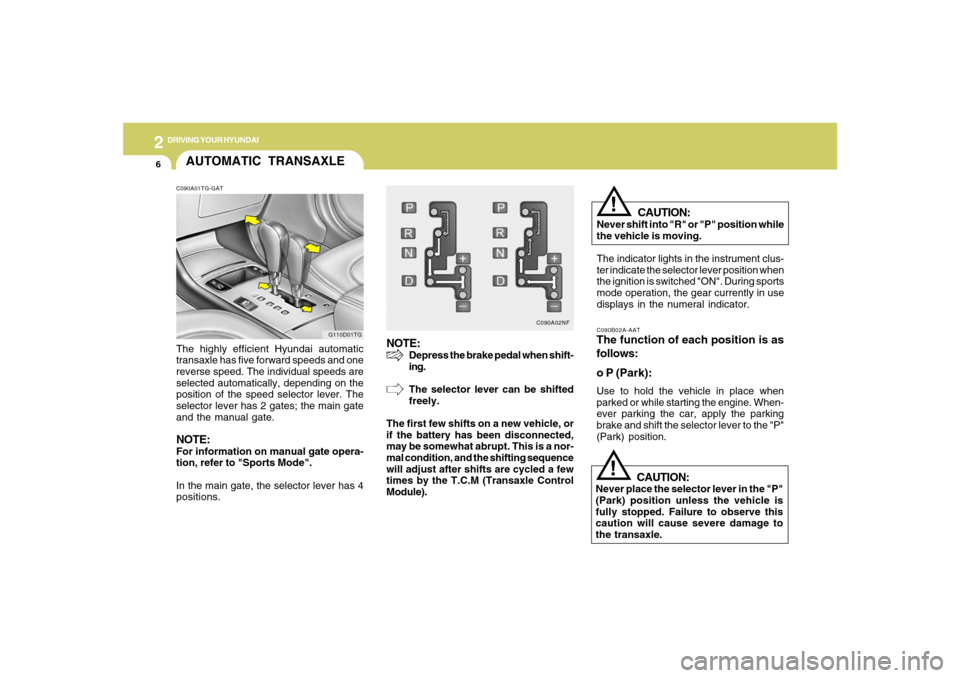
The indicator lights in the instrument clus-
ter indicate the selector lever position when
the ignition is switched "ON". During sports
mode operation, the gear currently in use
displays in the numeral indicator.C090B02A-AATThe function of each position is as
follows:
o P (Park):Use to hold the vehicle in place when
parked or while starting the engine. When-
ever parking the car, apply the parking
brake and shift the selector lever to the "P"
(Park) position.
CAUTION:
Never place the selector lever in the "P"
(Park) position unless the vehicle is
fully stopped. Failure to observe this
caution will cause severe damage to
the transaxle.
!
NOTE:
Depress the brake pedal when shift-
ing.
The selector lever can be shifted
freely.
The first few shifts on a new vehicle, or
if the battery has been disconnected,
may be somewhat abrupt. This is a nor-
mal condition, and the shifting sequence
will adjust after shifts are cycled a few
times by the T.C.M (Transaxle Control
Module).
C090A02NF
AUTOMATIC TRANSAXLEC090A01TG-GATThe highly efficient Hyundai automatic
transaxle has five forward speeds and one
reverse speed. The individual speeds are
selected automatically, depending on the
position of the speed selector lever. The
selector lever has 2 gates; the main gate
and the manual gate.NOTE:For information on manual gate opera-
tion, refer to "Sports Mode".
In the main gate, the selector lever has 4
positions.
G110D01TG
Page 194 of 308
2
DRIVING YOUR HYUNDAI
14
o If a tire goes flat while you are driving,
apply the brakes gently and keep the
car pointed straight ahead while you
slow down. When you are moving slowly
enough for it to be safe to do so, pull off
the road and stop in a safe place.
o If your car is equipped with an automatic
transaxle, don't let your car creep for-
ward. To avoid creeping forward, keep
your foot firmly on the brake pedal when
the car is stopped.
o Use caution when parking on a hill.
Firmly engage the parking brake and
place the gear selector lever in "P" (au-
tomatic transaxle) or in first or reverse
gear (manual transaxle). If your car is
facing downhill, turn the front wheels
into the curb to help keep the car from
rolling. If your car is facing uphill, turn
the front wheels away from the curb to
help keep the car from rolling. If there is
no curb or if it is required by other
conditions to keep the car from rolling,
block the wheels.
!GOOD BRAKING PRAC-
TICESC130A02A-AAT
WARNING:
o Whenever leaving vehicle or parking,
always set the parking brake as far as
possible and fully engage the vehicle's
transaxle into the park position. Ve-
hicles not fully engaged in park with
the parking brake set are at risk for
moving inadvertently and injuring
yourself or others.
o All vehicles should always have the
parking brake fully engaged when
parking to avoid inadvertent move-
ment of the car which can injure occu-
pants or pedestrians.
o Nothing should be carried on top of
the shelf panel behind the rear seat. If
there were an accident or a sudden
stop, such objects could move for-
ward and cause damage to the ve-
hicle or injure the occupants.o After being parked, check to be sure the
parking brake is not engaged and that
the parking brake indicator light is out
before driving away.
o Driving through water may get the
brakes wet. They can also get wet when
the car is washed. Wet brakes can be
dangerous! Your car will not stop as
quickly if the brakes are wet. Wet brakes
may cause the car to pull to one side. To
dry the brakes, apply the brakes lightly
until the braking action returns to nor-
mal, taking care to keep the car under
control at all times. If the braking action
does not return to normal, stop as soon
as it is safe to do so and call your
Hyundai dealer for assistance.
o Don't coast down hills with the car out of
gear. This is extremely hazardous. Keep
the car in gear at all times, use the
brakes to slow down, then shift to a
lower gear so that engine braking will
help you maintain a safe speed.
o Don't "ride" the brake pedal. Resting
your foot on the brake pedal while driv-
ing can be dangerous because it can
result in the brakes overheating and
losing their effectiveness. It also in-
creases the wear of the brake compo-
nents.
Page 195 of 308
2
DRIVING YOUR HYUNDAI
15
DRIVING FOR ECONOMYC140A02A-AATYou can save fuel and get more miles from
your car if you follow these suggestions:
o Drive smoothly. Accelerate at a moder-
ate rate. Don't make "jack-rabbit" starts
or full-throttle shifts and maintain a
steady cruising speed. Don't race be-
tween stoplights. Try to adjust your
speed to that of the other traffic so you
don't have to change speeds unneces-
sarily. Avoid heavy traffic whenever pos-
sible. Always maintain a safe distance
from other vehicles so you can avoid
unnecessary braking. This also reduces
brake wear.
o Drive at a moderate speed. The faster
you drive, the more fuel your car uses.
Driving at a moderate speed, espe-
cially on the highway, is one of the most
effective ways to reduce fuel consump-
tion.
o Don't "ride" the brake or clutch pedal.
This can increase fuel consumption and
also increase wear on these compo-
nents. In addition, driving with your foot
resting on the brake pedal may cause
the brakes to overheat, which reduces
their effectiveness and may lead to more
serious consequences. o Under some conditions your parking
brake can freeze in the engaged posi-
tion. This is most likely to happen when
there is an accumulation of snow or ice
around or near the rear brakes or if the
brakes are wet. If there is a risk that the
parking brake may freeze, apply it only
temporarily while you put the gear se-
lector lever in "P" (automatic) or in first
or reverse gear (manual transaxle) and
block the rear wheels so the car cannot
roll. Then release the parking brake.
o Do not hold the vehicle on the upgrade
with the accelerator pedal. This can
cause the transaxle to overheat. Al-
ways use the brake pedal or parking
brake.o Take care of your tires. Keep them in-
flated to the recommended pressure.
Incorrect inflation, either too much or
too little, results in unnecessary tire
wear. Check the tire pressures at least
once a month.
o Be sure that the wheels are aligned
correctly. Improper alignment can re-
sult from hitting curbs or driving too fast
over irregular surfaces. Poor alignment
causes faster tire wear and may also
result in other problems as well as
greater fuel consumption.
o Keep your car in good condition. For
better fuel economy and reduced main-
tenance costs, maintain your car in ac-
cordance with the maintenance sched-
ule in Section 5. If you drive your car in
severe conditions, more frequent main-
tenance is required (see Section 5 for
details).
o Keep your car clean. For maximum
service, your Hyundai should be kept
clean and free of corrosive materials. It
is especially important that mud, dirt,
ice, etc. not be allowed to accumulate
on the underside of the car. This extra
weight can result in increased fuel con-
sumption and also contribute to corro-
sion.
Page 196 of 308
2
DRIVING YOUR HYUNDAI
16
C160A01A-AATThe more severe weather conditions of
winter result in greater wear and other
problems. To minimize the problems of
winter driving, you should follow these
suggestions:WINTER DRIVING
o Travel lightly. Don't carry unnecessary
weight in your car. Weight reduces fuel
economy.
o Don't let the engine idle longer than
necessary. If you are waiting (and not in
traffic), turn off your engine and restart
only when you're ready to go.
o Remember, your Hyundai does not re-
quire extended warm-up. After the en-
gine has started, allow the engine to run
for 10 to 20 seconds prior to placing the
vehicle in gear. In very cold weather,
however, give your engine a slightly
longer warm-up period.
o Don't "lug" or "over-rev" the engine.
Lugging is driving too slowly in too high
a gear resulting in the engine bucking.
If this happens, shift to a lower gear.
Over-revving is racing the engine be-
yond its safe limit. This can be avoided
by shifting at the recommended speeds.
o Use your air conditioning sparingly. The
air conditioning system is operated by
engine power so your fuel economy is
reduced when you use it.
SMOOTH CORNERINGC150A01A-AATAvoid braking or gear changing in corners,
especially when roads are wet. Ideally,
corners should always be taken under
gentle acceleration. If you follow these
suggestions, tire wear will be held to a
minimum.
Page 198 of 308

2
DRIVING YOUR HYUNDAI
18
C160J01A-AATDon't Let Ice and Snow Accumulate
UnderneathUnder some conditions, snow and ice can
build up under the fenders and interfere
with the steering. When driving in severe
winter conditions where this may happen,
you should periodically check underneath
the car to be sure the movement of the front
wheels and the steering components is
not obstructed.C160K01A-AATCarry Emergency EquipmentDepending on the severity of the weather
where you drive your car, you should carry
appropriate emergency equipment. Some
of the items you may want to carry include
tire chains, tow straps or chains, flashlight,
emergency flares, sand, a shovel, jumper
cables, a window scraper, gloves, ground
cloth, coveralls, a blanket, etc.
C160G01A-GATTo Keep Locks from FreezingTo keep the locks from freezing, squirt an
approved de-icer fluid or glycerine into the
key opening. If a lock is covered with ice,
squirt it with an approved de-icing fluid to
remove the ice. If the lock is frozen inter-
nally, you may be able to thaw it out by
using a heated key. Handle the heated key
with care to avoid injury.NOTE:The proper temperature for using the
immobilizer key is from -40°F (-40°C) to
176°F (80°C). If you heat the immobilizer
key over 176°F (80°C) to open the frozen
lock, it may cause damage to the tran-
sponder in its head.
C160H02A-AATUse Approved Window Washer Anti-
Freeze in SystemTo keep the water in the window washer
system from freezing, add an approved
window washer anti-freeze solution in
accordance with instructions on the con-
tainer. Window washer anti-freeze is avail-
able from Hyundai dealers and most auto
parts outlets. Do not use engine coolant or
other types of anti-freeze as these may
damage the paint finish.C160I01L-AATDon't Let Your Parking Brake FreezeUnder some conditions your parking brake
can freeze in the engaged position. This
is most likely to happen when there is an
accumulation of snow or ice around or
near the rear brakes or if the brakes are
wet. If there is a risk the parking brake may
freeze, apply it only temporarily while you
put the gear selector lever in "P" and block
the rear wheels so the car cannot roll. Then
release the parking brake.