light Hyundai Azera 2007 Service Manual
[x] Cancel search | Manufacturer: HYUNDAI, Model Year: 2007, Model line: Azera, Model: Hyundai Azera 2007Pages: 308, PDF Size: 12.63 MB
Page 108 of 308
1FEATURES OF YOUR HYUNDAI94
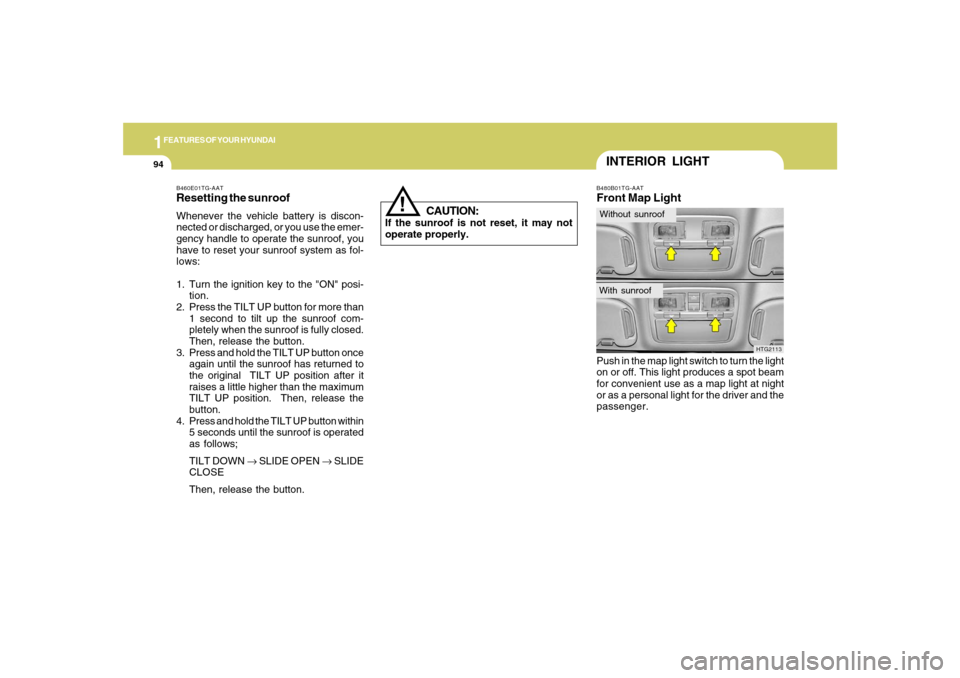
B480B01TG-AATFront Map LightPush in the map light switch to turn the light
on or off. This light produces a spot beam
for convenient use as a map light at night
or as a personal light for the driver and the
passenger.
HTG2113
INTERIOR LIGHTWithout sunroofWith sunroof
!
B460E01TG-AATResetting the sunroofWhenever the vehicle battery is discon-
nected or discharged, or you use the emer-
gency handle to operate the sunroof, you
have to reset your sunroof system as fol-
lows:
1. Turn the ignition key to the "ON" posi-
tion.
2. Press the TILT UP button for more than
1 second to tilt up the sunroof com-
pletely when the sunroof is fully closed.
Then, release the button.
3. Press and hold the TILT UP button once
again until the sunroof has returned to
the original TILT UP position after it
raises a little higher than the maximum
TILT UP position. Then, release the
button.
4. Press and hold the TILT UP button within
5 seconds until the sunroof is operated
as follows;
TILT DOWN → SLIDE OPEN → SLIDE
CLOSE
Then, release the button.
CAUTION:
If the sunroof is not reset, it may not
operate properly.
Page 109 of 308
1
FEATURES OF YOUR HYUNDAI
95
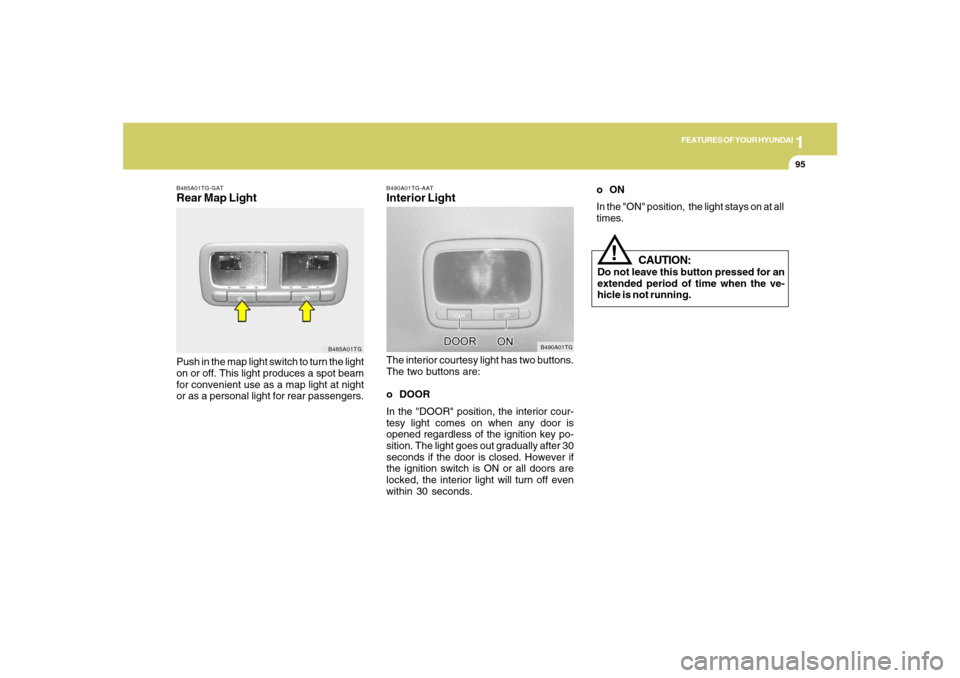
B490A01TG-AATInterior LightThe interior courtesy light has two buttons.
The two buttons are:
o DOOR
In the "DOOR" position, the interior cour-
tesy light comes on when any door is
opened regardless of the ignition key po-
sition. The light goes out gradually after 30
seconds if the door is closed. However if
the ignition switch is ON or all doors are
locked, the interior light will turn off even
within 30 seconds.
B490A01TG
B485A01TG-GATRear Map LightPush in the map light switch to turn the light
on or off. This light produces a spot beam
for convenient use as a map light at night
or as a personal light for rear passengers.
B485A01TG
CAUTION:
Do not leave this button pressed for an
extended period of time when the ve-
hicle is not running.
!
oON
In the "ON" position, the light stays on at all
times.
Page 110 of 308
1FEATURES OF YOUR HYUNDAI96
B500B01NF-GATIlluminated Glove BoxOpening the glove box will automatically
turn on the light when the multi-function
switch is turned to the first position.NOTE:Information about use of the trunk lid
control button located in the glove box is
located in the trunk lid section.
B541A01TG
!STORAGE BOXB500A01TG-AATGLOVE BOX
WARNING:To avoid the possibility of injury in case
of an accident or a sudden stop, the
glove box door should be kept closed
when the car is in motion.
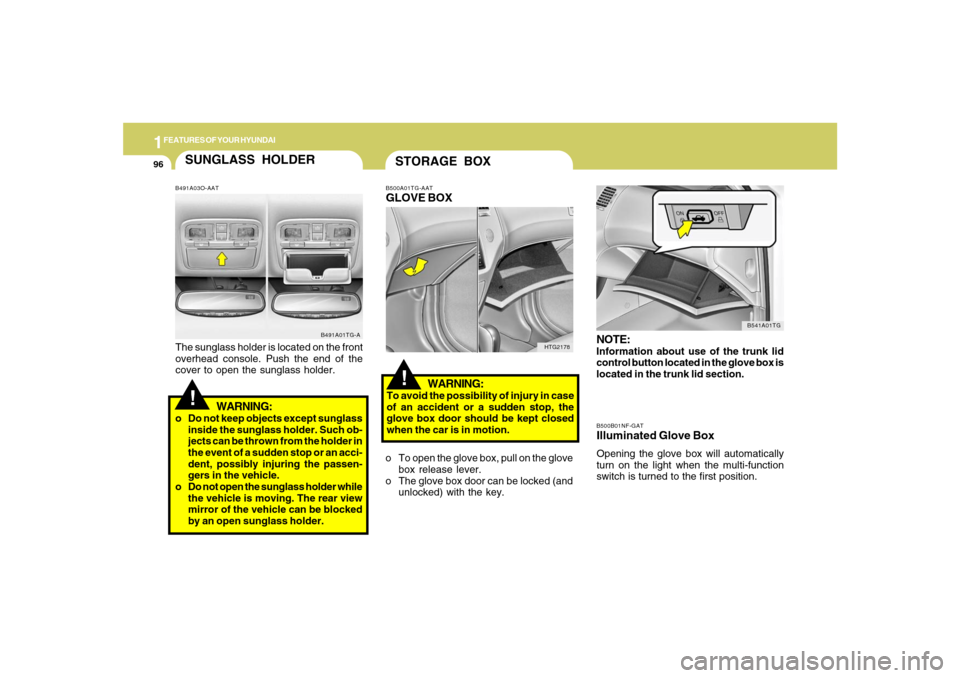
o To open the glove box, pull on the glove
box release lever.
o The glove box door can be locked (and
unlocked) with the key.
HTG2178
SUNGLASS HOLDER!
B491A03O-AATThe sunglass holder is located on the front
overhead console. Push the end of the
cover to open the sunglass holder.
WARNING:
o Do not keep objects except sunglass
inside the sunglass holder. Such ob-
jects can be thrown from the holder in
the event of a sudden stop or an acci-
dent, possibly injuring the passen-
gers in the vehicle.
o Do not open the sunglass holder while
the vehicle is moving. The rear view
mirror of the vehicle can be blocked
by an open sunglass holder.
B491A01TG-A
Page 115 of 308
1
FEATURES OF YOUR HYUNDAI
101
HOMELINK MIRRORB520C01NF-AATAutomatic-Dimming Mirror
with Z-Nav™ Electronic Compass
Display and HomeLink
®
Your vehicle comes with a Gentex Auto-
matic-Dimming Mirror with a Z-Nav™ Elec-
tronic Compass Display and an Integrated
HomeLink
® Wireless Control System. Dur-
ing nighttime driving, this feature will auto-
matically detect and reduce rearview mir-
ror glare while the compass indicates the
direction the vehicle is pointed. The
HomeLink® Universal Transceiver allows
you to activate your garage door(s), elec-
tric gate, home lighting, etc.
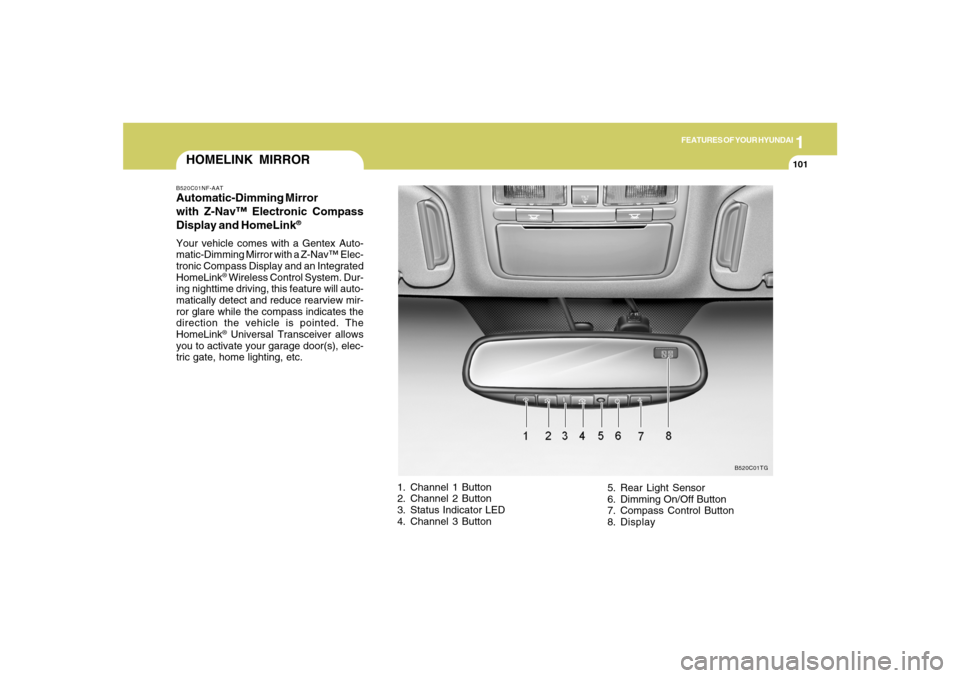
1. Channel 1 Button
2. Channel 2 Button
3. Status Indicator LED
4. Channel 3 Button5. Rear Light Sensor
6. Dimming On/Off Button
7. Compass Control Button
8. Display
B520C01TG
Page 116 of 308
1FEATURES OF YOUR HYUNDAI
102
Automatic-Dimming Night Vision
Safety™ (NVS
®) Mirror
The NVS
® Mirror in your vehicle is the most
advanced way to reduce annoying glare in
the rearview mirror during any driving situ-
ation. For more information regarding
NVS
® mirrors and other applications,
please refer to the Gentex website:
www.gentex.com.
CAUTION:
The NVS
® Mirror automatically reduces
glare during driving conditions based
upon light levels monitored in front of the
vehicle and from the rear of the vehicle.
These light sensors are visible through
openings in the front and rear of the
mirror case. Any object that would ob-
struct either light sensor will degrade
the automatic dimming control feature.
!
Automatic-Dimming Function
Your mirror will automatically dim upon
detecting glare from the vehicles traveling
behind you. The auto-dimming function
can be controlled by the Dimming ON/OFF
Button:
1. Pressing the
button turns the auto-
dimming function OFF which is indi-
cated by the green Status Indicator LED
turning off.
2. Pressing the button again turns the
auto-dimming function ON which is in-
dicated by the green Status Indicator
LED turning on.
NOTE:The mirror defaults to the "ON" position
each time the vehicle is started.Compass Function
The Compass can be turned ON and OFF
and will remember the last state when the
ignition is cycled. To turn the display
feature ON/OFF:
1. Press and release the button to turn
the display feature OFF.
2. Press and release the button again
to turn the display back ON.
Additional options can be set with press
and hold sequences of the button and
are detailed below.
There is a difference between magnetic
north and true north. The compass in the
mirror can compensate for this difference
when it knows the Magnetic Zone in which
it is operating. This is set either by the
dealer or by the user. The operating Zone
Numbers for North America are shown in
the figure on the following section.
Z-Nav™ Compass DisplayThe NVS™ Mirror in your vehicle is also
equipped with a Z-Nav™ Compass that
shows the vehicle Compass heading in
the Display Window using the 8 basic
cardinal headings (N, NE, E, SE, etc.).
Page 118 of 308
1FEATURES OF YOUR HYUNDAI
104
!
Integrated HomeLink
® Wireless Con-
trol System
The HomeLink
® Wireless Control System
provides a convenient way to replace up to
three hand-held radio-frequency (RF)
transmitters with a single built-in device.
This innovative feature will learn the radio
frequency codes of most current transmit-
ters to operate devices such as gate op-
erators, garage door openers, entry door
locks, security systems, even home light-
ing. Both standard and rolling code-
equipped transmitters can be programmed
by following the outlined procedures. Ad-
ditional HomeLink
® information can be
found at: www.homelink.com or by calling
1-800-355-3515.
CAUTION:
Before programming HomeLink
® to a
garage door opener or gate operator,
make sure that people and objects are
out of the way of the device to prevent
potential harm or damage. Do not use
HomeLink
® with any garage door opener
that lacks the safety stop and reverse
features as required by U.S. federal
safety standards (this includes any ga-
rage door opener model manufactured
before April 1, 1982). A garage door that
cannot detect an object - signaling the
door to stop and reverse - does not meet
current U.S. federal safety standards.
Using a garage door opener without these
features increases the risk of serious
injury or death.Programming HomeLink
®
NOTE:o When programming a garage door
opener, it is advised to park the ve-
hicle outside of the garage.
o It is recommended that a new battery
be placed in the hand-held transmit-
ter of the device being programmed
to HomeLink
® for quicker training and
accurate transmission of the radio-
frequency signal.
o Some vehicles may require the igni-
tion switch to be turned to the second
(or "accessories") position for pro-
gramming and/or operation of
HomeLink.
o In the event that there are still pro-
gramming difficulties or questions
after following the programming steps
listed below, contact HomeLink
® at:
www.homelink.com or 1-800-355-
3515. Retain the original transmitter of the RF
device you are programming for use in
other vehicles as well as for future
HomeLink
® programming. It is also sug-
gested that upon the sale of the vehicle, the
programmed HomeLink
® buttons be
erased for security purposes.
1. Press and hold the button for more
than 6 seconds. When the compass
memory is cleared a "C" will appear in
the display.
2. To calibrate the compass, drive the
vehicle in 2 complete circles at less than
5 MPH (8 Km/h).
Page 119 of 308

1
FEATURES OF YOUR HYUNDAI
105
Standard Programming
To train most devices, follow these instruc-
tions:
1. For first-time programming, press and
hold the two outside buttons, HomeLink
®
Channel 1 and Channel 3 Buttons, until
the indicator light begins to flash (after
20 seconds). Release both buttons. Do
not hold the buttons for longer than 30
seconds.
2. Position the end of your hand-held trans-
mitter 1-3 inches (5-14 cm) away from
the HomeLink
® buttons while keeping
the indicator light in view.
3. Simultaneously press and hold both
the HomeLink® and hand-held trans-
mitter button. DO NOT release the but-
tons until step 4 has been completed.
4. While continuing to hold the buttons the
red Indicator Status LED will flash slowly
and then rapidly after HomeLink
® suc-
cessfully trains to the frequency signal
from the hand-held transmitter. Release
both buttons.5. Press and hold the just-trained
HomeLink
® button and observe the red
Status Indicator LED. If the indicator
light stays on constantly, programming
is complete and your device should
activate when the HomeLink
® button is
pressed and released.
6. To program the remaining two
HomeLink
® buttons, follow steps 2
through 5.
Rolling Code Programming
Rolling code devices which are "code-
protected" and manufactured after 1996
may be determined by the following:
o Reference the device owner's manual
for verification.
o The handheld transmitter appears to
program the HomeLink Universal Trans-
ceiver but does not activate the device.
o Press and hold the trained HomeLink
button. The device has the rolling code
feature if the indicator light flashes rap-
idly and then turns solid after 2 seconds.To train rolling code devices, follow these
instructions:
1. At the garage door opener receiver
(motor-head unit) in the garage, locate
the "learn" or "smart" button. This can
usually be found where the hanging
antenna wire is attached to the motor-
head unit. Exact location and color of
the button may vary by garage door
opener brand. If there is difficulty locat-
ing the training button, reference the
device owner's manual or please visit
our Web site at www.homelink.com.
2. Firmly press and release the "learn" or
"smart" button (which activates the "train-
ing light").
NOTE:There are 30 seconds in which to initiate
step3.
3. Return to the vehicle and firmly press,
hold for two seconds and then release
the desired HomeLink
® button. Repeat
the "press/hold/release" sequence a
second time to complete the program-
ming. (Some devices may require you
to repeat this sequence a third time to
complete the programming.)
Page 120 of 308

1FEATURES OF YOUR HYUNDAI
106
4. Press and hold the just-trained
HomeLink
® button and observe the red
Status Indicator LED. If the indicator
light stays on constantly, programming
is complete and your device should
activate.
5. To program the remaining two
HomeLink® buttons, follow either steps
1 through 4 above for other Rolling
Code devices or steps 2 through 5 in
Standard Programming for standard
devices.
During programming, your handheld trans-
mitter may automatically stop transmitting.
Continue to press the Integrated
HomeLink
® Wireless Control System but-
ton (note steps 2 through 4 in the Standard
Programming portion of this document)
while you press and re-press ("cycle") your
handheld transmitter every two seconds
until the frequency signal has been learned.
The indicator light will flash slowly and
then rapidly after several seconds upon
successful training.Operating HomeLink
®
To operate, simply press and release the
programmed HomeLink
® button. Activa-
tion will now occur for the trained device
(i.e. garage door opener, gate operator,
security system, entry door lock, home/
office lighting, etc.). For convenience, the
hand-held transmitter of the device may
also be used at any time.
Reprogramming a Single HomeLink
®
Button
To program a new device to a previously
trained HomeLink
® button, follow these
steps:
1. Press and hold the desired HomeLink
®
button. Do NOT release until step 4 has
been completed.
2. When the indicator light begins to flash
slowly (after 20 seconds), position the
handheld transmitter 1 to 3 inches away
from the HomeLink
® surface.
3. Press and hold the handheld transmit-
ter button. The HomeLink
® indicator light
will flash, first slowly and then rapidly.
4. When the indicator light begins to flash
rapidly, release both buttons.
5. Press and hold the just-trainedHomeLink
® button and observe the red
Status Indicator LED. If the indicator
light stays on constantly, programming
is complete and your new device should
activate.
Erasing HomeLink
® Buttons
Individual buttons cannot be erased. How-
ever, to erase all three programmed but-
tons:
1. Press and hold the two outer HomeLink
®
buttons until the indicator light begins to
flash-after 20 seconds.
2. Release both buttons. Do not hold for
longer than 30 seconds.
The Integrated HomeLink
® Wireless Con-
trol System is now in the training (learn)
mode and can be programmed at any time
following the appropriate steps in the Pro-
gramming sections above.
FCC ID: NZLZTVHL3
IC: 4112A-ZTVHL3
Page 121 of 308
1
FEATURES OF YOUR HYUNDAI
107
!
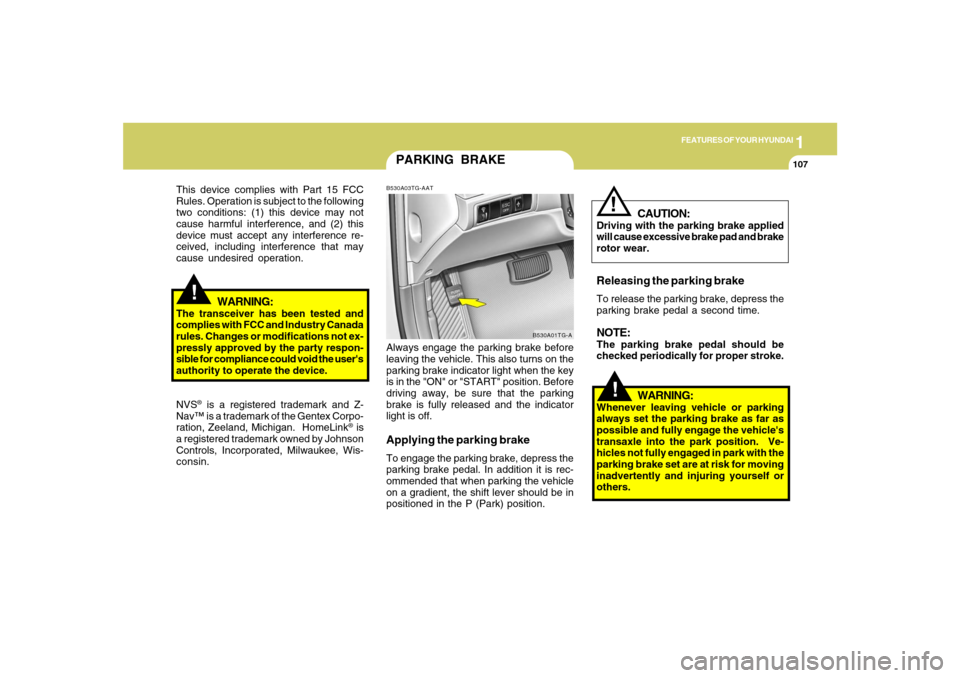
PARKING BRAKEB530A03TG-AATAlways engage the parking brake before
leaving the vehicle. This also turns on the
parking brake indicator light when the key
is in the "ON" or "START" position. Before
driving away, be sure that the parking
brake is fully released and the indicator
light is off.Applying the parking brakeTo engage the parking brake, depress the
parking brake pedal. In addition it is rec-
ommended that when parking the vehicle
on a gradient, the shift lever should be in
positioned in the P (Park) position.
B530A01TG-A
!
This device complies with Part 15 FCC
Rules. Operation is subject to the following
two conditions: (1) this device may not
cause harmful interference, and (2) this
device must accept any interference re-
ceived, including interference that may
cause undesired operation.
WARNING:
The transceiver has been tested and
complies with FCC and Industry Canada
rules. Changes or modifications not ex-
pressly approved by the party respon-
sible for compliance could void the user's
authority to operate the device.
NVS
® is a registered trademark and Z-
Nav™ is a trademark of the Gentex Corpo-
ration, Zeeland, Michigan. HomeLink
® is
a registered trademark owned by Johnson
Controls, Incorporated, Milwaukee, Wis-
consin.
WARNING:
Whenever leaving vehicle or parking
always set the parking brake as far as
possible and fully engage the vehicle's
transaxle into the park position. Ve-
hicles not fully engaged in park with the
parking brake set are at risk for moving
inadvertently and injuring yourself or
others.
CAUTION:
Driving with the parking brake applied
will cause excessive brake pad and brake
rotor wear.Releasing the parking brakeTo release the parking brake, depress the
parking brake pedal a second time.NOTE:The parking brake pedal should be
checked periodically for proper stroke.
!
Page 124 of 308
1FEATURES OF YOUR HYUNDAI
110
!
CAUTION:
To prevent damage to the goods or the
vehicle, care should be taken when car-
rying fragile or bulky objects in the lug-
gage compartment.
!
WARNING:
Avoid eye injury. DO NOT overstretch.
The luggage net ALWAYS keep your
face and body out of its recoil path. DO
NOT use when the luggage net straps
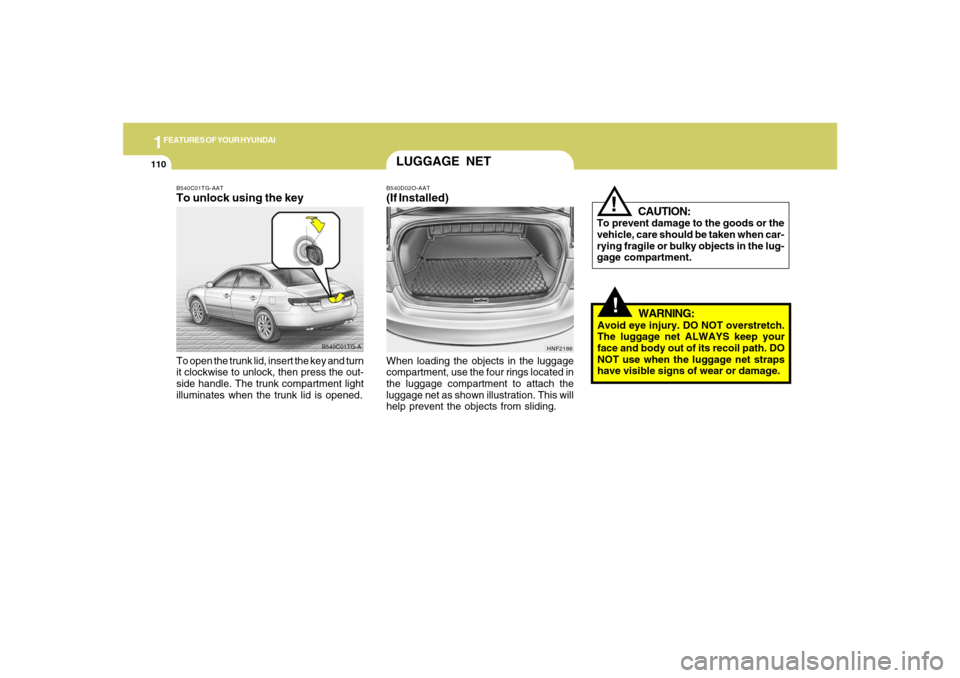
have visible signs of wear or damage. When loading the objects in the luggage
compartment, use the four rings located in
the luggage compartment to attach the
luggage net as shown illustration. This will
help prevent the objects from sliding.
HNF2186
LUGGAGE NETB540D02O-AAT(If Installed)
B540C01TG-A B540C01TG-AAT
To unlock using the keyTo open the trunk lid, insert the key and turn
it clockwise to unlock, then press the out-
side handle. The trunk compartment light
illuminates when the trunk lid is opened.