Hyundai Azera 2008 Manual Online
Azera 2008
Hyundai
Hyundai
https://www.carmanualsonline.info/img/35/14485/w960_14485-0.png
Hyundai Azera 2008 Manual Online
Page 164 of 345
1FEATURES OF YOUR HYUNDAI
150
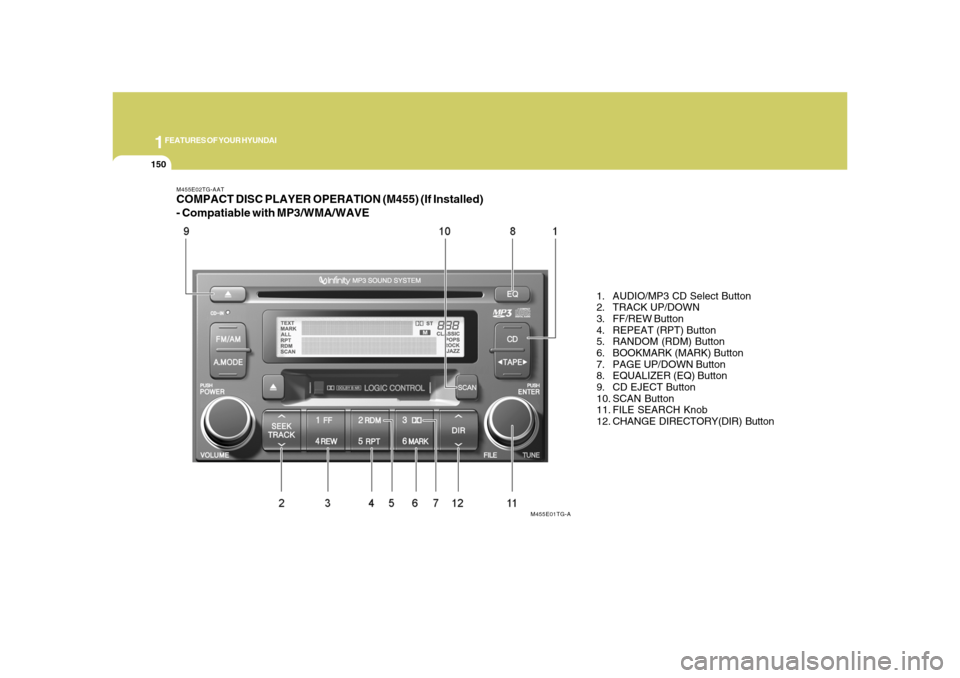
M455E02TG-AATCOMPACT DISC PLAYER OPERATION (M455) (If Installed)
- Compatiable with MP3/WMA/WAVE
1. AUDIO/MP3 CD Select Button
2. TRACK UP/DOWN
3. FF/REW Button
4. REPEAT (RPT) Button
5. RANDOM (RDM) Button
6. BOOKMARK (MARK) Button
7. PAGE UP/DOWN Button
8. EQUALIZER (EQ) Button
9. CD EJECT Button
10. SCAN Button
11. FILE SEARCH Knob
12. CHANGE DIRECTORY(DIR) Button
M455E01TG-A
Page 168 of 345
1FEATURES OF YOUR HYUNDAI
154
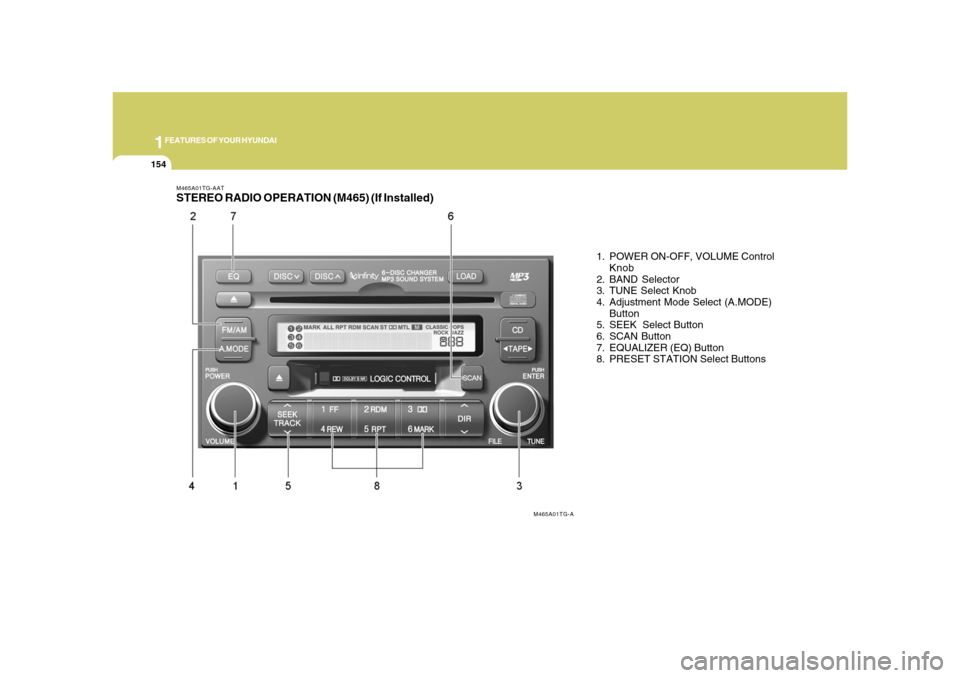
M465A01TG-AATSTEREO RADIO OPERATION (M465) (If Installed)
1. POWER ON-OFF, VOLUME Control
Knob
2. BAND Selector
3. TUNE Select Knob
4. Adjustment Mode Select (A.MODE)
Button
5. SEEK Select Button
6. SCAN Button
7. EQUALIZER (EQ) Button
8. PRESET STATION Select Buttons
M465A01TG-A
Page 170 of 345
1FEATURES OF YOUR HYUNDAI
156
6. SCAN ButtonWhen you press the button, frequency is
changed and the next channel is received
automatically. To stay on a station, press
the SCAN button again.7. EQUALIZER (EQ) ButtonPress the EQ button to select the CLAS-
SIC, POPS, ROCK, JAZZ and DEFEAT
MODE for the desired tone quality. Each
press of the button changes the display as
follows;
HOW TO PRESET STATIONSSix AM and twelve FM stations may be
programmed into the memory of the radio.
Then, by simply pressing the AM / FM
select button and/or one of the six station
select buttons, you may recall any of these
stations instantly. To program the stations,
follow these steps:
o Press AM/FM selector to set the band for
AM, FM1 and FM2.
o Select the desired station to be stored
by seek or manual tuning.
o Determine the preset station select
button you wish to use to access that
station.
o Press the station select button for more
than two seconds. A select button indi-
cator will show in the display indicating
which select button you have de-
pressed. The frequency display will flash
after it has been stored into the memory.
You should then release the button,
and proceed to program the next de-
sired station. A total of 18 stations can
be programmed by selecting one AM
and two FM station per button.
8. PRESET STATION Select ButtonsSix (6) stations for AM, FM1 and FM2
respectively can be preset in the electronic
memory circuit.o When completed, any preset station
may be recalled by selecting AM, FM1
or FM2 band and the appropriate sta-
tion button.
!
CLASSIC → POPS → ROCK → JAZZ →DEFEAT
CAUTION
o Do not place beverages close to the
audio system. The audio system
mechanism may be damaged if you
spill them.
o Do not strike or allow anything to im-
pact the audio system, damage to the
system mechanisms could occur.
Page 171 of 345
1
FEATURES OF YOUR HYUNDAI
157157
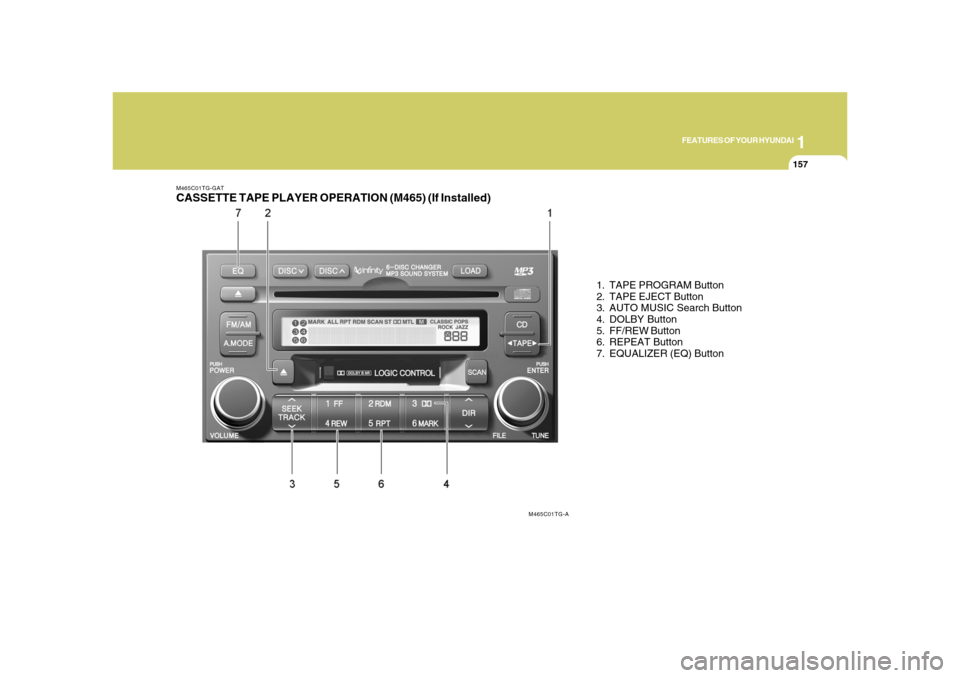
M465C01TG-GATCASSETTE TAPE PLAYER OPERATION (M465) (If Installed)
1. TAPE PROGRAM Button
2. TAPE EJECT Button
3. AUTO MUSIC Search Button
4. DOLBY Button
5. FF/REW Button
6. REPEAT Button
7. EQUALIZER (EQ) Button
M465C01TG-A
Page 174 of 345
1FEATURES OF YOUR HYUNDAI
160
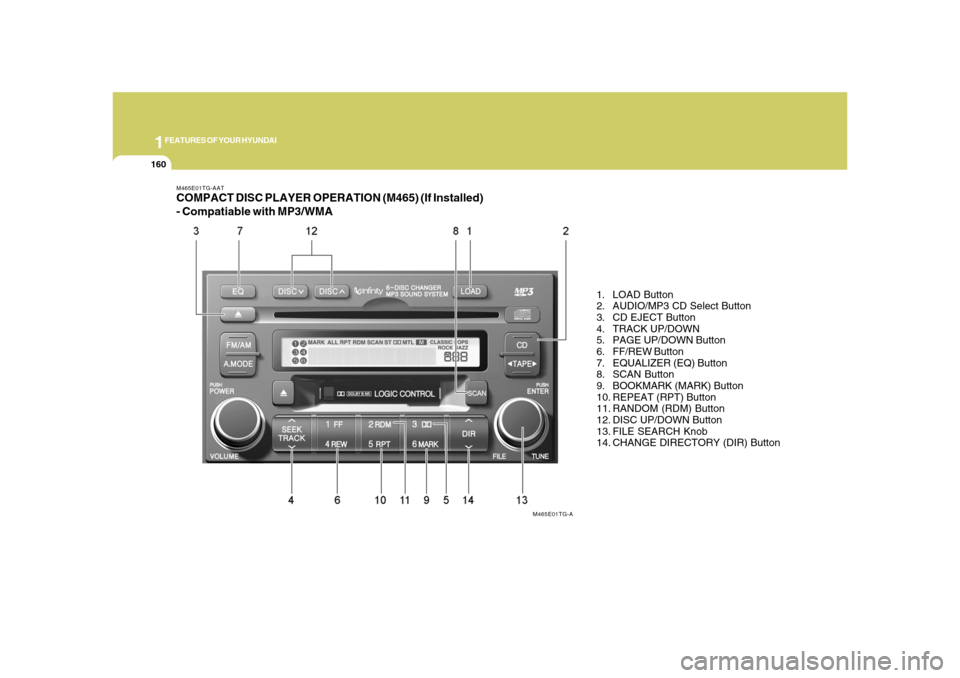
M465E01TG-AATCOMPACT DISC PLAYER OPERATION (M465) (If Installed)
- Compatiable with MP3/WMA
1. LOAD Button
2. AUDIO/MP3 CD Select Button
3. CD EJECT Button
4. TRACK UP/DOWN
5. PAGE UP/DOWN Button
6. FF/REW Button
7. EQUALIZER (EQ) Button
8. SCAN Button
9. BOOKMARK (MARK) Button
10. REPEAT (RPT) Button
11. RANDOM (RDM) Button
12. DISC UP/DOWN Button
13. FILE SEARCH Knob
14. CHANGE DIRECTORY (DIR) Button
M465E01TG-A
Page 179 of 345
1
FEATURES OF YOUR HYUNDAI
165165
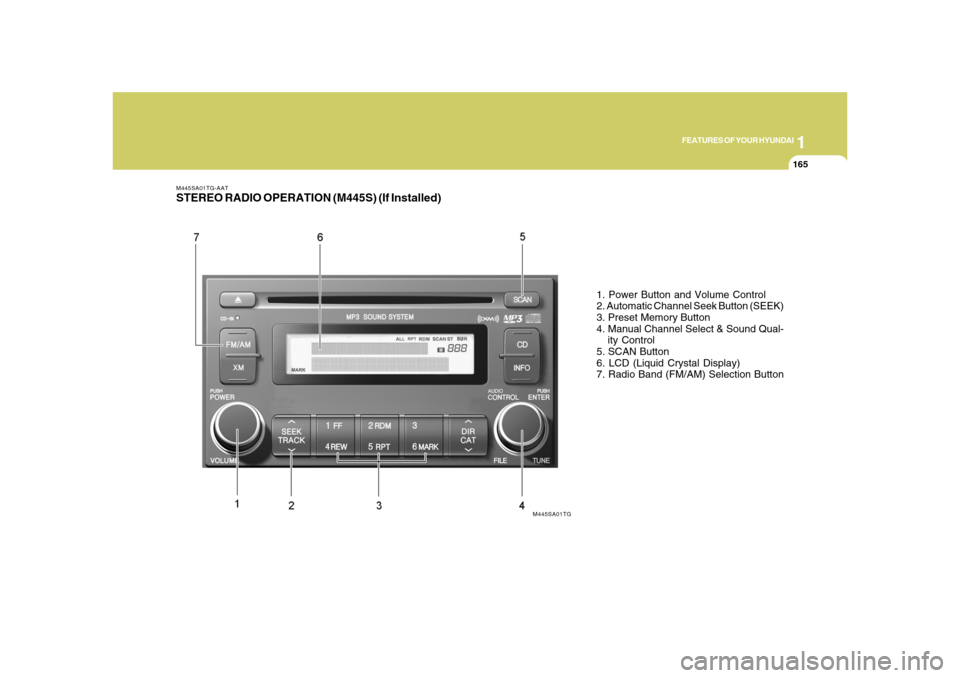
M445SA01TG-AATSTEREO RADIO OPERATION (M445S) (If Installed)
1. Power Button and Volume Control
2. Automatic Channel Seek Button (SEEK)
3. Preset Memory Button
4. Manual Channel Select & Sound Qual-
ity Control
5. SCAN Button
6. LCD (Liquid Crystal Display)
7. Radio Band (FM/AM) Selection Button
M445SA01TG
Page 182 of 345
1FEATURES OF YOUR HYUNDAI
168
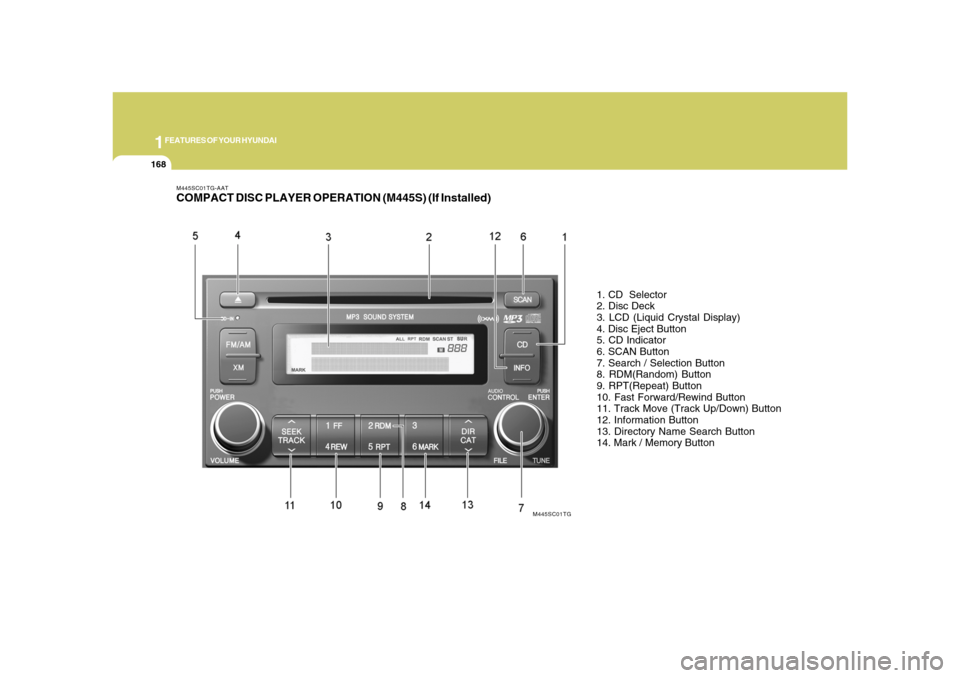
M445SC01TG-AATCOMPACT DISC PLAYER OPERATION (M445S) (If Installed)
1. CD Selector
2. Disc Deck
3. LCD (Liquid Crystal Display)
4. Disc Eject Button
5. CD Indicator
6. SCAN Button
7. Search / Selection Button
8. RDM(Random) Button
9. RPT(Repeat) Button
10. Fast Forward/Rewind Button
11. Track Move (Track Up/Down) Button
12. Information Button
13. Directory Name Search Button
14. Mark / Memory Button
M445SC01TG
Page 186 of 345
1FEATURES OF YOUR HYUNDAI
172
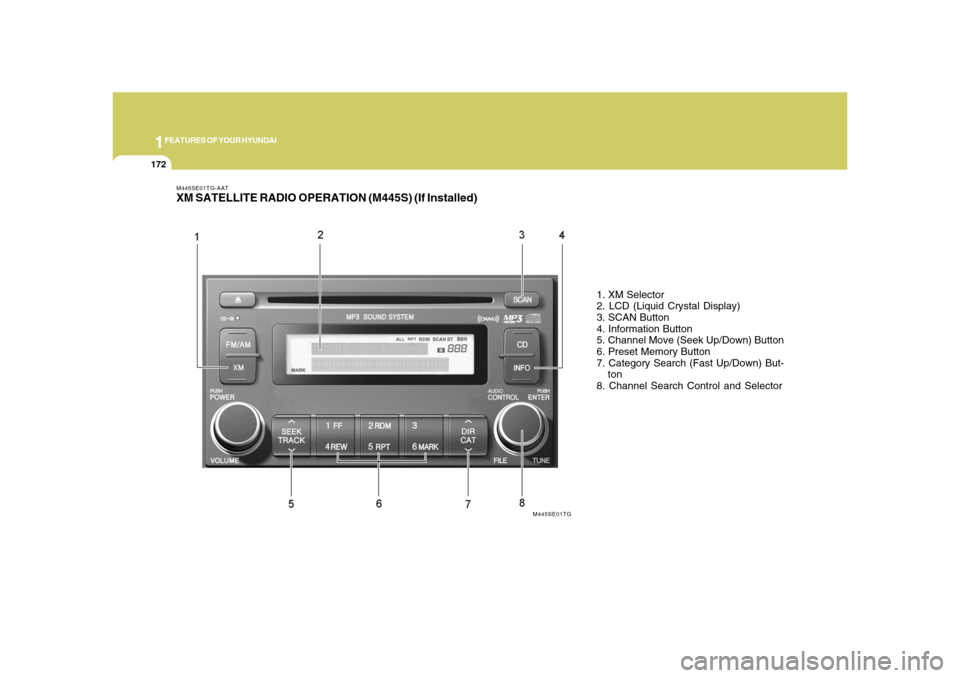
M445SE01TG-AATXM SATELLITE RADIO OPERATION (M445S) (If Installed)
1. XM Selector
2. LCD (Liquid Crystal Display)
3. SCAN Button
4. Information Button
5. Channel Move (Seek Up/Down) Button
6. Preset Memory Button
7. Category Search (Fast Up/Down) But-
ton
8. Channel Search Control and Selector
M445SE01TG
Page 189 of 345
1
FEATURES OF YOUR HYUNDAI
175175
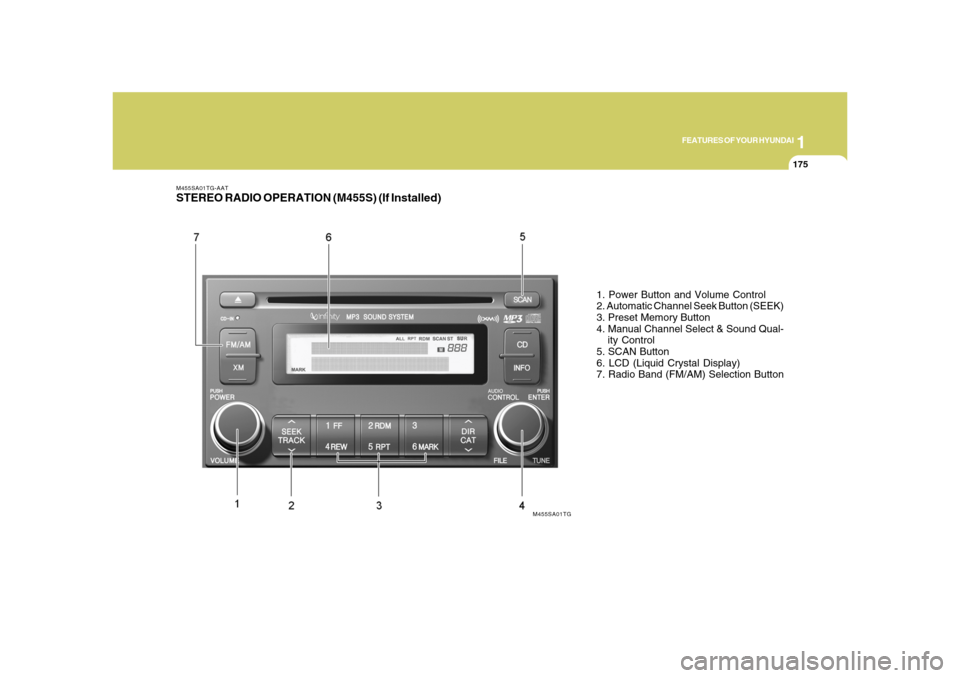
M455SA01TG-AATSTEREO RADIO OPERATION (M455S) (If Installed)
1. Power Button and Volume Control
2. Automatic Channel Seek Button (SEEK)
3. Preset Memory Button
4. Manual Channel Select & Sound Qual-
ity Control
5. SCAN Button
6. LCD (Liquid Crystal Display)
7. Radio Band (FM/AM) Selection Button
M455SA01TG
Page 192 of 345
1FEATURES OF YOUR HYUNDAI
178
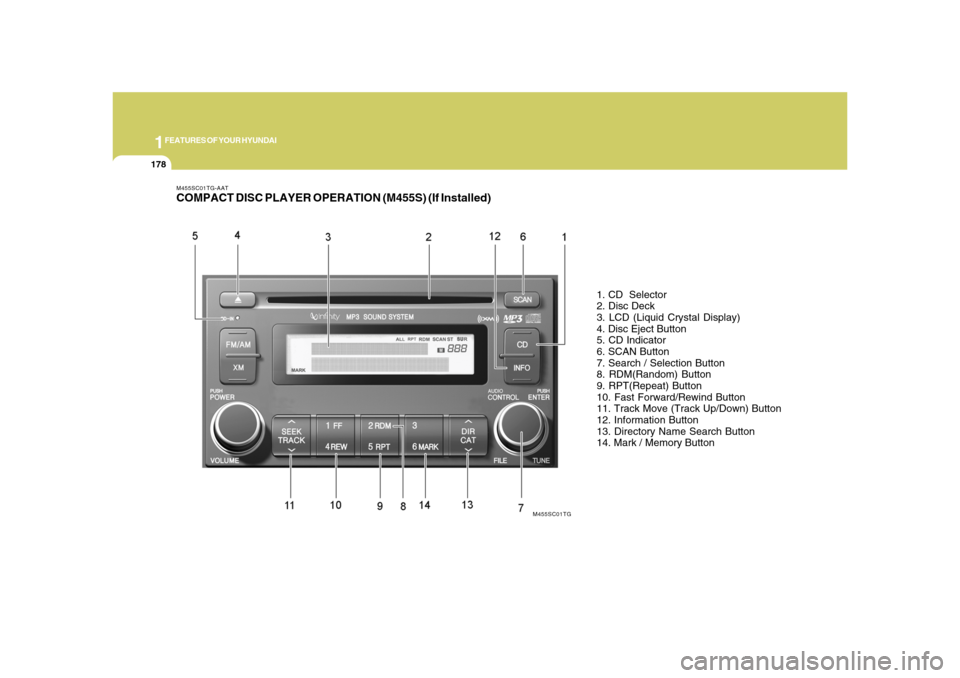
M455SC01TG-AATCOMPACT DISC PLAYER OPERATION (M455S) (If Installed)
1. CD Selector
2. Disc Deck
3. LCD (Liquid Crystal Display)
4. Disc Eject Button
5. CD Indicator
6. SCAN Button
7. Search / Selection Button
8. RDM(Random) Button
9. RPT(Repeat) Button
10. Fast Forward/Rewind Button
11. Track Move (Track Up/Down) Button
12. Information Button
13. Directory Name Search Button
14. Mark / Memory Button
M455SC01TG