Battery Hyundai Azera 2009 User Guide
[x] Cancel search | Manufacturer: HYUNDAI, Model Year: 2009, Model line: Azera, Model: Hyundai Azera 2009Pages: 335, PDF Size: 12.4 MB
Page 106 of 335
1
FEATURES OF YOUR HYUNDAI
93
!
CAUTION:
o Do not open the sunroof in severely
cold temperatures or when it is cov-
ered with ice or snow.
o Periodically remove any dirt that may
have accumulated on the guide rails.
o Do not press any sunroof control but-
ton longer than necessary. Damage
to the motor or system components
could occur.
!
B460E02TG-AATResetting the sunroofWhenever the vehicle battery is discon-
nected or discharged, you have to reset
your sunroof system as follows:
1. Turn the ignition key to the "ON" posi-
tion.
2. Press the TILT UP button for more than
1 second to tilt up the sunroof com-
pletely when the sunroof is fully closed.
Then, release the button.
3. Press and hold the TILT UP button once
again until the sunroof has returned to
the original TILT UP position after it
raises a little higher than the maximum
TILT UP position. Then, release the
button.
4. Press and hold the TILT UP button within
5 seconds until the sunroof is operated
as follows;
TILT DOWN → SLIDE OPEN → SLIDE
CLOSE
Then, release the button.
CAUTION:
If the sunroof is not reset, it may not
operate properly.
Page 117 of 335
1FEATURES OF YOUR HYUNDAI
104
!
Integrated HomeLink
® Wireless Con-
trol System
The HomeLink
® Wireless Control System
provides a convenient way to replace up to
three hand-held radio-frequency (RF)
transmitters with a single built-in device.
This innovative feature will learn the radio
frequency codes of most current transmit-
ters to operate devices such as gate op-
erators, garage door openers, entry door
locks, security systems, even home light-
ing. Both standard and rolling code-
equipped transmitters can be programmed
by following the outlined procedures. Ad-
ditional HomeLink
® information can be
found at: www.homelink.com or by calling
1-800-355-3515.
CAUTION:
Before programming HomeLink
® to a
garage door opener or gate operator,
make sure that people and objects are
out of the way of the device to prevent
potential harm or damage. Do not use
HomeLink
® with any garage door opener
that lacks the safety stop and reverse
features as required by U.S. federal
safety standards (this includes any ga-
rage door opener model manufactured
before April 1, 1982). A garage door that
cannot detect an object - signaling the
door to stop and reverse - does not meet
current U.S. federal safety standards.
Using a garage door opener without these
features increases the risk of serious
injury or death.Programming HomeLink
®
NOTE:o When programming a garage door
opener, it is advised to park the ve-
hicle outside of the garage.
o It is recommended that a new battery
be placed in the hand-held transmit-
ter of the device being programmed
to HomeLink
® for quicker training and
accurate transmission of the radio-
frequency signal.
o Some vehicles may require the igni-
tion switch to be turned to the second
(or "accessories") position for pro-
gramming and/or operation of
HomeLink.
o In the event that there are still pro-
gramming difficulties or questions
after following the programming steps
listed below, contact HomeLink
® at:
www.homelink.com or 1-800-355-
3515. Retain the original transmitter of the RF
device you are programming for use in
other vehicles as well as for future
HomeLink
® programming. It is also sug-
gested that upon the sale of the vehicle, the
programmed HomeLink
® buttons be
erased for security purposes.
1. Press and hold the button for more
than 6 seconds. When the compass
memory is cleared a "C" will appear in
the display.
2. To calibrate the compass, drive the
vehicle in 2 complete circles at less than
5 MPH (8 Km/h).
Page 139 of 335
1FEATURES OF YOUR HYUNDAI
126
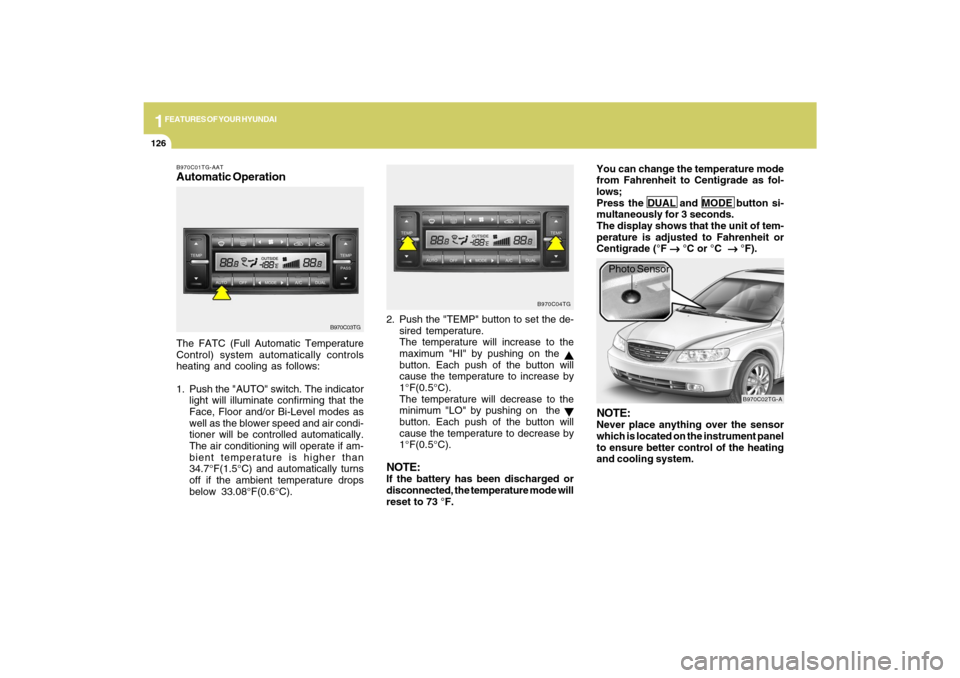
B970C01TG-AATAutomatic OperationThe FATC (Full Automatic Temperature
Control) system automatically controls
heating and cooling as follows:
1. Push the "AUTO" switch. The indicator
light will illuminate confirming that the
Face, Floor and/or Bi-Level modes as
well as the blower speed and air condi-
tioner will be controlled automatically.
The air conditioning will operate if am-
bient temperature is higher than
34.7°F(1.5°C) and automatically turns
off if the ambient temperature drops
below 33.08°F(0.6°C).2. Push the "TEMP" button to set the de-
sired temperature.
The temperature will increase to the
maximum "HI" by pushing on the
button. Each push of the button will
cause the temperature to increase by
1°F(0.5°C).
The temperature will decrease to the
minimum "LO" by pushing on the button. Each push of the button will
cause the temperature to decrease by
1°F(0.5°C).
NOTE:If the battery has been discharged or
disconnected, the temperature mode will
reset to 73 °F.You can change the temperature mode
from Fahrenheit to Centigrade as fol-
lows;
Press the DUAL and MODE button si-
multaneously for 3 seconds.
The display shows that the unit of tem-
perature is adjusted to Fahrenheit or
Centigrade (°F
→ →→ →
→ °C or °C
→ →→ →
→ °F).
B970C03TGB970C04TG
B970C02TG-A
Photo Sensor
NOTE:Never place anything over the sensor
which is located on the instrument panel
to ensure better control of the heating
and cooling system.
Page 161 of 335
1FEATURES OF YOUR HYUNDAI
148
o BALANCE Control
Rotate the knob clockwise to emphasize
right speaker sound (left speaker sound
will be attenuated). When the control knob
is turned counterclockwise, left speaker
sound will be emphasized (right speaker
sound will be attenuated).6. RANDOM Playback ButtonPress the button for less than 0.8 second
to start or stop the random playback of the
songs in the current folder.
Press the button for more than 0.8 second
to randomly play the entire songs in the
USB device.
Press the button again to cancel the mode.7. REPEAT ButtonPress the button for less than 0.8 second
to repeat the song currently played.
Press the button for more than 0.8 second
to repeat the entire songs in the USB
device.8. SCAN ButtonPlays 10 seconds of each song in the USB
device.
Press the button once again to cancel
scanning.
NOTE FOR USING i-Pod DEVICE:o Some i-Pod models might not support
the communication protocol and the
files will not be played. (i-Pod models
supported: Mini, 4G, Photo, Nano, 5G)
o The order of search or playback of
songs in the i-Pod can be different
from the order searched in the audio
system.
o If the i-Pod crashes due to its own
trouble, reset i-Pod. (Reset: Refer to
i-Pod manual)
o An i-Pod may not operate normally on
low battery charge.
!
CAUTION IN USING i-Pod
DEVICE:
o You need the power cable exclusive
for an i-Pod in order to operate i-Pod
with the buttons on the audio system.
The PC cable provided by Apple may
cause a malfunction. Do not use it for
vehicle use.
o When connecting the device with an i-
Pod cable, push in the jack fully to not
interfere with communication.
o When adjusting the sound of an i-Pod
and the audio system, the sound ef-
fects of both devices will overlap each
and might reduce or distort the quality
of the sound.
o Deactivate (turn off) the equalizer
function of an i-Pod when adjusting
the audio system’s volume, and turn
off the equalizer of the audio system
when using the equalizer of an i-Pod.
o When the i-Pod cable is connected,
the system can be switched to the
AUX mode even without the i-Pod
device and can cause noise. Discon-
nect i-Pod cable when you are not
using the i-Pod device.
Page 174 of 335
1
FEATURES OF YOUR HYUNDAI
161
o BALANCE Control
Rotate the knob clockwise to emphasize
right speaker sound (left speaker sound
will be attenuated). When the control knob
is turned counterclockwise, left speaker
sound will be emphasized (right speaker
sound will be attenuated).6. RANDOM Playback ButtonPress the button for less than 0.8 second
to start or stop the random playback of the
songs in the current folder.
Press the button for more than 0.8 second
to randomly play the entire songs in the
USB device.
Press the button again to cancel the mode.7. REPEAT ButtonPress the button for less than 0.8 second
to repeat the song currently played.
Press the button for more than 0.8 second
to repeat the entire songs in the USB
device.8. SCAN ButtonPlays 10 seconds of each song in the USB
device.
Press the button once again to cancel
scanning.
NOTE FOR USING i-Pod DEVICE:o Some i-Pod models might not support
the communication protocol and the
files will not be played. (i-Pod models
supported: Mini, 4G, Photo, Nano, 5G)
o The order of search or playback of
songs in the i-Pod can be different
from the order searched in the audio
system.
o If the i-Pod crashes due to its own
trouble, reset i-Pod. (Reset: Refer to
i-Pod manual)
o i-Pod may not operate normally on
low battery.
!
CAUTION IN USING i-Pod
DEVICE:
o You need the power cable exclusive
for an i-Pod in order to operate i-Pod
with the buttons on the audio system.
The PC cable provided by Apple may
cause a malfunction. Do not use it for
vehicle use.
o When connecting the device with an i-
Pod cable, push in the jack fully to not
interfere with communication.
o When adjusting the sound of an i-Pod
and the audio system, the sound ef-
fects of both devices will overlap each
and might reduce or distort the quality
of the sound.
o Deactivate (turn off) the equalizer
function of an i-Pod when adjusting
the audio system’s volume, and turn
off the equalizer of the audio system
when using the equalizer of an i-Pod.
o When the i-Pod cable is connected,
the system can be switched to the
AUX mode even without the i-Pod
device and can cause noise. Discon-
nect i-Pod cable when you are not
using the i-Pod device.
Page 187 of 335
1FEATURES OF YOUR HYUNDAI
174
o BALANCE Control
Rotate the knob clockwise to emphasize
right speaker sound (left speaker sound
will be attenuated). When the control knob
is turned counterclockwise, left speaker
sound will be emphasized (right speaker
sound will be attenuated).6. RANDOM Playback ButtonPress the button for less than 0.8 second
to start or stop the random playback of the
songs in the current folder.
Press the button for more than 0.8 second
to randomly play the entire songs in the
USB device.
Press the button again to cancel the mode.7. REPEAT ButtonPress the button for less than 0.8 second
to repeat the song currently played.
Press the button for more than 0.8 second
to repeat the entire songs in the USB
device.8. SCAN ButtonPlays 10 seconds of each song in the USB
device.
Press the button once again to cancel
scanning.
NOTE FOR USING i-Pod DEVICE:o Some i-Pod models might not support
the communication protocol and the
files will not be played. (i-Pod models
supported: Mini, 4G, Photo, Nano, 5G)
o The order of search or playback of
songs in the i-Pod can be different
from the order searched in the audio
system.
o If the i-Pod crashes due to its own
trouble, reset i-Pod. (Reset: Refer to
i-Pod manual)
o i-Pod may not operate normally on
low battery.
!
CAUTION IN USING i-Pod
DEVICE:
o You need the power cable exclusive
for i-Pod in order to operate i-Pod with
the buttons on the audio system. The
PC cable provided by Apple may cause
malfunction and do not use it for ve-
hicle use.
o When connecting the device with i-
Pod cable, push in the jack fully not to
interfere with communication.
o When adjusting the sound effects of i-
Pod and the audio system, the sound
effects of both devices will overlap
each and might cause reduce or dis-
tort the quality of the sound.
o Deactivate (turn off) the equalizer
function of i-Pod when adjusting the
audio system’s volume, and turn off
the equalizer of the audio system
when using the equalizer of i-Pod.
o When the i-Pod cable is connected,
the system can be switched to the
AUX mode even without the i-Pod
device and can cause noise. Discon-
nect i-Pod cable when you are not
using the i-Pod device.
Page 200 of 335
1
FEATURES OF YOUR HYUNDAI
187
o BALANCE Control
Rotate the knob clockwise to emphasize
right speaker sound (left speaker sound
will be attenuated). When the control knob
is turned counter clockwise, left speaker
sound will be emphasized (right speaker
sound will be attenuated).6. RANDOM Playback ButtonPress the button for less than 0.8 second
to start or stop the random playback of the
songs in the current folder.
Press the button for more than 0.8 second
to randomly play the entire songs in the
USB device.
Press the button again to cancel the mode.7. REPEAT ButtonPress the button for less than 0.8 second
to repeat the song currently played.
Press the button for more than 0.8 second
to repeat the entire songs in the USB
device.8. SCAN ButtonPlays 10 seconds of each song in the USB
device.
Press the button once again to cancel
scanning.
NOTE FOR USING i-Pod DEVICE:o Some i-Pod models might not support
the communication protocol and the
files will not be played. (i-Pod models
supported: Mini, 4G, Photo, Nano, 5G)
o The order of search or playback of
songs in the i-Pod can be different
from the order searched in the audio
system.
o If the i-Pod crashes due to its own
trouble, reset i-Pod. (Reset: Refer to
i-Pod manual)
o i-Pod may not operate normally on
low battery.
!
CAUTION IN USING i-Pod
DEVICE:
o You need the power cable exclusive
for i-Pod in order to operate i-Pod with
the buttons on the audio system. The
PC cable provided by Apple may cause
malfunction and do not use it for ve-
hicle use.
o When connecting the device with i-
Pod cable, push in the jack fully not to
interfere with communication.
o When adjusting the sound effects of i-
Pod and the audio system, the sound
effects of both devices will overlap
each and might cause reduce or dis-
tort the quality of the sound.
o Deactivate (turn off) the equalizer
function of i-Pod when adjusting the
audio system’s volume, and turn off
the equalizer of the audio system
when using the equalizer of i-Pod.
o When the i-Pod cable is connected,
the system can be switched to the
AUX mode even without the i-Pod
device and can cause noise. Discon-
nect i-Pod cable when you are not
using the i-Pod device.
Page 207 of 335
2
DRIVING YOUR HYUNDAI
4
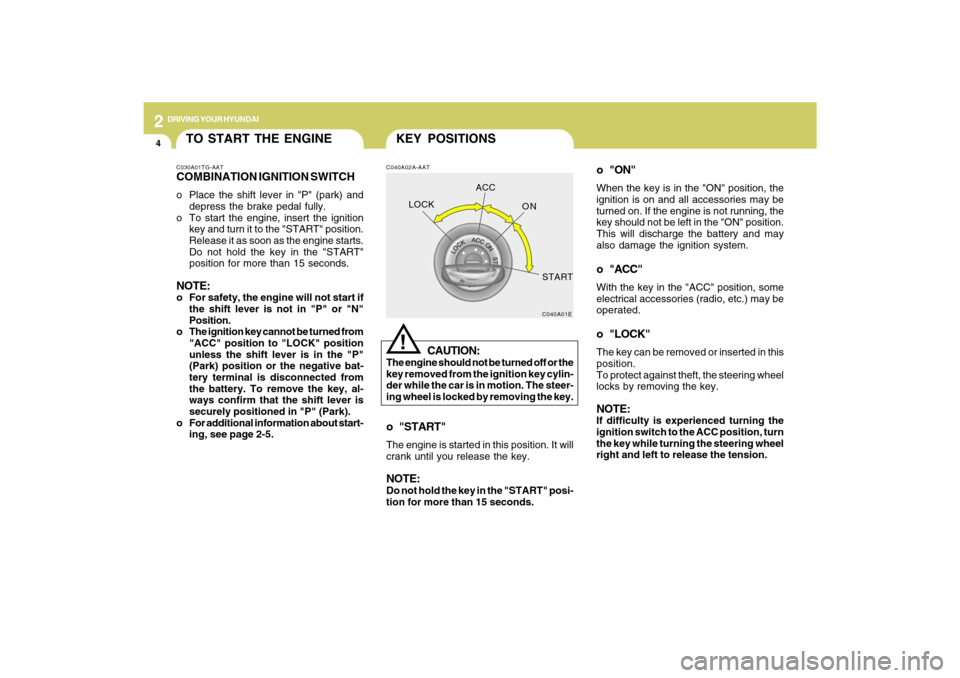
o "ON"When the key is in the "ON" position, the
ignition is on and all accessories may be
turned on. If the engine is not running, the
key should not be left in the "ON" position.
This will discharge the battery and may
also damage the ignition system.o "ACC"With the key in the "ACC" position, some
electrical accessories (radio, etc.) may be
operated.o "LOCK"The key can be removed or inserted in this
position.
To protect against theft, the steering wheel
locks by removing the key.NOTE:If difficulty is experienced turning the
ignition switch to the ACC position, turn
the key while turning the steering wheel
right and left to release the tension.
KEY POSITIONSC040A02A-AAT
CAUTION:
The engine should not be turned off or the
key removed from the ignition key cylin-
der while the car is in motion. The steer-
ing wheel is locked by removing the key.
!
o "START"The engine is started in this position. It will
crank until you release the key.NOTE:Do not hold the key in the "START" posi-
tion for more than 15 seconds.
C040A01E
LOCKACC
ON
START
TO START THE ENGINEC030A01TG-AATCOMBINATION IGNITION SWITCHo Place the shift lever in "P" (park) and
depress the brake pedal fully.
o To start the engine, insert the ignition
key and turn it to the "START" position.
Release it as soon as the engine starts.
Do not hold the key in the "START"
position for more than 15 seconds.NOTE:o For safety, the engine will not start if
the shift lever is not in "P" or "N"
Position.
o The ignition key cannot be turned from
"ACC" position to "LOCK" position
unless the shift lever is in the "P"
(Park) position or the negative bat-
tery terminal is disconnected from
the battery. To remove the key, al-
ways confirm that the shift lever is
securely positioned in "P" (Park).
o For additional information about start-
ing, see page 2-5.
Page 209 of 335
2
DRIVING YOUR HYUNDAI
6
!
CAUTION:
Never shift into "R" or "P" position while
the vehicle is moving.
Depress the brake pedal when shift-
ing.
The selector lever can be shifted
freely.
The first few shifts on a new vehicle, or if the
battery has been disconnected, may be
somewhat abrupt. This is a normal condi-
tion, and the shifting sequence will adjust
after shifts are cycled a few times by the
T.C.M (Transaxle Control Module).
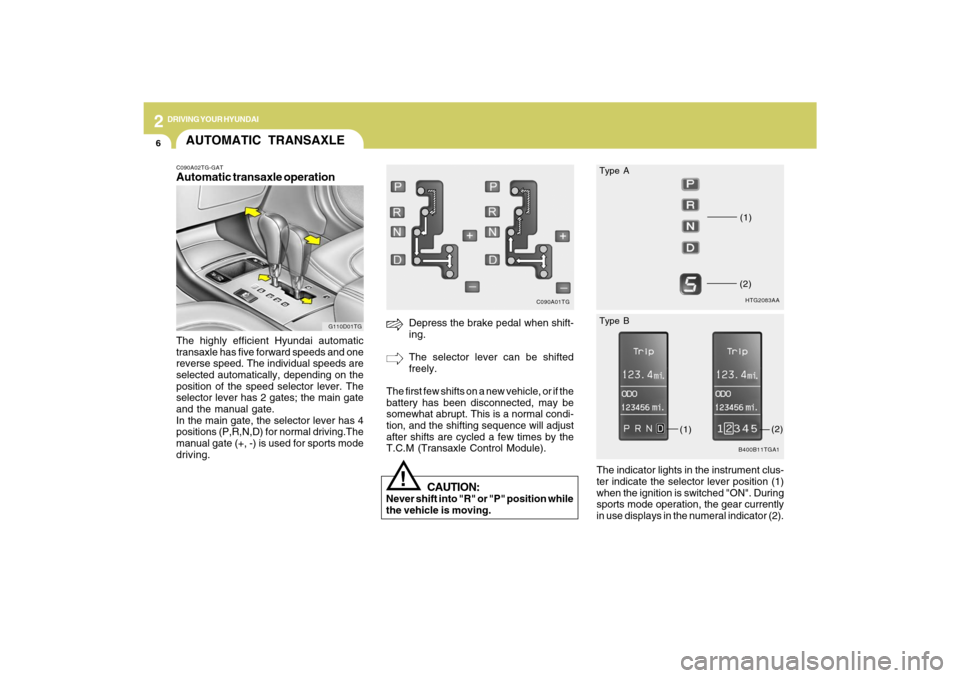
C090A01TG
AUTOMATIC TRANSAXLEC090A02TG-GATAutomatic transaxle operationThe highly efficient Hyundai automatic
transaxle has five forward speeds and one
reverse speed. The individual speeds are
selected automatically, depending on the
position of the speed selector lever. The
selector lever has 2 gates; the main gate
and the manual gate.
In the main gate, the selector lever has 4
positions (P,R,N,D) for normal driving.The
manual gate (+, -) is used for sports mode
driving.
G110D01TG
The indicator lights in the instrument clus-
ter indicate the selector lever position (1)
when the ignition is switched "ON". During
sports mode operation, the gear currently
in use displays in the numeral indicator (2).
HTG2083AA(1)(2)B400B11TGA1
(1)
(2) Type A
Type B
Page 220 of 335

2
DRIVING YOUR HYUNDAI
17
C160D01A-AATCheck Battery and CablesWinter puts additional burdens on the
battery system. Visually inspect the battery
and cables as described in Section 6. The
level of charge in your battery can be
checked by your Hyundai dealer or a ser-
vice station.C160C01A-AATUse High Quality Ethylene Glycol
CoolantYour Hyundai is delivered with high qual-
ity ethylene glycol coolant in the cooling
system. It is the only type of coolant that
should be used because it helps prevent
corrosion in the cooling system, lubricates
the water pump and prevents freezing. Be
sure to replace or replenish your coolant in
accordance with the maintenance sched-
ule in Section 5. Before winter, have your
coolant tested to assure that its freezing
point is sufficient for the temperatures an-
ticipated during the winter.
C160B01A-AATSnowy or Icy ConditionsTo drive your vehicle in deep snow, it may
be necessary to use snow tires or to install
tire chains on your tires. If snow tires are
needed, it is necessary to select tires
equivalent in size and type of the original
equipment tires. Failure to do so may ad-
versely affect the safety and handling of
your car. Furthermore, speeding, rapid
acceleration, sudden brake applications,
and sharp turns are potentially very haz-
ardous practices.
During deceleration, use engine braking
to the fullest extent. Sudden brake applica-
tions on snowy or icy roads may cause
skids to occur. You need to keep sufficient
distance between the vehicle in operation
in front and your vehicle. Also, apply the
brake gently. It should be noted that install-
ing tire chains on the tire will provide a
greater driving force, but will not prevent
side skids.NOTE:Tire chains are not legal in all states.
Check state laws before fitting tire
chains.
C160F02A-AATCheck Spark Plugs and Ignition
SystemInspect your spark plugs and replace them
if necessary. Also check all ignition wiring
and components to be sure they are not
cracked, worn or damaged in any way.C160E01A-AATChange to "Winter Weight" Oil if
NecessaryIn some climates it is recommended that a
lower viscosity "winter weight" oil be used
during cold weather. See Section 9 for
recommendations. If you aren't sure what
weight oil you should use, consult your
Hyundai dealer.