radio Hyundai Azera 2015 User Guide
[x] Cancel search | Manufacturer: HYUNDAI, Model Year: 2015, Model line: Azera, Model: Hyundai Azera 2015Pages: 473, PDF Size: 11.92 MB
Page 241 of 473
![Hyundai Azera 2015 User Guide RADIO MODE
Basic Mode Screen
(1) Mode Display
Displays currently operating mode.
(2) Frequency
Displays the current frequency.
(3) Preset
Displays currently playing preset number
[1] ~ [6].
(4) MENU
D](/img/35/14466/w960_14466-240.png "Hyundai Azera 2015 User Guide RADIO MODE
Basic Mode Screen
(1) Mode Display
Displays currently operating mode.
(2) Frequency
Displays the current frequency.
(3) Preset
Displays currently playing preset number
[1] ~ [6].
(4) MENU
D")
RADIO MODE
Basic Mode Screen
(1) Mode Display
Displays currently operating mode.
(2) Frequency
Displays the current frequency.
(3) Preset
Displays currently playing preset number
[1] ~ [6].
(4) MENU
Displays Radio menus.(5) Preset Display
Displays saved presets.
(6) A.Store
Automatically saves frequencies with
superior reception to Preset buttons.
4164
Features of your vehicle
Page 242 of 473
![Hyundai Azera 2015 User Guide Switching to Radio Mode
Pressing the key will change the
operating mode in order of FM1
➟ FM2
➟ AM .
If [Mode Pop up] is turned on within
[Display], then pressing the
key will display the Radio](/img/35/14466/w960_14466-241.png "Hyundai Azera 2015 User Guide Switching to Radio Mode
Pressing the key will change the
operating mode in order of FM1
➟ FM2
➟ AM .
If [Mode Pop up] is turned on within
[Display], then pressing the
key will display the Radio")
Switching to Radio Mode
Pressing the key will change the
operating mode in order of FM1
➟ FM2
➟ AM .
If [Mode Pop up] is turned on within
[Display], then pressing the
key will display the Radio mode
pop up screen.
Use TUNE knob to move the focus.
Press the knob to select.
✽ NOTICE
If the key is pressed with the
system power off, then the power will
turn on and the most recently played
broadcast will be played.
Searching Radio Frequencies
Using Seek
Press the , key to play
the previous/next frequency.
Using TUNE
Turn the TUNE knob to select the fre-
quency.
Using Radio Mode
Selecting Presets
Press the key Select
The 6 presets are displayed.
Press the ~ key to play the
desired preset.
6 1
PresetMENU
TRACKSEEK
RADIO
RADIO
SETUP
RADIO
Features of your vehicle
165 4
Page 243 of 473
Features of your vehicle
166 4
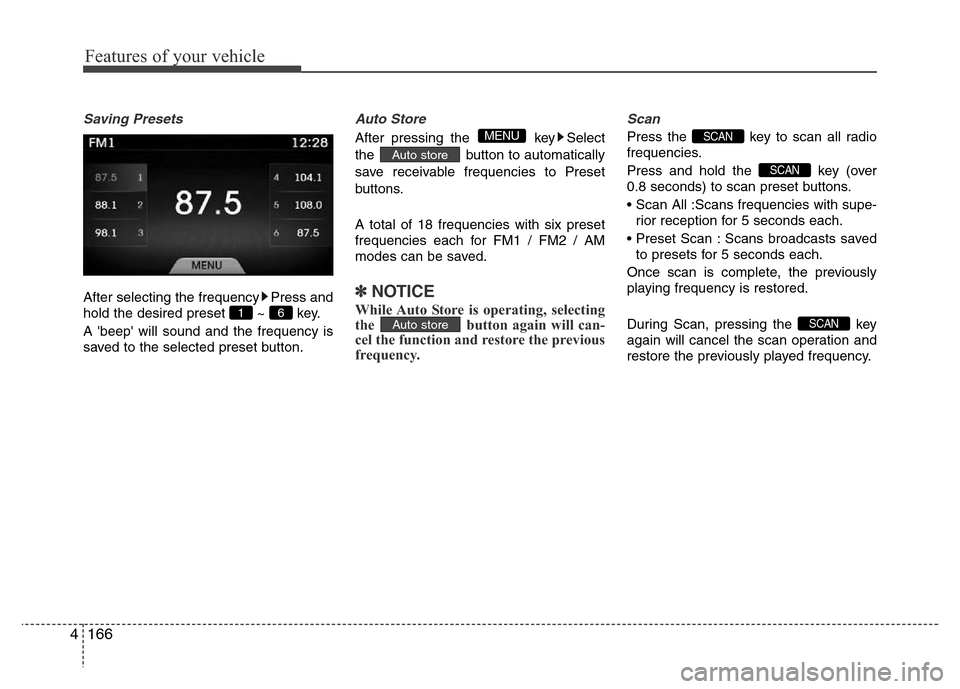
Saving Presets
After selecting the frequency Press and
hold the desired preset ~ key.
A 'beep' will sound and the frequency is
saved to the selected preset button.
Auto Store
After pressing the key Select
the button to automatically
save receivable frequencies to Preset
buttons.
A total of 18 frequencies with six preset
frequencies each for FM1 / FM2 / AM
modes can be saved.
✽NOTICE
While Auto Store is operating, selecting
the button again will can-
cel the function and restore the previous
frequency.
Scan
Press the key to scan all radio
frequencies.
Press and hold the key (over
0.8 seconds) to scan preset buttons.
• Scan All :Scans frequencies with supe-
rior reception for 5 seconds each.
• Preset Scan : Scans broadcasts saved
to presets for 5 seconds each.
Once scan is complete, the previously
playing frequency is restored.
During Scan, pressing the key
again will cancel the scan operation and
restore the previously played frequency.
SCAN
SCAN
SCAN
Auto store
Auto store
MENU
6 1
Page 275 of 473
![Hyundai Azera 2015 User Guide Features of your vehicle
198 4
USING SETUP
Starting Mode
Press the key to display the
Setup screen.
You can select and control options related
to [Display], [Sound], [Clock / Calendar],
[Phone] and [](/img/35/14466/w960_14466-274.png "Hyundai Azera 2015 User Guide Features of your vehicle
198 4
USING SETUP
Starting Mode
Press the key to display the
Setup screen.
You can select and control options related
to [Display], [Sound], [Clock / Calendar],
[Phone] and [")
Features of your vehicle
198 4
USING SETUP
Starting Mode
Press the key to display the
Setup screen.
You can select and control options related
to [Display], [Sound], [Clock / Calendar],
[Phone] and [System].
✽NOTICE
Once settings have been changed, press
the key to return to the previ-
ous menu.
Display Settings
Adjusting the Brightness
Press the key Select [Display]
Select [Brightness]
Use the
TUNE knobto adjust the
screen brightness or set the Brightness
on Automatic, Daylight, or Nightmode.
select the button to reset.
(1) Automatic : Adjusts the brightness
automatically
(2) Day : Always maintains the bright-
ness on high
(3) Night : Always maintains the bright-
ness on low
Mode Pop-up
Press the key Select [Display]
Select [Mode Pop up]
This feature is used to display the Mode
Pop-up screen when entering radio and
media modes.
When this feature is turned on, pressing
the or key will display
the Mode Pop-up screen.
✽NOTICE
The media Mode Pop-up screen can be
displayed only when two or more media
modes have been connected.
MEDIA RADIO
SETUP
Default
SETUP
MENU
SETUP
Page 375 of 473
What to do in an emergency
18 6
TPMS (Tire Pressure
Monitoring System)
malfunction indicator
The TPMS malfunction indicator will
illuminate after it blinks for approxi-
mately one minute when there is a
problem with the Tire Pressure
Monitoring System. If the system is
able to correctly detect an underinfla-
tion warning at the same time as sys-
tem failure then the TPMS malfunc-
tion indicator remains illuminated
after blinking for approximately 1
minute and the low tire pressure posi-
tion telltale will illuminate e.g. if Front
Left sensor fails, the TPMS malfunc-
tion indicator remains illuminated
after blinking for approximately 1
minute, but if the Front Right, Rear
Left, or Rear Right tire is under-inflat-
ed, the low tire pressure position tell-
tales may illuminate together with the
TPMS malfunction indicator.
We recommend that the system be
checked by an authorized HYUNDAI
dealer.
WARNING - Low pressure
damage
Significantly low tire pressure
makes the vehicle unstable and
can contribute to loss of vehicle
control and increased braking
distances.
Continued driving on low pres-
sure tires can cause the tires to
overheat and fail.CAUTION
• The TPMS malfunction indica-
tor may blink for approximate-
ly 1 minute and then remain
continuously illuminated if the
vehicle is moving around elec-
tric power supply cables or
radios transmitter such as at
police stations, government
and public offices, broadcast-
ing stations, military installa-
tions, airports, or transmitting
towers, etc. This can interfere
with normal operation of the
Tire Pressure Monitoring
System (TPMS).
• The TPMS malfunction indica-
tor may blink for approximate-
ly 1 minute and then remain
continuously illuminated if
snow chains are used or some
separate electronic devices
such as notebook computer,
mobile charger, remote starter
or navigation etc., are used in
the vehicle. This can interfere
with normal operation of the
Tire Pressure Monitoring
System (TPMS).
Page 473 of 473
89
Specifications & Consumer information
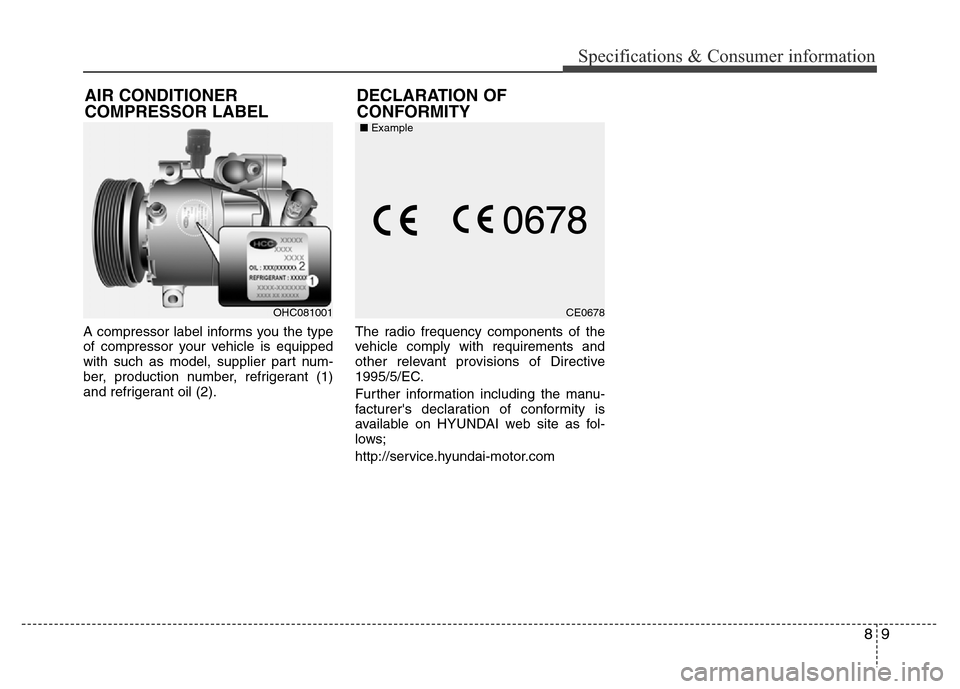
A compressor label informs you the type
of compressor your vehicle is equipped
with such as model, supplier part num-
ber, production number, refrigerant (1)
and refrigerant oil (2).The radio frequency components of the
vehicle comply with requirements and
other relevant provisions of Directive
1995/5/EC.
Further information including the manu-
facturer's declaration of conformity is
available on HYUNDAI web site as fol-
lows;
http://service.hyundai-motor.com
DECLARATION OF
CONFORMITY AIR CONDITIONER
COMPRESSOR LABEL
OHC081001CE0678 ■Example