set Hyundai Azera 2015 Owner's Guide
[x] Cancel search | Manufacturer: HYUNDAI, Model Year: 2015, Model line: Azera, Model: Hyundai Azera 2015Pages: 473, PDF Size: 11.92 MB
Page 132 of 473
455
Features of your vehicle
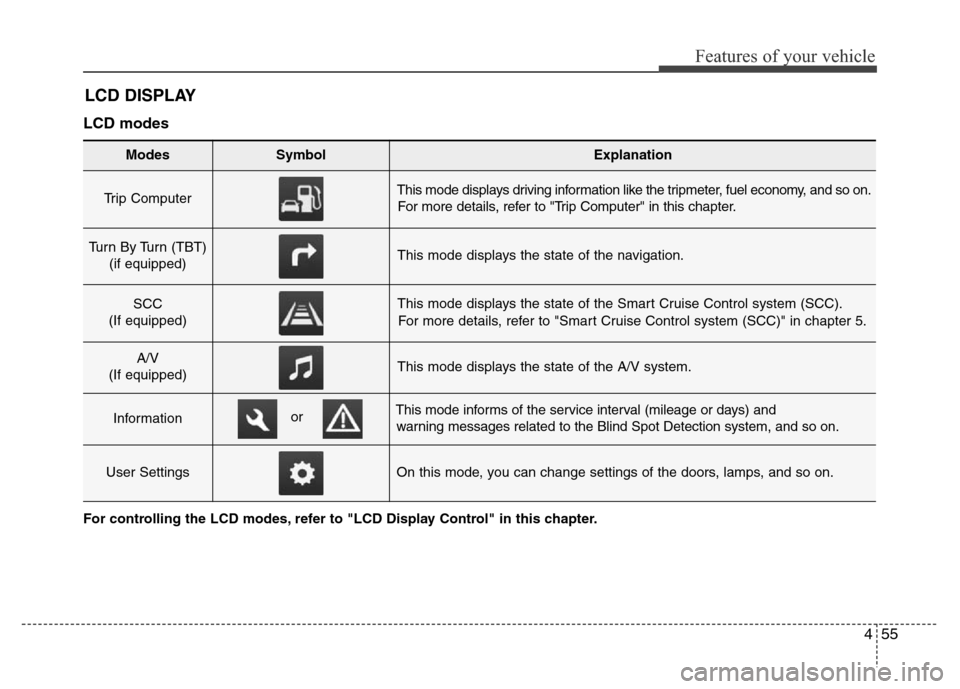
LCD DISPLAY
LCD modes
Modes SymbolExplanation
Trip Computer This mode displays driving information like the tripmeter, fuel economy, and so on.
For more details, refer to "Trip Computer" in this chapter.
Turn By Turn (TBT)
(if equipped)This mode displays the state of the navigation.
SCC
(If equipped)This mode displays the state of the Smart Cruise Control system (SCC).
For more details, refer to "Smart Cruise Control system (SCC)" in chapter 5.
A/V
(If equipped)This mode displays the state of the A/V system.
InformationThis mode informs of the service interval (mileage or days) and
warning messages related to the Blind Spot Detection system, and so on.
User SettingsOn this mode, you can change settings of the doors, lamps, and so on.
or
For controlling the LCD modes, refer to "LCD Display Control" in this chapter.
Page 133 of 473
Features of your vehicle
56 4
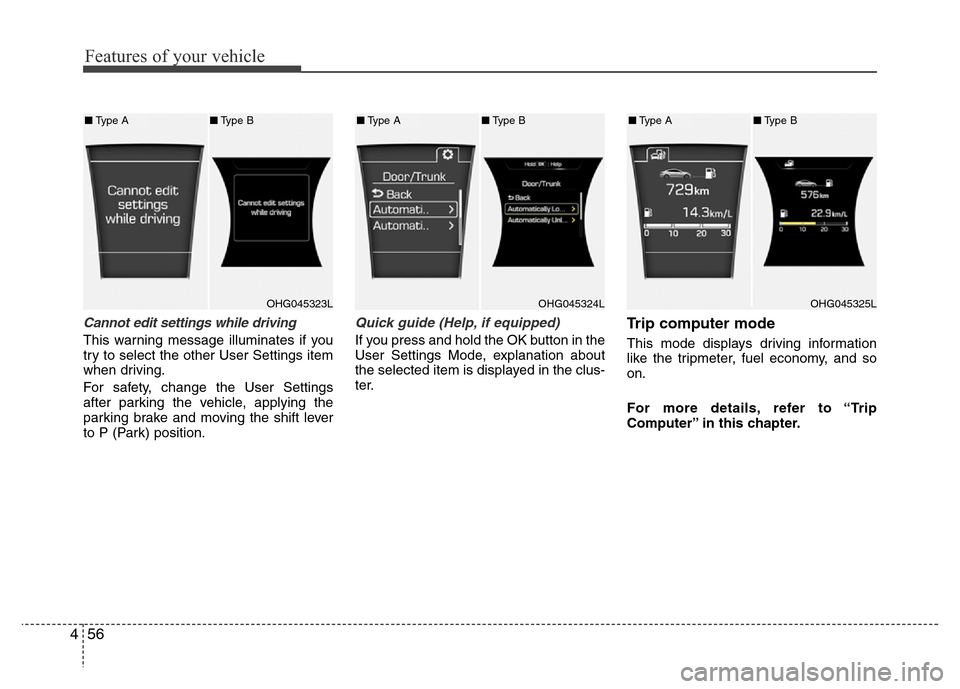
Cannot edit settings while driving
This warning message illuminates if you
try to select the other User Settings item
when driving.
For safety, change the User Settings
after parking the vehicle, applying the
parking brake and moving the shift lever
to P (Park) position.
Quick guide (Help, if equipped)
If you press and hold the OK button in the
User Settings Mode, explanation about
the selected item is displayed in the clus-
ter.
Trip computer mode
This mode displays driving information
like the tripmeter, fuel economy, and so
on.
For more details, refer to “Trip
Computer” in this chapter.
OHG045323LOHG045324LOHG045325L
■Type A■Type B■Type A■Type B■Type A■Type B
Page 134 of 473
457
Features of your vehicle
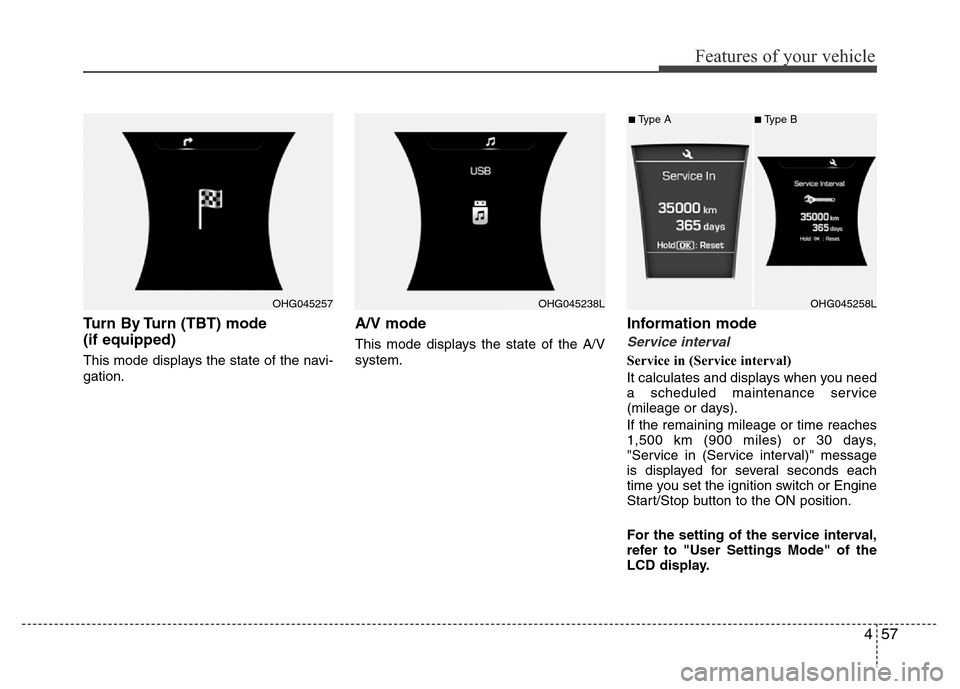
Turn By Turn (TBT) mode
(if equipped)
This mode displays the state of the navi-
gation.
A/V mode
This mode displays the state of the A/V
system.
Information mode
Service interval
Service in (Service interval)
It calculates and displays when you need
a scheduled maintenance service
(mileage or days).
If the remaining mileage or time reaches
1,500 km (900 miles) or 30 days,
"Service in (Service interval)" message
is displayed for several seconds each
time you set the ignition switch or Engine
Start/Stop button to the ON position.
For the setting of the service interval,
refer to "User Settings Mode" of the
LCD display.
OHG045257OHG045238LOHG045258L
■Type A■Type B
Page 135 of 473
Features of your vehicle
58 4
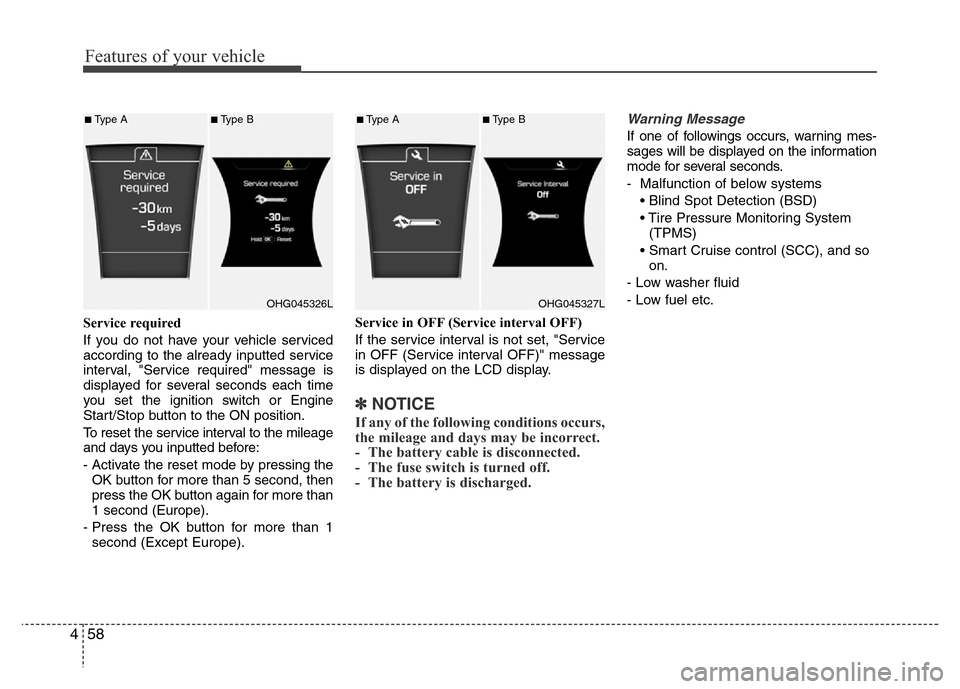
Service required
If you do not have your vehicle serviced
according to the already inputted service
interval, "Service required" message is
displayed for several seconds each time
you set the ignition switch or Engine
Start/Stop button to the ON position.
To reset the service interval to the mileage
and days you inputted before:
- Activate the reset mode by pressing the
OK button for more than 5 second, then
press the OK button again for more than
1 second (Europe).
- Press the OK button for more than 1
second (Except Europe).Service in OFF (Service interval OFF)
If the service interval is not set, "Service
in OFF (Service interval OFF)" message
is displayed on the LCD display.
✽NOTICE
If any of the following conditions occurs,
the mileage and days may be incorrect.
- The battery cable is disconnected.
- The fuse switch is turned off.
- The battery is discharged.
Warning Message
If one of followings occurs, warning mes-
sages will be displayed on the information
mode for several seconds.
- Malfunction of below systems
• Blind Spot Detection (BSD)
• Tire Pressure Monitoring System
(TPMS)
• Smart Cruise control (SCC), and so
on.
- Low washer fluid
- Low fuel etc.
OHG045326L
■Type A■Type B
OHG045327L
■Type A■Type B
Page 136 of 473
459
Features of your vehicle
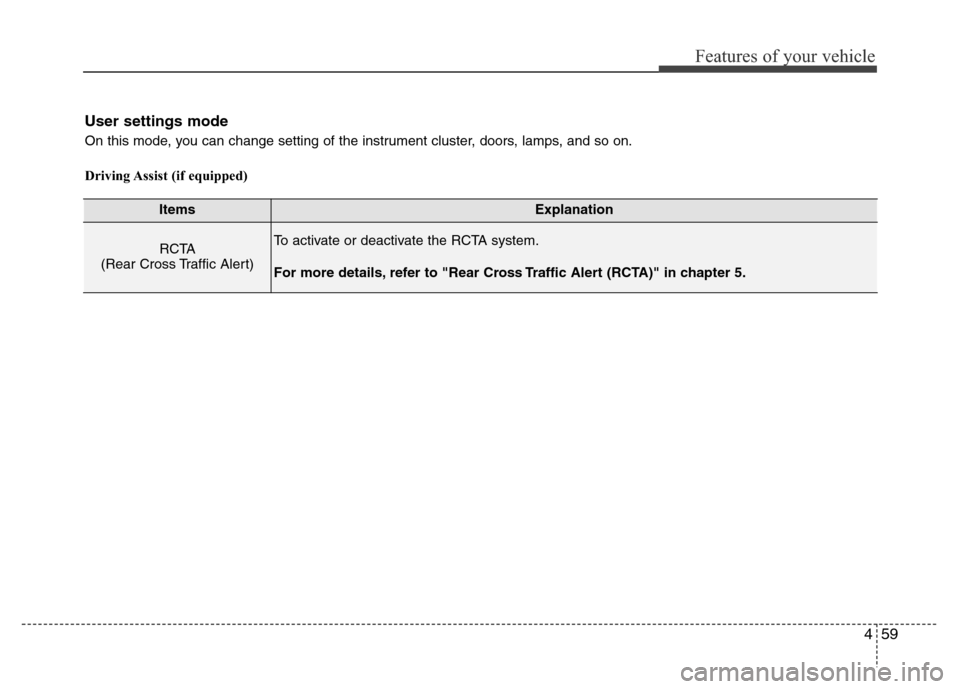
User settings mode
On this mode, you can change setting of the instrument cluster, doors, lamps, and so on.
Driving Assist (if equipped)
ItemsExplanation
RCTA
(Rear Cross Traffic Alert)To activate or deactivate the RCTA system.
For more details, refer to "Rear Cross Traffic Alert (RCTA)" in chapter 5.
Page 137 of 473
Features of your vehicle
60 4
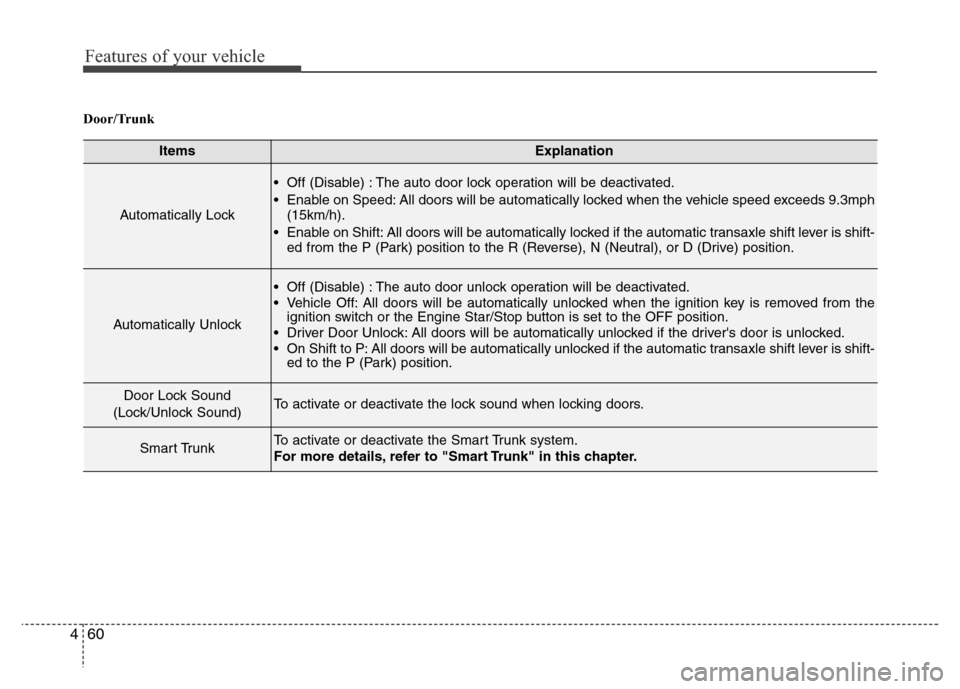
Door/Trunk
ItemsExplanation
Automatically Lock
• Off (Disable) : The auto door lock operation will be deactivated.
• Enable on Speed: All doors will be automatically locked when the vehicle speed exceeds 9.3mph
(15km/h).
• Enable on Shift: All doors will be automatically locked if the automatic transaxle shift lever is shift-
ed from the P (Park) position to the R (Reverse), N (Neutral), or D (Drive) position.
Automatically Unlock
• Off (Disable) : The auto door unlock operation will be deactivated.
• Vehicle Off: All doors will be automatically unlocked when the ignition key is removed from the
ignition switch or the Engine Star/Stop button is set to the OFF position.
• Driver Door Unlock: All doors will be automatically unlocked if the driver's door is unlocked.
• On Shift to P: All doors will be automatically unlocked if the automatic transaxle shift lever is shift-
ed to the P (Park) position.
Door Lock Sound
(Lock/Unlock Sound)To activate or deactivate the lock sound when locking doors.
Smart TrunkTo activate or deactivate the Smart Trunk system.
For more details, refer to "Smart Trunk" in this chapter.
Page 139 of 473
Features of your vehicle
62 4
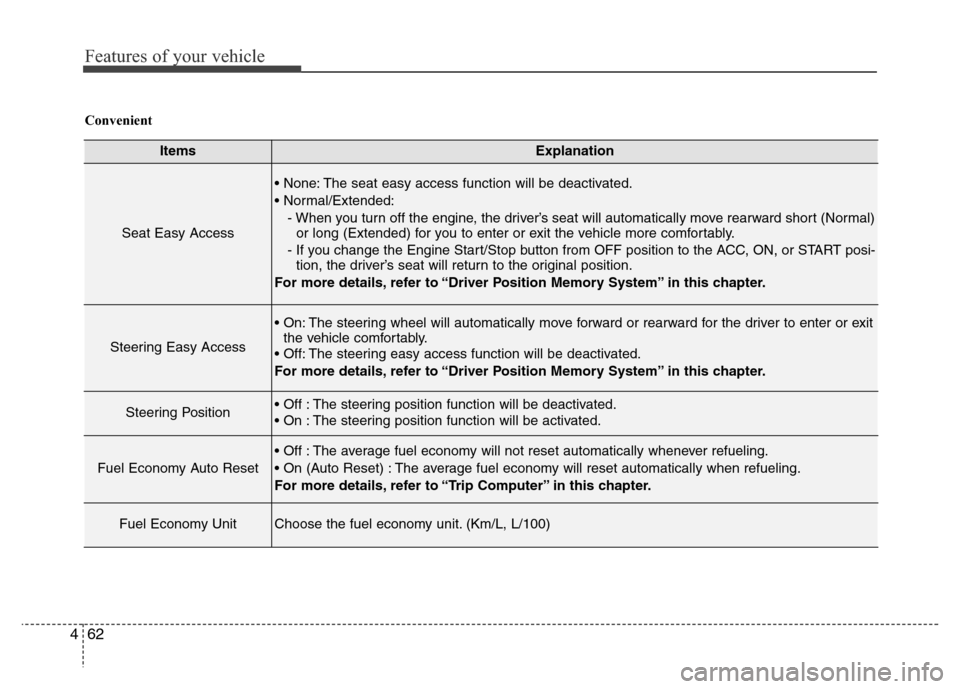
ItemsExplanation
Seat Easy Access
• None: The seat easy access function will be deactivated.
• Normal/Extended:
- When you turn off the engine, the driver’s seat will automatically move rearward short (Normal)
or long (Extended) for you to enter or exit the vehicle more comfortably.
- If you change the Engine Start/Stop button from OFF position to the ACC, ON, or START posi-
tion, the driver’s seat will return to the original position.
For more details, refer to “Driver Position Memory System” in this chapter.
Steering Easy Access
• On: The steering wheel will automatically move forward or rearward for the driver to enter or exit
the vehicle comfortably.
• Off: The steering easy access function will be deactivated.
For more details, refer to “Driver Position Memory System” in this chapter.
Steering Position• Off : The steering position function will be deactivated.
• On : The steering position function will be activated.
Fuel Economy Auto Reset
• Off : The average fuel economy will not reset automatically whenever refueling.
• On (Auto Reset) : The average fuel economy will reset automatically when refueling.
For more details, refer to “Trip Computer” in this chapter.
Fuel Economy UnitChoose the fuel economy unit. (Km/L, L/100)
Convenient
Page 140 of 473
463
Features of your vehicle
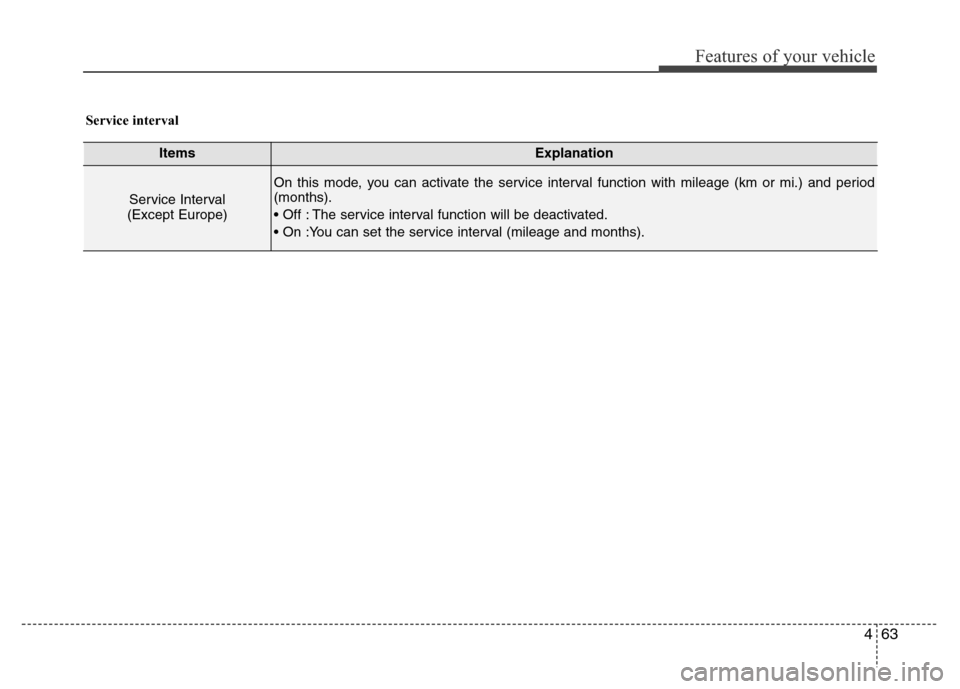
ItemsExplanation
Service Interval
(Except Europe)
On this mode, you can activate the service interval function with mileage (km or mi.) and period
(months).
• Off : The service interval function will be deactivated.
• On :You can set the service interval (mileage and months).
Service interval
Page 141 of 473
Features of your vehicle
64 4
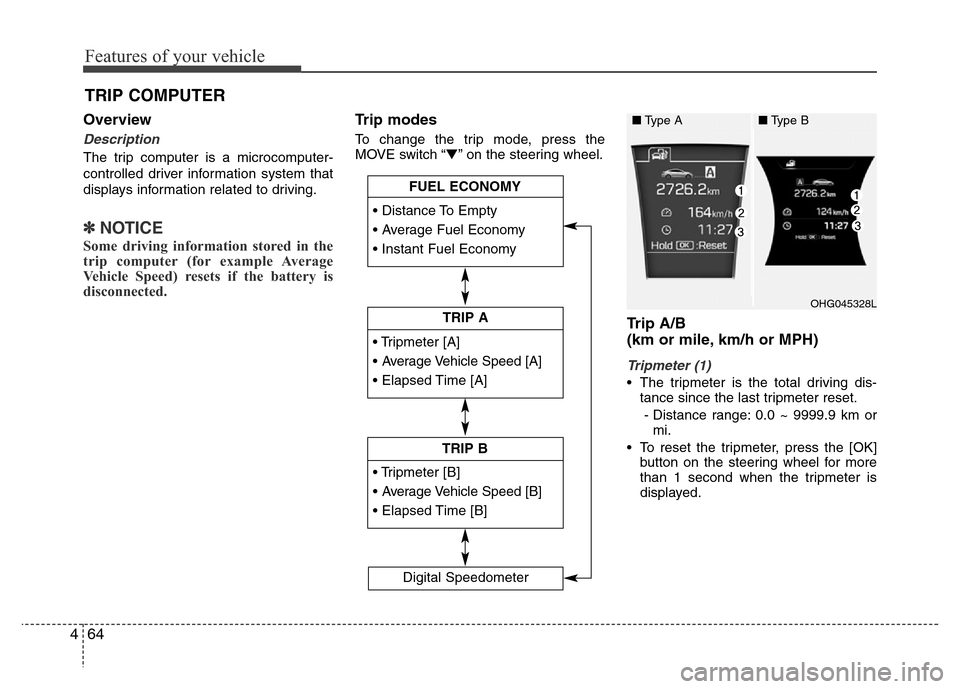
Overview
Description
The trip computer is a microcomputer-
controlled driver information system that
displays information related to driving.
✽NOTICE
Some driving information stored in the
trip computer (for example Average
Vehicle Speed) resets if the battery is
disconnected.
Trip modes
To change the trip mode, press the
MOVE switch “▼” on the steering wheel.
Trip A/B
(km or mile, km/h or MPH)
Tripmeter (1)
• The tripmeter is the total driving dis-
tance since the last tripmeter reset.
- Distance range: 0.0 ~ 9999.9 km or
mi.
• To reset the tripmeter, press the [OK]
button on the steering wheel for more
than 1 second when the tripmeter is
displayed.
TRIP COMPUTER
• Tripmeter [A]
• Average Vehicle Speed [A]
• Elapsed Time [A]
TRIP A
• Tripmeter [B]
• Average Vehicle Speed [B]
• Elapsed Time [B]
TRIP B • Distance To Empty
• Average Fuel Economy
• Instant Fuel Economy
FUEL ECONOMY
Digital Speedometer
OHG045328L
■Type A■Type B
Page 142 of 473
465
Features of your vehicle
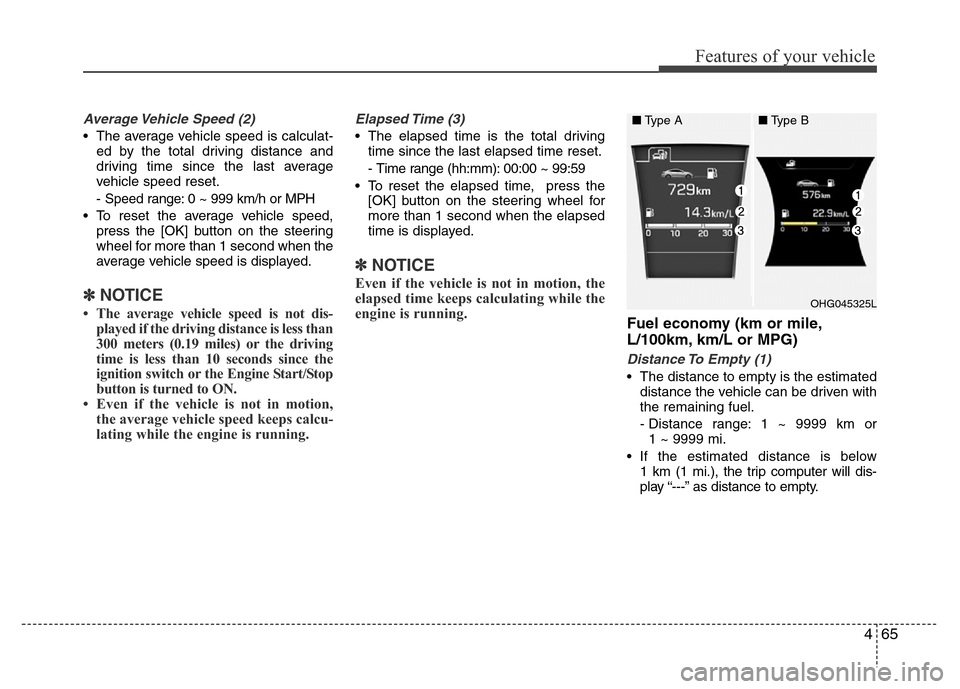
Average Vehicle Speed (2)
• The average vehicle speed is calculat-
ed by the total driving distance and
driving time since the last average
vehicle speed reset.
- Speed range: 0 ~ 999 km/h or MPH
• To reset the average vehicle speed,
press the [OK] button on the steering
wheel for more than 1 second when the
average vehicle speed is displayed.
✽NOTICE
• The average vehicle speed is not dis-
played if the driving distance is less than
300 meters (0.19 miles) or the driving
time is less than 10 seconds since the
ignition switch or the Engine Start/Stop
button is turned to ON.
• Even if the vehicle is not in motion,
the average vehicle speed keeps calcu-
lating while the engine is running.
Elapsed Time (3)
• The elapsed time is the total driving
time since the last elapsed time reset.
- Time range (hh:mm): 00:00 ~ 99:59
• To reset the elapsed time, press the
[OK] button on the steering wheel for
more than 1 second when the elapsed
time is displayed.
✽NOTICE
Even if the vehicle is not in motion, the
elapsed time keeps calculating while the
engine is running.
Fuel economy (km or mile,
L/100km, km/L or MPG)
Distance To Empty (1)
• The distance to empty is the estimated
distance the vehicle can be driven with
the remaining fuel.
- Distance range: 1 ~ 9999 km or
1 ~ 9999 mi.
• If the estimated distance is below
1 km (1 mi.), the trip computer will dis-
play “---” as distance to empty.
OHG045325L
■Type A■Type B