key Hyundai Azera 2015 Owner's Guide
[x] Cancel search | Manufacturer: HYUNDAI, Model Year: 2015, Model line: Azera, Model: Hyundai Azera 2015Pages: 473, PDF Size: 11.92 MB
Page 108 of 473
431
Features of your vehicle
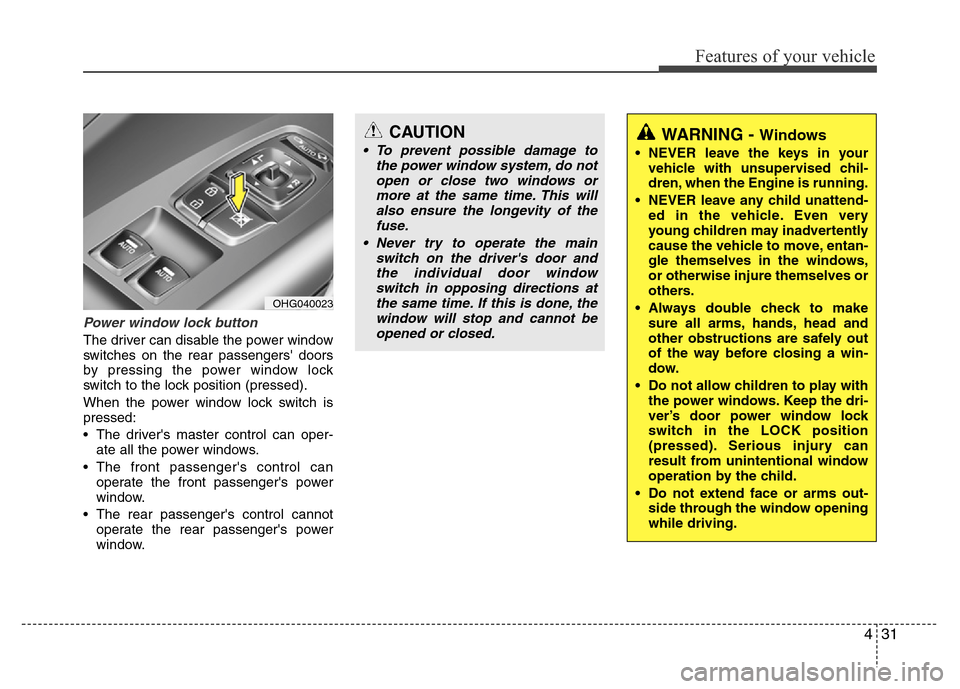
Power window lock button
The driver can disable the power window
switches on the rear passengers' doors
by pressing the power window lock
switch to the lock position (pressed).
When the power window lock switch is
pressed:
• The driver's master control can oper-
ate all the power windows.
• The front passenger's control can
operate the front passenger's power
window.
• The rear passenger's control cannot
operate the rear passenger's power
window.
CAUTION
• To prevent possible damage to
the power window system, do not
open or close two windows or
more at the same time. This will
also ensure the longevity of the
fuse.
• Never try to operate the main
switch on the driver's door and
the individual door window
switch in opposing directions at
the same time. If this is done, the
window will stop and cannot be
opened or closed.WARNING - Windows
• NEVER leave the keys in your
vehicle with unsupervised chil-
dren, when the Engine is running.
• NEVER leave any child unattend-
ed in the vehicle. Even very
young children may inadvertently
cause the vehicle to move, entan-
gle themselves in the windows,
or otherwise injure themselves or
others.
• Always double check to make
sure all arms, hands, head and
other obstructions are safely out
of the way before closing a win-
dow.
• Do not allow children to play with
the power windows. Keep the dri-
ver’s door power window lock
switch in the LOCK position
(pressed). Serious injury can
result from unintentional window
operation by the child.
• Do not extend face or arms out-
side through the window opening
while driving.
OHG040023
Page 114 of 473
437
Features of your vehicle
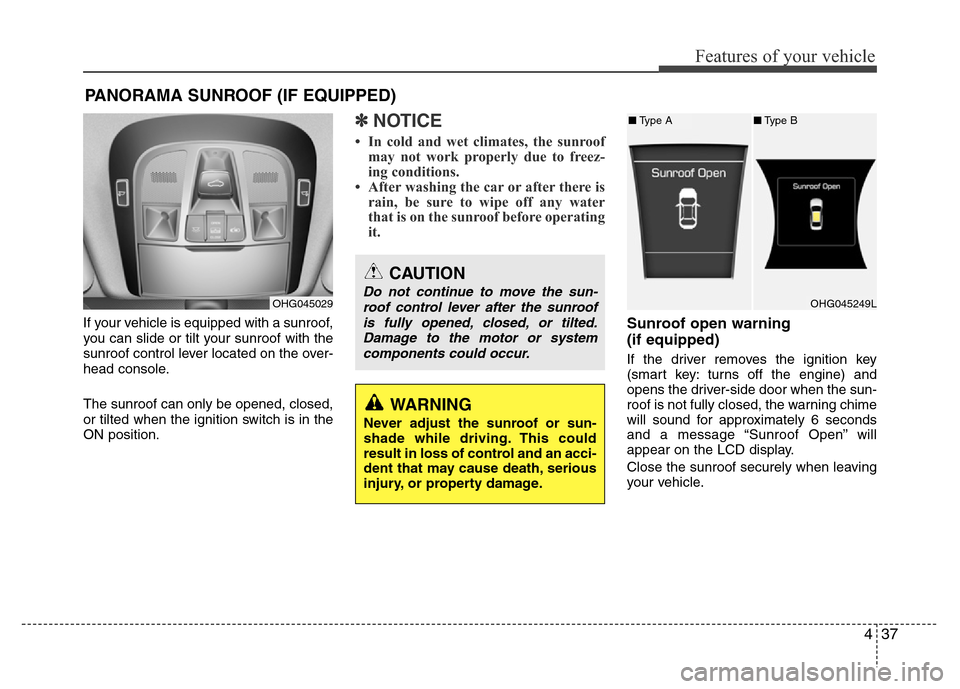
If your vehicle is equipped with a sunroof,
you can slide or tilt your sunroof with the
sunroof control lever located on the over-
head console.
The sunroof can only be opened, closed,
or tilted when the ignition switch is in the
ON position.
✽NOTICE
• In cold and wet climates, the sunroof
may not work properly due to freez-
ing conditions.
• After washing the car or after there is
rain, be sure to wipe off any water
that is on the sunroof before operating
it.
Sunroof open warning
(if equipped)
If the driver removes the ignition key
(smart key: turns off the engine) and
opens the driver-side door when the sun-
roof is not fully closed, the warning chime
will sound for approximately 6 seconds
and a message “Sunroof Open” will
appear on the LCD display.
Close the sunroof securely when leaving
your vehicle.
PANORAMA SUNROOF (IF EQUIPPED)
OHG045029
CAUTION
Do not continue to move the sun-
roof control lever after the sunroof
is fully opened, closed, or tilted.
Damage to the motor or system
components could occur.
WARNING
Never adjust the sunroof or sun-
shade while driving. This could
result in loss of control and an acci-
dent that may cause death, serious
injury, or property damage.
OHG045249L
■Type A■Type B
Page 119 of 473
Features of your vehicle
42 4
Recalling memory position
1. Move the shift lever into P (for
Automatic transaxle) or Neutral (for
manual transaxle) while the ignition
switch or the Engine Start/Stop button
is in the ON position.
2. Press the desired memory button (1 or
2). The system will beep once, then the
driver’s seat position, outside rearview
mirror and instrument panel illumina-
tion will automatically adjust to the
stored position (if equipped).
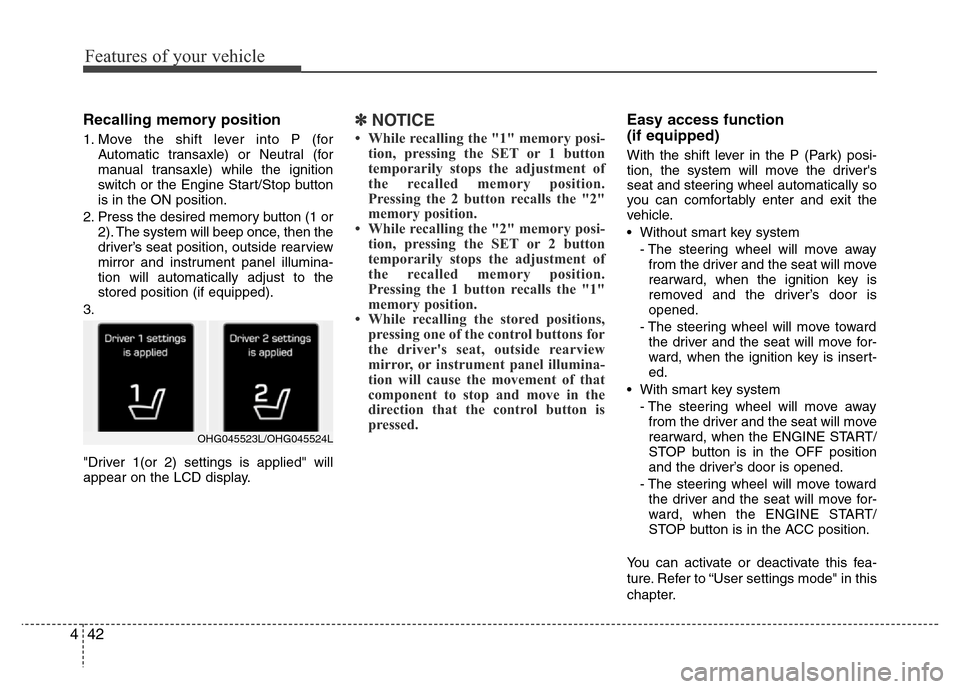
3.
"Driver 1(or 2) settings is applied" will
appear on the LCD display.
✽NOTICE
• While recalling the "1" memory posi-
tion, pressing the SET or 1 button
temporarily stops the adjustment of
the recalled memory position.
Pressing the 2 button recalls the "2"
memory position.
• While recalling the "2" memory posi-
tion, pressing the SET or 2 button
temporarily stops the adjustment of
the recalled memory position.
Pressing the 1 button recalls the "1"
memory position.
• While recalling the stored positions,
pressing one of the control buttons for
the driver's seat, outside rearview
mirror, or instrument panel illumina-
tion will cause the movement of that
component to stop and move in the
direction that the control button is
pressed.
Easy access function
(if equipped)
With the shift lever in the P (Park) posi-
tion, the system will move the driver's
seat and steering wheel automatically so
you can comfortably enter and exit the
vehicle.
• Without smart key system
- The steering wheel will move away
from the driver and the seat will move
rearward, when the ignition key is
removed and the driver’s door is
opened.
- The steering wheel will move toward
the driver and the seat will move for-
ward, when the ignition key is insert-
ed.
• With smart key system
- The steering wheel will move away
from the driver and the seat will move
rearward, when the ENGINE START/
STOP button is in the OFF position
and the driver’s door is opened.
- The steering wheel will move toward
the driver and the seat will move for-
ward, when the ENGINE START/
STOP button is in the ACC position.
You can activate or deactivate this fea-
ture. Refer to “User settings mode" in this
chapter.
OHG045523L/OHG045524L
Page 125 of 473
Features of your vehicle
48 4
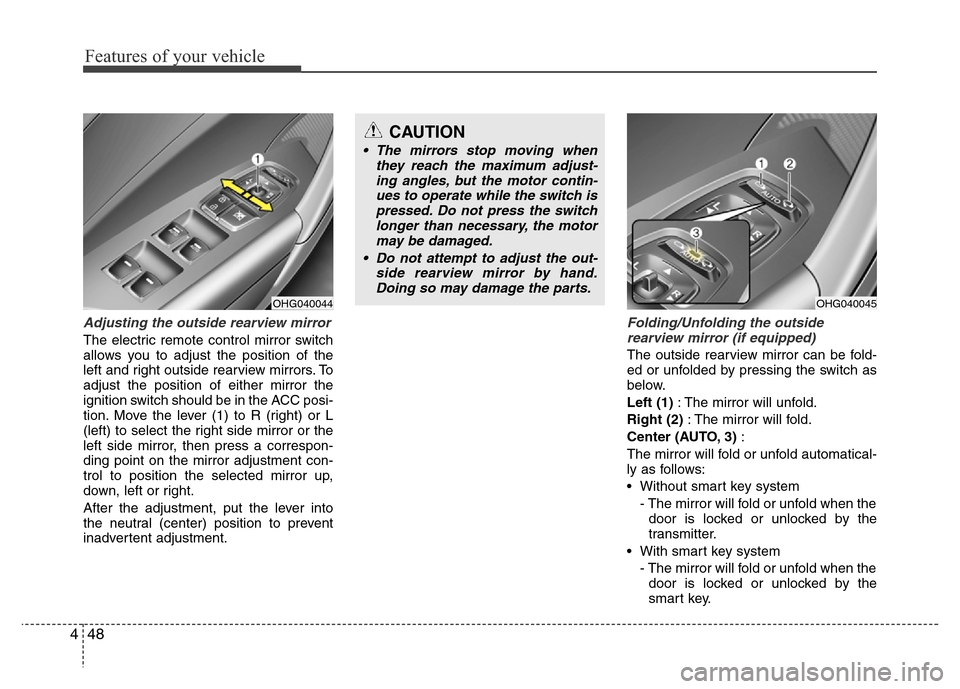
Adjusting the outside rearview mirror
The electric remote control mirror switch
allows you to adjust the position of the
left and right outside rearview mirrors. To
adjust the position of either mirror the
ignition switch should be in the ACC posi-
tion. Move the lever (1) to R (right) or L
(left) to select the right side mirror or the
left side mirror, then press a correspon-
ding point on the mirror adjustment con-
trol to position the selected mirror up,
down, left or right.
After the adjustment, put the lever into
the neutral (center) position to prevent
inadvertent adjustment.
Folding/Unfolding the outside
rearview mirror (if equipped)
The outside rearview mirror can be fold-
ed or unfolded by pressing the switch as
below.
Left (1): The mirror will unfold.
Right (2): The mirror will fold.
Center (AUTO, 3):
The mirror will fold or unfold automatical-
ly as follows:
• Without smart key system
- The mirror will fold or unfold when the
door is locked or unlocked by the
transmitter.
• With smart key system
- The mirror will fold or unfold when the
door is locked or unlocked by the
smart key.
OHG040044
CAUTION
• The mirrors stop moving when
they reach the maximum adjust-
ing angles, but the motor contin-
ues to operate while the switch is
pressed. Do not press the switch
longer than necessary, the motor
may be damaged.
• Do not attempt to adjust the out-
side rearview mirror by hand.
Doing so may damage the parts.
OHG040045
Page 126 of 473
449
Features of your vehicle
- The mirror will fold or unfold when the
door is locked or unlocked by the but-
ton on the outside door handle.
- The mirror will unfold when you
approach the vehicle (all doors
closed and locked) with a smart key
in possession. (if equipped)
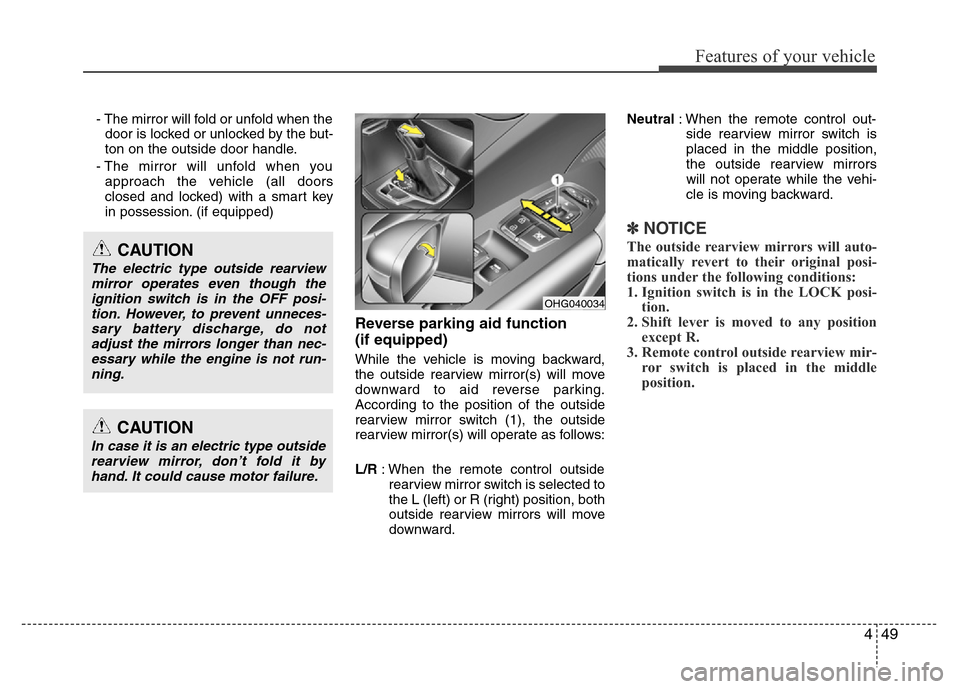
Reverse parking aid function
(if equipped)
While the vehicle is moving backward,
the outside rearview mirror(s) will move
downward to aid reverse parking.
According to the position of the outside
rearview mirror switch (1), the outside
rearview mirror(s) will operate as follows:
L/R: When the remote control outside
rearview mirror switch is selected to
the L (left) or R (right) position, both
outside rearview mirrors will move
downward.Neutral: When the remote control out-
side rearview mirror switch is
placed in the middle position,
the outside rearview mirrors
will not operate while the vehi-
cle is moving backward.
✽NOTICE
The outside rearview mirrors will auto-
matically revert to their original posi-
tions under the following conditions:
1. Ignition switch is in the LOCK posi-
tion.
2. Shift lever is moved to any position
except R.
3. Remote control outside rearview mir-
ror switch is placed in the middle
position.
CAUTION
In case it is an electric type outside
rearview mirror, don’t fold it by
hand. It could cause motor failure.
CAUTION
The electric type outside rearview
mirror operates even though the
ignition switch is in the OFF posi-
tion. However, to prevent unneces-
sary battery discharge, do not
adjust the mirrors longer than nec-
essary while the engine is not run-
ning.
OHG040034
Page 137 of 473
Features of your vehicle
60 4
Door/Trunk
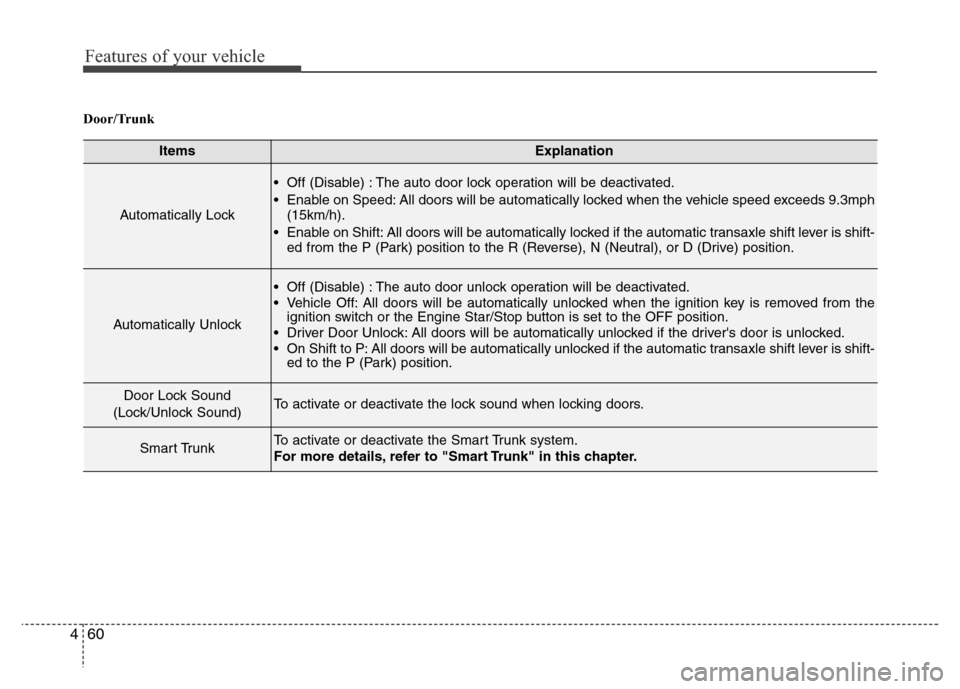
ItemsExplanation
Automatically Lock
• Off (Disable) : The auto door lock operation will be deactivated.
• Enable on Speed: All doors will be automatically locked when the vehicle speed exceeds 9.3mph
(15km/h).
• Enable on Shift: All doors will be automatically locked if the automatic transaxle shift lever is shift-
ed from the P (Park) position to the R (Reverse), N (Neutral), or D (Drive) position.
Automatically Unlock
• Off (Disable) : The auto door unlock operation will be deactivated.
• Vehicle Off: All doors will be automatically unlocked when the ignition key is removed from the
ignition switch or the Engine Star/Stop button is set to the OFF position.
• Driver Door Unlock: All doors will be automatically unlocked if the driver's door is unlocked.
• On Shift to P: All doors will be automatically unlocked if the automatic transaxle shift lever is shift-
ed to the P (Park) position.
Door Lock Sound
(Lock/Unlock Sound)To activate or deactivate the lock sound when locking doors.
Smart TrunkTo activate or deactivate the Smart Trunk system.
For more details, refer to "Smart Trunk" in this chapter.
Page 150 of 473
473
Features of your vehicle
Immobilizer indicator
(if equipped)
Without smart key system
This light illuminates when the immobiliz-
er key is inserted and turned to the ON
position to start the engine.
At this time, you can start the engine. The
light goes out after the engine is running.
If this light blinks when the ignition switch
is in the ON position before starting the
engine, we recommend that the system
be checked by an authorized HYUNDAI
dealer.
With smart key system (if equipped)
If any of the following occurs in a vehicle
equipped with the smart key, the immobi-
lizer indicator illuminates, blinks or the
light goes off.
• When the smart key is in the vehicle, if
the ENGINE START/STOP button is
turned to the ACC or ON position, the
indicator will illuminate. However, when
the smart key is not in the vehicle, if the
ENGINE START/STOP button is
depressed, the indicator will blink for a
few minutes to indicate that you will not
be able to start the engine.• When the ENGINE START/STOP but-
ton is changed to the ON position and
the indicator turns off after 2 seconds,
the system may have a problem. In this
case, we recommend that the system
be checked by an authorized
HYUNDAI dealer.
• When the battery is weak, if the
ENGINE START/STOP button is
pressed, the indicator will blink and you
will not be able to start the engine.
However, you may still be able to start
the engine by directly pressing the
ENGINE START/STOP button with the
smart key. If smart key system related
parts have a problem, the indicator will
blink.
Engine coolant tempera-
ture warning light
(if equipped)
The warning light illuminates if the tem-
perature of the engine coolant is above
125±2.5°C (257±4.5°F).
Do not continue driving with an overheat-
ed engine. If your vehicle overheats, refer
to “Overheating” in section 6.
✽NOTICE
If the engine coolant temperature warn-
ing light illuminates, it indicates over-
heating that may damage the engine.
Page 155 of 473
Features of your vehicle
78 4
LCD display warning (if equipped)
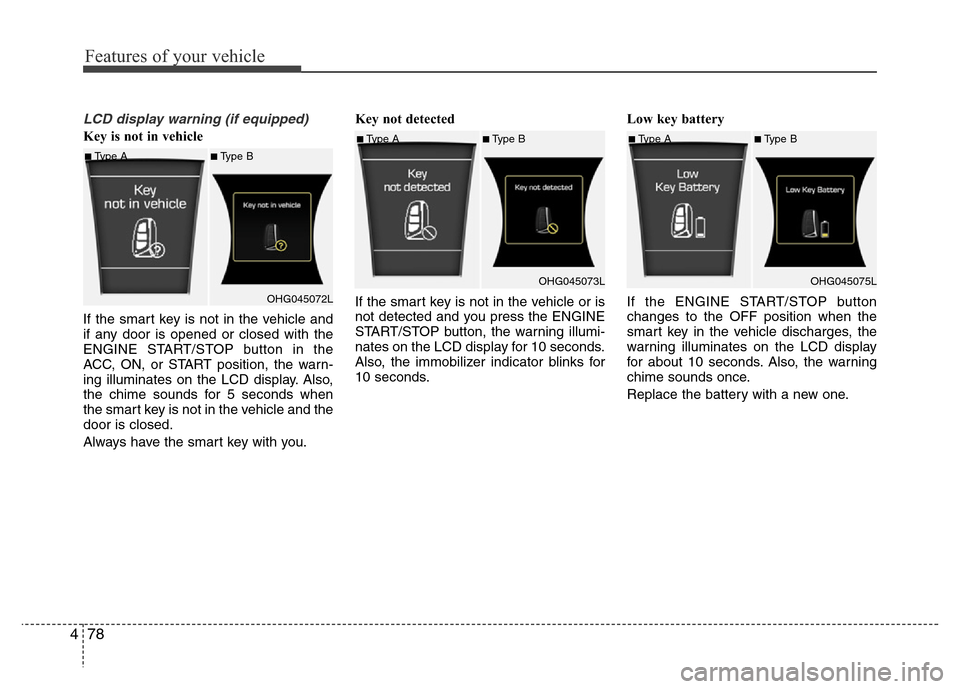
Key is not in vehicle
If the smart key is not in the vehicle and
if any door is opened or closed with the
ENGINE START/STOP button in the
ACC, ON, or START position, the warn-
ing illuminates on the LCD display. Also,
the chime sounds for 5 seconds when
the smart key is not in the vehicle and the
door is closed.
Always have the smart key with you.Key not detected
If the smart key is not in the vehicle or is
not detected and you press the ENGINE
START/STOP button, the warning illumi-
nates on the LCD display for 10 seconds.
Also, the immobilizer indicator blinks for
10 seconds.Low key battery
If the ENGINE START/STOP button
changes to the OFF position when the
smart key in the vehicle discharges, the
warning illuminates on the LCD display
for about 10 seconds. Also, the warning
chime sounds once.
Replace the battery with a new one.
■Type A■Type B
OHG045072L
■Type A■Type B
OHG045073L■Type A■Type B
OHG045075L
Page 158 of 473
481
Features of your vehicle
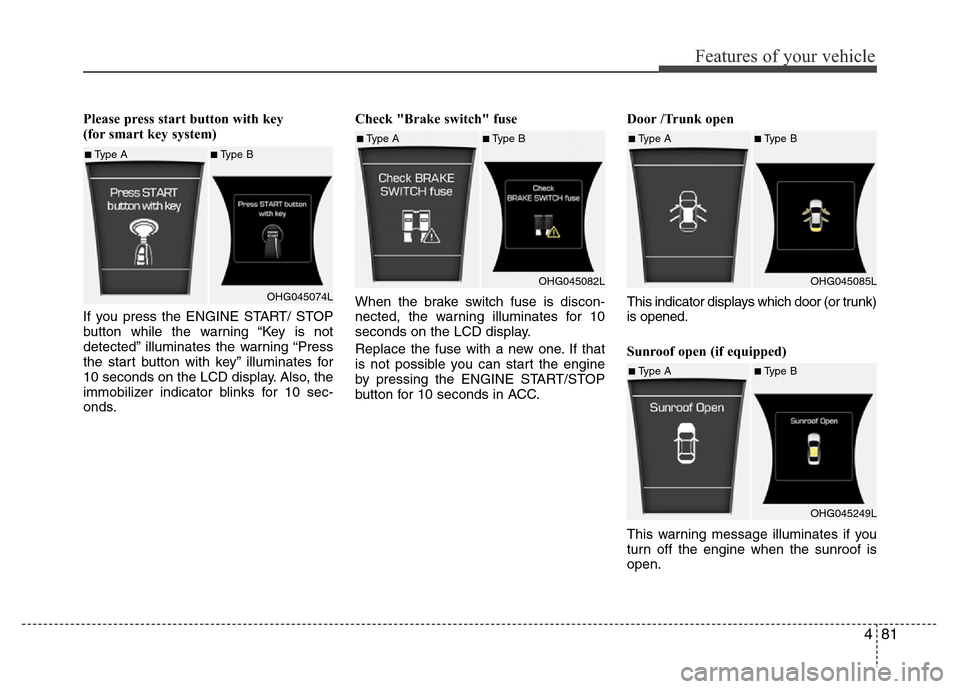
Please press start button with key
(for smart key system)
If you press the ENGINE START/ STOP
button while the warning “Key is not
detected” illuminates the warning “Press
the start button with key” illuminates for
10 seconds on the LCD display. Also, the
immobilizer indicator blinks for 10 sec-
onds.Check "Brake switch" fuse
When the brake switch fuse is discon-
nected, the warning illuminates for 10
seconds on the LCD display.
Replace the fuse with a new one. If that
is not possible you can start the engine
by pressing the ENGINE START/STOP
button for 10 seconds in ACC.Door /Trunk open
This indicator displays which door (or trunk)
is opened.
Sunroof open (if equipped)
This warning message illuminates if you
turn off the engine when the sunroof is
open.
■Type A■Type B
OHG045074L
■Type A■Type B
OHG045082L■Type A■Type B
OHG045085L
■Type A■Type B
OHG045249L
Page 170 of 473
493
Features of your vehicle
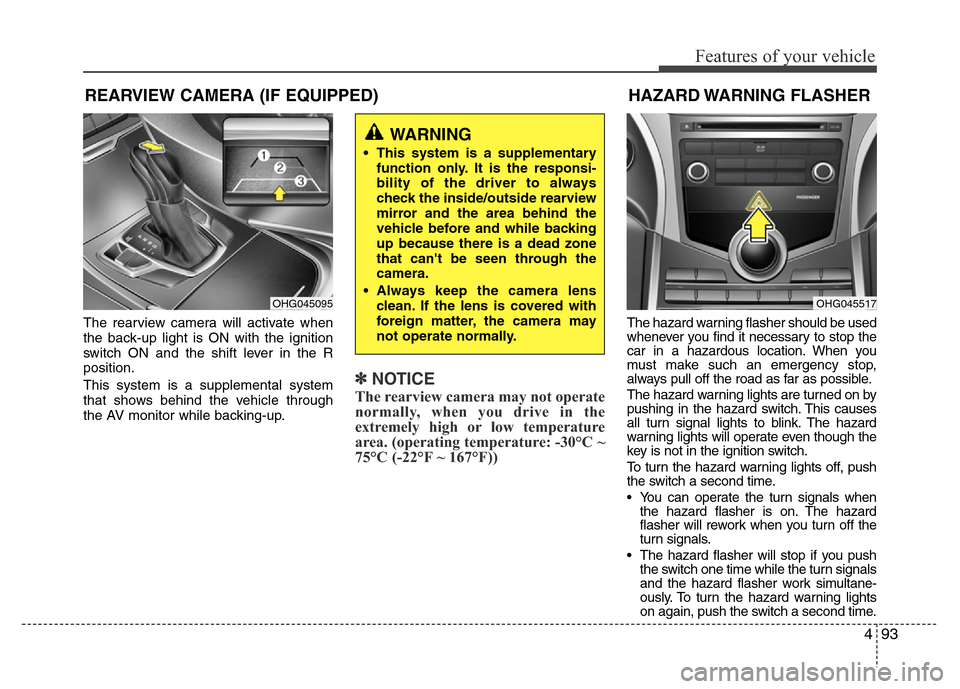
The rearview camera will activate when
the back-up light is ON with the ignition
switch ON and the shift lever in the R
position.
This system is a supplemental system
that shows behind the vehicle through
the AV monitor while backing-up.
✽NOTICE
The rearview camera may not operate
normally, when you drive in the
extremely high or low temperature
area. (operating temperature: -30°C ~
75°C (-22°F ~ 167°F))
The hazard warning flasher should be used
whenever you find it necessary to stop the
car in a hazardous location. When you
must make such an emergency stop,
always pull off the road as far as possible.
The hazard warning lights are turned on by
pushing in the hazard switch. This causes
all turn signal lights to blink. The hazard
warning lights will operate even though the
key is not in the ignition switch.
To turn the hazard warning lights off, push
the switch a second time.
• You can operate the turn signals when
the hazard flasher is on. The hazard
flasher will rework when you turn off the
turn signals.
• The hazard flasher will stop if you push
the switch one time while the turn signals
and the hazard flasher work simultane-
ously. To turn the hazard warning lights
on again, push the switch a second time.
HAZARD WARNING FLASHER
OHG045517
REARVIEW CAMERA (IF EQUIPPED)
OHG045095
WARNING
• This system is a supplementary
function only. It is the responsi-
bility of the driver to always
check the inside/outside rearview
mirror and the area behind the
vehicle before and while backing
up because there is a dead zone
that can't be seen through the
camera.
• Always keep the camera lens
clean. If the lens is covered with
foreign matter, the camera may
not operate normally.