key Hyundai Azera 2015 Service Manual
[x] Cancel search | Manufacturer: HYUNDAI, Model Year: 2015, Model line: Azera, Model: Hyundai Azera 2015Pages: 473, PDF Size: 11.92 MB
Page 171 of 473
Features of your vehicle
94 4
Battery saver function
• The purpose of this feature is to pre-
vent the battery from being dis-
charged. The system automatically
turns off the parking lights when the
driver removes the ignition key (smart
key: turns off the engine) and opens
the driver-side door.
• With this feature, the parking lights will
be turned off automatically if the driver
parks on the side of road at night.
If necessary, to keep the lights on
when the ignition key is removed,
(smart key: turns off the engine) per-
form the following:
1) Open the driver-side door.
2) Turn the parking lights OFF and ON
again using the light switch on the
steering column.
Headlight escort function
(if equipped)
If you turn the ignition switch to the ACC
or OFF position with the headlights ON,
the headlights (and/or tail lights) remain
on for about 5 minutes. However, if the
driver’s door is opened and closed, the
headlights are turned off after 15 sec-
onds.
The headlights can be turned off by
pressing the lock button on the transmit-
ter (or smart key) twice or turning the
light switch to the OFF or parking light
position.
Headlight welcome function
When the headlight is ON or AUTO posi-
tion and all doors (and trunk) are closed
and locked, if you press the door unlock
button on the transmitter (or the smart
key), the headlights will come on for
about 15 seconds. At this time, if you
press the door lock or unlock button, the
headlights will turn off immediately.
Daytime running light
(if equipped)
Daytime Running Lights (DRL) can make
it easier for others to see the front of your
vehicle during the day. DRL can be help-
ful in many different driving conditions,
and it is especially helpful after dawn and
before sunset.
The DRL system turns OFF when:
1. The headlights are ON.
2. The turn signal is ON. (the blinking
side of the DRL will turn off)
3. The hazard warning light is ON.
4. The parking brake is applied.
5. Engine stops.
LIGHTING
CAUTION
If the driver gets out of the vehicle
through other doors, the battery
saver function does not operate.
Therefore, it causes the battery to
be discharged. In this case, make
sure to turn off the lamp before get-
ting out of the vehicle.
Page 180 of 473
4103
Features of your vehicle
INTERIOR LIGHT
Automatic turn off function
(if equipped)
The interior lights automatically turn off
approximately 20 minutes after the igni-
tion switch is turned off.
If your vehicle is equipped with the theft
alarm system, the interior lights automat-
ically turns off approximately 5 seconds
after the system is in the armed stage.
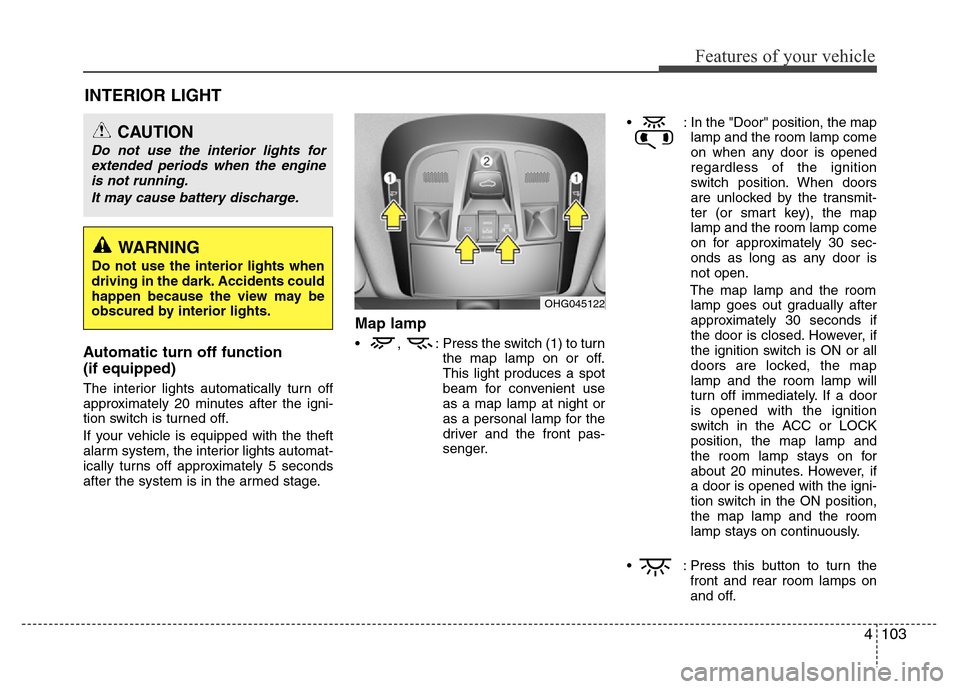
Map lamp
• , : Press the switch (1) to turn
the map lamp on or off.
This light produces a spot
beam for convenient use
as a map lamp at night or
as a personal lamp for the
driver and the front pas-
senger.• : In the "Door" position, the map
lamp and the room lamp come
on when any door is opened
regardless of the ignition
switch position. When doors
are unlocked by the transmit-
ter (or smart key), the map
lamp and the room lamp come
on for approximately 30 sec-
onds as long as any door is
not open.
The map lamp and the room
lamp goes out gradually after
approximately 30 seconds if
the door is closed. However, if
the ignition switch is ON or all
doors are locked, the map
lamp and the room lamp will
turn off immediately. If a door
is opened with the ignition
switch in the ACC or LOCK
position, the map lamp and
the room lamp stays on for
about 20 minutes. However, if
a door is opened with the igni-
tion switch in the ON position,
the map lamp and the room
lamp stays on continuously.
• : Press this button to turn the
front and rear room lamps on
and off.
CAUTION
Do not use the interior lights for
extended periods when the engine
is not running.
It may cause battery discharge.
OHG045122
WARNING
Do not use the interior lights when
driving in the dark. Accidents could
happen because the view may be
obscured by interior lights.
Page 183 of 473
Features of your vehicle
106 4
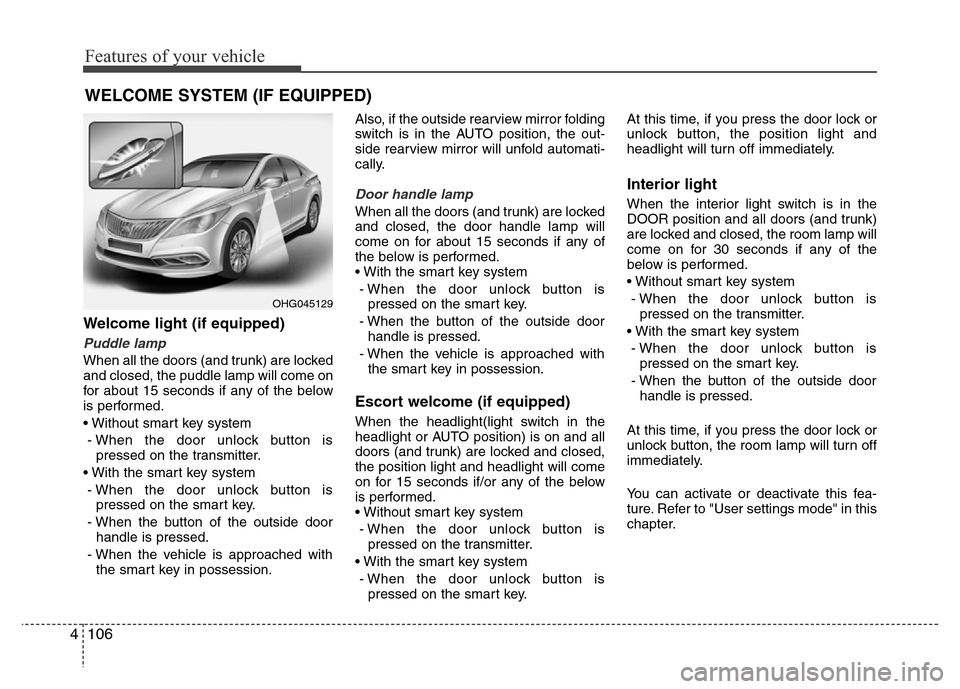
Welcome light (if equipped)
Puddle lamp
When all the doors (and trunk) are locked
and closed, the puddle lamp will come on
for about 15 seconds if any of the below
is performed.
• Without smart key system
- When the door unlock button is
pressed on the transmitter.
• With the smart key system
- When the door unlock button is
pressed on the smart key.
- When the button of the outside door
handle is pressed.
- When the vehicle is approached with
the smart key in possession.Also, if the outside rearview mirror folding
switch is in the AUTO position, the out-
side rearview mirror will unfold automati-
cally.
Door handle lamp
When all the doors (and trunk) are locked
and closed, the door handle lamp will
come on for about 15 seconds if any of
the below is performed.
• With the smart key system
- When the door unlock button is
pressed on the smart key.
- When the button of the outside door
handle is pressed.
- When the vehicle is approached with
the smart key in possession.
Escort welcome (if equipped)
When the headlight(light switch in the
headlight or AUTO position) is on and all
doors (and trunk) are locked and closed,
the position light and headlight will come
on for 15 seconds if/or any of the below
is performed.
• Without smart key system
- When the door unlock button is
pressed on the transmitter.
• With the smart key system
- When the door unlock button is
pressed on the smart key.At this time, if you press the door lock or
unlock button, the position light and
headlight will turn off immediately.
Interior light
When the interior light switch is in the
DOOR position and all doors (and trunk)
are locked and closed, the room lamp will
come on for 30 seconds if any of the
below is performed.
• Without smart key system
- When the door unlock button is
pressed on the transmitter.
• With the smart key system
- When the door unlock button is
pressed on the smart key.
- When the button of the outside door
handle is pressed.
At this time, if you press the door lock or
unlock button, the room lamp will turn off
immediately.
You can activate or deactivate this fea-
ture. Refer to "User settings mode" in this
chapter.
WELCOME SYSTEM (IF EQUIPPED)
OHG045129
Page 211 of 473
Features of your vehicle
134 4
These compartments can be used to
store small items required by the driver
or passengers.
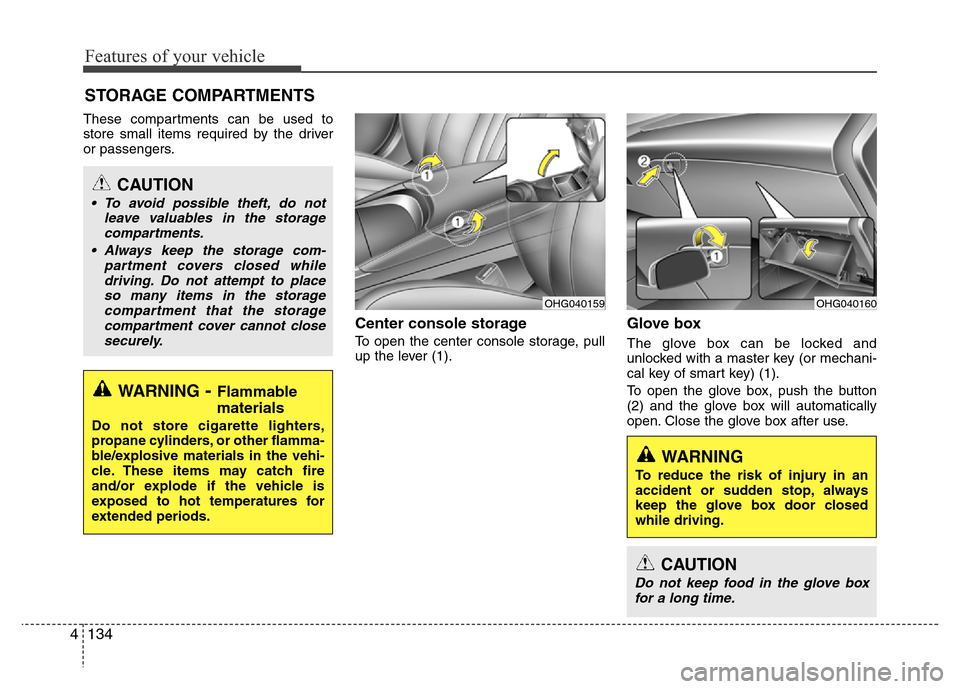
Center console storage
To open the center console storage, pull
up the lever (1).
Glove box
The glove box can be locked and
unlocked with a master key (or mechani-
cal key of smart key) (1).
To open the glove box, push the button
(2) and the glove box will automatically
open. Close the glove box after use.
STORAGE COMPARTMENTS
WARNING- Flammable
materials
Do not store cigarette lighters,
propane cylinders, or other flamma-
ble/explosive materials in the vehi-
cle. These items may catch fire
and/or explode if the vehicle is
exposed to hot temperatures for
extended periods.
CAUTION
• To avoid possible theft, do not
leave valuables in the storage
compartments.
• Always keep the storage com-
partment covers closed while
driving. Do not attempt to place
so many items in the storage
compartment that the storage
compartment cover cannot close
securely.
OHG040160OHG040159
WARNING
To reduce the risk of injury in an
accident or sudden stop, always
keep the glove box door closed
while driving.
CAUTION
Do not keep food in the glove box
for a long time.
Page 217 of 473
Features of your vehicle
140 4
GPS Time check
The clock is automatically updated
through the navigation system.
GPS Time non-check
The clock can be manually adjusted.
1. Select the "Setup" key on the H/Unit.
2. Select the "Clock".
3. Select the "Date/Time Settings".
For more details, please refer to the
manual that was supplied with your
vehicle.
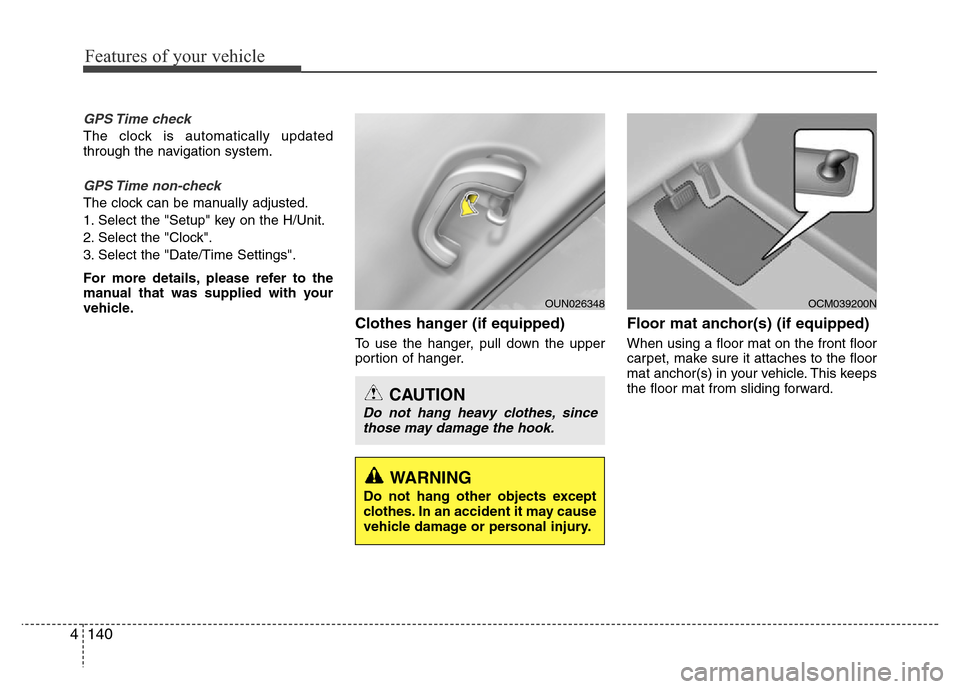
Clothes hanger (if equipped)
To use the hanger, pull down the upper
portion of hanger.
Floor mat anchor(s) (if equipped)
When using a floor mat on the front floor
carpet, make sure it attaches to the floor
mat anchor(s) in your vehicle. This keeps
the floor mat from sliding forward.
OCM039200N
CAUTION
Do not hang heavy clothes, since
those may damage the hook.
OUN026348
WARNING
Do not hang other objects except
clothes. In an accident it may cause
vehicle damage or personal injury.
Page 231 of 473
(Continued)
• Avoid use of USB
memory products that
can also be used as key
chains or mobile phone
accessories. Use of
such products may cause damage to
the USB jack.
• Connecting an MP3 device or
phone through various channels,
such as AUX/BT or Audio/ USB
mode may result in pop noises or
abnormal operation.
• USB memory without the certifica-
tion mark may not be recognized. (Continued)
• Charging through the USB may not
work for some mobile devices.
• The device may not support normal
operation when using a USB mem-
ory type besides (Metal Cover
Type) USB Memory.
• The device may not support normal
operation when using formats such
as HDD Type, CF, or SD Memory.
• The device will not support files
locked by DRM (Digital Rights
Management.)
• USB memory sticks used by con-
necting an Adaptor (SD Type or CF
Type) may not be properly recog-
nized.
• The device may not operate proper-
ly when using USB HDDs or USBs
subject to connection failures caused
by vehicle vibrations. (e.g. i-stick
type)
(Continued)
4154
Features of your vehicle
Page 232 of 473
✽NOTICE - USING THE iPod®
DEVICE
•iPod®is a registered trademark of
Apple Inc.
• In order to use the iPod
®while
operating the keys, you must use a
dedicated iPod
®cable. (the cable
that is supplied when purchasing
iPod
®/iPhone products)
• If the iPod®is connected to the
vehicle while it is playing, a high
pitch sound could occur for approx-
imately 1-2 seconds immediately
after connecting. If possible, con-
nect the iPod
®to the vehicle with
the iPod®stopped/paused.
• During ACC ON state, connecting
the iPod
®through the iPod®cable
will charge the iPod®through the
car audio system.
• When connecting with the iPod
®
cable, make sure to fully insert the
jack to prevent communication
interference.
(Continued)(Continued)
• When the EQ features of an exter-
nal device, such as the iPod
®, and
the audio system are both active,
EQ effects could overlap and cause
sound deterioration and distortion.
Whenever possible, turn off the EQ
feature within the external device
upon use by connecting with the
audio system.
• Noise may occur when an iPod
®or
AUX device is connected. When
such devices are not being used, dis-
connect the device for storage.
• When the iPod
®or AUX device
power is connected to the power
jack, playing the external device
may result in noise. In such cases,
disconnect the power connection
before use.
• Skipping or improper operation
may occur depending on the char-
acteristics of your iPod
®/Phone
device.
(Continued)(Continued)
• If your iPhone is connected to both
the Bluetooth
®Wireless Technology
and USB, the sound may not be
properly played. In your iPhone,
select the Dock connector or
Bluetooth
®Wireless Technology to
change the sound output (source).
•iPod
®mode cannot be operated
when the iPod®cannot be recog-
nized due to versions that do not
support communication protocols.
• For fifth generation iPod
®Nano
devices, the iPod®may not be rec-
ognized when the battery level is
low. Please charge the iPod
®for
use.
• Search/play orders shown within the
iPod
®device may differ with the
orders shown within the audio sys-
tem.
• If the iPod
®malfunctions due to an
iPod®device defect, reset the iPod®
and try again. (To learn more, refer
to your iPod®manual)
(Continued)
Features of your vehicle
155 4
Page 237 of 473
COMPONENT NAMES AND
FUNCTIONS
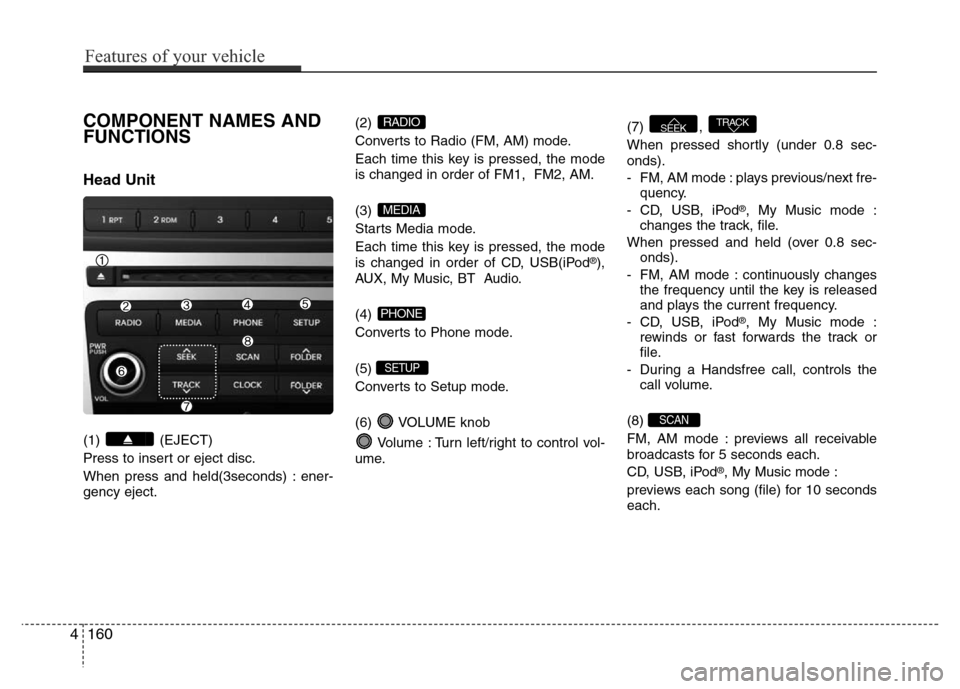
Head Unit
(1) (EJECT)
Press to insert or eject disc.
When press and held(3seconds) : ener-
gency eject.(2)
Converts to Radio (FM, AM) mode.
Each time this key is pressed, the mode
is changed in order of FM1, FM2, AM.
(3)
Starts Media mode.
Each time this key is pressed, the mode
is changed in order of CD, USB(iPod
®),
AUX, My Music, BT Audio.
(4)
Converts to Phone mode.
(5)
Converts to Setup mode.
(6) VOLUME knob
Volume : Turn left/right to control vol-
ume.(7) ,
When pressed shortly (under 0.8 sec-
onds).
- FM, AM mode : plays previous/next fre-
quency.
- CD, USB, iPod
®, My Music mode :
changes the track, file.
When pressed and held (over 0.8 sec-
onds).
- FM, AM mode : continuously changes
the frequency until the key is released
and plays the current frequency.
- CD, USB, iPod
®, My Music mode :
rewinds or fast forwards the track or
file.
- During a Handsfree call, controls the
call volume.
(8)
FM, AM mode : previews all receivable
broadcasts for 5 seconds each.
CD, USB, iPod
®, My Music mode :
previews each song (file) for 10 seconds
each.
SCAN
TRACKSEEK
SETUP
PHONE
MEDIA
RADIO
4160
Features of your vehicle
Page 238 of 473
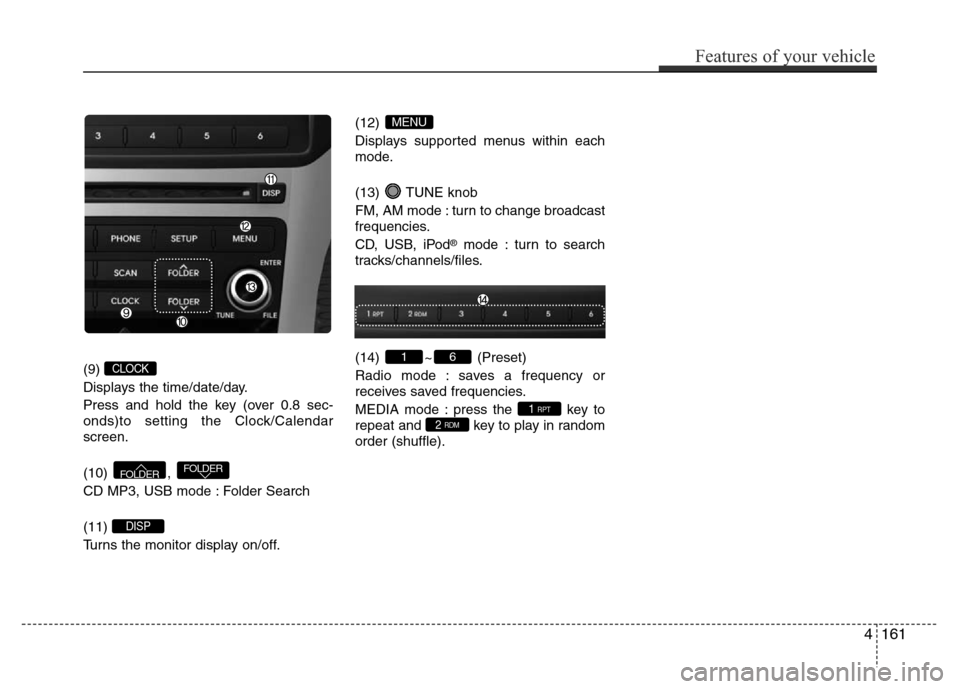
(9)
Displays the time/date/day.
Press and hold the key (over 0.8 sec-
onds)to setting the Clock/Calendar
screen.
(10) ,
CD MP3, USB mode : Folder Search
(11)
Turns the monitor display on/off.(12)
Displays supported menus within each
mode.
(13) TUNE knob
FM, AM mode : turn to change broadcast
frequencies.
CD, USB, iPod
®mode : turn to search
tracks/channels/files.
(14) ~ (Preset)
Radio mode : saves a frequency or
receives saved frequencies.
MEDIA mode : press the key to
repeat and key to play in random
order (shuffle).
2 RDM1 RPT
61
MENU
DISP
FOLDERFOLDER
CLOCK
Features of your vehicle
161 4
Page 239 of 473
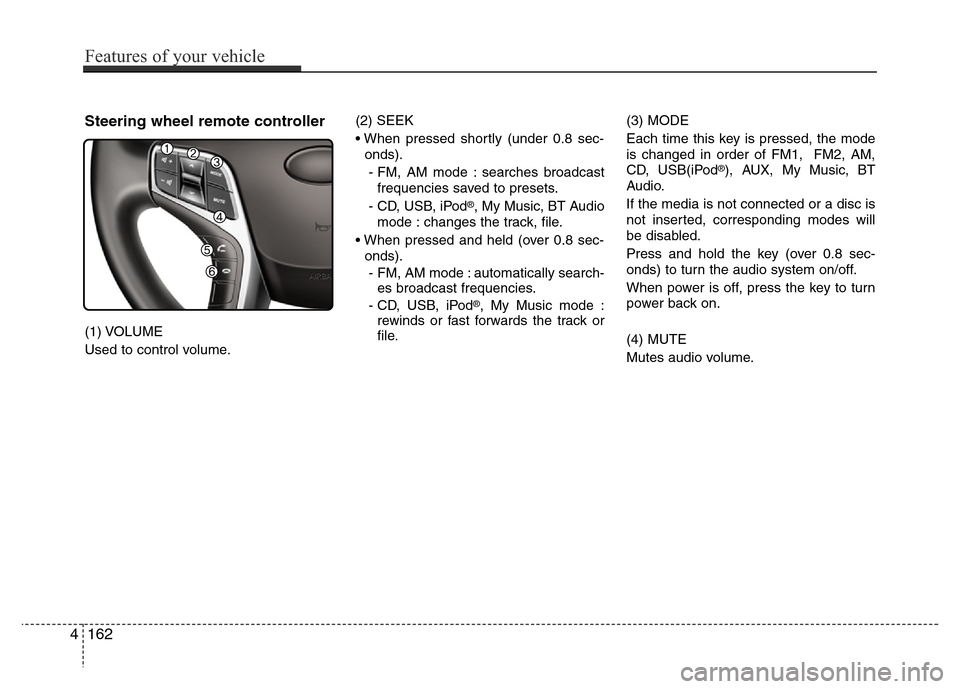
Steering wheel remote controller
(1) VOLUME
Used to control volume.(2) SEEK
• When pressed shortly (under 0.8 sec-
onds).
- FM, AM mode : searches broadcast
frequencies saved to presets.
- CD, USB, iPod
®, My Music, BT Audio
mode : changes the track, file.
• When pressed and held (over 0.8 sec-
onds).
- FM, AM mode : automatically search-
es broadcast frequencies.
- CD, USB, iPod
®, My Music mode :
rewinds or fast forwards the track or
file.(3) MODE
Each time this key is pressed, the mode
is changed in order of FM1, FM2, AM,
CD, USB(iPod
®), AUX, My Music, BT
Audio.
If the media is not connected or a disc is
not inserted, corresponding modes will
be disabled.
Press and hold the key (over 0.8 sec-
onds) to turn the audio system on/off.
When power is off, press the key to turn
power back on.
(4) MUTE
Mutes audio volume.
4162
Features of your vehicle