phone Hyundai Azera 2015 Owner's Guide
[x] Cancel search | Manufacturer: HYUNDAI, Model Year: 2015, Model line: Azera, Model: Hyundai Azera 2015Pages: 473, PDF Size: 11.92 MB
Page 279 of 473
![Hyundai Azera 2015 Owners Guide Features of your vehicle
202 4
Bluetooth®Wireless Technology
Setting
Pairing a New Device
Press the key Select
[Phone] Select [Pair Phone]
Bluetooth®Wireless Technology devices
can be paired with t](/img/35/14466/w960_14466-278.png "Hyundai Azera 2015 Owners Guide Features of your vehicle
202 4
Bluetooth®Wireless Technology
Setting
Pairing a New Device
Press the key Select
[Phone] Select [Pair Phone]
Bluetooth®Wireless Technology devices
can be paired with t")
Features of your vehicle
202 4
Bluetooth®Wireless Technology
Setting
Pairing a New Device
Press the key Select
[Phone] Select [Pair Phone]
Bluetooth®Wireless Technology devices
can be paired with the audio system.
For more information, refer to the “Pairing
through Phone Setup” section within
Bluetooth®Wireless Technology.
Viewing Paired Phone List
Press the key Select
[Phone] Select [Paired Phone List]
This feature is used to view mobile
phones that have been paired with the
audio system. Upon selecting a paired
phone, the setup menu is displayed.
For more information, refer to the
“Setting
Bluetooth®Wireless Technology
Connection” section within
Bluetooth®
Wireless Technology.
1) Connect/Disconnect Phone : Connect/
disconnects currently selected phone2) Delete : Deletes the currently selected
phone
3) Change Priority : Sets currently select-
ed phone to highest connection priority
SETUP
SETUP
Page 280 of 473
4203
Features of your vehicle
✽NOTICE BEFORE DOWN-
LOADING CONTACTS
• Only contacts within connected phones
can be downloaded. Also check to see
that your mobile phone supports the
download feature.
• To learn more about whether your
mobile phone supports contacts down-
loads, refer to your mobile phone user’s
manual.
• The contacts for only the connected
phone can be downloaded.
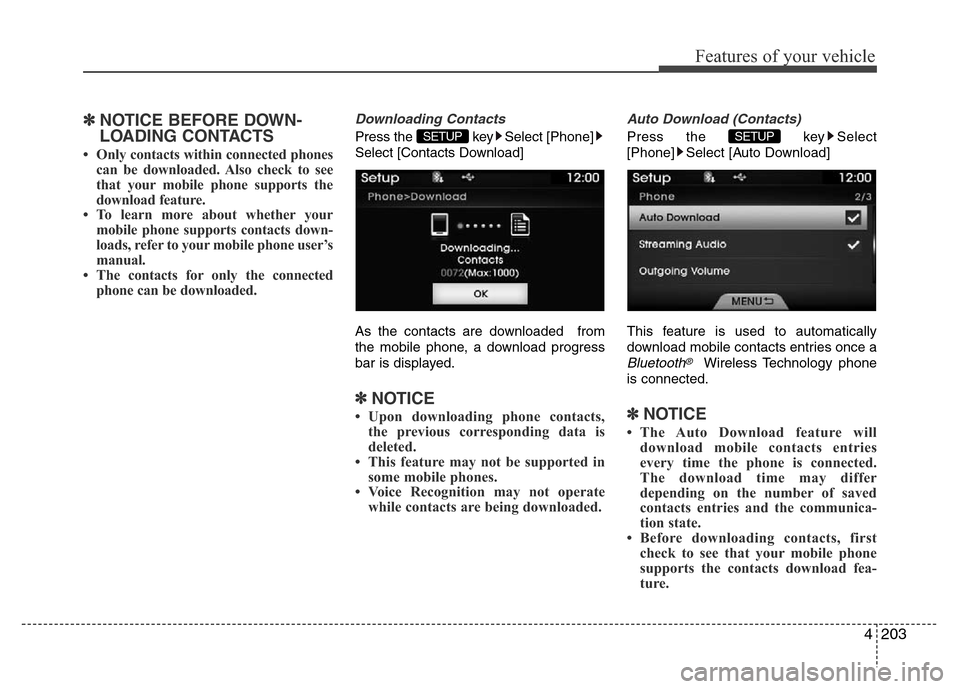
Downloading Contacts
Press the key Select [Phone]
Select [Contacts Download]
As the contacts are downloaded from
the mobile phone, a download progress
bar is displayed.
✽NOTICE
• Upon downloading phone contacts,
the previous corresponding data is
deleted.
• This feature may not be supported in
some mobile phones.
• Voice Recognition may not operate
while contacts are being downloaded.
Auto Download (Contacts)
Press the key Select
[Phone] Select [Auto Download]
This feature is used to automatically
download mobile contacts entries once a
Bluetooth®Wireless Technology phone
is connected.
✽NOTICE
• The Auto Download feature will
download mobile contacts entries
every time the phone is connected.
The download time may differ
depending on the number of saved
contacts entries and the communica-
tion state.
• Before downloading contacts, first
check to see that your mobile phone
supports the contacts download fea-
ture.
SETUP SETUP
Page 281 of 473
![Hyundai Azera 2015 Owners Guide Features of your vehicle
204 4
Streaming Audio
Press the key Select
[Phone] Select [Streaming Audio]
When Streaming Audio is turned on, you
can play music files saved in your
Bluetooth®Wireless Tech](/img/35/14466/w960_14466-280.png "Hyundai Azera 2015 Owners Guide Features of your vehicle
204 4
Streaming Audio
Press the key Select
[Phone] Select [Streaming Audio]
When Streaming Audio is turned on, you
can play music files saved in your
Bluetooth®Wireless Tech")
Features of your vehicle
204 4
Streaming Audio
Press the key Select
[Phone] Select [Streaming Audio]
When Streaming Audio is turned on, you
can play music files saved in your
Bluetooth®Wireless Technology device
through the audio system.
Outgoing Volume
Press the key Select
[Phone] Select [Outgoing Volume]
Use the
TUNE knobto adjust the out-
going volume level.
Turning Bluetooth System Off
Press the key Select
[Phone] Select [Bluetooth System Off]
Once
Bluetooth®Wireless Technology is
turned off,
Bluetooth®Wireless Technology
related features will not be supported with-
in the audio system.
SETUP SETUP SETUP
Page 282 of 473
![Hyundai Azera 2015 Owners Guide 4205
Features of your vehicle
✽NOTICE
To turn Bluetooth®Wireless Technology
back on, go to [Phone] and
press “Yes”.
System Setting
Memory Information
Press the key Select [System]
Select [M](/img/35/14466/w960_14466-281.png "Hyundai Azera 2015 Owners Guide 4205
Features of your vehicle
✽NOTICE
To turn Bluetooth®Wireless Technology
back on, go to [Phone] and
press “Yes”.
System Setting
Memory Information
Press the key Select [System]
Select [M")
4205
Features of your vehicle
✽NOTICE
To turn Bluetooth®Wireless Technology
back on, go to [Phone] and
press “Yes”.
System Setting
Memory Information
Press the key Select [System]
Select [Memory Information]
This feature displays information related to
system memory.
(1) Using : Displays capacity currently in
use
(2) Capacity : Displays total capacity
REAR VIEW CAMERA
(if equipped)
• The system has been equipped with a
rear view camera for user safety by
allowing a wider rear range of vision.
• The rear view camera will automatical-
ly operate when the ignition key is
turned ON and the transmission lever
is set to R.
• The rear view camera will automatical-
ly stop operating when set to a differ-
ent lever.SETUP
SETUP
CAUTION
The rear view camera has been
equipped with an optical lens to
provide a wider range of vision and
may appear different from the actu-
al distance. For safety, directly
check the rear and left/right sides.