mechanical key Hyundai Azera 2015 Owner's Manual
[x] Cancel search | Manufacturer: HYUNDAI, Model Year: 2015, Model line: Azera, Model: Hyundai Azera 2015Pages: 473, PDF Size: 11.92 MB
Page 81 of 473
Features of your vehicle
4 4
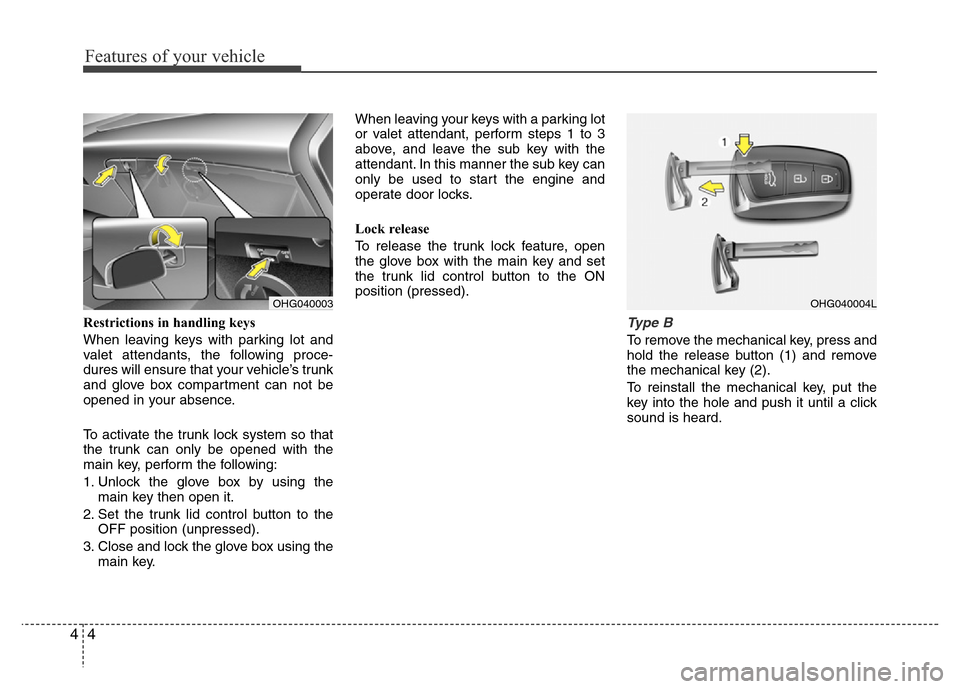
Restrictions in handling keys
When leaving keys with parking lot and
valet attendants, the following proce-
dures will ensure that your vehicle’s trunk
and glove box compartment can not be
opened in your absence.
To activate the trunk lock system so that
the trunk can only be opened with the
main key, perform the following:
1. Unlock the glove box by using the
main key then open it.
2. Set the trunk lid control button to the
OFF position (unpressed).
3. Close and lock the glove box using the
main key.When leaving your keys with a parking lot
or valet attendant, perform steps 1 to 3
above, and leave the sub key with the
attendant. In this manner the sub key can
only be used to start the engine and
operate door locks.
Lock release
To release the trunk lock feature, open
the glove box with the main key and set
the trunk lid control button to the ON
position (pressed).Type B
To remove the mechanical key, press and
hold the release button (1) and remove
the mechanical key (2).
To reinstall the mechanical key, put the
key into the hole and push it until a click
sound is heard.
OHG040003OHG040004L
Page 82 of 473
45
Features of your vehicle
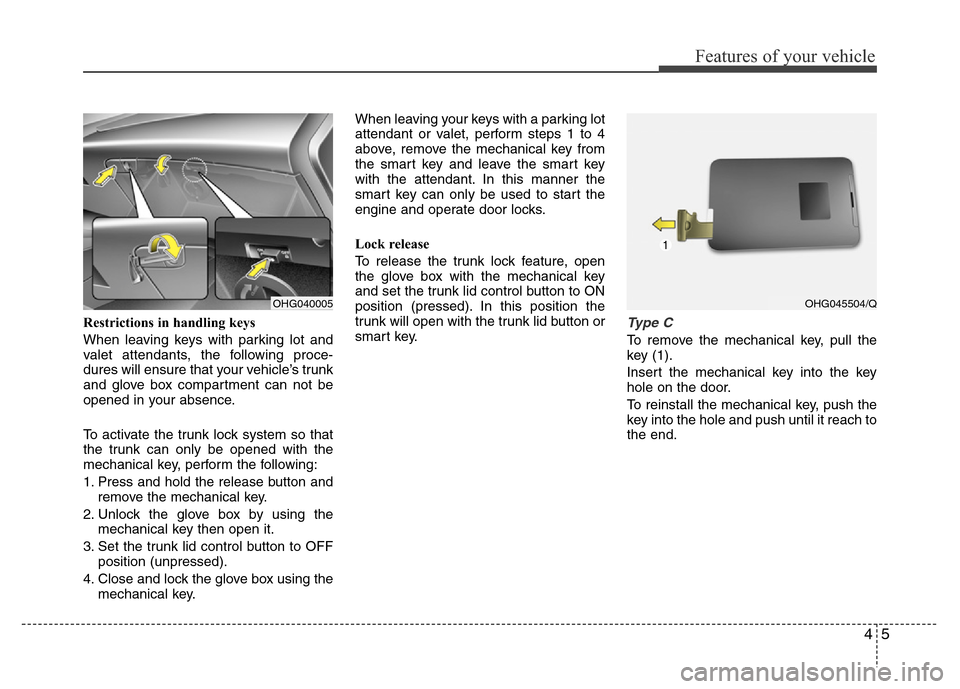
Restrictions in handling keys
When leaving keys with parking lot and
valet attendants, the following proce-
dures will ensure that your vehicle’s trunk
and glove box compartment can not be
opened in your absence.
To activate the trunk lock system so that
the trunk can only be opened with the
mechanical key, perform the following:
1.
Press and hold the release button and
remove the mechanical key.
2. Unlock the glove box by using the
mechanical key then open it.
3. Set the trunk lid control button to OFF
position (unpressed).
4. Close and lock the glove box using the
mechanical key.When leaving your keys with a parking lot
attendant or valet, perform steps 1 to 4
above, remove the mechanical key from
the smart key and leave the smart key
with the attendant. In this manner the
smart key can only be used to start the
engine and operate door locks.
Lock release
To release the trunk lock feature, open
the glove box with the mechanical key
and set the trunk lid control button to ON
position (pressed). In this position the
trunk will open with the trunk lid button or
smart key.
Type C
To remove the mechanical key, pull the
key (1).
Insert the mechanical key into the key
hole on the door.
To reinstall the mechanical key, push the
key into the hole and push until it reach to
the end.
OHG040005OHG045504/Q
Page 83 of 473
Features of your vehicle
6 4
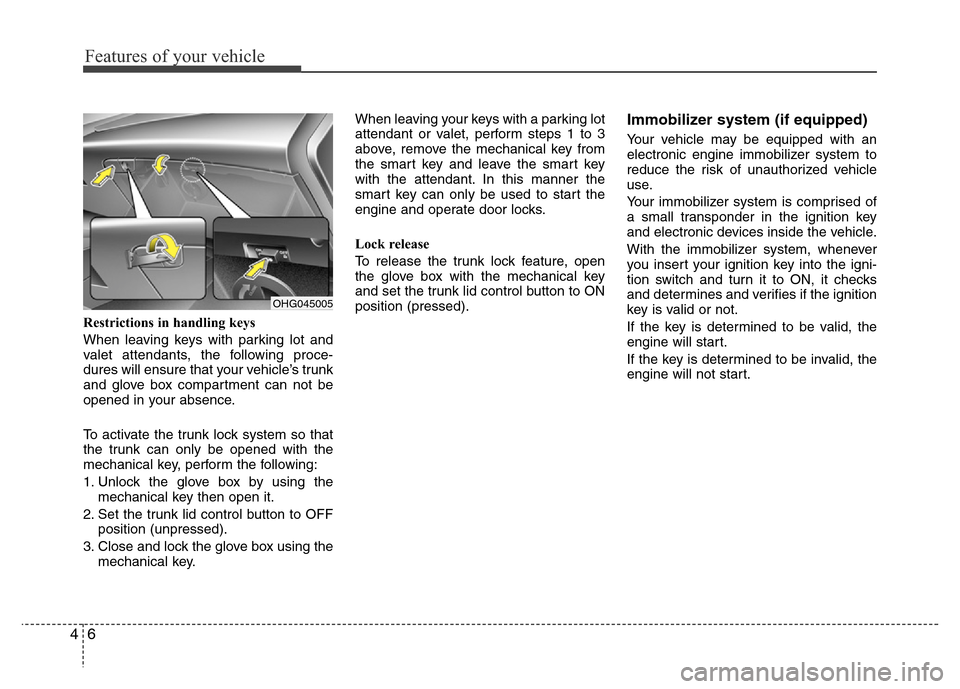
Restrictions in handling keys
When leaving keys with parking lot and
valet attendants, the following proce-
dures will ensure that your vehicle’s trunk
and glove box compartment can not be
opened in your absence.
To activate the trunk lock system so that
the trunk can only be opened with the
mechanical key, perform the following:
1. Unlock the glove box by using the
mechanical key then open it.
2. Set the trunk lid control button to OFF
position (unpressed).
3. Close and lock the glove box using the
mechanical key.When leaving your keys with a parking lot
attendant or valet, perform steps 1 to 3
above, remove the mechanical key from
the smart key and leave the smart key
with the attendant. In this manner the
smart key can only be used to start the
engine and operate door locks.
Lock release
To release the trunk lock feature, open
the glove box with the mechanical key
and set the trunk lid control button to ON
position (pressed).
Immobilizer system (if equipped)
Your vehicle may be equipped with an
electronic engine immobilizer system to
reduce the risk of unauthorized vehicle
use.
Your immobilizer system is comprised of
a small transponder in the ignition key
and electronic devices inside the vehicle.
With the immobilizer system, whenever
you insert your ignition key into the igni-
tion switch and turn it to ON, it checks
and determines and verifies if the ignition
key is valid or not.
If the key is determined to be valid, the
engine will start.
If the key is determined to be invalid, the
engine will not start.
OHG045005
Page 87 of 473
Features of your vehicle
10 4
Start-up
You can start the engine without inserting
the key. For detailed information refer to
“Engine start/stop button” in section 5.
Smart key precautions
✽NOTICE
• If, for some reason, you happen to lose
your smart key, you will not be able to
start the engine. Tow the vehicle, if
necessary, we recommend that you
contact an authorized HYUNDAI
dealer.
• A maximum of 3 smart keys can be
registered to a single vehicle. If you
lose a smart key, we recommend that
you contact an authorized HYUNDAI
dealer.
• The smart key will not work if any of
following occur:
- The smart key is close to a radio
transmitter such as a radio station or
an airport which can interfere with
normal operation of the smart key.
- You keep the smart key near a
mobile two-way radio system or a
cellular phone.
- Another vehicle’s smart key is being
operated close to your vehicle.
(Continued)(Continued)
When the smart key does not work
correctly, open and close the door with
the mechanical key. If you have a
problem with the smart key, we rec-
ommend that you contact an author-
ized HYUNDAI dealer.
• If the smart key is in close proximity
to your cell phone or smart phone, the
signal from the smart key could be
blocked by normal operation of your
cell phone or smart phone. This is
especially important when the phone
is active such as making call, receiving
calls, text messaging, and/or send-
ing/receiving emails. Avoid placing the
smart key and your cell phone or
smart phone in the same pants or
jacket pocket and maintain adequate
distance between the two devices. Battery replacement
A smart key battery should last for sever-
al years, but if the smart key is not work-
ing properly, try replacing the battery with
a new one. If you are unsure how to use
your smart key or replace the battery, we
recommend that you contact an authorized
HYUNDAI dealer.
CAUTION
Keep the smart key away from
water or any liquid. If the keyless
entry system is inoperative due to
exposure to water or liquids, it will
not be covered by your manufactur-
er’s vehicle warranty.
CAUTION
Keep the smart key away from elec-
tromagnetic materials that blocks
electromagnetic waves to the key
surface.
Page 95 of 473
Features of your vehicle
18 4
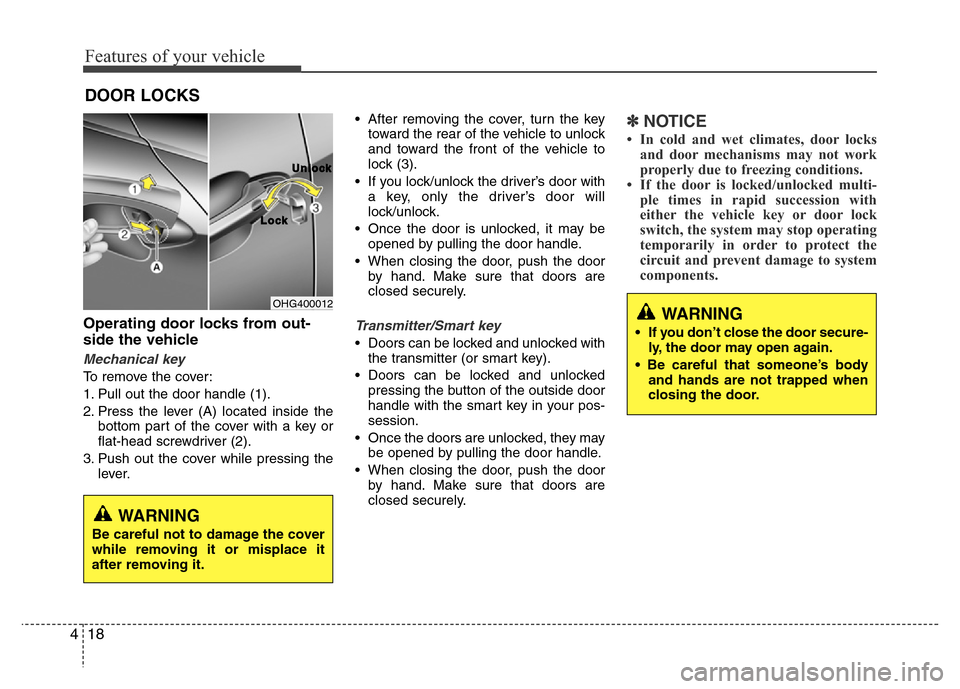
Operating door locks from out-
side the vehicle
Mechanical key
To remove the cover:
1. Pull out the door handle (1).
2. Press the lever (A) located inside the
bottom part of the cover with a key or
flat-head screwdriver (2).
3. Push out the cover while pressing the
lever.• After removing the cover, turn the key
toward the rear of the vehicle to unlock
and toward the front of the vehicle to
lock (3).
• If you lock/unlock the driver’s door with
a key, only the driver’s door will
lock/unlock.
• Once the door is unlocked, it may be
opened by pulling the door handle.
• When closing the door, push the door
by hand. Make sure that doors are
closed securely.
Transmitter/Smart key
• Doors can be locked and unlocked with
the transmitter (or smart key).
• Doors can be locked and unlocked
pressing the button of the outside door
handle with the smart key in your pos-
session.
• Once the doors are unlocked, they may
be opened by pulling the door handle.
• When closing the door, push the door
by hand. Make sure that doors are
closed securely.
✽NOTICE
• In cold and wet climates, door locks
and door mechanisms may not work
properly due to freezing conditions.
• If the door is locked/unlocked multi-
ple times in rapid succession with
either the vehicle key or door lock
switch, the system may stop operating
temporarily in order to protect the
circuit and prevent damage to system
components.
DOOR LOCKS
OHG400012
L L
o o
c c
k kU U
n n
l l
o o
c c
k k
WARNING
Be careful not to damage the cover
while removing it or misplace it
after removing it.
WARNING
• If you don’t close the door secure-
ly, the door may open again.
• Be careful that someone’s body
and hands are not trapped when
closing the door.
Page 99 of 473
Features of your vehicle
22 4
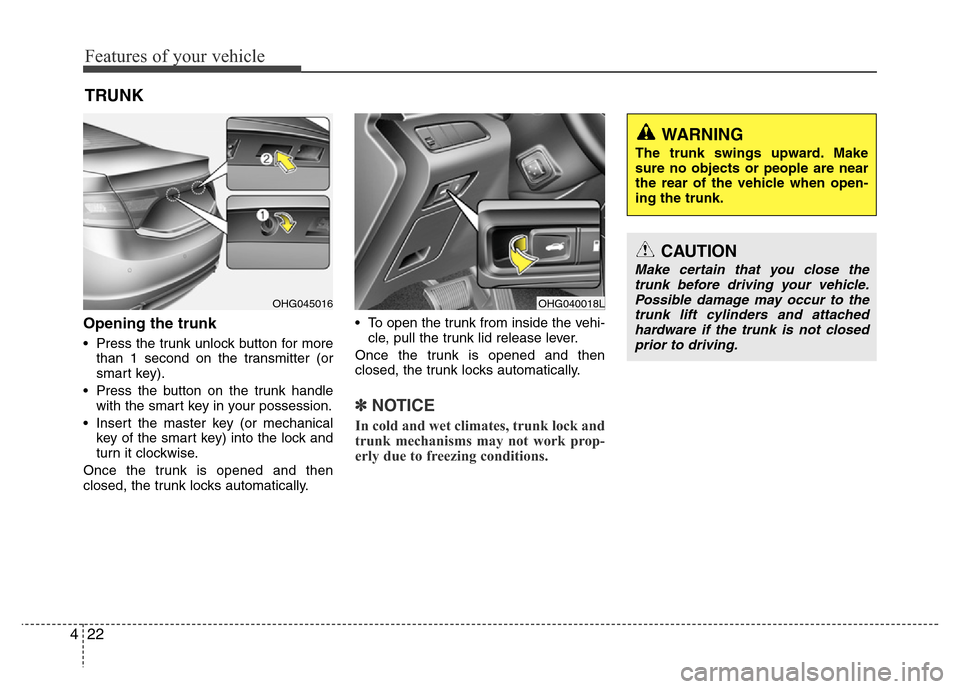
Opening the trunk
• Press the trunk unlock button for more
than 1 second on the transmitter (or
smart key).
• Press the button on the trunk handle
with the smart key in your possession.
• Insert the master key (or mechanical
key of the smart key) into the lock and
turn it clockwise.
Once the trunk is opened and then
closed, the trunk locks automatically.• To open the trunk from inside the vehi-
cle, pull the trunk lid release lever.
Once the trunk is opened and then
closed, the trunk locks automatically.
✽NOTICE
In cold and wet climates, trunk lock and
trunk mechanisms may not work prop-
erly due to freezing conditions.
TRUNK
OHG040018LOHG045016
CAUTION
Make certain that you close the
trunk before driving your vehicle.
Possible damage may occur to the
trunk lift cylinders and attached
hardware if the trunk is not closed
prior to driving.
WARNING
The trunk swings upward. Make
sure no objects or people are near
the rear of the vehicle when open-
ing the trunk.