display Hyundai Azera 2016 Manual PDF
[x] Cancel search | Manufacturer: HYUNDAI, Model Year: 2016, Model line: Azera, Model: Hyundai Azera 2016Pages: 521, PDF Size: 16.54 MB
Page 297 of 521
4217
Features of your vehicle
✽
✽NOTICE BEFORE DOWN-
LOADING CONTACTS
• Only contacts within connected
phones can be downloaded. Also
check to see that your mobile
phone supports the download fea-
ture.
• To learn more about whether your mobile phone supports contacts
downloads, refer to your mobile
phone user’s manual.
• The contacts for only the connect- ed phone can be downloaded.
Downloading Contacts
Press the key Select
[Phone] Select [Contacts
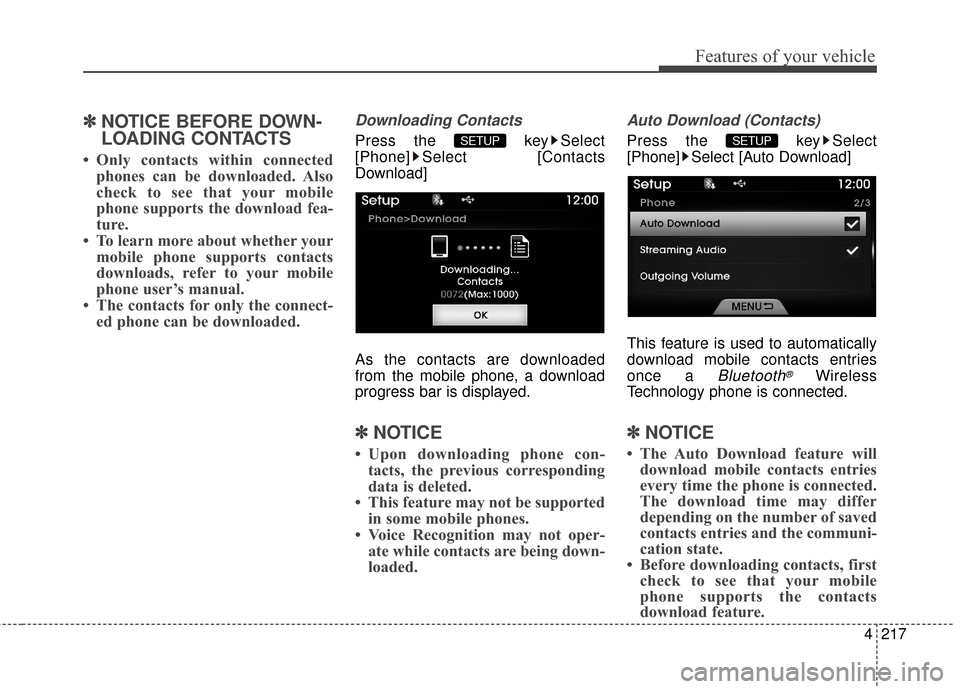
Download]
As the contacts are downloaded
from the mobile phone, a download
progress bar is displayed.
✽ ✽ NOTICE
• Upon downloading phone con-
tacts, the previous corresponding
data is deleted.
• This feature may not be supported in some mobile phones.
• Voice Recognition may not oper- ate while contacts are being down-
loaded.
Auto Download (Contacts)
Press the key Select
[Phone] Select [Auto Download]
This feature is used to automatically
download mobile contacts entries
once a
Bluetooth®Wireless
Technology phone is connected.
✽ ✽ NOTICE
• The Auto Download feature will
download mobile contacts entries
every time the phone is connected.
The download time may differ
depending on the number of saved
contacts entries and the communi-
cation state.
• Before downloading contacts, first check to see that your mobile
phone supports the contacts
download feature.
SETUP SETUP
Page 300 of 521
![Hyundai Azera 2016 Manual PDF Features of your vehicle
220
4
System Setting
Memory Information
Press the key Select [System]
Select [Memory Information]
This feature displays information
related to system memory.
(1) Using : Disp](/img/35/14461/w960_14461-299.png "Hyundai Azera 2016 Manual PDF Features of your vehicle
220
4
System Setting
Memory Information
Press the key Select [System]
Select [Memory Information]
This feature displays information
related to system memory.
(1) Using : Disp")
Features of your vehicle
220
4
System Setting
Memory Information
Press the key Select [System]
Select [Memory Information]
This feature displays information
related to system memory.
(1) Using : Displays capacity current- ly in use
(2) Capacity : Displays total capacity
Voice Recognition Mode Setting
Press the key Select
[System] Select [Prompt Feedback]
This feature is used to select the
desired prompt feedback option from
Normal and Expert.
(1) ON : When using voice recogni- tion, provides detailed guidance
prompts
(2) OFF : When using voice recogni- tion, omits some guidance
prompts
Language
Press the key Select [System]
Select [Language]
This feature is used to change the
system and voice recognition lan-
guage.
If the language is changed, the sys-
tem will restart and apply the select-
ed language.SETUP SETUP
SETUP
Page 303 of 521
4223
Features of your vehicle
2. Save Destination
“Save Destination” VR command is
used to assign a voice tag to the last
downloaded destination and store it
in a destination directory.
NOTE:
The Turn by Turn(TBT) feature sup-
ports the store of ten(10) destina-
tions in the TBT destinations
directory.
3. Route Preview
“Route Preview” VR command allows
the user to preview the route instruc-
tions (upcoming maneuver instruc-
tions) at any time during the route
guidance.
4. Destinations List
“Destinations List” VR command
allows the user to preview and delete
the stored destinations with their
associated voice tags in the Turn by
Turn destinations directory.5. Voice Guidance
“Voice Guidance” VR command
allows the user to mute/unmute the
Turn by Turn(TBT) direction
announcements.
6. Suspend Route
“Suspend Route” VR command
allows the user to suspend and
pause Turn by Turn(TBT) route guid-
ance while in the guidance mode.
7. Resume Route
“Resume Route” VR command
allows the user to resume Turn by
Turn(TBT) route guidance.
(3) (Blue Link
®for SOS)
In the case of an emergency,
requests for help to the Blue Link
®
center.
Call is connected to the Blue Link
®
emergency rescue center. Re-press-
ing the key will end the call.
If already on a Bluetooth
®phone call,
the call will end to connect you to the
Blue Link
®Emergency Rescue Center.
CAUTION
You cannot talk simultaneous- ly on the Bluetooth®phone
and Blue Link®phone.
While on a Bluetooth®call,
pressing the key or key will display a messageindicating that you are cur-rently on a call.
A message will be displayed if you receive a Bluetooth
®
Wireless Technology callwhile already on a Blue Link®
call. At this time, press the key on the steering wheel
remote controller to accept the call. The phone bell will notring.
Page 313 of 521
Driving your vehicle
85
Even if the smart key is in the vehi-cle, if it is far away from you, the
engine may not start.
When the ENGINE START/STOP button is in the ACC or ON posi-
tion, if any door is opened, the sys-
tem checks for the smart key. If the
smart key is not in the vehicle, the
warning "Key not in vehicle" will
illuminate on the LCD display. If all
doors are closed, the chime will
sound for 5 seconds. The warning
will turn off while the vehicle is
moving or the smart key is detect-
ed in the vehicle. Always have the
smart key with you.
The engine will start, only when the
smart key is in the vehicle. If the engine stalls while the vehicle
is in motion, do not attempt to move
the shift lever to the P (Park) posi-
tion. If the traffic and road conditions
permit, you may put the shift lever in
the N (Neutral) position while the
vehicle is still moving and press the
ENGINE START/STOP button in an
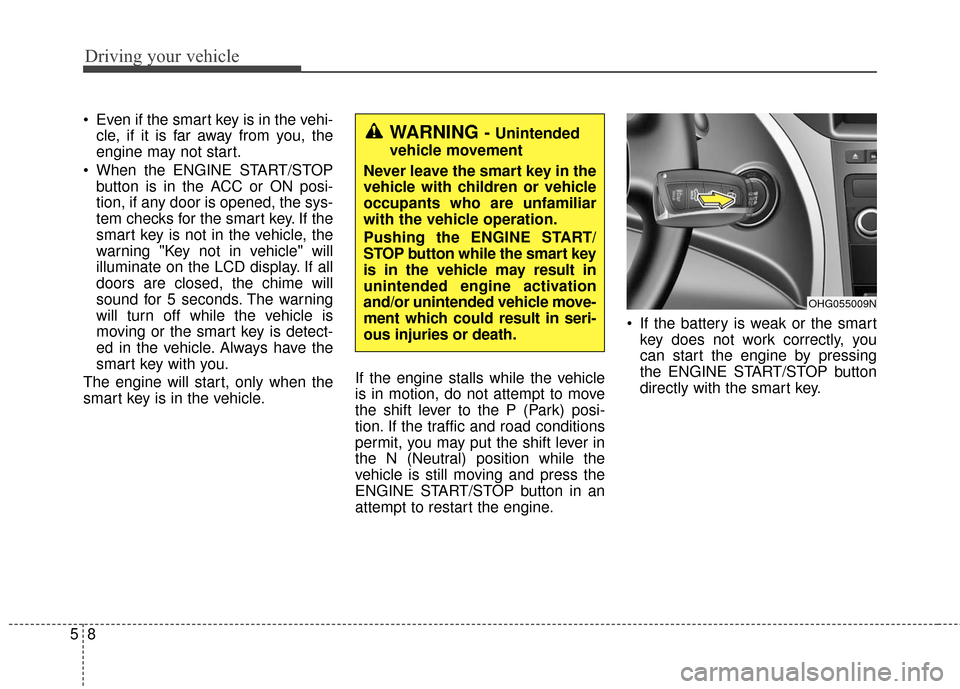
attempt to restart the engine. If the battery is weak or the smart
key does not work correctly, you
can start the engine by pressing
the ENGINE START/STOP button
directly with the smart key.WARNING - Unintended
vehicle movement
Never leave the smart key in the
vehicle with children or vehicle
occupants who are unfamiliar
with the vehicle operation.
Pushing the ENGINE START/
STOP button while the smart key
is in the vehicle may result in
unintended engine activation
and/or unintended vehicle move-
ment which could result in seri-
ous injuries or death.
OHG055009N
Page 316 of 521
511
Driving your vehicle
For smooth operation, depress thebrake pedal when shifting from N(Neutral) to a forward or reverse gear.
When stopped on an upgrade, do not
hold the vehicle with engine power.
Use the service brake or the parking
brake.
Transaxle ranges
The indicator in the instrument clus-
ter displays the shift lever position
when the ignition switch is in the ON
position.
P (Park)
Always come to a complete stop
before shifting into P (Park). This
position locks the transaxle and pre-
vents the drive wheels from rotating.
WARNING- Automatic
transaxle
Before leaving the driver’s seat,
always make sure the shift lever
is in the P (Park) position; then
set the parking brake fully and
shut the engine off. Always
make sure the shift lever is
latched in the P (Park) position
and set the parking brake fully.
Unexpected and sudden vehicle
movement can occur if these
precautions are not followed,
which could result in serious
injury or death.
CAUTION - Transaxle
To avoid damage to your transaxle, do not acceleratethe engine in R (Reverse) orany forward gear position withthe brakes on.
The transaxle may be dam- aged if you shift into P (Park)while the vehicle is in motion.
WARNING
Shifting into P (Park) while the vehicle is in motion will cause
the drive wheels to lock which
will cause you to lose control
of the vehicle.
Do not use the P (Park) posi- tion in place of the parking
brake. Always make sure the
shift lever is latched in the P
(Park) position and set the
parking brake fully.
Never leave a child unattend- ed in a vehicle.
Page 333 of 521
Driving your vehicle
28
5
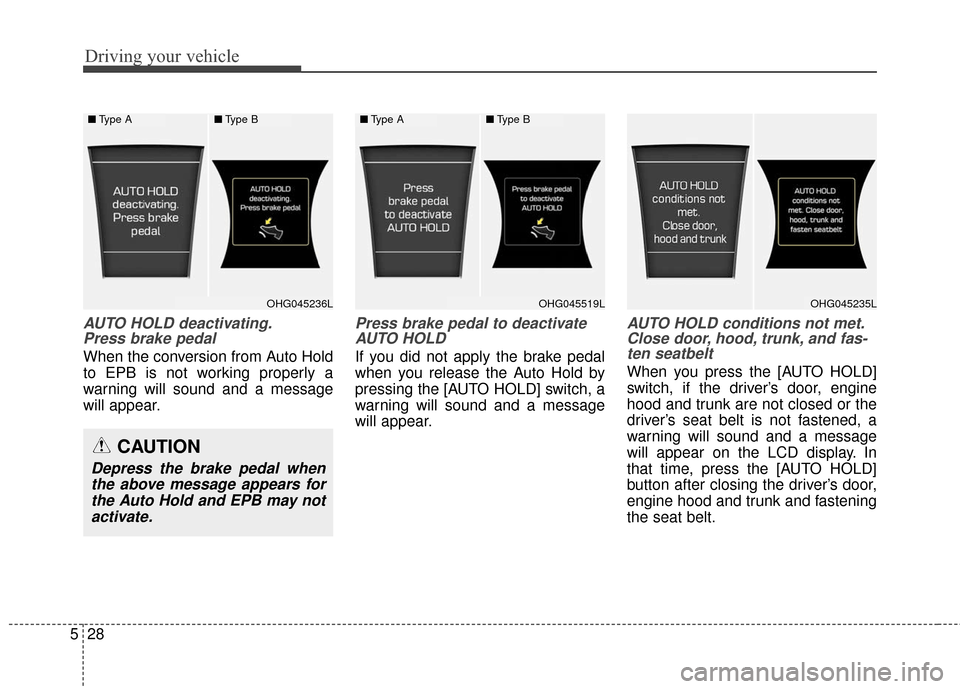
AUTO HOLD deactivating.
Press brake pedal
When the conversion from Auto Hold
to EPB is not working properly a
warning will sound and a message
will appear.
Press brake pedal to deactivateAUTO HOLD
If you did not apply the brake pedal
when you release the Auto Hold by
pressing the [AUTO HOLD] switch, a
warning will sound and a message
will appear.
AUTO HOLD conditions not met.Close door, hood, trunk, and fas-ten seatbelt
When you press the [AUTO HOLD]
switch, if the driver’s door, engine
hood and trunk are not closed or the
driver’s seat belt is not fastened, a
warning will sound and a message
will appear on the LCD display. In
that time, press the [AUTO HOLD]
button after closing the driver’s door,
engine hood and trunk and fastening
the seat belt.
CAUTION
Depress the brake pedal when
the above message appears forthe Auto Hold and EPB may notactivate.
■ Type A■Type B
OHG045236LOHG045235L
■Type A■Type B
OHG045519L
Page 349 of 521
Driving your vehicle
44
5
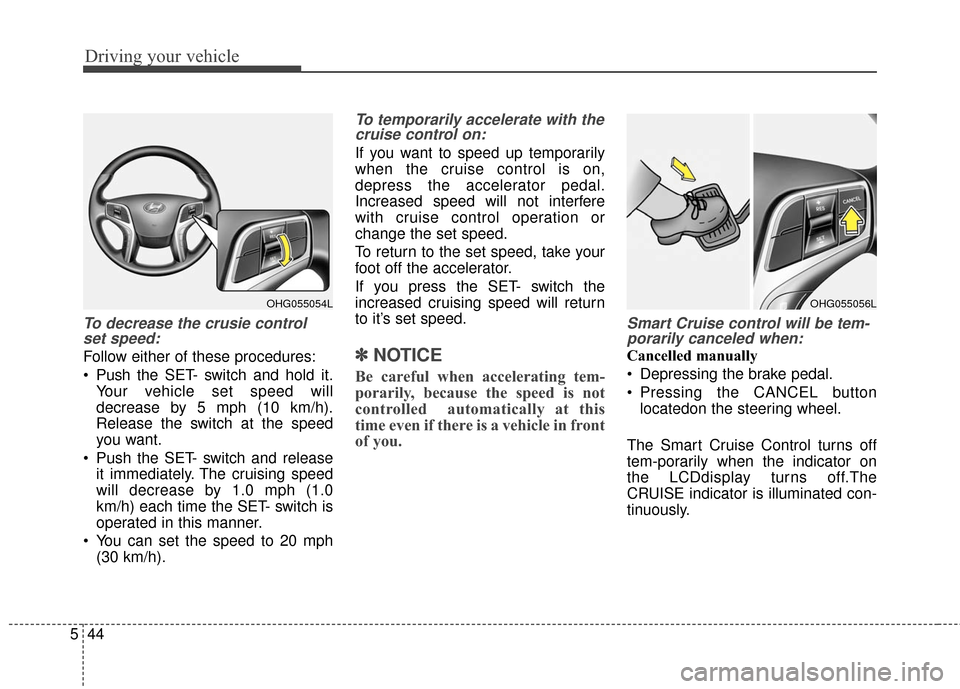
To decrease the crusie control
set speed:
Follow either of these procedures:
Push the SET- switch and hold it.
Your vehicle set speed will
decrease by 5 mph (10 km/h).
Release the switch at the speed
you want.
Push the SET- switch and release it immediately. The cruising speed
will decrease by 1.0 mph (1.0
km/h) each time the SET- switch is
operated in this manner.
You can set the speed to 20 mph (30 km/h).
To temporarily accelerate with thecruise control on:
If you want to speed up temporarily
when the cruise control is on,
depress the accelerator pedal.
Increased speed will not interfere
with cruise control operation or
change the set speed.
To return to the set speed, take your
foot off the accelerator.
If you press the SET- switch the
increased cruising speed will return
to it’s set speed.
✽ ✽ NOTICE
Be careful when accelerating tem-
porarily, because the speed is not
controlled automatically at this
time even if there is a vehicle in front
of you.
Smart Cruise control will be tem-
porarily canceled when:
Cancelled manually
Depressing the brake pedal.
Pressing the CANCEL button
locatedon the steering wheel.
The Smart Cruise Control turns off
tem-porarily when the indicator on
the LCDdisplay turns off.The
CRUISE indicator is illuminated con-
tinuously.
OHG055054LOHG055056L
Page 350 of 521
545
Driving your vehicle
Cancelled automatically
The driver's door is opened.
The EPB (electronic parking brake)is applied.
The vehicle speed is over 110 mph (180 km/h)
The vehicle stops on a steep incline.
The ESC or ABS is operating.
The ESC is turned off.
The sensor or the cover is dirty or blocked with foreign matter.
The vehicle stops and go repeat- edly for a long period of time.
The driver starts driving by depressing the accelerator pedal
or pushing the RES+ switch if a
vehicle stops far away ahead of the
your vehicle.
The shift lever is shifted to N (Neutral), R (Reverse), D (Drive).
The vehicle stops on a steep incline.
The vehicle stops and go repeat- edly for a long period of time.
The Smart Cruise Control has mal- functioned. The accelerator pedal is continu-
ously depressed for more than 1
minute.
Each of these actions will cancel
the smart cruise control operation.
(The SET indicator, set speed and
vehicle to vehicle distance on the
LCD display will go off.)
In a condition the smart cruise con-
trol is cancelled automatically, the
smart cruise control will not
resume even though the RES+ or
SET- switch is pushed. Also, the
EPB (electronic parking brake) will
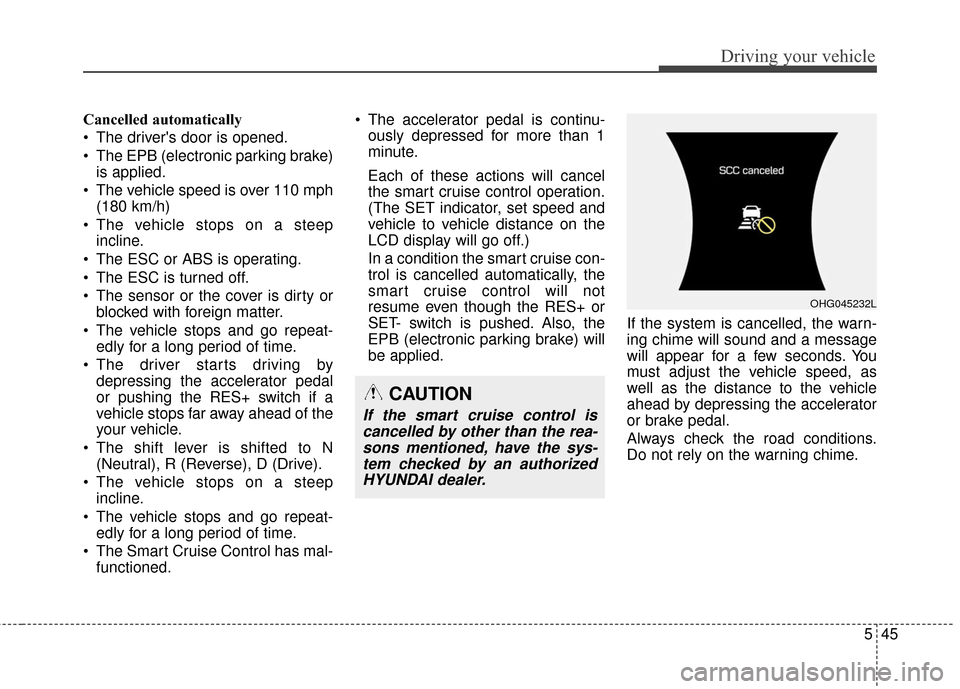
be applied. If the system is cancelled, the warn-
ing chime will sound and a message
will appear for a few seconds. You
must adjust the vehicle speed, as
well as the distance to the vehicle
ahead by depressing the accelerator
or brake pedal.
Always check the road conditions.
Do not rely on the warning chime.
OHG045232L
CAUTION
If the smart cruise control is
cancelled by other than the rea-sons mentioned, have the sys-tem checked by an authorizedHYUNDAI dealer.
Page 352 of 521

547
Driving your vehicle
Smart cruise control vehicle to
vehicle distance
To set vehicle to vehicle distance:
This function allows you to program
the vehicle to maintain relative dis-
tance to the vehicle ahead without
depressing the accelerator pedal or
brake pedal.
The vehicle to vehicle distance will
automatically activate when the
smart cruise control system is on.
Select the appropriate distance
according to road conditions and
vehicle speed.Each time the button is pressed, the
vehicle to vehicle distance changes
as follows:
For example, if you drive at 55 mph
(90 km/h), the distance maintain as
follows;
Distance 4 - approximately 172 feet
(52 m)
Distance 3 - approximately 130 feet (40 m)
Distance 2 - approximately 106 feet (32 m)
Distance 1 - approximately 82 feet (25 m)
✽ ✽NOTICE
The 'Distance 4' is always set when
the system is used for the first time
after starting the engine.
The vehicle will maintain the set
speed, when the lane ahead is
clear.
The vehicle will slow down or speed up to maintain the selected
distance, when there is a vehicle
ahead of you in the lane. (A vehicle
will appear in front of your vehicle
in the LCD display only when there
is an actual vehicle in front of you)
OHG055057K
Distance 4 Distance 3 Distance 2
Distance 1
OHG056167N/OHG056166N
Distance 4
Distance 3
Distance 1
OHG056165N/OHG056164N
Distance 2
Page 366 of 521
561
Driving your vehicle
RCTA (Rear Cross Traffic Alert)
Operating conditions
To operate:
Go to the User Settings Mode
(Driving Assist) and select RCTA
(Rear Cross Traffic Alert) on the LCD
display (For more details, refer to
"LCD Display" in chapter 4.) . The
system will turn on and standby to
activate. The system will activate
when vehicle speed is below 6.2
mph (10 km/h) with the shift lever in
R (Reverse).
✽ ✽ NOTICE
The RCTA (Rear Cross Traffic
Alert) detecting range is about 1.64
ft (0.5m) ~ 65 ft (20m). A vehicle will
be detected if the vehicle speed is 2.5
mph (4 km/h) ~ 22.4 mph (36 km/h)
within the detecting range. However,
the detecting range may change
under different conditions. Always
pay attention to the surroundings.
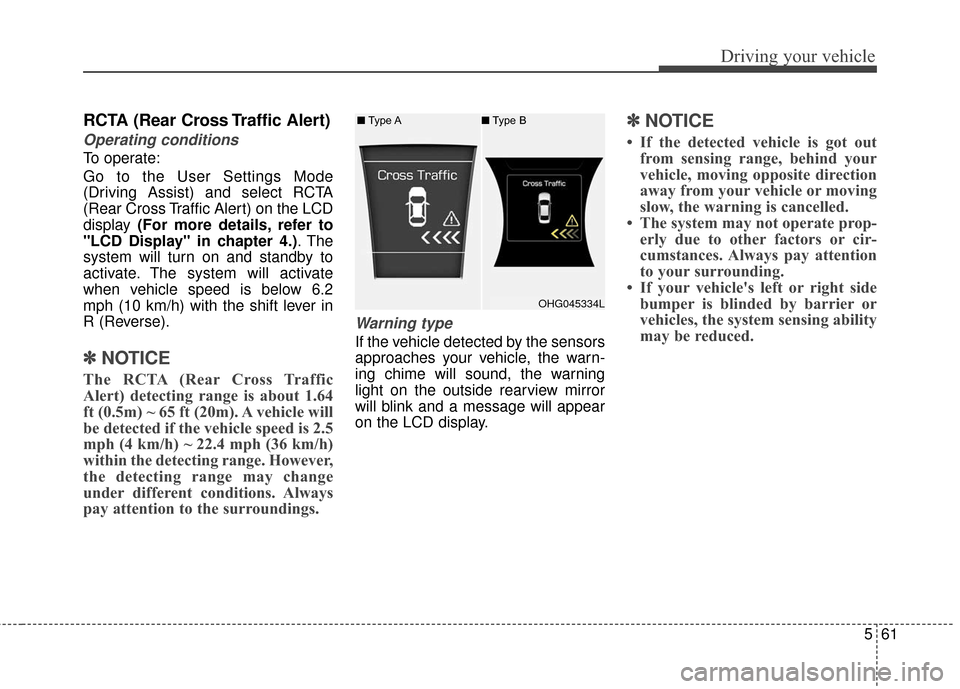
Warning type
If the vehicle detected by the sensors
approaches your vehicle, the warn-
ing chime will sound, the warning
light on the outside rearview mirror
will blink and a message will appear
on the LCD display.
✽ ✽NOTICE
• If the detected vehicle is got out
from sensing range, behind your
vehicle, moving opposite direction
away from your vehicle or moving
slow, the warning is cancelled.
• The system may not operate prop- erly due to other factors or cir-
cumstances. Always pay attention
to your surrounding.
• If your vehicle's left or right side bumper is blinded by barrier or
vehicles, the system sensing ability
may be reduced.
OHG045334L
■
Type A ■Type B