cruise control Hyundai Azera 2016 Owner's Manual
[x] Cancel search | Manufacturer: HYUNDAI, Model Year: 2016, Model line: Azera, Model: Hyundai Azera 2016Pages: 521, PDF Size: 16.54 MB
Page 7 of 521
1
2
3
4
5
6
7
8I
IntroductionHow to use this manual / Fuel requirements / Vehicle break-in process / Vehicle data collection and event data recorders
Your vehicle at a glance
Exterior overview / Interior overview / Instrument panel overview / Engi\
ne compartment
Safety features of your vehicle
Seats / Seat belts / Child restraint system / Air bag
Features of your vehicleKeys / Door locks / Trunk / Windows / Hood / Fuel filler lid / Sunroof / Steering wheel / Mirrors /
Instrument cluster / Lighting / Wipers & Washers / Climate control system / Multimedia system / Etc.
Driving your vehicleBefore driving / Engine start/stop button / Transaxle / Brake system / Cruise control system /
Active ECO system / Winter driving / Vehicle load limit / Etc.
What to do in an emergencyRoad warning / Emergency while driving / Emergency starting / Engine overheat / TPMS / Flat tire / Towing / Etc.
MaintenanceEngine compartment / Maintenance service / Engine oil / Engine coolant /\
Brake fluid / Washer fluid /
Parking brake / Air cleaner / Wiper blades / Battery / Tire and wheels / Fuses / Light bulbs / Etc.
Specifications, Consumer information and Reporting safety defects
Index
table of contents
Page 19 of 521
25
Your vehicle at a glance
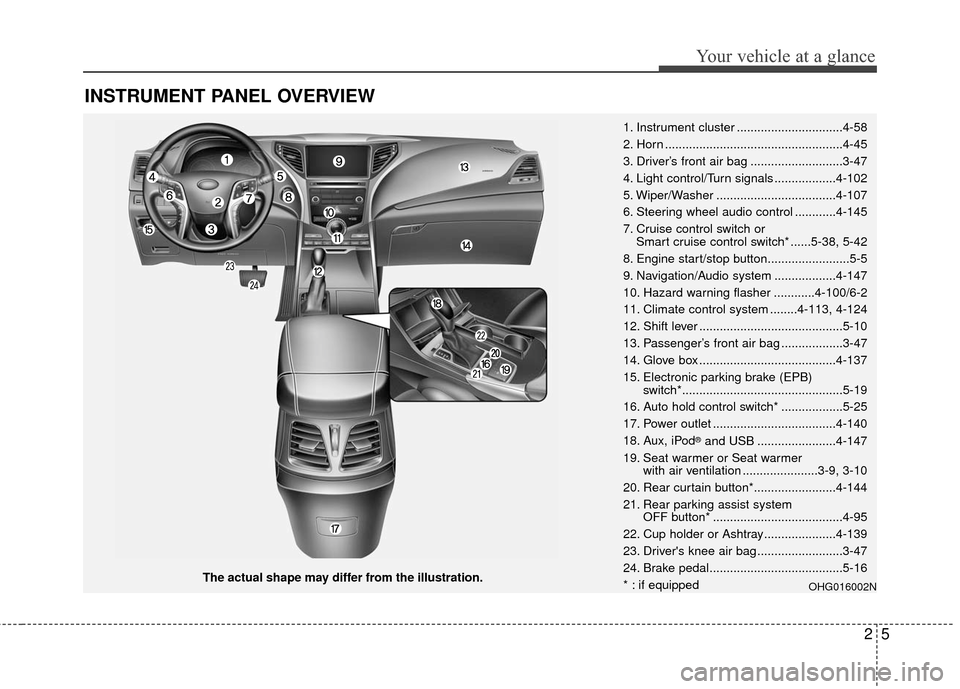
INSTRUMENT PANEL OVERVIEW
The actual shape may differ from the illustration.1. Instrument cluster ...............................4-58
2. Horn ....................................................4-45
3. Driver’s front air bag ...........................3-47
4. Light control/Turn signals ..................4-102
5. Wiper/Washer ...................................4-107
6. Steering wheel audio control ............4-145
7. Cruise control switch or
Smart cruise control switch* ......5-38, 5-42
8. Engine start/stop button........................5-5
9. Navigation/Audio system ..................4-147
10. Hazard warning flasher ............4-100/6-2
11. Climate control system ........4-113, 4-124
12. Shift lever ..........................................5-10
13. Passenger’s front air bag ..................3-47
14. Glove box ........................................4-137
15. Electronic parking brake (EPB) switch*...............................................5-19
16. Auto hold control switch* ..................5-25
17. Power outlet ....................................4-140
18. Aux, iPod
®and USB .......................4-147
19. Seat warmer or Seat warmer with air ventilation ......................3-9, 3-10
20. Rear curtain button*........................4-144
21. Rear parking assist system OFF button* ......................................4-95
22. Cup holder or Ashtray.....................4-139
23. Driver's knee air bag .........................3-47
24. Brake pedal.......................................5-16
* : if equipped
OHG016002N
Page 166 of 521
Features of your vehicle
86
4
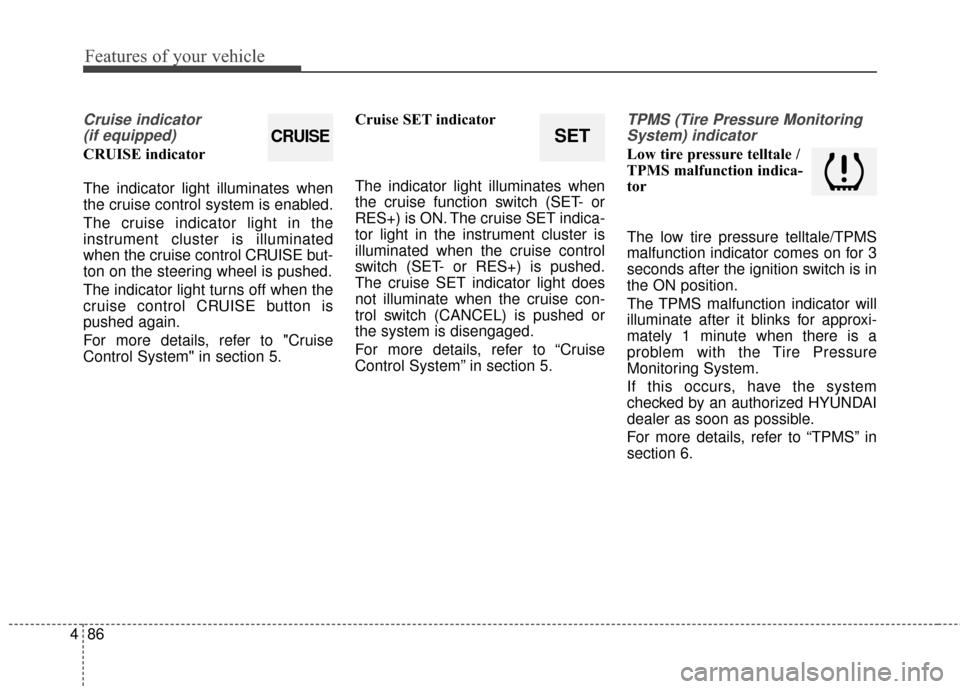
Cruise indicator
(if equipped)
CRUISE indicator
The indicator light illuminates when
the cruise control system is enabled.
The cruise indicator light in the
instrument cluster is illuminated
when the cruise control CRUISE but-
ton on the steering wheel is pushed.
The indicator light turns off when the
cruise control CRUISE button is
pushed again.
For more details, refer to "Cruise
Control System" in section 5. Cruise SET indicator
The indicator light illuminates when
the cruise function switch (SET- or
RES+) is ON. The cruise SET indica-
tor light in the instrument cluster is
illuminated when the cruise control
switch (SET- or RES+) is pushed.
The cruise SET indicator light does
not illuminate when the cruise con-
trol switch (CANCEL) is pushed or
the system is disengaged.
For more details, refer to “Cruise
Control System” in section 5.
TPMS (Tire Pressure Monitoring
System) indicator
Low tire pressure telltale /
TPMS malfunction indica-
tor
The low tire pressure telltale/TPMS
malfunction indicator comes on for 3
seconds after the ignition switch is in
the ON position.
The TPMS malfunction indicator will
illuminate after it blinks for approxi-
mately 1 minute when there is a
problem with the Tire Pressure
Monitoring System.
If this occurs, have the system
checked by an authorized HYUNDAI
dealer as soon as possible.
For more details, refer to “TPMS” in
section 6.
SETCRUISE
Page 306 of 521
Driving your vehicle
Before driving . . . . . . . . . . . . . . . . . . . . . . . . . . . . . . 5-3
Engine start/stop button . . . . . . . . . . . . . . . . . . . . . 5-5
• Illuminated ENGINE START/STOP button . . . . . . . 5-5
. . . . . . . . . . . 5-5
. . . . . . . . . . . . . . . . . . . . . . . . . . . . 5-7
Automatic transaxle . . . . . . . . . . . . . . . . . . . . . . . . 5-10
. . . . . . . . . . . . . . . . . . 5-10
Brake system . . . . . . . . . . . . . . . . . . . . . . . . . . . . . . 5-16
. . . . . . . . . . . . . . . . . . . . . . . . . . . . . . . . 5-16
. . . . . . . . . . . . . . . . . . . . . . . . . . . . . . . 5-18
. . . . . . . . . . . . . . . . 5-19
. . . . . . . . . . . . . . . . . . . . . . . . . . . . . . . . . . . 5-\
25
. . . . . . . . . . . . . . . . . . 5-29
. . . . . . . . . . . . . . . 5-30
. . . . . . . . . . . . 5-34
. . . . . . . . . . . . . . . . . . 5-35
Cruise control system. . . . . . . . . . . . . . . . . . . . . . . 5-38
Smart cruise control system . . . . . . . . . . . . . . . . . 5-42
Active ECO system. . . . . . . . . . . . . . . . . . . . . . . . . 5-56
Blind spot detection system (BSD) . . . . . . . . . . . . 5-57
LCA (Lane Change Assist) . . . . . . . . . . . . . . . . . . . . 5-58
. . . . . . . . . . . . . . . . . . . . . . . . . . . . 5-63
Lane departure warning system (LDWS) . . . . . . 5-65
Forward collision warning system (FCWS). . . . . 5-69
Economical operation . . . . . . . . . . . . . . . . . . . . . . 5-73
Special driving conditions . . . . . . . . . . . . . . . . . . . 5-75
. . . . . . . . . . . . . . . . . . 5-75
. . . . . . . . . . . . . . . . . . . . . . . . . . . 5-75
. . . . . . . . . . . . . . . . . . . . . . . . . . . . 5-76
. . . . . . . . . . . . . . . . . . . . . . . . . . . . . . 5-76
. . . . . . . . . . . . . . . . . . . . . . . . . . . . 5-77
. . . . . . . . . . . . . . . . . . . . . . . 5-77
. . . . . . . . . . . . . . . . . . . . . . . . . . . . . . 5-77
. . . . . . . . . . . . . . . . . . . . . . . . . . . . . 5-78
Winter driving . . . . . . . . . . . . . . . . . . . . . . . . . . . . 5-79
Vehicle load limit . . . . . . . . . . . . . . . . . . . . . . . . . . 5-83
. . . . . . . . . . . . . . 5-83
. . . . . . . . . . . . . . . . . . . . . . . . . . . . 5-86
Vehicle weight . . . . . . . . . . . . . . . . . . . . . . . . . . . . . 5-87
. . . . . . . . . . . . . . . . . . . . . . . . . . . . 5-87
. . . . . . . . . . . . . . . . . . . . . . . . . . . 5-87
. . . . . . . . . . . . . . . . . . . . . . . . . . . . . . . . 5-87
. . . . . . . . . . . . . . . . . . . . . . 5-87
. . . . . . . . . . . . . . . 5-87
. . . . . . . . . . . . . . . . . . . 5-87
. . . . . . . . . . . . 5-87
Trailer Towing . . . . . . . . . . . . . . . . . . . . . . . . . . . . 5-88
5
Page 330 of 521
525
Driving your vehicle
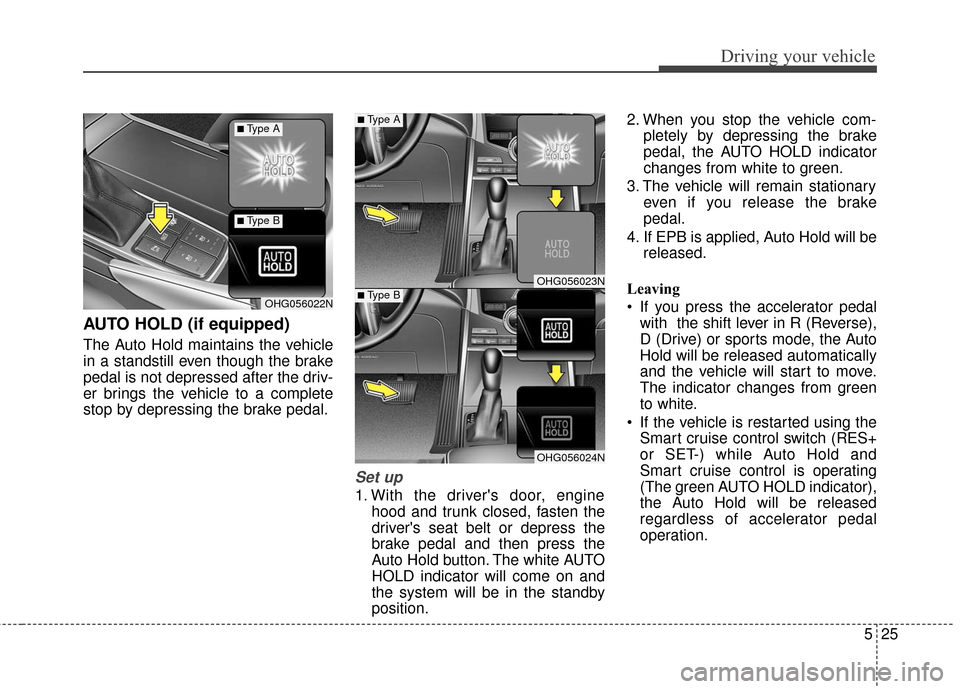
AUTO HOLD (if equipped)
The Auto Hold maintains the vehicle
in a standstill even though the brake
pedal is not depressed after the driv-
er brings the vehicle to a complete
stop by depressing the brake pedal.
Set up
1. With the driver's door, enginehood and trunk closed, fasten the
driver's seat belt or depress the
brake pedal and then press the
Auto Hold button. The white AUTO
HOLD indicator will come on and
the system will be in the standby
position. 2. When you stop the vehicle com-
pletely by depressing the brake
pedal, the AUTO HOLD indicator
changes from white to green.
3. The vehicle will remain stationary even if you release the brake
pedal.
4. If EPB is applied, Auto Hold will be released.
Leaving
If you press the accelerator pedal with the shift lever in R (Reverse),
D (Drive) or sports mode, the Auto
Hold will be released automatically
and the vehicle will start to move.
The indicator changes from green
to white.
If the vehicle is restarted using the Smart cruise control switch (RES+
or SET-) while Auto Hold and
Smart cruise control is operating
(The green AUTO HOLD indicator),
the Auto Hold will be released
regardless of accelerator pedal
operation.
OHG056023N
OHG056024N
OHG056022N
■Type A
■Type B
■Type A
■Type B
Page 337 of 521
Driving your vehicle
32
5
in use when the ESC acti-
vates, the Cruise Control
automatically disengages.
The Cruise Control can be
reengaged when the road
conditions allow. See
“Cruise Control System”
later in this chapter. (if
equipped)ESC operation off
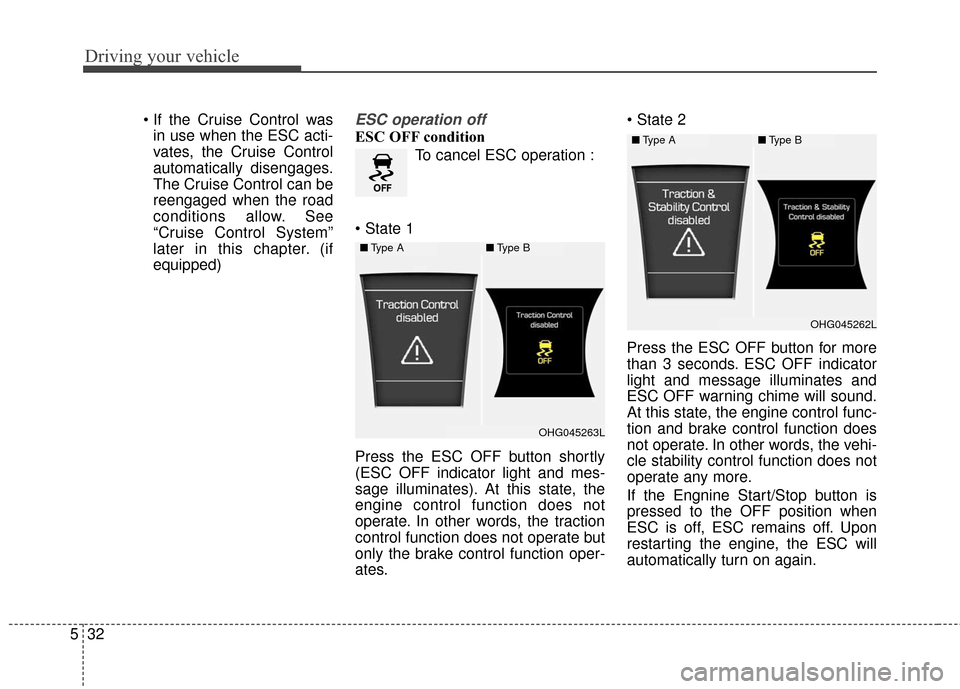
ESC OFF condition
To cancel ESC operation :
Press the ESC OFF button shortly
(ESC OFF indicator light and mes-
sage illuminates). At this state, the
engine control function does not
operate. In other words, the traction
control function does not operate but
only the brake control function oper-
ates.
Press the ESC OFF button for more
than 3 seconds. ESC OFF indicator
light and message illuminates and
ESC OFF warning chime will sound.
At this state, the engine control func-
tion and brake control function does
not operate. In other words, the vehi-
cle stability control function does not
operate any more.
If the Engnine Start/Stop button is
pressed to the OFF position when
ESC is off, ESC remains off. Upon
restarting the engine, the ESC will
automatically turn on again.
■
Type A■Type B
OHG045263L
■Type A■Type B
OHG045262L
Page 343 of 521
Driving your vehicle
38
5
CRUISE CONTROL SYSTEM
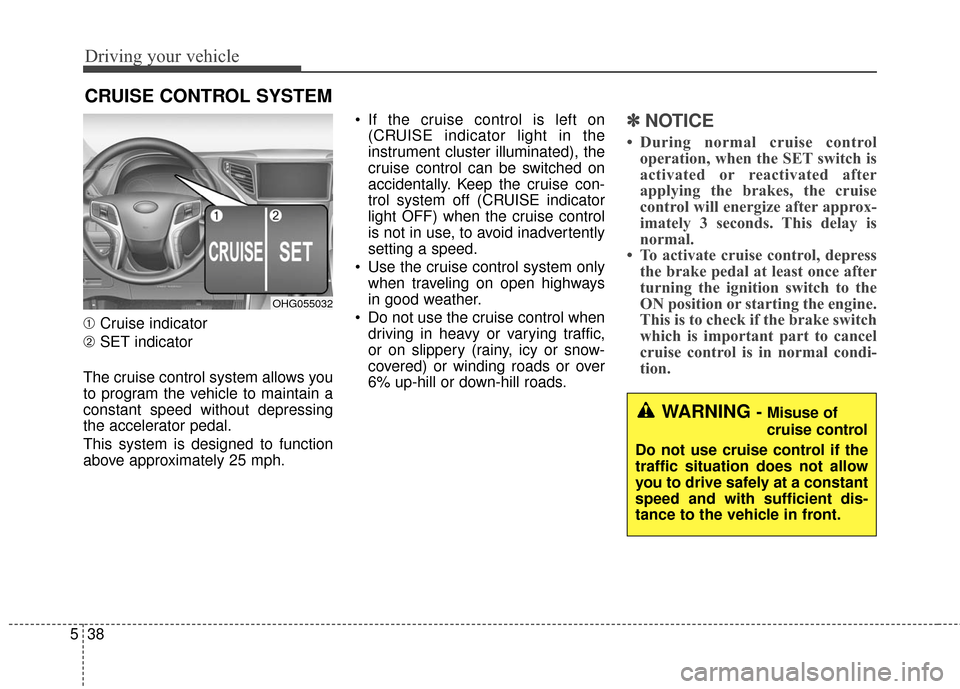
➀ Cruise indicator
➁ SET indicator
The cruise control system allows you
to program the vehicle to maintain a
constant speed without depressing
the accelerator pedal.
This system is designed to function
above approximately 25 mph. If the cruise control is left on
(CRUISE indicator light in the
instrument cluster illuminated), the
cruise control can be switched on
accidentally. Keep the cruise con-
trol system off (CRUISE indicator
light OFF) when the cruise control
is not in use, to avoid inadvertently
setting a speed.
Use the cruise control system only when traveling on open highways
in good weather.
Do not use the cruise control when driving in heavy or varying traffic,
or on slippery (rainy, icy or snow-
covered) or winding roads or over
6% up-hill or down-hill roads.
✽ ✽ NOTICE
• During normal cruise control
operation, when the SET switch is
activated or reactivated after
applying the brakes, the cruise
control will energize after approx-
imately 3 seconds. This delay is
normal.
• To activate cruise control, depress the brake pedal at least once after
turning the ignition switch to the
ON position or starting the engine.
This is to check if the brake switch
which is important part to cancel
cruise control is in normal condi-
tion.
WARNING - Misuse of
cruise control
Do not use cruise control if the
traffic situation does not allow
you to drive safely at a constant
speed and with sufficient dis-
tance to the vehicle in front.
OHG055032
Page 344 of 521
539
Driving your vehicle
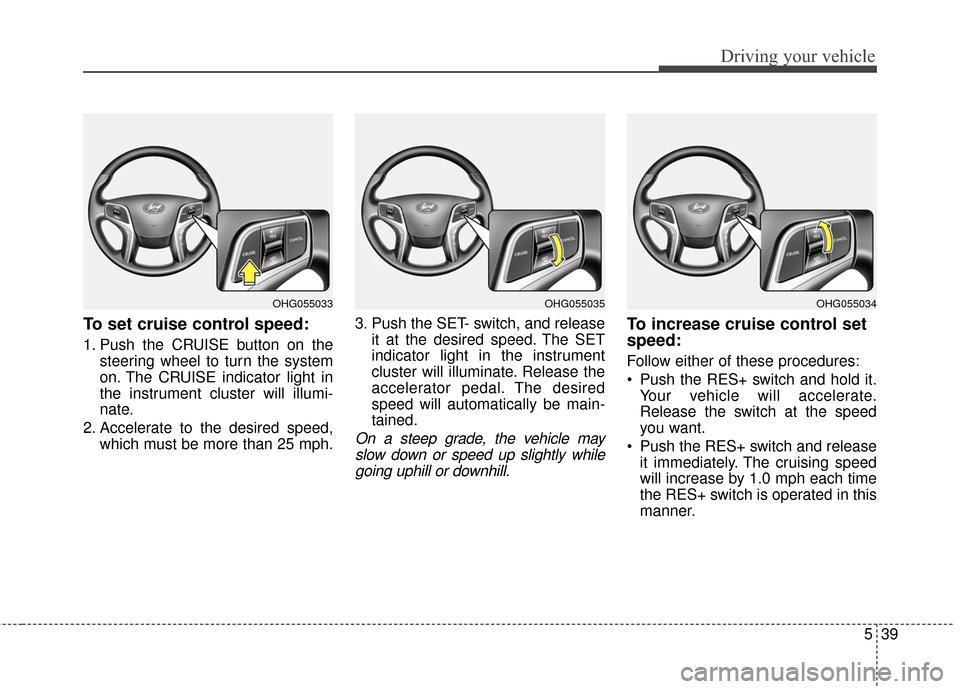
To set cruise control speed:
1. Push the CRUISE button on thesteering wheel to turn the system
on. The CRUISE indicator light in
the instrument cluster will illumi-
nate.
2. Accelerate to the desired speed, which must be more than 25 mph. 3. Push the SET- switch, and release
it at the desired speed. The SET
indicator light in the instrument
cluster will illuminate. Release the
accelerator pedal. The desired
speed will automatically be main-
tained.
On a steep grade, the vehicle mayslow down or speed up slightly whilegoing uphill or downhill.
To increase cruise control set
speed:
Follow either of these procedures:
Push the RES+ switch and hold it. Your vehicle will accelerate.
Release the switch at the speed
you want.
Push the RES+ switch and release it immediately. The cruising speed
will increase by 1.0 mph each time
the RES+ switch is operated in this
manner.
OHG055035OHG055034OHG055033
Page 345 of 521
Driving your vehicle
40
5
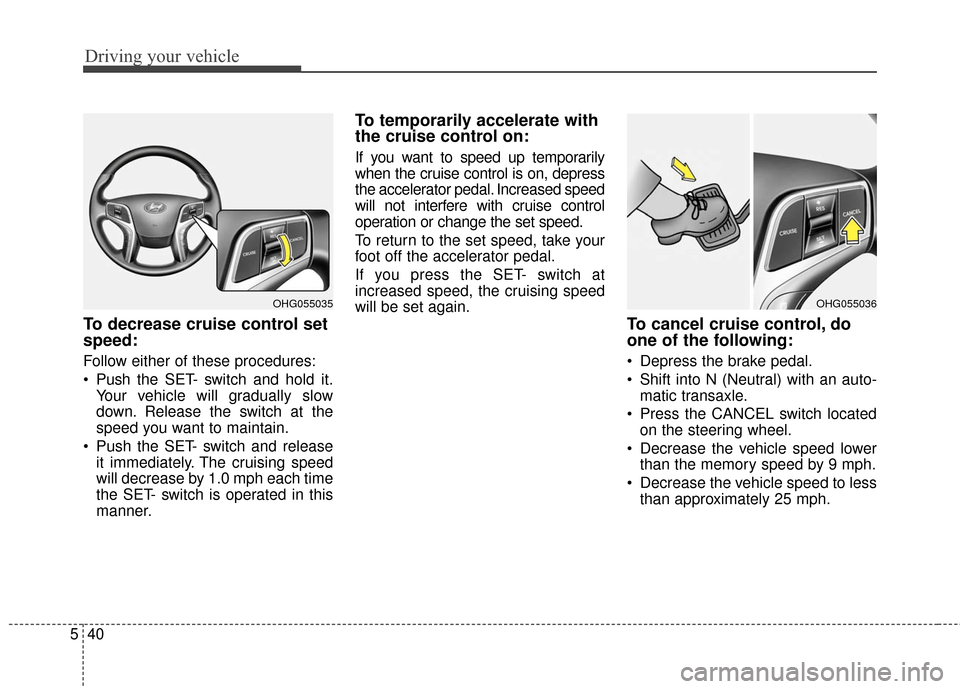
To decrease cruise control set
speed:
Follow either of these procedures:
Push the SET- switch and hold it.
Your vehicle will gradually slow
down. Release the switch at the
speed you want to maintain.
Push the SET- switch and release it immediately. The cruising speed
will decrease by 1.0 mph each time
the SET- switch is operated in this
manner.
To temporarily accelerate with
the cruise control on:
If you want to speed up temporarily
when the cruise control is on, depress
the accelerator pedal. Increased speed
will not interfere with cruise control
operation or change the set speed.
To return to the set speed, take your
foot off the accelerator pedal.
If you press the SET- switch at
increased speed, the cruising speed
will be set again.
To cancel cruise control, do
one of the following:
Depress the brake pedal.
Shift into N (Neutral) with an auto-matic transaxle.
Press the CANCEL switch located on the steering wheel.
Decrease the vehicle speed lower than the memory speed by 9 mph.
Decrease the vehicle speed to less than approximately 25 mph.
OHG055036OHG055035
Page 346 of 521
541
Driving your vehicle
Each of these actions will cancelcruise control operation (the SETindicator light in the instrument clus-ter will go off), but it will not turn thesystem off. If you wish to resumecruise control operation, push theRES+ switch located on your steer-ing wheel. You will return to your pre-viously preset speed.
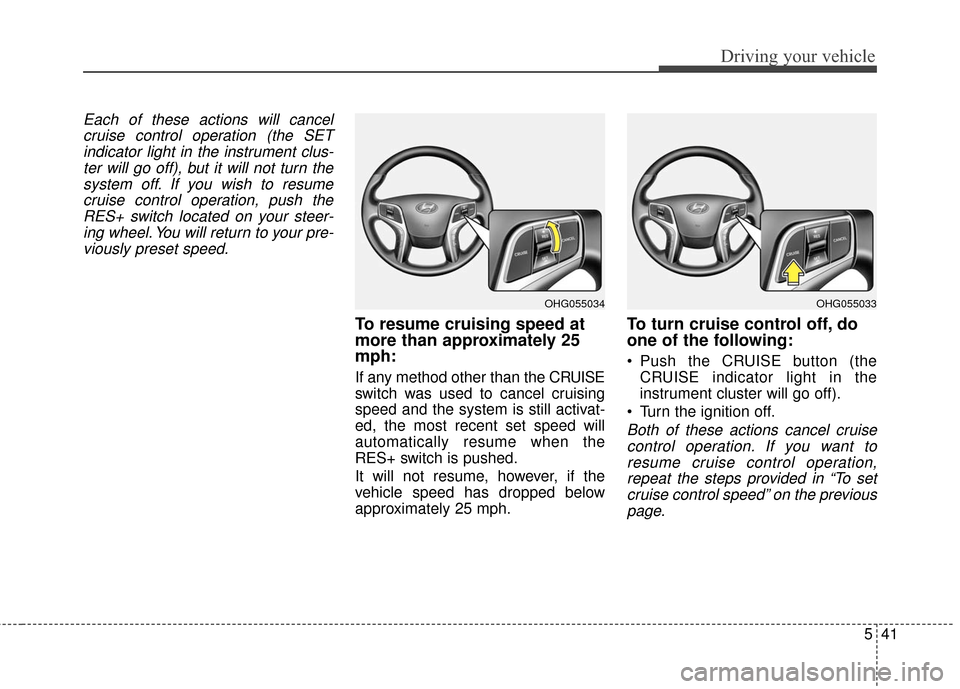
To resume cruising speed at
more than approximately 25
mph:
If any method other than the CR UISE
switch was used to cancel cruising
speed and the system is still activat-
ed, the most recent set speed will
automatically resume when the
RES+ switch is pushed.
It will not resume, however, if the
vehicle speed has dropped below
approximately 25 mph.
To turn cruise control off, do
one of the following:
Push the CRUISE button (the CRUISE indicator light in the
instrument cluster will go off).
Turn the ignition off.
Both of these actions cancel cruise control operation. If you want toresume cruise control operation,repeat the steps provided in “To setcruise control speed” on the previouspage.
OHG055034OHG055033