auto Hyundai Azera 2017 Owner's Guide
[x] Cancel search | Manufacturer: HYUNDAI, Model Year: 2017, Model line: Azera, Model: Hyundai Azera 2017Pages: 520, PDF Size: 16.33 MB
Page 101 of 520
Features of your vehicle
22
4
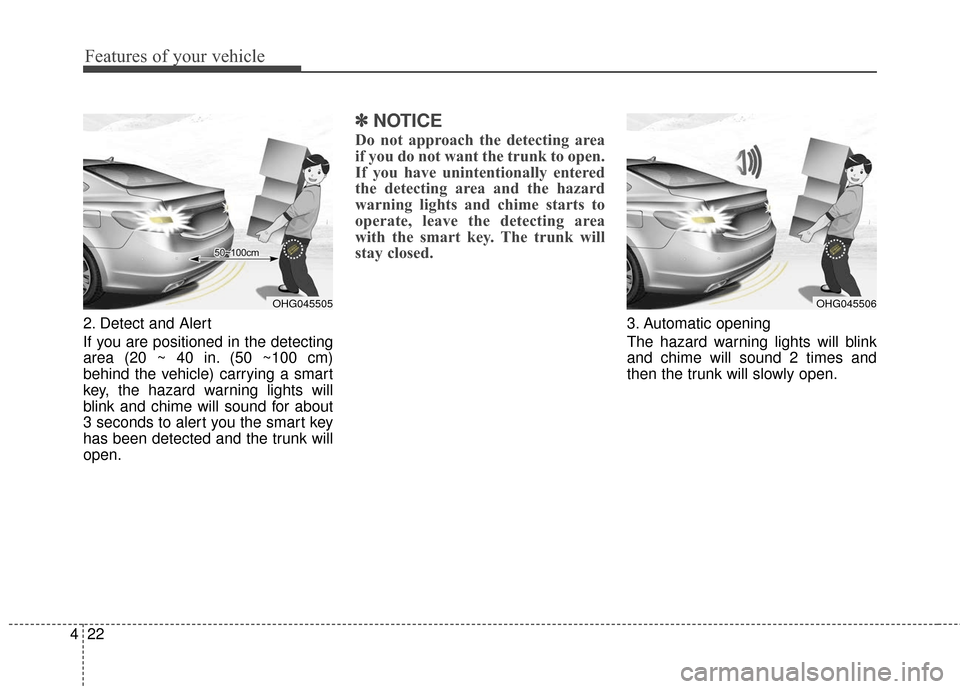
2. Detect and Alert
If you are positioned in the detecting
area (20 ~ 40 in. (50 ~100 cm)
behind the vehicle) carrying a smart
key, the hazard warning lights will
blink and chime will sound for about
3 seconds to alert you the smart key
has been detected and the trunk will
open.
✽ ✽
NOTICE
Do not approach the detecting area
if you do not want the trunk to open.
If you have unintentionally entered
the detecting area and the hazard
warning lights and chime starts to
operate, leave the detecting area
with the smart key. The trunk will
stay closed.
3. Automatic opening
The hazard warning lights will blink
and chime will sound 2 times and
then the trunk will slowly open.
OHG045505OHG045506
Page 104 of 520
425
Features of your vehicle
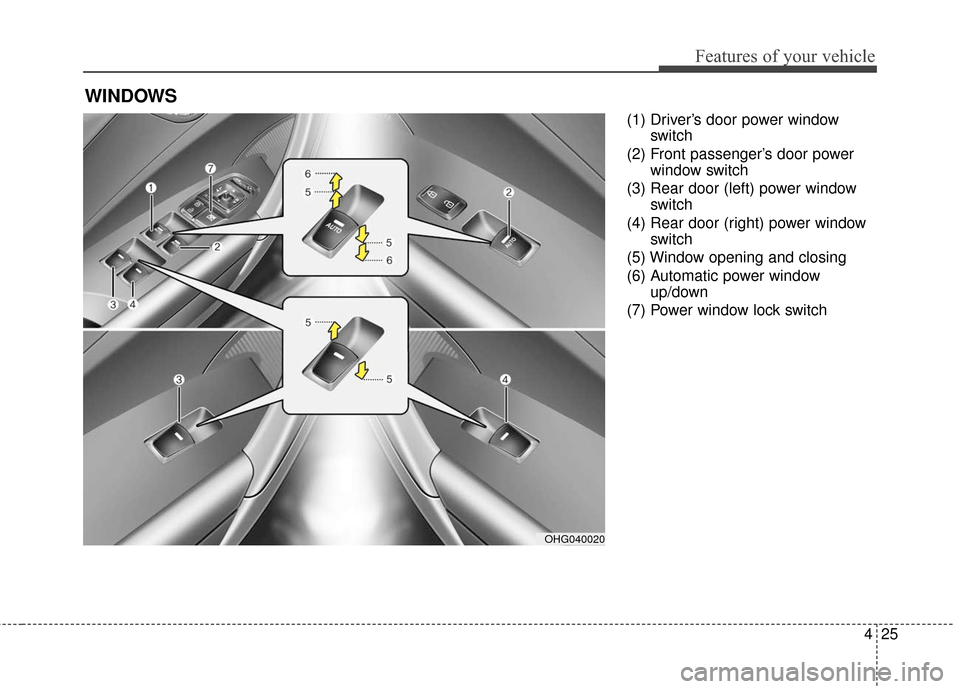
(1) Driver’s door power windowswitch
(2) Front passenger’s door power window switch
(3) Rear door (left) power window switch
(4) Rear door (right) power window switch
(5) Window opening and closing
(6) Automatic power window up/down
(7) Power window lock switch
WINDOWS
OHG040020
Page 106 of 520
427
Features of your vehicle
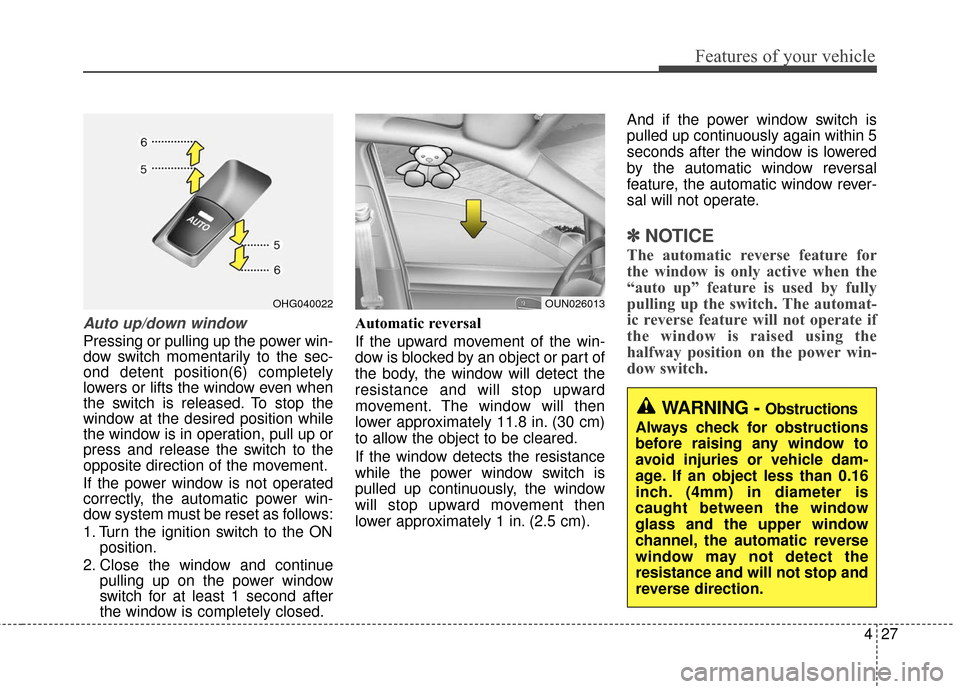
Auto up/down window
Pressing or pulling up the power win-
dow switch momentarily to the sec-
ond detent position(6) completely
lowers or lifts the window even when
the switch is released. To stop the
window at the desired position while
the window is in operation, pull up or
press and release the switch to the
opposite direction of the movement.
If the power window is not operated
correctly, the automatic power win-
dow system must be reset as follows:
1. Turn the ignition switch to the ONposition.
2. Close the window and continue pulling up on the power window
switch for at least 1 second after
the window is completely closed. Automatic reversal
If the upward movement of the win-
dow is blocked by an object or part of
the body, the window will detect the
resistance and will stop upward
movement. The window will then
lower approximately 11.8 in. (30 cm)
to allow the object to be cleared.
If the window detects the resistance
while the power window switch is
pulled up continuously, the window
will stop upward movement then
lower approximately 1 in. (2.5 cm). And if the power window switch is
pulled up continuously again within 5
seconds after the window is lowered
by the automatic window reversal
feature, the automatic window rever-
sal will not operate.
✽ ✽
NOTICE
The automatic reverse feature for
the window is only active when the
“auto up” feature is used by fully
pulling up the switch. The automat-
ic reverse feature will not operate if
the window is raised using the
halfway position on the power win-
dow switch.
OUN026013OHG040022
WARNING - Obstructions
Always check for obstructions
before raising any window to
avoid injuries or vehicle dam-
age. If an object less than 0.16
inch. (4mm) in diameter is
caught between the window
glass and the upper window
channel, the automatic reverse
window may not detect the
resistance and will not stop and
reverse direction.
Page 113 of 520
Features of your vehicle
34
4
Make sure to refuel your vehicle
according to the “Fuel requirements”
suggested in section 1.
If the fuel filler cap requires replace-
ment, use only a genuine HYUNDAI
cap or the equivalent specified for
your vehicle. An incorrect fuel filler
cap can result in a serious malfunc-
tion of the fuel system or emission
control system.Emergency fuel filler lid
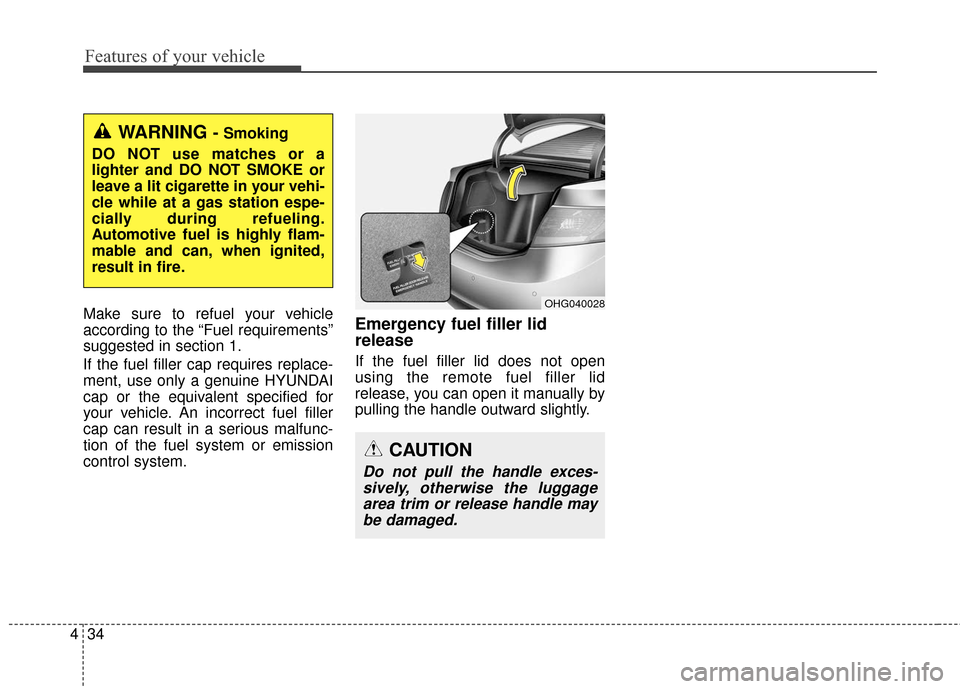
release
If the fuel filler lid does not open
using the remote fuel filler lid
release, you can open it manually by
pulling the handle outward slightly.
OHG040028
WARNING - Smoking
DO NOT use matches or a
lighter and DO NOT SMOKE or
leave a lit cigarette in your vehi-
cle while at a gas station espe-
cially during refueling.
Automotive fuel is highly flam-
mable and can, when ignited,
result in fire.
CAUTION
Do not pull the handle exces- sively, otherwise the luggagearea trim or release handle maybe damaged.
Page 117 of 520
Features of your vehicle
38
4
Automatic reversal
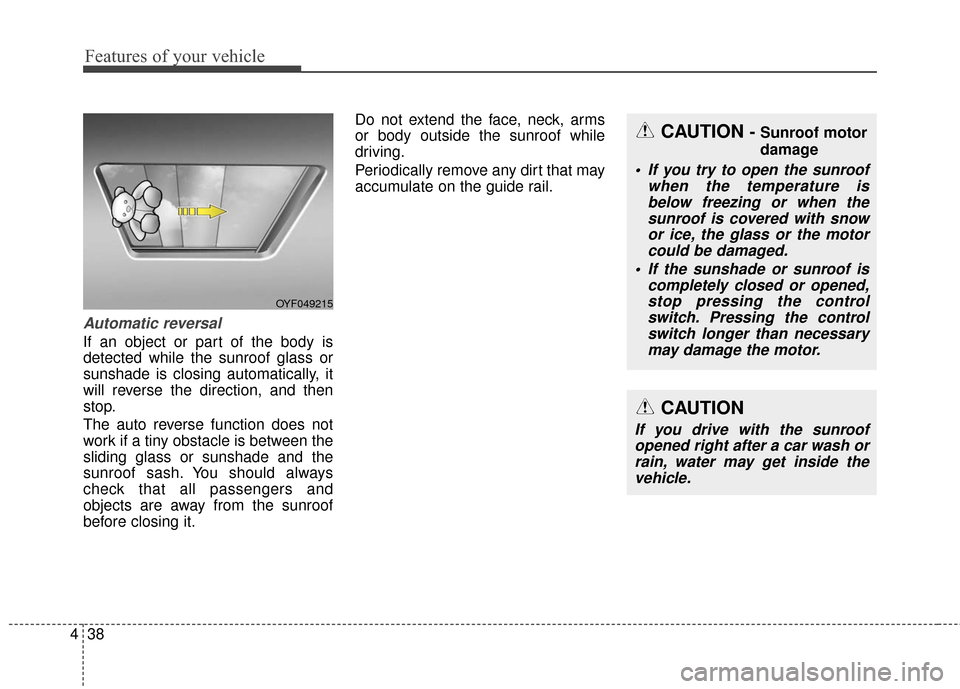
If an object or part of the body is
detected while the sunroof glass or
sunshade is closing automatically, it
will reverse the direction, and then
stop.
The auto reverse function does not
work if a tiny obstacle is between the
sliding glass or sunshade and the
sunroof sash. You should always
check that all passengers and
objects are away from the sunroof
before closing it. Do not extend the face, neck, arms
or body outside the sunroof while
driving.
Periodically remove any dirt that may
accumulate on the guide rail.
CAUTION
If you drive with the sunroof
opened right after a car wash orrain, water may get inside thevehicle.
CAUTION - Sunroof motor
damage
If you try to open the sunroof when the temperature isbelow freezing or when thesunroof is covered with snowor ice, the glass or the motorcould be damaged.
If the sunshade or sunroof is completely closed or opened,stop pressing the controlswitch. Pressing the controlswitch longer than necessarymay damage the motor.
OYF049215
Page 120 of 520
441
Features of your vehicle
5.
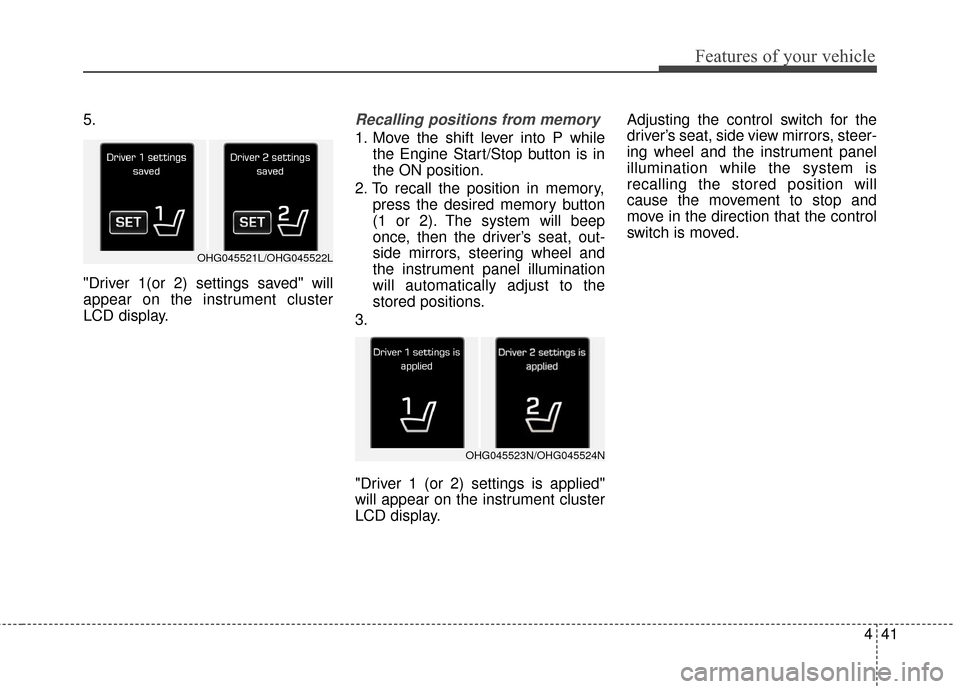
"Driver 1(or 2) settings saved" will
appear on the instrument cluster
LCD display.Recalling positions from memory
1. Move the shift lever into P whilethe Engine Start/Stop button is in
the ON position.
2. To recall the position in memory, press the desired memory button
(1 or 2). The system will beep
once, then the driver’s seat, out-
side mirrors, steering wheel and
the instrument panel illumination
will automatically adjust to the
stored positions.
3.
"Driver 1 (or 2) settings is applied"
will appear on the instrument cluster
LCD display. Adjusting the control switch for the
driver’s seat, side view mirrors, steer-
ing wheel and the instrument panel
illumination while the system is
recalling the stored position will
cause the movement to stop and
move in the direction that the control
switch is moved.
OHG045521L/OHG045522L
OHG045523N/OHG045524N
Page 121 of 520
Features of your vehicle
42
4
Easy access function
(if equipped)
With the shift lever in the P (Park)
position, the system will move the
driver's seat and steering wheel
automatically so you can comfortably
enter and exit the vehicle.
- The steering wheel will moveaway from the driver and the seat
will move rearward, when the
ENGINE START/ STOP button is
in the OFF position.
- The steering wheel will move toward the driver and the seat will
move forward, when the ENGINE
START/STOP button is in the
ACC position.
You can activate or deactivate this
feature. Refer to "User Settings
Mode" in this section.
Page 125 of 520
Features of your vehicle
46
4
Inside rearview mirror
Adjust the rearview mirror so that the
center view through the rear window
is seen. Make this adjustment before
you start driving.
Do not place objects in the rear seat
or cargo area which would interfere
with your vision through the rear win-
dow.
Electric chromic mirror (ECM)
with HomeLink®system and
compass
Your vehicle may be equipped with a
Gentex Automatic-Dimming Mirror
with a Z-Nav™ Electronic Compass
Display and an Integrated
HomeLink
®Wireless Control
System. During nighttime driving,
this feature will automatically detect
and reduce rearview mirror glare
while the compass indicates the
direction the vehicle is pointed. The
HomeLink
®Universal Transceiver
allows you to activate your garage
door(s), electric gate, home lighting,
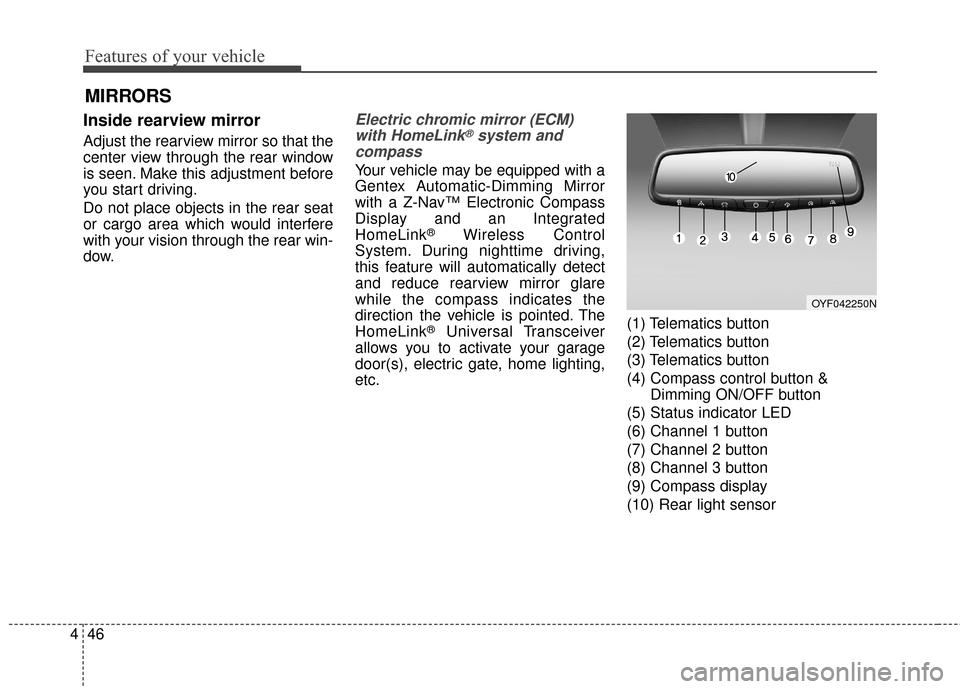
etc. (1) Telematics button
(2) Telematics button
(3) Telematics button
(4) Compass control button &
Dimming ON/OFF button
(5) Status indicator LED
(6) Channel 1 button
(7) Channel 2 button
(8) Channel 3 button
(9) Compass display
(10) Rear light sensor
MIRRORS
OYF042250N
Page 126 of 520
447
Features of your vehicle
Automatic-Dimming Night Vision
Safety™ (NVS®) Mirror
The NVS®Mirror in your vehicle is
the most advanced way to reduce
annoying glare in the rearview mirror
during any driving situation. For more
information regarding NVS
®mirrors
and other applications, please refer
to the Gentex website:
www.gentex.com
✽ ✽ NOTICE
The NVS®Mirror automatically
reduces glare during driving condi-
tions based upon light levels moni-
tored in front of the vehicle and
from the rear of the vehicle. These
light sensors are visible through
openings in the front and rear of the
mirror case. Any object that
obstructs either light sensor will
degrade the automatic dimming
control feature.
Automatic-dimming function
Your mirror will automatically dim
upon detecting glare from the vehi-
cles traveling behind you. The auto-
dimming function can be controlled
by the Dimming ON/OFF button:
1. Pressing and holding the button
for 3 seconds turns the autodim-
ming function OFF which is indi-
cated by the green Status
Indicator LED turning off.
2. Pressing and holding the button for 3 seconds again turns the
auto-dimming function ON which
is indicated by the green Status
Indicator LED turning on.
The mirror defaults to the ON posi-
tion each time the vehicle is started. Z-Nav™ Compass Display
The NVS™ Mirror in your vehicle is
also equipped with a Z-Nav™
Compass that shows the vehicle
Compass heading in the Display
Window using the 8 basic cardinal
headings (N, NE, E, SE, etc.).
Page 131 of 520
Features of your vehicle
52
4
4. Firmly press, hold for 5 seconds
and release the programmed
HomeLink
®button up to two sepa-
rate times to activate the door. If
the door does not activate, press
and hold the just-trained
HomeLink
®button and observe
the indicator light.
stantly, programming is complete
and your device should activate
when the HomeLink
®button is
pressed and released.
for 2 seconds and then turns to
a constant light, continue with
"Programming" steps 5-7 to
complete the programming of a
rolling code equipped device
(most commonly a garage door
opener).
5. At the garage door opener receiv- er (motor-head unit) in the garage,
locate the "learn" or "smart" but-
ton. This can usually be found
where the hanging antenna wire is
attached to the motor-head unit. 6. Firmly press and release the
"learn" or "smart" button. (The
name and color of the button vary
by manufacturer). There are 30
seconds to initiate step 7.
7. Return to the vehicle and firmly press, hold for 2 seconds
and release the programmed
HomeLink
®button. Repeat the
"press/hold/release" sequence a
second time, and, depending on
the brand of the garage door
opener (or other rolling code
equipped device), repeat this
sequence a third time to complete
the programming process.
HomeLink
®should now activate your
rolling code equipped device. Gate operator & Canadian
programming
During programming, your handheld
transmitter may automatically stop
transmitting. Continue to press
the Integrated HomeLink
®Wireless
Control System button (note steps
2 through 4 in the Standard
Programming portion of this docu-
ment) while you press and re-press
("cycle") your handheld transmitter
every two seconds until the frequen-
cy signal has been learned. The indi-
cator light will flash slowly and then
rapidly after several seconds upon
successful training.
Operating HomeLink
®
To operate, simply press and release
the programmed HomeLink®button.
Activation will now occur for the
trained device (i.e. garage door
opener, gate operator, security sys-
tem, entry door lock, home/office
lighting, etc.). For convenience, the
hand-held transmitter of the device
may also be used at any time.