change time Hyundai Azera 2017 Owner's Manual
[x] Cancel search | Manufacturer: HYUNDAI, Model Year: 2017, Model line: Azera, Model: Hyundai Azera 2017Pages: 520, PDF Size: 16.33 MB
Page 1 of 520
All information in this Owner's Manual is current at the time of pub-
lication. However, Hyundai reserves the right to make changes at
any time so that our policy of continual product improvement may
be carried out.
This manual applies to all models of this vehicle and includes
descriptions and explanations of optional as well as standard equip-
ment. As a result, you may find material in this manual that does not
apply to your specific vehicle.
O
OW
W N
NE
ER
R '
'S
S M
M A
AN
N U
UA
A L
L
Operation
Maintenance
Specifications
Page 28 of 520

39
Safety features of your vehicle
Seat warmer
The seat warmer is provided to warm
the front seats during cold weather.
With the ignition switch in the ON
position, push either of the switches
to warm the driver's seat or the front
passenger's seat.During mild weather or under condi-
tions where the operation of the seat
warmer is not needed, keep the
switches in the "OFF" position.
Each time you press the button,
the temperature setting of the seat
will change as follows :
The seat warmer defaults to the OFF position whenever the ignition
switch is turned on.
With the seat warmer switch in the ON position, the heating system in
the seat turns off or on automati-
cally depending on the seat tem-
perature.
→
■Type A
■Type BOFF
→ HIGH ( ) → LOW ( )
OFF
HIGH ( )
LOW ( ) MIDDLE ( )
→→→
→
OHG031018A
OHG036074N
■ Type A
■Type B
CAUTION
When cleaning the seats, do
not use an organic solventsuch as paint thinner, ben-zene, alcohol or gasoline.Doing so may damage the sur-face of the heater or seats.
To prevent overheating of the seat warmer, do not place any-thing on the seats that insu-lates against heat, such asblankets, cushions or seatcovers while the seat warmeris in operation.
Do not place heavy or sharp objects on seats equippedwith seat warmers. Damage tothe seat warming componentscould occur.
Page 29 of 520

Safety features of your vehicle
10
3
Air ventilation seat
The air ventilation is provided to cool
the front seats during hot weather by
blowing air through small vent holes
on the surface of the seats and seat-
backs. While the engine is running,
press the rear portion of the switch to
cool the driver's seat or the front pas-
senger's seat. When the operation of the air ventila-
tion is not needed, keep the switches
in the OFF position.
Each time you press the switch,
the airflow changes as follows:
When the air ventilation seat is turned on, the seat may get cooler
after about 5 minutes.
The air ventilation seat defaults to the OFF position whenever the
ignition switch is turned to the ON
position.
WARNING - Seat warmer
burns
Never allow passengers who
may not be able to take care of
themselves to be exposed to
the risk of seat warmer burns.
These include:
1. Infants, children, elderly or disabled persons, or hospital
outpatients
2. Persons with sensitive skin or those that burn easily
3. Fatigued individuals
4. Intoxicated individuals
5. Individuals taking medication that can cause drowsiness or
sleepiness (sleeping pills,
cold tablets, etc.)
OFF HIGH ( )
LOW ( ) MIDDLE ( )
→→→
→
OHG031019A
OHG036075N
■ Type A
■Type B
Page 32 of 520

313
Safety features of your vehicle
Removal and reinstallation
To remove the headrest, raise it asfar as it can go then press the
release button (1) while pulling
upward (2).
To reinstall the headrest, put the headrest poles (3) into the holes
while pressing the release button
(1). Then adjust it to the appropri-
ate height and ensure that it locks
in position.Seat warmer
The seat warmer is provided to warm
the rear seats during cold weather.
With the ignition switch in the ON
position, push either of the switches
to warm the seat.
During mild weather or under condi-
tions where the operation of the seat
warmer is not needed, keep the
switches in the OFF position. Each time you press the button,
the temperature setting of the seat
will change as follows :
The seat warmer defaults to the OFF position whenever the ignition
switch is turned on.
With the seat warmer switch in the ON position, the heating system in
the seat turns off or on automati-
cally depending on the seat tem-
perature.
OFF → HIGH( ) → LOW( )
→
OHG030028OHG030022
Page 56 of 520
337
Safety features of your vehicle
How does the air bag system
operate
Air bags are activated (able toinflate if necessary) only when the
ignition switch is changed to the
ON or START position.
Air bags inflate instantly in the event of a serious frontal or side collision
in order to help protect the occu-
pants from serious physical injury.
There is no single speed at which the air bags will inflate.
Generally, air bags are designed to
inflate based upon the severity of a
collision and its direction. These
two factors determine whether the
sensors produce an electronic
deployment/ inflation signal.
Air bag deployment depends on a number of factors including vehicle
speed, angles of impact and the
density and stiffness of the vehi-
cles or objects which your vehicle
hits in the collision. The determin-
ing factors are not limited to those
mentioned above. The front air bags will completely
inflate and deflate in an instant.
It is virtually impossible for you to
see the air bags inflate during an
accident.
It is much more likely that you will
simply see the deflated air bags
hanging out of their storage com-
partments after the collision.
In addition to inflating in certain side collisions, vehicles equipped with a
rollover sensor, side impact air bags
and curtain air bags will inflate if the
sensing system detects a rollover.
When a rollover is detected, side
impact air bags and curtain air bags
will remain inflated longer to help
provide protection from ejection,
especially when used in conjunction
with the seat belts.
In order to help provide protection in a severe collision, the air bags must
inflate rapidly. The speed of air bag
inflation is a consequence of the
extremely short time in which a col-
lision occurs and the need to inflate
the air bag between the occupant
and the vehicle structures before
the occupant impacts those struc-
tures. This speed of inflation reduces the
risk of serious or life-threatening
injuries in a severe collision and is
thus a necessary part of air bag
design.
However, air bag inflation can also
cause injuries which can include
facial abrasions, bruises and bro-
ken bones because the inflation
speed also causes the air bags to
expand with a great deal of force.
There are even circumstances under which contact with the
steering wheel air bag can cause
fatal injuries, especially if the
occupant is positioned exces-
sively close to the air bag.
WARNING - Air bag
inflation
Sit as far back as possible from
the steering wheel while still
maintaining comfortable control
of your vehicle. A distance of at
least 10" from your chest to the
steering wheel is recommended.
Failure to do so can result in
severe personal injuries or death
caused by a deploying air bag.
Page 122 of 520
443
Features of your vehicle
Electronic power steering (EPS)
The power steering uses a motor to
assist you in steering the vehicle. If
the engine is off or if the power steer-
ing system becomes inoperative, the
vehicle may still be steered, but it will
require increased steering effort.
The motor driven power steering is
controlled by a power steering con-
trol unit which senses the steering
wheel torque and vehicle speed to
command the motor.
The steering becomes heavier as
the vehicle’s speed increases and
becomes lighter as the vehicle’s
speed decreases for optimum steer-
ing control.
Should you notice any change in the
effort required to steer during normal
vehicle operation, have the power
steering checked by an authorized
HYUNDAI dealer.
✽ ✽NOTICE
The following symptoms may occur
during normal vehicle operation:
• The steering effort is high immedi-
ately after the engine starts. This
happens as the system performs
the EPS system diagnostics. When
the diagnostics is completed, the
steering wheel will return to its
normal condition.
• A click noise may be heard from the EPS relay after the ignition
switch is changed to the ON or
OFF position.
• Motor noise may be heard when the vehicle is at a stop or at a low
driving speed.
• When you operate the steering wheel in low temperature, abnor-
mal noise could occur. If tempera-
ture rises, the noise will disappear.
This is a normal condition. (Continued)(Continued)
• When the vehicle is stationary, if
you turn the steering wheel all the
way to the left or right continuous-
ly, the steering wheel effort
increases. This is not a system mal-
function. As time passes, the steer-
ing wheel effort will return to its
normal condition.
If the Electronic Power Steering
System does not operate normally,
the warning light ( ) will illuminate
on the instrument cluster. The steer-
ing wheel may become difficult to
control or operate abnormally. Take
your vehicle to an authorized
HYUNDAI dealer and have the
vehicle checked as soon as possible.
STEERING WHEEL
Page 130 of 520
451
Features of your vehicle
Programming
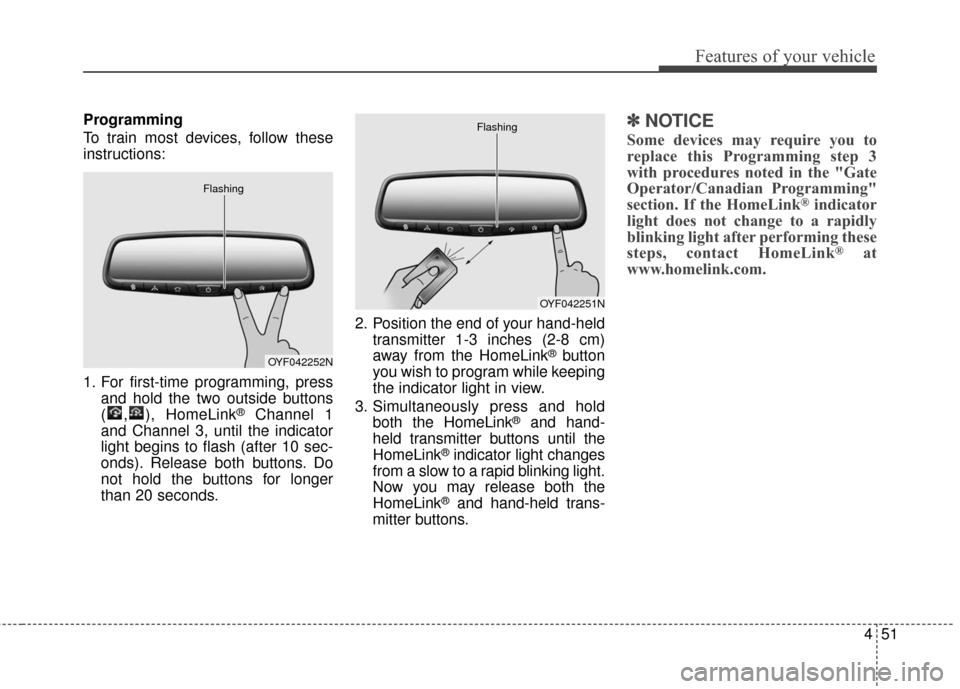
To train most devices, follow these
instructions:
1. For first-time programming, pressand hold the two outside buttons
( , ), HomeLink
®Channel 1
and Channel 3, until the indicator
light begins to flash (after 10 sec-
onds). Release both buttons. Do
not hold the buttons for longer
than 20 seconds. 2. Position the end of your hand-held
transmitter 1-3 inches (2-8 cm)
away from the HomeLink
®button
you wish to program while keeping
the indicator light in view.
3. Simultaneously press and hold both the HomeLink
®and hand-
held transmitter buttons until the
HomeLink
®indicator light changes
from a slow to a rapid blinking light.
Now you may release both the
HomeLink
®and hand-held trans-
mitter buttons.
✽ ✽ NOTICE
Some devices may require you to
replace this Programming step 3
with procedures noted in the "Gate
Operator/Canadian Programming"
section. If the HomeLink
®indicator
light does not change to a rapidly
blinking light after performing these
steps, contact HomeLink
®at
www.homelink.com.
OYF042252N
Flashing
OYF042251N
Flashing
Page 132 of 520
453
Features of your vehicle
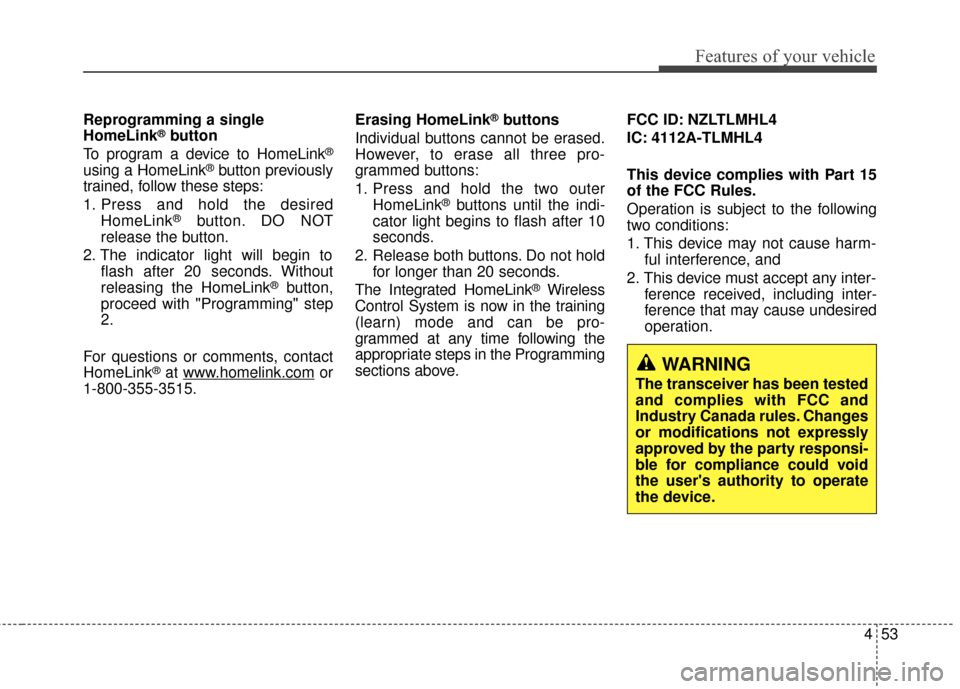
Reprogramming a single
HomeLink®button
To program a device to HomeLink®
using a HomeLink®button previously
trained, follow these steps:
1. Press and hold the desired HomeLink
®button. DO NOT
release the button.
2. The indicator light will begin to flash after 20 seconds. Without
releasing the HomeLink
®button,
proceed with "Programming" step
2.
For questions or comments, contact
HomeLink
®at www.homelink.comor
1-800-355-3515. Erasing HomeLink
®buttons
Individual buttons cannot be erased.
However, to erase all three pro-
grammed buttons:
1. Press and hold the two outer HomeLink
®buttons until the indi-
cator light begins to flash after 10
seconds.
2. Release both buttons. Do not hold for longer than 20 seconds.
The Integrated HomeLink
®Wireless
Control System is now in the training
(learn) mode and can be pro-
grammed at any time following the
appropriate steps in the Programming
sections above. FCC ID: NZLTLMHL4
IC: 4112A-TLMHL4
This device complies with Part 15
of the FCC Rules.
Operation is subject to the following
two conditions:
1. This device may not cause harm-
ful interference, and
2. This device must accept any inter- ference received, including inter-
ference that may cause undesired
operation.
WARNING
The transceiver has been tested
and complies with FCC and
Industry Canada rules. Changes
or modifications not expressly
approved by the party responsi-
ble for compliance could void
the user's authority to operate
the device.
Page 147 of 520
Features of your vehicle
68
4
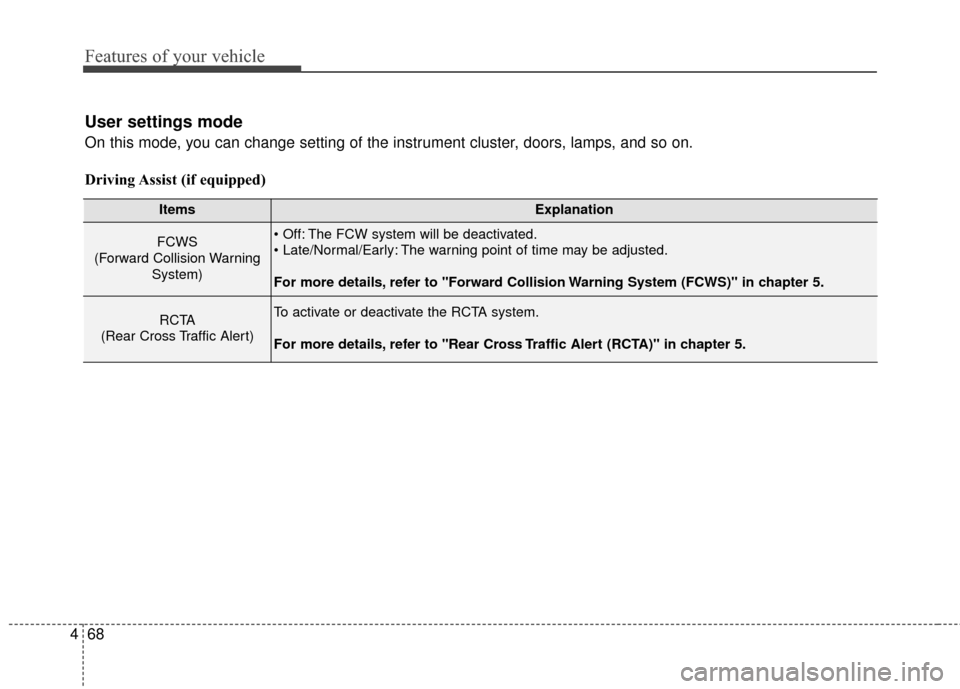
User settings mode
On this mode, you can change setting of the instrument cluster, doors, lamps, and so on.
Driving Assist (if equipped)
ItemsExplanation
FCWS
(Forward Collision Warning System) The FCW system will be deactivated.
The warning point of time may be adjusted.
For more details, refer to "Forward Collision Warning System (FCWS)" in chapter 5.
RCTA
(Rear Cross Traffic Alert)To activate or deactivate the RCTA system.
For more details, refer to "Rear Cross Traffic Alert (RCTA)" in chapter 5.
Page 149 of 520
Features of your vehicle
70
4
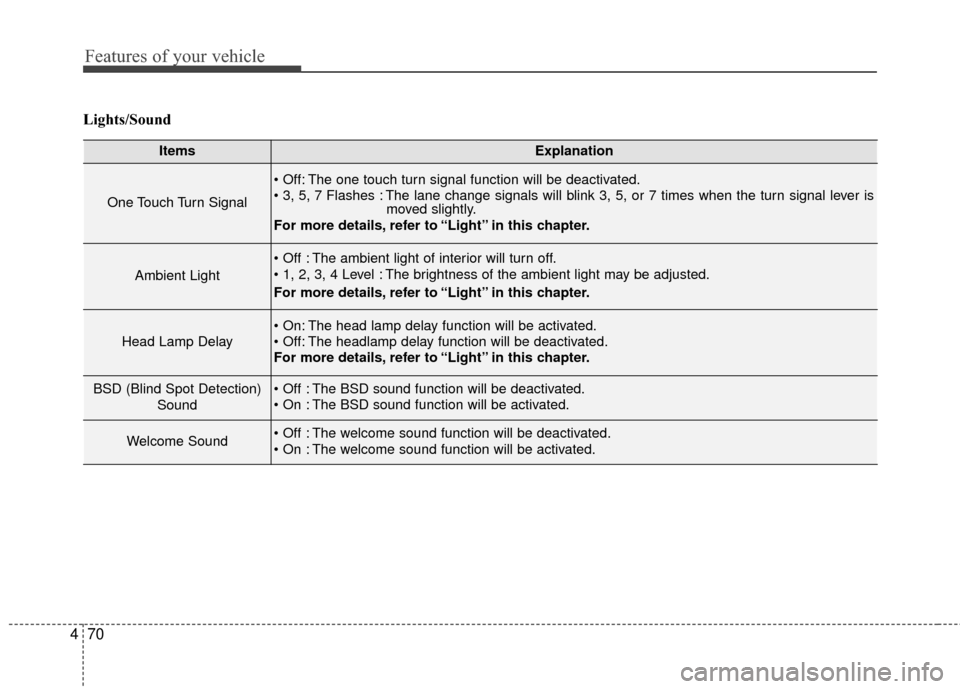
Lights/Sound
ItemsExplanation
One Touch Turn Signal
The one touch turn signal function will be deactivated.
The lane change signals will blink 3, 5, or 7 times when the turn signal lever is
moved slightly.
For more details, refer to “Light” in this chapter.
Ambient Light
The ambient light of interior will turn off.
The brightness of the ambient light may be adjusted.
For more details, refer to “Light” in this chapter.
Head Lamp Delay
The head lamp delay function will be activated.
The headlamp delay function will be deactivated.
For more details, refer to “Light” in this chapter.
BSD (Blind Spot Detection)
Sound The BSD sound function will be deactivated.
The BSD sound function will be activated.
Welcome Sound The welcome sound function will be deactivated.
The welcome sound function will be activated.