ignition Hyundai Coupe 2003 Workshop Manual
[x] Cancel search | Manufacturer: HYUNDAI, Model Year: 2003, Model line: Coupe, Model: Hyundai Coupe 2003Pages: 310, PDF Size: 2.87 MB
Page 205 of 310

CONTROLS AND EQUIPMENT1- 29
SB210S1-E BRAKE PAD WEAR INDICATORThe front brake disc pads are fitted with an audible wear indicator which will cause a highpitched noise to be emitted when the remainingamount of friction lining is below the specifiedvalue. When the wear indicator is heard, thebrake pads should be replaced without delay toavoid damage occurring to the brake discs and asevere reduction in braking efficiency. SB215A1-E FUEL GAUGE The fuel gauge indicates the quantity of fuel remaining in the fuel tank. NOTE: The fuel gauge is not intended to give otherthan an approximate indication of the fuellevel and is unsuitable for the purposes ofcalculating fuel consumption figures.
B260N01GK-EAT
MALFUNCTION INDICATOR LAMP
This lamp illuminates when there is a malfunction of an exhaust gas related component, and the
system is not functioning properly so that theexhaust gas regulation values are not satisfied.This lamp will also illuminate when the ignition
key is turned to the "ON" position, and will go outafter engine starting. If it illuminates while driving,or does not illuminate when the ignition key isturned to the "ON" position, take your car to yournearest authorized Hyundai dealer and have thesystem checked.
shortage may occur. This situation must be avoided to prevent damage to the catalyst occur-ring. B260E01HP-GAT
SEAT BELT WARNING LIGHT (Not all models)
The seat belt warning light blinks for about 6 seconds when the ignition key is turned from the"OFF" position to "ON" or "START".
B260Q01E-GAT
CRUISE INDICATOR (Not all models)
The cruise indicator light in the instrument cluster is illuminated when the cruise control main switchon the end of the barrel is pushed.The indicator light does not illuminate when thecruise control main switch is pushed a secondtime.Information about the use of cruise control isbeginning on page 1-48.
HGK133
B265C01O-AAT Traction Control Indicator Lights (If installed)
The traction control indicators change operation according to the ignition switch position andwhether the system is in operation or not.They will illuminate when the ignition key isturned to the "ON" position, but should go outafter three seconds. If the TCS or TCS-OFFindicator stays on, take your car to your autho-rized Hyundai dealer and have the systemchecked. See section 2 for more informationabout the TCS.
Page 207 of 310

CONTROLS AND EQUIPMENT1- 31
The trip computer is a microcomputer-controlled driver information system that displays informa-tion related to driving, such as distance to empty,average speed and drive time on the LCD. RESET SWITCH
o The reset switch is used to zero the multi-
functional display mode.
o Pushing in the reset switch on the left side of tacometer changes the display as follows;
HGK095B
B400B01GK-EAT TRIP COMPUTER
A Type
B Type
1. OdometerThe odometer records the total driving distance in miles, and is useful for keeping a record formaintenance intervals. NOTE: Any alteration of the odometer may void yourwarranty coverage. 2,3 Trip odometer Records the distance of 2 trips in miles. TRIP A:
First distance you have traveled from
your origination point to a first destination.TRIP B: Second distance from the first destina-
tion to the final destination. To shift from TRIP A to TRIP B, press the reset switch. When pressed for 1 second, it will resetto 0.
B310B01GK-EAT ODOMETER/TRIP ODOMETERHGK028C
Function of digital odometer/trip odom- eter
Pushing in the reset switch on the right side of speedometer when the ignition switch is turned"ON" will display the following sequence:
HGK055B
132
Page 210 of 310

CONTROLS AND EQUIPMENT
1- 34 SB220D1-E HIGH AND LOW BEAM To turn on the headlight high beams, push the lever forward (away from you). For low beams,pull the lever back (toward you). The appropriateheadlight beam indicator light will come on at thesame time.
SB220E1-E HEADLIGHT FLASH
SB220C3-ELIGHTING SWITCH The vehicle sidelamps and headlamps are oper- ated by rotating the end of the turn signal switchbarrel. To operate the sidelight, rotating the switchto the first detent with ignition switch at the "OFF"position will cause the lamps to illuminate. Tooperate the headlamps, the turn signal switchbarrel should be rotated to the second detent.The headlamps will only operate when the igni-tion switch is at the "On" position. If the ignitionswitch is turned to the "Off" position, only thesidelight will function. The headlight may be flashed by pulling the turnsignal switch lever towards the steering wheel.The headlight will be extinguished when theswitch is released.
To indicate an intention to change lanes, movingthe lever slightly towards the direction of therelevant turn signal will cause the turn signallamps to flash. When the lever is released, it willreturn to the "off" position.
HGK039-D
To operate the automatic light feature, turn the barrel on the end of the multi-function switch. Ifyou set the multi-function switch to "AUTO", thetail lights and headlights will be turned automati-cally on or off according to external illumination.
B340G01L-GAT Auto Light (Not all models)
HGK041-D
HGK233-D
NOTE: The ignition must be in the "ON" position toturn on the headlights. Parking light auto cut If you do not turn the parking lights "OFF" afterdriving, the parking lights will automatically shut"OFF" when the driver's door is opened.To turn them "ON" again you must simply turn theignition key to the "ON" position.
Page 212 of 310

CONTROLS AND EQUIPMENT
1- 36 SB250A1-E HEATED REAR WINDOW
SB240A1-EHAZARD WARNING SYSTEM The hazard warning system should be used whenever it becomes necessary to stop the carin a hazardous location. The hazard warningsystem is operated by depressing the switch atwhich time all turn signal lamps will flash simul-taneously and the turn signal warning lampslocated within the instrument cluster will flashsimultaneously.The hazard warning system may be turned off bydepressing the switch again. To operate the heated rear window depress theswitch shown. The heated rear window will auto-matically turn off after 15 minutes or when theignition is turned off.The system may be turned off manually by de-pressing the switch again. CAUTION: The inside of the rear windscreen shouldnever be cleaned with a hard or sharp imple-ment since damage to the heating elementmay occur. The glass should only be cleanedwith a soft cloth or chamois leather with theuse only of a mild detergent or proprietaryglass cleaner where necessary. Only hori-zontal movement of the cloth should be madewhen cleaning the glass and care should beexercised to ensure that the heating elementsare not damaged by rings or jewellery whilstthe glass is being cleaned.
o In icy or snowy weather, ensure that the
wiper blades are not frozen to the glassprior to operating the wipers.
HGK046-D
B350A01O-EAT Hatchback door Wiper And Washer Switch
1. :The washer fluid will be sprayed onto the
rear window and the wiper operates while the rear window wiper barrel is placed inthis position.
2.OFF3.INT :To use the intermittent wiper feature,
place the rear window wiper barrel in the"INT" position.
4.ON :When the point indicates the "ON", the
rear window wiper operates continuously.
HGK140B380A01GK
A Type
B Type
Page 215 of 310
CONTROLS AND EQUIPMENT1- 39
Loading conditionSwitch position
Driver only Driver + front passengerFull passengers (including driver) Full passengers (including driver) + full boot loading (or light trailerloading) Driver + full boot loading (or maximum trailer loading)0 01 2 3
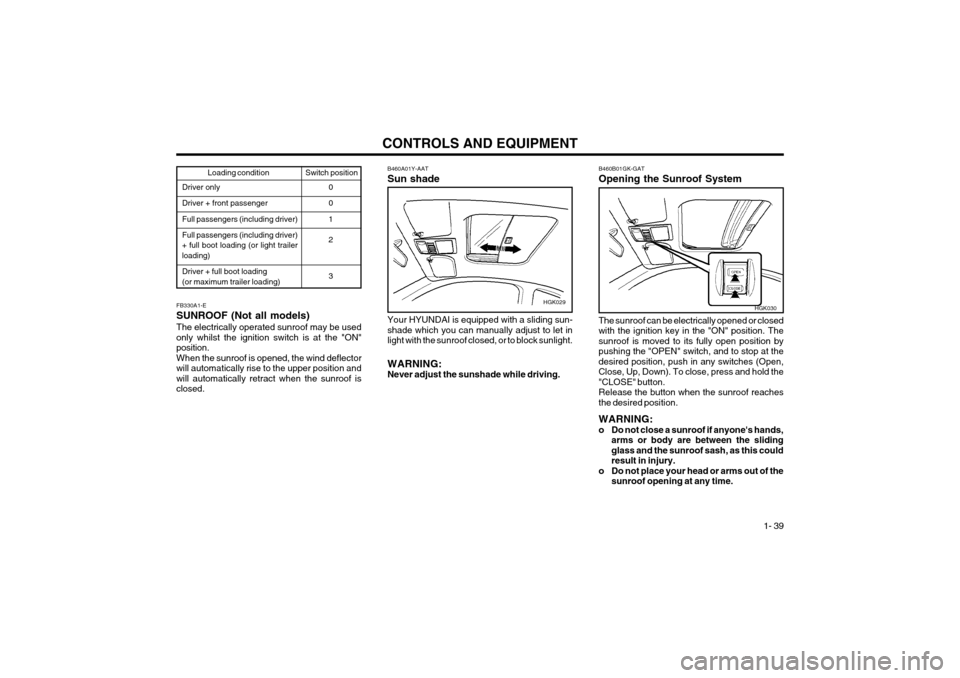
FB330A1-E SUNROOF (Not all models)The electrically operated sunroof may be used only whilst the ignition switch is at the "ON"position.When the sunroof is opened, the wind deflectorwill automatically rise to the upper position andwill automatically retract when the sunroof isclosed. B460A01Y-AAT Sun shadeHGK029
Your HYUNDAI is equipped with a sliding sun- shade which you can manually adjust to let inlight with the sunroof closed, or to block sunlight. WARNING: Never adjust the sunshade while driving.
B460B01GK-GAT Opening the Sunroof System
HGK030
The sunroof can be electrically opened or closed with the ignition key in the "ON" position. Thesunroof is moved to its fully open position by
pushing the "OPEN" switch, and to stop at thedesired position, push in any switches (Open,Close, Up, Down). To close, press and hold the"CLOSE" button.Release the button when the sunroof reachesthe desired position. WARNING:
o Do not close a sunroof if anyone's hands, arms or body are between the slidingglass and the sunroof sash, as this couldresult in injury.
o Do not place your head or arms out of the sunroof opening at any time.
Page 216 of 310

CONTROLS AND EQUIPMENT
1- 40
3. Push and turn the wrench counterclockwise to open or clockwise to close the sunroof.
B460D03GK-AAT Manual Operation of SunroofIf the sunroof does not electrically operate:
HGK032
1. Remove the cap located in the rear roof panel by using a coin or driver.
2. Insert the hexagonal head wrench provided with the vehicle into the socket. This wrench can be found in the vehicle's boot or glovebox.
HGK033
CAUTION:
o Do not open the sunroof in severely coldtemperature or when it is covered with iceor snow.
o Periodically remove any dirt that may have accumulated on the guide rails.
B460C01GK-GAT Tilting the Sunroof System
HGK031
The sunroof is moved to its fully tilt up position by pushing the "UP" switch, and to stop at thedesired position, push in any switches (Open,Close, Up, Down).To tilt down, press and hold the "DOWN" button.Release the button when the sunroof reachesthe desired position. NOTE: After washing the car or after there is rain, besure to wipe off any water that is on thesunroof before operating it.
B460E02GK-GAT Resetting the Sunroof SystemIf the battery has been recharged, disconnected or if the sunroof is operated with the hexagonalhead wrench manually, you may need to resetthe sunroof. To do this;
1. Turn the ignition switch "OFF".
2. With pressing "open" "up" button at the same time, turn the ignition switch "ON". The resetting is failed when the ignition key to the "OFF" within 1.5 seconds.
3. If the sunroof is set like this, the sunroof is reset with tilting up/down automatically oncefor all.
CAUTION:If the sunroof is not reset, it may not beoperated properly.
Page 217 of 310

CONTROLS AND EQUIPMENT1- 41
FB340B1-F SPECTACLE CASE (Not all models) The spectacle case is located on the front over- head console.Push the end of cover to open or close thespectacle case. WARNING: Do not open the spectacle case while the vehicle is moving.The rear view mirror of the vehicle can beblocked.
B480A01GK-GAT MAP LIGHT
HGK034
(1) Push in the map light switch to turn the driver side light.
(2) In the "DOOR" position, the interior courtesy light comes on when any door is opened regardless of the ignition key position. Thelight goes out gradually 6 seconds after thedoor is closed.
(3) Push in the map light switch to turn the passenger side light.(1) (2) (3)HGK036
B500A01A-EAT GLOVE BOX WARNING: To avoid the possibility of injury, the glove box lid must be kept closed whilst the vehicleis in motion.
o To open the glove box, pull the glove box
release lever.
HGK147-D
Page 219 of 310

CONTROLS AND EQUIPMENT1- 43
SB380A1-E PARKING BRAKE The parking brake must always be set when the vehicle is to be left unattended. When the parking brake is applied, and the ignition key is at the "ON" position, the parking brake warning lampwill be illuminated. Before driving the vehicle, theparking brake must be fully released and thewarning lamp extinguished.
o To set the parking brake, apply the foot brake
and pull the parking brake lever up with the button depressed. Release the button whenthe brake is fully applied.
o To release the parking brake, apply the foot brake and pull up the parking brake leverslightly. Depress the button and lower thelever.
SB370A1-E INTERIOR REAR VIEW MIRROR The interior mirror is of the day/night type to enable the glare of headlamps from followingvehicles to be eliminated during night time driv-ing.The tab located at the bottom of the mirror shouldbe set to the position nearest the windscreen fornormal day time driving, and flipped towards therear of the vehicle to eliminate glare during nighttime driving. To adjust the field of vision, themirror may be moved by hand upon the mount-ing. NOTE: The mirror should always be adjusted prior tosetting the vehicle in motion.
B520A01GK
B520B01O-GAT DAY/NIGHT REAR VIEW MIRROR (Electric type) (Not all models) The electric type day/night inside rearview mirror automatically controls the glare of headlights ofthe car behind you. Adjust the rearview mirror tothe desired position.
B520B01GK
Sensor
HGK178
Page 223 of 310

CONTROLS AND EQUIPMENT1- 47
SB450C2-E To Unlock Using the Key To open the hatchback door using the ignition key, insert the key into the lock barrel and turnclockwise to release the latch. The hatchbackdoor compartment lamp will illuminate wheneverthe hatchback door is opened.
B540C01GK
B540D01GK-GAT When you close the hatchback door
HGK226
HGK227
WARNING:
Do not close an open hatchback door while a person(s) is sitting upright on the rear seat.The hatchback door or hatchback door glassmay contact the head of a person sittingupright on the rear seat. Closing the hatch-back door onto a person's head may causeserious injuries, including death.
SB510A1-E SUNVISOR Sun visors are fitted to both the driver and pas- senger side of the vehicle. Certain derivativesare equipped with a vanity mirror which is locatedon the back of the passenger visor. The visormay be lowered to reduce the amount of glarefrom directly ahead, or may be moved towardsthe side window to reduce glare from the side ofthe vehicle, once the inner pivot has beenunclipped from the bracket. WARNING: Do not place the sunvisor in such a mannerthat it obscures visibility of the roadway,traffic or the objects. Vanity mirror
HGK145-D
Page 229 of 310

CONTROLS AND EQUIPMENT1- 53
HGK016B670D01GK-EAT Air Flow Control This is used to direct the flow of air. Air can be directed to the floor, dashboard outlets, orwindscreen. Five symbols are used to representFace, Bi-Level, Floor, Floor-Defrost and Defrostair position.HGK005
B670C01FC-EAT Air Intake Control This is used to select fresh outside air or recircu- lating inside air.To change the air intake control mode, (Freshmode, Recirculation mode) push the control but-ton. FRESH MODE ( ) : The indicator light on the button goes off when the air intake control isfresh mode. RECIRCULATION MODE ( ): The indicator light on the button is illuminated when the airintake control is recirculation mode. With the "Fresh" mode selected, air enters the vehicle from
the outside and is heated or cooled
according to the function selected. With the "Recirculation" mode selected, air fromwithin the passenger compartment
will be drawn
through the heating system and heated or cooledaccording to the function selected. NOTE:
o It should be noted that prolonged opera- tion of the heating in "Recirculation" modewill give rise to fogging of the windscreenand side windows and the air within thepassenger compartment will become stale.In addition, prolonged use of the air con-ditioning with the "Recirculation" modeselected may result in the air within thepassenger compartment becoming exces-sively dry.
o When the ignition switch is turned "ON" the air intake control will change to "Re-circulation" mode (regardless of switchposition). It is normal operation.