key Hyundai Coupe 2005 Owner's Guide
[x] Cancel search | Manufacturer: HYUNDAI, Model Year: 2005, Model line: Coupe, Model: Hyundai Coupe 2005Pages: 478, PDF Size: 13.44 MB
Page 116 of 478
1FEATURES OF YOUR HYUNDAI
102
H260b02E-AAT
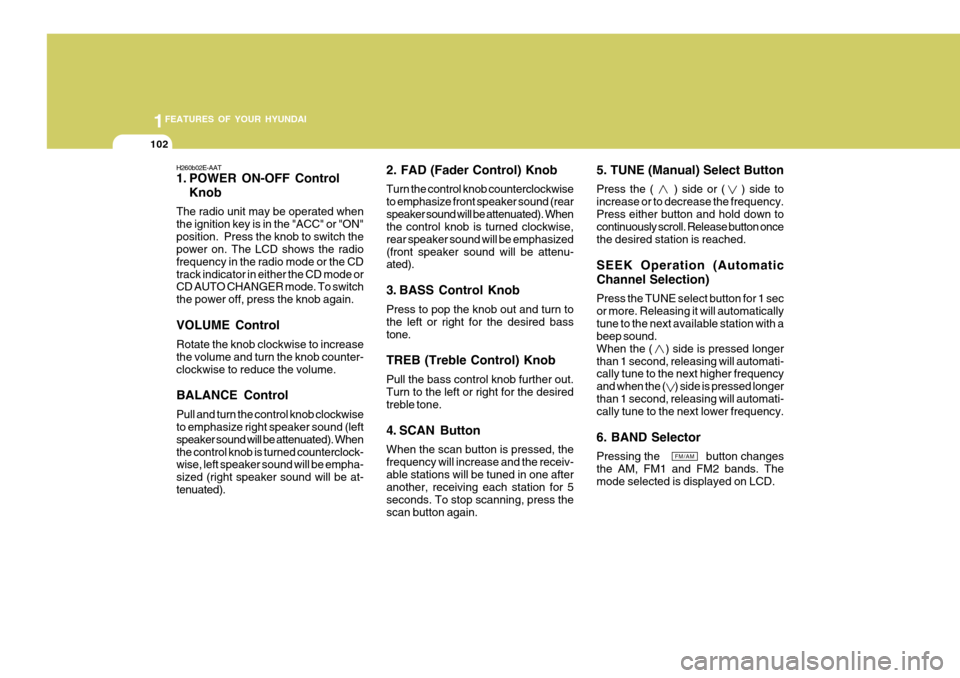
1. POWER ON-OFF ControlKnob
The radio unit may be operated when the ignition key is in the "ACC" or "ON"position. Press the knob to switch the power on. The LCD shows the radio frequency in the radio mode or the CDtrack indicator in either the CD mode or CD AUTO CHANGER mode. To switch the power off, press the knob again. VOLUME Control Rotate the knob clockwise to increase the volume and turn the knob counter-clockwise to reduce the volume. BALANCE Control Pull and turn the control knob clockwise to emphasize right speaker sound (left speaker sound will be attenuated). Whenthe control knob is turned counterclock- wise, left speaker sound will be empha- sized (right speaker sound will be at-tenuated). 2. FAD (Fader Control) Knob Turn the control knob counterclockwise to emphasize front speaker sound (rearspeaker sound will be attenuated). When the control knob is turned clockwise, rear speaker sound will be emphasized(front speaker sound will be attenu- ated).
3. BASS Control Knob Press to pop the knob out and turn to the left or right for the desired basstone. TREB (Treble Control) Knob Pull the bass control knob further out. Turn to the left or right for the desired treble tone.
4. SCAN Button When the scan button is pressed, the frequency will increase and the receiv-able stations will be tuned in one after another, receiving each station for 5 seconds. To stop scanning, press thescan button again. 5. TUNE (Manual) Select Button Press the ( ) side or ( ) side to increase or to decrease the frequency.Press either button and hold down to continuously scroll. Release button once the desired station is reached. SEEK Operation (Automatic Channel Selection) Press the TUNE select button for 1 sec or more. Releasing it will automaticallytune to the next available station with a beep sound. When the ( ) side is pressed longerthan 1 second, releasing will automati- cally tune to the next higher frequency and when the ( ) side is pressed longerthan 1 second, releasing will automati- cally tune to the next lower frequency. 6. BAND Selector Pressing the button changes the AM, FM1 and FM2 bands. Themode selected is displayed on LCD.
FM/AM
Page 125 of 478

1
FEATURES OF YOUR HYUNDAI
111
J290B01JM-GAT
1. POWER ON-OFF/VOLUME Control Knob
The radio unit may be operated when the ignition key is in the "ACC" or "ON"position. Press the button to switch the power on. The display shows the radio frequency in the radio mode, the tapedirection indicator in the tape mode, or
CD track in the CD AUTO CHANGER mode. To switch the power off, pressthe button again. VOLUME Control Rotate the knob clockwise to increase the volume and turn the knob counter- clockwise to reduce the volume.
2. BAND Selector Pressing the button changes the AM, FM1 and FM2 bands. The mode se-lected is shown on the display. o Press AM/FM selector to set the
band for AM, FM1 and FM2.
o Select the desired station to be stored by seek, scan or manual tuning.
o Determine the preset station select
button you wish to use to access that station.
o Press the station select button for
more than two seconds. A selectbutton indicator will show in the dis- play indicating which select buttonyou have depressed. The frequency display will flash after it has been stored into the memory. You shouldthen release the button, and proceed to program the next desired station. A total of 18 stations can be pro-grammed by selecting one AM and two FM station per button.
o When completed, any preset station may be recalled by selecting AM,FM1 or FM2 band and the appropri- ate station button.
3. SEEK Select Button
(Automatic Channel Selection)
Press the SEEK select button 1 sec. or
more. When the ( ) side is pressed, theunit will automatically tune to the next
higher frequency and when the ( ) side
is pressed, it will automatically tune to the next lower frequency.
4. PRESET STATION Select
Buttons
Six (6) stations for AM, FM and FM2 respectively can be preset in the elec- tronic memory circuit. HOW TO PRESET STATIONS Six AM and twelve FM stations may be programmed into the memory of the radio. Then, by simply pressing the AM/ FM select button and/or one of the six station select buttons, you may recall any of these stations instantly. To pro-gram the stations, follow these steps:
Page 126 of 478
1FEATURES OF YOUR HYUNDAI
112
CLASSIC JAZZ ROCK DEFEAT
5. Best Station Memory Button
(BSM)
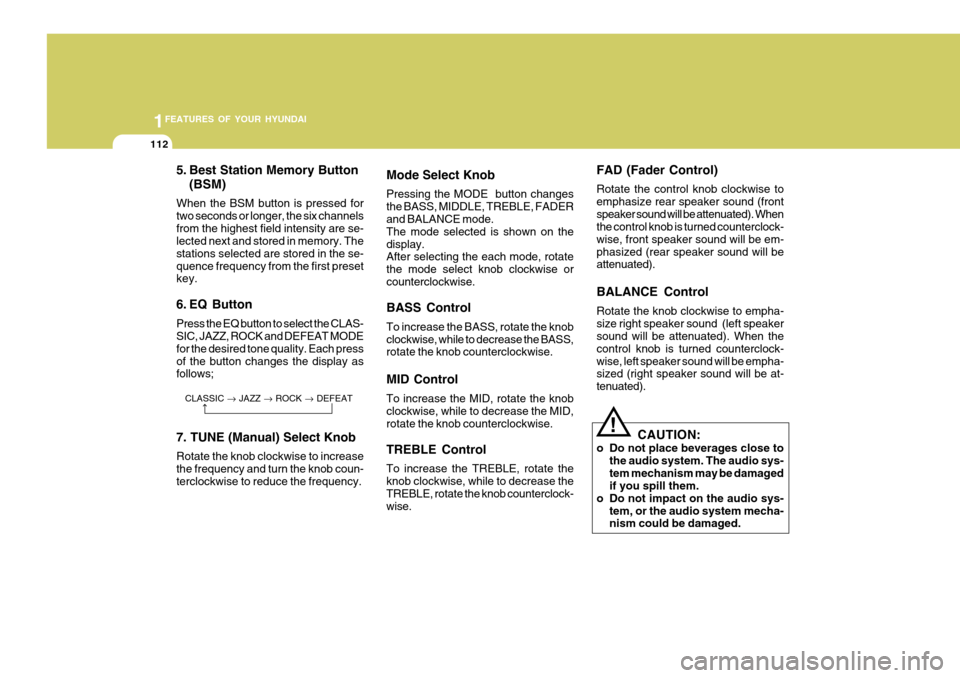
When the BSM button is pressed for two seconds or longer, the six channelsfrom the highest field intensity are se- lected next and stored in memory. The stations selected are stored in the se-quence frequency from the first preset key.
6. EQ Button Press the EQ button to select the CLAS- SIC, JAZZ, ROCK and DEFEAT MODE for the desired tone quality. Each pressof the button changes the display as follows; 7. TUNE (Manual) Select Knob Rotate the knob clockwise to increase the frequency and turn the knob coun-terclockwise to reduce the frequency.
Mode Select Knob Pressing the MODE button changes the BASS, MIDDLE, TREBLE, FADER and BALANCE mode. The mode selected is shown on thedisplay. After selecting the each mode, rotate the mode select knob clockwise orcounterclockwise. BASS Control To increase the BASS, rotate the knob clockwise, while to decrease the BASS, rotate the knob counterclockwise. MID Control To increase the MID, rotate the knob clockwise, while to decrease the MID, rotate the knob counterclockwise. TREBLE Control To increase the TREBLE, rotate the knob clockwise, while to decrease theTREBLE, rotate the knob counterclock- wise. FAD (Fader Control) Rotate the control knob clockwise to emphasize rear speaker sound (frontspeaker sound will be attenuated). When the control knob is turned counterclock- wise, front speaker sound will be em-phasized (rear speaker sound will be attenuated). BALANCE Control Rotate the knob clockwise to empha- size right speaker sound (left speaker sound will be attenuated). When the control knob is turned counterclock-wise, left speaker sound will be empha- sized (right speaker sound will be at- tenuated).
!
CAUTION:
o Do not place beverages close to the audio system. The audio sys- tem mechanism may be damaged if you spill them.
o Do not impact on the audio sys-
tem, or the audio system mecha-nism could be damaged.
Page 144 of 478
2
Engine Exhaust Can Be Dangerous! ........................... 2-2
Before Starting the Engine ........................................... 2-3
Key Positions ................................................................ 2-3Starting......................................................................... 2-4
Operating the Manual Transaxle ................................. 2-5
Operating the Automatic Transaxle ............................. 2-8
Anti-Lock Brake System (ABS) .................................. 2-12
Good Braking Practices ............................................. 2-13
Electronic Stabilty Program (ESP) ............................. 2-14
Driving for Economy ................................................... 2-16
Smooth Cornering ...................................................... 2-17
Winter Driving ............................................................. 2-18
Trailer or Vehicle Towing ........................................... 2-21
DRIVING YOUR HYUNDAI
2
Page 146 of 478
2
DRIVING YOUR HYUNDAI
3TO START THE ENGINEBEFORE STARTING THE EN- GINE
C020A01A-AAT Before you start the engine, you should always:
1. Look around the vehicle to be sure
there are no flat tires, puddles of oil, water or other indications of pos- sible trouble.
2. After entering the car, check to be sure the parking brake is engaged.
3. Check that all windows, and lights are clean.
4. Check that the interior and exterior
mirrors are clean and in position.
5. Check your seat, seatback and headrest to be sure they are in theirproper positions.
6. Close all the doors.
7. Fasten your seat belt and be sure
that all other occupants have fas- tened theirs.
8. Turn off all lights and accessories
that are not needed.
9. When you turn the ignition switch to "ON", check that all appropriatewarning lights are operating andthat you have sufficient fuel.
10.Check the operation of warning
lights and all bulbs when key is inthe "ON" position. C030A01A-GAT COMBINATION IGNITION SWITCH
o If your Hyundai is equipped with a
manual transaxle, place the shift lever in neutral and depress the clutch pedal fully.
o If your Hyundai has an automatic
transaxle, place the shift lever in "P"(park).
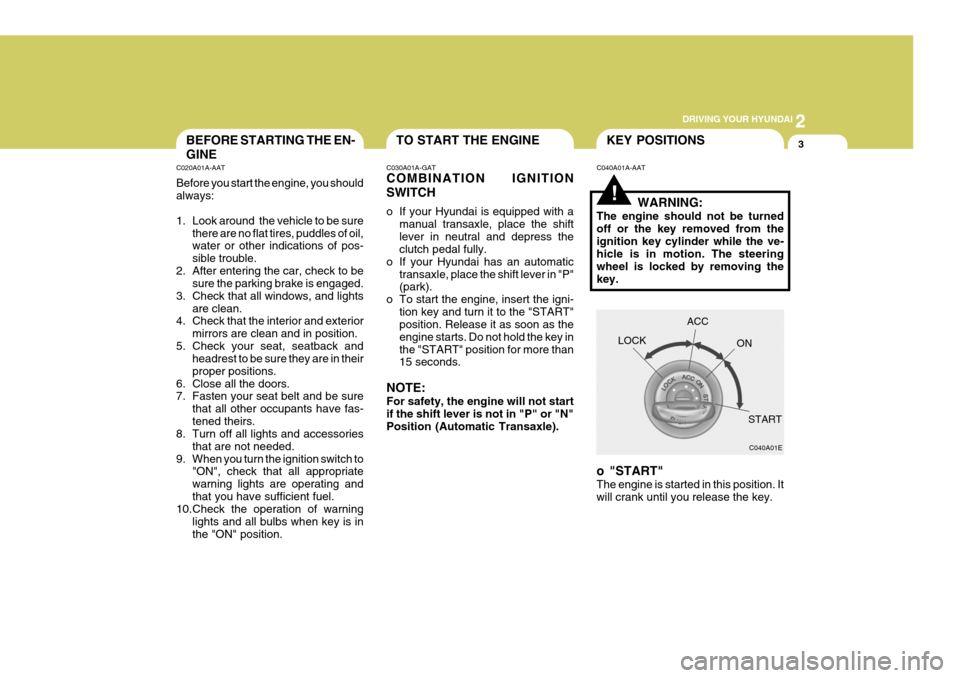
o To start the engine, insert the igni- tion key and turn it to the "START"position. Release it as soon as the engine starts. Do not hold the key inthe "START" position for more than 15 seconds.
NOTE: For safety, the engine will not start if the shift lever is not in "P" or "N" Position (Automatic Transaxle).
!
C040A01A-AAT KEY POSITIONS
WARNING:
The engine should not be turned off or the key removed from theignition key cylinder while the ve- hicle is in motion. The steering wheel is locked by removing thekey.
o "START" The engine is started in this position. It will crank until you release the key. LOCK
C040A01E
ACC
ON
START
Page 147 of 478
2 DRIVING YOUR HYUNDAI
4
!
NOTE: Do not hold the key in the "START" position for more than 15 seconds.
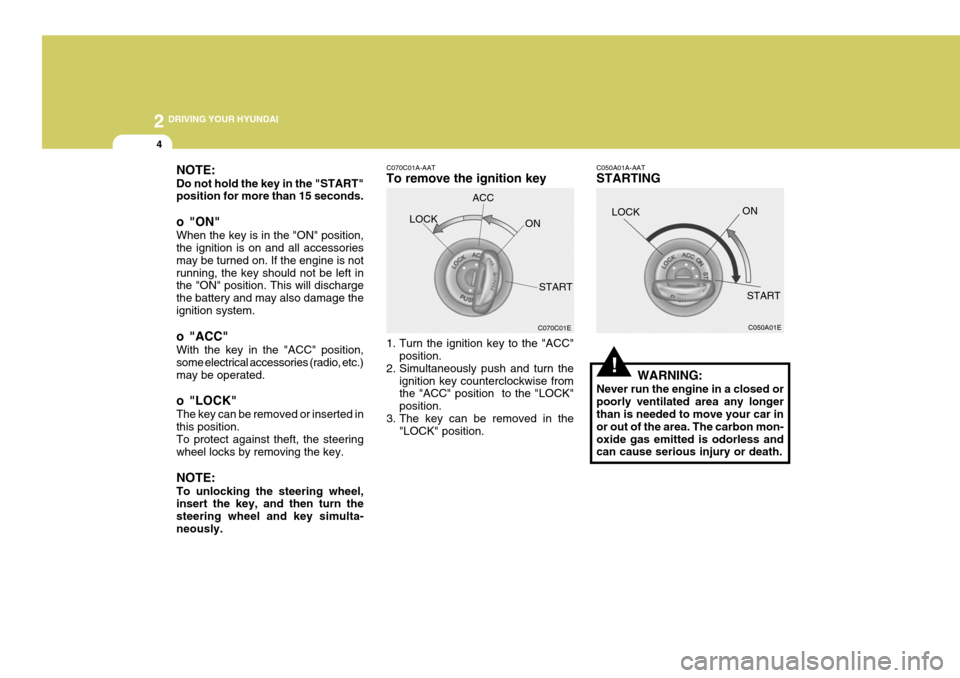
o "ON" When the key is in the "ON" position, the ignition is on and all accessories may be turned on. If the engine is notrunning, the key should not be left in the "ON" position. This will discharge the battery and may also damage theignition system.
o "ACC" With the key in the "ACC" position, some electrical accessories (radio, etc.)may be operated.
o "LOCK" The key can be removed or inserted in this position. To protect against theft, the steering wheel locks by removing the key. NOTE: To unlocking the steering wheel, insert the key, and then turn the steering wheel and key simulta-neously. C070C01A-AAT To remove the ignition key
1. Turn the ignition key to the "ACC"
position.
2. Simultaneously push and turn the
ignition key counterclockwise from the "ACC" position to the "LOCK" position.
3. The key can be removed in the "LOCK" position.LOCK
C050A01A-AAT STARTING
WARNING:
Never run the engine in a closed or poorly ventilated area any longer than is needed to move your car in or out of the area. The carbon mon-oxide gas emitted is odorless and can cause serious injury or death. LOCK
C070C01E
ACC
ON
START C050A01E
ON
START
Page 148 of 478
2
DRIVING YOUR HYUNDAI
5
!
C050B01A-GAT Normal Conditions: The Starting Procedure:
1. Insert key, and fasten the seat belt.
2. Depress the clutch pedal fully and
place the gearshift lever (manual transaxle) in neutral or the selector lever (automatic transaxle) in "P" (park) position.
3. After turning the ignition key to the "ON" position, make certain all warn-ing lights and gauges are function-ing properly before starting the en- gine.
WARNING:
Be sure that the clutch is fully de- pressed when starting a manual transaxle vehicle. Otherwise, there is the potential to cause damage tothe vehicle or injury to someone inside or outside the vehicle as a result of the forward or backwardmovement of the vehicle that will occur if the clutch is not depressed when the vehicle is started. 4. Turn the ignition key to the "Start"
position and release it when theengine starts.
OPERATING THE MANUAL TRANSAXLE
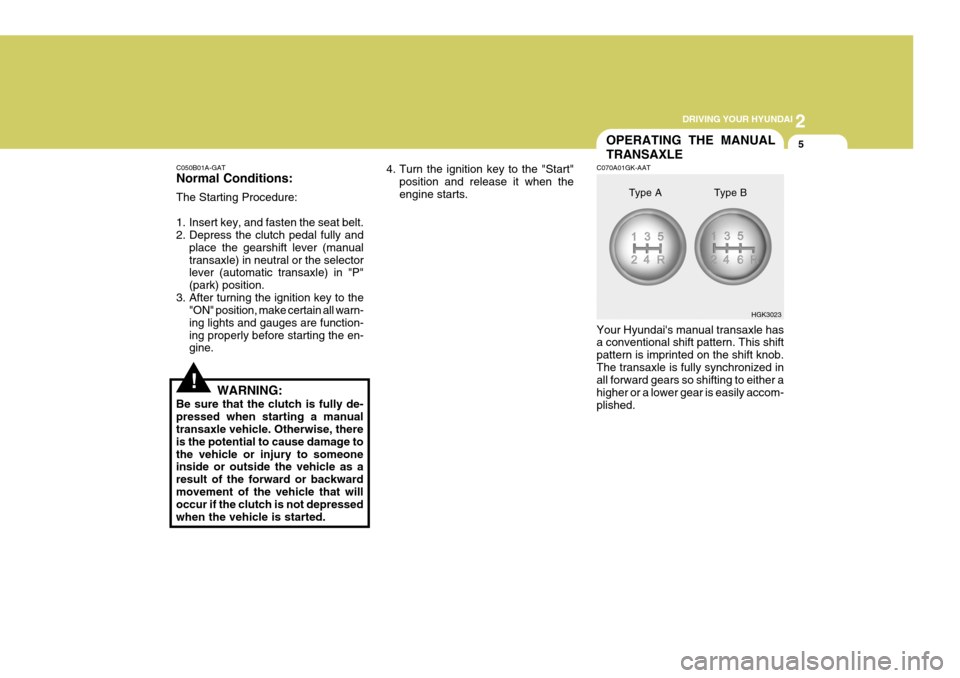
C070A01GK-AAT Your Hyundai's manual transaxle has a conventional shift pattern. This shift pattern is imprinted on the shift knob.The transaxle is fully synchronized in all forward gears so shifting to either a higher or a lower gear is easily accom-plished. HGK3023
Type A Type B
Page 154 of 478

2
DRIVING YOUR HYUNDAI
11
!
C090H01L-GAT NOTE:
o For smooth and safe operation,
depress the brake pedal when shifting from "Neutral" positionor "Park" position to a forward or reverse gear.
o The ignition key must be in the "ON" position and the brake pedalfully depressed in order to move the shift lever from the "P" (Park)position to any of the other posi- tions.
o It is always possible to shift from "R", "N", "D" position to "P" po-sition. The vehicle must be fully stopped to avoid transaxle dam-age. C090I03L-GAT
CAUTION:
o Shift into "R" and "P" position only when the vehicle has com-pletely stopped.
o Do not accelerate the engine in reverse or any of the forward posi-tions with the brakes applied.
o Always apply the footbrake when shifting from "P" or "N", to "R","D"position.
o Do not use the "P" (Park) position in place of the parking brake.Always set the parking brake, shiftthe transaxle into "P" (Park) posi- tion and turn off the ignition when you leave the vehicle, even mo-mentarily. Never leave the vehicle unattended while the engine is running.
o When accelerating from a stop on a steep hill, the vehicle may havea tendency to roll backwards. Shift-ing the shift lever into 2nd gear while in Sport mode will help pre- vent the vehicle from rolling back-wards. o Check the automatic transaxle fluid
level regularly, and add fluid as necessary.
o See the maintenance schedule for
the proper fluid recommendation.
C090N03O-AAT Good Driving Practices
o Never move the gear selector lever from "P" or "N" to any other position with the accelerator pedal de- pressed.
o Never move the gear selector lever
into "P" when the vehicle is in mo-tion.
o Be sure the car is completely stopped
before you attempt to shift into "R".
o Never take the car out of gear and
coast down a hill. This may be ex- tremely hazardous. Always leave the car in gear when moving.
o Do not "ride" the brakes. This can cause them to overheat and mal-function. Instead, when you are driv- ing down a long hill, slow down andshift to a lower gear. When you do this, engine braking will help slow the car.
Page 158 of 478

2
DRIVING YOUR HYUNDAI
15
C310B01JM-AAT ESP ON/OFF Mode When the ESP is operating, the ESP indicator in the instrument cluster willblink. If you turn the system off by pressing the ESP switch, the ESP-OFF indica-tor will come on and stay on. In the ESP-OFF mode, the stability control will be deactivated. Adjust your drivingaccordingly. To turn the system back on, press the switch again. The ESP- OFF indicator should go off. NOTE: The ESP mode will automatically be turned ON after the engine is turnedoff and restarted.
!
Factors including speed, road condi- tions and driver steering input can allaffect whether ESP will be effective in preventing a loss of control. It is still your responsibility to drive and cornerat reasonable speeds and to leave a sufficient margin of safety.
CAUTION:
Driving with varying tire or wheelsize may cause the ESP system to malfunction. When replacing tires,make sure they are the same size as your original tires.
WARNING:
Electronic stability program is only a driving aid; all normal precautions for driving in inclement weather and on slippery road surfaces should beobserved.
! C310D01JM-AAT Indicators and Warning The indicators should illuminate when the ignition key is turned to ON orSTART but should go out after three seconds. If the indicators do not illuminate, or theESP or ESP-OFF indicator does not go out after 3 seconds, have the vehicle checked by an authorized dealer. Should there be any unusual conditions in the device while driving, ESP-OFFindicator illuminates as a warning. If ESP-OFF indicator illuminates, pull your car to a safe place and stop theengine. Then, start the engine again to check if the ESP-OFF indicator goes out. If the indicator remains lit even after the engine has been started, have your carchecked by an authorized Hyundai dealer.
Page 162 of 478

2
DRIVING YOUR HYUNDAI
19
C160G01A-GAT To Keep Locks from Freezing To keep the locks from freezing, squirt an approved de-icer fluid or glycerineinto the key opening. If a lock is cov- ered with ice, squirt it with an approved de-icing fluid to remove the ice. If thelock is frozen internally, you may be able to thaw it out by using a heated key. Handle the heated key with careto avoid injury. NOTE: The proper temperature for using the immobilizer key is from -40°C to 80°C. If you heat the immobilizer key over 80°C to open the frozenlock, it may cause damage to the transponder in its head. C160H01A-AAT Use Approved Anti-Freeze in Window Washer System To keep the water in the window washer system from freezing, add an approvedanti-freeze solution in accordance with instructions on the container. Window washer anti-freeze is available fromHyundai dealers and most auto parts outlets. Do not use engine coolant or other types of anti-freeze as thesemay damage the finish.
C160I01A-AAT Don't Let Your Parking Brake Freeze Under some conditions your parking brake can freeze in the engaged posi-tion. This is most likely to happen when there is an accumulation of snow or ice around or near the rear brakes orif the brakes are wet. If there is a risk the parking brake may freeze, apply it only temporarily while you put the gearselector lever in "P" (automatic) or in first or reverse gear (manual transaxle) and block the rear wheels so the carcannot roll. Then release the parking brake.