radio Hyundai Coupe 2007 User Guide
[x] Cancel search | Manufacturer: HYUNDAI, Model Year: 2007, Model line: Coupe, Model: Hyundai Coupe 2007Pages: 487, PDF Size: 12.96 MB
Page 123 of 487
1
FEATURES OF YOUR HYUNDAI
111
H280F01GK-GAT
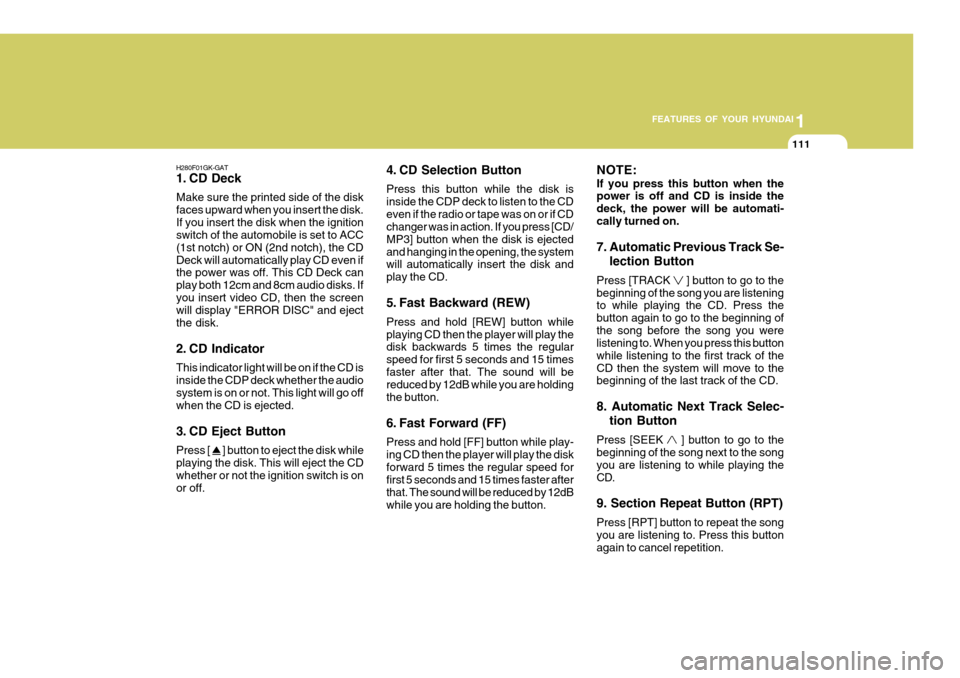
1. CD Deck Make sure the printed side of the disk faces upward when you insert the disk.If you insert the disk when the ignition switch of the automobile is set to ACC (1st notch) or ON (2nd notch), the CDDeck will automatically play CD even if the power was off. This CD Deck can play both 12cm and 8cm audio disks. Ifyou insert video CD, then the screen will display "ERROR DISC" and eject the disk.
2. CD Indicator This indicator light will be on if the CD is inside the CDP deck whether the audio system is on or not. This light will go off when the CD is ejected.
3. CD Eject Button Press [
] button to eject the disk while
playing the disk. This will eject the CD whether or not the ignition switch is on or off. 4. CD Selection Button Press this button while the disk is inside the CDP deck to listen to the CDeven if the radio or tape was on or if CD changer was in action. If you press [CD/ MP3] button when the disk is ejectedand hanging in the opening, the system will automatically insert the disk and play the CD.
5. Fast Backward (REW) Press and hold [REW] button while playing CD then the player will play the disk backwards 5 times the regular speed for first 5 seconds and 15 timesfaster after that. The sound will be reduced by 12dB while you are holding the button.
6. Fast Forward (FF) Press and hold [FF] button while play- ing CD then the player will play the diskforward 5 times the regular speed for first 5 seconds and 15 times faster after that. The sound will be reduced by 12dBwhile you are holding the button.NOTE: If you press this button when the power is off and CD is inside the deck, the power will be automati-cally turned on. 7. Automatic Previous Track Se-
lection Button
Press [TRACK
] button to go to the
beginning of the song you are listening to while playing the CD. Press the button again to go to the beginning ofthe song before the song you were listening to. When you press this button while listening to the first track of theCD then the system will move to the beginning of the last track of the CD. 8. Automatic Next Track Selec-
tion Button
Press [SEEK
] button to go to the
beginning of the song next to the song you are listening to while playing theCD. 9. Section Repeat Button (RPT) Press [RPT] button to repeat the song you are listening to. Press this button again to cancel repetition.
Page 125 of 487
1
FEATURES OF YOUR HYUNDAI
113
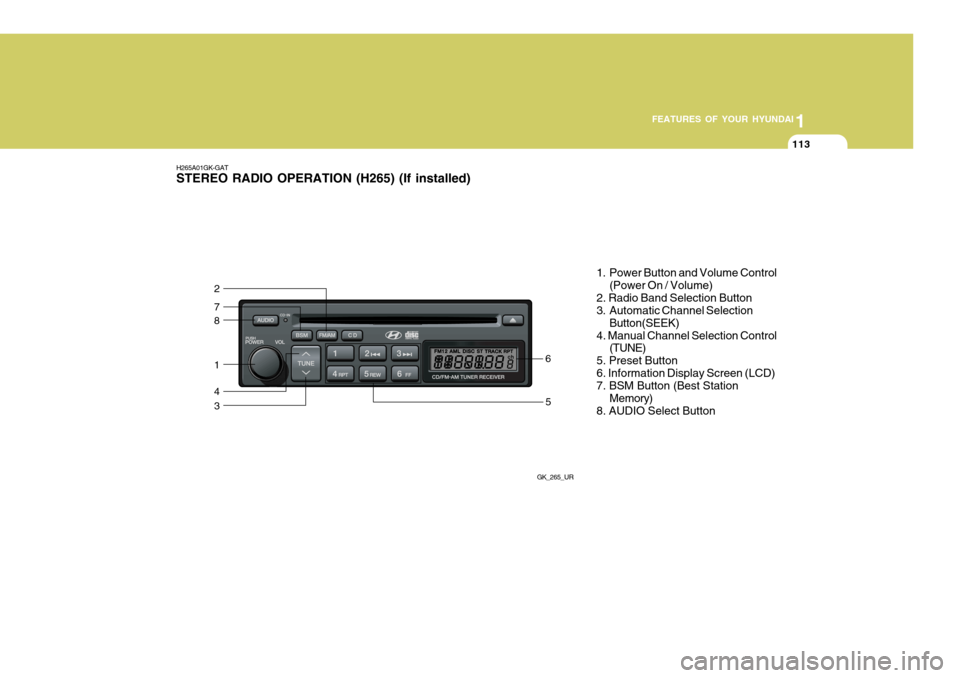
H265A01GK-GAT STEREO RADIO OPERATION (H265) (If installed)
GK_265_UR
8
7
2
1
4
35
6 1. Power Button and Volume Control
(Power On / Volume)
2. Radio Band Selection Button
3. Automatic Channel Selection Button(SEEK)
4. Manual Channel Selection Control (TUNE)
5. Preset Button 6. Information Display Screen (LCD) 7. BSM Button (Best Station Memory)
8. AUDIO Select Button
Page 126 of 487
1FEATURES OF YOUR HYUNDAI
114
H265B01GK-GAT
1. Power Button and VolumeControl (POWER ON/ VOL- UME)
Press this button when the ignition switch of the automobile is set to ACC (1st notch) or ON (2nd notch) to turn onthe power of the audio system. When the power is turned on, turn the volume control clockwise to increase volumeand counterclockwise to reduce. Press once again when the audio system is on to turn off the power.
2. Radio Band Selection Button (FM/AM)
North American Standard
o Press this button to listen to either FM or AM.
o The radio will be set to each mode
each time you press the button in aloop; FM1 ➟FM2 ➟AM ➟FM1 and
soon.
European Standard
o Press this button to listen to either FM or AM.
o The radio will be set to each mode each time you press the button in a loop; FM1 ➟FM2 ➟MW ➟LW ➟FM1
and soon. 5. Preset Button (1~6) Press this button but do not hold for no more than 2 seconds to listen to thechannels memorized to each button. If you want to memorize the current chan- nel to the preset button when you arelistening to channel not memorized to any of the preset buttons, press the button and hold for more than 2 sec-onds then the channel will be memo- rized to the button with the beep.
6. Information Display Screen
(LCD)
A variety of information will be dis- played on the screen including the radio bands (FM1/FM2/AM) while listening tothe radio, frequency of each channel, the number of preset channel and "ST" for FM stereo broadcasting.
3. Automatic Channel Selection
Button (SEEK)
Press and hold the [
] button for more
than 0.5 seconds until you hear the beep to automatically increase frequency and press and hold the [
] button for more
than 0.5 seconds until you hear the beep to automatically decrease frequency to select and play the next available chan- nel. If the received channel is memo-rized in the preset buttons then the screen will display the memorized chan- nel.
4. Manual Channel Selection
Control (TUNE)
Press and hold [
] button for less than
0.5 seconds to increase frequency by 1 step and [
] to decrease.
Press and hold [
] or [ ] button for
more than 0.5 seconds even after you hear the beep then the frequency will increase or decrease quickly. When you release the button, the system willturn to the automatic selection mode.
Page 129 of 487
1
FEATURES OF YOUR HYUNDAI
117
H265D01GK-GAT 1. CD Deck Make sure the printed side of the disk faces upward when you insert the disk.If you insert the disk when the ignition switch of the automobile is set to ACC (1st notch) or ON (2nd notch), the CDDECK will automatically play CD even if the power was off. This CD DECK can play both 12cm and8cm audio disks. If you insert video CD, then the screen will display the status of the CD but it will not play the video fileand therefore there will be no sound.
2. CD Indicator This indicator light will be on if the CD is inside the CD DECK if the ignition switch of the automobile is set to ACC(1st notch) or ON (2nd notch) regard- less of whether the audio system is on or off. This light will go off when the CDis ejected.
3. CD Eject Button Press [
] button to eject the disk while
playing the disk. This will eject the CD whether or not the ignition switch is on or off. 4. CD Selection Button Press this button while the disk is inside the CD DECK to listen to the CD.If the radio was on previously then it will be turned off and CD player will be activated. If you press [CD] buttonwhen the disk is ejected and hanging in the opening the system will automati- cally insert the disk and play the CD. 5. Fast Backward (REW) Press and hold [REW] button while playing CD then the player will play the disk backwards 5 times the regularspeed for first 5 seconds and 15 times faster after that. The sound will be reduced by 12dB while you are holdingthe button.
6. Fast Forward (FF) Press and hold [FF] button while play- ing CD then the player will play the diskforward 5 times the regular speed for first 5 seconds and 15 times faster after that. The sound will be reduced by 12dBwhile you are holding the button.
7. Automatic Previous Track Se-
lection Button
Press [
] button to go to the beginning
of the song you are listening to while playing the CD. Press the button again to go to the beginning of the song beforethe song you were listening to. When you press this button while listening to the first track of the CD then the systemwill move to the beginning of the last track of the CD.
8. Automatic Next Track Selec-
tion Button
Press [
] button to go to the beginning
of the song next to the song you are listening to while playing the CD. When you press this button while listening to the last track of the CD then the systemwill move to the beginning of the first track of the CD.
9. Section Repeat Button (RPT) Press [RPT] button to repeat the song you are listening to. Press this button again to cancel repetition.
Page 131 of 487
1
FEATURES OF YOUR HYUNDAI
119
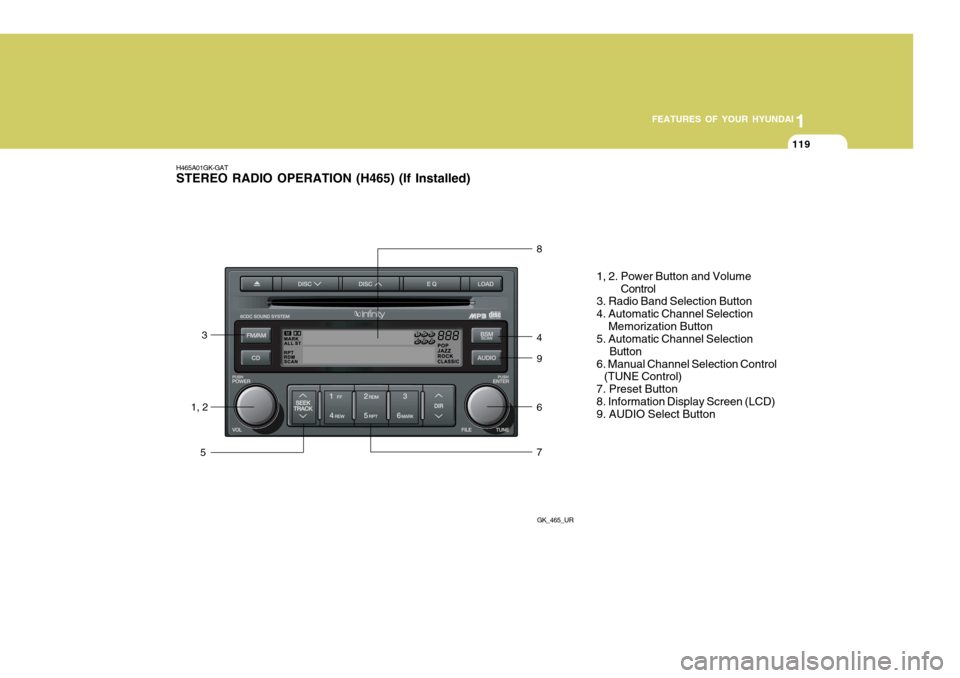
H465A01GK-GAT STEREO RADIO OPERATION (H465) (If Installed)
GK_465_UR
1, 23
5 8 4 9 6 7
1, 2. Power Button and Volume
Control
3. Radio Band Selection Button 4. Automatic Channel Selection Memorization Button 5. Automatic Channel Selection
Button
6. Manual Channel Selection Control (TUNE Control) 7. Preset Button8. Information Display Screen (LCD) 9. AUDIO Select Button
Page 132 of 487
1FEATURES OF YOUR HYUNDAI
120
H465B01GK-GAT
1. Power Button (POWER ON) Press this button when the ignition switch of the automobile is set to ACC(1st notch) or ON (2nd notch) to turn on the power and the audio system. Press once again when the audio system is onto turn off the power. 2. Volume Control (VOLUME) Turn the volume control clockwise to increase volume and counterclockwise to reduce. The volume level will bedisplayed on the screen when you ad- just the volume. 3. Radio Band Selection Button(FM/AM)
o Press this button to listen to either FM or AM.
o The radio will be set to each of the
following modes each time you press the button. FM1 ➟ FM2 ➟ AM NOTE: Push this button when the power is off to turn on the power automati- cally. 4. Automatic Channel Selection
Memorization Button (BSM: Best Station Memory)
Press this button once to automatically select channels starting from the cur-rent channel and memorize into the preset buttons (1~6) in the selected order and turn to the channel memo-rized in preset button 1. 5. Automatic Channel Selection Button (SEEK)
Press the [SEEK
] button to auto-
matically increase frequency and press the [TRACK
] button to automati-
cally decrease frequency to select and play the next available channel. If the received channel is memorized in thepreset buttons then the screen will dis- play the memorized channel. 6. Manual Channel Selection
Control (TUNE)
Turn the TUNE control clockwise to increase frequency and counterclock-wise to reduce frequency by 1 step for each click.
7. Preset Button (1~6) Press this button to listen to the chan- nels memorized to each button. If you want to memorize the current channelto the preset button, press the button for more than 1.5 seconds then the channel will be memorized to the buttonwith a beep.
8. Information Display Screen (LCD)
A variety of information will be dis- played on the screen including the radiobands (FM1/FM2/AM) while listening to the radio, frequency of each channel, the number of preset channel and "ST"for FM stereo broadcasting.
Page 135 of 487
![Hyundai Coupe 2007 User Guide 1
FEATURES OF YOUR HYUNDAI
123
H465D01GK-GAT 1.CD Deck The deck will open only when you press [LOAD] button. Make sure the printedside of the disk faces upward when you insert the disk. The CD changer](/img/35/14498/w960_14498-134.png "Hyundai Coupe 2007 User Guide 1
FEATURES OF YOUR HYUNDAI
123
H465D01GK-GAT 1.CD Deck The deck will open only when you press [LOAD] button. Make sure the printedside of the disk faces upward when you insert the disk. The CD changer")
1
FEATURES OF YOUR HYUNDAI
123
H465D01GK-GAT 1.CD Deck The deck will open only when you press [LOAD] button. Make sure the printedside of the disk faces upward when you insert the disk. The CD changer can only play 12cm disks. If you insertvideo CD or DATA CD, then the screen will display "ERROR DISC," eject the disk and return to the previous mode.
2. CD Load Button When you press [LOAD] button, the empty lots of the CD Changer will beopened in the order of 1, 2, 3, 4, 5 and 6. When you insert CD, you can listen to the corresponding CD. In this case,the last CD you inserted will be played. If you do not take any actions after pressing (LOAD) then the (LOAD) willbe cancelled.
3. CD Eject Button When you press [
] button, the cur-
rently played CD will be ejected. If you press the button for more than 2 sec- onds, you will be able to eject all CDs.If currently played CD is in the 3rd slot, the ejection order will be 3, 4, 5, 6, 1 and 2. 4. Information Display Screen
(LCD)
This shows the location of disk insidethe CD Changer and the correspondingCD deck number will flicker when you load or eject the CD.
5. CD Changer Selection Button If the power was turned off when the CD is inside the CD changer or if you press "CD" button when radio was on, thesystem will play CD. If you press [CD] button when there is no CD in the changer then the system will display"NO DISK" for 2 seconds and return to the previous mode. NOTE: If you press this button when the power is off and CD is inside the deck, the power will be automati-cally turned on.
6. Disc Selection Button If you press [DISC
] button while
using CD Changer, the next disc will be played (If you press the button when you are listening to CD 1, the CD 2 will be played). If you wish to listen to the previous CD, then press [DISC
] button then the
previous disc will be played (If you press the button when you are listening to CD 2, the CD 1 will be played). If the CD Changer is not fully loaded, this willmove to the next available deck. When the player moves from deck to deck, the screen will display the selecteddeck number.
7. Fast Backward (REW) Press and hold [REW] button while playing CD then the player will play the disk backwards 5 times the regular speed for first 5 seconds and 15 timesfaster after that. The sound will be reduced by 12dB while you are holding the button.
8. Fast Forward (FF) Press and hold [FF] button while play- ing CD then the player will play the disk forward 5 times the regular speed for first 5 seconds and 15 times faster afterthat. The sound will be reduced by 12dB while you are holding the button.
Page 144 of 487
2 DRIVING YOUR HYUNDAI
4
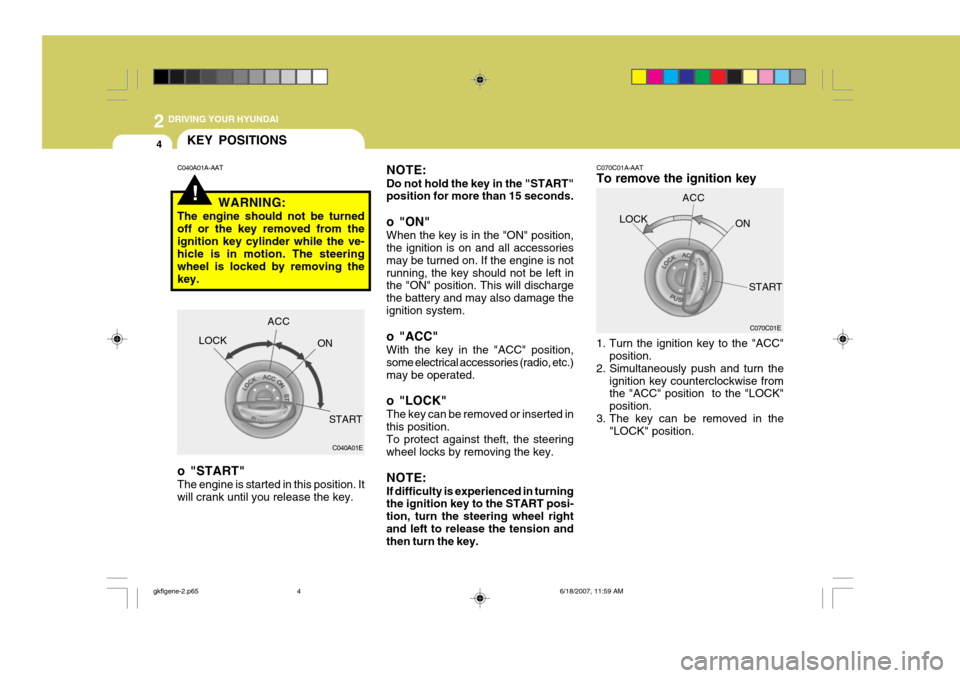
NOTE: Do not hold the key in the "START" position for more than 15 seconds.
o "ON" When the key is in the "ON" position, the ignition is on and all accessories may be turned on. If the engine is notrunning, the key should not be left in the "ON" position. This will discharge the battery and may also damage theignition system.
o "ACC" With the key in the "ACC" position, some electrical accessories (radio, etc.)may be operated.
o "LOCK" The key can be removed or inserted in this position. To protect against theft, the steering wheel locks by removing the key. NOTE: If difficulty is experienced in turning the ignition key to the START posi- tion, turn the steering wheel rightand left to release the tension and then turn the key. C070C01A-AAT To remove the ignition key
1. Turn the ignition key to the "ACC"
position.
2. Simultaneously push and turn the
ignition key counterclockwise from the "ACC" position to the "LOCK" position.
3. The key can be removed in the "LOCK" position.LOCK
C070C01E
ACC
ON
START
!
C040A01A-AATKEY POSITIONS
WARNING:
The engine should not be turned off or the key removed from theignition key cylinder while the ve- hicle is in motion. The steering wheel is locked by removing thekey.
o "START" The engine is started in this position. It will crank until you release the key. LOCK
C040A01E
ACC
ON
START
gkflgene-2.p65 6/18/2007, 11:59 AM
4
Page 220 of 487
6 DO-IT-YOURSELF MAINTENANCE
22
!
1. Turn off the ignition and all other
switches.
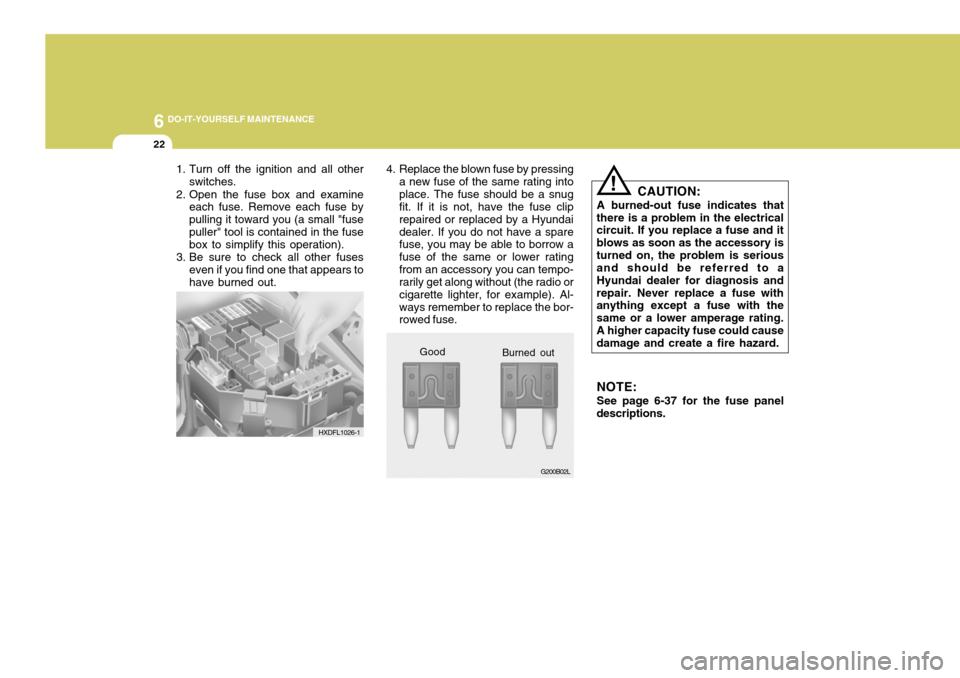
2. Open the fuse box and examine each fuse. Remove each fuse by pulling it toward you (a small "fusepuller" tool is contained in the fuse box to simplify this operation).
3. Be sure to check all other fuses even if you find one that appears to have burned out. 4. Replace the blown fuse by pressing
a new fuse of the same rating intoplace. The fuse should be a snug fit. If it is not, have the fuse clip repaired or replaced by a Hyundaidealer. If you do not have a spare fuse, you may be able to borrow a fuse of the same or lower ratingfrom an accessory you can tempo- rarily get along without (the radio or cigarette lighter, for example). Al-ways remember to replace the bor- rowed fuse. CAUTION:
A burned-out fuse indicates that
there is a problem in the electricalcircuit. If you replace a fuse and it blows as soon as the accessory isturned on, the problem is serious and should be referred to a Hyundai dealer for diagnosis andrepair. Never replace a fuse with anything except a fuse with the same or a lower amperage rating.A higher capacity fuse could cause damage and create a fire hazard.
NOTE: See page 6-37 for the fuse panel
descriptions.
Good
HXDFL1026-1
G200B02L
Burned out
Page 255 of 487
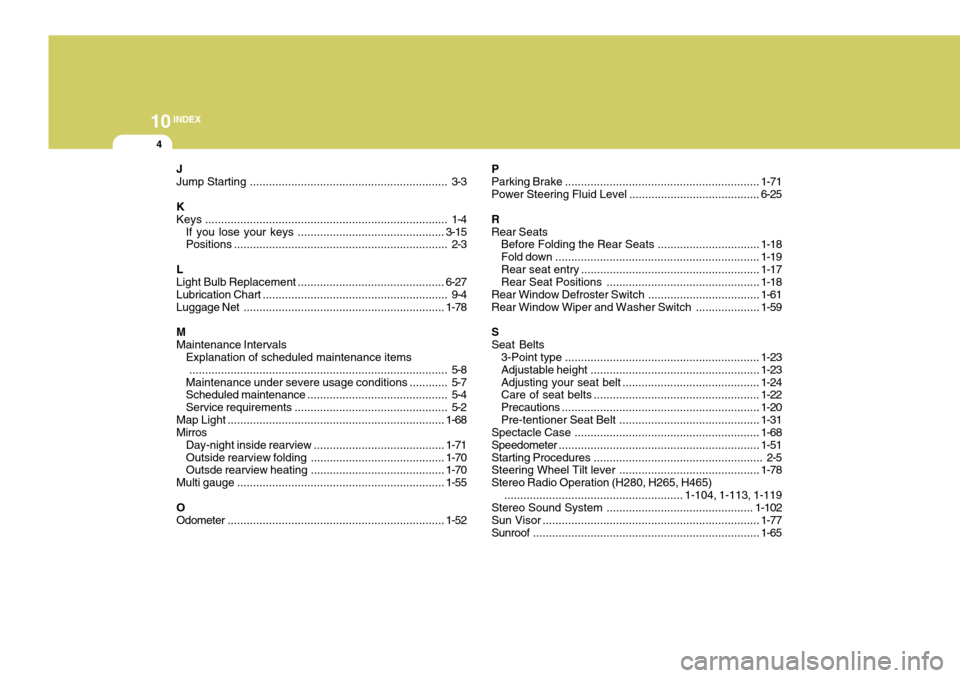
10INDEX
4
J Jump Starting .............................................................. 3-3
KKeys ............................................................................ 1-4
If you lose y our keys .............................................. 3-15
Positions ................................................................... 2-3
L
Light Bulb Replacement .............................................. 6-27
Lubrication Chart .......................................................... 9-4
Luggage Net ............................................................... 1-78
M Maintenance Intervals Explanation of scheduled maintenance items
................................................................................. 5-8
Maintenance under severe usage conditions ............ 5-7
Scheduled maintenance ............................................ 5-4
Service requirements ................................................ 5-2
Map Light .................................................................... 1-68
Mirros
Day-night inside rearview ......................................... 1-71
Outside rearview folding ............... ...........................1-70
Outsde rearview heating ....... ...................................1-70
Multi gauge ................................................................. 1-55
OOdometer .................................................................... 1-52PParking
Brake ............................................................. 1-71
Power Steering Fluid Level ......................................... 6-25
RRear Seats Before Folding the Rear Seats ................................ 1-18
Fold down ................................................................ 1-19
Rear seat entry ........................................................ 1-17
Rear Seat Positions ................................................ 1-18
Rear Window Defroster Switch ................................... 1-61
Rear Window Wiper and Washer Switch ....................1-59
SSeat Belts 3-Point type ............................................................. 1-23
Adjustable height ..................................................... 1-23
Adjusting your seat belt ........................................... 1-24
Care of seat belts .................................................... 1-22
Precautions .............................................................. 1-20
Pre-tentioner Seat Belt ............................................ 1-31
Spectacle C ase .......................................................... 1-68
Speedometer ............................................................... 1-51
Starting Pr ocedures..................................................... 2-5
Steering Wheel Tilt lever ............................................ 1-78
Stereo Radio Operation (H280, H265, H465)
........................................................ 1-104, 1-113, 1-119
Stereo Sound System .............................................. 1-102
Sun Visor .................................................................... 1-77
Sunroof ....................................................................... 1-65