radio Hyundai Coupe 2007 Owner's Manual
[x] Cancel search | Manufacturer: HYUNDAI, Model Year: 2007, Model line: Coupe, Model: Hyundai Coupe 2007Pages: 487, PDF Size: 12.96 MB
Page 4 of 487
F4
TWO-WAY RADIO OR CELLULAR TELEPHONE INSTALLATION
Your vehicle is equipped with electronic fuel injection and other electronic compo- nents. It is possible for an improperly installed/adjusted two-way radio or cellular telephone to adversely affect electronic systems. For this reason, we recommendthat you carefully follow the radio manufacturer's instructions or consult your Hyundai dealer for precautionary measures or special instructions if you choose to install one of these devices.
A080A01S-AAT
A070A01A-GAT!
CAUTION: MODIFICATIONS TO YOUR HYUNDAI
Modification of components may void the manufacturer's warranty Your Hyundai should not be modified in any way. Modifications may adversely affect the safety, durability and performance of your Hyundai. Components which are subjected to modification or are added to the vehicle resulting in consequentialdamage are not covered by the vehicle manufacturer's warranty.
Page 23 of 487
1
FEATURES OF YOUR HYUNDAI
11
B070F02A-GAT Keyless Entry System (If installed)Locking doors
1. Close all doors.
2. Push the "LOCK" button on the trans- mitter.
3. At the same time all doors lock, the turn signal lights will blink once to indicate that the system is armed.
Unlocking doors
1. Push the "UNLOCK" button on the transmitter.
2. At the same time all doors unlock,
the turn signal lights will blink twice to indicate that the system is dis- armed.
NOTE: The transmitter will not work if any of following occur:
- The ignition key is in ignition switch.
- You exceed the operating distance limit (10 m).
- The battery in the transmitter is weak. - Other vehicles or objects may be
blocking the signal.
- The weather is extremely cold.
- The transmitter is close to a radio transmitter such as a radio station or an airport which can interfere with normal operation of the trans- mitter.
When the transmitter does not workcorrectly, open and close the doorwith the ignition key. If you have a problem with the transmitter, con- tact an authorized Hyundai Dealer. NOTE: Keep the transmitter away from wa- ter or any liquid. If the keyless entry system is inoperative due to expo-sure to water or liquids, it will not be covered by your manufacturer ve- hicle warranty.
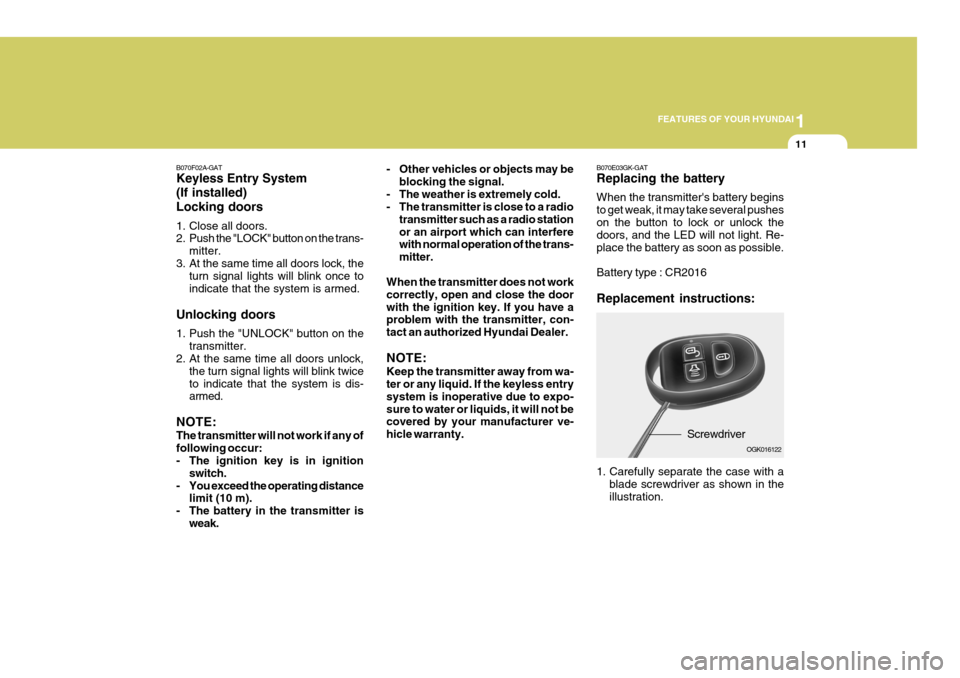
B070E03GK-GAT Replacing the battery When the transmitter's battery begins to get weak, it may take several pusheson the button to lock or unlock the doors, and the LED will not light. Re- place the battery as soon as possible. Battery type : CR2016 Replacement instructions:
Screwdriver
1. Carefully separate the case with a blade screwdriver as shown in the illustration. OGK016122
Page 94 of 487
1FEATURES OF YOUR HYUNDAI
82
SEEK UP ( ) Switch Press the SEEK UP ( ) switch 1 sec. or more.
1. RADIO mode When the SEEK UP ( ) switch is pressed, the unit will automatically tune to the next higher frequency.
2. TAPE mode Pressing the SEEK UP ( ) switch will play the beginning of the next music segment.
3. CD (compact disc)/CDC(compact disc changer) mode
Press the SEEK UP ( ) switch once to skip forward to the beginning of the next track.
VOL ( / ) Switch
o Press the VOL ( ) button to in- crease volume.
o Press the VOL ( ) button to de- cease volume.AUDIO REMOTE CONTROL SWITCH
o With the cruise control engaged,
when the brake pedal is applied, it is normal to hear the cruise control system deactivate. This is an indication of normal systemoperation.
o During normal cruise control
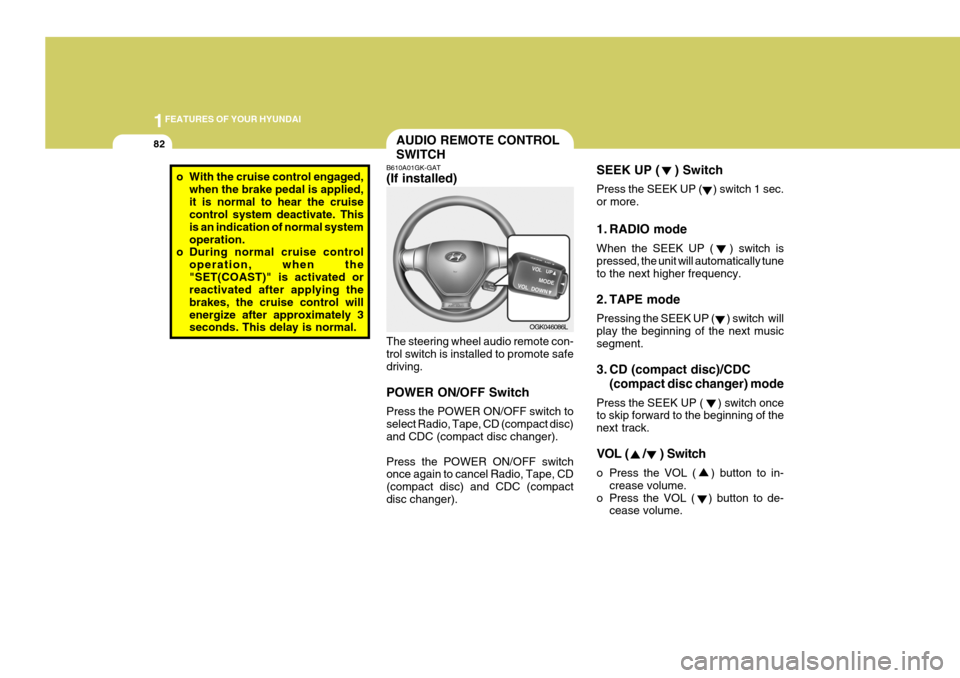
operation, when the"SET(COAST)" is activated or reactivated after applying the brakes, the cruise control willenergize after approximately 3 seconds. This delay is normal. B610A01GK-GAT (If installed) The steering wheel audio remote con- trol switch is installed to promote safe driving. POWER ON/OFF Switch Press the POWER ON/OFF switch to select Radio, Tape, CD (compact disc) and CDC (compact disc changer). Press the POWER ON/OFF switch once again to cancel Radio, Tape, CD (compact disc) and CDC (compactdisc changer).OGK046086L
Page 113 of 487
1
FEATURES OF YOUR HYUNDAI
101
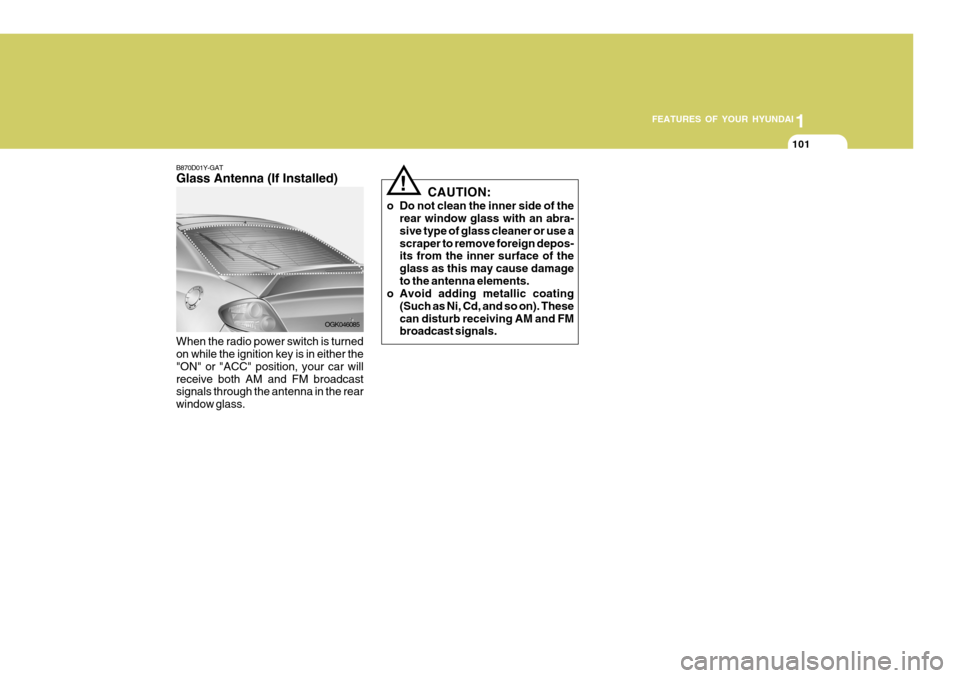
B870D01Y-GAT Glass Antenna (If Installed) When the radio power switch is turned on while the ignition key is in either the "ON" or "ACC" position, your car willreceive both AM and FM broadcast signals through the antenna in the rear window glass. OGK046085CAUTION:
o Do not clean the inner side of the rear window glass with an abra-sive type of glass cleaner or use ascraper to remove foreign depos- its from the inner surface of the glass as this may cause damageto the antenna elements.
o Avoid adding metallic coating
(Such as Ni, Cd, and so on). Thesecan disturb receiving AM and FM broadcast signals.
!
Page 114 of 487
1FEATURES OF YOUR HYUNDAI
102STEREO SOUND SYSTEM
AM reception
Ionosphere
FM reception
B750A01L
B750A02A-AAT How Car Audio Works
Ionosphere
B750A02L Mountains
Buildings Unobstructed
area
FM radio station
B750A03L
Obstructed area Iron bridges
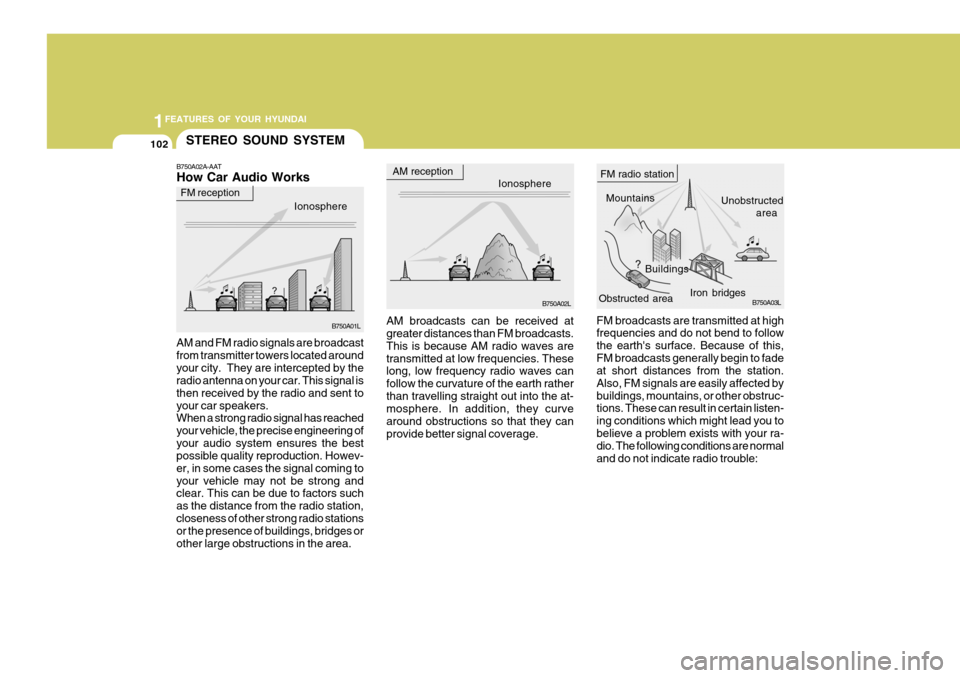
FM broadcasts are transmitted at high frequencies and do not bend to follow the earth's surface. Because of this,FM broadcasts generally begin to fade at short distances from the station. Also, FM signals are easily affected bybuildings, mountains, or other obstruc- tions. These can result in certain listen- ing conditions which might lead you tobelieve a problem exists with your ra- dio. The following conditions are normal and do not indicate radio trouble:
AM broadcasts can be received at greater distances than FM broadcasts. This is because AM radio waves aretransmitted at low frequencies. These long, low frequency radio waves can follow the curvature of the earth ratherthan travelling straight out into the at- mosphere. In addition, they curve around obstructions so that they canprovide better signal coverage.
AM and FM radio signals are broadcastfrom transmitter towers located aroundyour city. They are intercepted by the radio antenna on your car. This signal is then received by the radio and sent toyour car speakers. When a strong radio signal has reached your vehicle, the precise engineering ofyour audio system ensures the best possible quality reproduction. Howev- er, in some cases the signal coming toyour vehicle may not be strong and clear. This can be due to factors such as the distance from the radio station,closeness of other strong radio stations or the presence of buildings, bridges or other large obstructions in the area.
Page 115 of 487
1
FEATURES OF YOUR HYUNDAI
103
!
B750A04L
B750A05L
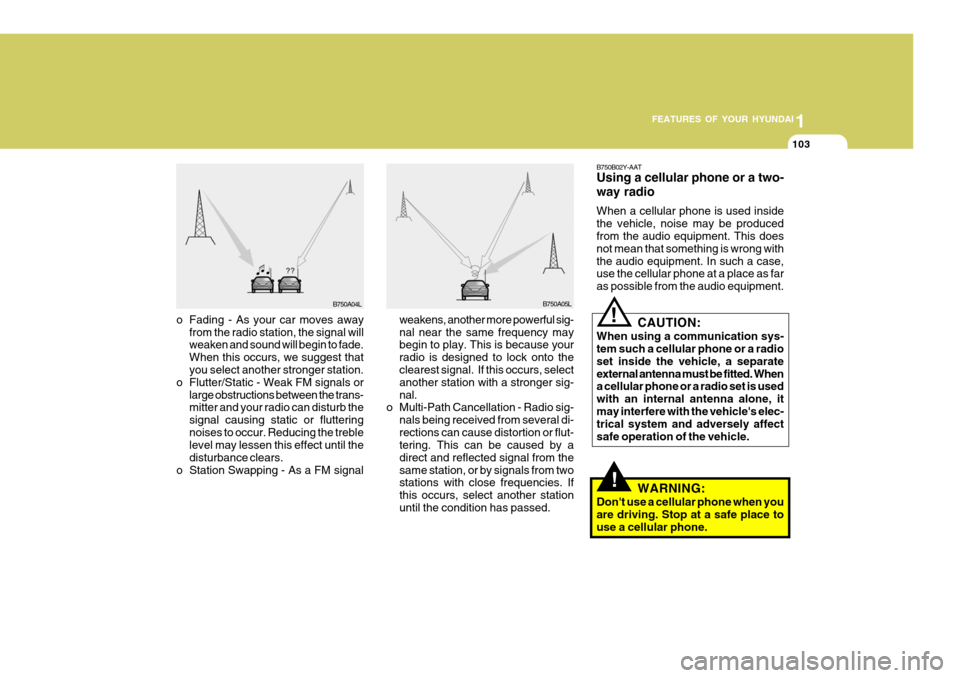
weakens, another more powerful sig- nal near the same frequency may begin to play. This is because your radio is designed to lock onto the clearest signal. If this occurs, select another station with a stronger sig-nal.
o Multi-Path Cancellation - Radio sig-
nals being received from several di-rections can cause distortion or flut- tering. This can be caused by a direct and reflected signal from thesame station, or by signals from two stations with close frequencies. If this occurs, select another stationuntil the condition has passed.
o Fading - As your car moves away
from the radio station, the signal will weaken and sound will begin to fade. When this occurs, we suggest that you select another stronger station.
o Flutter/Static - Weak FM signals or large obstructions between the trans-mitter and your radio can disturb the signal causing static or flutteringnoises to occur. Reducing the treble level may lessen this effect until the disturbance clears.
o Station Swapping - As a FM signal B750B02Y-AAT Using a cellular phone or a two- way radio When a cellular phone is used inside the vehicle, noise may be produced from the audio equipment. This does not mean that something is wrong withthe audio equipment. In such a case, use the cellular phone at a place as far as possible from the audio equipment.
!
CAUTION:
When using a communication sys- tem such a cellular phone or a radio set inside the vehicle, a separateexternal antenna must be fitted. When a cellular phone or a radio set is used with an internal antenna alone, itmay interfere with the vehicle's elec- trical system and adversely affect safe operation of the vehicle.
WARNING:
Don't use a cellular phone when youare driving. Stop at a safe place touse a cellular phone.
Page 116 of 487
1FEATURES OF YOUR HYUNDAI
104AUDIO SYSTEM
H280A01GK-GAT STEREO RADIO OPERATION (H280) (If Installed)
GK_280_UR
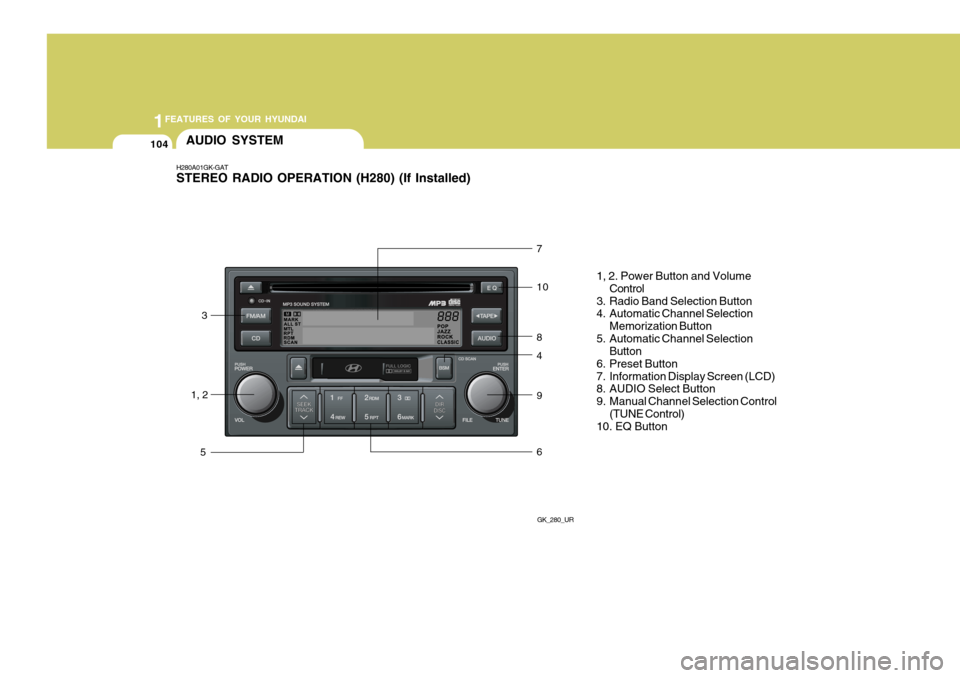
1, 23
5 7 10 8 4 9 6
1, 2. Power Button and Volume
Control
3. Radio Band Selection Button
4. Automatic Channel Selection
Memorization Button
5. Automatic Channel Selection Button
6. Preset Button
7. Information Display Screen (LCD)
8. AUDIO Select Button
9. Manual Channel Selection Control (TUNE Control)
10. EQ Button
Page 117 of 487
1
FEATURES OF YOUR HYUNDAI
105
H280B01GK-GAT
1. Power Button (POWER ON) Press this button when the ignition switch of the automobile is set to ACC(1st notch) or ON (2nd notch) to turn on the power and the audio system. Press once again when the audio system is onto turn off the power. 2. Volume Control (VOLUME) Turn the volume control clockwise to increase volume and counterclockwise to reduce. The volume level will bedisplayed on the screen when you ad- just the volume. 3. Radio Band Selection Button (FM/AM)
o Press this button to listen to either FM or AM.
o The radio will be set to each of the
following modes each time you press the button. FM1 ➟ FM2 ➟ AM NOTE: Push this button when the power is off to turn on the power automati- cally. 4. Automatic Channel Selection
Memorization Button (BSM: Best Station Memory)
Press this button once to automatically select channels starting from the cur-rent channel and memorize into the preset buttons (1~6) in the selected order and turn to the channel memo-rized in preset button 1. 5. Automatic Channel Selection Button (SEEK)
Press the upper side of the button to automatically increase frequency and select and play the receivable channel. Press the lower side of the button toautomatically decrease frequency and select and play the next available chan- nel. 6. Preset Button (1~6) Press this button to listen to the chan- nels memorized to each button. If youwant to memorize the current channel to the preset button, press the button for more than 1.5 seconds then thechannel will be memorized to the button with a beep.
7. Information Display Screen
(LCD)
A variety of information will be dis- played on the screen including the radio bands (FM1/FM2/AM) while listening tothe radio, frequency of each channel, the number of preset channel and "ST" for FM stereo broadcasting.
Page 118 of 487
1FEATURES OF YOUR HYUNDAI
106
!
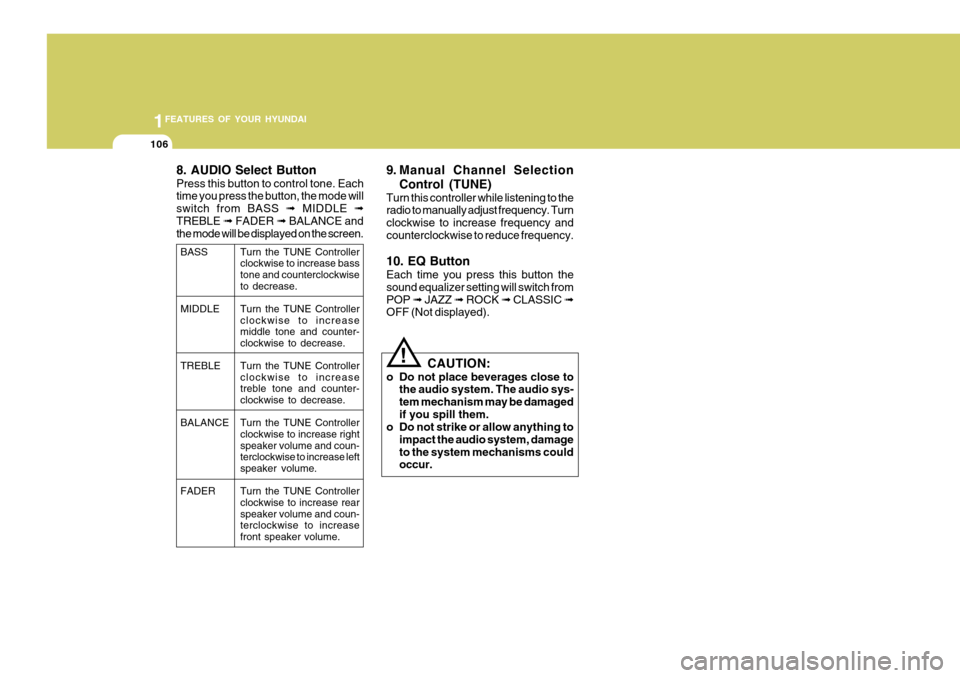
8. AUDIO Select Button Press this button to control tone. Each time you press the button, the mode will switch from BASS
➟ MIDDLE ➟
TREBLE ➟ FADER ➟ BALANCE and
the mode will be displayed on the screen. 9. Manual Channel Selection
Control (TUNE)
Turn this controller while listening to the radio to manually adjust frequency. Turn clockwise to increase frequency andcounterclockwise to reduce frequency. 10. EQ Button Each time you press this button the sound equalizer setting will switch fromPOP ➟ JAZZ ➟ ROCK ➟ CLASSIC ➟
OFF (Not displayed).
CAUTION:
o Do not place beverages close to the audio system. The audio sys-tem mechanism may be damagedif you spill them.
o Do not strike or allow anything to
impact the audio system, damageto the system mechanisms could occur.
BASS MIDDLE TREBLE BALANCE FADER Turn the TUNE Controller clockwise to increase basstone and counterclockwise to decrease. Turn the TUNE Controller clockwise to increase middle tone and counter-clockwise to decrease. Turn the TUNE Controller clockwise to increasetreble tone and counter- clockwise to decrease. Turn the TUNE Controller clockwise to increase right speaker volume and coun-terclockwise to increase left speaker volume. Turn the TUNE Controller clockwise to increase rear speaker volume and coun-terclockwise to increase front speaker volume.
Page 120 of 487
1FEATURES OF YOUR HYUNDAI
108
H280D01GK-GAT 1. TATE MODE Selection Button/ TAPE Side Selection Button
Press this button to turn to the TAPE mode. The system will play the tape ifthe tape is inside the deck and turn off CD or radio if either mode was on. If you press this button while the tape isbeing played, the other side of the tape will be played. The screen will display "PLAY" along with the direction of play.
2. Cassette Tape Deck (Tape In- sert)
When you insert the tape, push it into the deck while the side of tape you wantto listen to face upward. If the ignition switch of the automobile is set to ACC (1st notch) or ON (2nd notch), the tapewill be automatically played when you insert it even if the power of the audio system is off. 3. Tape EJECT Button Press this button while the tape is being played to eject the tape.This will eject the tape even when the ignition switch of the automobile is set to OFF. NOTE: Push this button to turn the power on automatically when the TAPE is in- side and the power is off. 4. DOLBY Selection Button Press this button when you play Dolbyized type to reduce noise in the medium to high bands due to Dolby effect. The screen will display "DOLBY."The "DOLBY" mark will disappear when you press it again. 5. Fast Rewind (REW) Press [REW] button while playing the tape to rewind the tape to the beginning and the screen will display "REW."Press it again while rewinding to play from the current position.
6. Fast Forward (FF) Press [FF] button while playing the tape to wind the tape to the end and the screen will display "FF." Press it againwhile winding to play from the current position.
7. Automatic Previous Track Se-
lection Button (TRACK DOWN)
Press [TRACK
] button to rewind the
tape to the beginning of the song you are listening to. While rewinding the tape, the screen will display "AMS."Press the button again while rewinding the tape to play from the current posi- tion.
8. Automatic Next Track Selec-
tion Button (TRACK UP)
Press [SEEK
] button to wind the
tape to the beginning of the song next to the song you are listening to. Whilewinding the tape, the screen will display "AMS." Press the button again while winding the tape to play from the currentposition.
9. Section Repeat Button (RPT) Press [RPT] button to repeat the song you are listening to.