steering wheel HYUNDAI COUPE 2014 Service Manual
[x] Cancel search | Manufacturer: HYUNDAI, Model Year: 2014, Model line: COUPE, Model: HYUNDAI COUPE 2014Pages: 546, PDF Size: 14.38 MB
Page 283 of 546
5-7
Driving your vehicle
5
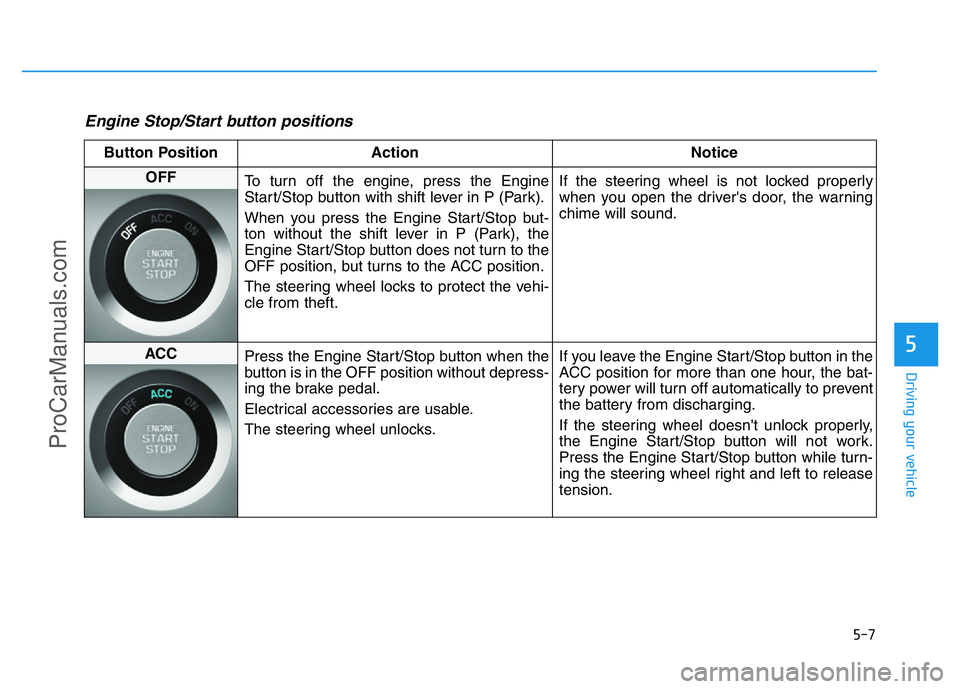
Engine Stop/Start button positions
Button Position Action Notice
OFF
To turn off the engine, press the Engine
Start/Stop button with shift lever in P (Park).
When you press the Engine Start/Stop but-
ton without the shift lever in P (Park), the
Engine Start/Stop button does not turn to the
OFF position, but turns to the ACC position.
The steering wheel locks to protect the vehi-
cle from theft.If the steering wheel is not locked properly
when you open the driver's door, the warning
chime will sound.
ACC
Press the Engine Start/Stop button when the
button is in the OFF position without depress-
ing the brake pedal.
Electrical accessories are usable.
The steering wheel unlocks.If you leave the Engine Start/Stop button in the
ACC position for more than one hour, the bat-
tery power will turn off automatically to prevent
the battery from discharging.
If the steering wheel doesn't unlock properly,
the Engine Start/Stop button will not work.
Press the Engine Start/Stop button while turn-
ing the steering wheel right and left to release
tension.
ProCarManuals.com
Page 294 of 546
5-18
Driving your vehicle
To reduce the risk of SERIOUS
INJURY or DEATH:
•ALWAYS wear your seatbelt.
In a collision, an unbelted
occupant is significantly more
likely to be seriously injured
or killed than a properly belt-
ed occupant.
•Avoid high speeds when cor-
nering or turning.
•Do not make quick steering
wheel movements, such as
sharp lane changes or fast,
sharp turns.
•The risk of rollover is greatly
increased if you lose control
of your vehicle at highway
speeds.
•Loss of control often occurs if
two or more wheels drop off
the roadway and the driver
over steers to reenter the
roadway.
(Continued)
(Continued)
•In the event your vehicle
leaves the roadway, do not
steer sharply. Instead, slow
down before pulling back into
the travel lanes.
•HYUNDAI recommends you
follow all posted speed limits.
WARNING
ProCarManuals.com
Page 295 of 546
5-19
Driving your vehicle
5
Using All Wheel Drive (AWD)
The All Wheel Drive (AWD) System
delivers engine power to front and
rear wheels for maximum traction.
AWD is useful when extra traction is
required, such as when driving slip-
pery, muddy, wet, or snow-covered
roads.
If the system determines there is a
need for four wheel drive, the
engine's driving power is distributed
to all four wheels automatically.
✽NOTICE
• Do not drive in water if the level is
higher than the bottom of the vehi-
cle.
• Check your brake condition once
you are out of mud or water.
Depress the brake pedal several
times as you move slowly until you
feel normal braking return.
• Shorten your scheduled mainte-
nance interval if you drive in off-
road conditions such as sand, mud
or water (see “Maintenance Under
Severe Usage Conditions” in chap-
ter 7).
• Make sure that AWD vehicle is
towed by a flatbed tow truck.
ALL WHEEL DRIVE (AWD) (IF EQUIPPED)
To reduce the risk of SERIOUS
INJURY or DEATH:
•Do not drive in conditions that
exceed the vehicles intended
design such as challenging
off-road conditions.
•Avoid high speeds when cor-
nering or turning.
•Do not make quick steering
wheel movements, such as
sharp lane changes or fast,
sharp turns.
•The risk of a rollover is great-
ly increased if you lose con-
trol of your vehicle at highway
speeds.
•Loss of control often occurs if
two or more wheels drop off
the roadway and the driver
over steers to reenter the
roadway.
•In the event your vehicle
leaves the roadway, do not
steer sharply. Instead, slow
down before pulling back into
the travel lanes.
WARNING
If the AWD warning light ( )
stays on the instrument cluster,
your vehicle may have a mal-
function with the AWD system.
When the AWD warning light
( ) illuminates we recom-
mend that the vehicle be
checked by an authorized
HYUNDAI dealer as soon as
possible.
WARNING
ProCarManuals.com
Page 296 of 546
5-20
Driving your vehicle
For safe AWD operation
Before driving
• Make sure all passengers are
wearing seat belts.
• Sit upright and closer to the steer-
ing wheel than usual. Adjust the
steering wheel to a position com-
fortable for you to drive.
Driving on snow-covered or icy
roads
• Start off slowly by applying the
accelerator pedal gently.
• Use snow tires or tire chains.
• Keep sufficient distance between
your vehicle and the vehicle in front
of you.
• Use engine braking during deceler-
ation.
• Avoid speeding, rapid acceleration,
sudden brake applications, and
sharp turns to prevent skids.
Driving in sand or mud
• Maintain slow and constant speed.
• Use tire chains driving in mud if
necessary.
• Keep sufficient distance between
your vehicle and the vehicle in front
of you.
• Reduce vehicle speed and always
check the road condition.
• Avoid speeding, rapid acceleration,
sudden brake applications, and
sharp turns to prevent getting
stuck.
✽NOTICE
• When using Snow Tires, mount
them on all four wheels.
• When using Tire Chains, install
them on all four tires. However, if
you are in a situation to use only
two tire chains, install them on the
rear tires. In this case, drive a
short distance to prevent damage
to the AWD system.
• If tire chains must be used, use
AutoSock (fabric snow chain) and
install the tire chain after review-
ing the instructions provided with
the tire chains.
For more information on Snow Tires
and Tire Chains, refer to "Winter
Driving" in this chapter.
When the vehicle is stuck in
snow, sand or mud, place a non-
slip material under the drive
wheels to provide traction OR
slowly spin the wheels in for-
ward and reverse directions
which causes a rocking motion
that may free the vehicle.
However, avoid running the
engine continuously at high
rpm, doing so may damage the
AWD system.
CAUTION
ProCarManuals.com
Page 297 of 546
5-21
Driving your vehicle
5
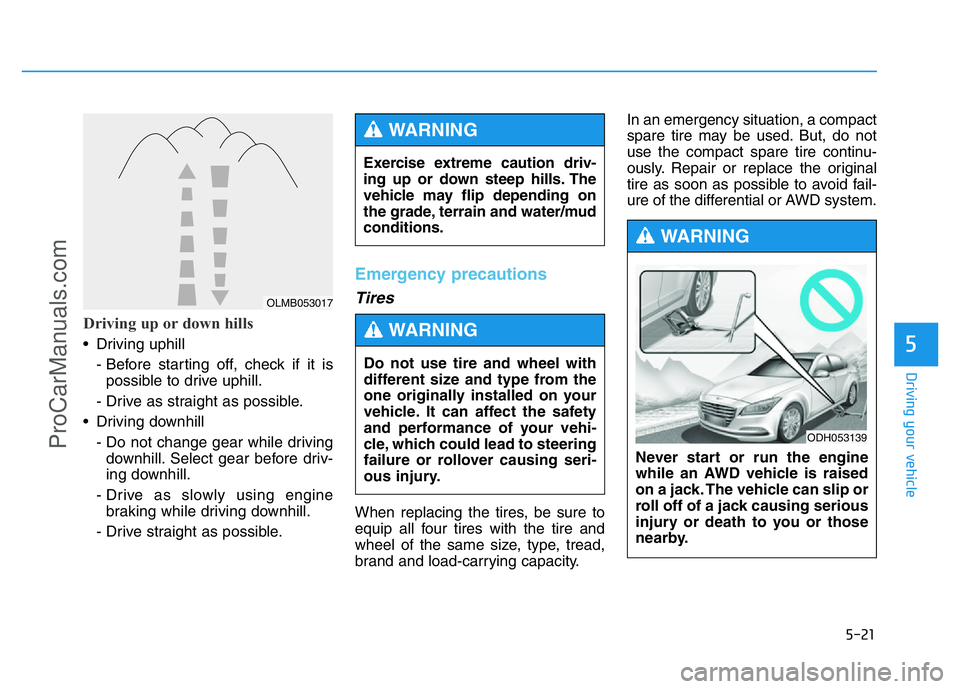
Driving up or down hills
• Driving uphill
- Before starting off, check if it is
possible to drive uphill.
- Drive as straight as possible.
• Driving downhill
- Do not change gear while driving
downhill. Select gear before driv-
ing downhill.
- Drive as slowly using engine
braking while driving downhill.
- Drive straight as possible.
Emergency precautions
Tires
When replacing the tires, be sure to
equip all four tires with the tire and
wheel of the same size, type, tread,
brand and load-carrying capacity.In an emergency situation, a compact
spare tire may be used. But, do not
use the compact spare tire continu-
ously. Repair or replace the original
tire as soon as possible to avoid fail-
ure of the differential or AWD system. Exercise extreme caution driv-
ing up or down steep hills. The
vehicle may flip depending on
the grade, terrain and water/mud
conditions.
WARNING
OLMB053017
Never start or run the engine
while an AWD vehicle is raised
on a jack. The vehicle can slip or
roll off of a jack causing serious
injury or death to you or those
nearby.
WARNING
ODH053139
Do not use tire and wheel with
different size and type from the
one originally installed on your
vehicle. It can affect the safety
and performance of your vehi-
cle, which could lead to steering
failure or rollover causing seri-
ous injury.
WARNING
ProCarManuals.com
Page 312 of 546
5-36
Driving your vehicle
Using ABS
To obtain the maximum benefit from
your ABS in an emergency situation,
do not attempt to modulate your brake
pressure and do not try to pump your
brakes. Depress your brake pedal as
hard as possible.
When you apply your brakes under
conditions which may lock the wheels,
you may hear sounds from the brakes,
or feel a corresponding sensation in
the brake pedal. This is normal and it
means your ABS is active.
ABS does not reduce the time or dis-
tance it takes to stop the vehicle.
Always maintain a safe distance from
the vehicle in front of you.
ABS will not prevent a skid that results
from sudden changes in direction,
such as trying to take a corner too fast
or making a sudden lane change.
Always drive at a safe speed for the
road and weather conditions.
ABS cannot prevent a loss of stability.
Always steer moderately when brak-
ing hard. Severe or sharp steering
wheel movement can still cause your
vehicle to veer into oncoming traffic or
off the road.On loose or uneven road surfaces,
operation of the anti-lock brake sys-
tem may result in a longer stopping
distance than for vehicles equipped
with a conventional brake system.
The ABS warning light ( ) will stay
on for several seconds after the
Engine Start/Stop button is in the ON
position. During that time, the ABS will
go through self-diagnosis and the light
will go off if everything is normal. If the
light stays on, you may have a prob-
lem with your ABS. We recommend
that you contact an authorized
HYUNDAI dealer as soon as possible.
✽NOTICE
When you jump start your vehicle
because of a drained battery, the
ABS warning light ( ) may turn
on at the same time. This happens
because of the low battery voltage. It
does not mean your ABS is malfunc-
tioning. Have the battery recharged
before driving the vehicle.
If the ABS warning light ( ) is
on and stays on, you may have
a problem with the ABS. Your
power brakes will work normal-
ly. To reduce the risk of serious
injury or death, we recommend
that you contact your HYUNDAI
dealer as soon as possible.
WARNING
When you drive on a road having
poor traction, such as an icy
road, and apply your brakes con-
tinuously, the ABS will be active
continuously and the ABS warn-
ing light ( ) may illuminate.
Pull your car over to a safe place
and turn the engine off.
Restart the engine. If the ABS
warning light is off, then your
ABS system is normal.
Otherwise, you may have a prob-
lem with your ABS system. We
recommend that you contact an
authorized HYUNDAI dealer as
soon as possible.
CAUTION
ProCarManuals.com
Page 320 of 546
5-44
Driving your vehicle
When Active ECO is activated:
• The acceleration response may be
slightly reduced as the accelerator
pedal is depressed moderately.
• The air conditioner performance
may be limited.
• The shift pattern of the automatic
transmission may change.
• The engine noise may get louder.
The above situations are normal
conditions when the Active ECO sys-
tem is activated to improve fuel effi-
ciency.Limitation of Active ECO opera-
tion:
If the following conditions occur while
Active ECO is operating, the system
operation is limited even though
there is no change in the ECO indi-
cator.
• When the coolant temperature is
low:
The system will be limited until
engine performance becomes nor-
mal.
• When driving up a hill:
The system will be limited to gain
power when driving uphill because
engine torque is restricted.
• When using the automatic trans-
mission Sports mode:
The system will be limited accord-
ing to the shift location.
SPORT mode
SPORT mode focuses on
dynamic driving by auto-
matically controlling the
steering wheel, engine
and transmission system.
• When the DRIVE MODE button is
pressed and the SPORT mode is
selected, the SPORT indicator
(yellow) will illuminate.
• When the SPORT mode is activat-
ed, and the engine is turned off
and on it will change to NORMAL
mode. To turn on the SPORT
mode, press the DRIVE MODE
button again.
• If the system is activated:
- After accelerating and releasing
the accelerator pedal, the gear and
engine speed RPM may not drop
as soon as in NORMAL mode.
- Up-shifting is delayed.
✽NOTICE
In SPORT mode, the fuel efficiency
may decrease.
SPORT
ProCarManuals.com
Page 323 of 546
5-47
Driving your vehicle
5
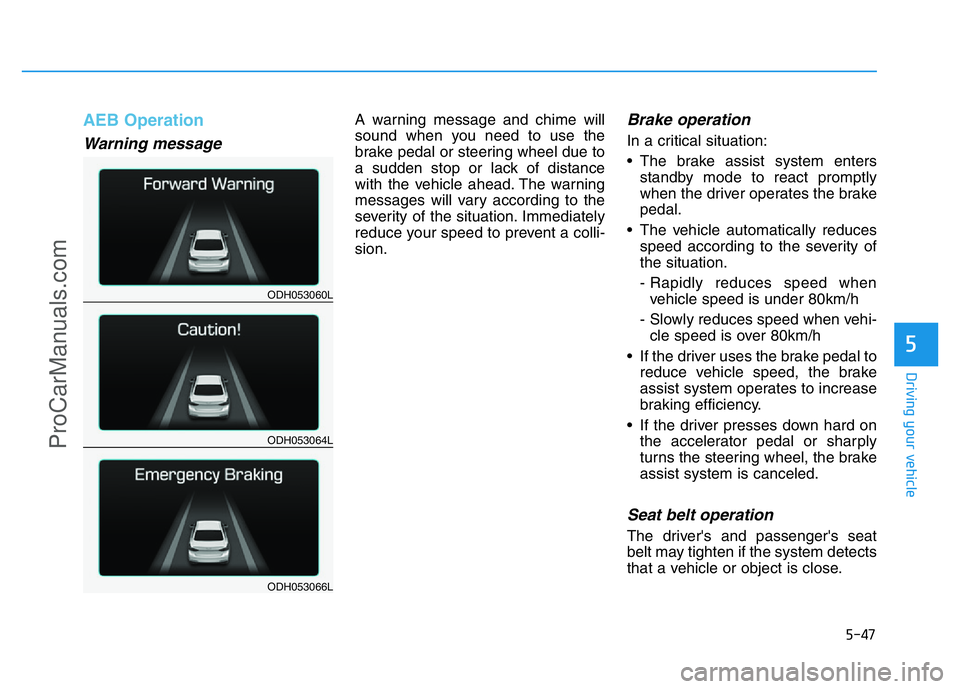
AEB Operation
Warning message
A warning message and chime will
sound when you need to use the
brake pedal or steering wheel due to
a sudden stop or lack of distance
with the vehicle ahead. The warning
messages will vary according to the
severity of the situation. Immediately
reduce your speed to prevent a colli-
sion.Brake operation
In a critical situation:
• The brake assist system enters
standby mode to react promptly
when the driver operates the brake
pedal.
• The vehicle automatically reduces
speed according to the severity of
the situation.
- Rapidly reduces speed when
vehicle speed is under 80km/h
- Slowly reduces speed when vehi-
cle speed is over 80km/h
• If the driver uses the brake pedal to
reduce vehicle speed, the brake
assist system operates to increase
braking efficiency.
• If the driver presses down hard on
the accelerator pedal or sharply
turns the steering wheel, the brake
assist system is canceled.
Seat belt operation
The driver's and passenger's seat
belt may tighten if the system detects
that a vehicle or object is close.
ODH053060L
ODH053064L
ODH053066L
ProCarManuals.com
Page 327 of 546
5-51
Driving your vehicle
5
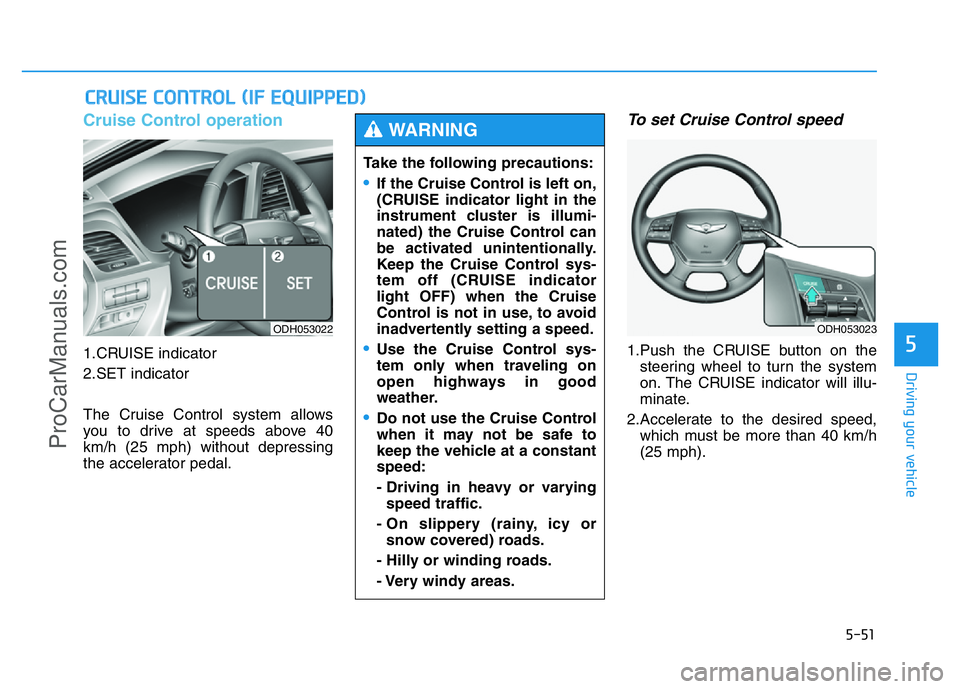
Cruise Control operation
1.CRUISE indicator
2.SET indicator
The Cruise Control system allows
you to drive at speeds above 40
km/h (25 mph) without depressing
the accelerator pedal.
To set Cruise Control speed
1.Push the CRUISE button on the
steering wheel to turn the system
on. The CRUISE indicator will illu-
minate.
2.Accelerate to the desired speed,
which must be more than 40 km/h
(25 mph).
CRUISE CONTROL (IF EQUIPPED)
ODH053022
Take the following precautions:
•If the Cruise Control is left on,
(CRUISE indicator light in the
instrument cluster is illumi-
nated) the Cruise Control can
be activated unintentionally.
Keep the Cruise Control sys-
tem off (CRUISE indicator
light OFF) when the Cruise
Control is not in use, to avoid
inadvertently setting a speed.
•Use the Cruise Control sys-
tem only when traveling on
open highways in good
weather.
•Do not use the Cruise Control
when it may not be safe to
keep the vehicle at a constant
speed:
- Driving in heavy or varying
speed traffic.
- On slippery (rainy, icy or
snow covered) roads.
- Hilly or winding roads.
- Very windy areas.
WARNING
ODH053023
ProCarManuals.com
Page 329 of 546
5-53
Driving your vehicle
5
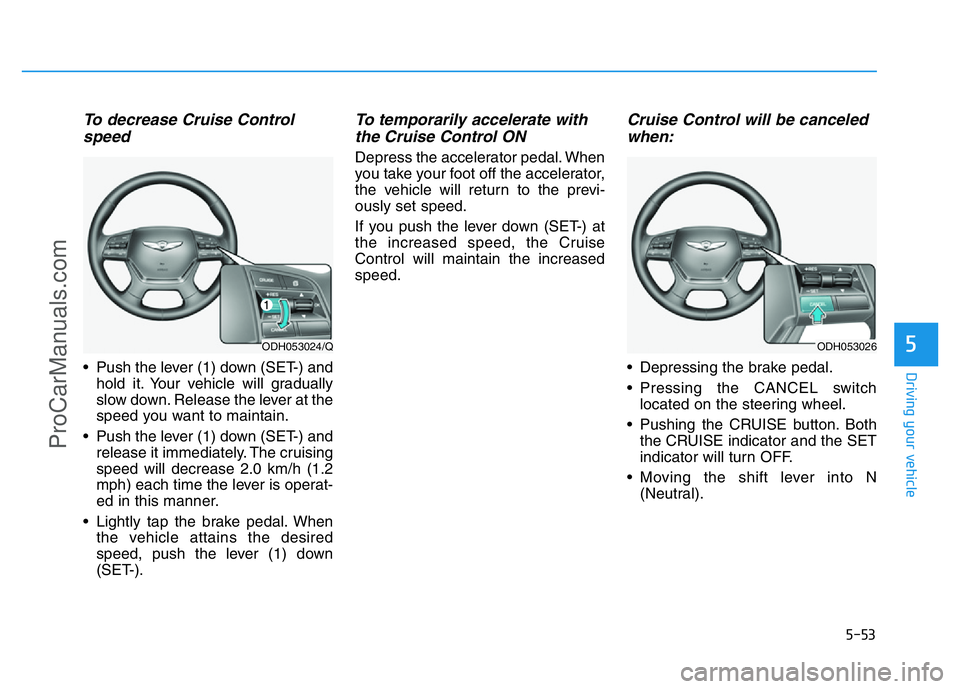
To decrease Cruise Control
speed
• Push the lever (1) down (SET-) and
hold it. Your vehicle will gradually
slow down. Release the lever at the
speed you want to maintain.
• Push the lever (1) down (SET-) and
release it immediately. The cruising
speed will decrease 2.0 km/h (1.2
mph) each time the lever is operat-
ed in this manner.
• Lightly tap the brake pedal. When
the vehicle attains the desired
speed, push the lever (1) down
(SET-).
To temporarily accelerate with
the Cruise Control ON
Depress the accelerator pedal. When
you take your foot off the accelerator,
the vehicle will return to the previ-
ously set speed.
If you push the lever down (SET-) at
the increased speed, the Cruise
Control will maintain the increased
speed.
Cruise Control will be canceled
when:
• Depressing the brake pedal.
• Pressing the CANCEL switch
located on the steering wheel.
• Pushing the CRUISE button. Both
the CRUISE indicator and the SET
indicator will turn OFF.
• Moving the shift lever into N
(Neutral).
ODH053024/QODH053026
ProCarManuals.com