ESP Hyundai Creta 2016 User Guide
[x] Cancel search | Manufacturer: HYUNDAI, Model Year: 2016, Model line: Creta, Model: Hyundai Creta 2016Pages: 512, PDF Size: 11.54 MB
Page 116 of 512
3-22
Convenient features of your vehicle
The ignition switch must be in the ON
position to be able to raise or lower
the windows. Each door has a Power
Window switch to control that door's
window. The driver has a Power
Window Lock switch which can block
the operation of passenger windows.
The power windows will operate for
approximately 30 seconds after the
ignition switch is placed in the ACC
or LOCK/OFF position. However, if
the front doors are opened, the
Power Windows cannot be operated
even within the 30 second period.Information
• I n c o l d a n d w e t c l i m a t e s , p o w e r w i n d o w s m a y n o t w o r k p r o p e r l y d u e t o
f r e e z i n g c o n d i t i o n s .
• W h i l e d r i v i n g w i t h t h e r e a r w i n d o w s d o w n , y o u r v e h i c l e m a y d e m o n s t r a t e
a w i n d b u f f e t i n g o r p u l s a t i o n n o i s e .
T h i s n o i s e i s n o r m a l a n d c a n b e
r e d u c e d o r e l i m i n a t e d b y t a k i n g t h e
f o l l o w i n g a c t i o n s . I f t h e n o i s e o c c u r s
w i t h o n e o r b o t h o f t h e r e a r w i n d o w s
d o w n , p a r t i a l l y l o w e r b o t h f r o n t w i n
d o w s a p p r o x i m a t e l y o n e i n c h .Window opening and closing
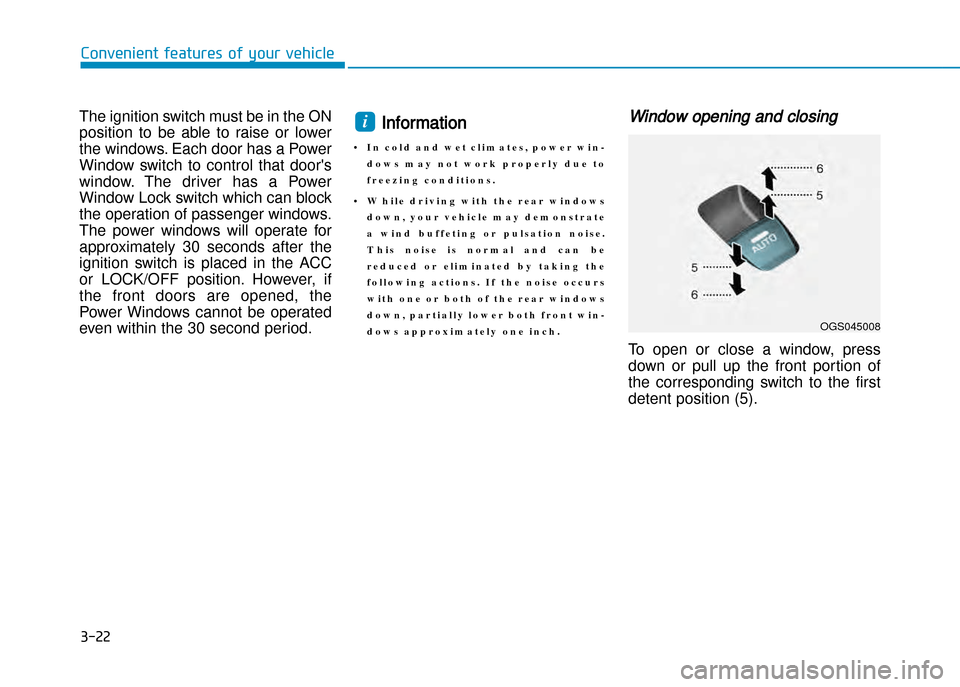
To open or close a window, press
down or pull up the front portion of
the corresponding switch to the first
detent position (5).
i
OGS045008
Page 124 of 512
3-30
Convenient features of your vehicle
Information
• M a k e s u r e t o r e f u e l y o u r v e h i c l e a c c o r d i n g t o t h e " F u e l R e q u i r e m e n t s "
s u g g e s t e d i n t h e i n t r o d u c t i o n c h a p t e r .
• D o n o t s p i l l f u e l o n t h e e x t e r i o r s u r f a c e s o f t h e v e h i c l e . A n y t y p e o f f u e l
s p i l l e d o n p a i n t e d s u r f a c e s m a y
d a m a g e t h e p a i n t .
If the fuel filler cap requires replace
ment, use only a genuine HYUNDAI
cap or the equivalent specified for
your vehicle. An incorrect fuel filler
cap can result in a serious malfunc
tion of the fuel system or emission
control system.
NOTICE
i•When refueling, always move
the shift lever to the P (Park)
position (for automatic
transaxle) or first gear or R
(Reverse, for manual transaxle),
set the parking brake, and place
the ignition switch to the
LOCK/OFF position. Sparks
produced by electrical compo
nents related to the engine can
ignite fuel vapors causing a fire.
•Do not use matches or a lighter
and do not smoke or leave a lit
cigarette in your vehicle while at
a gas station, especially during
refueling.
•Do not overfill or topoff your
vehicle tank, which can cause
gasoline spillage.
(Continued)
(Continued)
•If a fire breaks out during refuel
ing, leave the vicinity of the vehi
cle, and immediately contact the
manager of the gas station and
then contact the local fire
department. Follow any safety
instructions they provide.
•If pressurized fuel sprays out, it
can cover your clothes or skin
and thus subject you to the risk
of fire and burns. Always
remove the fuel cap carefully
and slowly. If the cap is venting
fuel or if you hear a hissing
sound, wait until the condition
stops before completely remov
ing the cap.
•Always check that the fuel cap is
installed securely to prevent fuel
spillage in the event of an acci
dent.
Page 172 of 512
3-78
Convenient features of your vehicle
3
Daytime running light (DRL)
(if equipped)
The Daytime Running Lights (DRL)
can make it easier for others to see
the front of your vehicle during the
day, especially after dawn and beforesunset.
The DRL system will turn the dedi
cated lamp OFF when:
1. The headlights or front fog lightsare in the ON position.
2. The engine is turned off.
Headlamp leveling device
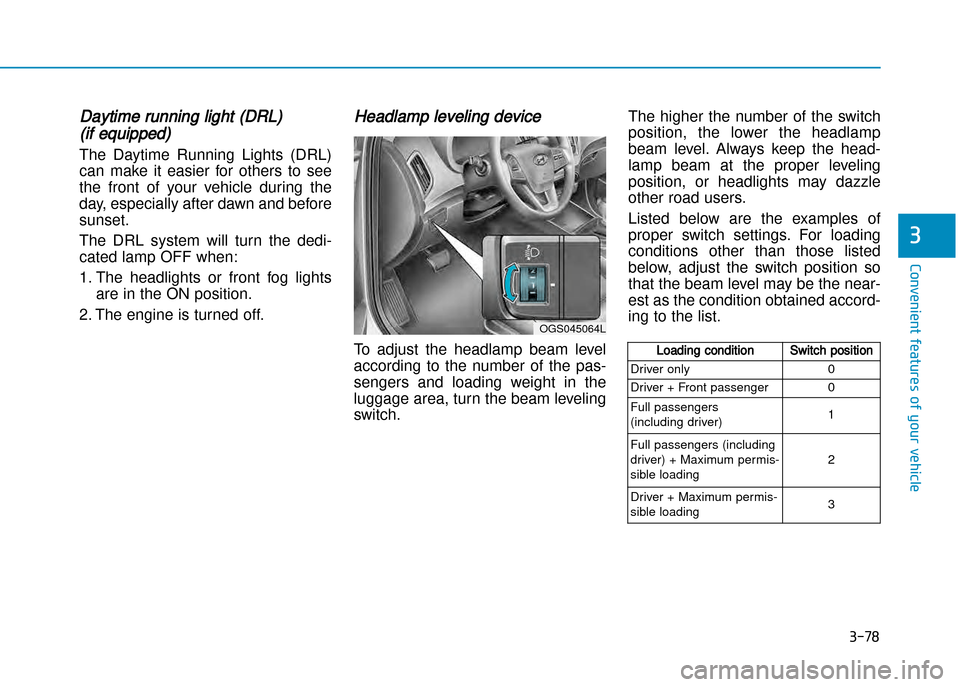
To adjust the headlamp beam level
according to the number of the pas
sengers and loading weight in the
luggage area, turn the beam leveling
switch. The higher the number of the switch
position, the lower the headlamp
beam level. Always keep the head
lamp beam at the proper leveling
position, or headlights may dazzle
other road users.
Listed below are the examples of
proper switch settings. For loading
conditions other than those listed
below, adjust the switch position so
that the beam level may be the near
est as the condition obtained accord
ing to the list.
OGS045064L
Loading conditionSwitch position
Driver only 0
Driver + Front passenger 0
Full passengers
(including driver) 1
Full passengers (including
driver) + Maximum permis
sible loading 2
Driver + Maximum permis
sible loading 3
Page 178 of 512
3-84
Convenient features of your vehicle
3
Rear view camera (if equipped)
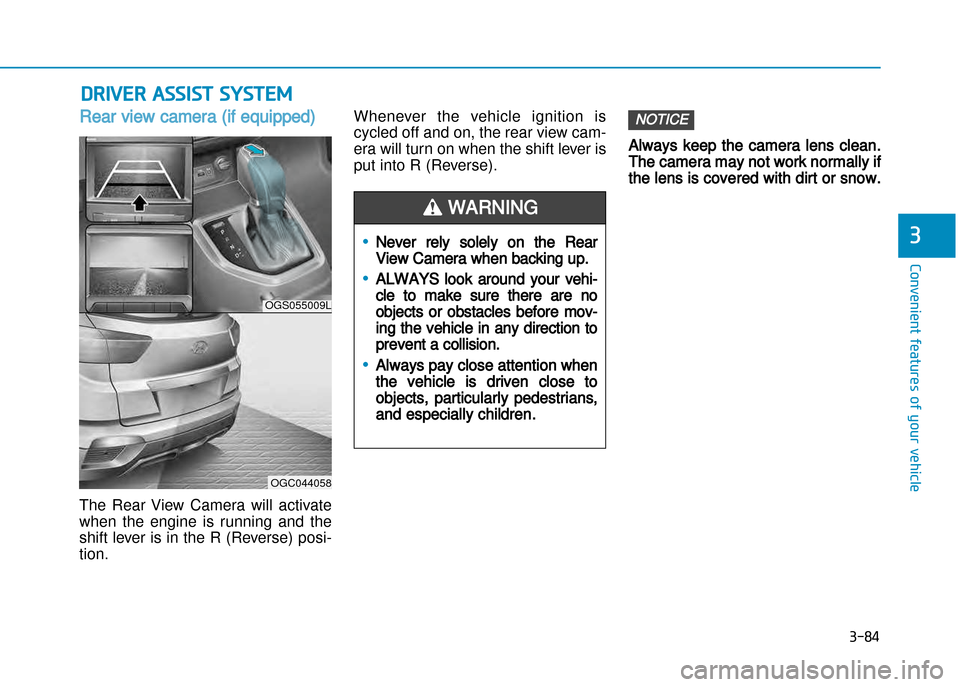
The Rear View Camera will activate
when the engine is running and the
shift lever is in the R (Reverse) position.Whenever the vehicle ignition is
cycled off and on, the rear view cam
era will turn on when the shift lever is
put into R (Reverse).
Always keep the camera lens clean.
The camera may not work normally if
the lens is covered with dirt or snow.
NOTICE
DRiVER ASSiSt SYStEM
•Never rely solely on the Rear
View Camera when backing up.
•ALWAYS look around your vehi
cle to make sure there are no
objects or obstacles before mov
ing the vehicle in any direction to
prevent a collision.
•Always pay close attention when
the vehicle is driven close to
objects, particularly pedestrians,
and especially children.
WARNING
OGS055009L
OGC044058
Page 179 of 512
3-85
Convenient features of your vehicle
Rear parking assist system
(if equipped)
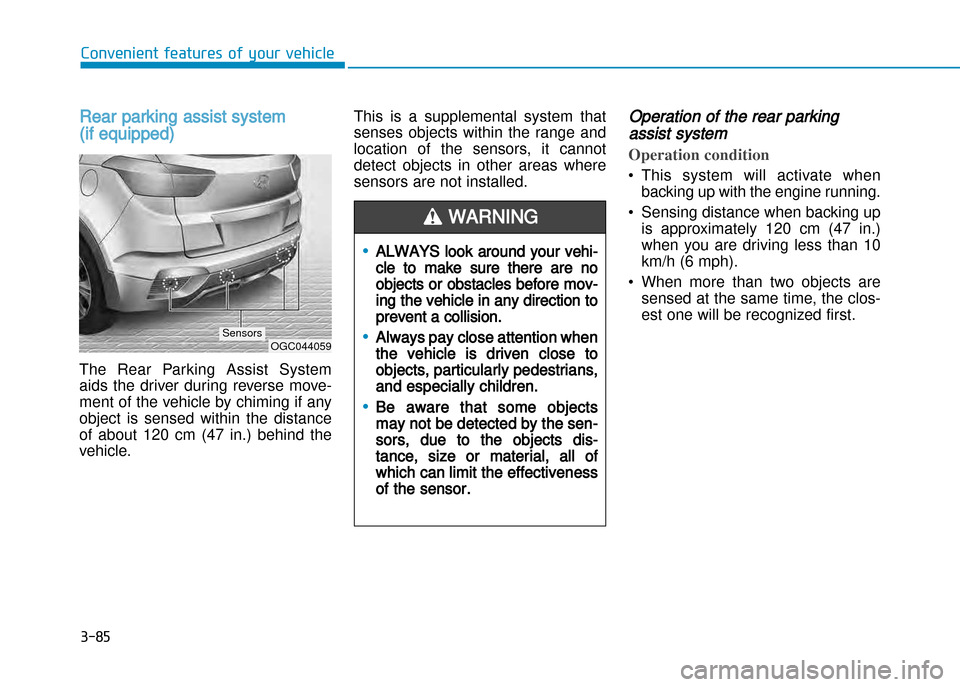
The Rear Parking Assist System
aids the driver during reverse move
ment of the vehicle by chiming if any
object is sensed within the distance
of about 120 cm (47 in.) behind the
vehicle. This is a supplemental system that
senses objects within the range and
location of the sensors, it cannot
detect objects in other areas where
sensors are not installed.
Operation of the rear parking
assist system
Operation condition
• This system will activate when
backing up with the engine running.
• Sensing distance when backing up is approximately 120 cm (47 in.)
when you are driving less than 10
km/h (6 mph).
• When more than two objects are sensed at the same time, the clos
est one will be recognized first.
•ALWAYS look around your vehi
cle to make sure there are no
objects or obstacles before mov
ing the vehicle in any direction to
prevent a collision.
•Always pay close attention when
the vehicle is driven close to
objects, particularly pedestrians,
and especially children.
•Be aware that some objects
may not be detected by the sen
sors, due to the objects dis
tance, size or material, all of
which can limit the effectiveness
of the sensor.
WARNING
OGC044059Sensors
Page 203 of 512
3-109
Convenient features of your vehicle
Windshield defrosting and defog
ging
• For maximum defrosting, set thetemperature control to the extreme
right/hot position and the fan speed
control to the highest speed.
• If warm air to the floor is desired while defrosting or defogging, set
the mode to the floordefrost position.
• Before driving, clear all snow and ice from the windshield, rear win
dow, outside rear view mirrors, and
all side windows.
• Clear all snow and ice from the hood and air inlet at the buttom of
the windshield.
• If the engine temperature is still cold after starting, then a brief
engine warm up period may be
required for the vented air flow to
become warm or hot.Manual climate control system
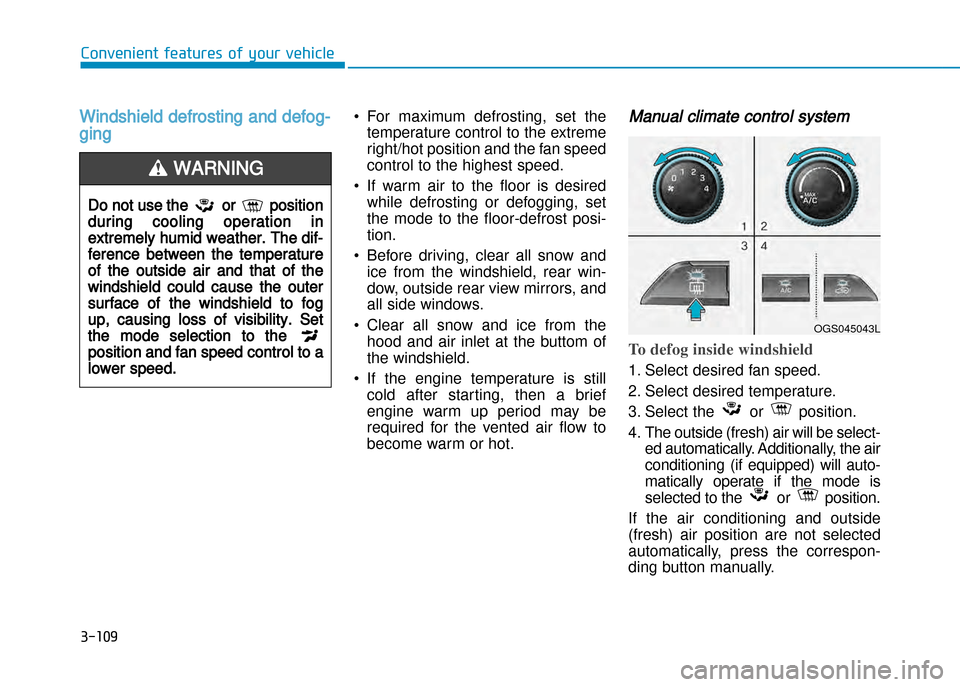
To defog inside windshield
1. Select desired fan speed.
2. Select desired temperature.
3. Select the or position.
4. The outside (fresh) air will be select ed automatically. Additionally, the air
conditioning (if equipped) will auto
matically operate if the mode is
selected to the or position.
If the air conditioning and outside
(fresh) air position are not selected
automatically, press the correspon
ding button manually.
Do not use the or position
during cooling operation in
extremely humid weather. The dif
ference between the temperature
of the outside air and that of the
windshield could cause the outer
surface of the windshield to fog
up, causing loss of visibility. Set
the mode selection to the
position and fan speed control to a
lower speed.
WARNING
OGS045043L
Page 204 of 512
3-110
Convenient features of your vehicle
3
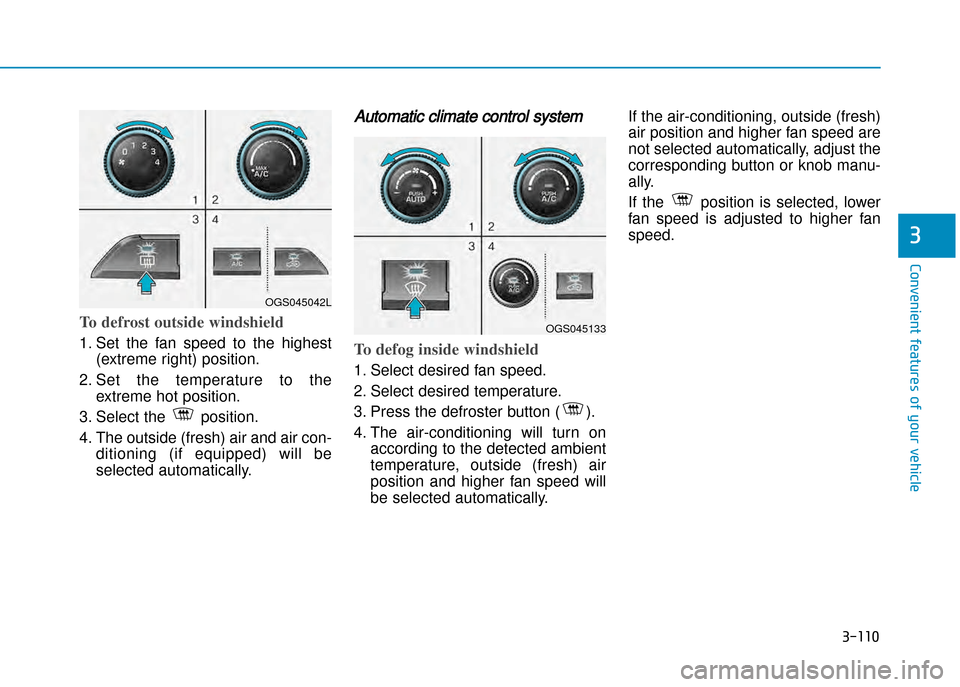
To defrost outside windshield
1. Set the fan speed to the highest(extreme right) position.
2. Set the temperature to the extreme hot position.
3. Select the position.
4. The outside (fresh) air and air con ditioning (if equipped) will be
selected automatically.
Automatic climate control system
To defog inside windshield
1. Select desired fan speed.
2. Select desired temperature.
3. Press the defroster button ( ).
4. The airconditioning will turn onaccording to the detected ambient
temperature, outside (fresh) air
position and higher fan speed will
be selected automatically. If the airconditioning, outside (fresh)
air position and higher fan speed are
not selected automatically, adjust the
corresponding button or knob manu
ally.
If the position is selected, lower
fan speed is adjusted to higher fanspeed.
OGS045042L
OGS045133
Page 217 of 512
Roof rack (if equipped)
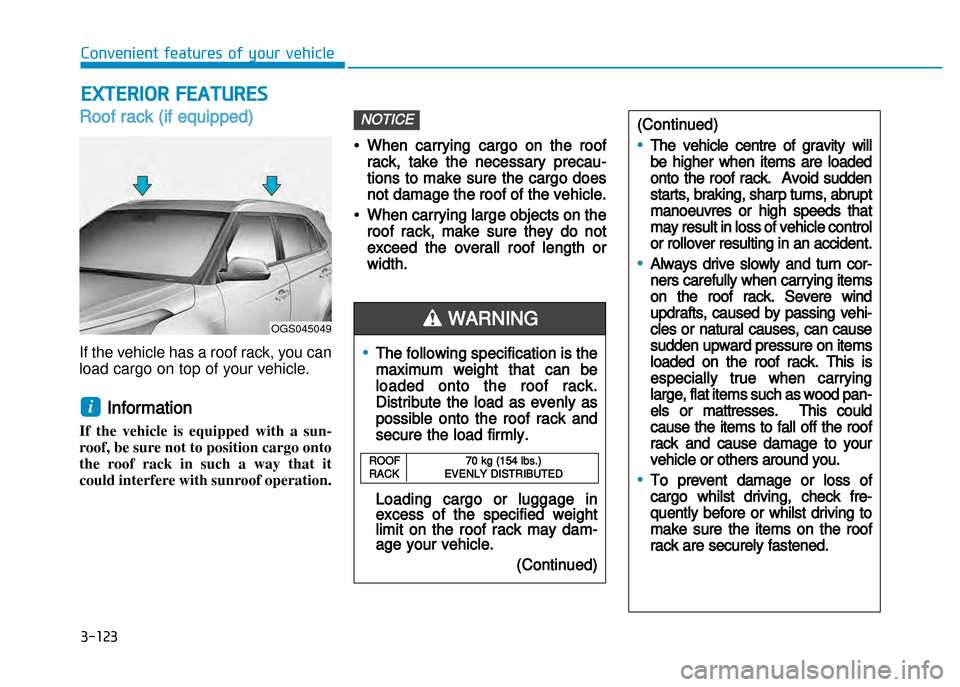
If the vehicle has a roof rack, you can
load cargo on top of your vehicle.
Information
If the vehicle is equipped with a sun
roof, be sure not to position cargo onto
the roof rack in such a way that it
could interfere with sunroof operation.
•When carrying cargo on the roof
rack, take the necessary precau
tions to make sure the cargo does
not damage the roof of the vehicle.
•When carrying large objects on the
roof rack, make sure they do not
exceed the overall roof length or
width.
NOTICE
i
ExtERioR FEAtURES
•The following specification is the
maximum weight that can be
loaded onto the roof rack.
Distribute the load as evenly as
possible onto the roof rack and
secure the load firmly.
Loading cargo or luggage inexcess of the specified weightlimit on the roof rack may damage your vehicle.
(Continued)
WARNING
(Continued)
•The vehicle centre of gravity will
be higher when items are loaded
onto the roof rack. Avoid sudden
starts, braking, sharp turns, abrupt
manoeuvres or high speeds that
may result in loss of vehicle control
or rollover resulting in an accident.
•Always drive slowly and turn cor
ners carefully when carrying items
on the roof rack. Severe wind
updrafts, caused by passing vehi
cles or natural causes, can cause
sudden upward pressure on items
loaded on the roof rack. This is
especially true when carrying
large, flat items such as wood pan
els or mattresses. This could
cause the items to fall off the roof
rack and cause damage to your
vehicle or others around you.
•To prevent damage or loss of
cargo whilst driving, check fre
quently before or whilst driving to
make sure the items on the roof
rack are securely fastened.
ROOF70 kg (154 lbs.)RACK EVENLY DISTRIBUTED
OGS045049
Convenient features of your vehicle
3-123
Page 240 of 512
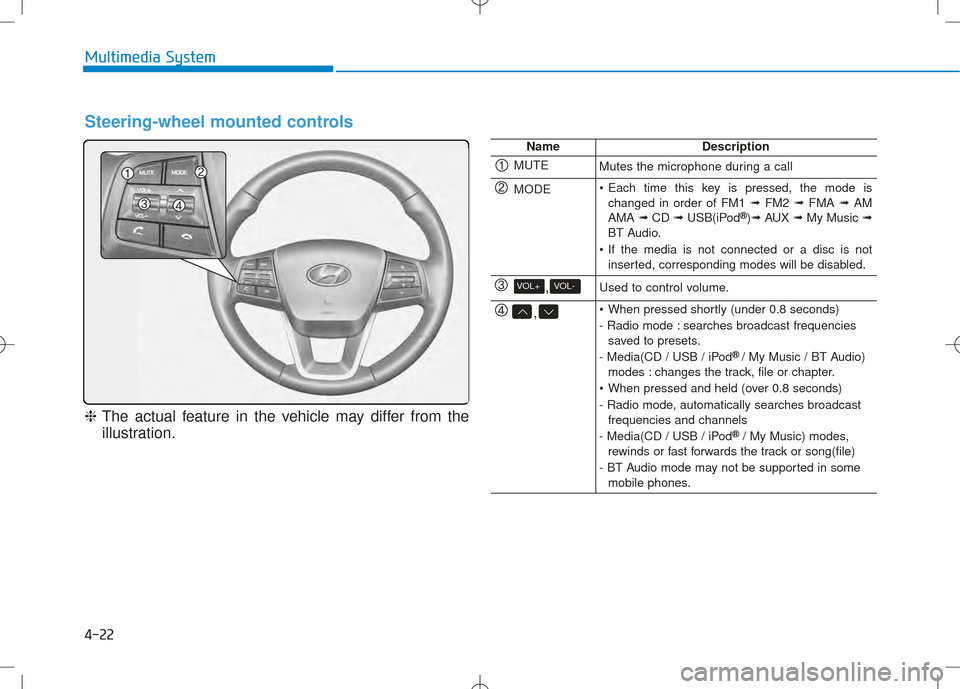
4-22
Multimedia System
Steering-wheel mounted controls
❈The actual feature in the vehicle may differ from the
illustration.
NameDescription
MUTEMutes the microphone during a call
MODE Each time this key is pressed, the mode is changed in order of FM1 ➟FM2 ➟FMA ➟AM
AMA ➟CD ➟USB(iPod ®
)➟ AUX ➟My Music ➟
BT Audio.
If the media is not connected or a disc is not inserted, corresponding modes will be disabled.
,VOL-VOL+Used to control volume.
, When pressed shortly (under 0.8 seconds)
- Radio mode : searches broadcast frequenciessaved to presets.
- Media(CD / USB / iPod ®
/ My Music / BT Audio)
modes : changes the track, file or chapter.
When pressed and held (over 0.8 seconds)
- Radio mode, automatically searches broadcast frequencies and channels
- Media(CD / USB / iPod ®
/ My Music) modes,
rewinds or fast forwards the track or song(file)
- BT Audio mode may not be supported in some mobile phones.
Page 250 of 512
![Hyundai Creta 2016 User Guide 4-32
Multimedia System
MMEEDD IIAA MM OODDEE
Pressing the key will change
the operating mode in order of CD
➟
USB(iPod®) ➟ AUX ➟ My Music ➟BT
Audio.
If [Mode Pop up] is turned on within](/img/35/14533/w960_14533-249.png "Hyundai Creta 2016 User Guide 4-32
Multimedia System
MMEEDD IIAA MM OODDEE
Pressing the key will change
the operating mode in order of CD
➟
USB(iPod®) ➟ AUX ➟ My Music ➟BT
Audio.
If [Mode Pop up] is turned on within")
4-32
Multimedia System
MMEEDD IIAA MM OODDEE
Pressing the key will change
the operating mode in order of CD
➟
USB(iPod®) ➟ AUX ➟ My Music ➟BT
Audio.
If [Mode Pop up] is turned on within
[Display], then pressing the
key will display the Media
Pop-up Mode screen.
Turn the TUNE knob to move the
focus. Press the knob to select.
Information
The media mode pop up screen can be
displayed only when there are two or
more media modes turned on.
Title Icon
When a Bluetooth®Wireless
Technology, iPod®, USB, or AUX
device is connected or a CD is
inserted, the corresponding mode
icon will be displayed.
Icon Title
Bluetooth®Wireless Technology
CD
iPod®
USB
AUX
i
MEDIA
SETUP
MEDIA