USB Hyundai Creta 2016 User Guide
[x] Cancel search | Manufacturer: HYUNDAI, Model Year: 2016, Model line: Creta, Model: Hyundai Creta 2016Pages: 512, PDF Size: 11.54 MB
Page 233 of 512
4-15
Multimedia System
4
(Continued)
When the EQ features of an exter-nal device, such as the iPod ®
, and
the audio system are both active,
EQ effects could overlap and cause
sound deterioration and distortion.
Whenever possible, turn off the EQ
feature within the external device
upon use by connecting with the
audio system.
Noise may occur when an iPod ®
or
AUX device is connected. When
such devices are not being used, dis-
connect the device for storage.
When the iPod ®
or AUX device
power is connected to the power
jack, playing the external device
may result in noise. In such cases,
disconnect the power connection
before use.
Skipping or improper operation may occur depending on the characteris-
tics of your iPod ®
/Phone ®
device.
(Continued) (Continued)
If your iPhone
®
is connected to both
the Bluetooth ®
Wireless Technology
and USB, the sound may not be
properly played. In your iPhone ®
,
select the Dock connector or
Bluetooth ®
Wireless Technology to
change the sound output (source).
iPod mode cannot be operated when the iPod ®
cannot be recognized due
to versions that do not support com-
munication protocols.
For fifth generation iPod ®
Nano
devices, the iPod ®
may not be recog-
nized when the battery level is low.
Please charge the iPod ®
for use.
Search/play orders shown within the iPod ®
device may differ with the
orders shown within the audio sys-
tem.
If the iPod ®
malfunctions due to an
iPod ®
device defect, reset the iPod ®
and try again. (To learn more, refer
to your iPod ®
manual)
(Continued) (Continued)
Some iPod
®
s may not sync with the
System depending on its version. If
the Media is removed before the
Media is recognized, then the sys-
tem may not properly restore the
previously operated mode. (iPad ®
charging is not supported.)
Beside support 1M cable when pur- chasing iPod/iPhone products, Long
Cable cannot be recognized.
Page 236 of 512
4-18
Multimedia System
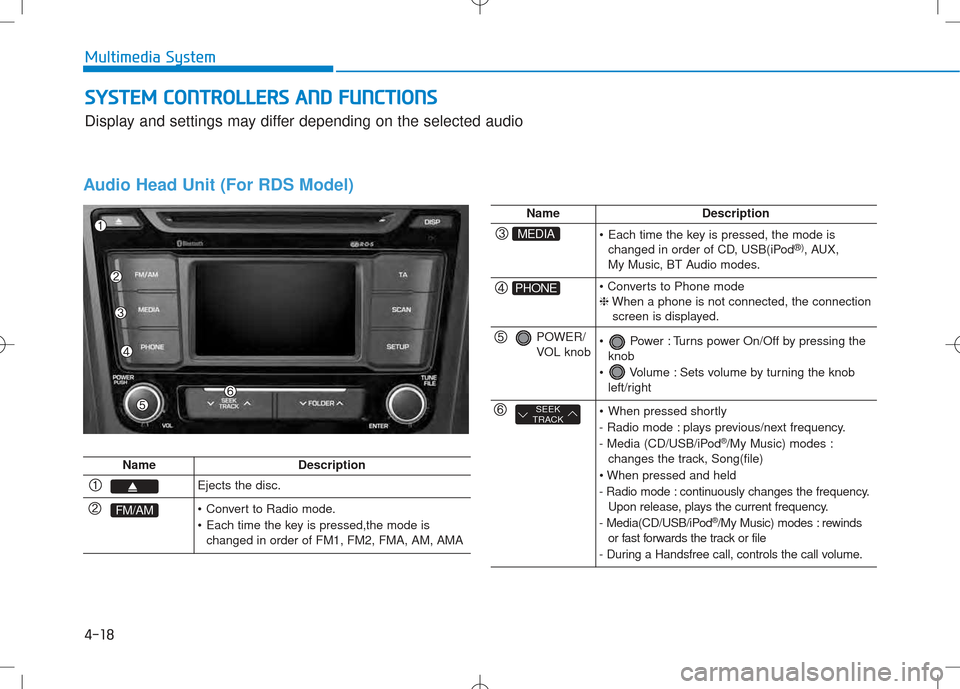
Audio Head Unit (For RDS Model)
NameDescription
Ejects the disc.
FM/AM Convert to Radio mode.
Each time the key is pressed,the mode ischanged in order of FM1, FM2, FMA, AM, AMA
NameDescription
MEDIA Each time the key is pressed, the mode ischanged in order of CD, USB(iPod ®)
, AUX,
My Music, BT Audio modes.
PHONE ❈ When a phone is not connected, the connection
screen is displayed.
POWER/
VOL knob Power : Turns power On/Off by pressing the knob
Volume : Sets volume by turning the knob left/right
SEEK
TRACK When pressed shortly
- Radio mode : plays previous/next frequency.
- Media (CD/USB/iPod ®
/My Music) modes :
changes the track, Song(file)
- Radio mode : continuously changes the frequency. Upon release, plays the current frequency.
- Media(CD/USB/iPod ®
/My Music) modes : rewinds
or fast forwards the track or file
- During a Handsfree call, controls the call volume.
SS YY SSTT EEMM CC OO NNTTRR OO LLLLEE RR SS AA NN DD FF UU NNCCTT IIOO NNSS
Display and settings may differ depending on the selected audio
Page 237 of 512
4-19
Multimedia System
4
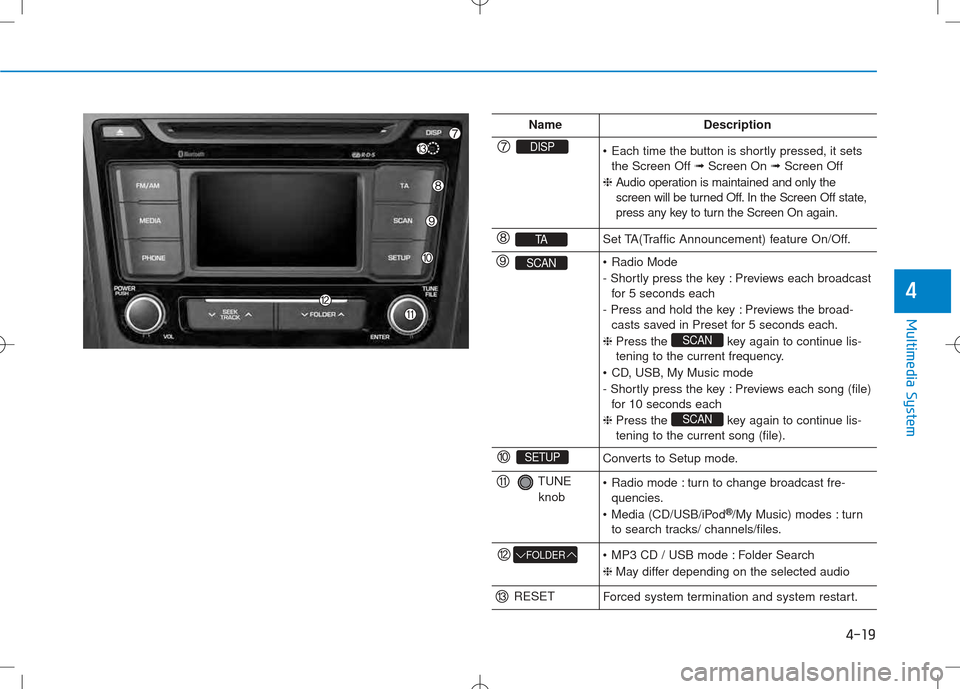
NameDescription
DISP Each time the button is shortly pressed, it setsthe Screen Off ➟Screen On ➟Screen Off
❈ Audio operation is maintained and only the
screen will be turned Off. In the Screen Off state,
press any key to turn the Screen On again.
TASet TA(Traffic Announcement) feature On/Off.
SCAN Radio Mode
- Shortly press the key : Previews each broadcast
for 5 seconds each
- Press and hold the key : Previews the broad- casts saved in Preset for 5 seconds each.
❈ Press the key again to continue lis-
tening to the current frequency.
CD, USB, My Music mode
- Shortly press the key : Previews each song (file) for 10 seconds each
❈ Press the key again to continue lis- tening to the current song (file).
SCAN
SCAN
SETUPConverts to Setup mode.
TUNE
knob Radio mode : turn to change broadcast fre- quencies.
Media (CD/USB/iPod ®
/My Music) modes : turn
to search tracks/ channels/files.
FOLDER MP3 CD / USB mode : Folder Search ❈ May differ depending on the selected audio
RESETForced system termination and system restart.
Page 238 of 512
4-20
Multimedia System
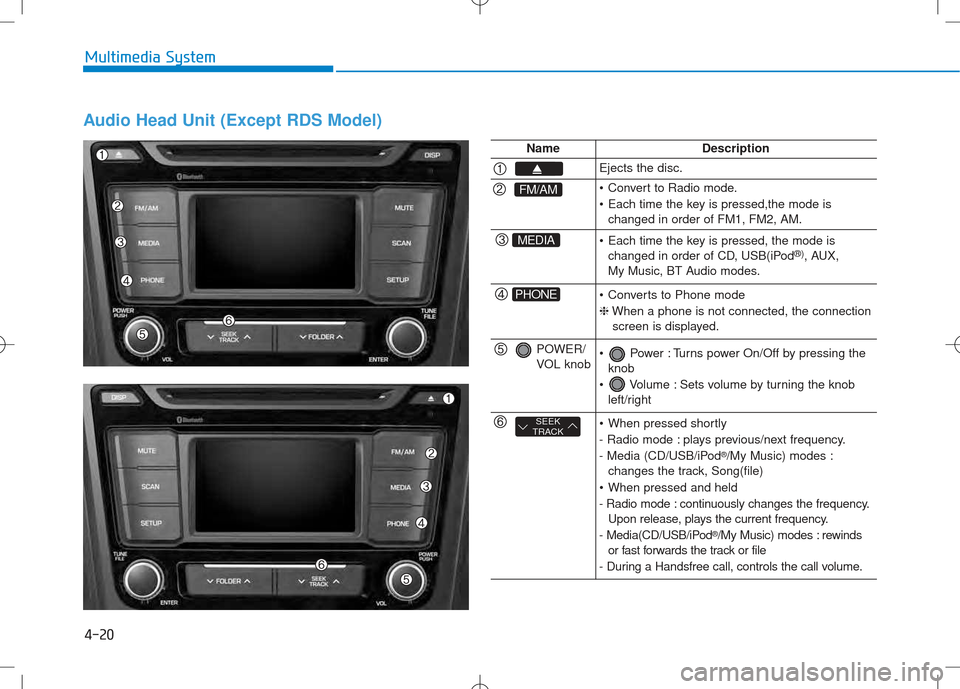
Audio Head Unit (Except RDS Model)
NameDescription
Ejects the disc.
FM/AM Convert to Radio mode.
Each time the key is pressed,the mode ischanged in order of FM1, FM2, AM.
MEDIA Each time the key is pressed, the mode ischanged in order of CD, USB(iPod ®)
, AUX,
My Music, BT Audio modes.
PHONE Converts to Phone mode ❈ When a phone is not connected, the connection
screen is displayed.
POWER/
VOL knob Power : Turns power On/Off by pressing the knob
Volume : Sets volume by turning the knob left/right
SEEK
TRACK When pressed shortly
- Radio mode : plays previous/next frequency.
- Media (CD/USB/iPod ®
/My Music) modes :
changes the track, Song(file)
When pressed and held
- Radio mode : continuously changes the frequency. Upon release, plays the current frequency.
- Media(CD/USB/iPod ®
/My Music) modes : rewinds
or fast forwards the track or file
- During a Handsfree call, controls the call volume.
Page 239 of 512
4-21
Multimedia System
4
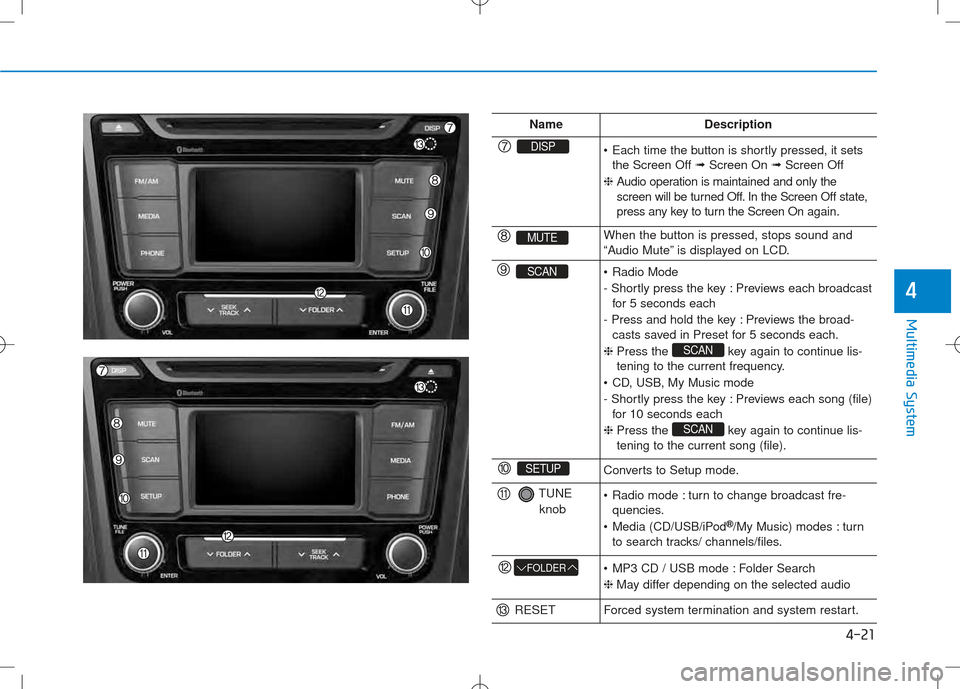
NameDescription
DISP Each time the button is shortly pressed, it setsthe Screen Off ➟Screen On ➟Screen Off
❈ Audio operation is maintained and only the
screen will be turned Off. In the Screen Off state,
press any key to turn the Screen On again.
MUTEWhen the button is pressed, stops sound and
“Audio Mute” is displayed on LCD.
SCAN Radio Mode
- Shortly press the key : Previews each broadcast
for 5 seconds each
- Press and hold the key : Previews the broad- casts saved in Preset for 5 seconds each.
❈ Press the key again to continue lis-
tening to the current frequency.
CD, USB, My Music mode
- Shortly press the key : Previews each song (file) for 10 seconds each
❈ Press the key again to continue lis- tening to the current song (file).
SCAN
SCAN
SETUPConverts to Setup mode.
TUNE
knob Radio mode : turn to change broadcast fre- quencies.
Media (CD/USB/iPod ®
/My Music) modes : turn
to search tracks/ channels/files.
FOLDER MP3 CD / USB mode : Folder Search ❈ May differ depending on the selected audio
RESETForced system termination and system restart.
Page 240 of 512
4-22
Multimedia System
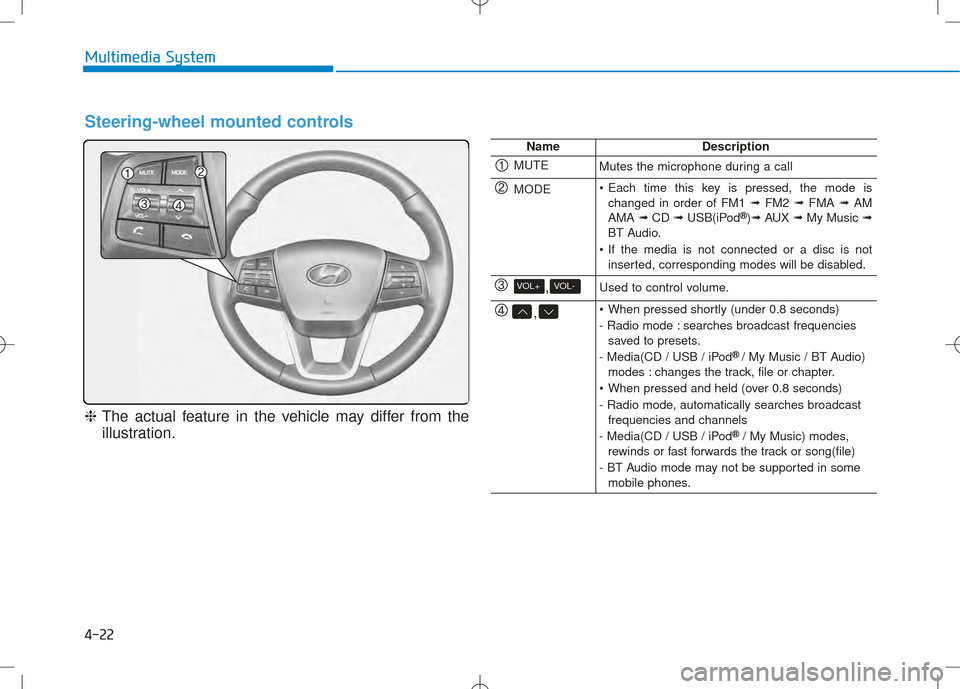
Steering-wheel mounted controls
❈The actual feature in the vehicle may differ from the
illustration.
NameDescription
MUTEMutes the microphone during a call
MODE Each time this key is pressed, the mode is changed in order of FM1 ➟FM2 ➟FMA ➟AM
AMA ➟CD ➟USB(iPod ®
)➟ AUX ➟My Music ➟
BT Audio.
If the media is not connected or a disc is not inserted, corresponding modes will be disabled.
,VOL-VOL+Used to control volume.
, When pressed shortly (under 0.8 seconds)
- Radio mode : searches broadcast frequenciessaved to presets.
- Media(CD / USB / iPod ®
/ My Music / BT Audio)
modes : changes the track, file or chapter.
When pressed and held (over 0.8 seconds)
- Radio mode, automatically searches broadcast frequencies and channels
- Media(CD / USB / iPod ®
/ My Music) modes,
rewinds or fast forwards the track or song(file)
- BT Audio mode may not be supported in some mobile phones.
Page 250 of 512
![Hyundai Creta 2016 User Guide 4-32
Multimedia System
MMEEDD IIAA MM OODDEE
Pressing the key will change
the operating mode in order of CD
➟
USB(iPod®) ➟ AUX ➟ My Music ➟BT
Audio.
If [Mode Pop up] is turned on within](/img/35/14533/w960_14533-249.png "Hyundai Creta 2016 User Guide 4-32
Multimedia System
MMEEDD IIAA MM OODDEE
Pressing the key will change
the operating mode in order of CD
➟
USB(iPod®) ➟ AUX ➟ My Music ➟BT
Audio.
If [Mode Pop up] is turned on within")
4-32
Multimedia System
MMEEDD IIAA MM OODDEE
Pressing the key will change
the operating mode in order of CD
➟
USB(iPod®) ➟ AUX ➟ My Music ➟BT
Audio.
If [Mode Pop up] is turned on within
[Display], then pressing the
key will display the Media
Pop-up Mode screen.
Turn the TUNE knob to move the
focus. Press the knob to select.
Information
The media mode pop up screen can be
displayed only when there are two or
more media modes turned on.
Title Icon
When a Bluetooth®Wireless
Technology, iPod®, USB, or AUX
device is connected or a CD is
inserted, the corresponding mode
icon will be displayed.
Icon Title
Bluetooth®Wireless Technology
CD
iPod®
USB
AUX
i
MEDIA
SETUP
MEDIA
Page 257 of 512
4-39
Multimedia System
4
UUSSBB MM OODDEE
Using USB Mode
Playing/Pausing USB Files
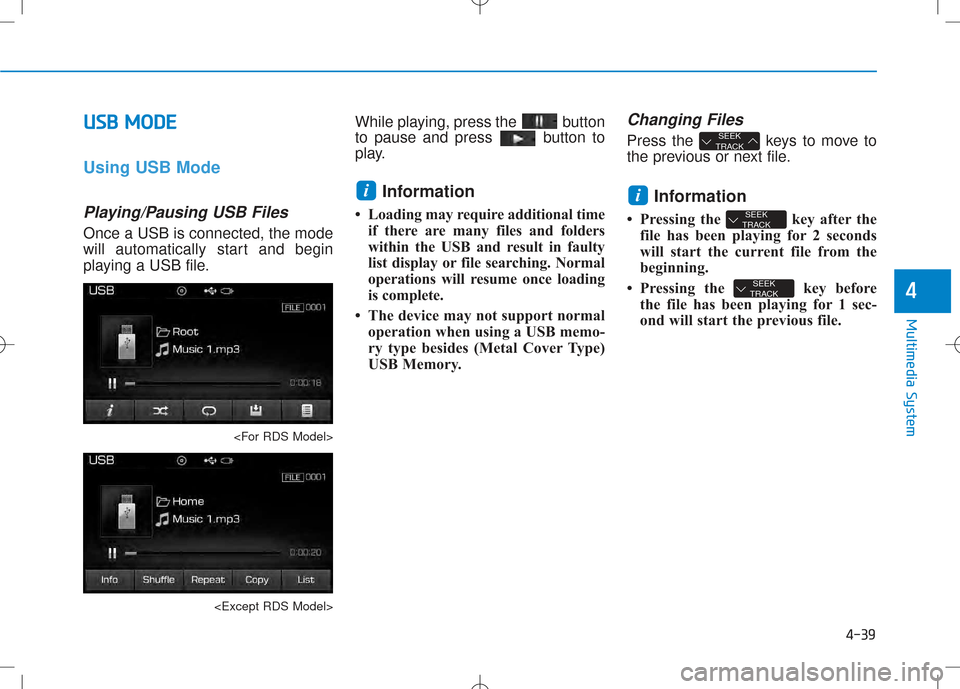
Once a USB is connected, the mode
will automatically start and begin
playing a USB file.
to pause and press button to
play.
Information
Loading may require additional time if there are many files and folders
within the USB and result in faulty
list display or file searching. Normal
operations will resume once loading
is complete.
The device may not support normal operation when using a USB memo-
ry type besides (Metal Cover Type)
USB Memory.
Changing Files
Press the keys to move to
the previous or next file.
Information
Pressing the key after the file has been playing for 2 seconds
will start the current file from the
beginning.
Pressing the key before the file has been playing for 1 sec-
ond will start the previous file.
SEEK
TRACK
SEEK
TRACK
i
SEEK
TRACK
i
Page 258 of 512
4-40
Multimedia System
Selecting from the List
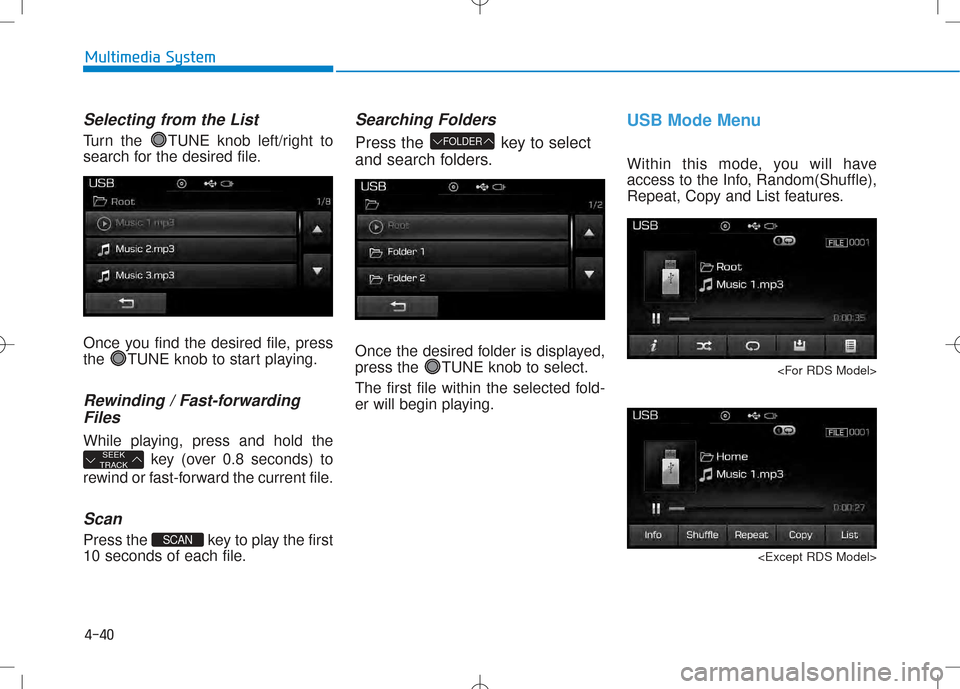
Turn the TUNE knob left/right to
search for the desired file.
Once you find the desired file, press
the TUNE knob to start playing.
Rewinding / Fast-forwarding
Files
While playing, press and hold the
key (over 0.8 seconds) to
rewind or fast-forward the current file.
Scan
Press the key to play the first
10 seconds of each file.
Searching Folders
Press the key to select
and search folders.
Once the desired folder is displayed,
press the TUNE knob to select.
The first file within the selected fold-
er will begin playing.
USB Mode Menu
Within this mode, you will have
access to the Info, Random(Shuffle),
Repeat, Copy and List features.
FOLDER
SCAN
SEEK
TRACK
Page 289 of 512
![Hyundai Creta 2016 User Guide 4-71
Multimedia System
4
Scroll Text
Press the key Select
[Display] Select [Scroll text]
This feature is used to scroll text dis-
played on the screen when it is too
long to be displayed at once.](/img/35/14533/w960_14533-288.png "Hyundai Creta 2016 User Guide 4-71
Multimedia System
4
Scroll Text
Press the key Select
[Display] Select [Scroll text]
This feature is used to scroll text dis-
played on the screen when it is too
long to be displayed at once.")
4-71
Multimedia System
4
Scroll Text
Press the key Select
[Display] Select [Scroll text]
This feature is used to scroll text dis-
played on the screen when it is too
long to be displayed at once.
When turned on, the text is repeat-
edly scrolled. When turned off, the
text is scrolled just once.
Song Info
Press the key Select
[Display] Select [Song Info]
This feature is used to change the
information displayed within USB
and MP3 CD modes.
1) Folder File : Displays file nameand folder name
2) Album Artist Song : Displays album name/artist name/song
Sound Settings
Audio Settings
Press the key Select
[Sound] Select [Audio Settings]
Use the , , , buttons to
adjust the Fader/Balance settings.
Use the , buttons to adjust the
Bass/Middle/Treble settings.
Press the button to reset.
Default
SETUP
SETUP SETUP