USB Hyundai Creta 2016 Owner's Guide
[x] Cancel search | Manufacturer: HYUNDAI, Model Year: 2016, Model line: Creta, Model: Hyundai Creta 2016Pages: 512, PDF Size: 11.54 MB
Page 295 of 512
![Hyundai Creta 2016 Owners Guide 4-77
Multimedia System
4
Mode Pop up
Press the key Select
[Display] Select [Mode Pop up]
This feature is used to display the
Mode Pop up screen when entering
radio and media modes.
When this feat](/img/35/14533/w960_14533-294.png "Hyundai Creta 2016 Owners Guide 4-77
Multimedia System
4
Mode Pop up
Press the key Select
[Display] Select [Mode Pop up]
This feature is used to display the
Mode Pop up screen when entering
radio and media modes.
When this feat")
4-77
Multimedia System
4
Mode Pop up
Press the key Select
[Display] Select [Mode Pop up]
This feature is used to display the
Mode Pop up screen when entering
radio and media modes.
When this feature is turned on,
pressing the or key
will display the Mode Pop up screen.Information
The media Mode Pop up screen can be
displayed only when two or more
media modes have been connected.
Text Scroll (If equipped)
Press the key Select
[Display] Select [Text Scroll]
This feature is used to scroll text dis-
played on the screen when it is too
long to be displayed at once.
When turned on, the text is repeat-
edly scrolled. When turned off, the
text is scrolled just once.
Media Display
Press the key Select
[Display] Select [Media Display]
This feature is used to change the
information displayed within USB
and MP3 CD modes.
1) Folder File : Displays file name and folder name
2) Album Artist Song : Displays album name/artist name/songSETUP SETUP
i
MEDIA FM/AM
SETUP
Page 301 of 512
4-83
Multimedia System
4
SSYY SSTT EEMM CC OO NNTTRR OO LLLL EE RR SS AA NN DD
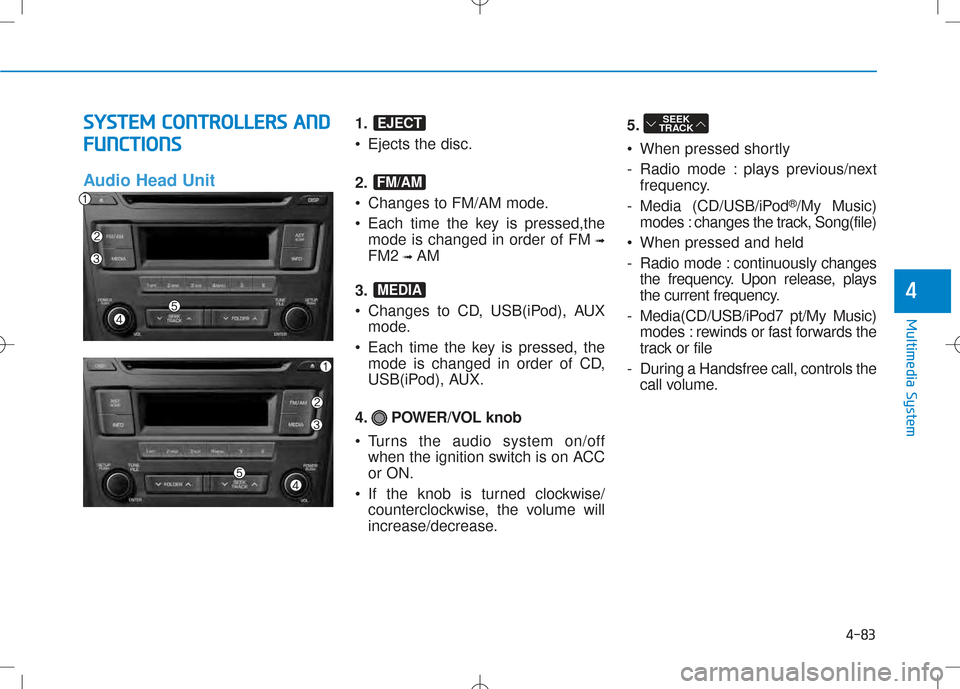
F
F UU NNCCTT IIOO NNSS
Audio Head Unit
1. • Ejects the disc.
2.
Changes to FM/AM mode.
Each time the key is pressed,the mode is changed in order of FM ➟
FM2 ➟AM
3.
Changes to CD, USB(iPod), AUX mode.
Each time the key is pressed, the mode is changed in order of CD,
USB(iPod), AUX.
4. POWER/VOL knob
Turns the audio system on/off when the ignition switch is on ACC or ON.
If the knob is turned clockwise/ counterclockwise, the volume will
increase/decrease. 5.
When pressed shortly
- Radio mode : plays previous/next
frequency.
- Media (CD/USB/iPod ®
/My Music)
modes : changes the track, Song(file)
When pressed and held
- Radio mode : continuously changes
the frequency. Upon release, plays
the current frequency.
- Media(CD/USB/iPod7 pt/My Music) modes : rewinds or fast forwards the
track or file
- During a Handsfree call, controls the call volume.SEEK
TRACK
MEDIA
FM/AM
EJECT
Page 302 of 512
4-84
Multimedia System
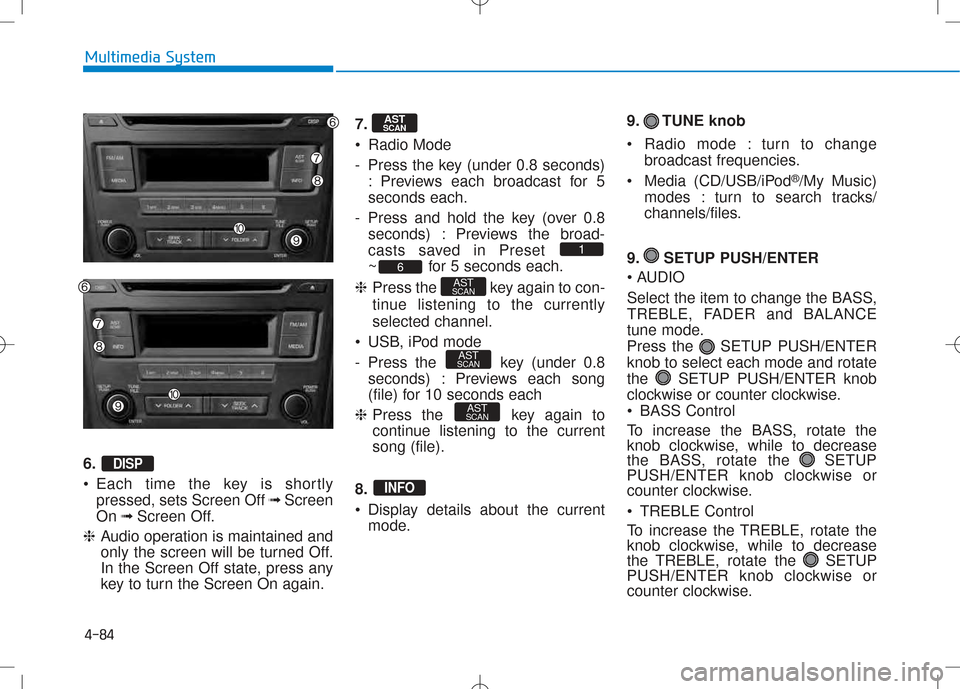
6. •Each time the key is shortly
pressed, sets Screen Off ➟Screen
On ➟Screen Off.
❈ Audio operation is maintained and
only the screen will be turned Off.
In the Screen Off state, press any
key to turn the Screen On again. 7.
Radio Mode
- Press the key (under 0.8 seconds)
: Previews each broadcast for 5 seconds each.
- Press and hold the key (over 0.8 seconds) : Previews the broad-
casts saved in Preset
~ for 5 seconds each.
❈ Press the key again to con-
tinue listening to the currentlyselected channel.
USB, iPod mode
- Press the key (under 0.8 seconds) : Previews each song
(file) for 10 seconds each
❈ Press the key again to
continue listening to the currentsong (file).
8.
Display details about the current mode. 9. TUNE knob
Radio mode : turn to change
broadcast frequencies.
Media (CD/USB/iPod ®
/My Music)
modes : turn to search tracks/
channels/files.
9. SETUP PUSH/ENTER
AUDIO
Select the item to change the BASS,
TREBLE, FADER and BALANCE
tune mode.
Press the SETUP PUSH/ENTERknob to select each mode and rotate
the SETUP PUSH/ENTER knob
clockwise or counter clockwise.
BASS Control
To increase the BASS, rotate the
knob clockwise, while to decrease
the BASS, rotate the SETUP
PUSH/ENTER knob clockwise or
counter clockwise.
TREBLE Control
To increase the TREBLE, rotate the
knob clockwise, while to decrease
the TREBLE, rotate the SETUP
PUSH/ENTER knob clockwise or
counter clockwise.
INFO
AST
SCAN
AST
SCAN
AST
SCAN6
1
AST
SCAN
DISP
Page 305 of 512
4-87
Multimedia System
4
BBAA SSIICC MM EETT HH OO DD OO FF UU SSEE :: CC DD
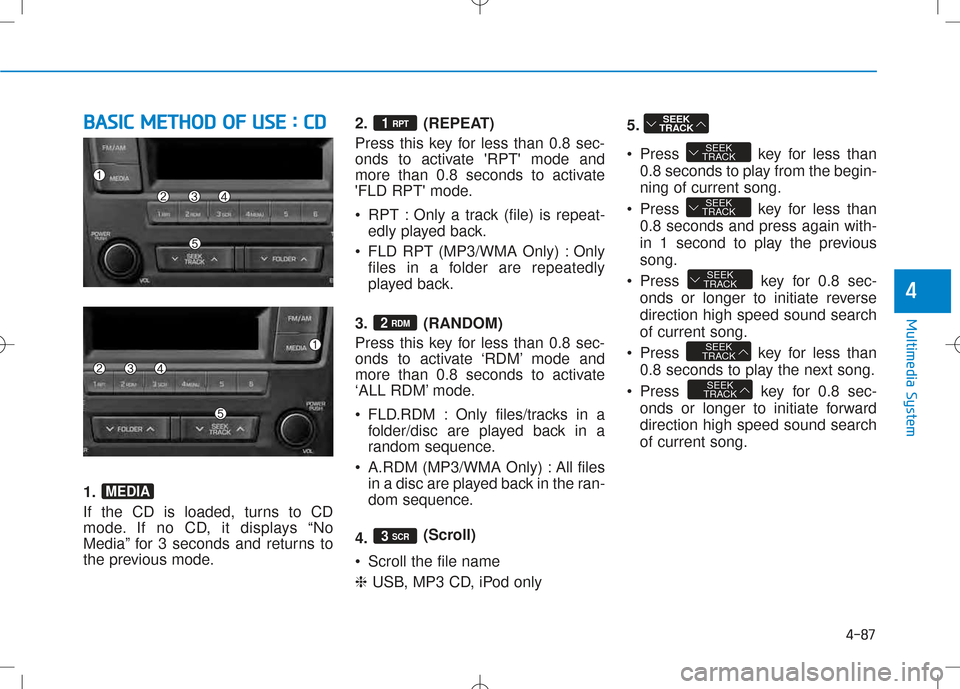
1.
If the CD is loaded, turns to CD
mode. If no CD, it displays “No
Media” for 3 seconds and returns to
the previous mode. 2. (REPEAT)
Press this key for less than 0.8 sec-
onds to activate 'RPT' mode and
more than 0.8 seconds to activate
'FLD RPT' mode.
RPT : Only a track (file) is repeat-
edly played back.
FLD RPT (MP3/WMA Only) : Only files in a folder are repeatedly
played back.
3. (RANDOM)
Press this key for less than 0.8 sec-
onds to activate ‘RDM’ mode and
more than 0.8 seconds to activate
‘ALL RDM’ mode.
FLD.RDM : Only files/tracks in a folder/disc are played back in a
random sequence.
A.RDM (MP3/WMA Only) : All files in a disc are played back in the ran-
dom sequence.
4. (Scroll)
Scroll the file name ❈ USB, MP3 CD, iPod only 5.
Press key for less than
0.8 seconds to play from the begin- ning of current song.
Press key for less than 0.8 seconds and press again with-
in 1 second to play the previoussong.
Press key for 0.8 sec- onds or longer to initiate reversedirection high speed sound searchof current song.
Press key for less than 0.8 seconds to play the next song.
Press key for 0.8 sec- onds or longer to initiate forwarddirection high speed sound searchof current song.
SEEK
TRACK
SEEK
TRACK
SEEK
TRACK
SEEK
TRACK
SEEK
TRACK
SEEK
TRACK
3 SCR
2 RDM
1 RPT
MEDIA
Page 307 of 512
4-89
Multimedia System
4
In using usb device
•To use an external USB device,
make sure the device is not
connected when starting up
the vehicle. Connect the device
after starting up.
•If you start the engine when
the USB device is connected, it
may damage the USB device.
(USB flashdrives are very sen-
sitive to electric shock.)
•If the engine is started up or
turned off while the external
USB device is connected, the
external USB device may not
work.
•It may not play inauthentic
MP3 or WMA files.
1) It can only play MP3 files with the compression rate between8Kbps~320Kbps.
2) It can only play WMA music files with the compression ratebetween 8Kbps~320Kbps.
(Continued)
CAUTION(Continued)
•Take precautions for static electricity when connecting or
disconnecting the external
USB device.
•An encrypted MP3 PLAYER is
not recognizable.
•Depending on the condition of
the external USB device, the
connected external USB
device can be unrecognizable.
•When the formatted byte/sec- tor setting of External USB
device is not either 512BYTE
or 2048BYTE, then the device
will not be recognized.
•Use only a USB device format-
ted to FAT 12/16/32.
•USB devices without USB I/F
authentication may not be
recognizable.
•Make sure the USB connec- tion terminal does not come in
contact with the human bodyor other objects.
(Continued)
(Continued)
•If you repeatedly connect or
disconnect the USB device in
a short period of time, it may
break the device.
•You may hear a strange noise when connecting or discon-
necting a USB device.
•If you disconnect the external
USB device during playback in
USB mode, the external USB
device can be damaged or may
malfunction. Therefore, discon-
nect the external USB devicewhen the audio is turned off or
in another mode. (e.g, Radio orCD)
•Depending on the type and
capacity of the external USB
device or the type of the files
stored in the device, there is a
difference in the time taken
for recognition of the device.
•Do not use the USB device for
purposes other than playing
music files.(Continued)
Page 308 of 512
4-90
Multimedia System
(Continued)
•Use of USB accessories such
as rechargers or heaters using
USB I/F may lower perform-
ance or cause trouble.
•If you use devices such as a
USB hub purchased separate-
ly, the vehicle’s audio system
may not recognize the USB
device. In that case, connect
the USB device directly to the
multimedia terminal of the
vehicle.
•If the USB device is divided by
logical drives, only the musicfiles on the highest-priority
drive are recognized by caraudio.
•Devices such as MP3 Player/ Cellular phone/Digital camera
can be unrecognizable by
standard USB I/F can be unrec-
ognizable.(Continued)
(Continued)
•Some non-standard USB
devices (METAL COVER TYPE
USB) can be unrecognizable.
•Some USB flash memory
readers (such as CF, SD,
microSD, etc.) or external-
HDD type devices can be
unrecognizable.
•Music files protected by DRM
(DIGITAL RIGHTS MANAGE-
MENT) are not recognizable.
•The data in the USB memory
may be lost while using this
audio. Always back up impor-
tant data on a personal stor-
age device.(Continued)
(Continued)
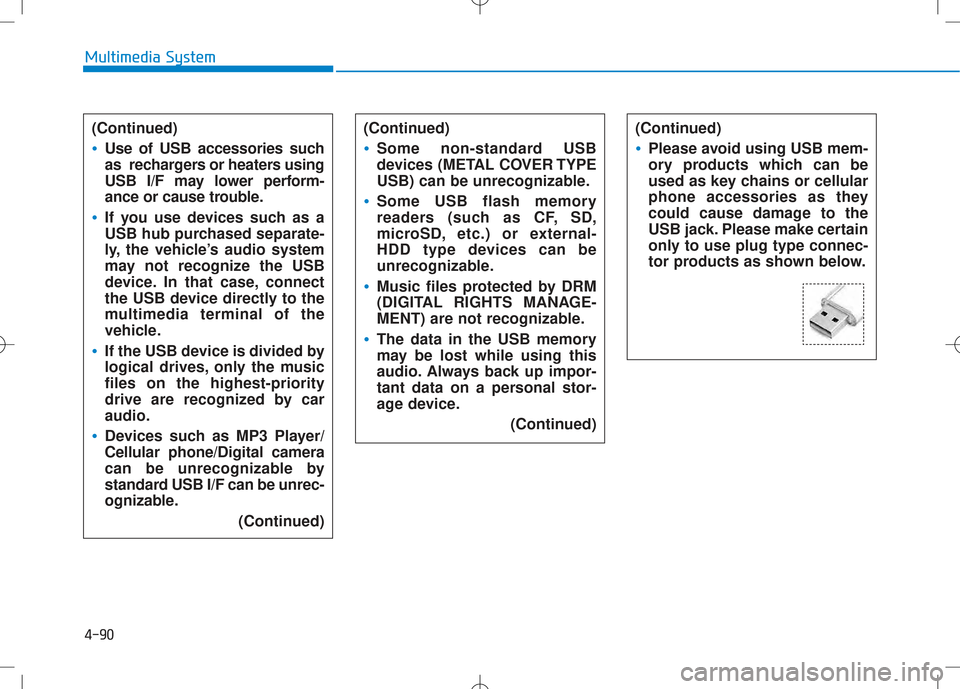
•Please avoid using USB mem-
ory products which can be
used as key chains or cellular
phone accessories as they
could cause damage to the
USB jack. Please make certain
only to use plug type connec-
tor products as shown below.
Page 310 of 512
4-92
Multimedia System
BBAA SSIICC MM EETT HH OO DD OO FF UU SSEE ::
U
U SSBB // iiPP oodd
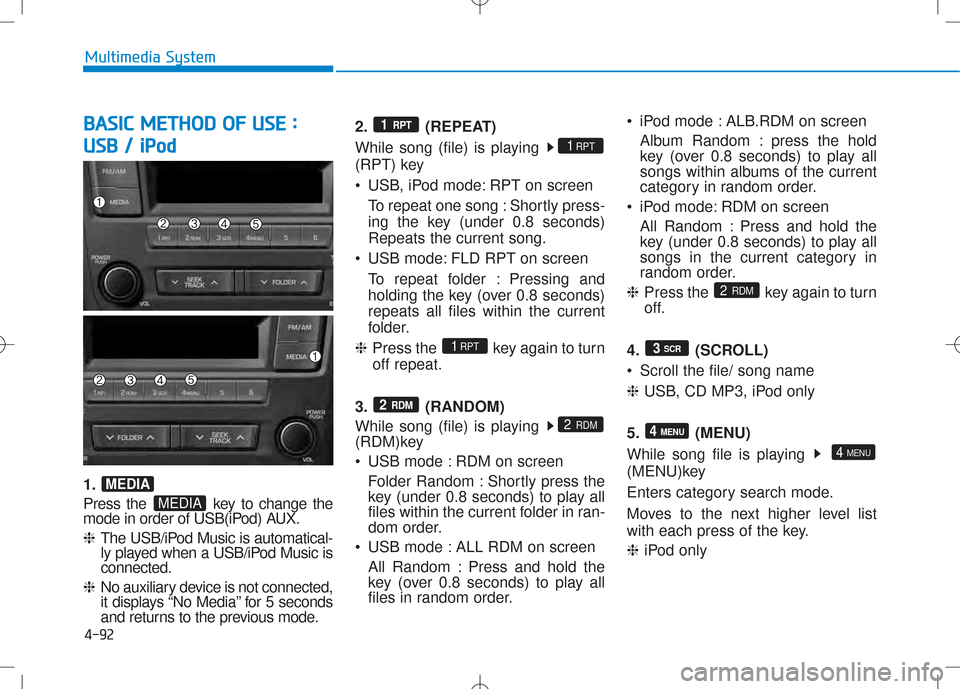
1.
Press the key to change the
mode in order of USB(iPod) AUX. ❈ The USB/iPod Music is automatical-
ly played when a USB/iPod Music isconnected.
❈ No auxiliary device is not connected,
it displays “No Media” for 5 seconds
and returns to the previous mode. 2. (REPEAT)
While song (file) is playing
(RPT) key
USB, iPod mode: RPT on screen
To repeat one song : Shortly press-
ing the key (under 0.8 seconds)Repeats the current song.
USB mode: FLD RPT on screen To repeat folder : Pressing and
holding the key (over 0.8 seconds)repeats all files within the current
folder.
❈ Press the key again to turnoff repeat.
3. (RANDOM)
While song (file) is playing
(RDM)key
USB mode : RDM on screen Folder Random : Shortly press the
key (under 0.8 seconds) to play all
files within the current folder in ran-
dom order.
USB mode : ALL RDM on screen
All Random : Press and hold the
key (over 0.8 seconds) to play all
files in random order. iPod mode : ALB.RDM on screen
Album Random : press the hold
key (over 0.8 seconds) to play all
songs within albums of the current
category in random order.
iPod mode: RDM on screen
All Random : Press and hold the
key (under 0.8 seconds) to play all
songs in the current category in
random order.
❈ Press the key again to turn
off.
4. (SCROLL)
Scroll the file/ song name❈ USB, CD MP3, iPod only
5. (MENU)
While song file is playing
(MENU)key
Enters category search mode.
Moves to the next higher level list
with each press of the key. ❈ iPod only
4 MENU
4 MENU
3
SCR
2
RDM
2 RDM
2 RDM
1RPT
1RPT
1 RPT
MEDIA
MEDIA
Page 311 of 512
4-93
Multimedia System
4
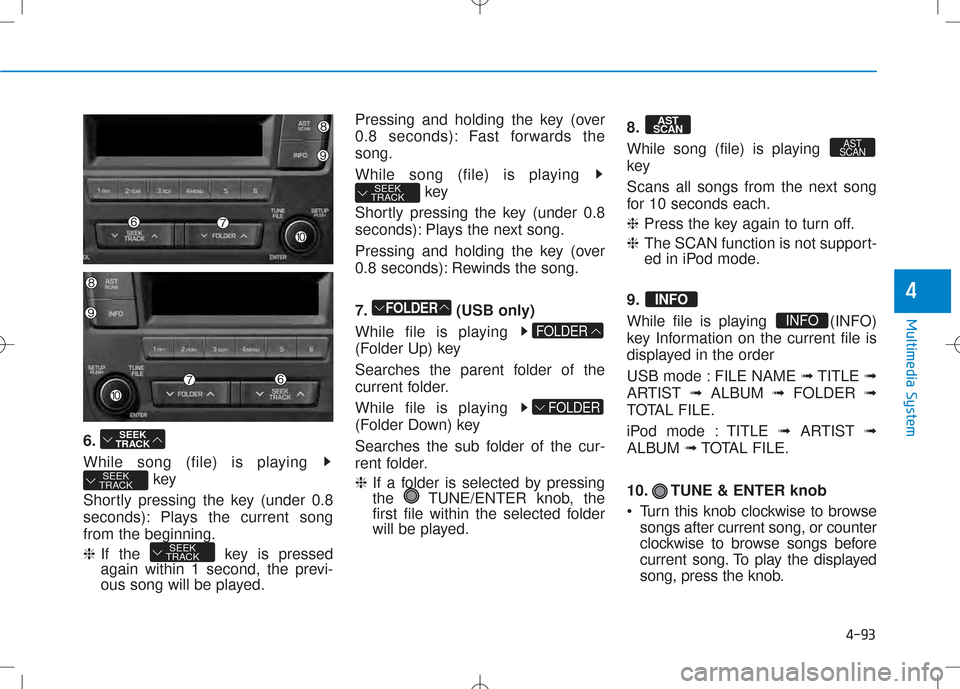
6.
While song (file) is playing key
Shortly pressing the key (under 0.8
seconds): Plays the current songfrom the beginning. ❈ If the key is pressed
again within 1 second, the previ-
ous song will be played. Pressing and holding the key (over
0.8 seconds): Fast forwards thesong.
While song (file) is playing
key
Shortly pressing the key (under 0.8
seconds): Plays the next song.
Pressing and holding the key (over
0.8 seconds): Rewinds the song.
7. (USB only)
While file is playing
(Folder Up) key
Searches the parent folder of the
current folder.
While file is playing
(Folder Down) key
Searches the sub folder of the cur-
rent folder. ❈ If a folder is selected by pressing
the TUNE/ENTER knob, the
first file within the selected folder
will be played. 8.
While song (file) is playing
key
Scans all songs from the next song
for 10 seconds each. ❈
Press the key again to turn off.
❈ The SCAN function is not support-
ed in iPod mode.
9.
While file is playing (INFO)
key Information on the current file is
displayed in the order
USB mode : FILE NAME ➟TITLE ➟
ARTIST ➟ALBUM ➟FOLDER ➟
TOTAL FILE.
iPod mode : TITLE ➟ARTIST ➟
ALBUM ➟TOTAL FILE.
10. TUNE & ENTER knob
Turn this knob clockwise to browse songs after current song, or counter
clockwise to browse songs before
current song. To play the displayed
song, press the knob.
INFO
INFO
AST
SCAN
AST
SCAN
FOLDER
FOLDER
FOLDER
SEEK
TRACK
SEEK
TRACK
SEEK
TRACK
SEEK
TRACK