change time Hyundai Creta 2016 Owner's Guide
[x] Cancel search | Manufacturer: HYUNDAI, Model Year: 2016, Model line: Creta, Model: Hyundai Creta 2016Pages: 512, PDF Size: 11.54 MB
Page 281 of 512
4-63
Multimedia System
4
Information
The waiting period during phone pairing will last for one minute. The
pairing process will fail if the device
is not paired within the given time. If
the pairing process fails, you must
start the process from the beginning.
Generally, most Bluetooth®
Wireless
Technology devices will automatical-
ly connect once pairing is complete.
However, some devices may require
a separate verification process to
connect. Check to see whether
Bluetooth ®
Wireless Technology has
been properly connected within your
mobile phone.
List of paired Bluetooth®
Wireless
Technology devices can be viewed at [Phone] [Paired Phone
List].Connecting a Device
Press the key Select
[Phone] Select [Paired Phone List]
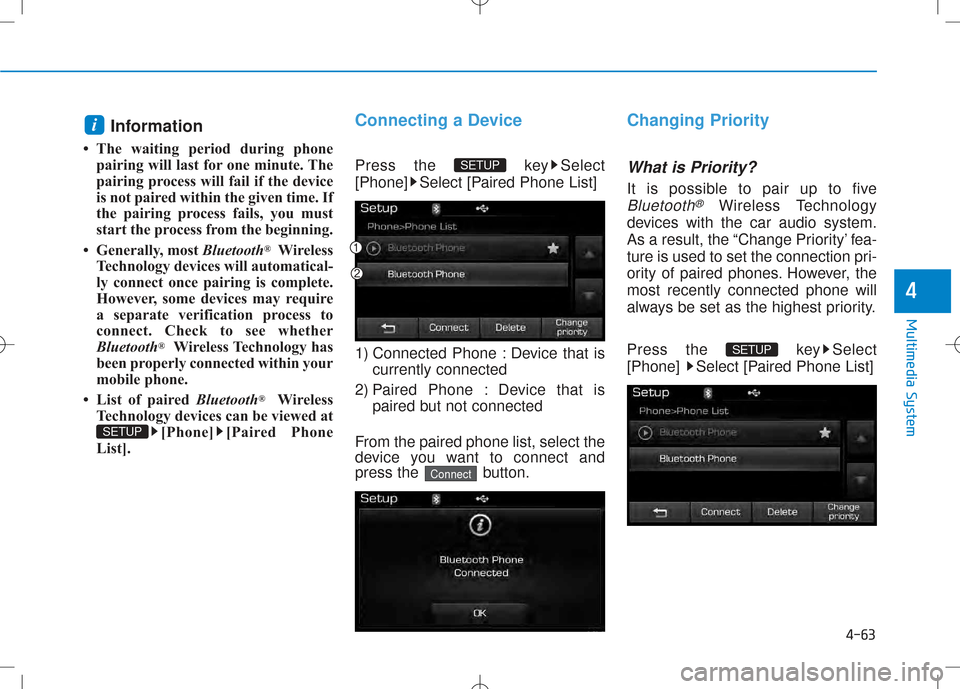
1) Connected Phone : Device that is currently connected
2) Paired Phone : Device that is paired but not connected
From the paired phone list, select the
device you want to connect and
press the button.
Changing Priority
What is Priority?
It is possible to pair up to five
Bluetooth®Wireless Technology
devices with the car audio system.
As a result, the “Change Priority’ fea-
ture is used to set the connection pri-
ority of paired phones. However, themost recently connected phone will
always be set as the highest priority.
Press the key Select
[Phone] Select [Paired Phone List]
SETUP
Connect
SETUP
SETUP
i
Page 282 of 512
4-64
Multimedia System
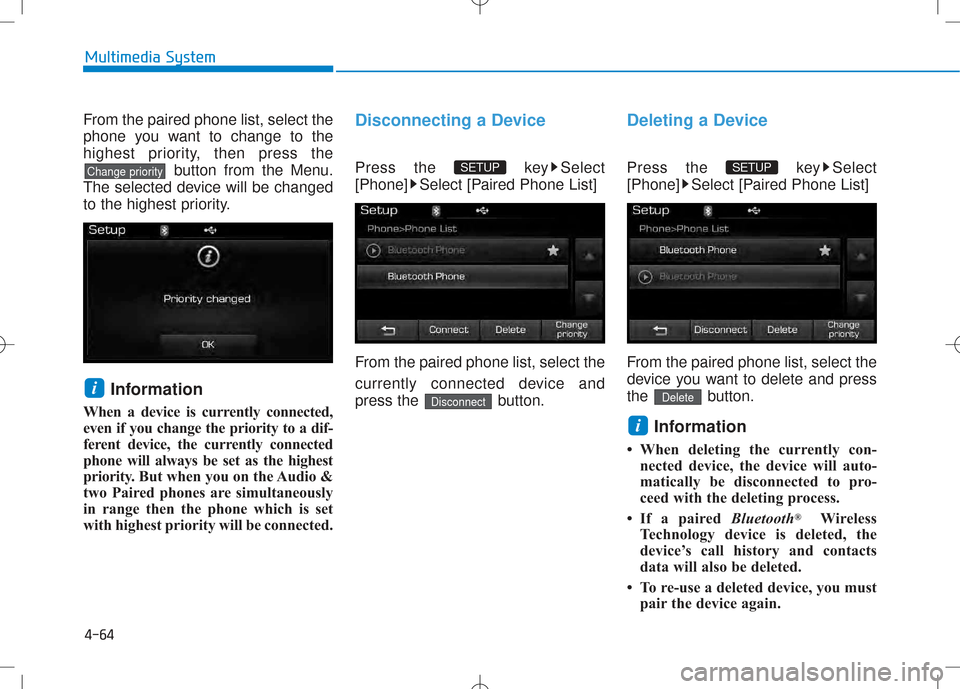
From the paired phone list, select the
phone you want to change to the
highest priority, then press thebutton from the Menu.
The selected device will be changed
to the highest priority.
Information
When a device is currently connected,
even if you change the priority to a dif-
ferent device, the currently connected
phone will always be set as the highest
priority. But when you on the Audio &
two Paired phones are simultaneously
in range then the phone which is set
with highest priority will be connected.Disconnecting a Device
Press the key Select
[Phone] Select [Paired Phone List]
From the paired phone list, select the
currently connected device and
press the button.
Deleting a Device
Press the key Select
[Phone] Select [Paired Phone List]
From the paired phone list, select the
device you want to delete and press
the button.
Information
When deleting the currently con- nected device, the device will auto-
matically be disconnected to pro-
ceed with the deleting process.
If a paired Bluetooth®
Wireless
Technology device is deleted, the
device’s call history and contacts
data will also be deleted.
To re-use a deleted device, you must pair the device again.
i
Delete
SETUP
Disconnect
SETUP
i
Change priority
Page 289 of 512
![Hyundai Creta 2016 Owners Guide 4-71
Multimedia System
4
Scroll Text
Press the key Select
[Display] Select [Scroll text]
This feature is used to scroll text dis-
played on the screen when it is too
long to be displayed at once.](/img/35/14533/w960_14533-288.png "Hyundai Creta 2016 Owners Guide 4-71
Multimedia System
4
Scroll Text
Press the key Select
[Display] Select [Scroll text]
This feature is used to scroll text dis-
played on the screen when it is too
long to be displayed at once.")
4-71
Multimedia System
4
Scroll Text
Press the key Select
[Display] Select [Scroll text]
This feature is used to scroll text dis-
played on the screen when it is too
long to be displayed at once.
When turned on, the text is repeat-
edly scrolled. When turned off, the
text is scrolled just once.
Song Info
Press the key Select
[Display] Select [Song Info]
This feature is used to change the
information displayed within USB
and MP3 CD modes.
1) Folder File : Displays file nameand folder name
2) Album Artist Song : Displays album name/artist name/song
Sound Settings
Audio Settings
Press the key Select
[Sound] Select [Audio Settings]
Use the , , , buttons to
adjust the Fader/Balance settings.
Use the , buttons to adjust the
Bass/Middle/Treble settings.
Press the button to reset.
Default
SETUP
SETUP SETUP
Page 294 of 512
![Hyundai Creta 2016 Owners Guide 4-76
Multimedia System
Language
Press the key Select
[System] Select [Language]
This feature is used to change the system. If the language is changed, the sys-
tem will restart and apply the selec](/img/35/14533/w960_14533-293.png "Hyundai Creta 2016 Owners Guide 4-76
Multimedia System
Language
Press the key Select
[System] Select [Language]
This feature is used to change the system. If the language is changed, the sys-
tem will restart and apply the selec")
4-76
Multimedia System
Language
Press the key Select
[System] Select [Language]
This feature is used to change the system. If the language is changed, the sys-
tem will restart and apply the select-
ed language.
SSEE TT UU PP (( EE xxccee pp tt RR DD SS MM ooddeell))
Starting Mode
Press the key to display the Setup screen.
You can select and control options
related to [Display], [Sound], [Phone]and [System].
Display Settings
Adjusting the Brightness
Press the key Select
[Display] Select [Brightness]
Use the , buttons to adjust the
screen brightness or set the
Brightness on Automatic, Daylight, or
Night mode.
Press the button to reset.
1) Automatic : Adjusts the brightness
automatically
2) Day : Always maintains the bright- ness on high
3) Night : Always maintains the brightness on low
Default
SETUP
SETUP
SETUP
Page 295 of 512
![Hyundai Creta 2016 Owners Guide 4-77
Multimedia System
4
Mode Pop up
Press the key Select
[Display] Select [Mode Pop up]
This feature is used to display the
Mode Pop up screen when entering
radio and media modes.
When this feat](/img/35/14533/w960_14533-294.png "Hyundai Creta 2016 Owners Guide 4-77
Multimedia System
4
Mode Pop up
Press the key Select
[Display] Select [Mode Pop up]
This feature is used to display the
Mode Pop up screen when entering
radio and media modes.
When this feat")
4-77
Multimedia System
4
Mode Pop up
Press the key Select
[Display] Select [Mode Pop up]
This feature is used to display the
Mode Pop up screen when entering
radio and media modes.
When this feature is turned on,
pressing the or key
will display the Mode Pop up screen.Information
The media Mode Pop up screen can be
displayed only when two or more
media modes have been connected.
Text Scroll (If equipped)
Press the key Select
[Display] Select [Text Scroll]
This feature is used to scroll text dis-
played on the screen when it is too
long to be displayed at once.
When turned on, the text is repeat-
edly scrolled. When turned off, the
text is scrolled just once.
Media Display
Press the key Select
[Display] Select [Media Display]
This feature is used to change the
information displayed within USB
and MP3 CD modes.
1) Folder File : Displays file name and folder name
2) Album Artist Song : Displays album name/artist name/songSETUP SETUP
i
MEDIA FM/AM
SETUP
Page 297 of 512
![Hyundai Creta 2016 Owners Guide 4-79
Multimedia System
4
Bluetooth®Wireless
Technology Setting
Pairing a New Device
Press the key Select
[Phone] Select [Pair Phone]
Bluetooth®Wireless Technology
devices can be paired with the au](/img/35/14533/w960_14533-296.png "Hyundai Creta 2016 Owners Guide 4-79
Multimedia System
4
Bluetooth®Wireless
Technology Setting
Pairing a New Device
Press the key Select
[Phone] Select [Pair Phone]
Bluetooth®Wireless Technology
devices can be paired with the au")
4-79
Multimedia System
4
Bluetooth®Wireless
Technology Setting
Pairing a New Device
Press the key Select
[Phone] Select [Pair Phone]
Bluetooth®Wireless Technology
devices can be paired with the audiosystem.
For more information, refer to the
“Pairing through Phone Setup” sec-tion within
Bluetooth®Wireless
Technology.
Viewing Paired Phone List
Press the key Select
[Phone] Select [Paired Phone List]
This feature is used to view mobile
phones that have been paired with
the audio system. Upon selecting a
paired phone, the setup menu is dis-
played.
For more information, refer to the “Setting
Bluetooth®Wireless
Technology Connection” section with-in
Bluetooth®Wireless Technology. 1) : Moves to the previous
screen
2) Connect/Disconnect Phone : Connect/disconnects currently selected phone
3) Delete : Deletes the currently selected phone
4) Change Priority : Sets currently selected phone to highest connec-
tion priority
Information
- BEFORE DOWNLOADING Contacts
Only contacts within connected phones can be downloaded. Also
check to see that your mobile phone
supports the download feature.
To learn more about whether your mobile phone supports contacts
downloads, refer to your mobile
phone user’s manual.
The contacts for only the connected phone can be downloaded. Before
downloading, check to see whether
your phone supports the download
feature.
i
SETUP
SETUP
Page 299 of 512
![Hyundai Creta 2016 Owners Guide 4-81
Multimedia System
4
Information
To turn Bluetooth ®
Wireless Technology
back on, go to [Phone] and
press “Yes”.
System Setting
Memory Information
Press the key Select
[System] Select [M](/img/35/14533/w960_14533-298.png "Hyundai Creta 2016 Owners Guide 4-81
Multimedia System
4
Information
To turn Bluetooth ®
Wireless Technology
back on, go to [Phone] and
press “Yes”.
System Setting
Memory Information
Press the key Select
[System] Select [M")
4-81
Multimedia System
4
Information
To turn Bluetooth ®
Wireless Technology
back on, go to [Phone] and
press “Yes”.
System Setting
Memory Information
Press the key Select
[System] Select [Memory Information]
This feature displays information
related to system memory.
1) Using : Displays capacity currently in use
2) Capacity : Displays total capacity
Language (For Colombia Model)
Press the key Select
[System] Select [Language] ❈ This feature is used to change the
system and voice recognition lan-
guage.
❈ if the language is changed, the
system will restart and apply the
selected language.SETUP
SETUP
SETUP
i
Page 301 of 512
4-83
Multimedia System
4
SSYY SSTT EEMM CC OO NNTTRR OO LLLL EE RR SS AA NN DD
F
F UU NNCCTT IIOO NNSS
Audio Head Unit
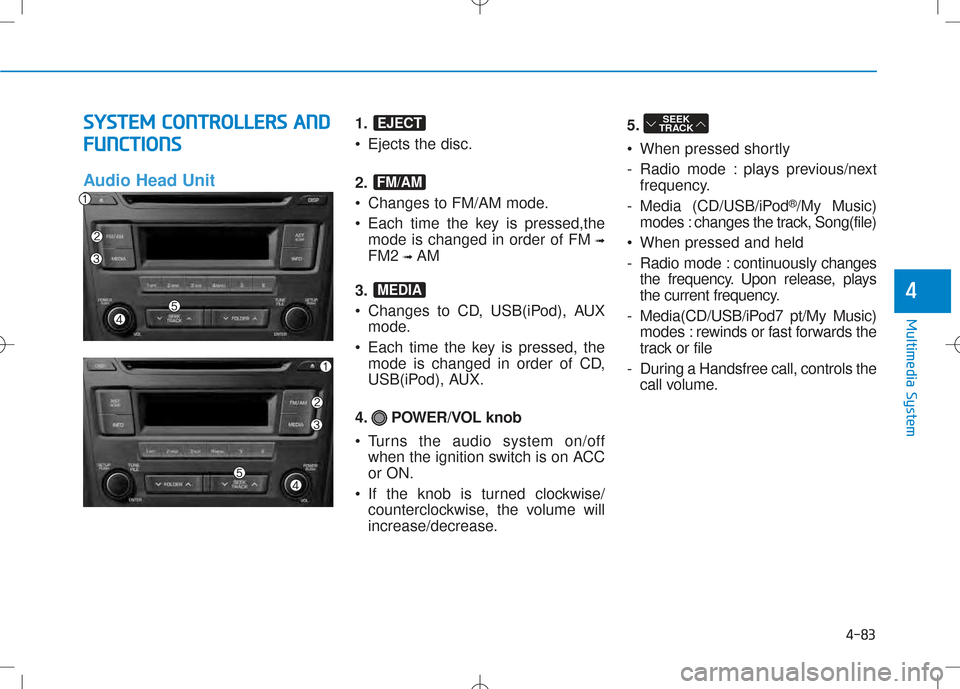
1. • Ejects the disc.
2.
Changes to FM/AM mode.
Each time the key is pressed,the mode is changed in order of FM ➟
FM2 ➟AM
3.
Changes to CD, USB(iPod), AUX mode.
Each time the key is pressed, the mode is changed in order of CD,
USB(iPod), AUX.
4. POWER/VOL knob
Turns the audio system on/off when the ignition switch is on ACC or ON.
If the knob is turned clockwise/ counterclockwise, the volume will
increase/decrease. 5.
When pressed shortly
- Radio mode : plays previous/next
frequency.
- Media (CD/USB/iPod ®
/My Music)
modes : changes the track, Song(file)
When pressed and held
- Radio mode : continuously changes
the frequency. Upon release, plays
the current frequency.
- Media(CD/USB/iPod7 pt/My Music) modes : rewinds or fast forwards the
track or file
- During a Handsfree call, controls the call volume.SEEK
TRACK
MEDIA
FM/AM
EJECT
Page 302 of 512
4-84
Multimedia System
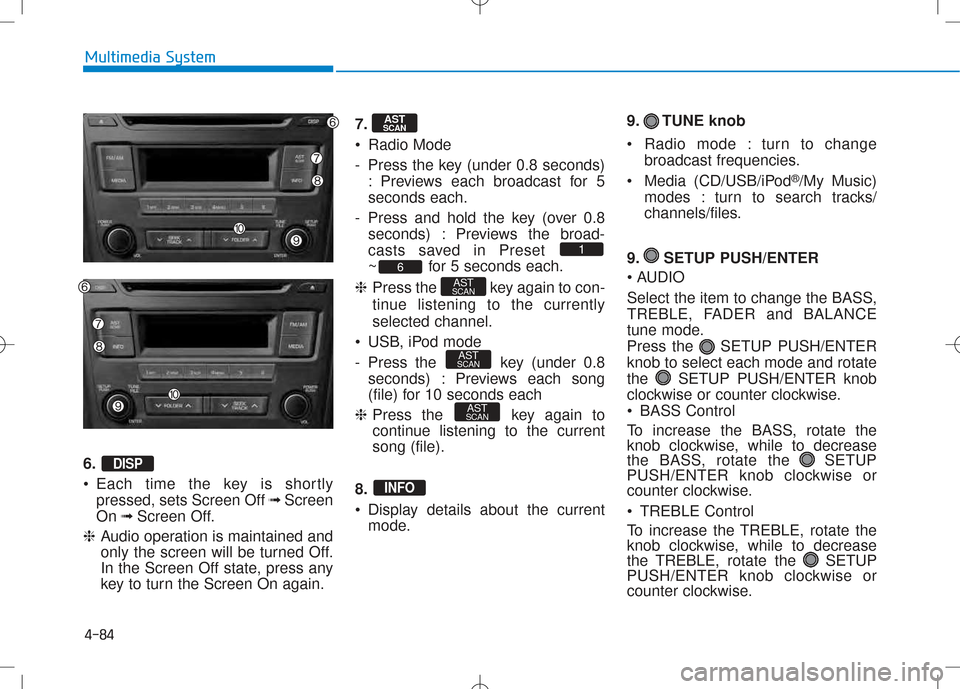
6. •Each time the key is shortly
pressed, sets Screen Off ➟Screen
On ➟Screen Off.
❈ Audio operation is maintained and
only the screen will be turned Off.
In the Screen Off state, press any
key to turn the Screen On again. 7.
Radio Mode
- Press the key (under 0.8 seconds)
: Previews each broadcast for 5 seconds each.
- Press and hold the key (over 0.8 seconds) : Previews the broad-
casts saved in Preset
~ for 5 seconds each.
❈ Press the key again to con-
tinue listening to the currentlyselected channel.
USB, iPod mode
- Press the key (under 0.8 seconds) : Previews each song
(file) for 10 seconds each
❈ Press the key again to
continue listening to the currentsong (file).
8.
Display details about the current mode. 9. TUNE knob
Radio mode : turn to change
broadcast frequencies.
Media (CD/USB/iPod ®
/My Music)
modes : turn to search tracks/
channels/files.
9. SETUP PUSH/ENTER
AUDIO
Select the item to change the BASS,
TREBLE, FADER and BALANCE
tune mode.
Press the SETUP PUSH/ENTERknob to select each mode and rotate
the SETUP PUSH/ENTER knob
clockwise or counter clockwise.
BASS Control
To increase the BASS, rotate the
knob clockwise, while to decrease
the BASS, rotate the SETUP
PUSH/ENTER knob clockwise or
counter clockwise.
TREBLE Control
To increase the TREBLE, rotate the
knob clockwise, while to decrease
the TREBLE, rotate the SETUP
PUSH/ENTER knob clockwise or
counter clockwise.
INFO
AST
SCAN
AST
SCAN
AST
SCAN6
1
AST
SCAN
DISP
Page 310 of 512
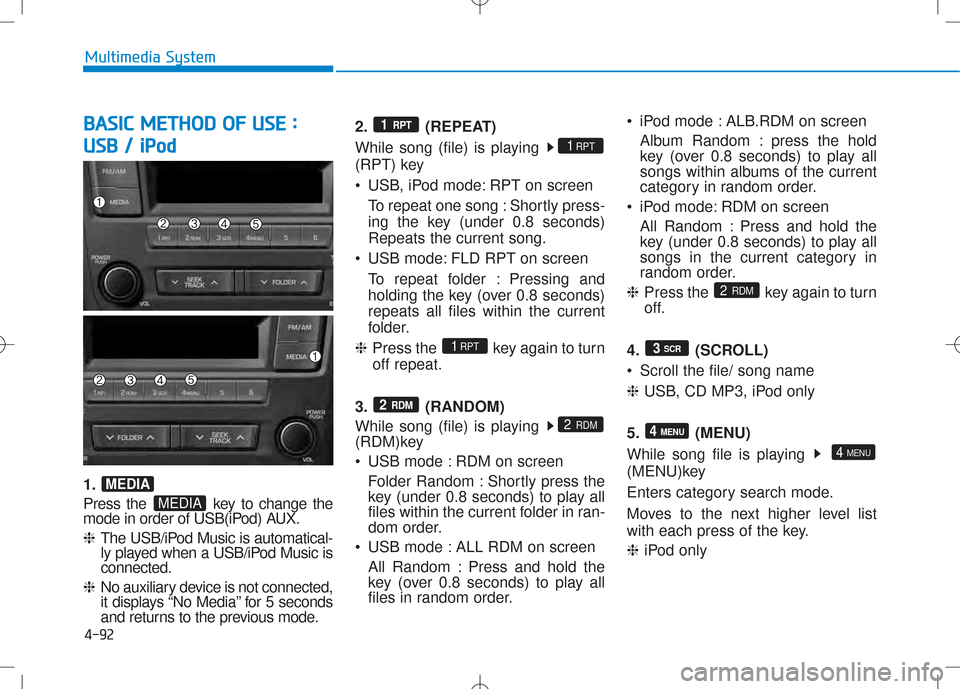
4-92
Multimedia System
BBAA SSIICC MM EETT HH OO DD OO FF UU SSEE ::
U
U SSBB // iiPP oodd
1.
Press the key to change the
mode in order of USB(iPod) AUX. ❈ The USB/iPod Music is automatical-
ly played when a USB/iPod Music isconnected.
❈ No auxiliary device is not connected,
it displays “No Media” for 5 seconds
and returns to the previous mode. 2. (REPEAT)
While song (file) is playing
(RPT) key
USB, iPod mode: RPT on screen
To repeat one song : Shortly press-
ing the key (under 0.8 seconds)Repeats the current song.
USB mode: FLD RPT on screen To repeat folder : Pressing and
holding the key (over 0.8 seconds)repeats all files within the current
folder.
❈ Press the key again to turnoff repeat.
3. (RANDOM)
While song (file) is playing
(RDM)key
USB mode : RDM on screen Folder Random : Shortly press the
key (under 0.8 seconds) to play all
files within the current folder in ran-
dom order.
USB mode : ALL RDM on screen
All Random : Press and hold the
key (over 0.8 seconds) to play all
files in random order. iPod mode : ALB.RDM on screen
Album Random : press the hold
key (over 0.8 seconds) to play all
songs within albums of the current
category in random order.
iPod mode: RDM on screen
All Random : Press and hold the
key (under 0.8 seconds) to play all
songs in the current category in
random order.
❈ Press the key again to turn
off.
4. (SCROLL)
Scroll the file/ song name❈ USB, CD MP3, iPod only
5. (MENU)
While song file is playing
(MENU)key
Enters category search mode.
Moves to the next higher level list
with each press of the key. ❈ iPod only
4 MENU
4 MENU
3
SCR
2
RDM
2 RDM
2 RDM
1RPT
1RPT
1 RPT
MEDIA
MEDIA