reset Hyundai Creta 2016 Owner's Guide
[x] Cancel search | Manufacturer: HYUNDAI, Model Year: 2016, Model line: Creta, Model: Hyundai Creta 2016Pages: 512, PDF Size: 11.54 MB
Page 244 of 512
4-26
Multimedia System
Using Radio Mode
Selecting /Saving Presets
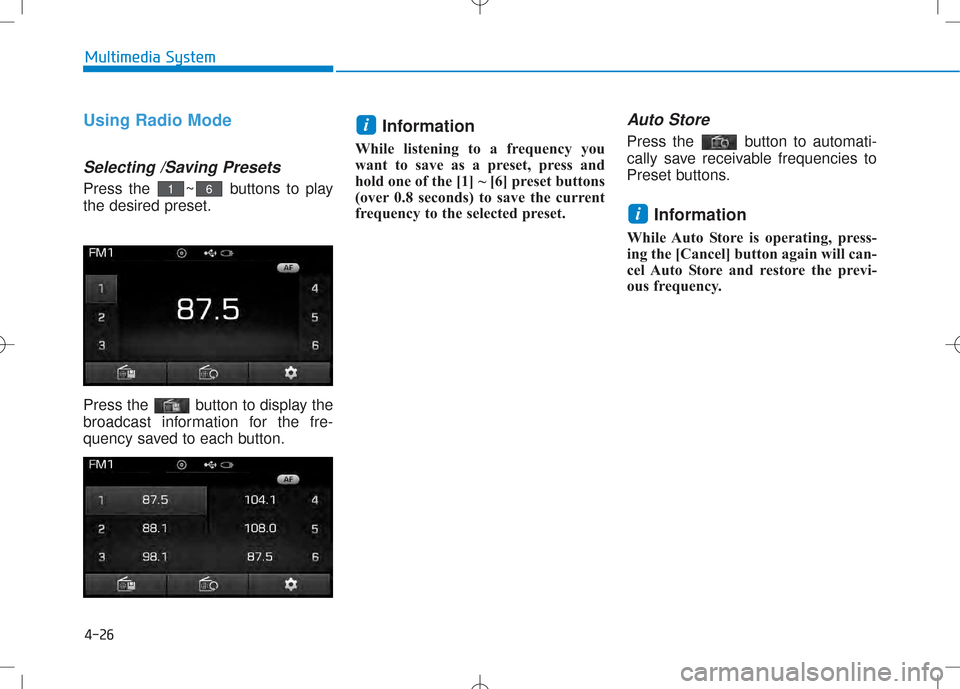
Press the ~ buttons to play the desired preset.
Press the button to display the
broadcast information for the fre-
quency saved to each button.Information
While listening to a frequency you
want to save as a preset, press and
hold one of the [1] ~ [6] preset buttons
(over 0.8 seconds) to save the current
frequency to the selected preset.
Auto Store
Press the button to automati-
cally save receivable frequencies to
Preset buttons.
Information
While Auto Store is operating, press-
ing the [Cancel] button again will can-
cel Auto Store and restore the previ-
ous frequency.
i
i
61
Page 246 of 512
4-28
Multimedia System
RRAA DDIIOO MM OODDEE
(
( EE xxccpp eett RR DD SS MM ooddeell))
Basic Mode Screen
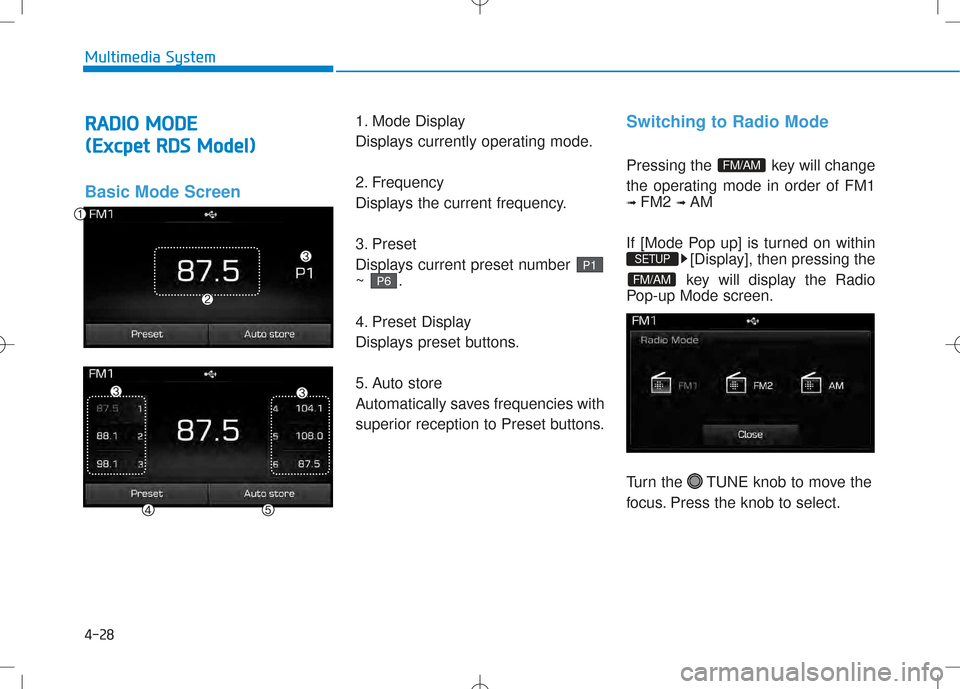
1. Mode Display
Displays currently operating mode.
2. Frequency
Displays the current frequency.
3. Preset
Displays current preset number ~ .
4. Preset Display
Displays preset buttons.
5. Auto store
Automatically saves frequencies with
superior reception to Preset buttons.Switching to Radio Mode
Pressing the key will change
the operating mode in order of FM1 ➟ FM2 ➟ AM
If [Mode Pop up] is turned on within [Display], then pressing the
key will display the Radio
Pop-up Mode screen.
Turn the TUNE knob to move the
focus. Press the knob to select.
FM/AM
SETUP
FM/AM
P 6
P1
Page 247 of 512
4-29
Multimedia System
4
Searching Radio Frequencies
Using Seek
Press the key to play the
previous/next frequency.
Using TUNE
Turn the TUNE knob to select the
desired frequency.
Using Radio Mode
Selecting Presets/Saving Presets
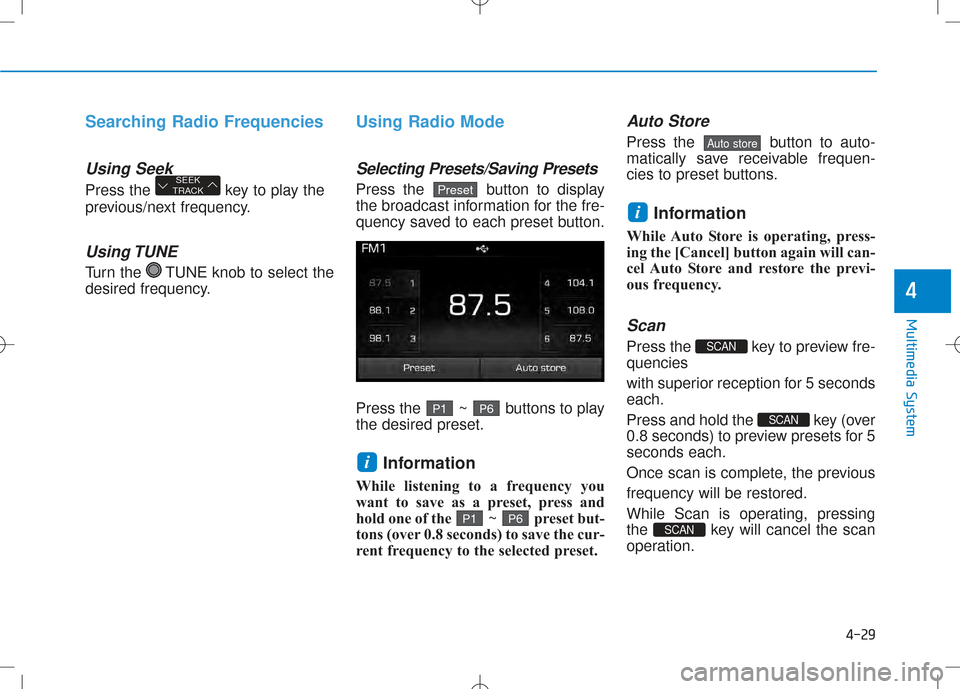
Press the button to display
the broadcast information for the fre-
quency saved to each preset button.
Press the ~ buttons to play the desired preset.Information
While listening to a frequency you
want to save as a preset, press and
hold one of the ~ preset but-
tons (over 0.8 seconds) to save the cur-
rent frequency to the selected preset.
Auto Store
Press the button to auto-
matically save receivable frequen-
cies to preset buttons.
Information
While Auto Store is operating, press-
ing the [Cancel] button again will can-
cel Auto Store and restore the previ-
ous frequency.
Scan
Press the key to preview fre-quencies
with superior reception for 5 seconds each.
Press and hold the key (over
0.8 seconds) to preview presets for 5seconds each.
Once scan is complete, the previousfrequency will be restored.
While Scan is operating, pressing
the key will cancel the scan
operation.
SCAN
SCAN
SCAN
i
Auto store
P 6P1
i
P 6P1
PresetSEEK
TRACK
Page 248 of 512
4-30
RRAA DDIIOO MM OODDEE
(
( FF oorr CC oolloo mm bbiiaa MM ooddeell))
Basic Mode Screen
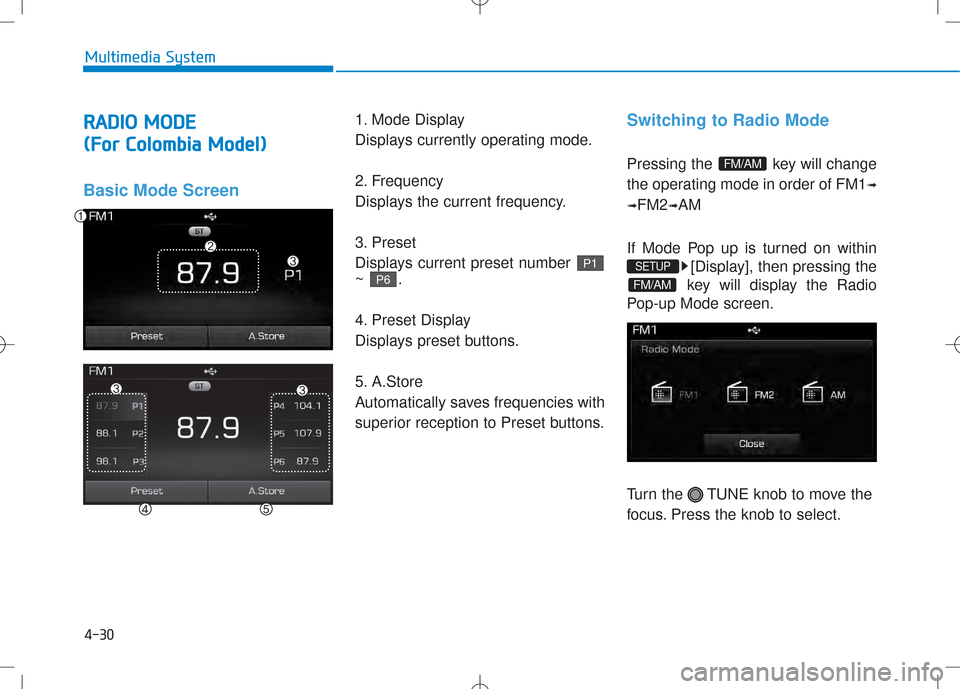
1. Mode Display
Displays currently operating mode.
2. Frequency
Displays the current frequency.
3. Preset
Displays current preset number ~ .
4. Preset Display
Displays preset buttons.
5. A.Store
Automatically saves frequencies with
superior reception to Preset buttons.Switching to Radio Mode
Pressing the key will change
the operating mode in order of FM1
➟
➟ FM2
➟AM
If Mode Pop up is turned on within [Display], then pressing the
key will display the Radio
Pop-up Mode screen.
Turn the TUNE knob to move the
focus. Press the knob to select.
FM/AM
SETUP
FM/AM
P 6
P 1
Multimedia System
Page 249 of 512
4-31
Multimedia System
Searching Radio Frequencies
Using Seek
Press the key to play the
previous/next frequency.
Using TUNE
Turn the TUNE knob to select the
desired frequency.
Using Radio Mode
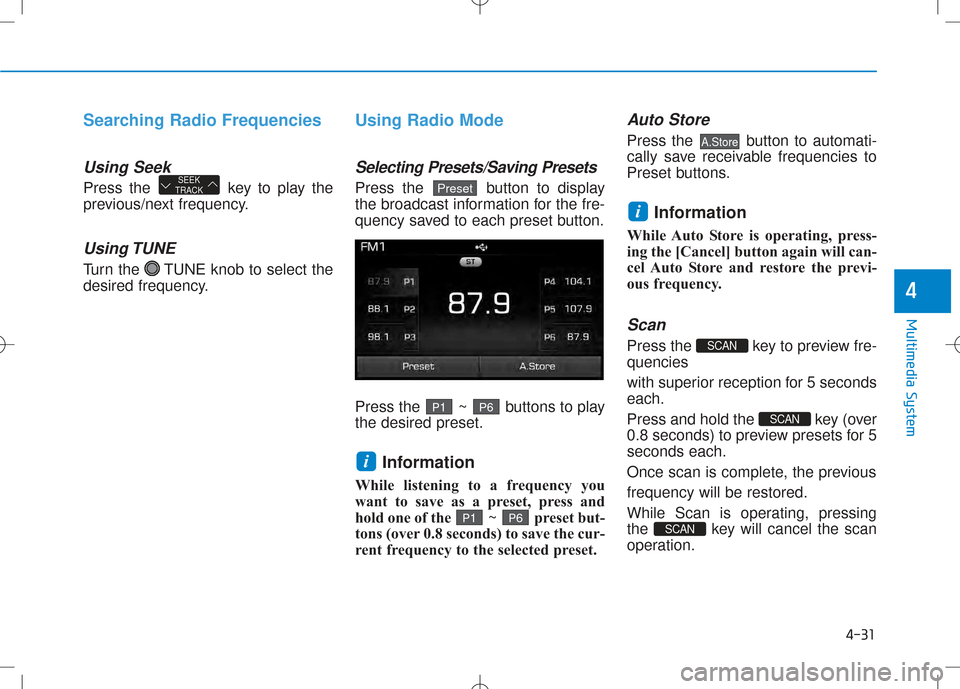
Selecting Presets/Saving Presets
Press the button to display
the broadcast information for the fre-
quency saved to each preset button.
Press the ~ buttons to play the desired preset.Information
While listening to a frequency you
want to save as a preset, press and
hold one of the ~ preset but-
tons (over 0.8 seconds) to save the cur-
rent frequency to the selected preset.
Auto Store
Press the button to automati-
cally save receivable frequencies to
Preset buttons.
Information
While Auto Store is operating, press-
ing the [Cancel] button again will can-
cel Auto Store and restore the previ-
ous frequency.
Scan
Press the key to preview fre-quencies
with superior reception for 5 seconds each.
Press and hold the key (over
0.8 seconds) to preview presets for 5seconds each.
Once scan is complete, the previousfrequency will be restored.
While Scan is operating, pressing
the key will cancel the scan
operation.
SCAN
SCAN
SCAN
i
A.Store
P 6P 1
i
P6P1
PresetSEEK
TRACK
4
Page 288 of 512
![Hyundai Creta 2016 Owners Guide 4-70
Multimedia System
SSEE TT UU PP ((FF oorr RR DD SS MM ooddeell))
Starting Mode
Press the key to display the Setup screen.
You can select and control options
related to [Display], [Sound], [P](/img/35/14533/w960_14533-287.png "Hyundai Creta 2016 Owners Guide 4-70
Multimedia System
SSEE TT UU PP ((FF oorr RR DD SS MM ooddeell))
Starting Mode
Press the key to display the Setup screen.
You can select and control options
related to [Display], [Sound], [P")
4-70
Multimedia System
SSEE TT UU PP ((FF oorr RR DD SS MM ooddeell))
Starting Mode
Press the key to display the Setup screen.
You can select and control options
related to [Display], [Sound], [Phone]and [System].
Display Settings
Adjusting the Brightness
Press the key Select
[Display] Select [Brightness]
Use the , buttons to adjust the
screen brightness or set the
Brightness on Automatic, Day, or
Night mode.
Press the button to reset.
1) Automatic : Adjusts the brightness
automatically
2) Day : Always maintains the bright- ness on high
3) Night : Always maintains the
brightness on low
Pop-up Mode
Press the key Select
[Display] Select [Pop-up Mode]
This feature is used to display the
Pop-up Mode screen when entering
radio and media modes.
When this feature is turned on,
pressing the or key
will display the Pop-up Mode screen.
Information
The media Pop-up Mode screen can
be displayed only when two or more
media modes have been connected.
i
MEDIA FM/AM
SETUP
Default
SETUP
SETUP
Page 289 of 512
![Hyundai Creta 2016 Owners Guide 4-71
Multimedia System
4
Scroll Text
Press the key Select
[Display] Select [Scroll text]
This feature is used to scroll text dis-
played on the screen when it is too
long to be displayed at once.](/img/35/14533/w960_14533-288.png "Hyundai Creta 2016 Owners Guide 4-71
Multimedia System
4
Scroll Text
Press the key Select
[Display] Select [Scroll text]
This feature is used to scroll text dis-
played on the screen when it is too
long to be displayed at once.")
4-71
Multimedia System
4
Scroll Text
Press the key Select
[Display] Select [Scroll text]
This feature is used to scroll text dis-
played on the screen when it is too
long to be displayed at once.
When turned on, the text is repeat-
edly scrolled. When turned off, the
text is scrolled just once.
Song Info
Press the key Select
[Display] Select [Song Info]
This feature is used to change the
information displayed within USB
and MP3 CD modes.
1) Folder File : Displays file nameand folder name
2) Album Artist Song : Displays album name/artist name/song
Sound Settings
Audio Settings
Press the key Select
[Sound] Select [Audio Settings]
Use the , , , buttons to
adjust the Fader/Balance settings.
Use the , buttons to adjust the
Bass/Middle/Treble settings.
Press the button to reset.
Default
SETUP
SETUP SETUP
Page 294 of 512
![Hyundai Creta 2016 Owners Guide 4-76
Multimedia System
Language
Press the key Select
[System] Select [Language]
This feature is used to change the system. If the language is changed, the sys-
tem will restart and apply the selec](/img/35/14533/w960_14533-293.png "Hyundai Creta 2016 Owners Guide 4-76
Multimedia System
Language
Press the key Select
[System] Select [Language]
This feature is used to change the system. If the language is changed, the sys-
tem will restart and apply the selec")
4-76
Multimedia System
Language
Press the key Select
[System] Select [Language]
This feature is used to change the system. If the language is changed, the sys-
tem will restart and apply the select-
ed language.
SSEE TT UU PP (( EE xxccee pp tt RR DD SS MM ooddeell))
Starting Mode
Press the key to display the Setup screen.
You can select and control options
related to [Display], [Sound], [Phone]and [System].
Display Settings
Adjusting the Brightness
Press the key Select
[Display] Select [Brightness]
Use the , buttons to adjust the
screen brightness or set the
Brightness on Automatic, Daylight, or
Night mode.
Press the button to reset.
1) Automatic : Adjusts the brightness
automatically
2) Day : Always maintains the bright- ness on high
3) Night : Always maintains the brightness on low
Default
SETUP
SETUP
SETUP
Page 296 of 512
![Hyundai Creta 2016 Owners Guide 4-78
Multimedia System
Sound Settings
Sound Settings
Press the key Select
[Sound] Select [Sound Setting]Use the , , , buttons to
adjust the Fader/Balance settings.
Use the , buttons to adjust th](/img/35/14533/w960_14533-295.png "Hyundai Creta 2016 Owners Guide 4-78
Multimedia System
Sound Settings
Sound Settings
Press the key Select
[Sound] Select [Sound Setting]Use the , , , buttons to
adjust the Fader/Balance settings.
Use the , buttons to adjust th")
4-78
Multimedia System
Sound Settings
Sound Settings
Press the key Select
[Sound] Select [Sound Setting]Use the , , , buttons to
adjust the Fader/Balance settings.
Use the , buttons to adjust the
Bass/Middle/Treble settings.
Press the button to reset.
SDVC (Speed Dependent
Volume Control)
Press the key Select
[Sound] Select [Speed Dependent
Vol.]
The volume level is controlled auto-
matically according to the vehicle
speed. SDVC can be set by selecting
from On/Off.
Touch Screen Beep
Press the key Select
[Sound] Select [Touch Screen Beep]SETUP
SETUP
DefaultSETUP
Page 302 of 512
4-84
Multimedia System
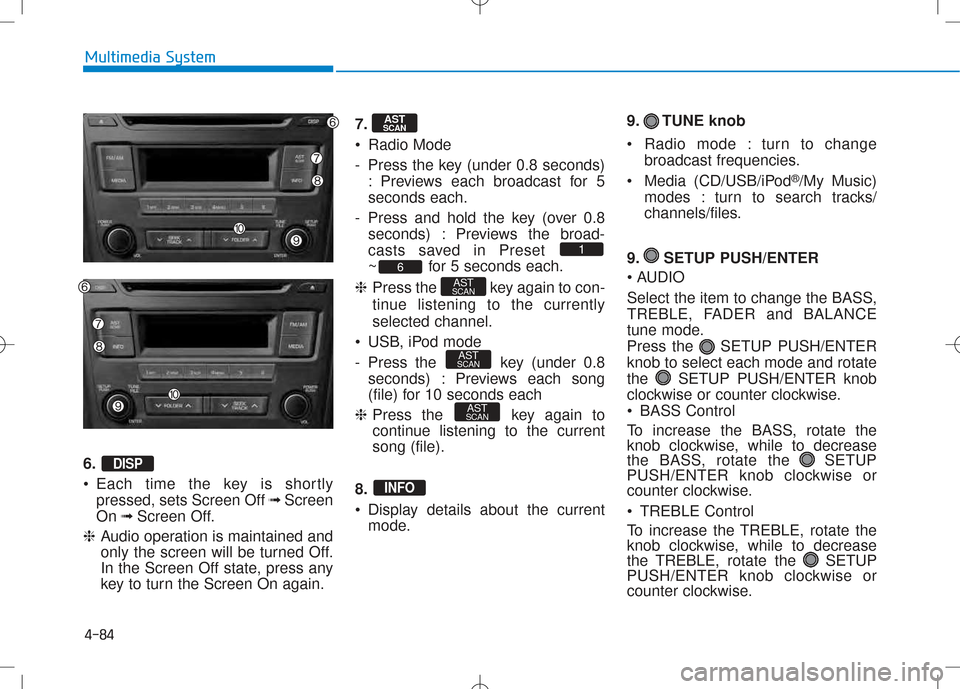
6. •Each time the key is shortly
pressed, sets Screen Off ➟Screen
On ➟Screen Off.
❈ Audio operation is maintained and
only the screen will be turned Off.
In the Screen Off state, press any
key to turn the Screen On again. 7.
Radio Mode
- Press the key (under 0.8 seconds)
: Previews each broadcast for 5 seconds each.
- Press and hold the key (over 0.8 seconds) : Previews the broad-
casts saved in Preset
~ for 5 seconds each.
❈ Press the key again to con-
tinue listening to the currentlyselected channel.
USB, iPod mode
- Press the key (under 0.8 seconds) : Previews each song
(file) for 10 seconds each
❈ Press the key again to
continue listening to the currentsong (file).
8.
Display details about the current mode. 9. TUNE knob
Radio mode : turn to change
broadcast frequencies.
Media (CD/USB/iPod ®
/My Music)
modes : turn to search tracks/
channels/files.
9. SETUP PUSH/ENTER
AUDIO
Select the item to change the BASS,
TREBLE, FADER and BALANCE
tune mode.
Press the SETUP PUSH/ENTERknob to select each mode and rotate
the SETUP PUSH/ENTER knob
clockwise or counter clockwise.
BASS Control
To increase the BASS, rotate the
knob clockwise, while to decrease
the BASS, rotate the SETUP
PUSH/ENTER knob clockwise or
counter clockwise.
TREBLE Control
To increase the TREBLE, rotate the
knob clockwise, while to decrease
the TREBLE, rotate the SETUP
PUSH/ENTER knob clockwise or
counter clockwise.
INFO
AST
SCAN
AST
SCAN
AST
SCAN6
1
AST
SCAN
DISP