key Hyundai Creta 2016 Owner's Guide
[x] Cancel search | Manufacturer: HYUNDAI, Model Year: 2016, Model line: Creta, Model: Hyundai Creta 2016Pages: 512, PDF Size: 11.54 MB
Page 152 of 512
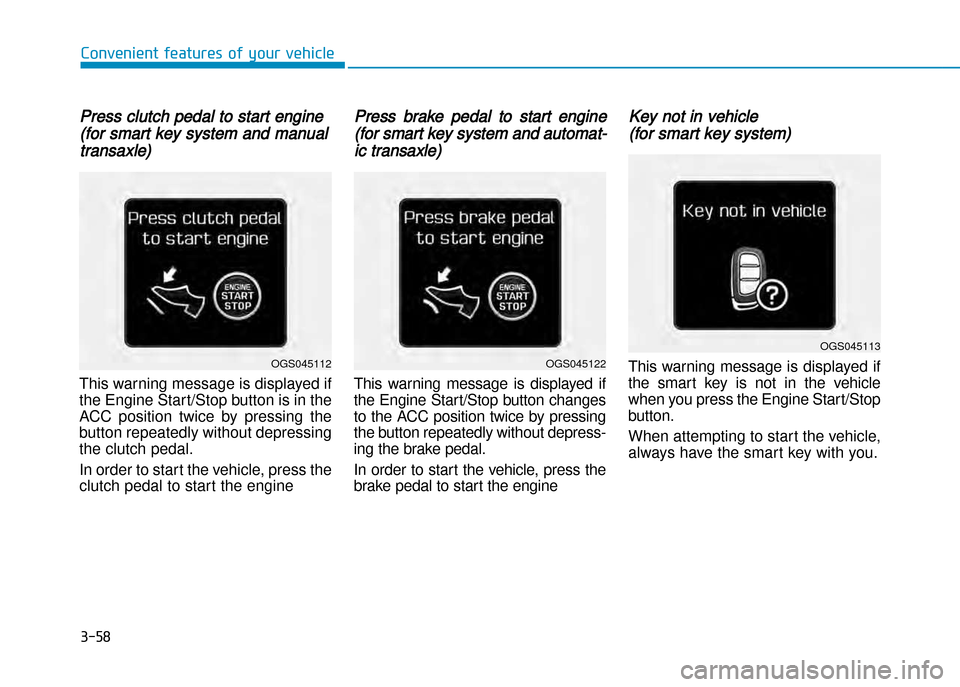
Press clutch pedal to start engine
(for smart key system and manual
transaxle)
This warning message is displayed if
the Engine Start/Stop button is in the
ACC position twice by pressing the
button repeatedly without depressing
the clutch pedal.
In order to start the vehicle, press the
clutch pedal to start the engine
Press brake pedal to start engine
(for smart key system and automat
ic transaxle)
This warning message is displayed if
the Engine Start/Stop button changes
to the ACC position twice by pressing
the button repeatedly without depress
ing the brake pedal.
In order to start the vehicle, press the
brake pedal to start the engine
Key not in vehicle
(for smart key system)
This warning message is displayed if
the smart key is not in the vehicle
when you press the Engine Start/Stop
button.
When attempting to start the vehicle,
always have the smart key with you.
3-58
Convenient features of your vehicle
OGS045113
OGS045122OGS045112
Page 153 of 512
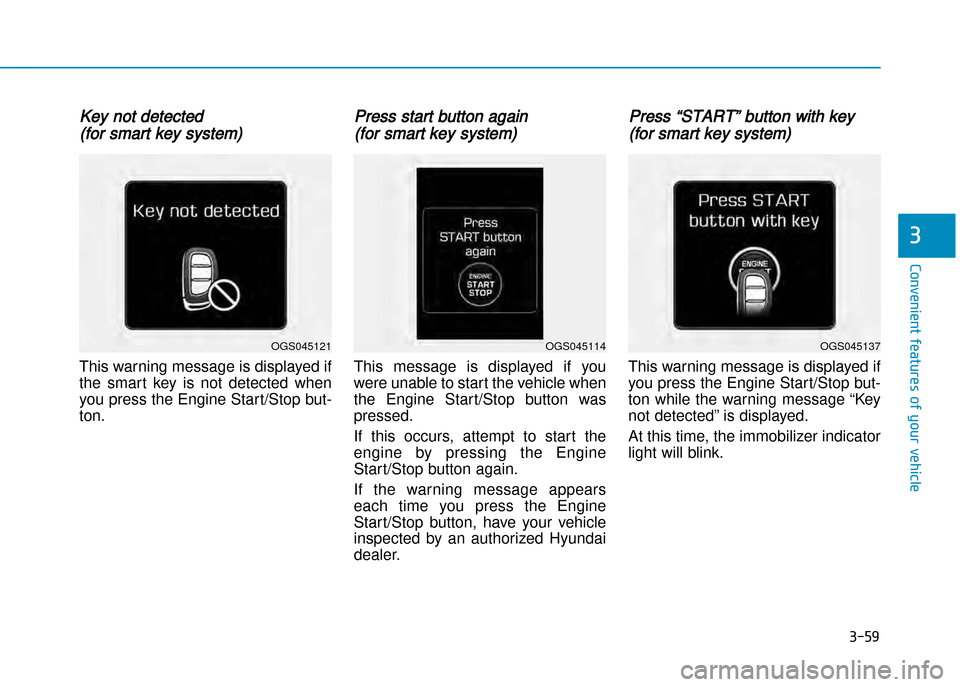
Key not detected
(for smart key system)
This warning message is displayed if
the smart key is not detected when
you press the Engine Start/Stop button.
Press start button again
(for smart key system)
This message is displayed if you
were unable to start the vehicle when
the Engine Start/Stop button was
pressed.
If this occurs, attempt to start the
engine by pressing the Engine
Start/Stop button again.
If the warning message appears
each time you press the Engine Start/Stop button, have your vehicle
inspected by an authorized Hyundai
dealer.
Press “START” button with key
(for smart key system)
This warning message is displayed if
you press the Engine Start/Stop but
ton while the warning message “Key
not detected” is displayed.
At this time, the immobilizer indicator
light will blink.
3-59
Convenient features of your vehicle
3
OGS045114OGS045137OGS045121
Page 154 of 512
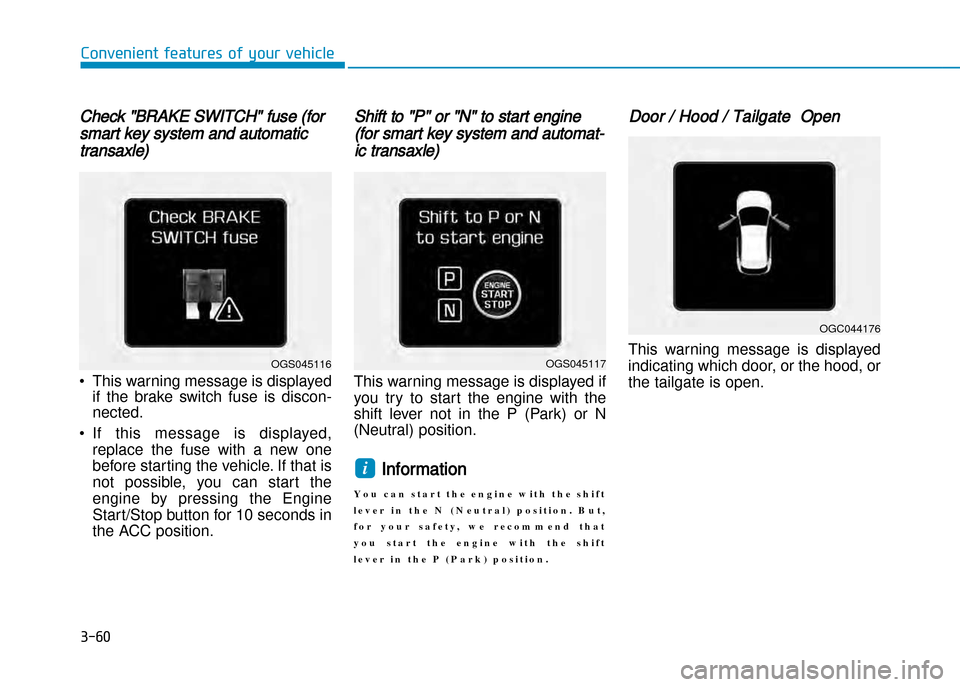
Check "BRAKE SWITCH" fuse (for
smart key system and automatic
transaxle)
• This warning message is displayedif the brake switch fuse is discon nected.
• If this message is displayed, replace the fuse with a new one
before starting the vehicle. If that is
not possible, you can start the
engine by pressing the Engine
Start/Stop button for 10 seconds in
the ACC position.
Shift to "P" or "N" to start engine
(for smart key system and automat
ic transaxle)
This warning message is displayed if
you try to start the engine with the
shift lever not in the P (Park) or N
(Neutral) position.
Information
Y o u c a n s t a r t t h e e n g i n e w i t h t h e s h i f t
l e v e r i n t h e N ( N e u t r a l ) p o s i t i o n . B u t ,
f o r y o u r s a f e t y , w e r e c o m m e n d t h a t
y o u s t a r t t h e e n g i n e w i t h t h e s h i f t
l e v e r i n t h e P ( P a r k ) p o s i t i o n .
Door / Hood / Tailgate Open
This warning message is displayed
indicating which door, or the hood, or
the tailgate is open.
i
3-60
Convenient features of your vehicle
OGS045117
OGC044176
OGS045116
Page 160 of 512
3-66
Convenient features of your vehicle
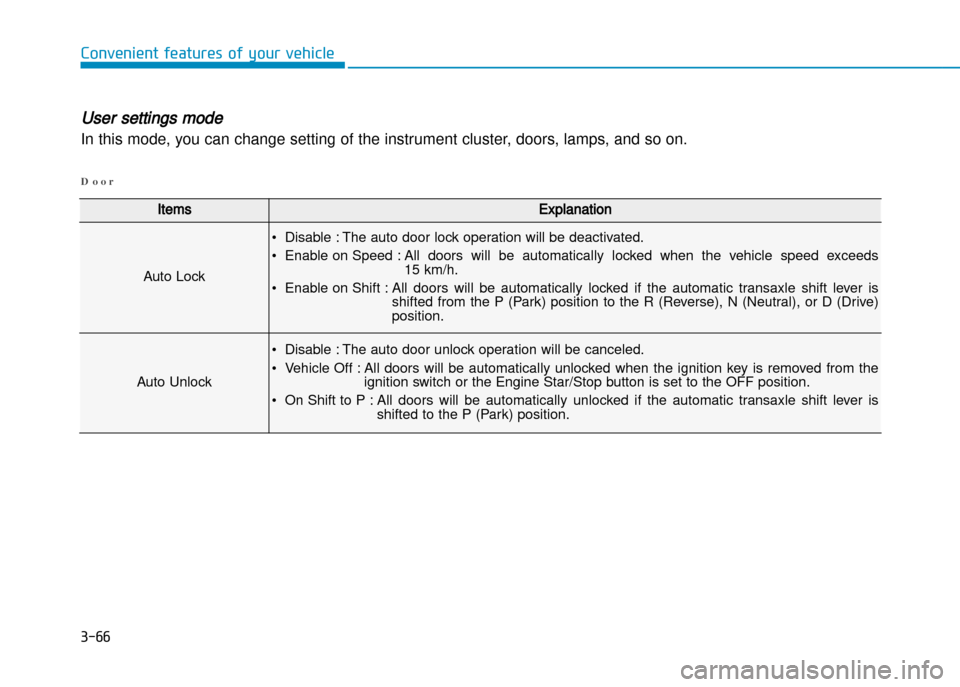
ItemsExplanation
Auto Lock
• Disable : The auto door lock operation will be deactivated.
• Enable on Speed : All doors will be automatically locked when the vehicle speed exceeds 15 km/h.
• Enable on Shift : All doors will be automatically locked if the automatic transaxle shift lever is shifted from the P (Park) position to the R (Reverse), N (Neutral), or D (Drive) position.
Auto Unlock
• Disable : The auto door unlock operation will be canceled.
• Vehicle Off : All doors will be automatically unlocked when the ignition key is removed from the ignition switch or the Engine Star/Stop button is set to the OFF position.
• On Shift to P : All doors will be automatically unlocked if the automatic transaxle shift lever is shifted to the P (Park) position.
D o o r
User settings mode
In this mode, you can change setting of the instrument cluster, doors, lamps, and so on.
Page 171 of 512
3-77
Convenient features of your vehicle
Battery saver function
The purpose of this feature is to pre
vent the battery from being dis
charged. The system automatically
turns off the parking lights when the
driver removes the ignition key or
turns the engine off (for smart key)
and opens the driverside door.
With this feature, the parking lights
will turn off automatically if the driver
parks on the side of road at night.
If necessary, to keep the lights on
when the ignition key is removed or
the engine is turned off (for smart
key), perform the following:
1) Open the driverside door.
2) Turn the parking lights OFF andON again using the light switch on
the steering column.
Headlamp delay function
(if equipped)
If the key is removed from the ignition
switch or placed in the ACC or
LOCK/OFF position with the head
lights ON, the headlights (and/or
parking lights) remain on for about 5
minutes. However, with the engine off
if the driver’s door is opened and
closed, the headlights (and/or parking
lights) are turned off after 15 seconds.
The headlights (and/or parking
lights) can be turned off by pressing
the lock button on the remote key (or
smart key) twice or turning the light
switch to the OFF or AUTO position.
However, if you turn the light switch
to the AUTO position when it is dark
outside, the headlights will not be
turned off.If the driver gets out of the vehicle
through other doors (except driver's
door), the battery saver function
does not operate and the headlamp
delay function does not turn off auto
matically. Therefore, It causes the
battery to be discharged. In this
case, make sure to turn off the lamp
before getting out of the vehicle.
NOTICE
Page 173 of 512
3-79
Convenient features of your vehicle
Interior lights
Do not use the interior lights for
extended periods when the engine is
turned off or the battery will dis
charge.
Interior lamp AUTO cut
The interior lamps will automatically
go off approximately 20 minutes after
the engine is turned off and the
doors closed. If a door is opened, the
lamp will go off 40 minutes after the
engine is turned off. If the doors are
locked by the remote key or smart
key and the vehicle enters the armed
stage of the theft alarm system, the
lamps will go off five seconds later.
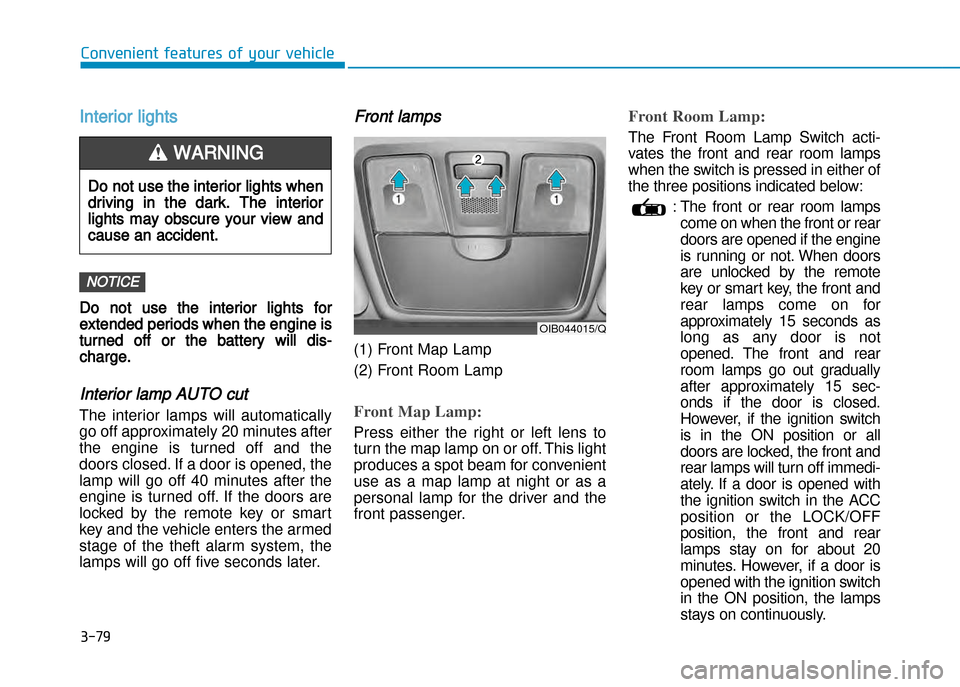
Front lamps
(1) Front Map Lamp
(2) Front Room Lamp
Front Map Lamp:
Press either the right or left lens to
turn the map lamp on or off. This light
produces a spot beam for convenient
use as a map lamp at night or as a
personal lamp for the driver and the
front passenger.
Front Room Lamp:
The Front Room Lamp Switch acti
vates the front and rear room lamps
when the switch is pressed in either of
the three positions indicated below:
: The front or rear room lampscome on when the front or rear
doors are opened if the engine
is running or not. When doors
are unlocked by the remote
key or smart key, the front and
rear lamps come on for
approximately 15 seconds as
long as any door is not
opened. The front and rear
room lamps go out gradually
after approximately 15 sec
onds if the door is closed.
However, if the ignition switch
is in the ON position or all
doors are locked, the front and
rear lamps will turn off immedi
ately. If a door is opened with
the ignition switch in the ACC
position or the LOCK/OFF
position, the front and rear
lamps stay on for about 20
minutes. However, if a door is
opened with the ignition switch
in the ON position, the lamps
stays on continuously.
NOTICE
OIB044015/Q
Do not use the interior lights when
driving in the dark. The interior
lights may obscure your view and
cause an accident.
WARNING
Page 232 of 512
4-14
Multimedia System
(Continued)
Charging through the USB may notwork for some mobile devices.
The device may not support normal operation when using a USB memo-
ry type besides (Metal Cover Type)
USB Memory.
The device may not support normal operation when using formats such
as HDD Type, CF, or SD Memory.
The device will not support files locked by DRM (Digital Rights
Management.)
USB memory sticks used by con- necting an Adaptor (SD Type or CF
Type) may not be properly recog-
nized.
The device may not operate properly when using USB HDDs or USBs sub-
ject to connection failures caused by
vehicle vibrations. (e.g. i-stick type)
(Continued)(Continued)
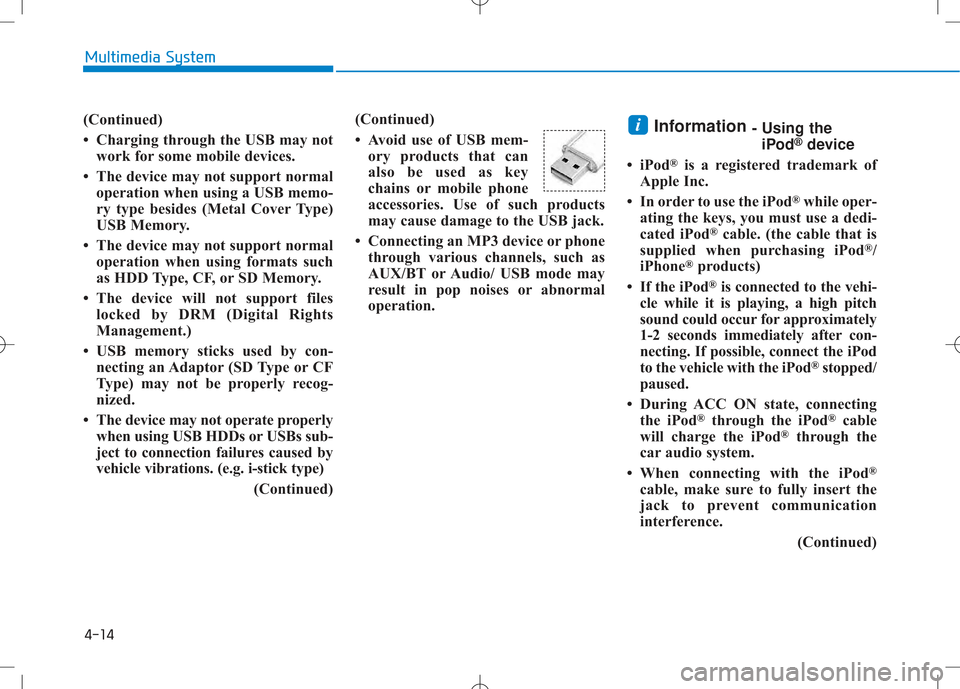
Avoid use of USB mem-
ory products that can
also be used as key
chains or mobile phone
accessories. Use of such products
may cause damage to the USB jack.
Connecting an MP3 device or phone through various channels, such as
AUX/BT or Audio/ USB mode may
result in pop noises or abnormal
operation. Information
- Using the
iPod ®
device
iPod ®
is a registered trademark of
Apple Inc.
In order to use the iPod ®
while oper-
ating the keys, you must use a dedi-
cated iPod ®
cable. (the cable that is
supplied when purchasing iPod ®
/
iPhone ®
products)
If the iPod ®
is connected to the vehi-
cle while it is playing, a high pitch
sound could occur for approximately
1-2 seconds immediately after con-
necting. If possible, connect the iPod
to the vehicle with the iPod ®
stopped/
paused.
During ACC ON state, connecting the iPod ®
through the iPod ®
cable
will charge the iPod ®
through the
car audio system.
When connecting with the iPod ®
cable, make sure to fully insert the
jack to prevent communication
interference.
(Continued)i
Page 236 of 512
4-18
Multimedia System
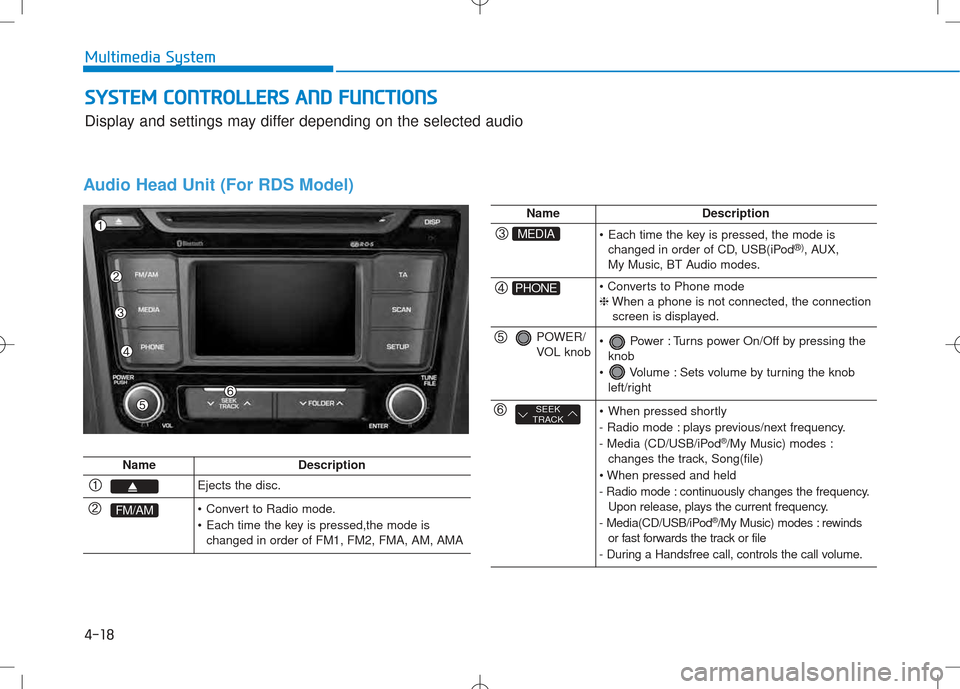
Audio Head Unit (For RDS Model)
NameDescription
Ejects the disc.
FM/AM Convert to Radio mode.
Each time the key is pressed,the mode ischanged in order of FM1, FM2, FMA, AM, AMA
NameDescription
MEDIA Each time the key is pressed, the mode ischanged in order of CD, USB(iPod ®)
, AUX,
My Music, BT Audio modes.
PHONE ❈ When a phone is not connected, the connection
screen is displayed.
POWER/
VOL knob Power : Turns power On/Off by pressing the knob
Volume : Sets volume by turning the knob left/right
SEEK
TRACK When pressed shortly
- Radio mode : plays previous/next frequency.
- Media (CD/USB/iPod ®
/My Music) modes :
changes the track, Song(file)
- Radio mode : continuously changes the frequency. Upon release, plays the current frequency.
- Media(CD/USB/iPod ®
/My Music) modes : rewinds
or fast forwards the track or file
- During a Handsfree call, controls the call volume.
SS YY SSTT EEMM CC OO NNTTRR OO LLLLEE RR SS AA NN DD FF UU NNCCTT IIOO NNSS
Display and settings may differ depending on the selected audio
Page 237 of 512
4-19
Multimedia System
4
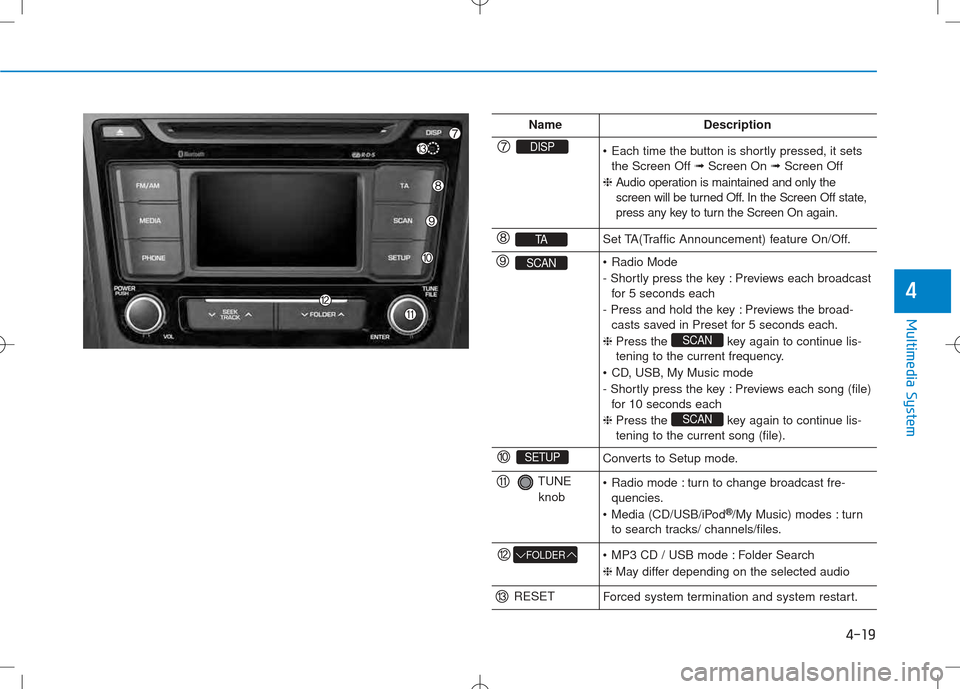
NameDescription
DISP Each time the button is shortly pressed, it setsthe Screen Off ➟Screen On ➟Screen Off
❈ Audio operation is maintained and only the
screen will be turned Off. In the Screen Off state,
press any key to turn the Screen On again.
TASet TA(Traffic Announcement) feature On/Off.
SCAN Radio Mode
- Shortly press the key : Previews each broadcast
for 5 seconds each
- Press and hold the key : Previews the broad- casts saved in Preset for 5 seconds each.
❈ Press the key again to continue lis-
tening to the current frequency.
CD, USB, My Music mode
- Shortly press the key : Previews each song (file) for 10 seconds each
❈ Press the key again to continue lis- tening to the current song (file).
SCAN
SCAN
SETUPConverts to Setup mode.
TUNE
knob Radio mode : turn to change broadcast fre- quencies.
Media (CD/USB/iPod ®
/My Music) modes : turn
to search tracks/ channels/files.
FOLDER MP3 CD / USB mode : Folder Search ❈ May differ depending on the selected audio
RESETForced system termination and system restart.
Page 238 of 512
4-20
Multimedia System
Audio Head Unit (Except RDS Model)
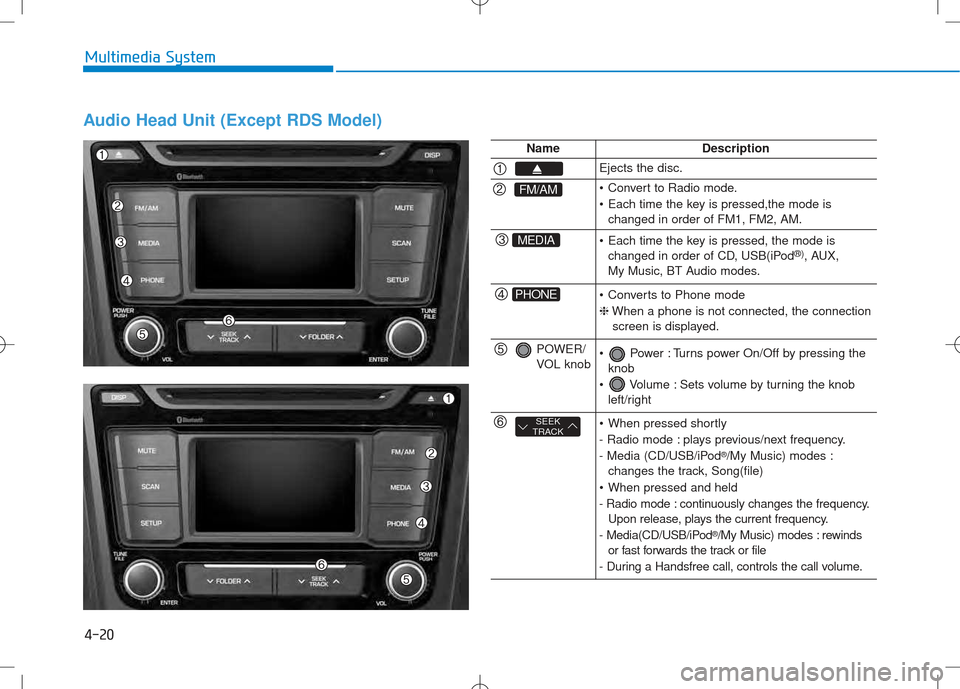
NameDescription
Ejects the disc.
FM/AM Convert to Radio mode.
Each time the key is pressed,the mode ischanged in order of FM1, FM2, AM.
MEDIA Each time the key is pressed, the mode ischanged in order of CD, USB(iPod ®)
, AUX,
My Music, BT Audio modes.
PHONE Converts to Phone mode ❈ When a phone is not connected, the connection
screen is displayed.
POWER/
VOL knob Power : Turns power On/Off by pressing the knob
Volume : Sets volume by turning the knob left/right
SEEK
TRACK When pressed shortly
- Radio mode : plays previous/next frequency.
- Media (CD/USB/iPod ®
/My Music) modes :
changes the track, Song(file)
When pressed and held
- Radio mode : continuously changes the frequency. Upon release, plays the current frequency.
- Media(CD/USB/iPod ®
/My Music) modes : rewinds
or fast forwards the track or file
- During a Handsfree call, controls the call volume.