key Hyundai Creta 2016 Manual PDF
[x] Cancel search | Manufacturer: HYUNDAI, Model Year: 2016, Model line: Creta, Model: Hyundai Creta 2016Pages: 512, PDF Size: 11.54 MB
Page 281 of 512
4-63
Multimedia System
4
Information
The waiting period during phone pairing will last for one minute. The
pairing process will fail if the device
is not paired within the given time. If
the pairing process fails, you must
start the process from the beginning.
Generally, most Bluetooth®
Wireless
Technology devices will automatical-
ly connect once pairing is complete.
However, some devices may require
a separate verification process to
connect. Check to see whether
Bluetooth ®
Wireless Technology has
been properly connected within your
mobile phone.
List of paired Bluetooth®
Wireless
Technology devices can be viewed at [Phone] [Paired Phone
List].Connecting a Device
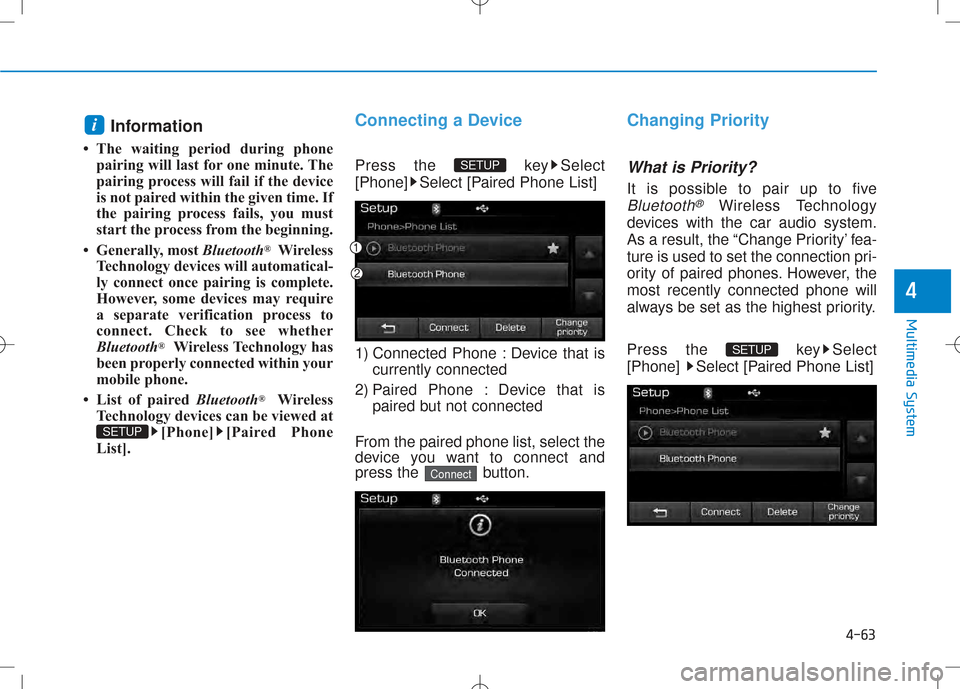
Press the key Select
[Phone] Select [Paired Phone List]
1) Connected Phone : Device that is currently connected
2) Paired Phone : Device that is paired but not connected
From the paired phone list, select the
device you want to connect and
press the button.
Changing Priority
What is Priority?
It is possible to pair up to five
Bluetooth®Wireless Technology
devices with the car audio system.
As a result, the “Change Priority’ fea-
ture is used to set the connection pri-
ority of paired phones. However, themost recently connected phone will
always be set as the highest priority.
Press the key Select
[Phone] Select [Paired Phone List]
SETUP
Connect
SETUP
SETUP
i
Page 282 of 512
4-64
Multimedia System
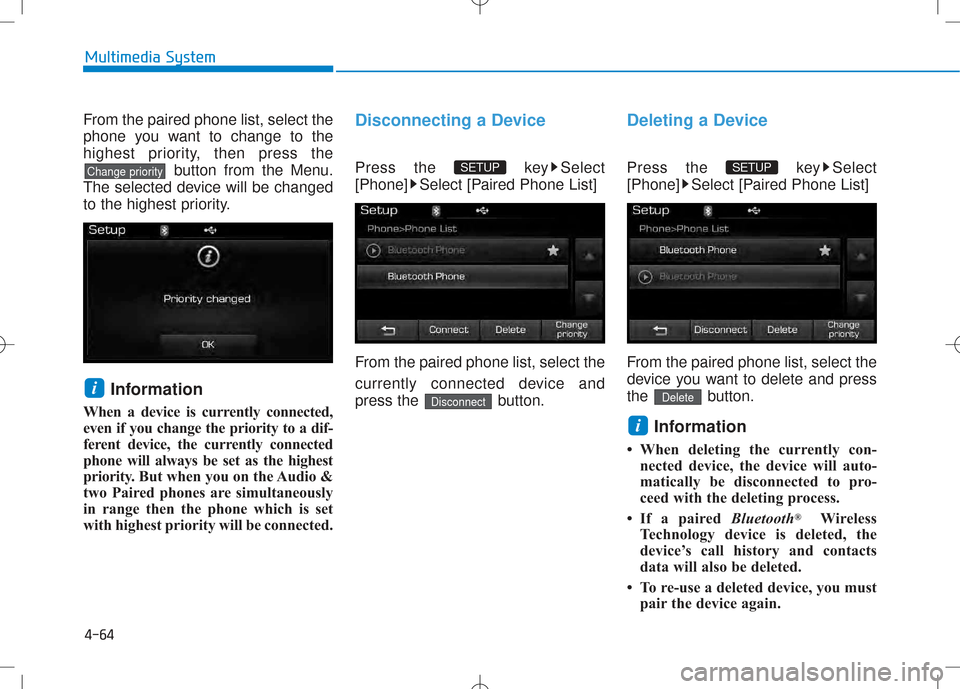
From the paired phone list, select the
phone you want to change to the
highest priority, then press thebutton from the Menu.
The selected device will be changed
to the highest priority.
Information
When a device is currently connected,
even if you change the priority to a dif-
ferent device, the currently connected
phone will always be set as the highest
priority. But when you on the Audio &
two Paired phones are simultaneously
in range then the phone which is set
with highest priority will be connected.Disconnecting a Device
Press the key Select
[Phone] Select [Paired Phone List]
From the paired phone list, select the
currently connected device and
press the button.
Deleting a Device
Press the key Select
[Phone] Select [Paired Phone List]
From the paired phone list, select the
device you want to delete and press
the button.
Information
When deleting the currently con- nected device, the device will auto-
matically be disconnected to pro-
ceed with the deleting process.
If a paired Bluetooth®
Wireless
Technology device is deleted, the
device’s call history and contacts
data will also be deleted.
To re-use a deleted device, you must pair the device again.
i
Delete
SETUP
Disconnect
SETUP
i
Change priority
Page 283 of 512
4-65
Multimedia System
4
Phone Menu Screen
Phone Menus
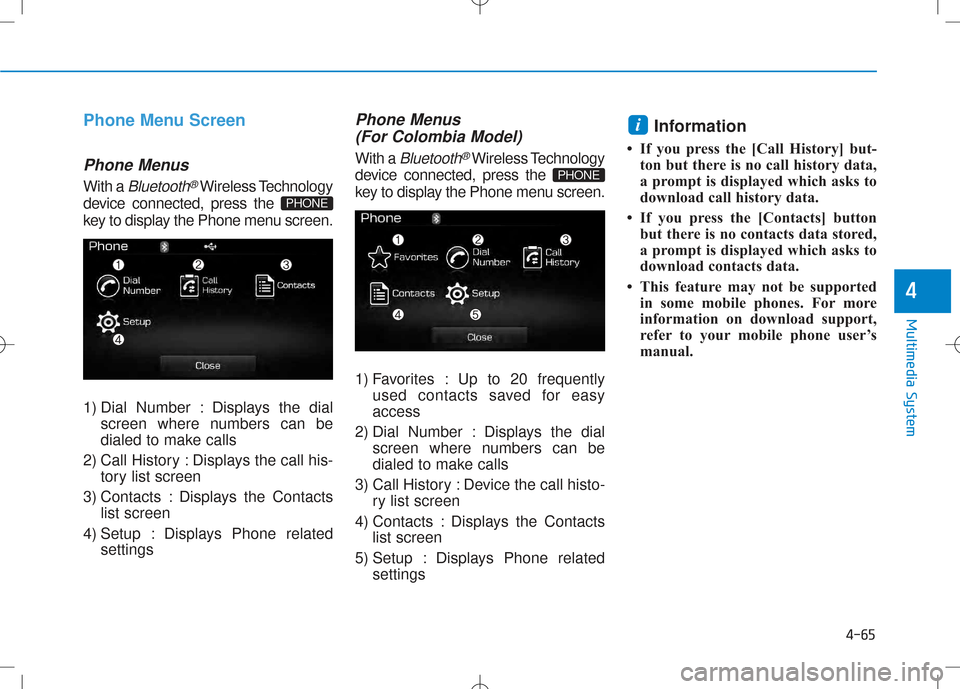
With a Bluetooth®Wireless Technology
device connected, press the
key to display the Phone menu screen.
1) Dial Number : Displays the dial screen where numbers can be
dialed to make calls
2) Call History : Displays the call his- tory list screen
3) Contacts : Displays the Contacts list screen
4) Setup : Displays Phone related settings
Phone Menus
(For Colombia Model)
With a Bluetooth®Wireless Technology
device connected, press the
key to display the Phone menu screen.
1) Favorites : Up to 20 frequently used contacts saved for easy access
2) Dial Number : Displays the dial screen where numbers can be
dialed to make calls
3) Call History : Device the call histo- ry list screen
4) Contacts : Displays the Contacts list screen
5) Setup : Displays Phone related settings Information
If you press the [Call History] but- ton but there is no call history data,
a prompt is displayed which asks to
download call history data.
If you press the [Contacts] button but there is no contacts data stored,
a prompt is displayed which asks to
download contacts data.
This feature may not be supported in some mobile phones. For more
information on download support,
refer to your mobile phone user’s
manual.
i
PHONE
PHONE
Page 284 of 512
![Hyundai Creta 2016 Manual PDF 4-66
Multimedia System
Favorites(For Colombia Model)
Press the key Select
[Favorites]
1) Saved favorite contact : Connectscall upon selection
2) To add favorite : Downloaded con- tacts be saved as](/img/35/14533/w960_14533-283.png "Hyundai Creta 2016 Manual PDF 4-66
Multimedia System
Favorites(For Colombia Model)
Press the key Select
[Favorites]
1) Saved favorite contact : Connectscall upon selection
2) To add favorite : Downloaded con- tacts be saved as")
4-66
Multimedia System
Favorites(For Colombia Model)
Press the key Select
[Favorites]
1) Saved favorite contact : Connectscall upon selection
2) To add favorite : Downloaded con- tacts be saved as favorite.
3) Delete All : Delete all stored favorite contacts Information (For Colombia Model)
To save Favorite, contacts should be downloaded.
Contact saved in Favorites will not be automatically updated if the contact
has been updated in the phone. To
update Favorites, delete the Favorite
and create a new Favorite.
Calling by Dialing a Number
Press the key Select [Dial Number]
1) Dial Pad : Used to enter phone number
2) Call : If a number has been entered, calls the number If no
number has been entered, switch-
es to call history screen
3) End : Deletes the entered phone number
4) Delete : Deletes entered numbers one digit at a timePHONE
i
PHONE
Page 286 of 512
![Hyundai Creta 2016 Manual PDF 4-68
Call History
Press the key Select [Call
History] A list of incoming, outgoing and
missed calls is displayed.
Press the button to down-
load the call history.
1) Call History :- Displays r](/img/35/14533/w960_14533-285.png "Hyundai Creta 2016 Manual PDF 4-68
Call History
Press the key Select [Call
History] A list of incoming, outgoing and
missed calls is displayed.
Press the button to down-
load the call history.
1) Call History :- Displays r")
4-68
Call History
Press the key Select [Call
History] A list of incoming, outgoing and
missed calls is displayed.
Press the button to down-
load the call history.
1) Call History :- Displays recent calls (call history)
- Connects call upon selection
2) Download : Download Recent Call History
Contacts
Press the key Select [Contacts]
The list of saved phone book entries
is displayed. Press the but-
ton to download the Contacts.
1) Contacts List :
- Displays downloaded contactsentries
- Connects call upon selection
2) Download : Download contacts entries Information
Up to 1,000 contacts entries can be copied into car contacts.
Upon downloading contacts data, previously saved contacts data will
be deleted.
Downloading is not possible if the contacts download feature is turned
off within the Bluetooth®
Wireless
Technology device. Also, some
devices may require device authori-
zation upon attempting to down-
load. If downloading cannot be nor-
mally conducted, check the
Bluetooth ®
Wireless Technology
device setting or the screen state.
Caller ID information will not be displayed for unsaved callers.
The download feature may not be supported in some mobile phones.
Check to see that the Bluetooth®
Wireless Technology device sup-
ports the download feature.
i
Download
PHONE
Download
PHONE
Multimedia System
Page 287 of 512
![Hyundai Creta 2016 Manual PDF 4-69
Multimedia System
Contacts (For Colombia Model)
Press the key Select [Contacts]
The list of saved phone book entries
is displayed. Press the but-
ton to download the Contacts.1) Contacts List](/img/35/14533/w960_14533-286.png "Hyundai Creta 2016 Manual PDF 4-69
Multimedia System
Contacts (For Colombia Model)
Press the key Select [Contacts]
The list of saved phone book entries
is displayed. Press the but-
ton to download the Contacts.1) Contacts List")
4-69
Multimedia System
Contacts (For Colombia Model)
Press the key Select [Contacts]
The list of saved phone book entries
is displayed. Press the but-
ton to download the Contacts.1) Contacts List :
- Displays downloaded contactsentries
- Connects call upon selection
2) Sort by : Find a contact in an alphabetical order.
3) Download : Download contacts entries
Information (For Colombia Model)
Up to 1,000 contacts saved in your Bluetooth ®
Wireless Technology
phone can be downloaded into the
car contacts. Contacts that have
been downloaded to the car cannot
be edited or deleted on the phone.
Mobile phone contacts are managed separately for each paired Bluetooth®
Wireless Technology device (max 5
devices x 1,000 contacts each).
Previously downloaded data is main-
tained even if the Bluetooth®
Wireless
Technology device has been discon-
nected. (However , the contacts and call
history saved to the phone will be delet-
ed if a paired phone is deleted.)
(Continued)(Continued)
It is possible to download contacts
during Bluetooth streaming audio.
When downloading contacts, the icon will be displayed within the sta-
tus bar.
It is not possible to begin download- ing a contact list when the contact
download feature has been turned
off within the Bluetooth®
Wireless
Technology device. In addition,
some devices may require device
authorization upon attempting to
download contacts. If downloading
does not normally occur, check the
Bluetooth ®
Wireless Technology
device settings or the screen state.
The contacts download feature may not be supported in some mobile
phones. For more information of
supported Bluetooth®
devices and
function support, refer to your
phone’s user manual.
i
Download
PHONE
4
Page 288 of 512
![Hyundai Creta 2016 Manual PDF 4-70
Multimedia System
SSEE TT UU PP ((FF oorr RR DD SS MM ooddeell))
Starting Mode
Press the key to display the Setup screen.
You can select and control options
related to [Display], [Sound], [P](/img/35/14533/w960_14533-287.png "Hyundai Creta 2016 Manual PDF 4-70
Multimedia System
SSEE TT UU PP ((FF oorr RR DD SS MM ooddeell))
Starting Mode
Press the key to display the Setup screen.
You can select and control options
related to [Display], [Sound], [P")
4-70
Multimedia System
SSEE TT UU PP ((FF oorr RR DD SS MM ooddeell))
Starting Mode
Press the key to display the Setup screen.
You can select and control options
related to [Display], [Sound], [Phone]and [System].
Display Settings
Adjusting the Brightness
Press the key Select
[Display] Select [Brightness]
Use the , buttons to adjust the
screen brightness or set the
Brightness on Automatic, Day, or
Night mode.
Press the button to reset.
1) Automatic : Adjusts the brightness
automatically
2) Day : Always maintains the bright- ness on high
3) Night : Always maintains the
brightness on low
Pop-up Mode
Press the key Select
[Display] Select [Pop-up Mode]
This feature is used to display the
Pop-up Mode screen when entering
radio and media modes.
When this feature is turned on,
pressing the or key
will display the Pop-up Mode screen.
Information
The media Pop-up Mode screen can
be displayed only when two or more
media modes have been connected.
i
MEDIA FM/AM
SETUP
Default
SETUP
SETUP
Page 289 of 512
![Hyundai Creta 2016 Manual PDF 4-71
Multimedia System
4
Scroll Text
Press the key Select
[Display] Select [Scroll text]
This feature is used to scroll text dis-
played on the screen when it is too
long to be displayed at once.](/img/35/14533/w960_14533-288.png "Hyundai Creta 2016 Manual PDF 4-71
Multimedia System
4
Scroll Text
Press the key Select
[Display] Select [Scroll text]
This feature is used to scroll text dis-
played on the screen when it is too
long to be displayed at once.")
4-71
Multimedia System
4
Scroll Text
Press the key Select
[Display] Select [Scroll text]
This feature is used to scroll text dis-
played on the screen when it is too
long to be displayed at once.
When turned on, the text is repeat-
edly scrolled. When turned off, the
text is scrolled just once.
Song Info
Press the key Select
[Display] Select [Song Info]
This feature is used to change the
information displayed within USB
and MP3 CD modes.
1) Folder File : Displays file nameand folder name
2) Album Artist Song : Displays album name/artist name/song
Sound Settings
Audio Settings
Press the key Select
[Sound] Select [Audio Settings]
Use the , , , buttons to
adjust the Fader/Balance settings.
Use the , buttons to adjust the
Bass/Middle/Treble settings.
Press the button to reset.
Default
SETUP
SETUP SETUP
Page 290 of 512
![Hyundai Creta 2016 Manual PDF 4-72
Multimedia System
SDVC (Speed Dependent VolumeControl)
Press the key Select
[Sound] Select [Speed Dependent
Vol.]
The volume level is controlled auto-
matically according to the vehicle
speed](/img/35/14533/w960_14533-289.png "Hyundai Creta 2016 Manual PDF 4-72
Multimedia System
SDVC (Speed Dependent VolumeControl)
Press the key Select
[Sound] Select [Speed Dependent
Vol.]
The volume level is controlled auto-
matically according to the vehicle
speed")
4-72
Multimedia System
SDVC (Speed Dependent VolumeControl)
Press the key Select
[Sound] Select [Speed Dependent
Vol.]
The volume level is controlled auto-
matically according to the vehicle
speed. SDVC can be set by selecting
from On / Off.
Touch Screen Beep
Press the key Select
[Sound] Select [Touch ScreenBeep]
This feature is used to turn the touch
screen beep on/off.
Bluetooth®Wireless Technology
Setting
Pairing a New Device
Press the key Select
[Phone] Select [Pair Phone]
Bluetooth®Wireless Technology
devices can be paired with the audiosystem.
For more information, refer to the
“Pairing through Phone Setup” sec-tion within
Bluetooth®Wireless
Technology.
SETUP
SETUP
SETUP
Page 291 of 512
![Hyundai Creta 2016 Manual PDF 4-73
Multimedia System
4
Viewing Paired Phone List
Press the key Select
[Phone] Select [Paired Phone List]
This feature is used to view mobile
phones that have been paired with
the audio system. U](/img/35/14533/w960_14533-290.png "Hyundai Creta 2016 Manual PDF 4-73
Multimedia System
4
Viewing Paired Phone List
Press the key Select
[Phone] Select [Paired Phone List]
This feature is used to view mobile
phones that have been paired with
the audio system. U")
4-73
Multimedia System
4
Viewing Paired Phone List
Press the key Select
[Phone] Select [Paired Phone List]
This feature is used to view mobile
phones that have been paired with
the audio system. Upon selecting a
paired phone, the setup menu is dis-
played.
For more information, refer to the “Setting
Bluetooth®Wireless
Technology Connection” section with-in
Bluetooth®Wireless Technology. 1) : Moves to the previous
screen
2) : Connect/disconnects cur- rently selected phone
3) : Deletes the currently selected phone
4) : Sets currently selected phone to highest connection priority Information
- BEFORE DOWNLOADING
PHONE BOOKS
Only phone books within connected phones can be downloaded. Also
check to see that your mobile phone
supports the download feature.
To learn more about whether your mobile phone supports phone book
downloads, refer to your mobile
phone user’s manual.
The Phone book for only the con- nected phone can be downloaded.
Before downloading, check to see
whether your phone supports the
download feature.
iSETUP